End-to-end encrypted messaging sounds simple until a real workflow touches it.
A team moves a sensitive discussion out of email. A founder shares credentials in a “private” chat. A journalist coordinates with a source. A security team creates a confidential incident channel. Everyone assumes the encryption label solved the problem.
Teams think the problem is choosing an encrypted messaging app. The real problem is designing a communication system where identity, devices, metadata, backups, retention, and user behavior do not quietly undermine the encryption.
That changes the conversation. The practical question is not “does this app use end-to-end encryption?” It is “what still leaks, who can act, what happens when a device is lost, and how does the workflow behave under pressure?”
In 2026, end-to-end encrypted messaging is no longer niche. It is part of how remote teams, privacy-conscious users, security professionals, activists, and everyday people protect conversations. But private chat is not a magic wrapper. It is architecture.
Table of contents
- End-to-End Encrypted Messaging Is a Workflow, Not a Checkbox
- The Threat Model Comes Before the App Choice
- Identity and Key Verification Are the Real Control Plane
- Devices, Sessions, and Backups Decide Your Actual Risk
- Metadata Is Where Private Messaging Usually Leaks
- Groups and Teams Make Encryption Operationally Messy
- Remote Workflows Need Secure Defaults, Not Heroic Users
- What Breaks When End-to-End Encrypted Messaging Is Implemented Badly
- A Practical Implementation Sequence for 2026
- Where qrypt.chat Fits in the Architecture
- End-to-End Encrypted Messaging Checklist and Closing
End-to-End Encrypted Messaging Is a Workflow, Not a Checkbox
End-to-end encrypted messaging means message content is encrypted on the sender’s device and decrypted on the recipient’s device. The service carrying the message should not be able to read the content while it is in transit or stored on its servers.
That is the clean version. The operational version is messier.
A useful way to think about it is this: encryption protects a path, but people operate a system. The system includes phones, laptops, browsers, notifications, screenshots, cloud backups, account recovery, group membership, device sync, and the habits users bring from less private tools.
What the encryption actually protects
Good end-to-end encryption protects message content from the infrastructure in the middle. If the provider is compromised, subpoenaed, misconfigured, or inspected by an insider, the message body should remain unreadable without endpoint keys.
That matters. It changes the trust model from “trust the server with everything” to “trust the server for delivery, availability, and coordination, but not plaintext content.”
In practice, this protects against several common risks:
- Server-side message inspection
- Accidental provider data exposure
- Network interception
- Cloud infrastructure compromise of stored ciphertext
- Broad content scanning by intermediaries
The mistake teams make is stopping there. They hear “the server cannot read it” and assume the communication workflow is private.
It may be private enough for casual messages. It may not be private enough for a legal negotiation, a security incident, a source conversation, a medical discussion, or a remote team handling credentials.
What the app cannot protect by itself
The app cannot fully protect a compromised device. It cannot stop a recipient from forwarding or screenshotting content. It cannot make a weak account recovery process safe. It cannot erase metadata that the system must collect to route messages unless the architecture is designed to minimize it.
It also cannot fix unclear ownership. If nobody knows who approves new devices, who removes former contractors, or where sensitive files should go, users will improvise.
Practical rule: Treat end-to-end encrypted messaging as one layer in a privacy workflow, not as a complete privacy program.
That does not make encrypted chat less valuable. It makes implementation more serious. The right question is not whether E2EE is useful. It is where the trust boundary actually sits.
The Threat Model Comes Before the App Choice
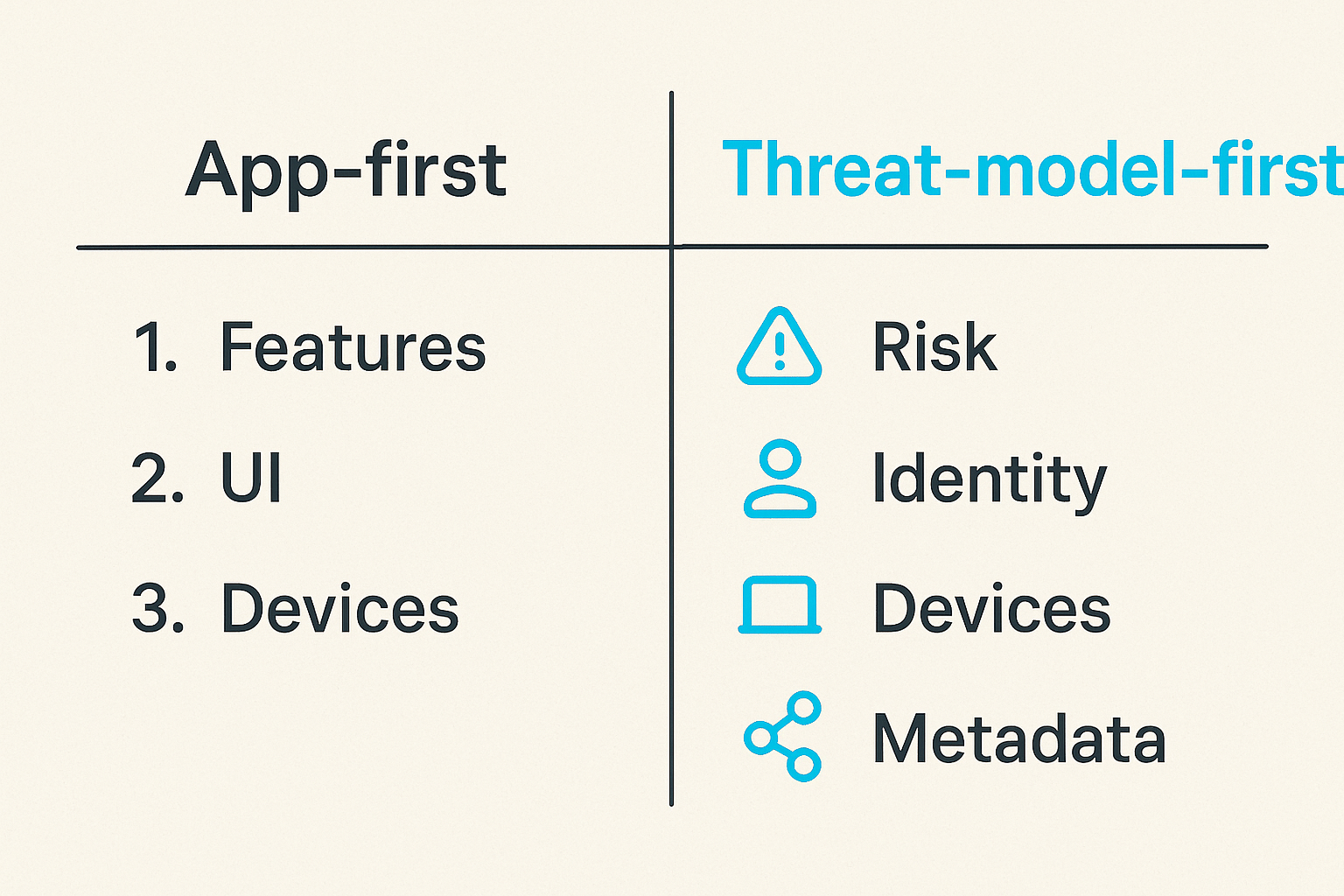
Most teams choose messaging tools backwards. They compare features, user interface, device support, and price. Those matter, but they are not the starting point for end-to-end encrypted messaging.
Start with risk. Then choose architecture.
Start with who you are protecting against
Threat modeling does not need to be academic. For messaging, it usually starts with a few direct questions:
- Are you protecting content from the service provider?
- Are you protecting conversations from network observers?
- Are you protecting relationships from being mapped?
- Are you protecting against stolen phones or laptops?
- Are you protecting against hostile insiders?
- Are you protecting against legal requests, account takeover, or device seizure?
- Are you protecting short-lived coordination or long-term records?
Different answers produce different workflows.
A family chat about travel plans has one risk profile. A security team coordinating breach response has another. A journalist speaking to a confidential source has another. A remote engineering team sharing production access details should have a very different answer than a casual group chat.
Related reading from our network: teams building home media and privacy stacks face similar architecture-before-tools tradeoffs in this practical home media stack guide.
Match the workflow to the risk
Once you know the threat model, the app choice becomes less abstract.
| Use case | Main risk | Workflow priority | Common mistake |
|---|---|---|---|
| Personal private chat | Provider or network visibility | Simple E2EE and safe backups | Ignoring device security |
| Remote team coordination | Accidental sharing and access drift | Group controls and offboarding | Treating chat like permanent storage |
| Security incident response | Urgency and confidentiality | Verified members and low-noise channels | Creating ad hoc rooms under stress |
| Source communication | Identity exposure and metadata | Minimal metadata and careful verification | Assuming content encryption hides relationships |
| Executive communication | Targeted compromise | Device hygiene and recovery controls | Relying on convenience settings |
The practical question is: what must remain confidential, from whom, and for how long?
If the answer is “message content from the provider,” standard E2EE may be enough. If the answer includes “who talks to whom,” “what devices are trusted,” or “what happens when someone leaves,” you need a stronger workflow.
Identity and Key Verification Are the Real Control Plane
End-to-end encryption depends on keys. But users do not think in keys. They think in names, phone numbers, usernames, avatars, and group titles.
That gap is where many secure messaging workflows become weak.
Why contact names are not identities
A contact name is a label. A phone number is a routing handle. A username is an account identifier. None of those automatically prove that the public key you are encrypting to belongs to the person you intend.
Modern encrypted messaging systems try to make this manageable. They may use safety numbers, key fingerprints, QR code verification, trusted contact flows, or alerts when a contact’s key changes.
But what breaks in practice is user attention. People ignore key-change warnings because they have seen too many harmless device migrations. Teams add new members to rooms based on display names. People continue sensitive conversations after a phone replacement without verifying the new device.
For high-value communication, identity verification is not optional ceremony. It is the control plane.
Practical rule: If the conversation would be damaging in the wrong hands, verify identity out-of-band before treating the channel as trusted.
This can be simple. A team can verify new members during a video call. Two users can compare a fingerprint over a known-good channel. A security team can require device enrollment approval before incident channels are used.
The details depend on the tool, but the principle does not.
When verification needs to be mandatory
Mandatory verification is useful when the cost of a wrong recipient is high. Examples include:
- Incident response channels
- Legal and executive conversations
- Source or whistleblower communication
- Financial approval workflows
- Sharing credentials or recovery material
- Internal security coordination
For lower-risk chats, strict verification may create too much friction. That is fine. Not every conversation needs the same process.
The mistake teams make is applying one trust model everywhere. Either they verify nothing, or they impose heavyweight rules on casual communication and users route around them.
A better approach is tiering:
- Casual private chat: E2EE enabled, basic device hygiene.
- Sensitive team chat: verified members, controlled groups, backup rules.
- High-risk channels: mandatory verification, limited devices, defined retention, incident playbooks.
If you are evaluating a messenger for this kind of workflow, the security model matters more than the landing-page promise. QryptChat describes its secure messaging posture on its security page, which is the kind of place teams should review before trusting a tool with sensitive communication.
Devices, Sessions, and Backups Decide Your Actual Risk
Encryption usually fails at the edges. Not because the cryptography is bad, but because endpoints are messy.
Phones get lost. Laptops are shared. Browser sessions stay open. Notifications reveal message previews. Backups copy private content into less private storage. Old devices remain linked long after anyone remembers them.
A private message is only as safe as the endpoint
End-to-end encrypted messaging protects content between endpoints. It does not make endpoints trustworthy.
If malware can read the screen, capture keystrokes, or access local message storage after unlock, encryption in transit is not the main issue. If a user’s phone is unlocked on a café table, the server’s inability to read messages is not much comfort.
For practical security, endpoint rules matter:
- Require device lock with strong passcodes or biometrics.
- Keep operating systems and messaging apps updated.
- Disable message previews for sensitive channels.
- Remove old linked devices regularly.
- Avoid shared devices for sensitive conversations.
- Separate work and personal accounts where possible.
Practical rule: If you would not trust the device with the plaintext, do not trust it as an endpoint for end-to-end encrypted messaging.
Security professionals know this, but teams still underinvest here because endpoint hygiene feels less exciting than cryptography. The boring controls decide the real outcome.
Backups are often the side door
Backups are where private messaging gets complicated.
Users want recovery. Teams want continuity. Nobody wants to lose critical conversations because a phone was destroyed. But if backups are unencrypted, weakly encrypted, or stored under a cloud account with broad access, they can become the easiest way around E2EE.
The backup decision should be explicit:
| Backup approach | Benefit | Risk | Best fit |
|---|---|---|---|
| No message backup | Minimal stored history | Loss on device failure | High-risk, short-lived chats |
| Local encrypted backup | User-controlled recovery | User must protect backup key | Privacy-conscious individuals |
| Cloud encrypted backup | Convenience and recovery | Account takeover and key handling risk | General private messaging |
| Enterprise archive | Compliance and search | May conflict with E2EE goals | Regulated workflows with clear policy |
There is no universal answer. The wrong answer is pretending backups do not exist.
A secure team should document whether messages are recoverable, who controls recovery material, what happens after device loss, and whether old backups retain deleted conversations.
Metadata Is Where Private Messaging Usually Leaks
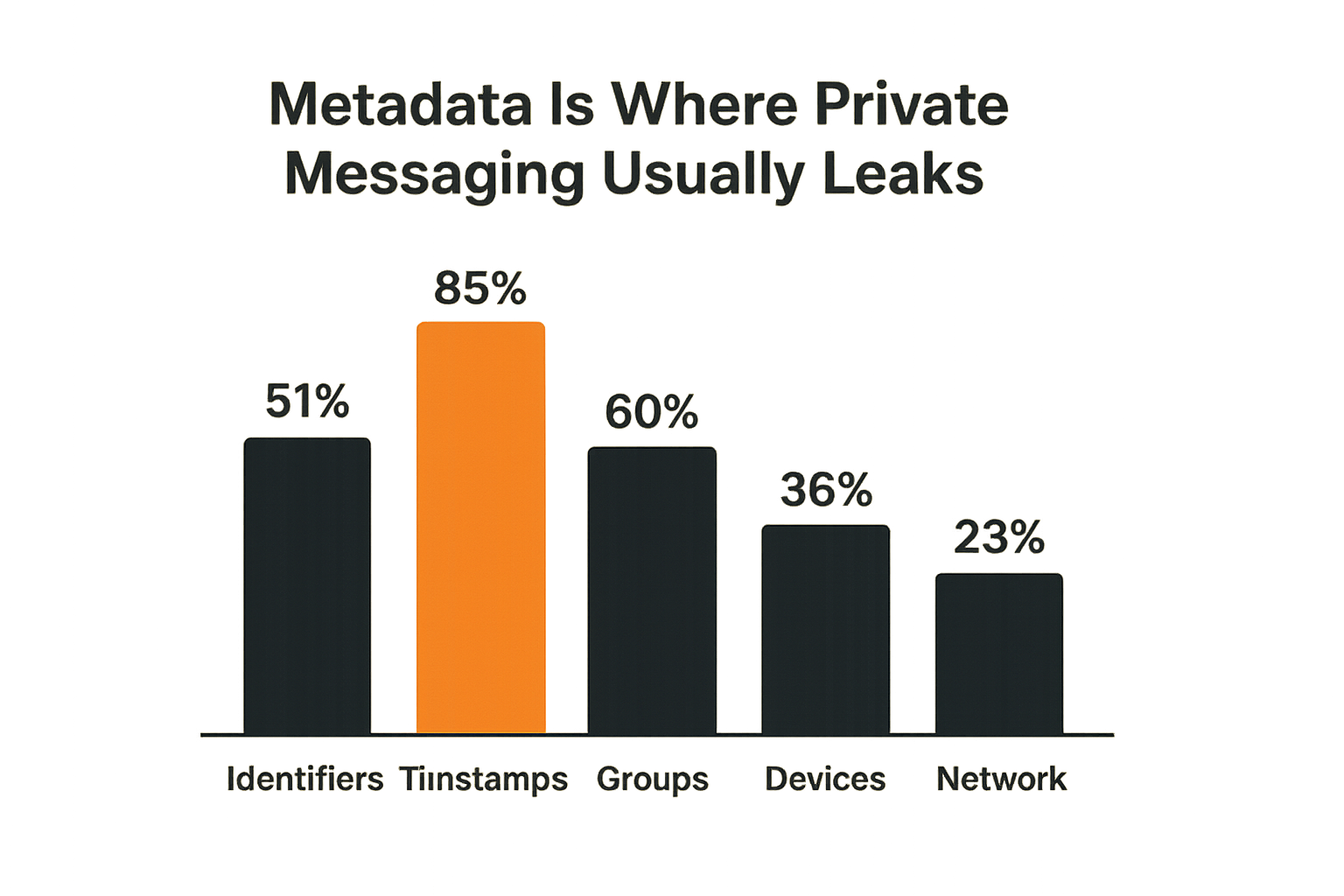
Many users hear end-to-end encrypted messaging and think “nobody knows anything.” That is not usually true.
Encryption may hide content while leaving metadata visible. Sometimes metadata is necessary for delivery. Sometimes it is minimized. Sometimes it is retained longer than users expect.
Content privacy is not relationship privacy
Content privacy means the message body is protected. Relationship privacy means it is difficult to determine who is communicating with whom, when, how often, from what device, and sometimes from what network.
Those are different problems.
Metadata can include:
- Account identifiers
- Phone numbers or usernames
- Contact discovery data
- IP addresses
- Timestamps
- Group membership events
- Device registration events
- Message size and delivery patterns
- Push notification tokens
Some systems reduce these signals. Some do not. Some claim minimal retention, but users still need to understand what is technically visible and what is policy-controlled.
This is where privacy policies matter, not as legal wallpaper but as operational documentation. A privacy-conscious user should read how a service handles account, device, and usage information; QryptChat publishes that kind of information in its privacy documentation.
Related reading from our network: local communities dealing with trust and coordination have adjacent problems around identity, routing, and follow-up, which are explored in this local network operating system guide.
Operational metadata matters for teams
For teams, metadata is not only a privacy concern. It is also an operational concern.
Consider a remote company that creates private rooms for product launches, security issues, hiring, legal review, and customer escalations. Even if message content is encrypted, the existence of rooms and membership patterns may reveal sensitive business context.
That matters during:
- Mergers and acquisitions
- Layoffs or reorganizations
- Security incidents
- Customer breach response
- Legal disputes
- Executive planning
The practical response is not paranoia. It is minimization.
Do not create permanent sensitive rooms for every topic. Do not name channels with unnecessary detail. Do not invite observers “just in case.” Do not keep old groups alive after the work ends.
A simple naming pattern can help:
| Bad room name | Better room name | Why |
|---|---|---|
| breach-acme-prod-token-leak | ir-2026-07-a | Reduces exposed context |
| acquisition-target-name | project-red | Avoids business leakage |
| terminate-vendor-x | ops-review-3 | Limits interpretation |
| ceo-medical-issue | exec-private | Avoids sensitive labels |
The content may be encrypted, but labels, timing, and membership can still tell a story.
Groups and Teams Make Encryption Operationally Messy
One-to-one encrypted messaging is comparatively clean. Groups are harder.
Every new member changes the trust boundary. Every removed member raises questions about history, future access, cached content, screenshots, exported files, and linked devices.
Group membership is a security boundary
A group is not just a conversation. It is an access control list.
When a user is added to an encrypted group, the system must arrange keys so that the user can read future messages. Depending on the protocol and product behavior, they may or may not see message history. When a user leaves or is removed, they should not receive future messages, but they may retain prior content already delivered to their devices.
The mistake teams make is treating group membership like a convenience feature instead of a security boundary.
For sensitive groups, define:
- Who can create the group
- Who can add members
- Whether new members can see history
- Who audits membership
- How removals are handled
- When the group should be closed
- Whether files are allowed
This is not bureaucracy. It is how you prevent accidental access drift.
Role changes need a real process
People change roles. Contractors finish projects. Employees leave. Vendors rotate staff. Devices are replaced. Temporary incident responders go back to normal work.
If the encrypted messaging workflow does not track those changes, old access remains. In many teams, this is the biggest practical failure mode.
A workable offboarding process should include:
- Remove the user from sensitive groups.
- Review linked devices if the platform supports it.
- Rotate any secrets shared in chat.
- Close temporary rooms that no longer need to exist.
- Confirm ownership of remaining groups.
- Document what was done.
For high-risk channels, removal may not be enough. If a former member had access to credentials, recovery phrases, API keys, legal drafts, or customer data, assume the content was seen and act accordingly.
Practical rule: Removing a person from an encrypted group blocks future access; it does not erase what their devices already received.
That sounds obvious, but it changes how teams share. If the material should not persist, do not send it as ordinary chat content.
Remote Workflows Need Secure Defaults, Not Heroic Users
Remote teams live in messaging tools. That makes secure defaults more important than user discipline.
People share under time pressure. They switch between personal and work devices. They paste screenshots. They forward messages to get quick answers. They solve the immediate problem first and think about retention later.
Reduce decisions at the moment of sharing
The best privacy workflow reduces the number of decisions users must make while busy.
Instead of telling people “be careful with sensitive information,” create defaults:
- A dedicated encrypted channel for security incidents
- A rule against posting long-lived secrets in chat
- Message preview disabled for high-sensitivity groups
- Verified membership for privileged rooms
- A standard process for device loss
- Short-lived groups for temporary sensitive projects
- Clear escalation paths when something is posted in the wrong place
This turns privacy from a personal judgment call into an operating model.
A useful policy might be short:
Sensitive chat rules:
1. Use approved encrypted channels for confidential work.
2. Verify members before discussing high-risk topics.
3. Do not post production secrets, private keys, or recovery phrases.
4. Use expiring access tools for secrets when possible.
5. Remove temporary members when the work ends.
6. Report lost devices immediately.
The point is not to write a giant policy nobody reads. The point is to remove ambiguity.
Separate urgent, sensitive, and durable work
Chat is excellent for coordination. It is not always the right system of record.
Teams often overload messaging with three different jobs:
- Urgent coordination: fast decisions, alerts, incident updates
- Sensitive exchange: confidential discussion, identity-protected communication
- Durable knowledge: decisions, documents, project history, audit trails
End-to-end encrypted messaging can support the first two well. The third requires caution. Durable records may need access controls, retention policy, legal review, backup strategy, and search. Trying to make chat do everything leads to either privacy risk or operational loss.
For remote work, define where decisions live after the conversation. A message can coordinate a legal review, but the final signed document should live in the correct document system. A security channel can coordinate a response, but the incident record should be stored according to the incident process.
Related reading from our network: infrastructure teams face similar state, routing, and control-plane questions in this decentralized IaaS architecture guide.
What Breaks When End-to-End Encrypted Messaging Is Implemented Badly
Bad E2EE implementation rarely fails in a dramatic movie-scene way. It fails through ordinary workflow gaps.
A contractor remains in a group. A backup restores old messages onto a shared tablet. A user ignores a key-change warning. A screenshot lands in an unencrypted ticket. A sensitive room name reveals the project. A lost phone is not reported for two days.
What fails in production
Common failure modes include:
- Unverified contacts: users trust display names without checking keys or identities.
- Access drift: old members remain in sensitive groups.
- Backup leakage: message history exists in a less secure cloud backup.
- Endpoint compromise: malware or unlocked devices expose plaintext.
- Notification exposure: message previews leak content on lock screens.
- Metadata leakage: room names, timestamps, and membership reveal sensitive context.
- Tool sprawl: users split private work across multiple apps with no ownership.
- No device-loss process: teams do not know what to revoke or rotate.
- Chat as secret storage: credentials and recovery phrases sit in message history.
- No offboarding link: HR, IT, and team owners do not coordinate removals.
The pattern is consistent: the cryptography may be fine, but the workflow is unmanaged.
What works instead
What works is boring, explicit, and repeatable.
| Weak approach | Better approach |
|---|---|
| “Use an encrypted app” | Define sensitivity tiers and approved workflows |
| Trust names and avatars | Verify identities for sensitive channels |
| Keep every group forever | Close temporary groups after the work ends |
| Allow all backups by default | Choose backup behavior based on risk |
| Share secrets in chat | Use dedicated secret-sharing or access tools |
| Remove users manually when remembered | Tie group review to role changes and offboarding |
| Treat metadata as irrelevant | Minimize room names, membership, and retention |
The practical question is not whether users can behave perfectly. They cannot. The question is whether the system makes the safe path the easiest path.
Practical rule: If the secure workflow depends on every user making the right decision every time, the workflow is not secure enough.
A Practical Implementation Sequence for 2026
If you are rolling out end-to-end encrypted messaging for a team, do not begin with a company-wide announcement and a pile of vague advice. Build the workflow first.
A staged rollout is easier to operate and easier to debug.
The rollout sequence
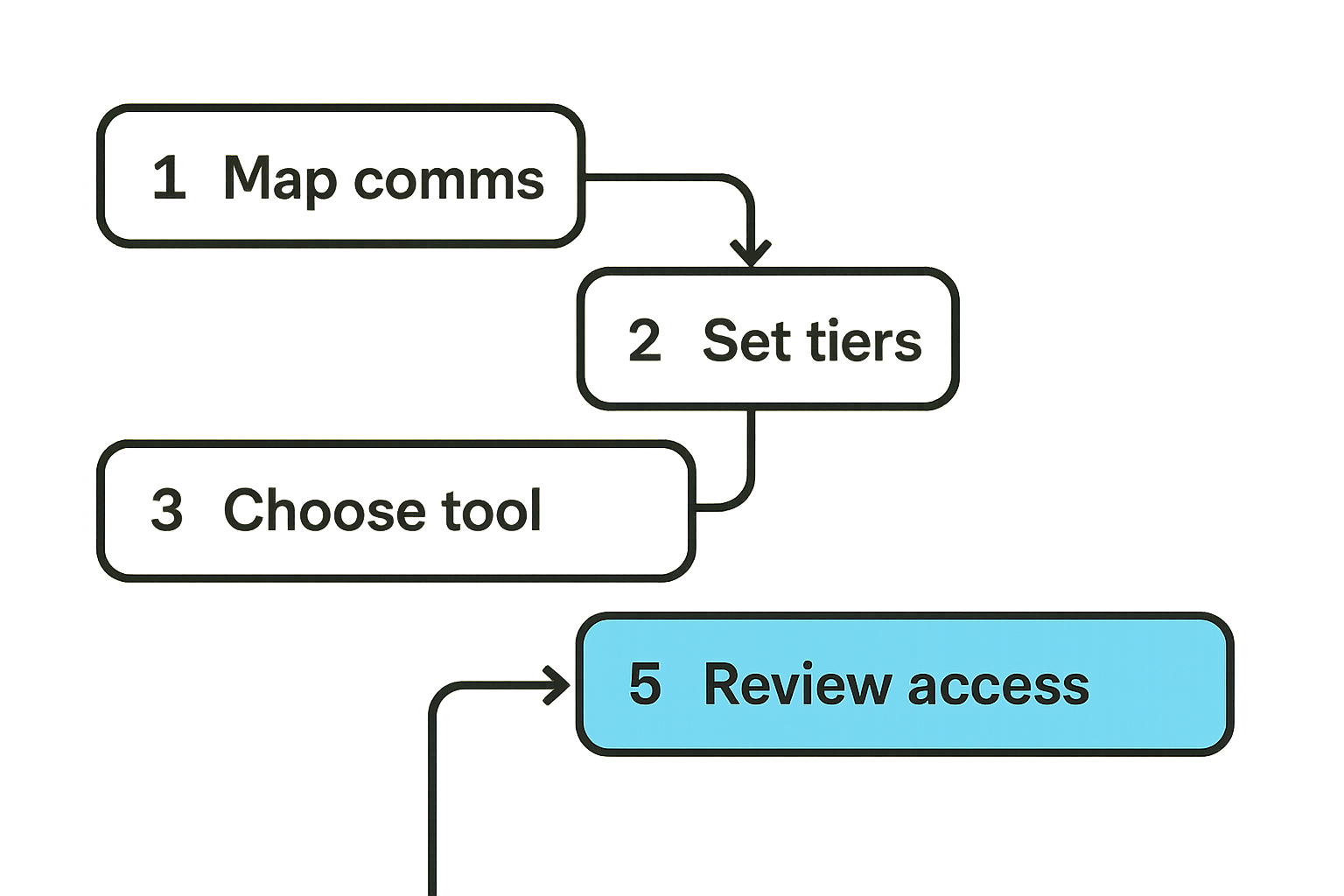
Use this sequence as a practical baseline:
- Map communication types. Identify what needs private chat: executive discussion, incidents, legal, customer escalations, source communication, personal privacy, or general team coordination.
- Define sensitivity tiers. Separate casual private chat, sensitive team chat, and high-risk channels.
- Choose the tool. Evaluate encryption model, identity verification, device support, backup behavior, metadata posture, group controls, and recovery.
- Set device rules. Require lock screens, updates, lost-device reporting, and review of linked sessions.
- Create group templates. Decide who owns each group, who can add members, whether history is visible, and when groups expire.
- Write sharing rules. Clarify what cannot be posted: private keys, seed phrases, production credentials, long-lived secrets, regulated data, or customer files unless explicitly approved.
- Train with scenarios. Use realistic examples: lost phone, wrong recipient, contractor offboarding, key-change alert, screenshot leak.
- Run a review cycle. Audit group membership, linked devices, backup settings, and policy exceptions on a schedule.
This is not overkill. It is how you avoid discovering the missing process during an incident.
The operating rules
A lightweight operating model can fit on one page:
Encrypted messaging operating model

Owners:
- Security owns high-risk channel policy.
- Team leads own group membership.
- Users own device reporting and app updates.

Controls:
- Verify members in high-risk channels.
- Review sensitive groups every 30-90 days.
- Disable previews for sensitive groups.
- Do not store long-lived secrets in chat.
- Report lost or replaced devices immediately.

Response:
- Wrong recipient: stop, assess, rotate exposed secrets.
- Lost device: revoke sessions if possible, rotate sensitive material.
- Member departure: remove, review groups, close temporary rooms.
The numbers can change. The ownership cannot be fuzzy.
Where qrypt.chat Fits in the Architecture
A secure messenger should not ask users to become cryptographers. It should give privacy-conscious users and teams a clear, usable way to communicate with stronger confidentiality assumptions than ordinary chat.
That is where qrypt.chat fits: private communication, secure messaging, and practical digital security for people who care about the details but still need the workflow to be usable.
Product fit for private communication workflows
qrypt.chat is relevant when the requirement is not just “send a message” but “reduce the amount of trust we place in the communication provider and improve the privacy posture of the conversation.”
Good product fit includes:
- Privacy-conscious users who want secure everyday messaging
- Remote teams discussing sensitive operational topics
- Security professionals coordinating private workflows
- Users who want modern encrypted messaging with attention to future-facing cryptographic risk
- Organizations that want clearer boundaries between message delivery and message content
For readers comparing secure chat tools, the broader QryptChat positioning around post-quantum private messaging is described on the about page.
This is not a claim that any one product removes the need for operational security. It does not. The value of a secure messenger is highest when it is paired with identity verification, device hygiene, sensible backup choices, and group management.
What to evaluate before adopting any secure messenger
Before adopting any secure messenger, ask concrete questions:
- What exactly is end-to-end encrypted?
- What metadata is visible to the service?
- How are keys generated, stored, rotated, and verified?
- What happens when a user adds a new device?
- What happens when a device is lost?
- Are backups encrypted, optional, disabled, or provider-managed?
- Can users verify contacts in a practical way?
- What controls exist for groups?
- Can former members access history after removal?
- How does account recovery work?
- What user behavior would bypass the security model?
That list is more useful than asking whether a tool is “secure.” Secure against what? Under whose control? With what recovery path? With what metadata? With what endpoint assumptions?
The mistake teams make is buying the promise and postponing the architecture. Do it in the other order.
End-to-End Encrypted Messaging Checklist and Closing
End-to-end encrypted messaging is now a baseline expectation for private digital communication. But the baseline is not the finish line.
The real work is building a communication workflow that still makes sense after a phone is lost, a contractor leaves, a key changes, a backup restores, a room grows, or a user shares something under pressure.
A practical checklist
Use this checklist before trusting a private messaging workflow with sensitive communication:
- Define the threat model before choosing the app.
- Separate casual, sensitive, and high-risk communication.
- Verify identities for sensitive channels.
- Review linked devices and old sessions.
- Decide backup behavior intentionally.
- Disable notification previews where content exposure matters.
- Treat group membership as an access control list.
- Remove former members promptly.
- Close temporary groups when work ends.
- Avoid storing long-lived secrets in chat.
- Minimize sensitive room names and visible context.
- Train users on lost devices, wrong recipients, and key-change alerts.
- Review the workflow on a schedule.
Closing the loop
End-to-end encrypted messaging is not just a privacy feature. It is a system design choice.
If you only look at the encryption label, you miss the parts that break in practice: identity, endpoints, backups, metadata, groups, and human behavior. If you design the workflow around those realities, encrypted messaging becomes far more useful and far less fragile.
The practical question for 2026 is not whether private chat matters. It does. The question is whether your end-to-end encrypted messaging workflow is strong enough for the conversations you are actually having.
Try qrypt.chat
qrypt.chat is for people who care about private communication, secure messaging, and practical digital security. Try qrypt.chat.