Most teams adopt end to end encryption messaging after something already feels wrong. A sensitive file was sent through a consumer chat app. A contractor kept access after leaving. A legal thread got forwarded into a platform nobody controls. Nobody planned for it; the workflow just grew around convenience.
Teams think the problem is encrypted chat. The real problem is communication architecture: who can read what, which devices hold keys, how identity is verified, what metadata remains visible, and what happens when a phone is lost at 2 a.m.
That changes the conversation. End to end encryption messaging is not a sticker you put on an app. It is a trust boundary, an operational model, and a set of failure modes you either design for or discover under pressure.
The practical question is simple: can your messaging system protect private communication while still being usable enough that people do not route around it?
Table of contents
- End to end encryption messaging is an architecture decision
- What end to end encryption messaging actually has to protect
- The core architecture: identity, keys, sessions, and devices
- What works in encrypted messaging workflows
- What fails when teams implement secure chat badly
- End to end encryption messaging for remote teams
- Implementation sequence for private messaging
- How to evaluate an encrypted messaging platform
- Operational hygiene after rollout
- Where qrypt.chat fits
- Closing: treat end to end encryption messaging as infrastructure
End to end encryption messaging is an architecture decision
Encryption is not the product boundary
The mistake teams make is treating encryption as a checkbox inside a chat product. They ask whether messages are encrypted, get a yes, and move on. That is not enough.
The meaningful boundary is who can decrypt the content. In end to end encryption messaging, messages should be encrypted on the sender's device and decrypted only on the intended recipient's device. The service provider should not have routine access to message plaintext. That is the point.
But the boundary does not stop at message content. Attachments, previews, push notifications, backups, search indexes, synced devices, link metadata, and exported logs can all undermine the model. A useful way to think about it is this: every convenience feature is a possible plaintext re-entry point.
Practical rule: if a feature makes encrypted content searchable, recoverable, previewable, or administratively visible, ask where plaintext exists and who can access it.
Threat model before feature list
A threat model does not need to be academic. It needs to be honest. Are you protecting against casual account compromise, platform operators, stolen phones, hostile networks, insider forwarding, legal discovery, targeted malware, or future cryptographic risk?
Different answers produce different architecture decisions. A journalist, a remote engineering team, a family group, and a crypto custody operation do not share the same risk profile. The same app may work for one and fail another.
The practical question is not whether an app is secure in the abstract. The practical question is secure against whom, under which failure conditions, and at what usability cost.
Why 2026 changes the risk model
In 2026, private communication has more pressure on it. Remote work spread sensitive conversations across personal networks. AI tools made message ingestion and summarization normal. Device fleets became messier. Cryptography discussions now include post-quantum planning rather than only current classical attacks.
None of that means every user needs to become a cryptographer. It does mean encrypted messaging choices should be made like infrastructure decisions, not like app-store preferences. If your conversations contain business plans, credentials, legal strategy, security incidents, health information, or political risk, the messaging layer deserves design attention.
What end to end encryption messaging actually has to protect

Content confidentiality is only layer one
The obvious goal is content confidentiality: outsiders should not read the message body or attachment. This is the part most people understand.
But content confidentiality has edges. If encrypted messages trigger plaintext notification previews on a locked phone, the system leaks. If a desktop app caches attachments unencrypted, the system leaks. If cloud backups store message history outside the end-to-end encrypted channel, the system leaks.
What breaks in practice is rarely the core encryption primitive. It is the glue around it.
Metadata becomes the next attack surface
Even when message content is protected, metadata can remain visible: who talked to whom, when, how often, from which IP ranges, with what device type, and with what group membership changes.
For many users, metadata is not harmless. A confidential acquisition discussion, a whistleblower contact, an incident response channel, or a legal consultation can be sensitive even if nobody reads the message body.
This is where privacy policies, security design, and operational logging matter. If you are evaluating a platform, read how it describes data handling, retention, and service-level visibility. For qrypt.chat specifically, the public privacy information is the right place to understand how the service frames privacy commitments.
Device compromise beats perfect cryptography
End-to-end encryption protects messages in transit and from server-side plaintext access. It does not magically protect a fully compromised endpoint. If malware can read the screen, capture keystrokes, or access local storage after decryption, the cryptography did its job and the device still lost.
That does not make encryption useless. It means secure messaging has to be paired with device hygiene: OS updates, screen locks, disk encryption, phishing resistance, careful browser extensions, and sane session management.
Practical rule: end-to-end encryption reduces server and network trust, but it does not eliminate endpoint trust.
Related reading from our network: teams managing home media and peer-to-peer workflows face similar privacy and storage tradeoffs in computer systems technology for streaming, torrents, IPTV, and home media, especially where local devices become the real control plane.
The core architecture: identity, keys, sessions, and devices
Identity has to be verifiable
Encryption is only useful if you know who owns the key. If Alice sends a message to a key she believes belongs to Bob, but the key was silently replaced, confidentiality becomes theater.
Strong messaging systems need some way to verify identity. That may be safety numbers, key fingerprints, QR code scanning, trusted contacts, device approval, or organization-managed identity controls. The exact mechanism can vary, but silent identity substitution should be difficult to hide.
For high-risk conversations, verification should not be optional folklore. It should be part of the workflow.
Keys need lifecycle management
Keys are not static decorations. They are created, rotated, backed up or not backed up, revoked, replaced, and sometimes lost. Each event has consequences.
A practical key lifecycle answers:
- How are new user keys generated?
- How are new devices approved?
- What happens when a device is lost?
- Can an old device still decrypt future messages?
- Are key changes visible to conversation members?
- Are group keys rotated when membership changes?
The mistake teams make is ignoring lifecycle until an employee leaves or a phone disappears. At that point, every vague policy becomes an incident.
Multi-device support is where designs get messy
Users expect secure chat on phones, laptops, tablets, and sometimes browsers. Multi-device support is useful, but it complicates trust.
Each device may need its own key material. Each device may need approval. Each device may receive message history. Each device may become a future compromise point. If adding a device is too easy, attackers benefit. If adding a device is too hard, users create workarounds.
A reasonable model makes device additions visible, requires meaningful user action, and limits how much old history appears on newly added devices unless the user explicitly chooses that behavior.
What works in encrypted messaging workflows
Clear channel purpose
Secure messaging gets weaker when every conversation lands in one giant room. A better pattern is to create channels or groups with clear purpose: incident response, finance approvals, legal review, executive planning, customer escalations, family matters, or personal private chat.
Clear purpose makes membership easier to audit. It also reduces accidental disclosure. People are less likely to send the wrong file when the room name and participant list match the work.
Small groups with accountable membership
Large encrypted groups are not automatically unsafe, but they are harder to reason about. Every member is an endpoint. Every member can screenshot, forward, or lose a device. Every inactive account becomes a stale access path.
For sensitive topics, smaller groups are usually better. If a person does not need access to a conversation, they should not be in it. That sounds obvious until a team creates a permanent all-hands secure room and starts dropping secrets into it.
Practical rule: the sensitivity of an encrypted group is bounded by the least careful member and the least secure device in the group.
Usable verification rituals
The best verification system is the one people actually use. Long fingerprints copied manually into a different app will fail for most users. QR code scans during onboarding, short safety number checks during high-risk conversations, or clear device-change warnings are more realistic.
The ritual matters. For example:
- Create the sensitive group.
- Confirm members out-of-band.
- Verify identities for high-risk participants.
- Pin a short purpose statement.
- Review membership at a regular interval.
That sequence is not glamorous. It works because it turns vague privacy intent into repeatable behavior.
What fails when teams implement secure chat badly
Security theater replaces security behavior
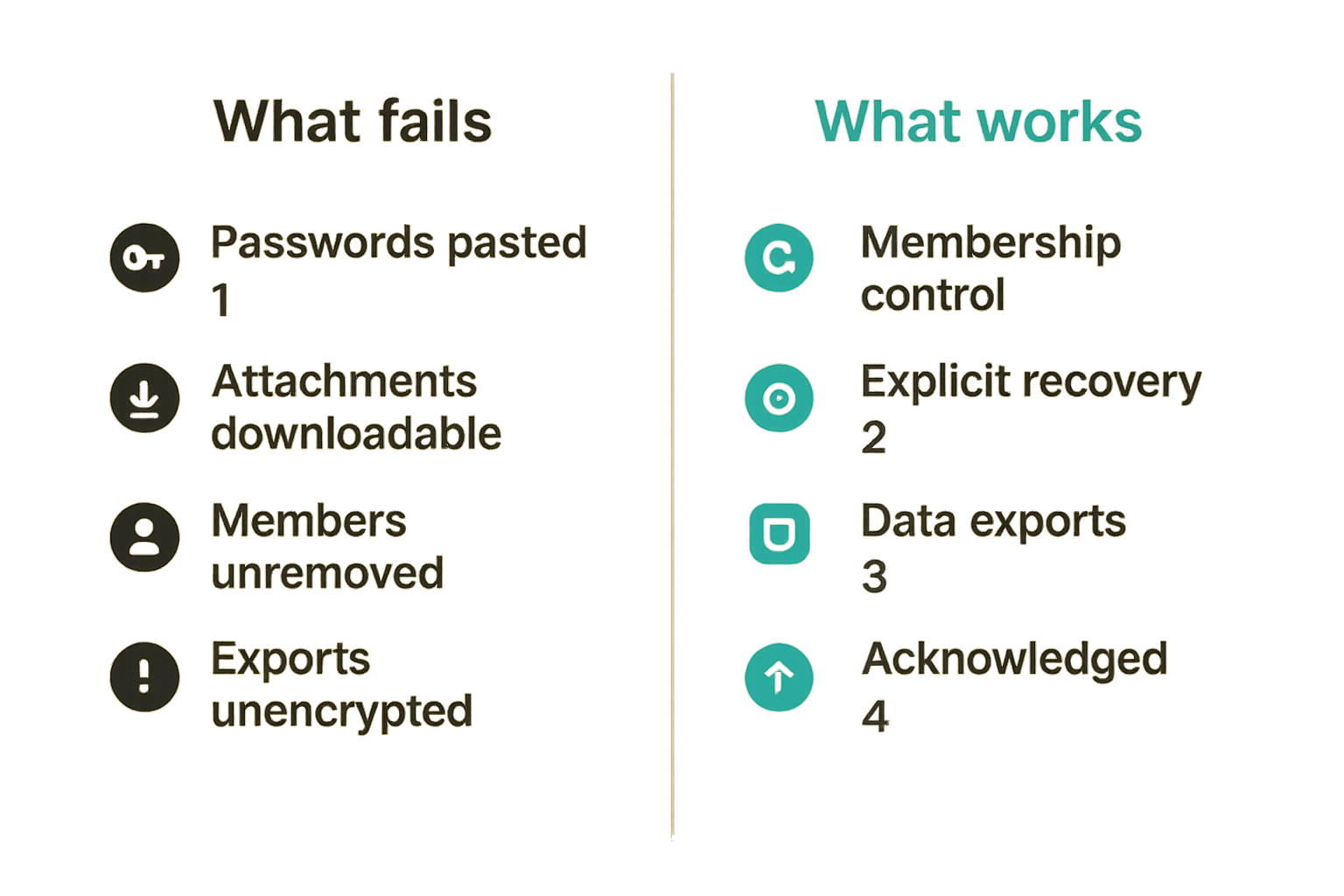
Security theater is when a team says use the encrypted app but never changes how decisions, files, identities, and devices are handled. The tool changes. The risk stays.
Examples are common:
- People paste passwords into long-lived group chats.
- Sensitive attachments remain downloadable forever.
- Departed contractors stay in rooms.
- Verification warnings are ignored.
- Message exports move into unencrypted folders.
The platform may be strong, but the workflow is weak.
Recovery becomes the backdoor
Recovery is one of the hardest parts of secure messaging. Users lose phones. Teams need continuity. People forget passwords. Support requests happen at the worst time.
If recovery gives the provider, administrator, or help desk access to plaintext, the end-to-end model is compromised. If recovery is impossible, users may lose critical data. Neither extreme is acceptable for every use case.
The practical design is to decide what should be recoverable, what should intentionally disappear, and who can approve new devices. Recovery should be explicit, documented, and tested before it is needed.
People export data to get work done
What breaks in practice is often workflow pressure. If the encrypted messaging platform cannot support search, file handling, cross-device use, or team coordination in a safe way, people export data into tools that can.
They forward a thread to email. They upload screenshots to a ticketing system. They paste logs into a public AI assistant. They move the sensitive part of the conversation outside the protected boundary.
That is why encrypted messaging needs product discipline, not just cryptographic discipline. Secure defaults must align with how people actually communicate.
Related reading from our network: the same workflow gap appears in SaaS operations, where tools fail when automation is bolted onto bad process; automation direct in SaaS workflow architecture is a useful adjacent example.
End to end encryption messaging for remote teams
Access changes must be operational events
Remote teams change shape constantly. People join, leave, switch projects, change devices, travel, and work across networks. In that environment, encrypted messaging membership cannot be treated as set-and-forget.
Access changes should be events with owners. When someone leaves a project, they leave the group. When someone loses a device, sessions are reviewed. When a sensitive channel is created, membership is documented. When a contractor offboards, secure chat access is part of the checklist.
This is not bureaucracy. It is how private communication survives normal business motion.
Admin convenience must not become plaintext access
Administrators need to manage users, billing, abuse, and policy. They do not need routine access to everyone’s message content. The difference matters.
A secure team platform should separate administration from decryption. Admins may need to disable accounts, enforce device rules, manage organization membership, or configure retention defaults. That should not imply they can silently read private conversations.
When evaluating security claims, look for this separation. qrypt.chat publishes a dedicated security overview for readers who want to inspect how secure messaging is approached beyond the marketing layer.
Policy should map to real workflows
A messaging policy nobody follows is worse than no policy because it creates false confidence. Keep it short and operational.
For example:
- Use encrypted messaging for credentials, private decisions, security issues, legal-sensitive discussions, and personal data.
- Do not paste long-lived secrets into chat; use a secret manager and share references.
- Verify identity before discussing high-risk topics.
- Remove members when their need-to-know ends.
- Report lost devices immediately.
The policy should answer what to do on Monday morning, not describe abstract values.
Implementation sequence for private messaging
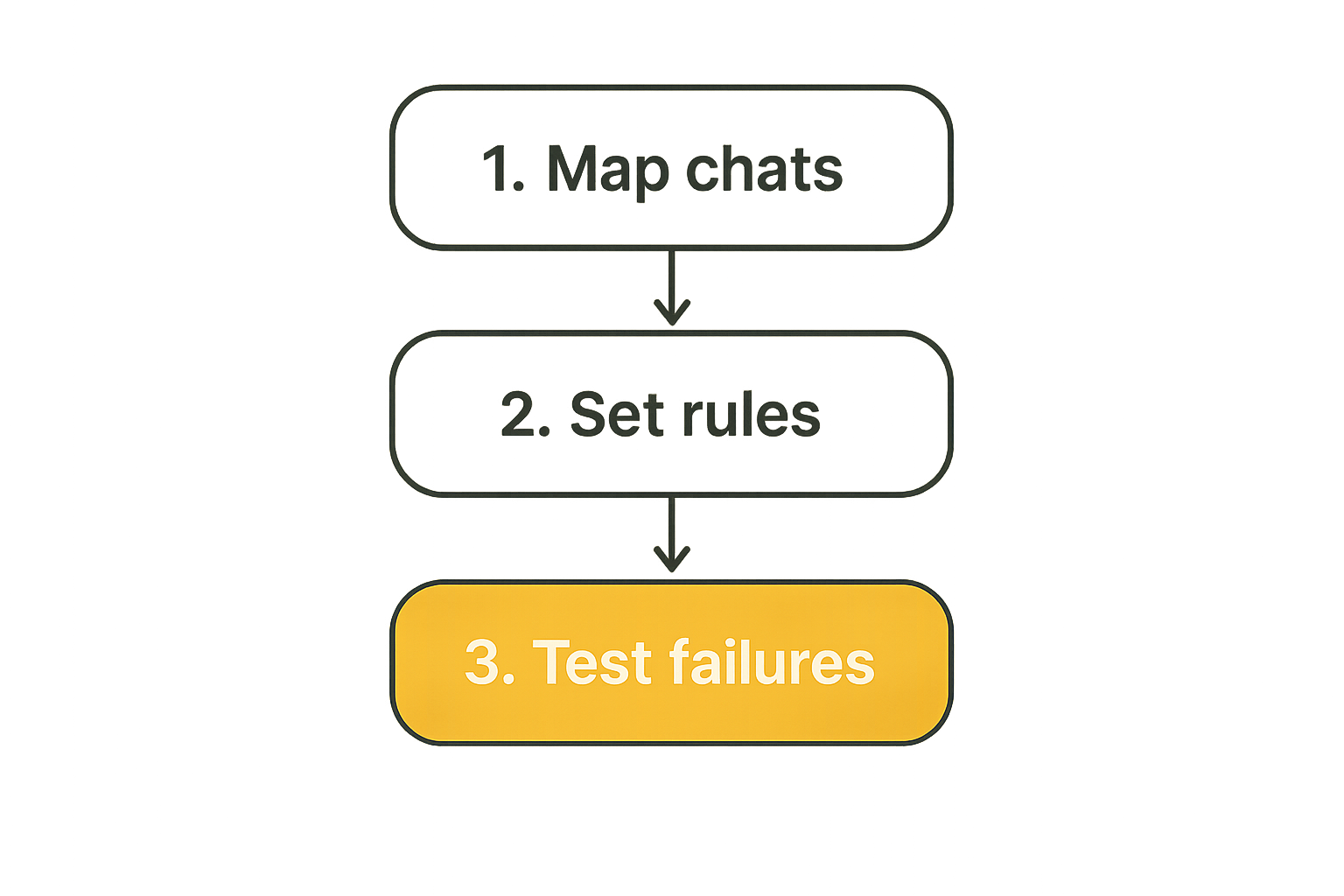
Step 1: map communication classes
Start by classifying conversations. Do not start by comparing app logos.
A simple map might look like this:
- Public or low-sensitivity coordination.
- Internal operational chat.
- Sensitive business discussions.
- Security, legal, financial, or personal data conversations.
- High-risk conversations requiring identity verification and strict membership.
Then decide which classes require end to end encryption messaging, tighter group control, shorter retention, or device verification.
Step 2: define key and device rules
Next, define the rules that users will actually encounter.
Example baseline:
secure_messaging_policy:
  device_approval: required
  lost_device_reporting: immediate
  identity_verification: required_for_high_risk_chats
  group_review_interval: monthly
  attachment_retention: limited
  admin_plaintext_access: prohibited
This is not a universal policy. It is a starting point. The value is that it makes assumptions visible.
Step 3: test failure paths
Most teams test happy paths and ignore failure paths. That is backwards for secure communication.
Test these before rollout:
- A user loses a phone.
- A user adds a new laptop.
- A contractor leaves a project.
- A group member reports a suspicious key-change warning.
- A user needs to preserve a message for a legitimate business reason.
- A sensitive attachment was sent to the wrong group.
The outcome should not be improvisation. It should be a known workflow.
How to evaluate an encrypted messaging platform
Questions that expose weak architecture
Vendor pages often sound similar. Better questions create better signal.
Ask:
- Can the provider read message content under normal operation?
- Are attachments end-to-end encrypted too?
- What metadata is collected and retained?
- How are new devices approved?
- Are key changes visible to users?
- What happens when group membership changes?
- Are cloud backups protected by the same model?
- Can administrators access plaintext?
- What recovery options exist, and what do they expose?
- Is post-quantum cryptography part of the roadmap or architecture?
None of these questions require deep cryptographic expertise. They require a platform to be specific.
Comparison table: weak vs practical design
| Area | Weak implementation | Practical implementation |
|---|---|---|
| Identity | Users trust names and avatars | Users can verify keys or safety numbers |
| Devices | New devices appear silently | Device additions are visible and controlled |
| Groups | Membership grows without review | Membership is purpose-based and reviewed |
| Backups | Plaintext history goes to cloud backup | Backup behavior is explicit and protected |
| Admins | Admin role implies message access | Admin control is separated from plaintext access |
| Recovery | Help desk can restore everything | Recovery tradeoffs are explicit and limited |
| Metadata | Ignored as harmless | Minimized, documented, and governed |
| Offboarding | Chat access is forgotten | Removal is part of the operational checklist |
The point is not to demand perfection. The point is to avoid being surprised by obvious design gaps.
Signals to validate before rollout
During a pilot, watch behavior rather than promises.
Useful signals include:
- Do users understand device-change warnings?
- Do teams create smaller purpose-built groups?
- Are sensitive files staying inside approved workflows?
- Are people still forwarding private content to email?
- Does support know what to do when a device is lost?
- Can administrators manage access without reading content?
This is where secure messaging becomes measurable. Not with vanity metrics, but with operational signals that show whether the architecture is holding.
Related reading from our network: decentralized compute markets have a similar state-management problem across jobs, workers, validation, and payments; sigma computing in decentralized compute marketplace operations is adjacent reading for teams thinking about distributed trust boundaries.
Operational hygiene after rollout
Retention and deletion need defaults
Retention is a business decision disguised as a settings page. Keeping everything forever creates risk. Deleting too aggressively can break continuity, compliance, or accountability.
For private messaging, defaults matter. Sensitive groups may need shorter retention. Low-risk coordination may tolerate longer history. Attachments may need different handling from text. Legal or regulated environments may have special requirements.
The mistake teams make is leaving retention undefined until after a dispute, breach, or discovery request. Define it early.
Auditability without message access
Teams often assume auditability requires plaintext visibility. It does not always have to.
You may need to know that a user joined a group, a device was added, a policy changed, or an account was disabled. You may not need message content. Good architecture separates operational audit events from private message bodies.
This distinction matters for organizations that need governance without turning administrators into surveillance operators.
Incident response for secure messaging
Incident response should include the messaging layer. If an account is suspected compromised, responders need to know how to revoke sessions, remove devices, warn contacts, review group membership, and preserve necessary evidence without breaking privacy guarantees unnecessarily.
A lightweight runbook is enough for many teams:
- Confirm the affected account or device.
- Revoke active sessions where possible.
- Remove the user from sensitive groups temporarily if needed.
- Notify relevant contacts about possible exposure.
- Review recent device additions and group changes.
- Restore access only after identity is verified.
This is not paranoia. It is normal operational hygiene for private communication.
Where qrypt.chat fits
Private communication without pretending risk disappears
qrypt.chat is built for people who care about private communication, secure messaging, and practical digital security. That framing matters because serious privacy work should not pretend that one tool eliminates all risk.
A good encrypted messaging product reduces trust in servers, narrows exposure, and gives users better control over private conversations. It should also be honest about endpoints, metadata, recovery, and user behavior.
If you are comparing secure messaging platforms, qrypt.chat positions itself around end-to-end encrypted messaging with post-quantum cryptography; the broader product framing is available on the about page.
Product fit for privacy-conscious users and teams
qrypt.chat is most relevant when private communication is not an edge case. That includes privacy-conscious individuals, security professionals, remote teams, and users who want secure chat without needing to become cryptography experts.
The fit is architectural:
- You want conversations protected from routine server-side plaintext access.
- You care about secure messaging as a workflow, not only a feature.
- You need a privacy-first default for sensitive coordination.
- You want a communication layer aligned with modern cryptographic risk discussions.
No messaging product can fix compromised devices, careless forwarding, or a bad access process. But the right product can make the secure path easier than the insecure workaround.
Closing: treat end to end encryption messaging as infrastructure
The durable rule
End to end encryption messaging works best when treated as infrastructure for trust, not as a cosmetic privacy feature. The architecture has to account for identity, keys, devices, metadata, recovery, retention, and real user behavior.
Teams think the problem is choosing an encrypted app. The real problem is designing a communication workflow that keeps private content private while still letting people work.
That changes the conversation. You stop asking only whether messages are encrypted and start asking whether the system survives lost devices, membership changes, admin pressure, recovery requests, and everyday human shortcuts.
Practical rule: secure messaging is only as strong as the workflow around key trust, device control, and group membership.
Try qrypt.chat
qrypt.chat is for people who care about private communication, secure messaging, and practical digital security. Start with end to end encryption messaging that treats privacy as architecture, not decoration: Try qrypt.chat