
A client sends an API key in chat because email feels unsafe. Three weeks later, the project ends, but the key remains searchable on two phones, a desktop, and a backup. The conversation was encrypted. The workflow was not secure.
Freelancing encrypted messaging is often treated as an app-selection problem: choose a private messenger, turn on disappearing messages, and continue working as usual. That approach misses where most practical exposure occurs—identity verification, device access, file copies, notifications, project handoffs, and forgotten credentials.
Teams think the problem is choosing the strongest encryption. The real problem is designing a communication workflow in which people know what belongs in chat, who should have access, how access is verified, and what happens when the engagement ends.
That changes the conversation. The practical question is not simply, “Is this message encrypted?” It is, “Can the freelancer and client control the entire lifecycle of this information?” This guest contribution draws on the team at ugig.net and its experience helping freelancers build practical, technology-assisted work systems.
Table of contents
- Why freelance communication needs an architecture
- Build a threat model before choosing a messenger
- Choose an encrypted messaging channel
- Verify identity and onboard clients
- Run a secure freelance messaging workflow
- Protect files credentials and AI workflows
- Manage groups devices and project boundaries
- Know what breaks in practice
- Implement and measure the workflow
- Where qrypt.chat fits
Why freelance communication needs an architecture
Encryption protects a path not a project
End-to-end encryption is an important control. In simple terms, it is intended to keep message contents readable only on participating endpoints rather than by every intermediary carrying the traffic. But a freelance project extends beyond that transport path.
A message may appear in a lock-screen notification. A recipient may copy it into a task manager, download its attachment, or paste it into an AI assistant. A compromised laptop may expose an active session. A client may add a colleague whose identity the freelancer has never checked.
The mistake teams make is assuming that a secure channel automatically makes everything done through that channel secure. It does not control screenshots, exports, malicious endpoints, unsafe backups, or what recipients do after decryption.
Practical rule: Treat encrypted messaging as one controlled layer in the project, not as the project’s entire security boundary.
Freelancers cross organizational boundaries
Employees usually operate inside one identity system, device policy, support process, and legal structure. Freelancers frequently cross several. They may use a personal laptop, a client-managed repository, their own phone, and multiple communication platforms in the same day.
That creates unclear ownership. Who removes an old device? Who reports a stolen phone? Who decides whether a file may be retained for a portfolio? Who revokes a contractor after the project? If nobody answers these questions during onboarding, the answers are improvised during an incident.
A useful way to think about it is as a temporary trust boundary. The client grants limited access for a defined purpose and period. Secure messaging should reinforce that boundary instead of becoming an indefinite archive shared across unrelated work.
Convenience creates unofficial systems
When the approved workflow is slow, people route around it. They send a password in chat because vault access takes a day. They create a new group because the project owner is unavailable. They download a customer export because the controlled environment is inconvenient.
The secure design therefore has to be usable. A technically impressive system that clients cannot join or understand will push sensitive conversations into ordinary SMS, personal email, or unmanaged social accounts.
The practical target is not maximum complexity. It is the smallest set of controls that people can follow consistently under deadline pressure.
Build a threat model before choosing a messenger
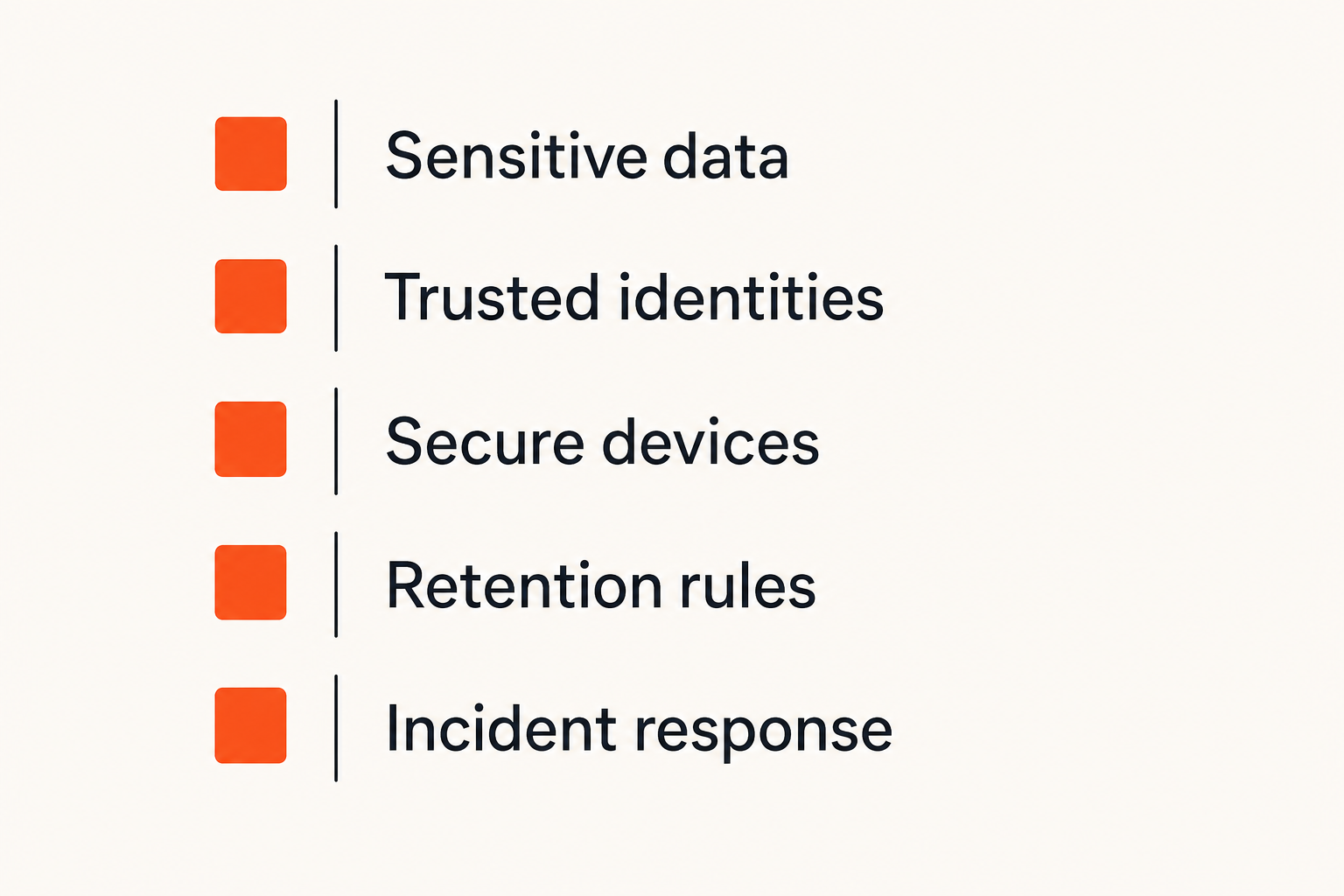
Identify the information at risk
Start by listing what the engagement will handle. Typical categories include:
- Contact details and private client conversations
- Unreleased product plans, designs, or source code
- Customer records and support screenshots
- Contracts, invoices, and payment information
- Repository links, environment names, and internal URLs
- Credentials, recovery codes, or signing material
- Regulated or legally privileged information
Not every message deserves identical treatment. Scheduling a public webinar is different from sharing a production incident log. Classification lets both parties reserve stricter handling for information that would cause meaningful harm if exposed.
A simple model is often enough: routine, confidential, and restricted. Routine coordination can use the approved encrypted channel. Confidential material may require controlled file transfer and limited retention. Restricted data may be prohibited from chat entirely.
Decide which failures matter
Threat modeling is not a list of movie-plot attackers. It is a decision about plausible failures and consequences. For a freelancer, the most realistic cases often include:
- A phone or laptop is lost, stolen, or repaired by a third party.
- A client account is impersonated or taken over.
- A notification exposes content during travel or screen sharing.
- A message or attachment is sent to the wrong group.
- A former collaborator retains access.
- Malware reads data after it is decrypted on an endpoint.
- A cloud backup preserves content longer than expected.
Rank these by impact and likelihood in the specific engagement. A journalist protecting a source, a developer maintaining a small business website, and a designer preparing an unannounced launch do not have identical threat models.
Match controls to realistic threats
Once the failure cases are clear, assign controls. Device encryption and short auto-lock periods reduce exposure from a lost laptop. Independent identity verification helps resist impersonation. Hidden notification previews reduce shoulder-surfing and screen-sharing leaks. A password manager or secrets vault keeps credentials out of chat history.
This is where freelancing encrypted messaging becomes an architecture decision. The messenger is selected because it supports the required workflow, not because it won a feature checklist detached from actual work.
Do not claim that one control eliminates a threat. Controls reduce risk and create opportunities to detect or contain failure. An encrypted channel cannot compensate for an unlocked device, and device security cannot correct a message sent to the wrong verified person.
Choose an encrypted messaging channel
Evaluate more than the encryption label
“Encrypted” can refer to transport encryption, stored-data encryption, or end-to-end encryption. Those properties are not interchangeable. Before using a channel for client work, understand what is protected, which devices can decrypt content, and how new devices join.
Evaluate operational capabilities alongside cryptography:
| Decision area | What works | What fails |
|---|---|---|
| Identity | Verifiable contacts and visible device changes | Trusting a display name or profile image |
| Access | Clear membership and device controls | Shared accounts or unknown linked sessions |
| Retention | Explicit, agreed retention behavior | Assuming deletion works everywhere |
| Recovery | Documented recovery with acceptable tradeoffs | Recovery paths nobody has tested |
| Files | Defined size, expiry, and download handling | Treating attachments as temporary messages |
| Usability | Clients can join and operate safely | Controls so awkward that users bypass them |
Do not select a platform from a single marketing phrase. Document what you expect it to protect and test the client-side workflow before sensitive work begins.
Understand metadata and endpoint limits
Even when message content is end-to-end encrypted, a system may still process some operational information needed to deliver messages or prevent abuse. Depending on its design, that can include account identifiers, timing, group relationships, device information, or network data.
The exact exposure varies by service, so avoid broad assumptions. If relationship metadata itself is highly sensitive, evaluate it explicitly. The fact that a provider cannot read message content does not automatically mean every aspect of communication is invisible.
Endpoints remain the larger practical problem for many projects. Once a message is decrypted, the operating system and authorized user can display it. Screenshots, accessibility tools, malware, clipboard history, and backups may create additional copies.
Practical rule: Judge a private messenger by its encryption, identity model, device behavior, retention controls, and failure handling—not by a lock icon alone.
Separate messaging from secret storage
Chat is optimized for conversation. A secrets manager is optimized for storing, rotating, and revoking credentials. A repository records code changes. A project tracker preserves assigned work. Trying to make one messenger perform every role creates an unstructured archive that is hard to govern.
Use encrypted messaging to coordinate the transfer: “Access has been granted through the vault” is safer and more actionable than pasting a token into the conversation. If a secret is accidentally posted, treat it as exposed and rotate it. Deleting the message is useful cleanup, not proof that every copy disappeared.
Verify identity and onboard clients
Confirm people through a second channel
A convincing profile is not identity proof. Before exchanging sensitive material, confirm the contact through an independent path: a known telephone number, an established company email, a scheduled video call, or an in-person verification. For higher-risk work, compare any available safety code or device identity information supported by the chosen service.
This step matters most when a new contact introduces urgency: “The launch is blocked; send the key now.” Urgency is precisely when workers skip verification. Establish the trusted account before the deadline or incident.
Reverify after unexpected account or device changes, especially when paired with unusual requests. The goal is not ceremony. It is preventing one compromised account from silently becoming the new source of truth.
Set communication rules in writing
Create a short communication agreement during onboarding. It can fit on one page and should answer:
- Which messaging account and project group are approved?
- Which data categories are prohibited in chat?
- Where are files, secrets, tasks, and final approvals stored?
- Who may add members or authorize a new device?
- How quickly should a lost device or mistaken send be reported?
- What must be retained for contractual or legal reasons?
- When will access and local files be removed?
This prevents security choices from changing message by message. It also gives the freelancer permission to refuse unsafe requests without turning every refusal into a debate.
Handle client resistance without friction
Clients may not want another app or security procedure. Explain the workflow in business terms: fewer accidental disclosures, cleaner project separation, faster revocation, and a clear record location. Avoid promising perfect secrecy.
Offer a short setup sequence and a fallback for non-sensitive scheduling. If the client refuses the required controls for restricted data, change the project scope or decline to receive that data. Accepting information you cannot protect is not customer service; it is unmanaged liability.
The best onboarding feels ordinary. Verify once, state the boundaries, test the channel, and move into the work.
Run a secure freelance messaging workflow
Classify before sending
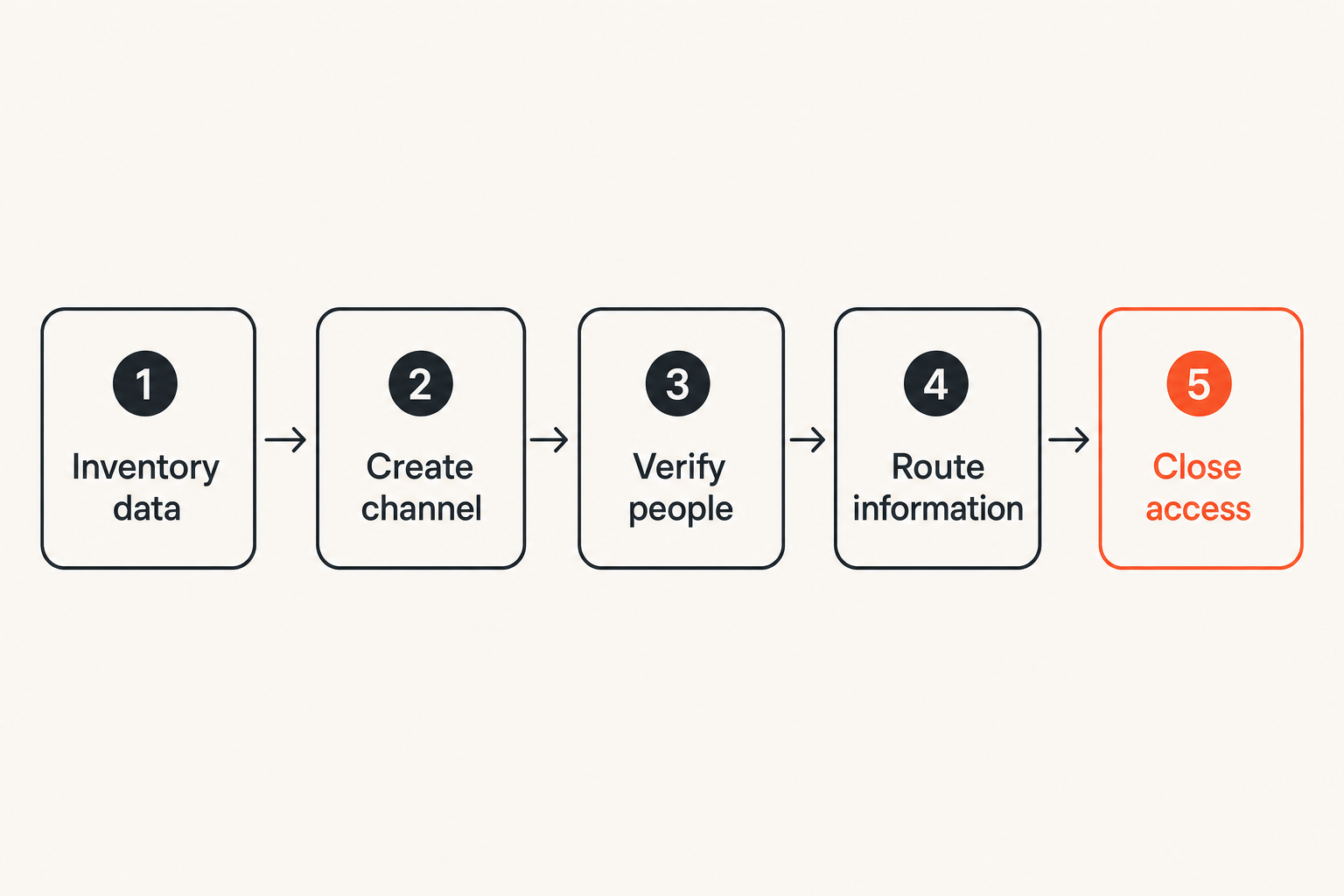
A repeatable workflow reduces in-the-moment judgment. Use this sequence for every new engagement:
- Inventory the data. Identify what will be discussed, uploaded, or accessed.
- Create the approved channel. Use a project-specific conversation with known members.
- Verify identities and devices. Confirm participants through an independent route.
- Route information by type. Put tasks, files, and secrets in their appropriate systems.
- Review and close. Remove access, rotate temporary credentials, and handle retained records.
Before sending, ask two questions: “Is this the right recipient?” and “Is chat the right destination?” That pause catches more routine errors than an elaborate policy nobody remembers.
For restricted information, use a pre-agreed message pattern such as: “A new item is available in the approved vault under project Alpha.” The chat coordinates access without becoming the storage location.
Move decisions into the right system
Fast client decisions often happen in conversation, but work becomes unreliable when chat is the only record. Capture scope changes, approvals, deadlines, and acceptance criteria in the system designated for durable project records.
This is not an argument for copying every private message into another database. Record the minimum business decision without duplicating unrelated conversation. For example: “Client approved version 3 on September 29” is usually more useful than exporting the entire discussion.
What breaks in practice is the mismatch between disappearing conversation and durable obligations. A message can be intentionally temporary while the resulting contract decision needs a retained record.
Close the channel when work ends
Offboarding is part of delivery, not an optional cleanup task. On the final project day:
- Confirm which deliverables and records the client received.
- Remove the freelancer from client groups and systems.
- Remove client contacts from shared freelance workspaces where appropriate.
- Rotate temporary passwords, tokens, and recovery material.
- Delete local working copies that are no longer required.
- Preserve only records required by contract, tax, insurance, or law.
- Record that the access review occurred.
Do not promise deletion you cannot verify. Backups, recipient devices, and legal retention requirements can limit what either party can remove. State the scope honestly: active access revoked, local copies handled, and known credentials rotated.
Protect files credentials and AI workflows
Treat files as separate security objects
An encrypted attachment is protected while moving through the messaging system according to that system’s design. After download, it becomes a file governed by the recipient device, storage location, backup policy, and sharing behavior.
Use controlled file transfer for sensitive deliverables. Limit access to named people, set expiry where appropriate, and avoid permanent public links. Remove unnecessary metadata from documents and images when metadata could reveal names, locations, software, or internal paths.
For highly sensitive files, agree on integrity verification so the client can detect corruption or substitution. This may be as simple as comparing a cryptographic hash through a separately verified channel, provided both parties understand the process.
Keep credentials out of conversation history
Passwords, API tokens, private keys, session cookies, and recovery codes should not be normal chat content. Use a password manager, secrets vault, or the client’s access-management system. Prefer individual accounts and short-lived access over shared master credentials.
If chat must be used to coordinate bootstrap access, split roles carefully and rotate the credential immediately after enrollment. Do not rely on disappearing messages as a credential lifecycle. A secret can be copied before its timer expires.
Practical rule: If a credential appears in chat, assume it may have been copied; revoke or rotate it rather than trusting message deletion.
Freelancers should also avoid retaining production credentials “in case the client returns.” Re-entry should use a new authorization event. Dormant access is difficult to monitor and easy to forget.
Control what enters AI tools
AI-assisted writing, coding, transcription, and summarization can improve freelance productivity, but they create another data flow. Pasting an encrypted client conversation into an external tool moves the content outside the original messaging boundary.
Before using AI, check the client agreement, the tool’s data handling, account configuration, retention options, and whether the information can be minimized or anonymized. Remove names, tokens, customer data, and proprietary details unless the client has approved that processing route.
A local or enterprise-controlled tool may fit some threat models, but deployment labels are not enough. Confirm where inference occurs, what logs are retained, who administers the system, and whether extensions or plugins receive the prompt.
Manage groups devices and project boundaries
Use one project one context
Mixing clients in one workspace increases the chance of wrong-recipient mistakes. Similar project names, reused group icons, and rapid mobile switching make those mistakes surprisingly easy.
Create a clearly named context for each engagement. Use neutral names if lock-screen exposure would reveal sensitive relationships. Keep social conversation separate from operational work, and archive or close the context when the project ends.
Do not use one large “clients” group for convenience. Group membership is an authorization decision. Every participant should have a project reason to read every message in that group.
Control membership and linked devices
Review members when a project phase changes, a stakeholder leaves, or a subcontractor finishes. Restrict who can add participants where the service permits it. Announce legitimate membership changes so unexpected additions are visible.
Device hygiene should include:
- Full-device encryption and current security updates
- Strong screen locking with a short idle timeout
- Hidden message previews on locked screens
- Review of linked desktop, tablet, and browser sessions
- Remote lock or wipe capability where appropriate
- Separate operating-system profiles for shared machines
- Secure disposal or reset before device transfer
A secure messenger on an unsupported operating system is not a strong endpoint. Updates matter because the application depends on the security of the platform beneath it.
Design for subcontractors and handoffs
Freelancers sometimes bring in editors, developers, translators, or assistants. Client permission should come before access, not after an extra person has joined the group. Give subcontractors only the information needed for their task.
For handoffs, transfer durable materials into the client-owned destination rather than forwarding months of conversational history. The incoming worker usually needs current requirements, decisions, files, and access—not every informal discussion.
Define who owns the group and data if the lead freelancer becomes unavailable. A client should not lose operational access because one personal account controls the only project channel.
Know what breaks in practice
Encryption with weak endpoint security
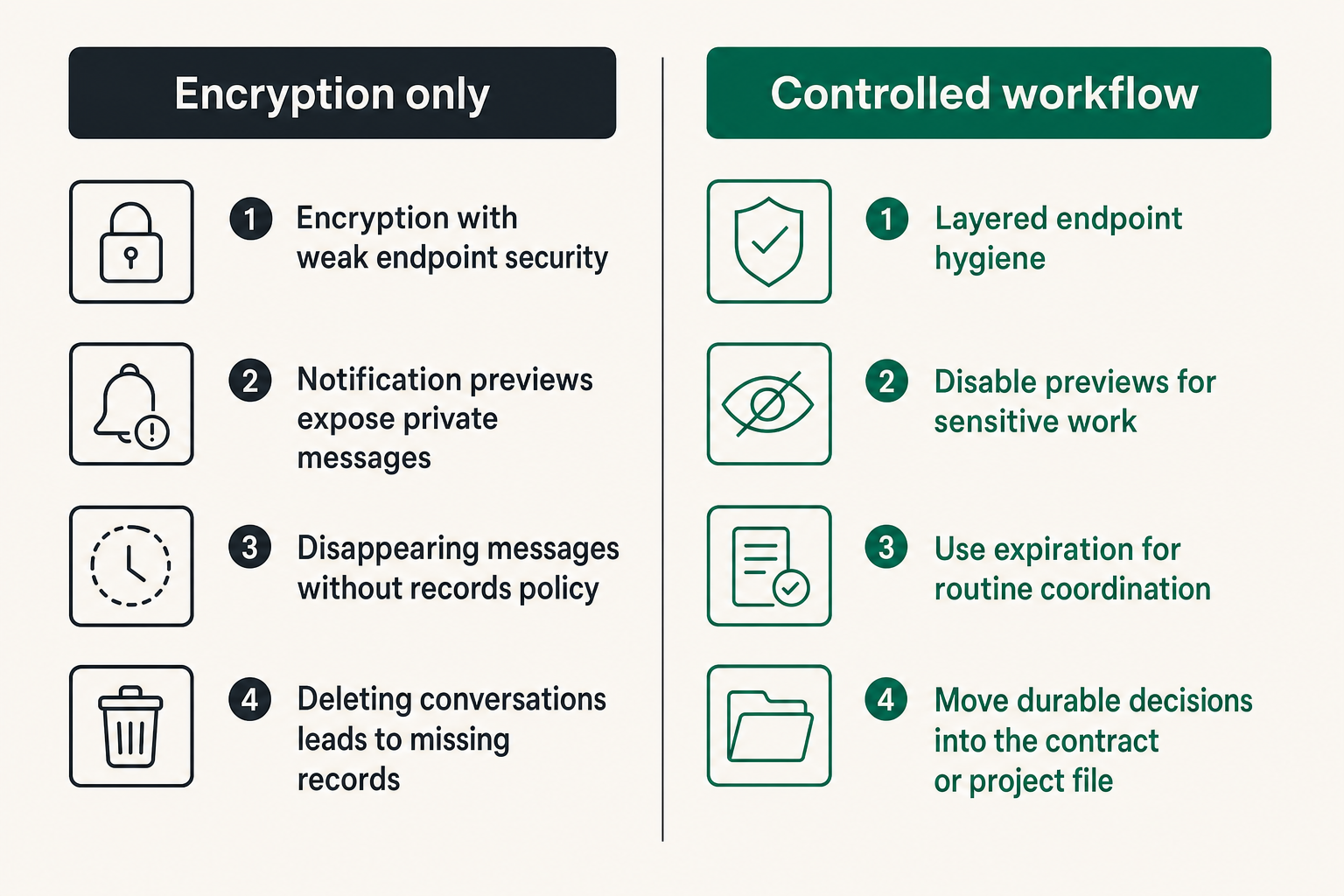
The common failure is strong message encryption paired with weak device controls. An unlocked phone on a café table, a browser session on a shared computer, or malware with user-level access can expose decrypted content without attacking the encryption protocol.
What works is layered endpoint hygiene: updates, screen locks, limited extensions, trusted software sources, session review, and separate work contexts. What fails is treating the messenger as a protective shell around the entire device.
Notification previews deserve particular attention. A private message displayed on a projector or recorded screen share is no longer private to its intended participants. Disable previews for sensitive work and check screen-sharing settings before client calls.
Disappearing messages without records policy
Disappearing messages reduce some long-term exposure, but they are not reliable evidence destruction. A participant may capture the content, another device may remain offline, or required records may need to be retained elsewhere.
The opposite failure is deleting every conversation and then discovering that nobody recorded the approved scope, delivery acceptance, or payment terms. Temporary communication must be paired with deliberate recordkeeping.
Use expiration for routine coordination when both parties agree. Move durable decisions into the contract, ticket, repository, or project record. Do not use chat history as the only proof of business commitments.
No plan for mistakes or compromise
Mistakes will happen. A secure workflow needs a response path that does not depend on embarrassment or silence. If information goes to the wrong recipient, report it immediately, identify what was exposed, delete or revoke access where possible, and rotate affected secrets.
For suspected account compromise:
- Use a separate trusted channel to warn the other party.
- Secure the underlying email, device, and recovery accounts.
- Revoke unknown sessions and linked devices.
- Rotate credentials shared during the exposure window.
- Reverify identity before resuming sensitive communication.
- Document relevant business impact without copying unnecessary private content.
The mistake teams make is optimizing only for prevention. Recovery speed matters because no practical control eliminates human error, stolen devices, or software defects.
Implement and measure the workflow
Use a minimum viable security baseline
Freelancers do not need a large-company security department to establish a defensible baseline. Start with controls that address the most common failure paths:
- One approved encrypted messaging channel per project
- Independent identity verification before sensitive exchange
- Updated, encrypted, auto-locking devices
- Hidden lock-screen previews for client conversations
- No credentials stored in chat
- Separate destinations for files, tasks, and durable approvals
- A clear incident contact and offboarding date
Add stronger controls when the data or client threat model requires them. High-risk work may call for dedicated devices, stricter metadata protection, hardware-backed credentials, managed file environments, or professional legal guidance.
Measure behavior rather than promises
Security metrics should reveal whether the workflow operates as intended. Useful checks include:
- Percentage of active projects with documented communication rules
- Number of unknown or stale linked devices found during review
- Time required to revoke access after a project ends
- Number of credentials accidentally placed in conversation
- Number of active groups containing former participants
- Whether recovery and incident contacts were tested
These measures do not prove perfect confidentiality. They expose workflow drift. A policy that says “remove access promptly” is weaker than a record showing who reviewed access and when.
Avoid turning metrics into surveillance. The aim is to verify controls without collecting more private communication content. Count configuration and process outcomes, not the substance of client conversations.
Review the system between projects
A short review after delivery can prevent repeated mistakes. Ask what information entered chat unnecessarily, which client steps caused friction, whether any access remained, and whether the selected tools matched the threat model.
Update templates rather than relying on memory. Maintain a reusable onboarding checklist, communication agreement, incident note, and offboarding sequence. Templates lower the cost of good security while still allowing project-specific changes.
Freelancing encrypted messaging works best as a routine operating system: establish trust, route data deliberately, monitor access, and close the boundary. It should not depend on remembering security advice during a crisis.
Where qrypt.chat fits
Use the product as a controlled communication layer
A private messaging product fits this architecture when it gives freelancers and clients an understandable place for protected conversation without encouraging chat to become a secrets vault, file archive, and project database at once.
When evaluating qrypt.chat for a project, start with the engagement’s threat model and test the real workflow. Confirm how participants join, how identities and devices are handled, what users can control, and how the channel behaves when someone loses access or leaves the engagement.
The strongest product fit is specific: use encrypted chat for direct project communication, sensitive coordination, and timely alerts while routing credentials, durable files, and formal approvals to systems designed for those purposes.
Keep the surrounding controls intact
No messaging product can decide whether a freelancer should paste customer data into an AI tool, retain a client export, approve a new group member, or postpone credential rotation. Those are operational decisions.
Keep identity verification, endpoint security, project separation, data classification, incident response, and offboarding around the messaging layer. This produces a system that remains understandable when people change devices, deadlines become urgent, or a project ends unexpectedly.
That is the practical value of freelancing encrypted messaging in 2026: not a claim that one app makes client work risk-free, but a controlled communication path inside a wider, repeatable privacy workflow.
Try qrypt.chat
Private encrypted messaging for people and teams that want practical control over sensitive conversations. Try qrypt.chat.