
A client sends production credentials through the same chat thread used for scheduling. A subcontractor joins halfway through the project. Six months later, nobody remembers which device still has the files, whether the conversation was backed up, or who was supposed to delete what.
This is the recurring problem with freelancing encrypted messaging. The encryption may be strong, but the surrounding workflow is improvised. Sensitive information crosses personal devices, client accounts, cloud drives, browser extensions, AI assistants, and notification systems without a clear boundary.
Teams think the problem is choosing an encrypted chat app. The real problem is designing a communication architecture that remains private when clients change scope, devices disappear, collaborators rotate, and disputes require a reliable record.
That changes the conversation. The practical question is not simply, “Is this messenger encrypted?” It is, “Can a freelancer operate this channel safely from onboarding through deletion?” As a guest contribution from the team at ugig.net, this guide approaches that question from the reality of independent work: multiple clients, uneven security maturity, limited IT support, and constant pressure to move quickly.
Table of contents
- Why freelancing encrypted messaging is a workflow problem
- Start with a practical threat model
- Separate client identities and workspaces
- Design the encrypted client onboarding workflow
- Evaluate secure messaging systems beyond encryption
- Handle files credentials and calls safely
- Use AI and automation without breaking confidentiality
- Recognize what breaks in practice
- Implement freelancing encrypted messaging in seven steps
- Where qrypt.chat fits the architecture
Why freelancing encrypted messaging is a workflow problem
The UI is not the security boundary
A lock icon tells you something about message transport or storage. It does not tell you whether the recipient is the correct person, whether message previews appear on a shared laptop, whether an attachment was exported, or whether a browser integration copied the thread elsewhere.
A useful way to think about encrypted messaging is as a state machine. A project moves through invitation, identity verification, active collaboration, handoff, archive, and deletion. At each state, different people should have access and different information should be allowed into the channel.
The mistake teams make is treating the visible chat window as the whole system. In production, the system includes:
- Account registration and recovery
- Device enrollment and revocation
- Contact and identity verification
- Message and attachment retention
- Notifications and operating-system previews
- Bots, bridges, exports, and backups
- Offboarding and deletion
A secure protocol can protect a message while it travels. It cannot correct a screenshot sent to the wrong client or revoke a file already saved to an unmanaged device.
Independent workers inherit both sides of the risk
Inside a company, IT may manage devices while legal sets retention rules and security handles incidents. A freelancer often owns all three functions while also delivering the work. The client may assume the freelancer has controls that were never discussed.
Freelancers also switch contexts more often than ordinary employees. A designer may handle unreleased product images in the morning, discuss healthcare copy at noon, and receive repository access in the afternoon. One mistaken paste can cross contractual and competitive boundaries.
Practical rule: Treat every client conversation as a separate security domain, even when the projects feel small.
Freelancing encrypted messaging therefore needs repeatable operating rules. Without them, security depends on attention at the exact moment a freelancer is busiest.
Start with a practical threat model
Identify what a conversation can expose
Begin with information, not software. List what enters the conversation and what exposure would mean. Common categories include personal data, contracts, unpublished work, source code, credentials, financial details, access links, customer records, and strategic plans.
Do not overlook relationship metadata. Even if message content is protected, contact names, timestamps, project frequency, IP information, and group membership can reveal who works with whom and when a launch or dispute is happening.
For each category, ask four questions:
- Who is allowed to see it?
- How long is it useful?
- Where can it be copied?
- What happens if it becomes public?
The answers determine whether information belongs in chat at all.
Model likely failures before exotic attacks
Security discussions can become dominated by advanced cryptographic threats. Those matter, but many freelance incidents are operational: a stolen phone, a reused password, an unlocked desktop, an old collaborator, a phishing link, or a personal cloud backup.
Prioritize scenarios by likelihood and consequence. A journalist working with a sensitive source needs stronger anonymity and device protections than a freelancer arranging public event photography. Both still need identity verification and clean client separation.
Threat modeling should include the client. If a client forwards messages into ordinary email, leaves a shared tablet unlocked, or insists on adding unknown participants, your side of the encryption cannot preserve the original boundary.
Match controls to consequences
Not every message needs the same control. Scheduling may tolerate longer retention, while a temporary access code should expire quickly. A public draft may be easy to resend; customer data may require a separate approved system.
| Information type | Primary risk | Appropriate handling |
|---|---|---|
| Scheduling and logistics | Metadata leakage | Private channel, limited previews |
| Draft creative work | Premature disclosure | Client-specific encrypted space |
| Contracts and invoices | Integrity and retention | Controlled document system plus confirmation |
| Passwords and recovery codes | Account takeover | Dedicated secret-sharing method |
| Customer or regulated data | Legal and contractual exposure | Client-approved environment only |
| Sensitive source material | Identity and safety harm | Strong verification, minimal retention, hardened devices |
Practical rule: The more damaging a copied message would be, the less you should rely on chat history as its permanent home.
Separate client identities and workspaces
Use one boundary per client
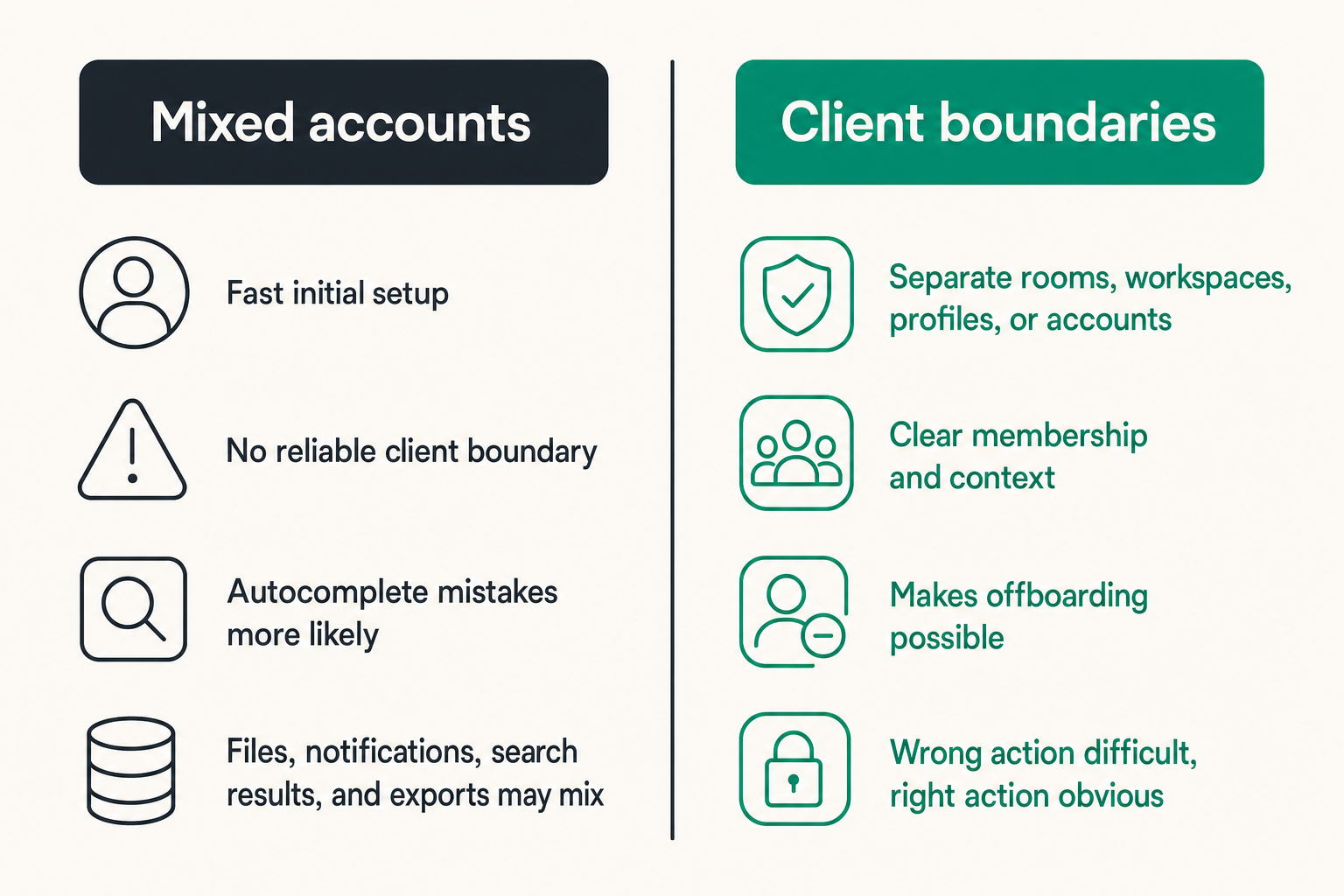
Client separation should be visible and enforceable. Separate rooms, workspaces, profiles, or accounts reduce autocomplete mistakes and make offboarding possible. Merely renaming contacts is weak isolation because files, notifications, search results, and exports may still mix.
The strongest practical design is not always one account per client. That can create recovery and usability problems. The objective is a boundary that makes the wrong action difficult and the right action obvious.
| Approach | What works | What fails |
|---|---|---|
| One personal thread for all work | Fast initial setup | No reliable client boundary |
| Separate group per project | Clear membership and context | Old members may persist across phases |
| Separate workspace per client | Better lifecycle control | More administration and account recovery |
| Client-managed account | Aligns with client policy | Access may disappear before handoff |
| Freelancer-managed secure channel | Consistent freelancer workflow | Requires client agreement and offboarding discipline |
Use naming conventions such as CLIENT — PROJECT — PURPOSE. Avoid ambiguous room names like “launch” when several clients have launches underway.
Control devices accounts and notifications
A secure account on an insecure endpoint remains an insecure workflow. Use full-device encryption, automatic locking, current operating systems, strong account authentication, and a documented recovery method. Enroll only devices needed for work.
Notification previews are a common leak. Message content can appear on a lock screen, smartwatch, shared display, vehicle console, or presentation projector. Disable previews for sensitive work and test the behavior rather than trusting a settings label.
Personal and work browser profiles should also be separated. This limits accidental uploads, extension access, shared history, and account confusion. On higher-risk engagements, a dedicated operating-system account or device may be justified.
Plan collaborator access explicitly
Freelancers often add editors, developers, translators, accountants, or assistants after a project begins. Before adding anyone, confirm authorization, define their scope, and decide whether they need historical messages.
Group membership is not administrative housekeeping. It is an access-control event. Record who approved the addition, verify the new member through a known route, and remove access as soon as the task ends.
The room should not automatically become the project archive. If a subcontractor needs three files, share those three files rather than granting indefinite access to months of discussion.
Design the encrypted client onboarding workflow
Agree on channels before sharing secrets
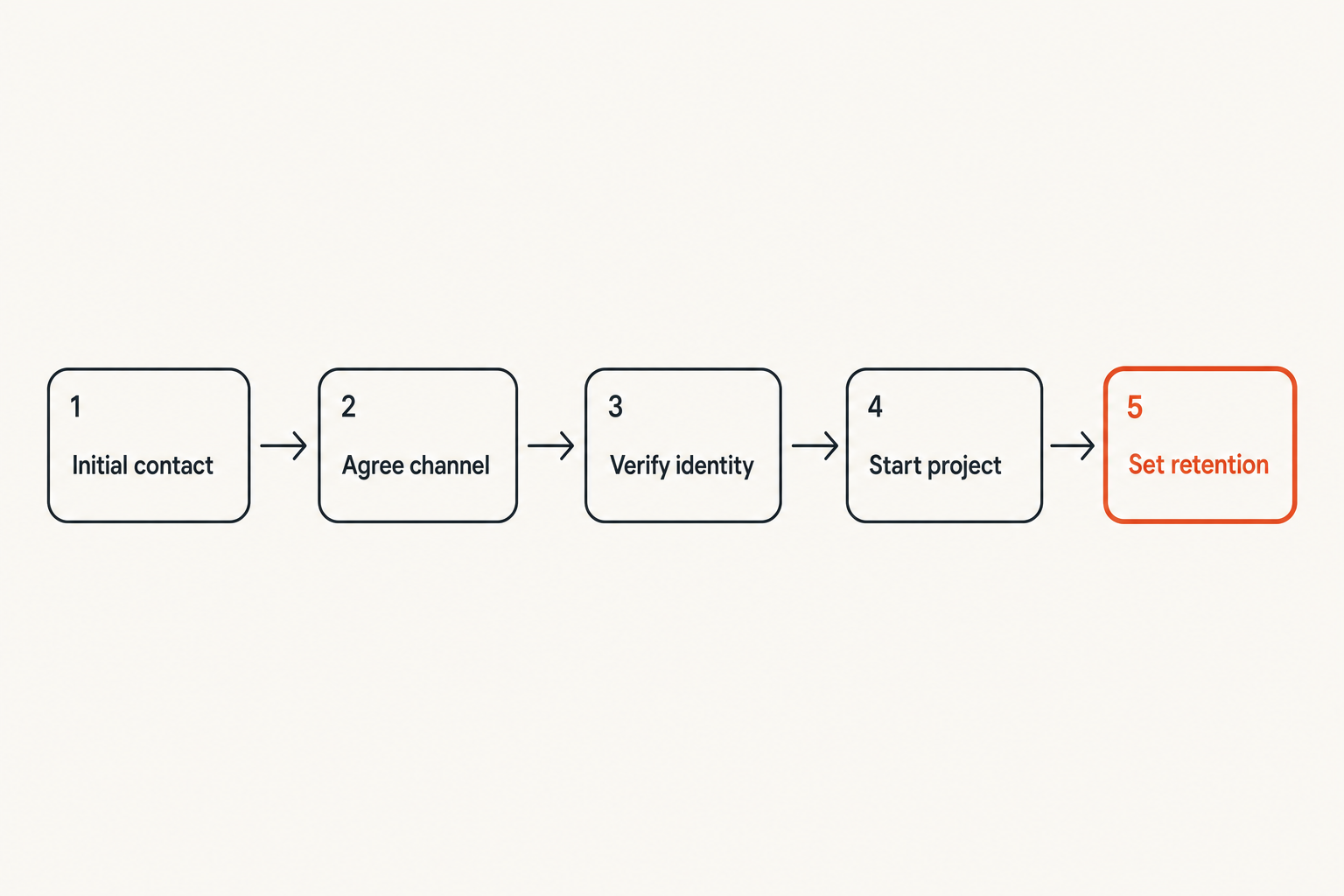
The first client exchange often happens through a marketplace inbox, social network, or ordinary email. Use that channel to establish contact, not to transmit sensitive project material. Propose the encrypted channel and explain what will move there.
A concise onboarding message can state:
- Which application or workspace will be used
- Which project information belongs there
- How each party will verify identity
- Who may add participants
- Where final documents and credentials belong
- When project conversations will be removed or archived
This is not bureaucracy. It prevents a client from sending sensitive information before the secure path is ready.
Verify identities outside the new channel
Encryption protects a conversation with an account. Verification helps establish that the account belongs to the expected person. If an attacker controls the invitation email and the new chat account, confirming identity only inside that chat proves little.
Use a known phone number, a live video call, a previously verified corporate contact, or an agreed verification phrase. For higher-risk work, compare safety numbers, fingerprints, or other identity indicators supported by the messaging system.
Verification should happen again when a client changes devices unexpectedly, creates a replacement account, or asks to add a new decision-maker. Avoid making account changes during a rushed request involving payment or credentials.
Practical rule: Verify a new secure channel through an old trusted channel before moving sensitive work into it.
Document the communication contract
A lightweight communication contract removes ambiguity. It can live in the statement of work or onboarding checklist and should cover approved channels, response expectations, participant authority, retention, and emergency contact paths.
It should also state what will not be sent through chat. Examples include complete password collections, regulated datasets, private signing keys, and unredacted identity documents. Name the approved alternative rather than simply prohibiting the action.
Finally, define what counts as authorization. A chat message may be appropriate for routine approvals but insufficient for contract amendments, bank-detail changes, or destructive production actions. Encryption does not make every message legally or operationally authoritative.
Evaluate secure messaging systems beyond encryption
Inspect trust and metadata boundaries
End-to-end encryption is an important starting point, not the final selection criterion. Determine where keys are created, how new devices join, what the provider can observe, whether account identifiers expose phone numbers or email addresses, and how recovery works.
Ask what happens when a participant loses a device. Can an attacker use account recovery to enter? Does a restored backup include old messages? Are other participants warned when keys or devices change? Secure recovery that nobody understands can become insecure recovery under deadline pressure.
Metadata requirements vary. Some freelancers mainly need content confidentiality. Others need to avoid exposing client relationships. The latter should examine identifiers, contact discovery, server logs, notification routing, and group metadata more closely.
Test operational controls
Do not choose a messenger from a feature matrix alone. Create a test project and run through the lifecycle:
- Invite a second account.
- Verify its identity.
- Add and remove a third participant.
- Enroll a new device.
- Revoke the old device.
- Send and delete an attachment.
- Inspect notifications, exports, and backups.
- Attempt account recovery.
What breaks in practice is often revealed during removal and recovery, not during message delivery. If offboarding is confusing in a test, it will be worse after a difficult client engagement.
Compare tools using real project scenarios
Create requirements from the work. A remote development team may need stable group membership and multiple verified devices. A consultant handling one sensitive conversation may prioritize minimal identifiers and disappearing messages. A creative freelancer may need practical image transfer without uncontrolled cloud previews.
Score candidate systems on security and operability:
- Identity verification
- Device visibility and revocation
- Group membership controls
- Attachment behavior
- Retention options
- Recovery model
- Metadata exposure
- Client usability
- Export and backup behavior
- Administrative ownership
The best tool is one whose failure modes match your threat model and whose controls will actually be used. A theoretically stronger option that clients routinely bypass can create less security overall.
Handle files credentials and calls safely
Treat attachments as durable copies
A disappearing message does not guarantee a disappearing file. Recipients may download it, open it in another application, include it in device backups, or capture it. Temporary delivery should be treated as retention reduction, not remote deletion.
Classify attachments before sending. Working drafts may belong in the encrypted conversation. Final deliverables may need a controlled repository. Highly sensitive datasets may require a client-managed environment where processing happens without local download.
Use filenames that identify the client and version without exposing sensitive details on a lock screen. Remove hidden metadata from documents and images where relevant. Confirm receipt before deleting your only protected copy.
Keep credentials out of ordinary conversation
Chat history is a poor credential vault. Passwords, API tokens, seed phrases, private keys, and recovery codes have different lifecycle requirements from conversation. They need restricted access, rotation, auditability, and reliable revocation.
If a client sends a password in chat, move it into the approved credential system, delete the message where possible, and rotate the password. Do not normalize the thread as a permanent secret store simply because it is encrypted.
For one-time access, prefer short-lived credentials with narrow permissions. A temporary deployment token is safer than an administrator password that remains valid after the contract ends. Record ownership so the client knows which secrets to rotate during offboarding.
Protect calls previews and screen sharing
Voice and video calls introduce microphones, cameras, nearby listeners, recordings, and visible screens. Confirm participants at the start of a sensitive call. Use headphones in shared spaces and avoid discussing confidential work where voices can be overheard.
Before screen sharing, close unrelated client windows, disable notifications, and share one application rather than the full desktop. Clear clipboard history when it contains secrets. A separate presentation profile can reduce accidental exposure.
Recording requires explicit agreement. Clarify where the recording will be stored, who can access it, and when it will be deleted. The fact that a call occurred over an encrypted service does not protect a recording exported afterward.
Use AI and automation without breaking confidentiality
Map every data exit
Freelancers increasingly use AI to summarize meetings, rewrite messages, translate drafts, generate code, or extract tasks. Each action may move client content from the encrypted conversation into a separate processor with its own accounts, logs, retention, and model policies.
Before connecting a tool, trace the path:
encrypted conversation -> local device -> integration or copy -> external processor -> output -> project record
At every arrow, ask who operates the system, what data is retained, and whether the client authorized that use. “It saves time” is not a confidentiality control.
Native automation can still expand the trust boundary. Bots may need access to plaintext to perform their function. Notification relays can reproduce content in email or team dashboards. Browser extensions may read more than the selected message.
Minimize before processing
When AI use is permitted, send the smallest useful input. Remove client names, credentials, customer records, internal URLs, and irrelevant conversation history. Replace identifiers with consistent placeholders when context must be preserved.
For example, a freelancer asking for help improving a status update rarely needs to submit the entire client thread. A redacted paragraph with project-specific names removed is usually enough.
Where available and appropriate, use local processing for highly sensitive material. But local software is not automatically safe: inspect model sources, update mechanisms, local logs, and whether companion applications send telemetry.
Constrain bots bridges and integrations
Integrations should use dedicated identities, narrow permissions, and explicit room access. Do not grant a summarization bot access to every client workspace because configuring rooms individually is inconvenient.
Maintain a simple integration register with these fields:
| Field | Operational question |
|---|---|
| Owner | Who approved and maintains it? |
| Scope | Which rooms and message types can it access? |
| Data destination | Where does plaintext go? |
| Retention | How long are inputs and outputs stored? |
| Revocation | How is access removed? |
| Client approval | Which agreement permits the processing? |
Practical rule: If an integration needs plaintext, treat it as a participant in the conversation and approve it accordingly.
Recognize what breaks in practice
What fails
The mistake teams make is deploying encrypted messaging while leaving the workflow unchanged. Common failures include:
- Using one personal account for every client
- Trusting display names without identity verification
- Leaving old subcontractors in project groups
- Sending permanent administrator credentials in chat
- Assuming disappearing messages erase downloaded files
- Exporting conversations into unencrypted notes
- Allowing message previews on shared devices
- Connecting broad AI or automation permissions
- Keeping every conversation indefinitely “just in case”
- Deleting everything without preserving agreed business records
Another failure is making the secure route so difficult that clients return to email. Excessive account creation, unexplained verification steps, and brittle recovery all encourage bypasses. Security architecture must account for human behavior without pretending convenience removes risk.
What works
Effective workflows use a few visible defaults: one client boundary, one verified contact path, a clear rule for credentials, limited integrations, and a defined closing procedure. Exceptions require a conscious decision rather than becoming the normal process.
Freelancers should keep an operational inventory, but not a second copy of sensitive content. The inventory can record client name, channel owner, approved participants, enrolled work devices, retention date, credential owner, and offboarding status.
Short templates also help. Prepare standard messages for channel setup, identity verification, collaborator approval, suspected compromise, and project closure. Templates reduce hesitation when the correct action must happen quickly.
Prepare for lost devices and client disputes
A lost device plan should specify how to revoke the device, change account credentials, notify affected clients, rotate exposed secrets, and document the timeline. Test whether revocation works without the missing device.
Disputes create the opposite pressure: retain everything. Decide in advance which records demonstrate scope, approval, delivery, and payment without preserving unnecessary sensitive conversation. Contractual and legal requirements may affect this choice, so do not promise deletion that conflicts with real obligations.
If compromise is suspected, stop sharing new sensitive information, verify the other party through an independent route, revoke uncertain sessions, and move the conversation to a known-clean channel. Quietly continuing in the same thread gives an attacker more context.
Implement freelancing encrypted messaging in seven steps
Build the minimum viable secure workflow
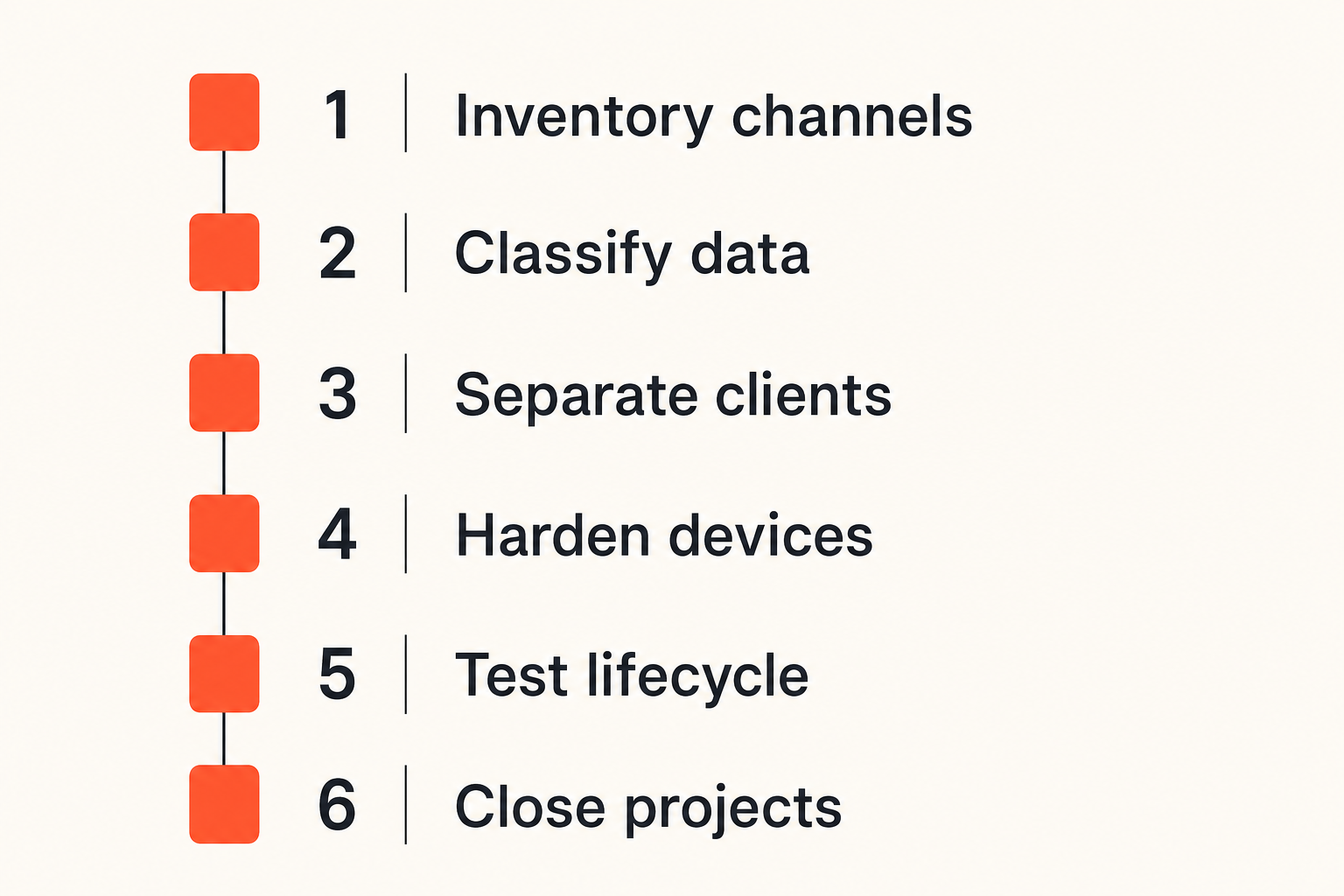
A practical implementation can be completed in a deliberate sequence:
- Inventory communication paths. List messaging apps, email accounts, marketplace inboxes, cloud drives, video tools, browser profiles, and AI integrations used for client work.
- Classify project information. Define what may enter chat, what requires a controlled repository, and what must never be sent as an ordinary message.
- Create client boundaries. Establish separate rooms, profiles, or workspaces with consistent naming and explicit ownership.
- Harden endpoints. Enable device encryption, automatic locking, secure authentication, updates, limited previews, and tested recovery.
- Write the onboarding contract. Specify approved channels, verification, participant changes, credential handling, retention, and emergency contact procedures.
- Test lifecycle events. Add a device, replace an account, remove a collaborator, recover access, export a file, and close a test project.
- Close real projects deliberately. Deliver records, remove members, revoke credentials, archive required evidence, and delete unnecessary content.
Do not attempt to solve every edge case before adopting basic separation. The minimum viable workflow should first prevent cross-client mistakes and abandoned access.
Measure operational signals
Traditional security metrics can be too abstract for a solo operator. Track signals that reveal whether the process is functioning:
- Projects with an agreed secure channel
- Client identities verified before sensitive exchange
- Active rooms containing former collaborators
- Devices enrolled but no longer used
- Credentials shared through ordinary chat
- Integrations without a named owner
- Projects past their retention review date
- Time required to revoke a lost device
These are not vanity numbers. Each points to a specific corrective action. A weekly five-minute review may be more useful than a complex dashboard that nobody maintains.
The practical question is whether uncertainty is shrinking. Can you identify every active client space, participant, device, and integration? Can you close a project without searching through several personal accounts?
Review boundaries at project changes
Security reviews should occur when risk changes, not only on a calendar. Useful triggers include a new subcontractor, a changed client contact, expanded data access, a new AI integration, travel, a device replacement, a payment-detail change, or project termination.
At each trigger, check identity, membership, permissions, retention, and credential scope. Keep the review short enough that it happens. A four-question prompt is often sufficient:
- Who has access now?
- What new information is entering the channel?
- Which systems can copy it?
- What must change when this phase ends?
This turns freelancing encrypted messaging from an app choice into an operating discipline.
Where qrypt.chat fits the architecture
Make private conversation the default path
A private messaging platform fits best when it becomes the clear path for client conversation rather than one more optional inbox. The value is architectural: reducing the temptation to scatter sensitive discussions across personal email, social messages, and ad hoc tools.
For freelancers, the useful deployment question is how the service supports a repeatable client boundary. Test onboarding, identity expectations, device behavior, room membership, attachment handling, and project closure against the workflow described above.
No messaging platform can control every endpoint or prevent an authorized recipient from copying content. It can, however, provide a stronger communication layer around which better operating rules are built.
Keep product fit in perspective
Encrypted messaging should sit alongside secure devices, scoped credentials, controlled file storage, client agreements, and incident procedures. It should not be used to justify moving all project data into chat.
Start with one representative client workflow. Move ordinary confidential conversation into the private channel, retain specialized systems for credentials and regulated data, and test offboarding before expanding. This reveals usability problems without creating another uncontrolled archive.
The closing principle is simple: freelancing encrypted messaging works when privacy survives the entire client lifecycle, not merely the moment a message is sent.
Try qrypt.chat
Private messaging for freelancers, remote teams, and clients who want a clearer communication boundary. Try qrypt.chat.