
A client sends production credentials in a direct message. Another shares an unreleased product roadmap in a group chat. Six months later, the project is over, but both conversations—and the downloaded files—still exist across several personal devices.
This is the everyday problem behind freelancing encrypted messaging. Choosing an app with end-to-end encryption matters, but it does not settle who can access a conversation, where attachments end up, how clients verify your identity, or what happens when a device is lost.
Teams think the problem is finding a private chat app. The real problem is building a communication workflow that remains private across identities, devices, files, backups, project transitions, and human mistakes.
That changes the conversation. The practical question is not simply whether a messenger is encrypted. It is whether your entire client communication architecture preserves confidentiality without making routine freelance work impossible.
Table of contents
- Why freelancing encrypted messaging is an architecture decision
- Map the communication lifecycle before choosing tools
- Choose an encrypted messenger by trust boundary
- Build identity and device controls around the chat
- Design a repeatable secure client workflow
- Control files, credentials, and sensitive links
- Set retention, backup, and offboarding rules
- Prepare for failure and incident response
- Balance privacy with usable freelance operations
- Make encrypted messaging part of the client service
Why freelancing encrypted messaging is an architecture decision
Encryption protects a channel, not a business
End-to-end encryption is a strong control against a service provider, network observer, or intercepted connection reading message contents. It is not a universal privacy layer. If a laptop is unlocked, a recipient forwards a screenshot, or an attachment is copied into an automatically synchronized folder, the encrypted transport has already done its job. The exposure happened elsewhere.
A useful way to think about it is as a set of connected trust boundaries:
- Identity: How do you know the account belongs to the intended client?
- Endpoint: Which phones, laptops, browser sessions, and notification surfaces can display content?
- Conversation: Who belongs in each direct chat or project room?
- Storage: Where do message history, attachments, exports, and backups persist?
- Operations: Who removes access, rotates secrets, and handles a lost device?
The mistake teams make is treating the application boundary as the security boundary. In reality, client information moves through a chain of systems and people. The messenger is one component in that chain.
Practical rule: Consider a message protected only when its sender, recipient, endpoints, storage path, and retention period are all understood.
Start with the client data you actually handle
Security improves when controls follow concrete data rather than vague claims that everything is confidential. A freelance illustrator, penetration tester, recruiter, and fractional finance lead do not carry the same exposure.
Create a small inventory before changing tools. Include active client names, common message types, shared file types, credentials received, contractual restrictions, and legal retention needs. Then assign simple handling classes. For example:
| Class | Typical content | Messaging rule | Retention default |
|---|---|---|---|
| Routine | Scheduling, public links | Approved client channel | Project term |
| Confidential | Drafts, pricing, roadmaps | Encrypted chat only | Review at closure |
| Restricted | Credentials, personal data | Dedicated secret or file channel | Minimum necessary |
| Regulated | Health, legal, financial records | Contract-approved system | Client-defined |
Classification does not need enterprise software. It needs consistent decisions. If a contract requires a specific portal, an encrypted messenger does not override that requirement. If there is no operational reason to retain restricted content, do not retain it merely because the chat supports history.
Map the communication lifecycle before choosing tools
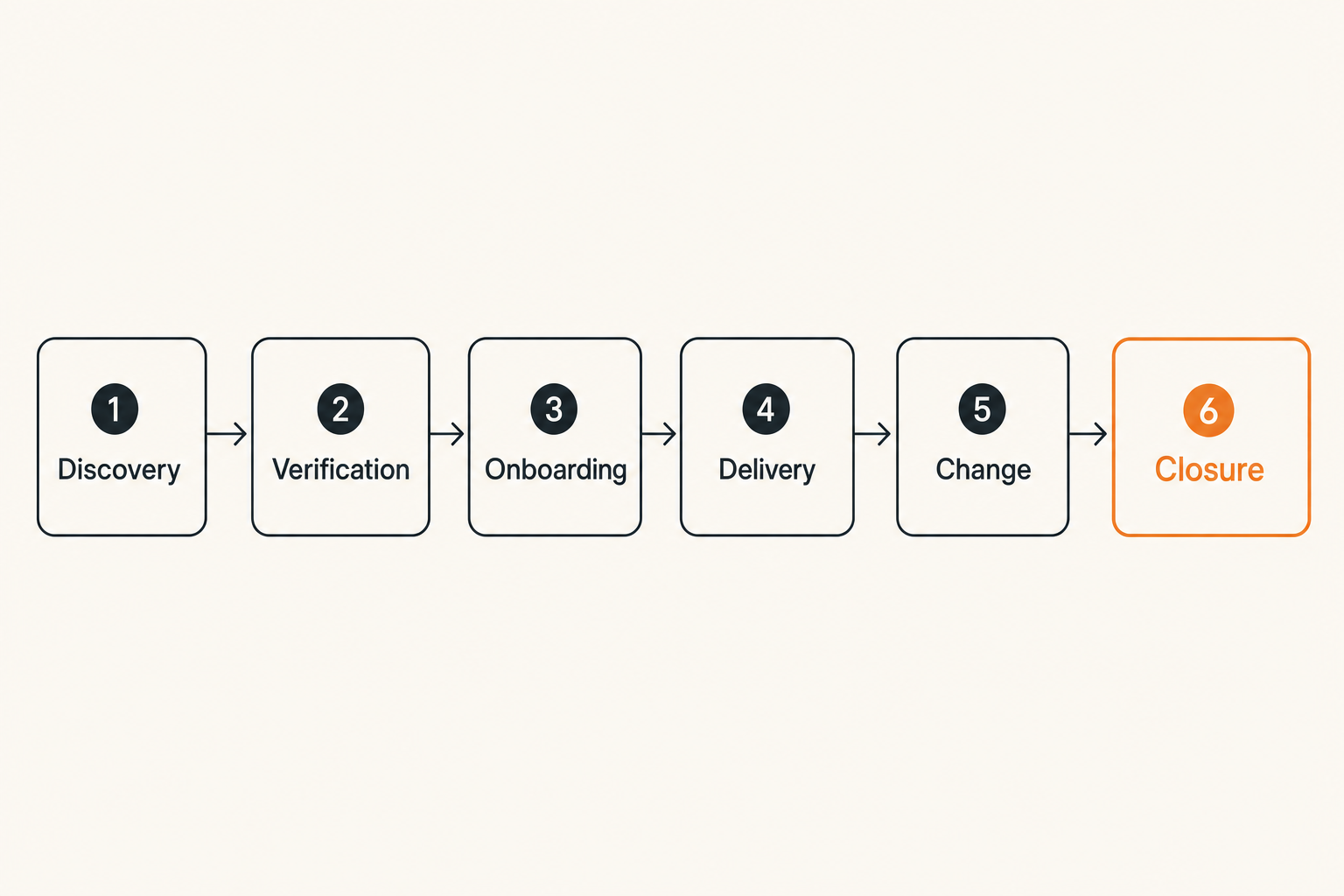
Define states from introduction to deletion
Freelance communication has a lifecycle, even when nobody documents it. A prospect contacts you, identities are established, work begins, collaborators join, deliverables are exchanged, invoices are resolved, and access eventually should end.
Map those states explicitly:
- Discovery: Keep sensitive details out until identity and scope are established.
- Verification: Confirm the client and agree on an approved channel.
- Onboarding: Create the conversation, document participants, and set handling rules.
- Delivery: Use the channel for decisions while routing secrets and large files appropriately.
- Change: Recheck membership when stakeholders or subcontractors change.
- Closure: Export only required records, revoke access, and remove temporary data.
- Deletion: Apply the agreed retention schedule across devices and backups where possible.
This model exposes gaps that a feature comparison will miss. For example, disappearing messages may reduce long-term exposure but conflict with a contractual need to preserve approvals. A browser-based channel may simplify client onboarding but create unmanaged sessions on shared computers.
Separate communication by sensitivity
One large chat is convenient until routine messages bury a security decision or a temporary collaborator gains historical access. Separate channels according to purpose, not every minor topic.
A workable project might use a general room for coordination, a limited room for commercial or personnel matters, and a separate mechanism for credentials. Direct messages should not become a hidden substitute for project records. Important decisions belong where authorized project participants can find them.
The team at ugig.net works with freelancers and gig professionals who need practical systems for managing modern client work, including the operational tradeoffs around digital tools and AI-assisted workflows.
For solo operators, separation can be lightweight: one approved client conversation, one controlled file location, and one credential manager. The objective is not complexity. It is preventing a single compromised account or accidental invite from exposing every category of project information.
Choose an encrypted messenger by trust boundary
Evaluate more than the encryption claim
An encryption label says little about deployment details. When assessing a platform, ask operational questions:
- Is content end-to-end encrypted by default for the exact conversation type being used?
- How are new devices added, and are existing members notified?
- Can participants verify identities or device keys through another channel?
- Does the service collect phone numbers, contact books, IP addresses, or social graphs?
- Can messages be exported, forwarded, previewed in notifications, or included in cloud backups?
- How are group membership changes displayed?
- What recovery mechanism exists, and who can invoke it?
- Can the freelancer and client remove old sessions without administrator intervention?
The practical question is which failures the product prevents, which it merely reports, and which remain entirely with the user. A polished interface cannot compensate for invisible device enrollment or an account recovery path that bypasses the expected trust model.
Practical rule: Evaluate the exact mode you will deploy, not the platform's strongest optional security feature.
Decide what metadata exposure is acceptable
Message content is only part of communication privacy. Metadata can reveal who contacted whom, when activity occurred, which devices connected, and how often a client relationship is active. That may matter to journalists, security researchers, deal teams, or contractors working under confidentiality restrictions.
No practical service operates without any metadata at all. Servers need enough information to route traffic, limit abuse, and maintain availability. The relevant questions are what is collected, how long it remains, whether identifiers are required, and who can correlate activity.
Make this a risk decision rather than an absolutist argument. A designer coordinating public campaign assets may accept more account metadata than a consultant supporting an unannounced acquisition. If the risk is high, minimize identifying profile details, disable unnecessary contact discovery, avoid public invitation links, and confirm whether client policy permits the service.
Build identity and device controls around the chat
Verify people before trusting messages
An encrypted conversation with an impostor is still securely delivered to the wrong person. Account takeover, lookalike usernames, compromised email invitations, and fraudulent payment changes are realistic freelance threats.
Verify a new client through an independent path. If the relationship began by email, confirm the secure-chat identity during a known video call or through a previously validated company contact. For high-risk work, compare safety codes, fingerprints, or another platform-specific identity signal.
Repeat verification after meaningful changes: a new executive contact, a replaced device, an unexpected account reset, or a request to change payment details. Do not approve bank changes, cryptocurrency addresses, production access, or password resets solely because a familiar account asked in chat.
A useful rule is two-channel confirmation for high-impact instructions. The second channel should already be trusted; replying to a phone number supplied in the suspicious message proves very little.
Treat every linked device as an endpoint
Multi-device support is useful for freelancers switching between a workstation and phone. It also multiplies the places where plaintext can appear. Inventory authorized devices and remove old sessions, test machines, borrowed computers, and browser profiles.
Each device should have:
- Current operating system and application updates
- Full-disk encryption
- A strong local login with automatic locking
- Minimal lock-screen message previews
- A supported method for remote account or session revocation
- Separate user profiles when a computer is shared
- Controlled local backups and synchronization
Browser sessions deserve particular attention. A secure chat opened on a client-site computer, virtual desktop, or shared family machine may persist after the engagement. Private browsing can reduce local residue, but it is not a substitute for logging out and revoking the session.
The endpoint standard should match the sensitivity of the work. If a personal device cannot meet the client's requirements, use a dedicated work profile or device rather than hoping encryption will cover the gap.
Design a repeatable secure client workflow
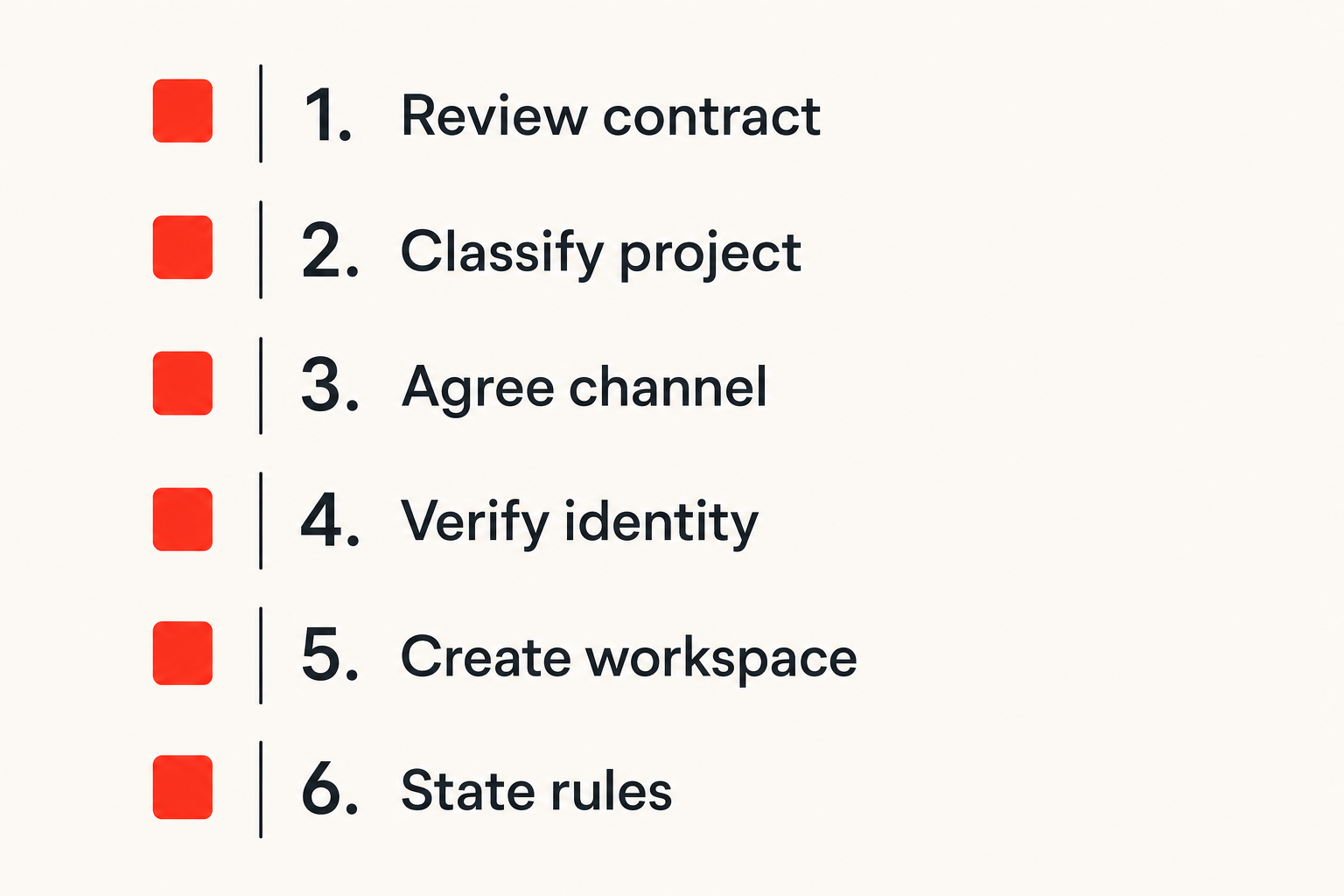
Use a seven-step onboarding sequence
A dependable freelancing encrypted messaging workflow should be repeatable enough to use under deadline pressure. The following sequence works for many independent professionals:
- Review the contract. Identify required communication systems, confidentiality terms, recordkeeping duties, and prohibited storage locations.
- Classify the project. Decide whether messages will contain routine, confidential, restricted, or regulated information.
- Agree on the channel. Name the approved messenger and define what must go elsewhere.
- Verify identities. Confirm the client contact using an independent, already trusted method.
- Create the workspace. Use a project-specific room or conversation, then inspect membership and linked devices.
- State the rules. Pin a short note covering secrets, files, urgent requests, payment changes, and retention.
- Schedule closure. Put an offboarding review on the calendar when the project is expected to end.
The final step is easy to omit. Without a scheduled trigger, temporary access tends to become permanent access. If the engagement extends, move the review date rather than deleting it.
Make the secure path the easy path
Security workflows fail when every safe action requires a policy lookup. Prepare reusable text for proposals and onboarding emails. Keep the instructions short enough that a client can follow them without security training.
For example:
Practical rule: We use the agreed encrypted chat for project discussion. Do not paste passwords, recovery codes, private keys, or full personal records into chat. We confirm payment and account-access changes through a second channel.
Configure defaults before the first sensitive message arrives. Turn off unnecessary previews, review download locations, enable account protection, and bookmark the correct client room. Use clear project names without exposing confidential details in device notifications.
What works is a small number of approved paths with obvious ownership. What fails is telling clients to be secure while accepting sensitive material through email, social direct messages, consumer file links, and whichever app happens to be open.
Control files, credentials, and sensitive links
Keep secrets out of conversational history
Chat is optimized for fast exchange, not secret lifecycle management. Credentials pasted into a conversation can remain in notifications, search indexes, quoted replies, screenshots, exports, and backups. Deleting the original message may not remove those copies.
Use a credential manager or purpose-built secret-sharing method for passwords, API tokens, recovery codes, signing keys, and production configuration. Grant the narrowest access required, set expiration where available, and rotate secrets after temporary access ends.
If a secret is accidentally posted, treat it as exposed. Removing the message reduces casual discovery but does not establish that every copy disappeared. Rotate or revoke the secret, review access logs where available, and document the action without reposting the value.
The same principle applies to authentication links. A one-click administrative URL or password-reset link can function as a credential. Do not assume it is harmless because it expires later.
Track what leaves the encrypted channel
Attachments are decrypted so recipients can use them. Once downloaded, they may enter a synced desktop folder, photo library, thumbnail cache, document index, or automated backup. The messenger's encryption no longer controls those copies.
Decide where client files should live after receipt. A simple policy can require moving work files into an encrypted project directory, deleting duplicate downloads, and avoiding personal cloud photo or document synchronization. Sensitive deliverables should use a client-approved repository when access control, version history, or retention matters.
Check collaboration features as well. Opening a document in a third-party editor can upload it to another provider. Feeding client messages or files into an AI assistant can create another processing boundary and may violate contractual restrictions. Before using transcription, summarization, translation, or generative tools, confirm permission, data handling, retention, and model-training terms.
Practical rule: Encryption in transit does not authorize a new storage provider, editor, plug-in, or AI service to process the content.
Set retention, backup, and offboarding rules
Match retention to business requirements
Keeping everything feels safe because it preserves context. It also increases the impact of a lost device, compromised account, legal dispute, or accidental search result. Deleting everything immediately can be equally careless when contracts, invoices, approvals, or professional obligations require records.
Set retention by category. Preserve final agreements, accepted deliverables, invoices, and essential approval records in their proper business systems. Remove transient coordination, duplicated files, expired invitations, and secrets when no longer required. Do not rely on memory to distinguish them months later.
Disappearing messages are useful for reducing residue, not for guaranteeing erasure. Recipients may capture, quote, export, or copy content before expiration. They also can make it harder to establish what the client approved. Use them where short retention matches the business need, not as a universal privacy switch.
Backups require the same analysis. Determine whether message databases and downloaded files enter device or cloud backups, how those backups are encrypted, and whether deletion propagates. A deleted chat with a long-lived unencrypted backup is not meaningfully deleted.
Close projects instead of abandoning them
Project closure should be a defined operation. Complete it when work ends, a retainer pauses, or a freelancer leaves a subcontracting arrangement.
Use this checklist:
- Confirm delivery and identify records that must be retained
- Move required records into the approved system
- Revoke shared credentials, tokens, and temporary accounts
- Remove subcontractors and external guests from conversations
- Review active devices and browser sessions
- Delete unnecessary local downloads and duplicate exports
- Record the retention or deletion date
- Tell the client how future contact should occur
Be careful with group ownership. A freelancer who created the room may be the only person able to manage members. Transfer required administrative control before closing an account. Conversely, do not leave yourself in client rooms that no longer require your participation.
Prepare for failure and incident response
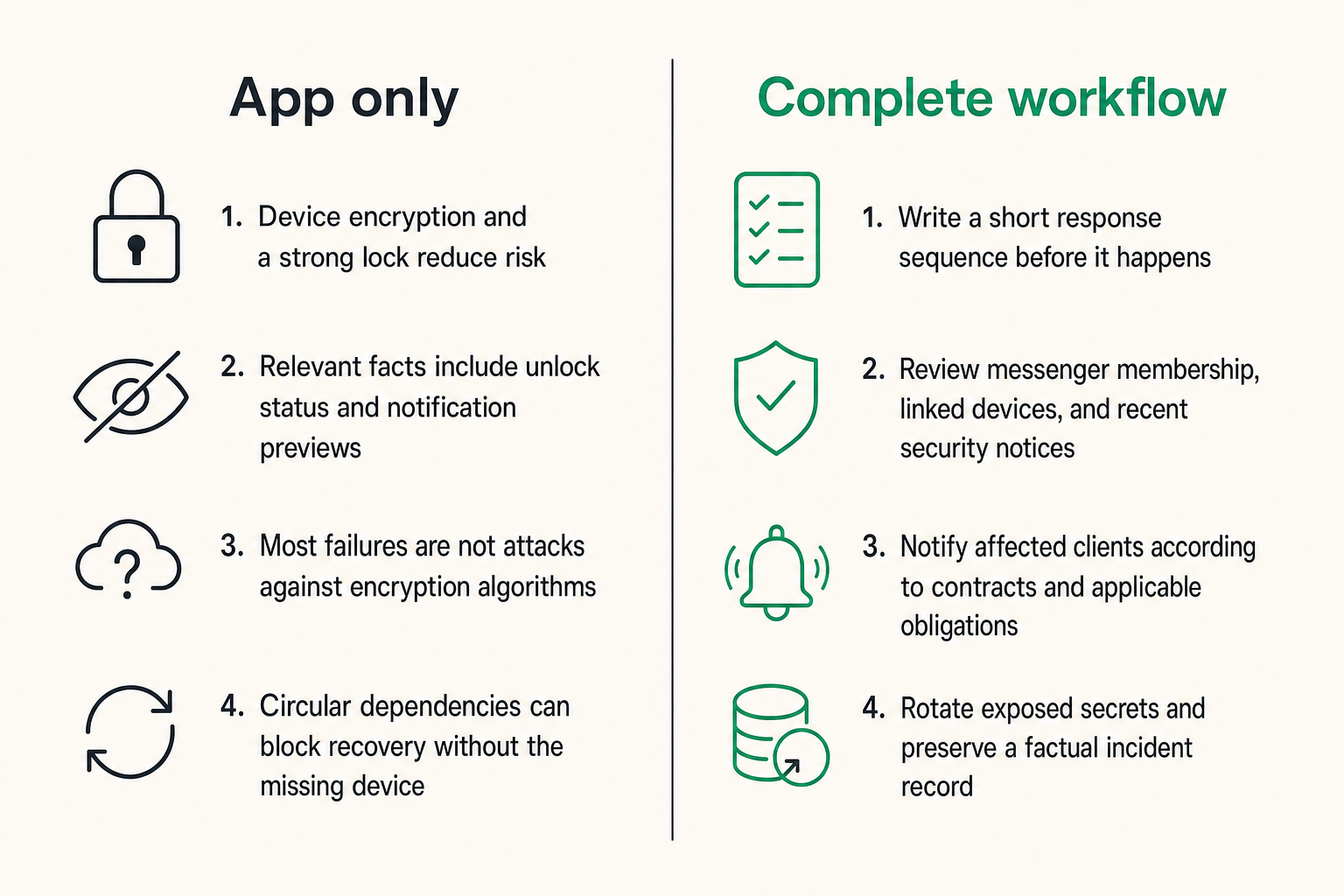
Plan for a lost or compromised device
Incident planning is not reserved for large companies. A phone left in a taxi can contain several clients' conversations, authentication apps, email, and password-reset capability.
Write a short response sequence before it happens:
- Use a trusted device to revoke or unlink the missing endpoint.
- Lock or erase the device through the operating system service if available.
- Change credentials that could enable account recovery or session creation.
- Review messenger membership, linked devices, and recent security notices.
- Identify which client data was locally accessible.
- Notify affected clients according to contracts and applicable obligations.
- Rotate exposed secrets and preserve a factual incident record.
Do not make unsupported assurances. Device encryption and a strong lock reduce risk, but the relevant facts include whether the device was unlocked, whether notification previews were visible, and whether sessions could be revoked.
Run a brief tabletop exercise once a year: assume your primary phone disappears while traveling and test whether you can recover without using that phone. This often reveals circular dependencies, such as needing the missing device to access the password manager required to revoke it.
Recognize what breaks in practice
Most failures are not attacks against encryption algorithms. They are workflow failures around the protected channel.
| Failure mode | What breaks | Better control |
|---|---|---|
| Unverified client account | Confidential data reaches an impostor | Independent identity confirmation |
| Shared public invite | Unknown participant joins | Expiring invites and membership review |
| Secret pasted in chat | Copies persist in history and notifications | Secret manager plus rotation |
| Automatic downloads | Files spread into unmanaged storage | Controlled download directory |
| Old browser session | Former or shared device retains access | Session inventory and revocation |
| No offboarding owner | Access survives the contract | Scheduled closure checklist |
| Payment change by message | Account takeover becomes fraud | Two-channel verification |
| AI tool used without approval | Data crosses an unauthorized boundary | Contract and processor review |
The mistake teams make is buying a stronger messenger while leaving these operating habits unchanged. Better cryptography cannot determine whether a payment request is fraudulent or whether a subcontractor should still be in a project room.
Balance privacy with usable freelance operations
Define an exception path for clients
Some clients cannot install a new application, may be restricted to corporate systems, or may require auditable channels. Refusing every exception can block legitimate work; accepting every client preference can fragment communication across unsafe tools.
Define a controlled fallback. It might permit ordinary scheduling by email while requiring confidential content through an approved secure channel or client portal. State which data cannot be sent through the fallback and who can approve a different method.
Avoid shadow channels. If a client sends sensitive content through an unapproved service, move the conversation rather than normalizing the exception. Delete the misplaced copy where practical, explain the correct route without blaming the sender, and record any exposure that requires action.
Usability is a security property here. A client who cannot understand the workflow will bypass it. Clear naming, short instructions, and one obvious place for each content type usually outperform a long policy full of cryptographic terminology.
Measure workflow health without reading messages
Freelancers do not need surveillance dashboards to know whether the process works. Review operational signals that do not require inspecting message content:
- Number of active client conversations without an owner
- Unknown or obsolete linked devices
- Projects past their scheduled closure date
- External participants whose access is no longer justified
- Secrets that were shared improperly and required rotation
- Clients using unapproved fallback channels
- Time needed to revoke a lost endpoint
These are control-health indicators, not productivity scores. The goal is to find stale access and process friction. If clients repeatedly send credentials in chat, the answer may be a simpler secret-sharing method and clearer onboarding—not more warnings.
Quarterly review is enough for many solo practices. Higher-risk engagements may justify checks at onboarding, major membership changes, and closure. Keep the review proportionate so it actually happens.
Make encrypted messaging part of the client service
Use a lightweight policy clients can understand
A short communication note can strengthen both privacy and professionalism. Include it in onboarding rather than surprising the client after sensitive data has already arrived.
The note should identify:
- The approved project conversation
- The method used to verify identities
- Where files and credentials belong
- How urgent requests should be escalated
- How payment or access changes are confirmed
- Whether subcontractors may participate
- What is retained when the project ends
- Who handles a suspected compromise
This is not a claim that no incident can occur. It is a shared operating agreement. It reduces ambiguity when deadlines tighten or personnel change.
For freelancers, secure communication can also be part of service quality. Clients should not have to guess where to send information, repeat sensitive details across channels, or wonder whether a former collaborator still has access. A clear workflow demonstrates control without turning every exchange into a security ceremony.
Know when qrypt.chat fits the workflow
qrypt.chat fits when private conversation needs to be straightforward enough for real client use while remaining part of a deliberate security architecture. The product decision should still follow the same evaluation: participant verification, endpoint hygiene, file handling, retention, and incident ownership remain essential.
The useful framing is not that one tool eliminates risk. It is that a focused encrypted messaging layer can reduce exposure and channel sprawl when paired with clear operating rules. Freelancers should decide which conversations belong there, how clients enter, which information must use a separate system, and how access ends.
That is the durable approach to freelancing encrypted messaging in 2026: protect the content in transit, then manage the identities, devices, copies, and decisions around it. Encryption establishes an important boundary. A repeatable workflow keeps that boundary meaningful throughout the client relationship.
Try qrypt.chat
Private encrypted messaging for practical client communication. Try qrypt.chat.