
A client sends credentials through a direct message. A contractor downloads the attachment to an unmanaged laptop. Three months later, the engagement is over, but the conversation, file, and active group membership are still sitting on four devices.
This is the practical problem behind freelancing encrypted messaging. The encryption may be working exactly as designed while the overall workflow still exposes the client, the freelancer, or both.
Teams think the problem is choosing a private chat application. The real problem is building a communication architecture that controls identity, endpoints, files, retention, and access throughout a short-lived business relationship. That changes the conversation from which app has the best lock icon to how sensitive work moves from first contact to verified deletion.
This guest contribution draws on the workflow experience of the team at ugig.net, particularly the reality that freelancers routinely move between client systems, personal devices, AI tools, and temporary project teams. In 2026, that fragmented operating environment matters as much as the cryptography.
Table of contents
- Freelancing encrypted messaging is a workflow problem
- Start with a realistic threat model
- Design the messaging architecture
- Verify clients and collaborators
- Build a secure daily communication workflow
- Control files links and copied data
- Manage groups and temporary access
- Know what breaks in practice
- Implement the workflow in seven steps
- Evaluate encrypted messaging tools
- Make freelancing encrypted messaging sustainable
Freelancing encrypted messaging is a workflow problem
Define the protected unit
A useful way to think about secure communication is to stop treating the individual message as the protected unit. The real unit is the client engagement: participants, devices, conversation history, attachments, credentials, approvals, exports, and eventual offboarding.
An encrypted message can be exposed after delivery through a screenshot, notification preview, cloud backup, browser session, copied text, infected endpoint, or forgotten group member. None of those outcomes necessarily means the encryption failed. They mean the system boundary was drawn too narrowly.
For each engagement, identify:
- who may communicate about the project;
- which devices and accounts they may use;
- which data may enter the channel;
- where attachments may be stored;
- how long history should remain available;
- who removes access when work ends.
Practical rule: Protect the engagement lifecycle, not just the message in transit.
Map the full message lifecycle
A client message commonly moves through more places than either party realizes. It may appear on a phone lock screen, synchronize to a desktop, enter a local search index, be quoted in another room, and become part of a backup.
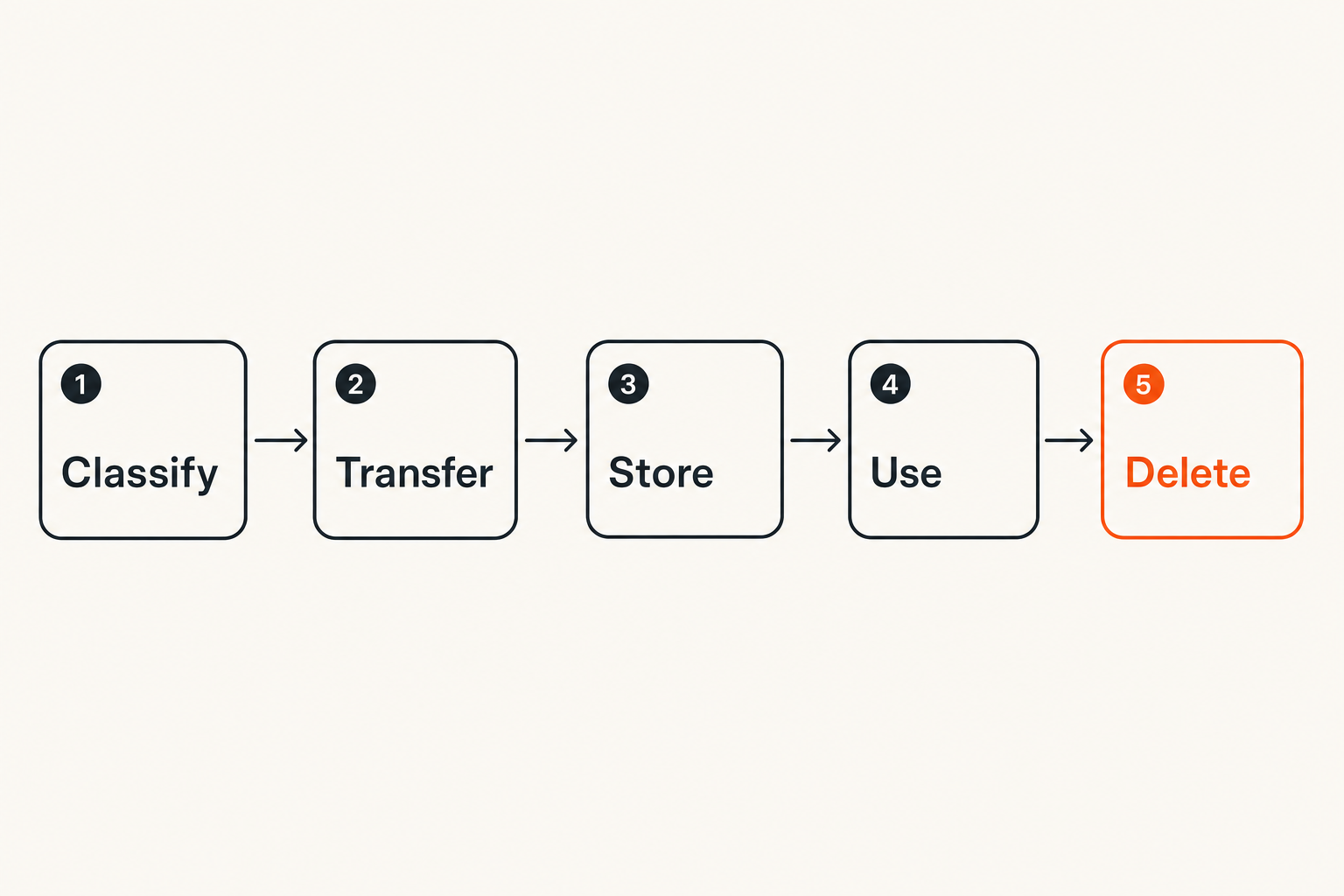
Map five stages: creation, transmission, receipt, reuse, and deletion. At each stage, ask who can gain access and what control remains. This exercise often reveals that transmission is the strongest stage because encryption is active there. Receipt and reuse are usually weaker because plaintext has reached a person and a device.
The mistake teams make is documenting the approved messenger while ignoring what happens immediately before and after it.
Start with a realistic threat model
Separate likely risks from dramatic risks
Freelancers do not all face the same adversary. A journalist handling source identities, a designer working on an unreleased launch, and a developer receiving staging credentials have different consequences and attack paths.
Start with probable events:
- phishing or client impersonation;
- a stolen or shared device;
- an old collaborator retaining access;
- sensitive text copied into the wrong service;
- cloud backups preserving deleted conversations;
- accidental disclosure through notifications or screen sharing.
Advanced interception may matter for some projects, but mundane account takeover and endpoint exposure are generally easier to execute. Prioritizing realistic risks keeps the workflow usable enough that people will follow it.
Decide what metadata matters
End-to-end encryption is primarily designed to protect message content between endpoints. It does not automatically eliminate every piece of metadata. Depending on the service and configuration, account identifiers, IP information, timestamps, contact relationships, group membership, or device details may still exist somewhere in the system.
For ordinary client coordination, some metadata exposure may be acceptable. For sensitive investigations, labor organizing, legal work, or politically exposed users, the relationship between participants may itself be confidential.
The practical question is not whether a service is perfectly private. It is which data the service can observe, how long that data persists, and whether that matches the engagement threat model.
Set protection levels by project
Use simple levels rather than inventing a complicated classification framework:
| Level | Typical material | Minimum handling rule |
|---|---|---|
| Routine | Scheduling, public references | Approved account and basic device security |
| Confidential | Drafts, internal plans, client files | Encrypted channel, verified participant, controlled downloads |
| Restricted | Credentials, source identity, regulated data | Separate secret transfer, strong verification, minimal retention |
Classification should determine behavior. If every message is marked restricted, the system creates friction without guidance. If nothing is classified, people make inconsistent decisions under deadline pressure.
Design the messaging architecture
Understand what encryption protects
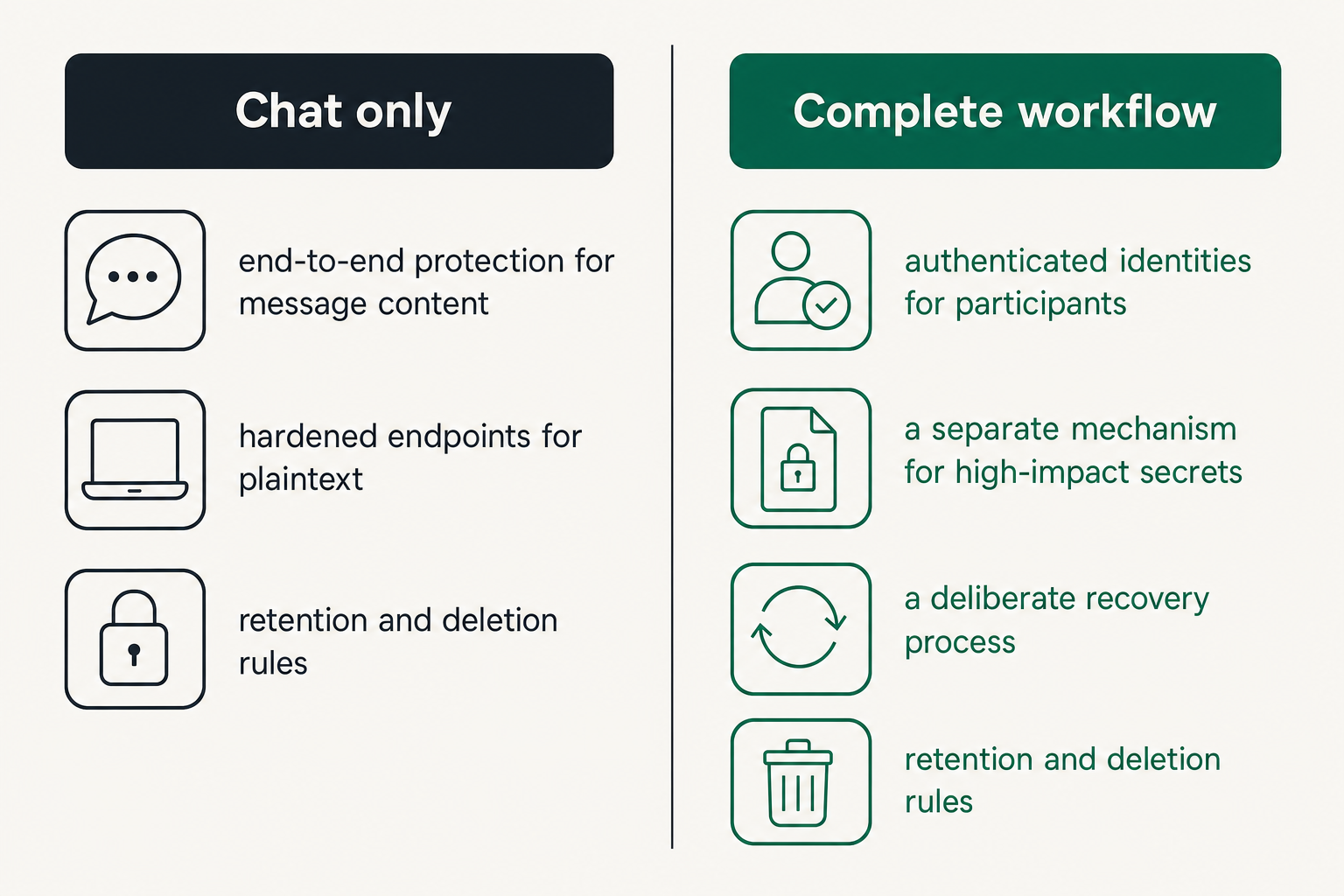
Encryption in transit protects traffic between a device and a service. End-to-end encryption narrows access further by making message content readable only at participating endpoints, assuming the implementation and identity model work as intended.
That distinction matters. A provider-managed encryption layer can still leave content accessible to the service under certain architectures. End-to-end design reduces that trust requirement, but it shifts more responsibility to endpoint security, key handling, participant verification, and recovery.
A secure architecture combines controls instead of expecting one control to do everything:
- end-to-end protection for message content;
- authenticated identities for participants;
- hardened endpoints for plaintext;
- a deliberate recovery process;
- retention and deletion rules;
- a separate mechanism for high-impact secrets.
Treat endpoints as part of the channel
Once a message is decrypted, the laptop or phone becomes part of the security boundary. Require supported operating systems, full-disk encryption, automatic locking, current security updates, and account-level multifactor authentication where available.
Browser access deserves separate review. A persistent browser session on a shared computer can defeat an otherwise sound workflow. Freelancers should avoid client communication from public or borrowed systems and should maintain separate operating system accounts when family members use the same computer.
Notification settings also matter. A confidential message displayed on a lock screen is no longer meaningfully confidential from anyone looking at that screen.
Practical rule: If an endpoint cannot be trusted with plaintext, it cannot be trusted as a member of the encrypted conversation.
Keep recovery from becoming a backdoor
Recovery is where secure systems meet operational reality. People lose phones, forget credentials, and replace laptops. A weak recovery method can let an attacker bypass stronger controls, while an unrecoverable design can permanently lock a freelancer out during a deadline.
Document where recovery codes or keys are stored, who can use them, and what happens when a device disappears. Do not keep the only recovery material in the same bag, account, or device as the primary credential.
Test recovery before relying on the channel for urgent work. The objective is not merely to regain access. It is to regain access without silently trusting an attacker-controlled device or exposing historical messages unnecessarily.
Verify clients and collaborators
Move identity checks out of the chat thread
Encryption protects a conversation with an account. It does not prove that the account belongs to the person you intended to contact unless identity verification is part of the process.
For confidential work, verify a new contact through an independent channel. Confirm a safety code, fingerprint, invite detail, or other service-supported identity signal during a known video call, phone call, or in-person meeting. Do not verify a suspicious account using instructions sent only by that same account.
This is especially important when a client suddenly requests payment changes, credential disclosure, repository access, or delivery of unpublished work. Those actions should trigger fresh verification even when the message appears inside an existing conversation.
Handle device changes explicitly
A changed key or newly added device may be legitimate. It may also indicate account recovery, unauthorized enrollment, or a replaced endpoint that has not been secured.
Create a basic rule: when the service reports an identity or device change, pause restricted communication until the participant confirms the change through another channel. Record the confirmation only as long as needed for operational accountability.
This is a small amount of friction at a high-value boundary. Silently accepting every device change trains users to ignore one of the few visible signs that the trust state has changed.
Build a secure daily communication workflow
Classify before sending
Before sending material, ask three questions:
- Would disclosure cause meaningful harm?
- Does the recipient need the full information?
- Is chat the right system for storing it?
A status update may belong in the conversation. A production password usually does not. A contract draft may be acceptable as an encrypted attachment, while a complete customer export may require a controlled client repository with auditing and expiration.
The goal is not to ban useful communication. It is to avoid turning chat history into an undocumented database of every sensitive asset used during the project.
Separate coordination from secrets
Coordination and secret transfer have different requirements. Chat is useful for discussing what needs to happen, confirming context, and notifying a recipient. Long-lived credentials, private keys, recovery codes, and identity documents need tighter handling.
A practical message might say that a credential is available in an approved secret-sharing system, identify its purpose, and state when it expires. The credential itself remains outside the searchable conversation history.
Use short-lived, scoped credentials wherever the client infrastructure permits. If a credential leaks, limited permissions and a short validity window reduce the consequences. Encryption cannot provide that containment after a legitimate recipient device is compromised.
Create rules for urgent requests
Attackers manufacture urgency because urgency suppresses verification. Establish the rule before a crisis: requests involving money, access, sensitive exports, or changed delivery destinations require independent confirmation.
A compact operating policy can look like this:
Routine update: encrypted chat is sufficient
New file recipient: confirm identity and authorization
Credential request: use approved secret transfer
Payment change: verify through a known second channel
New device alert: pause restricted messages and reverify
Lost device: revoke session, rotate secrets, review exposure
A policy this short is easier to follow than a security document nobody opens during an urgent request.
Control files links and copied data
Encryption does not follow every download
Encrypted delivery does not guarantee encrypted storage after a file is opened. The attachment may land in a downloads directory, thumbnail cache, temporary folder, recent-files list, cloud-synchronized desktop, or automated backup.
Before transferring a sensitive file, decide whether the recipient should download it at all. When possible, use controlled access with expiration, least privilege, and the ability to revoke future access. For local copies, define an approved storage location protected by full-disk encryption and exclude restricted client folders from consumer synchronization services unless the client has authorized them.
File names can also disclose information. A carefully encrypted attachment named after a confidential acquisition or legal matter may reveal useful context through notifications or local indexing.
Limit clipboard and AI tool exposure
Copying text is a data transfer. Freelancers often move client material from chat into notes, issue trackers, translation services, browser extensions, transcription systems, or generative AI tools. Each destination creates a new trust and retention decision.
Before pasting client content into any external tool, check contractual permission, workspace configuration, data retention, model-training terms, access controls, and the minimum text needed. Redaction helps, but superficial removal of names may not anonymize distinctive source code, financial details, or project descriptions.
The mistake teams make is writing a strict messaging policy while leaving copy-and-paste behavior entirely unmanaged. The encrypted channel then becomes a secure entrance to an uncontrolled processing chain.
Plan for safe deletion
Deletion is not a single event. A message may remain on other participant devices, in exports, backups, quoted replies, downloaded files, or screenshots. Disappearing messages can reduce retained history, but they cannot force a malicious or careless recipient to forget content.
Define what must be deleted locally at project close and what must be retained for tax, legal, or contractual reasons. Move required business records into the appropriate system rather than preserving an entire chat because one approval might matter later.
Practical rule: Retain the record you need, not the whole conversation that happened to contain it.
Manage groups and temporary access
Use project scoped rooms
Freelancers commonly work across several clients at once. Reusing one broad room or informal group increases the chance of wrong-recipient errors and makes offboarding ambiguous.
Create spaces around a specific project, client entity, or workstream. Use clear names that are useful without exposing confidential details on lock screens. Keep social coordination separate from restricted delivery channels, and avoid inviting subcontractors into historical rooms when they only need current tasks.
Project-scoped rooms also make retention easier. When the engagement ends, the room can be reviewed, archived where appropriate, and closed without disrupting unrelated work.
Assign membership ownership
Someone must own participant access. In a small engagement, that may be the freelancer. In a larger client team, it should usually be a named client administrator or project lead.
The owner should approve additions, review unexpected device or identity changes, remove inactive participants, and know who is authorized to invite others. Relying on every member to notice an outdated participant is not a control.
Maintain only enough membership documentation to support the work. A simple list of role, access scope, approval owner, and expected end date is often sufficient.
Offboard on a schedule
Temporary access tends to become permanent when nobody schedules its removal. Set the expected project end date during onboarding, then trigger a review when the date arrives.
Offboarding should include:
- removing the freelancer or subcontractor from project rooms;
- revoking active sessions and shared links;
- rotating credentials known to departing participants;
- transferring required records to the client;
- deleting unnecessary local files and exports;
- confirming whether ongoing retention obligations remain.
Do not wait for a conflict or account compromise. Routine offboarding is faster and less accusatory because it is the normal end state for every engagement.
Know what breaks in practice
What fails
The most common failure is treating installation as implementation. Everyone downloads an encrypted messenger, but nobody defines verification, file handling, recovery, or offboarding.
Other failure modes include:
- using personal and client identities interchangeably;
- sending every secret through chat because the channel is encrypted;
- accepting new devices without confirmation;
- allowing unrestricted backups or message exports;
- leaving former collaborators in active groups;
- trusting deletion timers as proof that no copy exists;
- creating rules so burdensome that clients return to email or SMS.
What breaks in practice is usually the transition between systems: chat to download folder, chat to password manager, chat to AI assistant, or client account to personal archive.
What works
A sustainable workflow uses a small number of understandable controls. It makes the secure action the easiest normal action and reserves heavier verification for high-impact events.
| Fragile approach | Operational approach |
|---|---|
| One tool is declared secure | Data flows and trust boundaries are mapped |
| All messages handled identically | Controls follow project sensitivity |
| Identity assumed from account name | Important identities verified independently |
| Credentials pasted into chat | Secrets transferred through a dedicated path |
| Access removed when remembered | Offboarding tied to an end date |
| Success measured by adoption | Success measured by correct handling and recovery |
This comparison matters because a tool-centric rollout can look complete while leaving the riskiest decisions unchanged.
Prepare for compromised accounts
A response plan should exist before a device is lost or an account is taken over. At minimum, know how to revoke sessions, notify affected clients, rotate exposed credentials, preserve required evidence, and re-establish trusted identity.
Avoid continuing the investigation entirely inside the potentially compromised channel. Move to a previously agreed backup contact method. Determine which conversations and files were available to the account rather than assuming either total safety or total exposure.
Incident response should be proportionate and factual. A lost locked phone with prompt session revocation is different from an unlocked laptop containing exported files. The architecture should provide enough context to tell those events apart.
Implement the workflow in seven steps
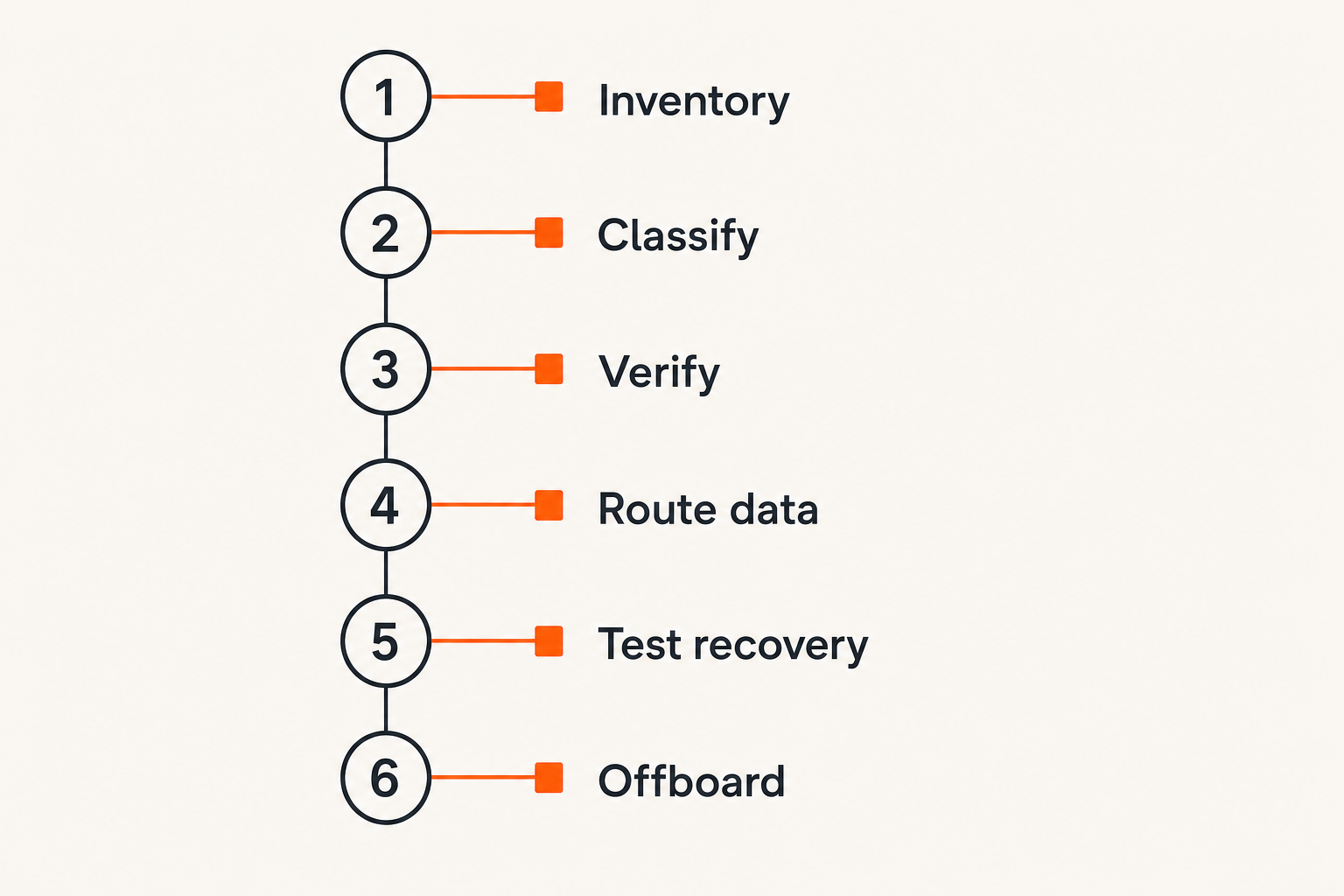
Start with one repeatable baseline
Implementation is easier when freelancers use the same baseline for every client and add stricter controls only where justified.
- Inventory channels and devices. List where client communication currently occurs and which endpoints can read it.
- Classify the engagement. Choose routine, confidential, or restricted handling based on consequences, contracts, and client expectations.
- Select the approved channel. Confirm encryption behavior, participant controls, device support, recovery, exports, and retention options.
- Verify key participants. Use an independent method before exchanging confidential material or acting on high-impact requests.
- Define data routes. Decide where chat, files, credentials, approvals, and permanent records belong.
- Test loss and recovery. Simulate a missing device, changed identity, mistaken attachment, and departing collaborator.
- Schedule closure. Set an access review and deletion date when the engagement begins.
This sequence turns security into an operating procedure rather than a one-time application choice.
Measure operational outcomes
Do not measure only how many people installed the approved messenger. Measure whether the workflow reduces exposure and confusion.
Useful review questions include:
- Were sensitive requests verified through the agreed method?
- Could the freelancer revoke a lost session quickly?
- Were credentials kept out of chat history?
- Did downloads remain in approved storage?
- Were former participants removed on time?
- Could required project records be found without retaining everything?
- Did clients understand the process without repeated support?
The best indicators are often event based. Time to revoke a lost device, time to remove a contractor, and number of restricted secrets found in message history reveal more than adoption alone. Avoid collecting invasive telemetry merely to prove that a privacy workflow exists.
Practical rule: Measure whether sensitive actions are handled correctly, not whether users send more encrypted messages.
Evaluate encrypted messaging tools
Test behavior instead of feature lists
Feature pages can tell you whether a service claims encryption, disappearing messages, groups, or device synchronization. They do not show how those features interact under failure.
Run a small test with non-sensitive data. Add a second device, remove it, change an identity, export a conversation if supported, recover an account, remove a member, and inspect notification behavior. Check whether warnings are clear enough for a busy client to understand.
Also identify the trust boundary. Ask where keys are generated, what the service can access, how participants are authenticated, what metadata is retained, and whether backups preserve readable content. The exact answers matter more than broad labels such as military-grade or zero trust.
Check the client experience
A theoretically strong tool can fail if clients cannot onboard, recover access, or recognize an impersonation attempt. Freelancers often have less power than employees to mandate a complex platform, so interoperability and support burden are real security factors.
Evaluate:
- how much information registration requires;
- whether clients need a new application or account;
- how identity and device changes are communicated;
- whether guest access is appropriately constrained;
- whether accessibility needs are supported;
- what happens when one participant loses access;
- whether project closure is understandable.
Usability is not separate from security. Confusing workflows create shadow channels and rushed exceptions.
Document acceptable exceptions
Some clients will require their own collaboration stack. Others may be unable to use the freelancer's preferred channel. Define an exception path instead of improvising.
An exception record can state the approved alternative, permitted data level, compensating controls, decision owner, and expiration date. For example, ordinary scheduling might move to the client's platform while restricted credentials still use a dedicated secret-sharing path.
Avoid claiming that one messenger makes every other channel safe. The architecture should remain coherent when the client imposes constraints.
Make freelancing encrypted messaging sustainable
Where qrypt chat fits
A messaging product belongs inside the architecture as the communication layer, not as a substitute for endpoint security, identity verification, secret management, or offboarding. When evaluating qrypt.chat, map its actual behavior to the engagement threat model and test it with the same loss, recovery, participant, and retention scenarios described above.
The right product fit is operational. The freelancer and client should be able to establish a trusted conversation, understand changes in that trust, communicate without leaking content into weaker channels, and close access cleanly when the work ends.
Freelancing encrypted messaging succeeds when privacy controls survive everyday events: a rushed request, a replaced phone, a temporary subcontractor, a downloaded file, and the end of a contract. Encryption is essential, but the workflow around it determines the result.
Try qrypt chat
Evaluate qrypt.chat as the private communication layer in a complete client security workflow. Try qrypt.chat.