
A client sends production credentials through the same chat thread used for meeting links, draft feedback, and casual conversation. Three months later, the project is finished, but the messages remain on two laptops, a phone, cloud backups, and perhaps a subcontractor's device.
That is the normal failure mode in freelancing encrypted messaging. The cryptography may be sound while the working process around it remains uncontrolled.
Teams think the problem is choosing an encrypted app. The real problem is designing a communication system that controls identity, devices, sensitive content, access, retention, and offboarding across several clients with different expectations.
For freelancers, this matters more in 2026 because client work increasingly moves through distributed teams, AI-assisted tools, temporary accounts, and personal devices. The practical question is not simply whether a message is encrypted. It is whether the entire workflow preserves confidentiality without making routine work impossible.
Table of contents
- Why freelancing encrypted messaging is an operating system
- Build the threat model before choosing a messenger
- Design the encrypted messaging architecture
- Create a repeatable client onboarding workflow
- Set day to day messaging rules
- Handle files credentials and AI tools safely
- Manage devices subcontractors and remote teams
- Recognize what breaks in practice
- Evaluate secure messaging tools as infrastructure
- Make freelancing encrypted messaging operational with qrypt chat
Why freelancing encrypted messaging is an operating system
Encryption does not define the workflow
Encryption answers a narrow question: who can read data while it moves or while it is stored in a particular system? A freelance operation has broader questions. Who is allowed into the client conversation? How is that person verified? Can messages appear in lock-screen previews? Are attachments copied into downloads folders? What happens when a phone is lost or a contract ends?
The mistake teams make is treating the messenger as the security boundary. In practice, the boundary includes every endpoint, participant, export, notification, integration, and recovery method connected to the conversation.
A useful way to think about it is that the messaging application provides a secure transport layer. The freelancer still needs to provide governance: rules for what enters that transport layer, who participates, and how long information remains available.
Freelancers carry unusual trust boundaries
Employees usually operate inside one organization's identity system, managed devices, and documented policies. Freelancers move between organizations. One client may mandate a corporate workspace; another may prefer a consumer chat app; a third may send everything by email.
This creates overlapping trust boundaries on the same devices. A freelancer may hold source code from one client, campaign plans from another, and personal conversations in adjacent applications. A mistaken attachment, screenshot, paste, or notification can cross those boundaries without defeating any encryption.
The team at ugig.net works with freelancers and gig professionals adopting new tools, where the recurring lesson is that operational separation matters as much as tool capability.
Security must survive ordinary work
A secure process that takes ten extra minutes for every message will be bypassed. A process that requires no judgment will eventually expose something sensitive. The objective is a small set of rules that people can apply during a deadline, from a mobile device, or while moving between projects.
Practical rule: Design secure messaging for the busiest ordinary day, not for an ideal security review.
Good controls reduce decisions. Dedicated client spaces, clear labels, narrow membership, automatic screen locking, and an agreed location for credentials are more reliable than asking everyone to reconsider the threat model before every send.
Build the threat model before choosing a messenger
Identify what needs protection
Start with information, not applications. List the material likely to pass through client communication:
- Commercial terms, rates, invoices, and payment details
- Customer records or personally identifiable information
- Source code, designs, drafts, and unpublished assets
- Infrastructure details, API endpoints, and diagnostic logs
- Credentials, recovery codes, or signing material
- Legal advice, acquisition plans, and internal disputes
- Meeting links, calendars, locations, and travel details
Not every item needs the same handling. A public product URL and a production recovery code should never be treated as equivalent merely because both fit inside a message.
Separate likely threats from dramatic threats
Many freelancers do not need to defend every conversation from a nation-state adversary. They do need to account for stolen phones, compromised email accounts, malicious browser extensions, accidental forwarding, former collaborators, shoulder surfing, client impersonation, and malware.
Build a simple threat register with four columns: asset, plausible threat, consequence, and control. For example, an invoice may face payment-detail substitution, producing financial loss; the control is verification of changed banking details over a previously established second channel.
This keeps the model useful. It also exposes where encrypted messaging helps and where it does not. End-to-end encryption may protect a conversation from a network observer, but it cannot stop an authorized participant from copying a message or an attacker from reading an unlocked endpoint.
Write down the trust assumptions
Every messaging system relies on assumptions. You may trust client devices, trust a service not to retain readable content, trust account recovery, or trust participants to verify new devices. Hidden assumptions are dangerous because nobody monitors them.
Document at least these points:
- Whether messages are end-to-end encrypted or only encrypted in transit
- What metadata the provider can observe
- How participant identity and new devices are verified
- Whether backups preserve the same protection
- Who can add members to groups
- How account recovery works
- Whether disappearing messages remove every copy
That changes the conversation from “Is this app secure?” to “Does this system's trust model fit this client engagement?”
Design the encrypted messaging architecture
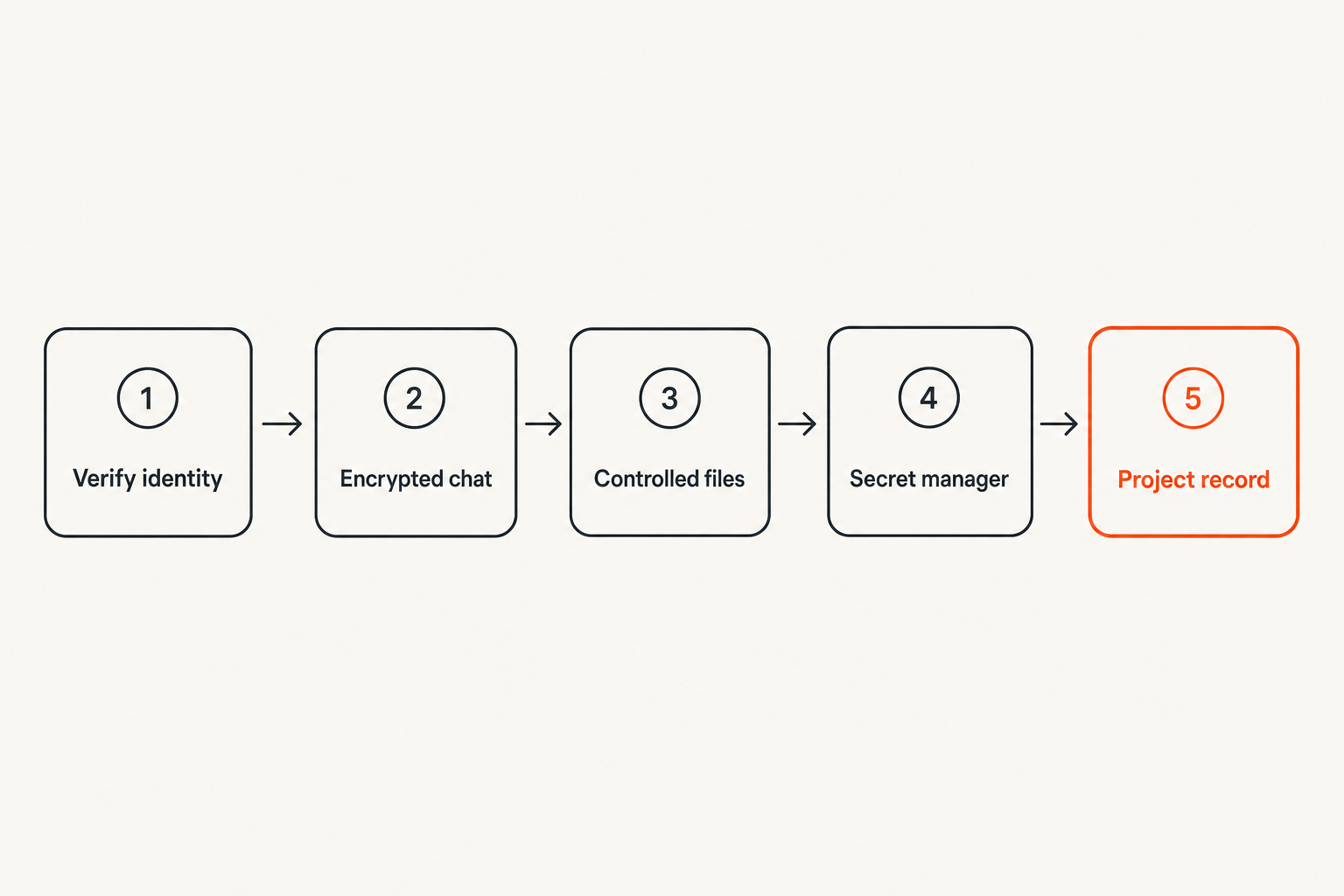
Understand what encryption covers
Transport encryption protects data between a device and a service. End-to-end encryption is designed so message content is readable only at participating endpoints. The distinction matters, but neither model secures a compromised endpoint.
Also inspect metadata. Depending on the architecture, a service may be able to observe account identifiers, connection times, IP addresses, group relationships, device information, or message timing even when it cannot read content. Metadata can still expose who is working with whom and when a project becomes active.
Avoid absolute statements such as “nothing is stored” or “nobody can access this.” Ask precise questions about content, metadata, keys, backups, logs, and endpoints.
Create communication zones
One messenger does not have to carry every part of a client relationship. Divide communication into zones based on sensitivity and operational purpose:
| Zone | Typical content | Recommended handling |
|---|---|---|
| Coordination | Scheduling, status, public links | Encrypted chat with normal retention |
| Confidential work | Drafts, internal decisions, private feedback | Restricted client channel and verified participants |
| Sensitive transfer | Regulated data, private deliverables | Approved encrypted transfer with explicit recipient check |
| Secrets | Passwords, private keys, recovery codes | Password manager or secrets system, not chat |
| System record | Approvals, contract changes, final decisions | Authoritative project or document system |
This structure prevents chat from becoming an unsearchable mixture of temporary discussion, permanent records, and high-impact secrets.
Keep sensitive systems out of chat
Messaging is optimized for conversation, not secret rotation, durable approvals, version control, or records management. A production token pasted into an encrypted room is still copied to every authorized device. It may remain in notifications, local databases, backups, exports, and screenshots.
Practical rule: Use encrypted messaging to coordinate access to sensitive systems, not as the sensitive system itself.
Send a notification that a credential has been shared through the approved secret manager. Link to a controlled document rather than uploading an uncontrolled copy. Record a final approval in the system where the work is governed. Chat should move the workflow forward without becoming the only evidence that the workflow occurred.
Create a repeatable client onboarding workflow
Verify identity through a second path
A secure account is not useful if it belongs to an impersonator. Before sharing confidential information, verify the client's messaging identity using a channel established independently. This might be a known phone number, a scheduled video call, or an address already present in a signed agreement.
For higher-risk work, compare available safety codes, fingerprints, or device verification indicators. Repeat verification when a participant replaces a device, creates a new account, or unexpectedly requests sensitive access.
Do not use the potentially compromised channel to validate itself. If a client account suddenly asks for a password reset code, calling a known number is stronger than asking “Is this really you?” in the same thread.
Agree on channels and content rules
During kickoff, define where different communication belongs. A minimal workflow may use encrypted chat for rapid coordination, a project system for task state, a controlled repository for deliverables, and a password manager for secrets.
Name an owner on both sides. Decide who may invite participants and whether subcontractors require approval. State whether messages may be forwarded, copied into AI systems, or retained after the engagement.
These decisions need not become a long policy. Five clear lines in the onboarding document are better than a security handbook nobody applies.
Record the minimum operating agreement
A lightweight client communication agreement should answer:
- Which messaging account or workspace is authoritative?
- Who administers membership?
- What information is prohibited in chat?
- Where are files, credentials, and approvals stored?
- What requires out-of-band identity verification?
- How quickly should a lost device be reported?
- What happens to messages and access at project end?
Confirm the agreement in writing and keep it with the project record. If a client insists on a weaker channel, document the limitation and avoid sending content whose risk exceeds that channel's protection.
Set day to day messaging rules
Classify information before sending
Classification does not need five colors and a compliance committee. For freelance work, three levels often work:
- Routine: low-impact coordination that can remain in normal encrypted chat.
- Confidential: client-only information requiring verified membership and careful retention.
- Restricted: credentials, regulated data, identity documents, signing keys, or material that should move through a dedicated controlled system.
Place the rule near the work. Pin a short note in each client space stating what must not be posted. Naming channels clearly also reduces cross-client mistakes.
Use channels as access boundaries
Create separate spaces for separate clients and, where justified, separate channels for sensitive subprojects. Do not add everyone to one broad room because it is convenient. Membership should reflect the current task, not every person who has ever touched the account.
For group chats, review who can add participants, whether joining exposes message history, and whether departed members retain local copies. Removing an account prevents future access; it usually cannot retract content already delivered to that person's devices.
Direct messages can also create hidden project state. Important decisions made privately should be summarized in the authoritative client space or project record, without copying unnecessary sensitive detail.
Control notifications previews and exports
Message content often escapes through features around the messenger. Disable sensitive previews on lock screens and wearable devices. Review desktop notification behavior during screen sharing. Avoid copying confidential messages into personal notes, unencrypted ticket systems, or clipboard-history tools.
Exports deserve particular scrutiny. An encrypted conversation may become an ordinary text or archive file once exported. If exports are necessary for legal or project records, store them in an approved encrypted location, limit access, and define a deletion date.
Handle files credentials and AI tools safely
Treat attachments as durable copies
An expiring message does not guarantee an expiring attachment. Recipients may download it, applications may cache it, and operating systems may include it in device backups or recent-file lists.
Before sending a file, verify the recipient, remove unnecessary metadata, and check whether the document contains comments, revision history, hidden sheets, or embedded credentials. Share the minimum useful file rather than a full client archive.
For highly sensitive transfers, use a method that supports access control, expiration, and revocation. The message should contain context and a controlled access path, not an extra uncontrolled copy.
Move secrets into purpose built systems
Passwords, API tokens, private keys, seed phrases, recovery codes, and administrator session material do not belong in chat. Even an encrypted chat distributes those secrets to endpoints outside the secret lifecycle.
A proper credential workflow supports scoped sharing, revocation, auditing, and rotation. If a secret is accidentally pasted into a conversation, deleting the message is not enough. Treat it as exposed to every participant and endpoint that received it, rotate it, and inspect relevant logs.
The same principle applies to customer datasets and diagnostic bundles. Redact logs before sharing and replace real records with synthetic examples when the task does not require production data.
Define an AI handling boundary
Freelancers increasingly use AI for drafting, coding, summarization, and analysis. Copying an encrypted client discussion into an external AI service creates a new data flow with different storage, training, retention, and access terms.
Set a default rule: client content does not enter an AI tool unless the client permits it and the tool is approved for that data class. Remove names, credentials, customer records, and proprietary details whenever a generalized prompt can do the job.
This is another reason not to confuse encryption with control. The original conversation can be strongly protected while a copied prompt leaves the approved environment entirely.
Manage devices subcontractors and remote teams
Make device security part of messaging security
Endpoints hold decrypted content. Protect them with full-disk encryption, current operating systems, automatic locking, strong authentication, and a safe recovery process. Separate work and personal browser profiles at minimum; higher-risk engagements may justify a dedicated operating-system account or device.
Review linked devices periodically. Old web sessions, tablets, and replacement phones are easy to forget. Remove any endpoint that is no longer actively controlled. Store recovery material somewhere protected and independent of the device it recovers.
Malware remains a hard boundary. If an attacker can capture the screen, read the clipboard, or control the keyboard, message encryption cannot restore confidentiality.
Grant subcontractors narrow access
A freelancer who hires a designer, researcher, or developer becomes responsible for another trust boundary. Obtain client approval where required, provide access only to the relevant project area, and avoid forwarding whole conversation histories.
Subcontractors should receive the same short operating agreement: approved channel, prohibited content, file location, incident contact, and deletion expectations. Remove access immediately when their task ends rather than waiting for the main contract to close.
Do not assume a subcontractor uses a managed device. Ask enough questions to understand the actual setup without turning onboarding into an audit theater exercise.
Plan for travel and shared environments
Remote work often happens in airports, coworking spaces, hotels, and client offices. Network encryption helps on untrusted Wi-Fi, but visual and physical exposure remain. Use privacy-aware screen positioning, avoid discussing sensitive details aloud, and lock the device whenever it leaves your hand.
Screen sharing is a frequent source of leakage. Close unrelated client windows, pause notifications, and share one application instead of the entire desktop. A separate work profile reduces the chance that another client's name or message appears during a call.
Recognize what breaks in practice
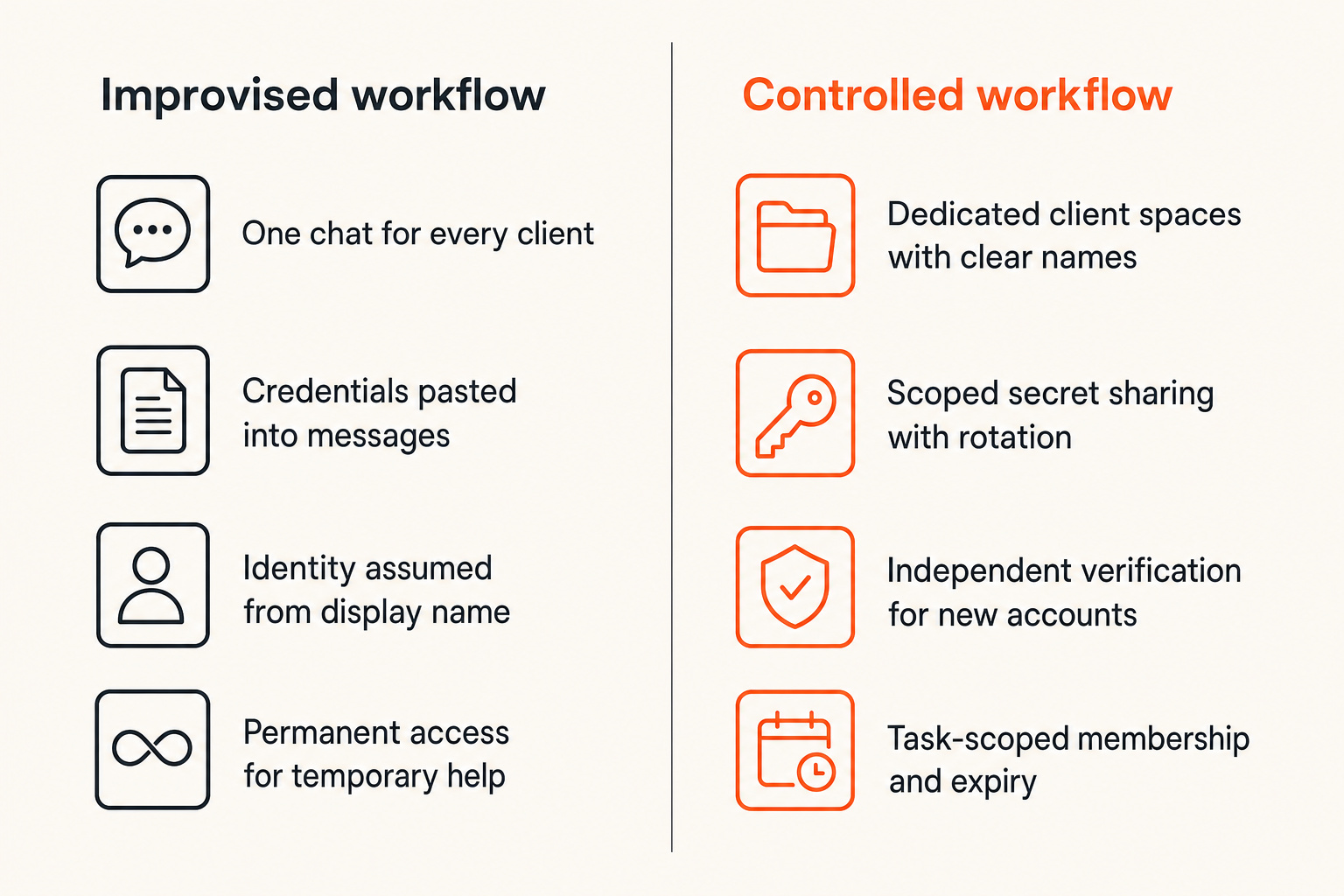
Convenience creates shadow channels
What breaks in practice is rarely the encryption algorithm. Someone cannot find the official room, so they send a personal text. A client cannot open a protected file, so it is reattached to email. A contractor is not provisioned, so screenshots are forwarded.
The response is not simply stricter policy. Fix the source of friction. Make invitations predictable, publish one contact path, test file access before deadlines, and ensure urgent recovery does not depend on one unavailable administrator.
| Weak pattern | Operational replacement |
|---|---|
| One chat for every client | Dedicated client spaces with clear names |
| Credentials pasted into messages | Scoped secret sharing with rotation |
| Identity assumed from display name | Independent verification for new accounts |
| Permanent access for temporary help | Task-scoped membership and expiry |
| Deletion treated as revocation | Rotation, access removal, and endpoint review |
| Policy stored in a forgotten document | Short pinned rules near the conversation |
Encryption creates false confidence
Encrypted messaging can produce risk compensation: people share more sensitive data because the channel feels private. That is the wrong conclusion. Encryption reduces specific interception and provider-access risks. It does not authorize the recipient, secure their room, prevent screenshots, or guarantee deletion.
The mistake teams make is asking whether a channel is encrypted after a disclosure occurs. The better question comes before sending: does every intended recipient need this exact information, and is chat the right system to hold it?
Privacy claims should also be read narrowly. “Encrypted” may refer to transport, storage, a particular message type, or only certain device combinations. Verify the actual behavior that matters to your workflow.
Retention and recovery become liabilities
Long retention is convenient during disputes and project handoffs, but it increases the material available to a stolen device, compromised account, or former participant. Short retention limits exposure but can remove business records you genuinely need.
Separate conversational retention from record retention. Keep final approvals, contracts, and deliverables in their authoritative systems. Then chat history can be reduced without erasing the official project record.
Recovery can also weaken an otherwise strong design. If account access is restored through a lightly protected email inbox, that inbox becomes part of the messaging threat model. Secure it accordingly and understand whether recovery restores message history, keys, or only account identity.
Evaluate secure messaging tools as infrastructure
Test security properties and operational controls
Evaluate a messenger against a written requirement set rather than a feature page. Relevant questions include:
- Is message content end-to-end encrypted for direct and group conversations?
- How are keys generated, stored, rotated, and verified?
- What happens when a new device joins?
- Which metadata remains visible to the service?
- Are backups encrypted under equivalent control?
- Can administrators silently add participants or recover content?
- Can users review and revoke linked devices?
- How do deletion, expiration, and local storage behave?
- Are there clear controls for invitations and group membership?
Not every freelancer needs every control. The point is to identify tradeoffs before sensitive client data exposes them.
Evaluate usability under pressure
Security properties are necessary but not sufficient. Test the workflow on desktop and mobile, with a client who is not a cryptography expert. Observe account creation, invitation handling, device changes, file sharing, and recovery.
A good tool should make participant identity and conversation boundaries understandable. Warnings should tell users what changed and what action is required. If the secure path is materially harder than the fallback, expect the fallback to win during a deadline.
Practical rule: Reject tools that are secure only when every participant remembers undocumented exceptions.
Also consider support. Freelancers need a clear response when access fails because client work cannot stop indefinitely while nobody knows whether reinstalling an application will erase keys or history.
Run a small acceptance test
Before committing a major client engagement, run a controlled test:
- Create a project conversation and invite a test participant.
- Verify identity using the application's available mechanism.
- Send routine text, a confidential file, and a link to a controlled document.
- Add a second device and inspect the alerts shown to participants.
- Remove a member and observe what remains accessible locally.
- Test message expiration or deletion without assuming it retracts downloads.
- Simulate a lost device and follow the revocation process.
- Export or back up data, if supported, and inspect the resulting protection.
Record the outcome. A ten-minute feature demonstration is not a substitute for observing state changes across actual endpoints.
Make freelancing encrypted messaging operational with qrypt chat
Use qrypt chat where private conversation matters
qrypt.chat can serve as the private conversation layer in a freelancing encrypted messaging architecture. The useful fit is not “put everything in chat.” It is to create a deliberate place for conversations that should not default to ordinary email, public collaboration channels, or mixed personal messaging accounts.
That conversation layer should still connect to clear operating rules. Keep credentials in a secrets system, final files in controlled storage, and contractual records in their authoritative location. Verify participants before discussing confidential work, review active devices, and close access when the engagement ends.
This narrower framing is more credible than treating any messenger as a complete security program. The product provides a protected communication capability; the freelancer provides classification, endpoint discipline, and lifecycle management.
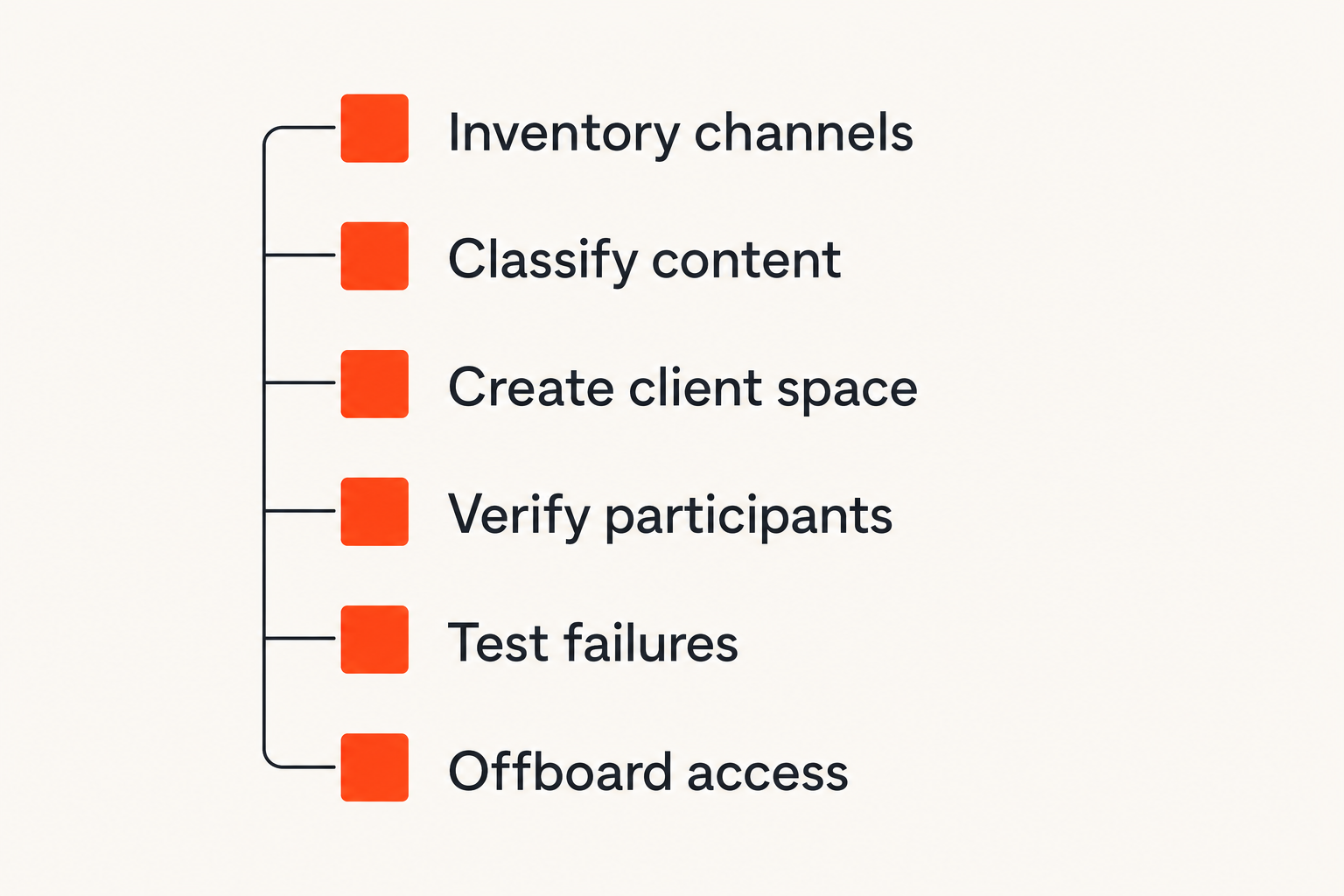
Roll out the workflow in seven steps
Use this implementation sequence rather than migrating every conversation at once:
- Inventory current channels. List where client messages, files, credentials, and approvals currently move.
- Classify common content. Mark it routine, confidential, or restricted.
- Define prohibited chat content. Include passwords, recovery codes, signing keys, and unredacted regulated data.
- Create one pilot client space. Choose a cooperative client and a project with manageable sensitivity.
- Verify participants and devices. Establish an independent contact path for suspicious requests or account changes.
- Test normal and failure workflows. Include a new device, lost access, mistaken attachment, member removal, and project closure.
- Review after thirty days. Remove friction that creates shadow channels and update the pinned rules.
At project completion, export only records that must be retained, remove participants, revoke project access, rotate shared credentials, and delete local working copies according to the client agreement. Confirm completion rather than assuming an application removal handled every copy.
Freelancing encrypted messaging works when these actions become a repeatable project lifecycle. The tool matters, but ownership and state transitions matter more: who joins, what gets shared, where records live, and how access ends.
Try qrypt chat
Use qrypt.chat as the private conversation layer for a more deliberate freelance communication workflow. Try qrypt.chat.