
A client sends credentials in a chat thread because it is faster than opening a password manager. A contractor downloads a confidential attachment to a personal laptop. Three months after the project ends, the conversation, files, and access details are still sitting across several devices.
This is the everyday problem behind freelancing encrypted messaging. Teams think the problem is choosing an app with encryption. The real problem is building a communication workflow that remains private before, during, and after a client engagement.
Encryption matters, but it cannot decide who joins a conversation, whether a notification exposes sensitive text, how long files remain available, or what happens when a device is lost. Freelancers need an operating model around the messenger: identity verification, device security, information boundaries, retention, and offboarding.
That changes the conversation. The practical question is not simply, “Which encrypted messenger should I install?” It is, “How do I make private messaging reliable enough to use across changing clients, collaborators, devices, and risk levels?”
Table of contents
- Why freelancing encrypted messaging is a workflow problem
- Define a realistic threat model
- Choose an encrypted messaging service
- Build a freelancing encrypted messaging workflow
- Handle files credentials and sensitive details
- Protect devices identity and availability
- Collaborate with clients and subcontractors
- Avoid common encrypted messaging failure modes
- Measure whether the workflow is working
- Where qrypt.chat fits
Why freelancing encrypted messaging is a workflow problem
Freelancers often work outside the managed environments available to larger companies. They switch between client accounts, communicate from personal devices, bring in specialists temporarily, and retain records for invoicing or dispute resolution. That flexibility creates a fragmented security boundary.
Client trust depends on handling details
Clients rarely inspect encryption protocols themselves. They notice operational behavior: whether the freelancer proposes a private channel, confirms a new participant, avoids copying credentials into email, and removes access after delivery.
The team at ugig.net works with freelancers and gig professionals adopting practical technology, where the recurring lesson is that a tool only helps when it fits the actual client workflow. A technically strong messenger used inconsistently offers less protection than a clear, repeatable process everyone can follow.
Privacy can also affect commercial trust. A designer may see unreleased branding. A developer may receive production logs. A consultant may discuss staffing, financial, or legal concerns. Mishandling that context can damage the relationship even when no public breach occurs.
Encryption is one control, not the operating model
End-to-end encryption is designed to keep message content readable only at intended endpoints. It does not automatically protect an unlocked endpoint, a screenshot, an exposed notification, a malicious participant, or a file copied out of the conversation.
The mistake teams make is treating an encryption label as proof that the entire communication lifecycle is secure. In reality, the lifecycle includes invitation, identity verification, message delivery, local storage, export, backup, retention, and deletion.
A useful way to think about it is that encryption protects a route, while the workflow governs the people, endpoints, and information moving through that route.
Practical rule: Never use “encrypted” as a substitute for identifying who can read the conversation, on which devices, and for how long.
Start with information boundaries
Before selecting a tool, divide project information into practical classes:
- Routine: scheduling, meeting links, general status updates.
- Internal: drafts, non-public plans, ordinary client feedback.
- Sensitive: customer data, private financial details, security findings, contracts, or unreleased assets.
- Secrets: passwords, recovery codes, private keys, API credentials, and authentication tokens.
These classes do not need a complicated governance program. They provide a shared answer when someone asks whether a detail belongs in chat, a controlled file store, a credential manager, or nowhere persistent at all.
Define a realistic threat model
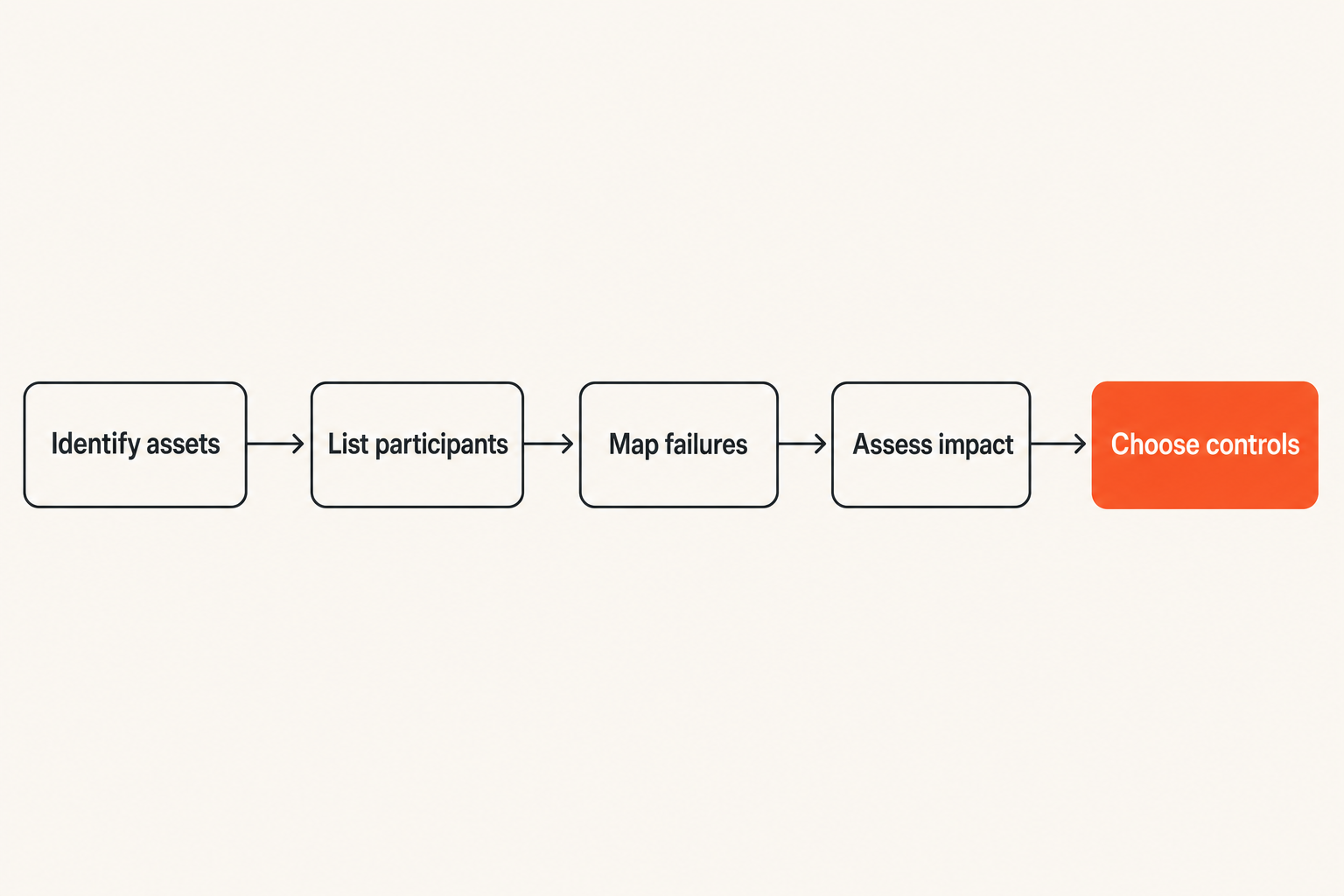
A threat model keeps security proportional. Without one, freelancers either ignore meaningful risks or impose a process so burdensome that clients route around it.
Identify what needs protection
List the project assets before listing attack techniques. Typical assets include conversation content, attachments, client identities, contact networks, credentials, intellectual property, billing information, and evidence of decisions.
Then identify who legitimately needs access. A client sponsor may need progress updates but not infrastructure credentials. A subcontractor may need one design file but not commercial negotiations. The freelancer may need a short-term record of approval without retaining every sensitive attachment indefinitely.
This exercise defines the minimum useful access boundary. It also exposes situations where a single large group chat would grant more visibility than the work requires.
Model likely failures before exotic attacks
For many freelancers, the probable failures are ordinary:
- A phone is lost while still signed in.
- A laptop displays message previews during screen sharing.
- A sensitive file syncs into a consumer backup.
- A former collaborator remains in a project space.
- A client sends a secret through an unapproved channel.
- An attacker takes over an email account used for invitations or recovery.
- Someone mistakes a new account for a known contact.
Sophisticated interception may matter for high-risk engagements, but endpoint exposure, account recovery, and human confusion are usually easier paths. Address those first.
Match controls to project sensitivity
Not every scheduling message requires the same treatment as a vulnerability disclosure. Define a baseline for all projects, then add controls where impact warrants them.
| Engagement level | Typical information | Sensible controls |
|---|---|---|
| Routine | Scheduling, public assets | Encrypted channel, device lock, clear offboarding |
| Confidential | Drafts, internal plans, customer context | Identity verification, restricted groups, controlled attachments |
| High sensitivity | Security findings, regulated data, major transactions | Dedicated devices or profiles, minimal retention, strict membership review, separate secret transfer |
This tiering reduces friction because the strictest process is reserved for the projects that need it. The baseline still prevents private work from spilling into SMS, social direct messages, or unmanaged email threads.
Choose an encrypted messaging service
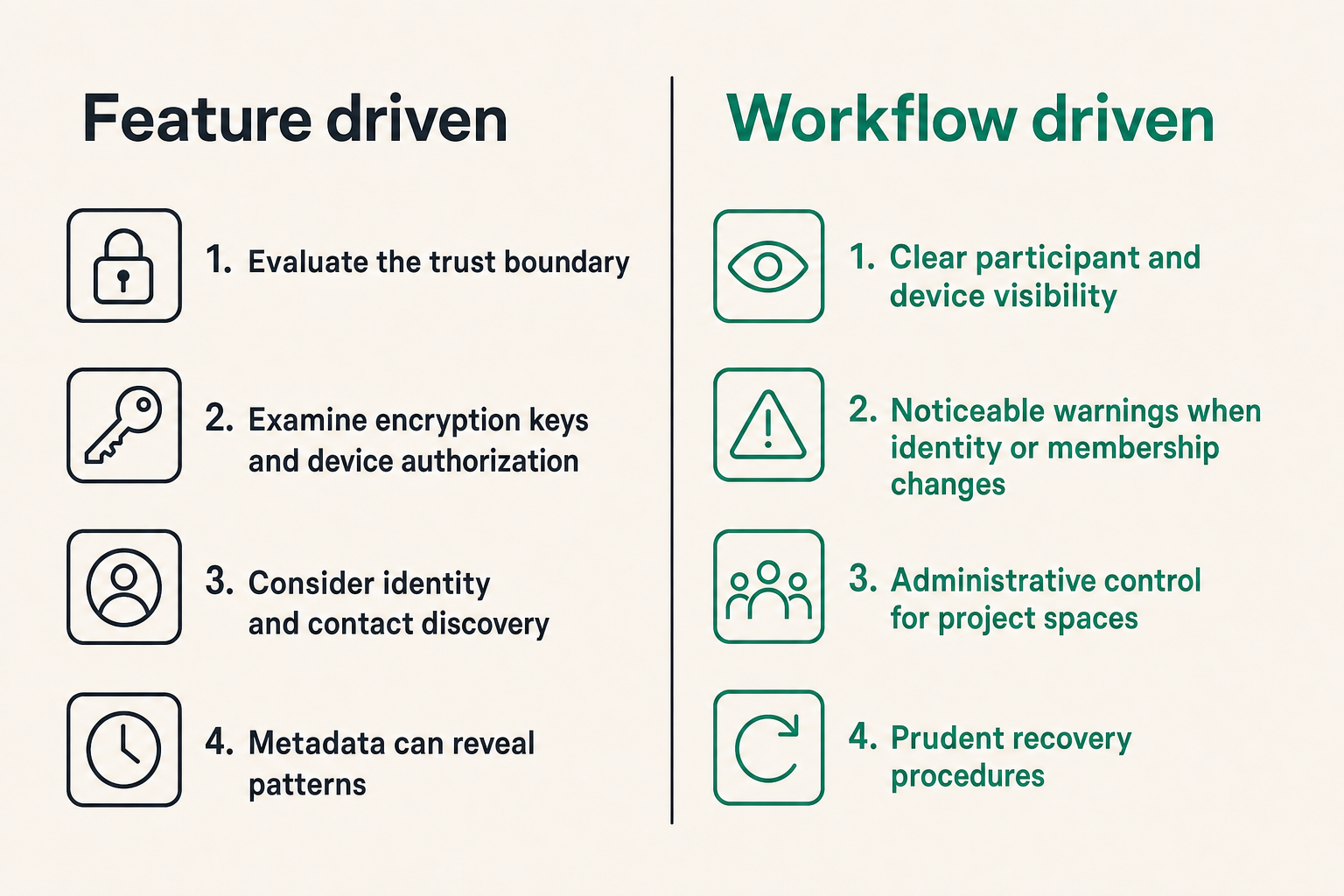
Choosing a service is an architectural decision, not a feature-page contest. The interface must be usable, but the important questions concern trust, identity, endpoints, data persistence, and recovery.
Evaluate the trust boundary
Start by asking what the service operator can access. Consider message content, attachments, account identifiers, contact discovery data, group membership, IP-derived information, and timing metadata. Content encryption is critical, but metadata can still reveal who communicates, when, and how often.
Examine how encryption keys are generated and controlled, how new devices are authorized, and whether participants can verify identity changes. If a service adds a device silently or makes account recovery indistinguishable from identity replacement, the workflow needs compensating checks.
Also consider whether the product requires a phone number, exposes a stable public identifier, or makes contact discovery optional. Freelancers sometimes need to keep personal identity, public business identity, and sensitive client work separate.
Check operational features as carefully as cryptography
Strong cryptography cannot rescue a product that people cannot operate safely. Relevant features include:
- Clear participant and device visibility.
- Noticeable warnings when identity or membership changes.
- Administrative control for project spaces.
- Practical message and attachment deletion behavior.
- Protection against casual notification exposure.
- Support for the client’s actual devices and browsers.
- Predictable session expiry and account recovery.
- A usable way to remove former participants.
Ask what deletion means. Removing a message from one interface may not erase downloaded files, screenshots, exports, backups, or copies on another endpoint. Claims should be interpreted according to the real data path, not the button label.
Compare tools against the engagement
A simple comparison avoids choosing by reputation alone:
| Decision area | Weak selection method | Better selection method |
|---|---|---|
| Encryption | Look for a lock icon | Confirm what is encrypted and at which endpoints |
| Identity | Assume an account name is enough | Verify contacts and monitor identity changes |
| Access | Create one group for convenience | Grant access by project role and purpose |
| Retention | Keep history indefinitely | Set a project-specific retention expectation |
| Recovery | Choose maximum convenience | Understand who can restore access and how |
| Adoption | Mandate a complex setup | Test onboarding with a real client workflow |
Practical rule: Select the messenger that supports your required trust boundary and can still be used correctly by the least technical project participant.
Build a freelancing encrypted messaging workflow
A secure tool needs a repeatable entry point. If channel setup happens only after confidential material starts moving, the most sensitive details may already be scattered across email and consumer chat accounts.
Set the channel before work starts
Include communication handling during onboarding. Tell the client which channel will carry private discussion, where large files belong, and how secrets should be delivered. Keep the explanation short enough that it is read.
A useful onboarding note covers four points:
- The official project messaging space.
- The participants expected to join.
- The kinds of information that must not be pasted into chat.
- The fallback route if either party loses access.
The goal is not to make the client study cryptography. It is to remove ambiguity before urgency takes over.
Verify identities and devices
An encrypted connection to the wrong person is still a failure. Verify new contacts through an independent path when the project is sensitive. For example, confirm an identity indicator during a known video call or through a previously established contact method.
Repeat verification after meaningful changes: a replacement phone, a new laptop, a re-created account, or an unexpected identity warning. Do not train clients to dismiss those events as routine noise.
Device approval also needs boundaries. A freelancer may use a workstation and phone, but adding an old tablet merely for convenience expands the number of endpoints storing or displaying client information.
Use a repeatable project sequence
A workable implementation sequence looks like this:
- Classify the engagement. Identify the data types, participants, and consequences of exposure.
- Select the channel. Confirm that the service and device support match the project risk.
- Create the project space. Use a distinct name and avoid mixing unrelated clients.
- Invite and verify participants. Confirm identities through an existing trusted route.
- State handling rules. Explain where messages, attachments, and secrets belong.
- Review during delivery. Remove inactive participants and investigate device changes.
- Close the space. Transfer records, revoke access, delete unnecessary local copies, and document completion.
This process can take minutes for an ordinary engagement. Consistency matters more than ceremony.
Practical rule: Create the private channel during onboarding, not after the first sensitive message arrives.
Handle files credentials and sensitive details
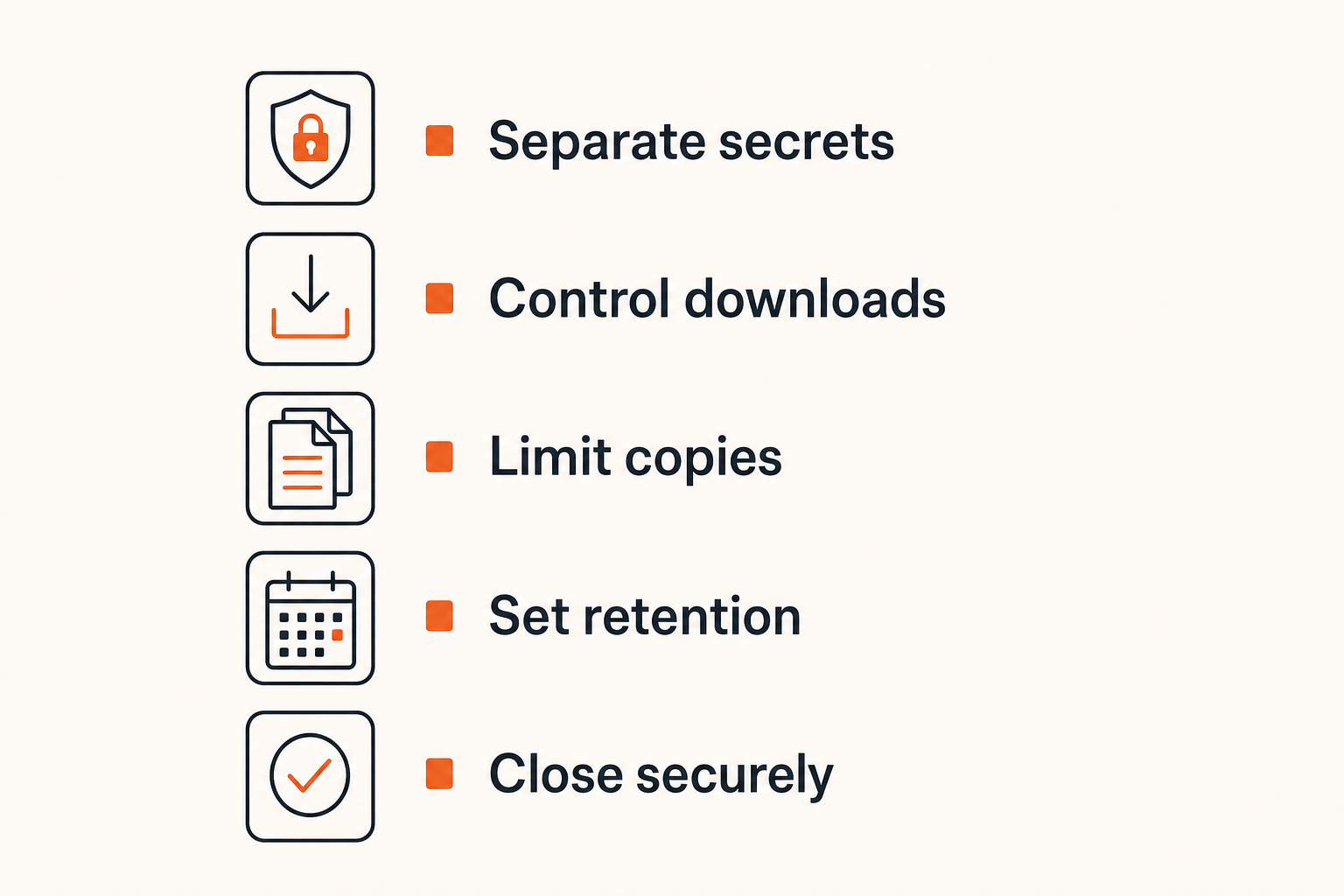
Messages are only one data type. Freelance projects often fail at the point where attachments, credentials, or copied text leave the protected conversation and acquire a longer life elsewhere.
Separate conversation from secret delivery
A chat can be private without being the right place for reusable credentials. Passwords, API keys, signing material, recovery codes, and seed phrases require tighter controls because anyone who retrieves them later may gain direct access to another system.
Use chat to coordinate secret delivery, not necessarily to carry the secret itself. A credential manager or purpose-built one-time transfer mechanism can provide narrower access and easier rotation. Avoid splitting a password across two ordinary channels and assuming that creates meaningful security; both channels may terminate on the same compromised device.
If a client sends a secret into chat anyway, move it to the approved system, ask the client to rotate it where appropriate, and remove the exposed copy as far as the platform allows. Do not leave cleanup until project close.
Control attachment copies
Attachments can exist in the conversation cache, downloads folder, desktop, preview database, cloud backup, and project archive. That is why “the chat is encrypted” does not settle file security.
Define where the authoritative file lives. For temporary review, download only when necessary and remove local copies afterward. For continuing work, store the file in an approved encrypted location with access limited to the project. Check whether mobile devices automatically save media to a photo library or sync downloaded documents.
File names can also disclose context. A locked attachment named after an acquisition, legal dispute, or vulnerability may leak useful information through notifications or local indexes. Use neutral project identifiers where exposure would matter.
Treat message history as stored data
Persistent history is useful for approvals, scope decisions, and dispute resolution. It is also a growing archive of client context. Retention should therefore be an explicit trade-off, not an accidental default.
Decide what must be retained for contractual, tax, or professional reasons. Extract necessary records into the appropriate controlled archive. Remove transient discussion and sensitive attachments when their operational purpose ends.
Disappearing messages can reduce casual accumulation, but they do not prevent screenshots, copying, malicious clients, or compromised endpoints. Use them as a retention aid, not as proof that information cannot survive.
Protect devices identity and availability
Encrypted messaging moves the security boundary toward the endpoint. If the endpoint is exposed, the attacker may read messages after legitimate decryption, impersonate the freelancer, or approve another device.
Secure the endpoint first
Every device used for client messaging should have a strong unlock method, current security updates, storage encryption, and a short automatic lock interval. Remove unsupported devices from sensitive work. Keep browser extensions and desktop utilities under control because they may access notifications, clipboard data, screenshots, or page content.
Separate work and personal contexts where practical. A dedicated operating-system profile or browser profile reduces accidental cross-client sharing and limits the number of applications interacting with client data. High-sensitivity work may justify a dedicated device, but only if it is maintained properly.
Do not ignore physical context. Shared offices, travel, public transport, and screen sharing can expose messages without defeating any technical control.
Reduce notification and metadata exposure
A lock-screen preview can reveal a client name, message excerpt, or verification code. Disable message content in notifications on devices used outside controlled environments. During presentations or screen sharing, use a focus mode or close the messaging session entirely.
Metadata deserves realistic treatment. Even when content is encrypted, account identifiers, device network information, group changes, and communication timing may remain observable to some parties. Users with higher anonymity requirements should evaluate these properties separately from content confidentiality.
The mistake teams make is promising “complete anonymity” based on message encryption alone. Private content and anonymous participation are related but different objectives.
Plan for recovery without creating a backdoor
Loss of access can stop a project at a critical moment. Recovery planning should answer:
- Which identity or credential starts recovery?
- Can the service provider restore content or only account access?
- How is a recovered or replaced device shown to other participants?
- Where are recovery codes stored?
- What does the client do if the freelancer cannot access the usual channel?
Store recovery material outside the messaging account it protects. Test the documented process without weakening it for convenience. A fallback email address protected by a weak password can become the easiest route into an otherwise strong messaging setup.
Practical rule: Recovery must restore availability without silently making a new device equivalent to a previously verified identity.
Collaborate with clients and subcontractors
Freelancing often becomes small-team work. A writer brings in an editor, a developer involves a specialist, or a client adds procurement and legal contacts. Each addition changes the trust boundary.
Keep membership explicit
Name a person responsible for group membership. In many engagements, that should be the freelancer for subcontractors and the client sponsor for client-side participants. Either way, additions should be announced and tied to a project need.
Do not rely on a member list that nobody reviews. At project milestones, compare current participants with active responsibilities. Unexpected additions, duplicate-looking accounts, and dormant users deserve investigation.
If someone joins late, consider what history becomes visible. A new participant who needs tomorrow’s deliverable may not need months of negotiation, customer data, or credentials.
Create separate spaces for separate purposes
One large conversation is convenient until access needs diverge. Use separate spaces when groups have different membership or data requirements. Common divisions include:
- Client coordination and approvals.
- Internal production discussion.
- Security or incident handling.
- A specific subcontractor workstream.
Avoid excessive fragmentation. Too many channels cause participants to post in the wrong place. Split communication when the audience, sensitivity, or retention requirement is genuinely different.
A channel name should identify the client and purpose without exposing sensitive details. Consistent names also help prevent a freelancer from sending one client’s file into another client’s similarly named group.
Make offboarding part of delivery
Project closure is not complete when the invoice is paid. Remove temporary members, revoke linked devices or sessions that are no longer needed, transfer agreed records, rotate shared credentials, and delete unnecessary working copies.
Tell the client what was retained and why. If contractual evidence must remain, store it in a controlled archive rather than keeping an entire active conversation available on every device.
Subcontractors should confirm deletion or return of client material when the agreement requires it. This is not perfect technical proof, but it establishes expectations and creates an accountable closure step.
Avoid common encrypted messaging failure modes
Most failures are not weaknesses in encryption algorithms. They are mismatches between the product, the people, and the surrounding project process.
What fails in practice
Common failure modes include:
- Tool sprawl: The client uses one messenger, the freelancer another, and urgent details end up in email.
- Unverified identity: Participants trust display names or profile photos after an account change.
- Oversized groups: Everyone can see everything because permissions were inconvenient.
- Secret accumulation: Credentials remain searchable in long-lived history.
- Automatic downloads: Sensitive files spread into photo libraries, backup services, and shared folders.
- Ignored warnings: Frequent unexplained identity changes teach participants to click through alerts.
- No owner: Nobody reviews membership, retention, or project closure.
- Security theater: The team uses disappearing messages but leaves devices unlocked.
What breaks in practice is usually the handoff between controls. A private message delivers a file securely, but the file is then uploaded to an open folder. A verified conversation is protected, but recovery runs through a compromised inbox.
What works instead
Successful workflows keep a small number of rules visible and enforceable. They define one normal channel, one fallback path, one method for secret delivery, and one person responsible for access decisions.
They also make secure behavior easier than insecure behavior. If inviting a client requires an hour of setup, the client will probably send an email. If the private channel is ready during kickoff and the rules fit in four bullets, adoption improves.
Avoid absolute promises to clients. Say what the workflow protects and what remains outside its control. For example: message content is protected in transit and delivery, while screenshots and copied files must still be governed by project rules.
Respond to a suspected compromise
When a device, account, or participant may be compromised, speed and clarity matter. Use a known independent channel to notify affected participants. Do not continue discussing the incident in the potentially compromised space.
A practical response sequence is:
- Isolate or lock the affected endpoint.
- Revoke its sessions where possible.
- Verify participant identities again.
- Rotate exposed credentials and recovery material.
- Identify files and conversations available to the account.
- Create a clean project space if trust cannot be restored confidently.
- Record decisions and meet any contractual notification duties.
Deleting a suspicious message does not resolve an account takeover. The response must restore trust in identities, devices, and secrets.
Measure whether the workflow is working
Security metrics do not need to become a reporting project. A few operational signals can reveal whether the process is being followed or merely documented.
Track operational signals
Useful questions include:
- How many active projects use the agreed private channel?
- How many sensitive details arrived through unapproved channels?
- Are former participants removed promptly?
- Are identity changes investigated before communication continues?
- How often do users need help joining or recovering access?
- Are project files appearing in unmanaged storage locations?
These are not universal benchmarks. Track direction and recurring causes. If clients repeatedly send credentials by email, the secret-delivery instructions may be unclear or too difficult.
Review exceptions and friction
An exception is useful evidence. Ask why someone bypassed the workflow. Perhaps the client could not install software, an external approver joined for one day, or a file exceeded a service limit. The answer should improve the process rather than produce a vague warning to “be more secure.”
Review friction as part of risk. A technically ideal setup that delays every approval encourages shadow channels. A slightly simpler setup with clear identity checks, endpoint controls, and offboarding may produce better real-world protection.
That changes the conversation from product loyalty to operational performance.
Use a lightweight project checklist
At kickoff:
- Classify the project.
- Establish the private channel and fallback.
- Verify participants.
- State file and secret-handling rules.
During work:
- Review new members and devices.
- Move misplaced data into the correct system.
- Remove obsolete local copies.
- Investigate warnings rather than dismissing them.
At closure:
- Export only required records.
- Revoke access and rotate shared secrets.
- Remove unnecessary messages and files.
- Confirm retention expectations with the client.
The checklist should fit the engagement. Its value comes from making ownership and timing explicit.
Where qrypt.chat fits
Freelancing encrypted messaging works best when private communication is treated as project infrastructure. The messaging layer should help participants communicate without requiring them to become cryptographers, while the surrounding workflow handles access, devices, files, and retention.
Use private messaging as a project control
qrypt.chat can serve as the defined private channel within that model. Establish it during onboarding, verify who belongs in each conversation, and pair it with clear rules for attachments and credentials.
The product does not replace endpoint security, client agreements, credential management, or good judgment. No messenger does. Its role is to provide a private communication path that can be incorporated into a broader freelance operating process.
This framing also makes evaluation more honest. Instead of asking whether a product “solves privacy,” ask whether it reduces exposure in the communication layer and supports behavior that participants can maintain.
Keep the process understandable
Clients are more likely to use a secure channel when the request is concrete. Explain that it is the designated place for project conversation, identify who should join, and state where secrets and long-lived files belong.
Freelancers should test the complete experience before introducing it to a high-stakes client: invitation, first contact, device change, attachment handling, notification behavior, and closure. The polished chat interface is only the visible part. Trust, state, recovery, and support are the real work.
For 2026 freelance operations, that is the durable lesson: freelancing encrypted messaging is not a one-time app choice. It is a repeatable security workflow that protects client communication across the full engagement.
Try qrypt.chat
Use qrypt.chat as the private communication layer for a clearer, more disciplined freelance messaging workflow. Try qrypt.chat.