
Freelancers routinely receive contracts, credentials, unpublished product plans, customer records, payment details, and private feedback through chat. One compromised device or convincing impersonation attempt can expose several clients at once.
That makes freelancing encrypted messaging more than a question of which app has the strongest encryption label. Teams think the problem is choosing secure chat. The real problem is designing a communication workflow that preserves identity, context, access control, and accountability from first contact through project deletion.
This matters more in 2026 because client work is increasingly fragmented across direct messages, project platforms, AI tools, cloud drives, and temporary teams. Encryption can protect message content in transit and at rest within a particular system, but it cannot determine whether the person requesting a production credential is actually your client.
The practical question is not simply, “Is this chat encrypted?” It is, “Can both sides make safe decisions when identities, devices, files, and project states keep changing?”
Table of contents
- Why freelancing encrypted messaging is an architecture problem
- Start with a freelancer threat model
- Separate identity, channel, and project trust
- Choose encrypted messaging by operational properties
- Design client onboarding before the first sensitive message
- Control files, links, metadata, and retention
- Build a freelancing encrypted messaging workflow
- Know what breaks in practice
- Scale the model from one freelancer to a small team
- Where qrypt.chat fits in the communication stack
Why freelancing encrypted messaging is an architecture problem
Client chat has become a work system
Chat used to be where a client asked for a progress update. It now functions as an informal ticket queue, approval system, file repository, identity directory, and incident channel.
A client might approve a design, send an API key, change payment instructions, and invite a subcontractor in the same thread. Those actions have different risk levels, yet ordinary messaging interfaces make them look equivalent. A “yes” beside a low-risk copy edit appears much like a “yes” authorizing a production deployment.
The mistake teams make is treating every message as conversational data. Some messages are operational commands. Some are evidence of approval. Others carry secrets or change who is trusted. A secure workflow must classify those differences even when the messaging product does not.
Encryption does not define the whole boundary
Strong encryption addresses an important part of the system: unauthorized access to message contents. It does not automatically secure screenshots, exported transcripts, notification previews, malware-infected endpoints, copied files, weak device passcodes, or a recipient who was added by mistake.
Nor does encryption prove that a new contact belongs to the organization they claim to represent. A protected conversation with an impostor remains a protected conversation with an impostor.
A useful way to think about it is that encrypted messaging creates a private transport and workspace. Identity verification, authorization, endpoint protection, retention, and recovery still need their own controls.
Practical rule: Never use the presence of encryption as a substitute for verifying who is participating and what each participant is authorized to request.
Communication mistakes become business incidents
For a freelancer, one messaging error can cross several business boundaries. Sending one client’s draft into another client’s thread creates a confidentiality incident. Following fraudulent payment instructions creates a financial incident. Exposing a production credential creates a security incident. Losing a project decision creates a delivery dispute.
The team at ugig.net focuses on the real operating conditions freelancers face: multiple clients, uneven tooling, rapid context switching, and increasing use of AI-assisted workflows. Those conditions make a consistent communication architecture more valuable than another isolated privacy setting.
That changes the conversation. Secure messaging is not only about secrecy. It is about reducing the chance that ordinary work produces an extraordinary failure.
Start with a freelancer threat model

Identify the assets inside the conversation
A lightweight threat model begins with what the conversation contains or can authorize. Common assets include:
- Client identities and contact details
- Contracts, invoices, rates, and payment instructions
- Password reset links, access tokens, and temporary credentials
- Source code, designs, drafts, and research
- Personal data relating to users or employees
- Internal URLs, infrastructure names, and environment details
- Approvals for publishing, purchasing, deploying, or deleting
- Reputationally sensitive feedback and negotiations
Do not limit the inventory to attachments. A message saying “the backup is stored at this path” may make another leaked artifact more useful. Context has security value.
Rank assets by consequence rather than by file size. A two-line recovery code is usually more sensitive than a large public video export.
Model realistic adversaries and accidents
Most freelancers do not need to design against every theoretical attacker. They do need to account for likely events:
- A phisher impersonates a client or collaborator.
- A client’s email account is compromised and used to redirect chat.
- A phone or laptop is lost while still logged in.
- A browser extension or endpoint malware captures content after decryption.
- A former contractor retains access to a project room.
- A freelancer pastes client material into the wrong conversation or AI service.
- Notification previews reveal sensitive text during screen sharing.
- A dispute arises because an approval cannot be tied to a verified person.
What breaks in practice is often mundane. The cryptography can perform correctly while a tired operator responds to the wrong account.
Write down the assumptions you are making
Every workflow has assumptions. Making them explicit lets you challenge them before an incident does.
For example:
communication_policy:
  verified_client_contact: true
  sensitive_changes_need_second_channel: true
  secrets_allowed_in_chat: false
  subcontractor_access_expires: project_end
  local_device_encryption: required
  transcript_retention: 30_days_after_handoff
This is not a universal policy. A journalist, penetration tester, designer, and virtual assistant will have different obligations. The point is to stop relying on unwritten expectations.
Practical rule: If a project assumption would cause serious harm when false, convert it into a verification step or technical control.
Separate identity, channel, and project trust
Treat a username as a claim
A familiar display name is not identity proof. Usernames can be copied, profile images can be reused, and compromised accounts can continue to look legitimate.
At the start of a project, bind the client’s messaging identity to information established through another trusted context. That could mean confirming the account during a scheduled video call, checking a fingerprint through a known phone number, or having an authorized stakeholder confirm the project room.
Record what was verified, when it happened, and who participated. Do not record unnecessary identity documents merely to appear rigorous; collecting more sensitive data creates another liability.
Verify sensitive changes out of band
Routine discussion can remain inside the encrypted channel. High-impact changes deserve a second path. Examples include:
- New bank or wallet details
- Requests for password resets or recovery codes
- Addition of a new administrator
- Transfer of domains, repositories, or cloud ownership
- Deployment to production
- Deletion of primary data or backups
- Sudden changes to confidentiality or publication instructions
“Out of band” means using a previously established channel, not a phone number included in the suspicious message itself. If someone messages, “I have a new number; call me here to verify,” that is one unverified claim supporting another.
A compact confirmation template helps:
Action: Replace production payment destination
Requested by: Verified client owner
Confirmed through: Previously recorded voice number
Effective time: 14:00 UTC
Rollback contact: Project owner
Make offboarding part of access control
Freelancer projects often end gradually. The final invoice is sent, revisions linger, and chat access remains active indefinitely. That ambiguity expands the attack surface.
Define offboarding at onboarding. Decide when guest access ends, which files move to the client’s system, who keeps the authoritative record, and when local or hosted copies are deleted. Remove subcontractors as soon as their work ends rather than waiting for the entire project to close.
Offboarding should also cover devices and sessions. Signing out a lost phone, revoking an old browser session, and rotating exposed credentials are distinct tasks. Deleting a conversation from one screen may not perform any of them.
Choose encrypted messaging by operational properties
Evaluate properties instead of badges
“Encrypted” is not a sufficiently precise procurement category. When comparing a messaging service, examine the properties that affect your workflow:
- Whether message content is end-to-end encrypted
- How participants verify identity or key changes
- What account recovery can expose or reset
- How new devices join an account
- Whether linked devices are visible and revocable
- How groups handle membership changes
- What metadata the service needs to operate
- Whether disappearing messages cover every copy
- How attachments are stored and removed
- Whether exports, backups, and notification previews create plaintext copies
- How the provider communicates security limitations
No product eliminates the need for endpoint security or sound judgment. Be skeptical of claims that collapse a multi-layer threat model into one feature name.
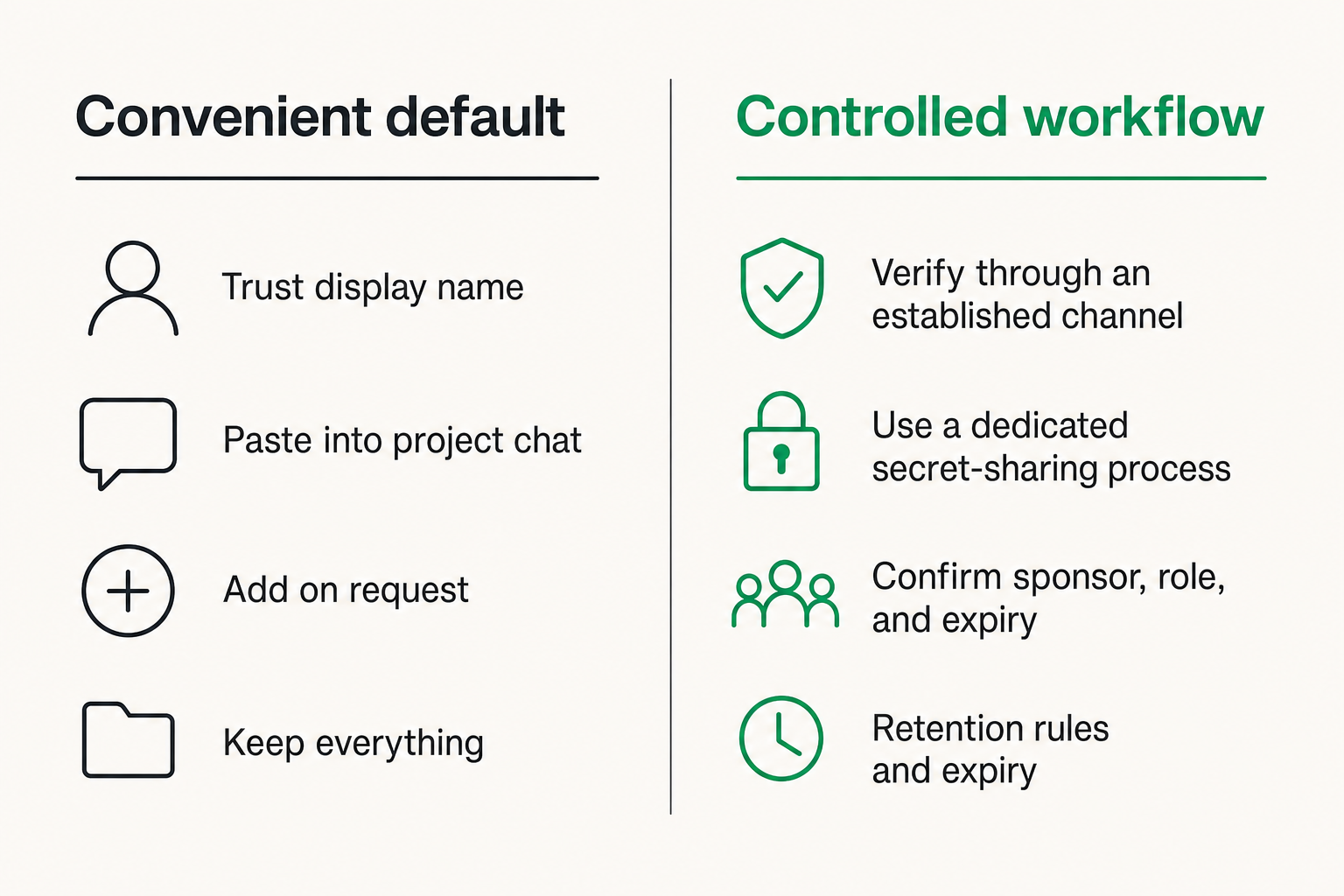
Compare secure and convenient workflows
| Workflow decision | Convenient default | Controlled alternative | Trade-off |
|---|---|---|---|
| Client identity | Trust display name | Verify through an established channel | More onboarding effort |
| Credentials | Paste into project chat | Use a dedicated secret-sharing process | Additional tool or step |
| New collaborator | Add on request | Confirm sponsor, role, and expiry | Slower invitations |
| File retention | Keep everything | Delete by project phase | Less historical convenience |
| Payment change | Accept written instruction | Confirm out of band | Delayed processing |
| Device access | Leave sessions active | Review and revoke sessions | Regular maintenance |
The answer is not to maximize friction. It is to spend friction where consequences are highest. Requiring a call for every spelling correction would train people to bypass the process. Requiring verification before changing a payment destination is proportionate.
Practical rule: Apply stronger verification to irreversible, high-value, or identity-changing actions—not to every ordinary message.
Account for the devices at each endpoint
Encryption protects data between endpoints, but the endpoints eventually display plaintext. A secure messenger on an unmanaged laptop with an exposed screen, unpatched operating system, and malicious extensions is not a secure working environment.
At minimum, freelancers should use full-device encryption, automatic locking, current software, a strong device credential, and separate user profiles where client sensitivity warrants it. Review notification settings before presentations and screen shares. Avoid leaving web sessions active on shared machines.
Client endpoints matter too, although a freelancer may not control them. If a client insists on using a shared account, forwarding every attachment to email, or adding unverified participants, state the limitation clearly and adjust what is sent through that channel.
Design client onboarding before the first sensitive message
Use a repeatable onboarding sequence
Secure onboarding should be short enough to follow consistently. A practical sequence is:
- Confirm the commercial contact through the original inquiry path.
- Establish the approved encrypted messaging channel.
- Verify key participants through a separate known channel.
- Define which actions require additional confirmation.
- Agree on how files, credentials, and approvals will be handled.
- Record who may invite collaborators.
- Set an expected project end and retention period.
This can take minutes for a small project. The value comes from removing ambiguity before urgency appears.
Do not let the first sensitive message become the onboarding process. Once credentials or confidential files are already flowing, correcting the channel becomes harder.
Create a minimum security brief
Clients do not need a cryptography lecture. They need a clear operating brief. Keep it to the decisions that affect behavior:
- The official account or room for project communication
- The people authorized to approve scope and payment changes
- The channel used to verify unusual requests
- The method for exchanging credentials
- The expected response if a device is lost or an account changes
- The retention and deletion plan
A freelancer can send this as a concise pinned message. Ask the client to acknowledge it, especially if the work involves regulated, personal, or commercially sensitive data.
Avoid promising “complete security” or “total anonymity.” Those claims are difficult to define and usually ignore endpoints, human behavior, and legal obligations. Describe the controls you actually use.
Define an escalation path
When something looks wrong, people need to know where to go without relying on the possibly compromised channel. Maintain one pre-verified fallback contact for each project. For larger engagements, identify a business owner and a technical owner.
The escalation path should answer:
- Who can pause work?
- Who confirms identity?
- Who revokes access?
- Who decides whether credentials must be rotated?
- Who communicates with affected stakeholders?
If the answer to every question is “send another message in the same room,” the workflow has no independent recovery path.
Control files, links, metadata, and retention
Manage the complete file lifecycle
A file does not become safe merely because it crossed an encrypted channel. Consider its lifecycle: creation, local storage, upload, download, editing, backup, forwarding, archival, and deletion.
Before sending a file, confirm the recipient and remove unnecessary content. After downloading, place it in the intended project directory rather than leaving it in a general downloads folder. Avoid uncontrolled duplicates named final, final-2, and final-really-final; they make deletion and provenance difficult.
For highly sensitive work, keep a simple asset register:
| Asset | Authoritative location | Authorized users | Delete or transfer date |
|---|---|---|---|
| Contract draft | Client project folder | Client owner, freelancer | Project close + 30 days |
| Production export | Client-controlled storage | Named operations staff | After acceptance |
| Temporary test data | Encrypted local workspace | Freelancer only | End of test cycle |
Reduce metadata leakage
Message content is only one source of information. File names, document authors, revision history, image location data, timestamps, contact graphs, and communication frequency can reveal useful context.
Before sharing, inspect document properties and remove metadata that the recipient does not need. Rename files that expose internal client names or personal details. Strip location data from images when location is irrelevant. Be careful with link previews, which may cause a service or device to request an external URL.
Metadata risk depends on the threat model. A routine design client may care mainly about confidentiality. A source, activist, investigator, or executive team may also need protection against relationship mapping and timing analysis.
Set retention by project phase
Keeping every message forever feels operationally safe because it preserves history. It also creates a growing archive of client relationships, decisions, files, and credentials.
Use project phases to define retention:
- Active: Keep current discussions and necessary working files.
- Handoff: Transfer authoritative deliverables and decisions.
- Warranty period: Retain only what is needed for agreed support.
- Closed: Remove unnecessary local files, sessions, and chat history according to policy.
Disappearing messages can reduce residual data, but they are not guaranteed deletion from screenshots, exports, recipient devices, or external backups. Use them as a retention aid, not as proof that information no longer exists.
Build a freelancing encrypted messaging workflow
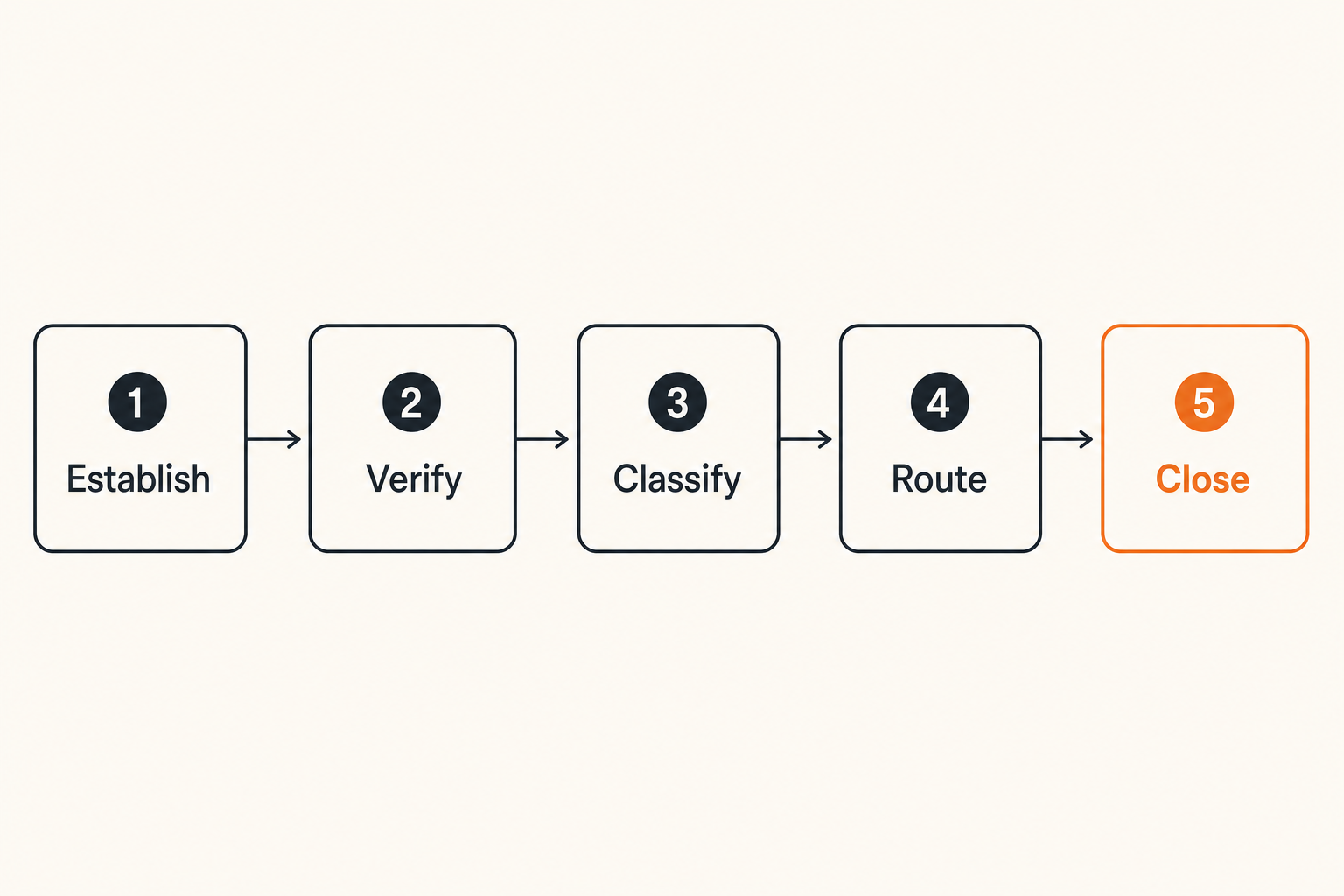
Follow a seven-step communication sequence
The messaging workflow should make risky transitions visible. A useful sequence is:
- Establish: Create the approved project channel and fallback contact.
- Verify: Confirm the identities and roles of initial participants.
- Classify: Decide whether the conversation is routine, sensitive, or authorization-bearing.
- Route: Move secrets and large files to their designated handling process.
- Confirm: Use stronger verification for high-impact actions.
- Record: Preserve necessary approvals in an agreed authoritative location.
- Close: Revoke access, transfer records, and execute retention rules.
This sequence does not require enterprise software. It requires explicit boundaries. The same model can serve a two-day editing job or a six-month development engagement, with controls scaled to consequence.
Use status boundaries for risky actions
Messaging encourages immediate action. A client asks for a deployment, the freelancer replies “sure,” and work begins. Introduce status labels to prevent discussion from being mistaken for authorization:
- Proposed: Being discussed; no action authorized.
- Pending verification: Request received; identity or details need confirmation.
- Approved: Authorized by a named person.
- In progress: Action has started.
- Completed: Result delivered with evidence where appropriate.
- Cancelled: Request withdrawn or rejected.
These labels are especially useful for payment changes, production access, publishing, and destructive actions. They also reduce disputes because both parties can see whether a request crossed the approval boundary.
Keep asynchronous work understandable
Remote clients may respond hours later from different devices. Long threads mix old and new instructions, while edited messages can remove useful context. Summarize decisions instead of expecting everyone to reconstruct them from chat history.
A good decision record includes the request, responsible person, approver, effective date, and relevant artifact. Do not duplicate the entire conversation. Capture the operational result.
For example:
Decision: Publish version 2 landing page
Approved by: Client product owner
Scope: Desktop and mobile assets dated 2026-10-06
Excluded: Pricing experiment
Deployment window: 16:00–17:00 UTC
That small structure shortens future investigation and makes handoff easier.
Know what breaks in practice
Recognize common failure modes
The most common failures are rarely exotic:
- Trusting a familiar profile without checking an account change
- Sending a secret because an encrypted room feels universally safe
- Adding a subcontractor without defining role or expiry
- Leaving client sessions active on an old device
- Assuming disappearing messages erase every copy
- Mixing several clients in one general-purpose workspace
- Using chat history as the only project record
- Sharing sensitive prompts or attachments with an unapproved AI service
- Continuing in a compromised channel because moving feels inconvenient
Another failure is policy overload. A 20-page procedure that nobody remembers during a deadline offers less protection than five clear rules consistently applied.
Prepare a recovery procedure
When compromise is suspected, speed and sequence matter. Prepare a short response plan before you need it:
- Stop sensitive actions in the affected channel.
- Contact the client through the pre-verified fallback route.
- Revoke suspicious sessions, devices, links, and participant access.
- Rotate credentials that may have appeared in the conversation.
- Identify affected files, approvals, and downstream systems.
- Preserve only the evidence required for investigation or obligations.
- Re-establish identities before resuming work.
- Document what changed to prevent recurrence.
Do not delete everything immediately if doing so would destroy evidence needed to understand the incident. Conversely, do not preserve unnecessary private data indefinitely under the vague label of forensics. The response should match contractual, legal, and operational requirements.
Distinguish what works from what fails
What works: short onboarding, verified fallback contacts, clear action thresholds, separate secret handling, visible project membership, endpoint hygiene, and scheduled offboarding.
What fails: relying on brand reputation alone, treating every participant as permanently trusted, storing all project history by default, and assuming clients interpret “secure” the same way you do.
The best controls are composable. If a device is lost, session revocation limits access. If an identity is spoofed, out-of-band confirmation blocks high-impact action. If someone enters the wrong room, data classification limits what was available there. No single control carries the entire system.
Scale the model from one freelancer to a small team
Add structure before adding people
A solo freelancer can hold project context mentally. A small team cannot. As collaborators join, define separate project rooms, participant roles, invitation authority, and access expiry.
Avoid one permanent room containing every contractor and client. That design makes accidental disclosure likely and offboarding difficult. Create boundaries based on client, project, and sensitivity. A public marketing draft and a production incident should not share the same membership merely because the same people sometimes discuss both.
Use a consistent naming convention that reveals enough context to prevent mistakes without exposing unnecessary client information on lock screens or workspace lists.
Assign ownership for decisions
Shared responsibility often becomes unowned responsibility. Assign an owner for:
- Approving new participants
- Maintaining fallback contacts
- Reviewing active sessions and devices
- Moving final records into the client system
- Initiating incident response
- Closing the workspace and deleting retained material
For a solo operator, these remain useful roles even when one person performs all of them. The checklist prevents a project from drifting into permanent access.
Practical rule: Every sensitive workspace needs a named owner, an authoritative client contact, and a defined closing condition.
Work around client constraints carefully
Some clients mandate a particular platform. Others cannot install new software or follow a complex verification process. Security architecture has to accommodate those realities without pretending they do not exist.
If a required channel lacks a control you need, reduce what passes through it. Use it for scheduling and routine discussion while placing credentials or sensitive artifacts in an approved alternative. Document the limitation and obtain agreement on the compensating process.
Do not quietly bypass the client’s policy. That can create contractual and compliance problems even when your alternative seems technically stronger. Escalate the mismatch and agree on a workable boundary.
Where qrypt.chat fits in the communication stack
Use private chat as a controlled workspace
A private messaging service should occupy a defined place in the project architecture. It can provide the protected conversational layer where verified participants coordinate work, discuss sensitive context, and confirm routine decisions.
It should not become the only copy of every deliverable, the universal credential vault, or a replacement for client-owned systems of record. Keeping those boundaries clear makes the messaging layer easier to secure and eventually close.
For privacy-conscious freelancers and remote teams, qrypt.chat can be evaluated as that communication layer. The important question is how it fits with participant verification, endpoint controls, file handling, retention, and incident recovery—not whether a chat interface alone solves every security problem.
Evaluate fit with a real project
Run a limited pilot using a representative but non-critical project. During the pilot, test:
- How easily both sides establish and verify the intended conversation
- Whether new devices or participants are noticeable
- How the workflow handles files and sensitive requests
- What happens when someone loses access
- Whether important decisions can be summarized and transferred
- How project closure and deletion work in practice
Include the client in the evaluation. A theoretically strong workflow that causes recipients to copy everything into less secure channels will fail operationally.
Freelancing encrypted messaging works when privacy controls support a repeatable business process: establish trust, limit access, verify consequential actions, preserve necessary decisions, and close the workspace cleanly.
Try qrypt.chat
Use private messaging as a deliberate part of your client security workflow. Try qrypt.chat.