
A client sends production credentials in a chat thread. A contractor forwards part of the conversation to a personal account. Three months after the project ends, the files, messages, and access details still exist across four devices.
This is the practical problem behind freelancing encrypted messaging in 2026. Freelancers increasingly handle source code, product plans, customer data, financial documents, unpublished media, and AI-generated work. Yet communication is often assembled from whichever apps the freelancer and client already use.
Teams think the problem is choosing an encrypted chat app. The real problem is designing a communication workflow that controls identity, devices, message state, files, access, retention, and handoff from the first client contact to final deletion.
That changes the conversation. Encryption matters, but it cannot compensate for an exposed endpoint, an unverified contact, a copied attachment, or a project channel that remains open indefinitely. This guest contribution draws on the freelance workflow experience of the team at ugig.net, with a focus on security controls that independent professionals can actually operate.
Table of contents
- Why freelancing encrypted messaging is an operational problem
- Build a threat model before choosing a messenger
- Choose the communication architecture
- Control identity devices and onboarding
- Design the secure messaging workflow
- Handle files credentials and AI tools safely
- Set client expectations and retention rules
- Understand what breaks in practice
- Run a 30-day freelancing encrypted messaging rollout
- Decide where qrypt.chat fits
Why freelancing encrypted messaging is an operational problem
A conversation spans the full project lifecycle
Freelance communication rarely stays in one place. Discovery may begin on a marketplace or social platform. Scope moves to email. Delivery questions enter a group chat. Files arrive through cloud storage. Credentials appear in a direct message. Approval ends up in a video-call transcript.
Each move creates another copy, account, device, notification surface, and retention policy. Even if one channel uses strong end-to-end encryption, the project may still leak through previews on a locked screen, automatic downloads, screenshots, backups, exports, or copied content.
The practical question is not simply, “Is this chat encrypted?” It is, “Where can this project’s information exist, who can access each location, and how does it leave the system?”
Encryption does not create operational control
Encryption protects information under specific conditions. Encryption in transit can protect data while it moves between systems. End-to-end encryption is intended to limit message content to communicating endpoints. Device encryption protects stored data when the device and keys are secured.
None of those controls verify that the recipient is the intended client. They do not stop the recipient from exporting a file. They do not remove malware from a laptop or prevent someone from pasting confidential material into an AI service.
Practical rule: Treat encrypted messaging as a protected transport layer, not as the entire security program.
The workflow has to remain usable
A policy that requires five unfamiliar tools for every exchange will be bypassed. A policy with no fallback will fail when a client cannot access the preferred channel. A policy that classifies every message as highly sensitive will produce classification fatigue.
Good freelancer security is intentionally small. Use a limited number of channels, assign each a clear function, and reserve the strongest controls for material that creates meaningful risk. The objective is not perfect secrecy. It is predictable handling under normal deadlines, travel, device changes, and client pressure.
Build a threat model before choosing a messenger
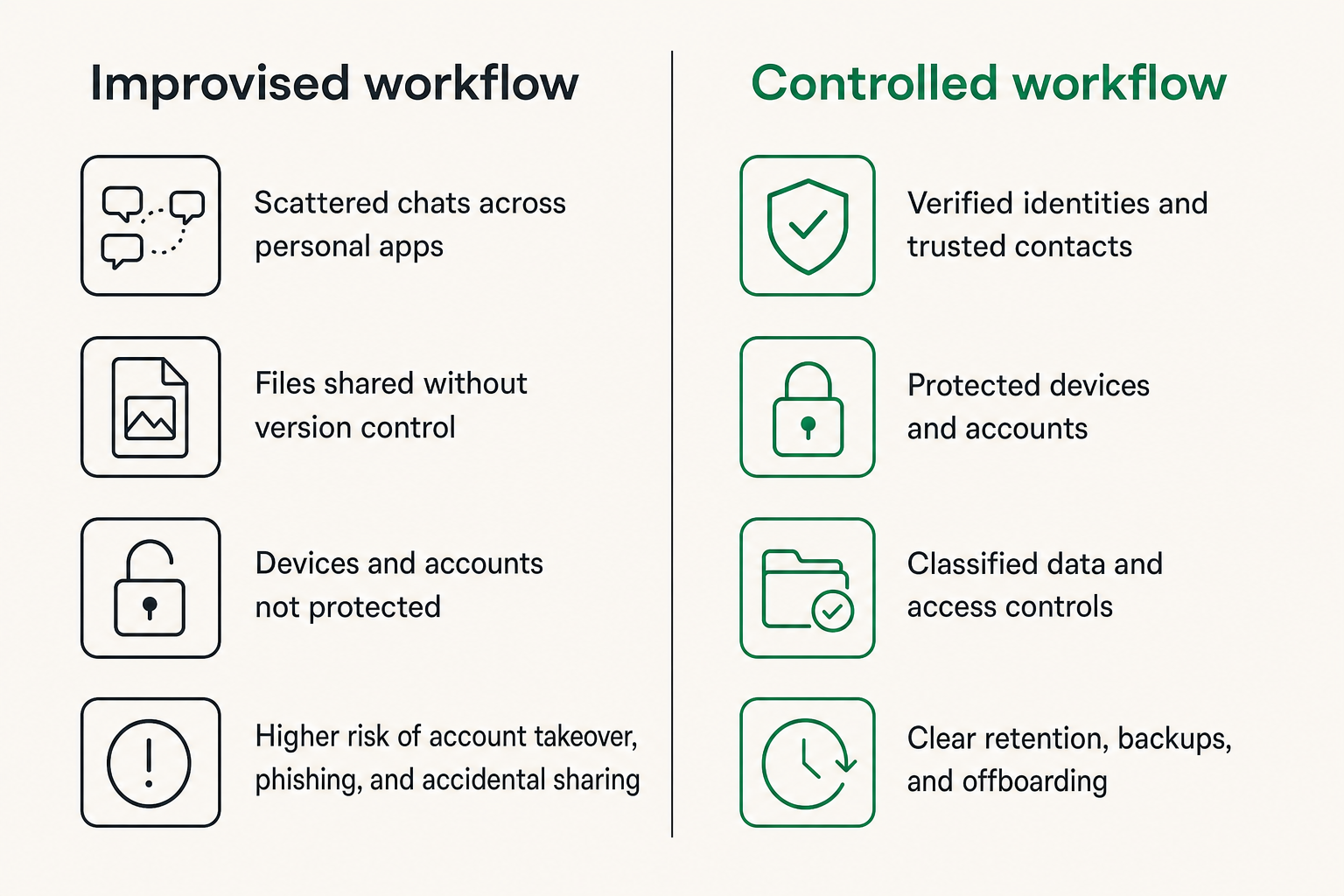
Identify what the client is trusting you with
Start with the actual engagement. A copywriter may receive launch plans and interview recordings. A developer may hold repository access, API credentials, logs, and customer records. A virtual assistant may see calendars, invoices, addresses, and internal discussions.
List the data types before selecting controls:
- Contract and billing information
- Client contact details
- Drafts, source files, and deliverables
- Credentials, recovery codes, or private links
- Customer or employee information
- Legal, health, or financial documents
- Internal strategy and incident discussions
This inventory can be short. Its purpose is to prevent the common mistake of protecting chat text while ignoring the attachment, notification, or credential that carries more risk.
Separate likely threats from dramatic ones
Many freelancers do not face a dedicated intelligence operation. They do face account takeover, phishing, stolen devices, malicious browser extensions, accidental sharing, reused passwords, impersonation, and former collaborators retaining access.
A useful way to think about it is to rank threats by likelihood and impact. An unlocked phone left in a shared workspace may be more relevant than an exotic attack against a cryptographic protocol. A fake client account requesting source files may be more plausible than interception of properly encrypted traffic.
Security professionals can extend this model with jurisdictional, metadata, coercion, or targeted-surveillance concerns. The basic workflow still applies: identify the asset, route, endpoint, actor, and consequence.
Map data to consequences
Assign simple handling levels rather than writing a complex policy:
| Level | Examples | Default handling |
|---|---|---|
| Routine | Scheduling, public links, general status | Approved business channel |
| Internal | Drafts, estimates, ordinary project notes | Encrypted project conversation |
| Sensitive | Customer data, unreleased plans, contracts | Verified participants, restricted files, limited retention |
| Secret | Passwords, private keys, recovery material | Dedicated secret-sharing method; never ordinary chat history |
The labels only help if they change behavior. If “Sensitive” and “Routine” use the same channel, storage, and retention, the classification is decorative.
Choose the communication architecture
Compare channels by function
The mistake teams make is choosing one app and pushing every activity through it. That turns the messenger into a notification system, file archive, password manager, approval ledger, and knowledge base. Most chat products are not equally good at all five jobs.
| Function | Suitable location | Poor default |
|---|---|---|
| Fast coordination | Encrypted project chat | Public social direct messages |
| Formal approval | Contract system or designated record | Ambiguous reaction emoji |
| Large deliverables | Access-controlled file store | Permanent chat attachment |
| Credentials | Password manager or expiring secret transfer | Plaintext message |
| Durable decisions | Project record with owner and date | Search-dependent chat history |
| Urgent fallback | Pre-agreed secondary channel | Any new account claiming to be the client |
This division reduces the value of any single compromised system. It also makes cleanup possible because the freelancer knows where authoritative files and approvals belong.
Define a system of record
Chat is conversational. A system of record is authoritative. The two can overlap, but they should not be confused without an explicit decision.
For each project, decide where to find:
- The current scope and contract
- Final client approvals
- The latest deliverable
- Access ownership and expiration
- Open actions and responsible people
- Retention or deletion requirements
When a decision occurs in chat, summarize it in the designated record. Include what changed, who approved it, and the effective date. This avoids relying on a long message history that may disappear, become inaccessible, or contain contradictory instructions.
Keep sensitive data out of general chat
Some information should not become a durable message at all. Passwords, private keys, seed phrases, recovery codes, identity documents, and bulk personal data deserve purpose-built handling.
Disappearing messages can reduce casual retention, but they are not a guarantee of deletion. Recipients can copy content, take screenshots, photograph a screen, or retain data through endpoint tools. Use expiration as one layer, not as proof that no copy exists.
Practical rule: If exposure would require immediate credential rotation, legal review, or client notification, do not place the material in ordinary conversation history.
Control identity devices and onboarding
Verify the person not just the profile
Encrypted delivery to an impersonator is still a secure delivery to the wrong person. Before exchanging sensitive content, verify the client through a second known route. This might mean confirming a new chat identity during an established video call, checking a safety code where supported, or validating a new contact through a previously verified address.
Reverify after account recovery, an unexpected device replacement, a sudden contact change, or a request that alters payment details. These events are common ingredients in impersonation and invoice fraud.
Verification should match risk. Routine scheduling does not require ceremony. A request to change bank information or transfer production access does.
Treat every device as part of the boundary
The endpoint is where readable messages live. Secure it accordingly:
- Use a current operating system and install security updates promptly.
- Require a strong device passcode and automatic locking.
- Enable full-device encryption where available.
- Keep work profiles separate from shared family or guest use.
- Disable sensitive notification previews on locked screens.
- Review linked desktop, tablet, browser, and wearable sessions.
- Remove unused extensions and applications with broad permissions.
- Maintain a tested method for remotely revoking sessions.
Backups also need attention. A protected conversation can become an unprotected cloud backup or desktop export. Check whether backups include message content, attachments, or keys and whether those copies receive equivalent protection.
Use a repeatable client onboarding message
Send a concise communication plan at the start of the engagement. State the primary secure channel, the verified participants, the location for deliverables, and the route for urgent contact. Explain that passwords and recovery material will not be accepted in chat.
Also define how payment changes will be confirmed. For example: “Any request to change payment destination must be verified on our existing video call or phone route.” That sentence converts an informal assumption into a control.
Avoid presenting the policy as a technical lecture. Clients need to know what to do, not every cryptographic mechanism behind it.
Design the secure messaging workflow
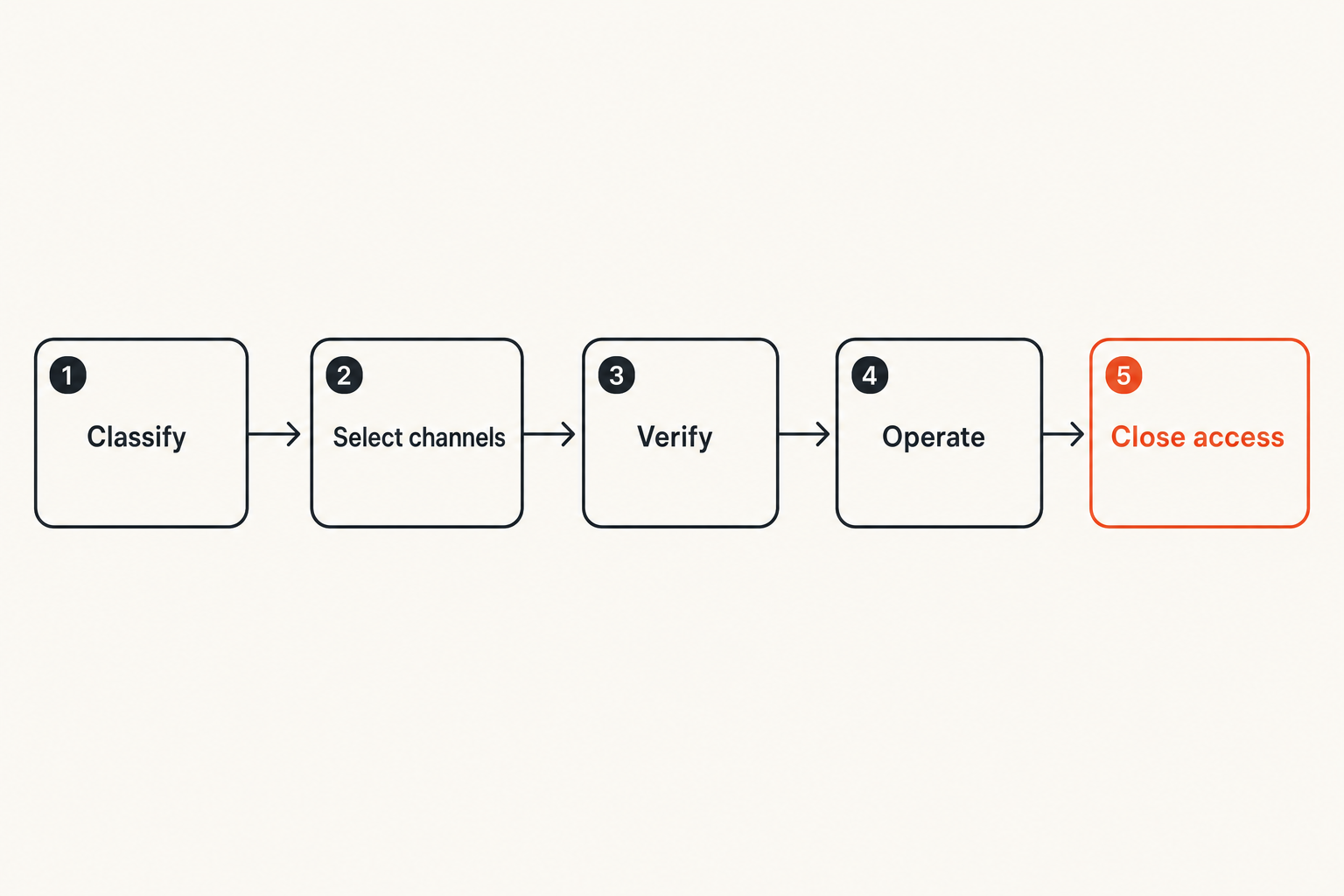
Use a seven-step project sequence
A workable encrypted messaging process follows the project rather than treating security as a one-time setup task:
- Classify the engagement. Identify expected data, client requirements, and any legal or contractual constraints.
- Select the channels. Assign locations for chat, formal decisions, files, credentials, and emergency contact.
- Verify participants. Confirm identities before exchanging sensitive material and document who may join.
- Configure endpoints. Update devices, review linked sessions, hide previews, and restrict local downloads.
- Operate the project. Keep chat focused, move durable decisions to the record, and avoid unnecessary copies.
- Review access. Check membership and file permissions at milestones or whenever a collaborator changes.
- Close and retain. Transfer ownership, revoke access, archive required records, and delete unnecessary copies.
This sequence is lightweight enough for a solo professional but explicit enough to support a small distributed team.
Make message states explicit
Chat interfaces make delivery look simple, but operational meaning is less clear. Sent may not mean delivered. Delivered may not mean read. Read may not mean understood, approved, or recorded.
Use clear language around state transitions:
- “For review” means feedback is requested.
- “Approved” means the named version may proceed.
- “Received” acknowledges delivery but not acceptance.
- “Final” identifies the deliverable and its canonical location.
- “Revoked” means a previous instruction or file must no longer be used.
For consequential decisions, include a version, date, and responsible person. Do not use a thumbs-up reaction as the only evidence that a production deployment, payment change, or legal copy was approved.
Plan retries and fallback channels
What breaks in practice is the exception path. A client loses a device. A service is unavailable. A message remains undelivered. Someone creates a replacement account and asks for an urgent file.
Define the fallback before the incident. Specify which secondary channel may be used, what information can travel through it, and how identity will be reverified. If a secure message fails, do not repeatedly copy the sensitive content into progressively weaker channels.
A good fallback message contains minimal information: there is an issue, action is required, and the recipient should reconnect through the verified route. Sensitive context can wait until the protected channel is restored.
Handle files credentials and AI tools safely
Move files according to sensitivity
Attachments are often the least controlled part of messaging. They may auto-download to several devices, appear in local search, enter photo backups, or remain after the conversation is deleted.
For sensitive files, prefer access-controlled storage with named recipients, expiration where appropriate, and revocation. Share the access path through the encrypted conversation, but keep the authoritative file in the controlled repository. Remove stale versions rather than scattering corrected copies across chat threads.
Before sending, inspect metadata and contents. Documents can reveal author names, revision history, hidden comments, geographic data, or client identities. Export a clean delivery copy when the working file contains information the recipient does not need.
Keep credentials outside conversation history
A password sent in an encrypted message may still be visible on every linked endpoint and retained in backups. It is also difficult to manage after delivery: there may be no reliable rotation reminder, ownership record, or access log.
Use unique project credentials and grant individual access where the service supports it. Prefer time-limited tokens or delegated roles over shared administrator passwords. If a temporary secret must be transferred, use a method designed for secret delivery and rotate it after use.
Never ask clients to send seed phrases, full recovery codes, or private keys. If the work genuinely involves key management, define custody, authorization, signing, backup, and recovery as a separate security design.
Set boundaries for AI-assisted work
Freelancers routinely use AI for drafting, coding, transcription, research, and analysis. The security issue is not whether AI is useful. It is whether client content is copied into another processor without authorization or sufficient control.
Before submitting client material, ask:
- Does the contract permit third-party AI processing?
- Is the information confidential, personal, regulated, or under embargo?
- Can identifiers and secrets be removed?
- What retention and training settings apply?
- Can synthetic or local test data accomplish the task?
- Does the client require disclosure of AI-assisted work?
An encrypted chat does not preserve confidentiality after content is copied out of it. Treat every paste, upload, plugin, bot, and automated transcript as a new disclosure boundary.
Set client expectations and retention rules
Write a short communication policy
A freelancer does not need a 40-page security manual. A one-page policy can define:
- Approved communication channels
- Identity verification for new participants
- Where files and credentials belong
- How approvals are recorded
- Expected response windows
- Emergency and fallback routes
- Project-close retention and deletion
- How a suspected incident should be reported
The policy should be easy to attach to a proposal or kickoff message. If the client requires a different platform, record the exception and adapt the controls instead of quietly abandoning the workflow.
Agree on retention before work begins
Deletion can conflict with contractual, tax, insurance, dispute, or professional recordkeeping requirements. Conversely, retaining every message forever increases exposure and complicates client assurances.
Define retention by category:
| Record | Typical decision question |
|---|---|
| Contract and invoice | How long is it legally or operationally required? |
| Final deliverable | Who owns the canonical copy after handoff? |
| Working drafts | Are they needed after acceptance? |
| Chat history | Does it contain required approvals or merely convenience copies? |
| Credentials | Can access be revoked immediately at project close? |
| Client personal data | Is there a documented purpose for continued storage? |
Do not promise deletion you cannot verify. Be precise about scope: active devices, linked sessions, exports, backups, and third-party systems may follow different schedules.
Close projects deliberately
Project close is a security event, not just an invoice status. Confirm delivery, transfer file ownership, remove temporary collaborators, revoke tokens, rotate shared credentials, and close guest accounts. Export only the records you are required to retain.
Then remove unnecessary local downloads, test data, transcripts, and duplicate attachments. Check desktop download folders and synced drives, not just the chat interface. Record what was retained, why, where it is stored, and when it should be reviewed again.
Practical rule: No client project is complete until access, retention, and deletion have named owners.
Understand what breaks in practice
What fails
The most common failures are operational rather than cryptographic:
- Mandating a secure app while leaving notification previews exposed
- Allowing clients to send passwords because it is convenient
- Using disappearing messages as proof of deletion
- Adding collaborators without identity verification or role review
- Mixing several clients in one account, folder, or group
- Treating every message as a permanent project record
- Keeping former client sessions active on old devices
- Copying private chat content into AI tools without approval
- Switching to an unverified fallback account during an urgent request
Another failure is security theater. Long warnings and complicated rituals can create the appearance of control while basic endpoint updates, access reviews, and project cleanup remain undone.
What works
Effective workflows have a few visible properties. Participants know which channel to use. Sensitive files have one authoritative location. Identity changes trigger verification. Credentials are separate from conversation history. Approvals use explicit language. Project closure removes access and copies.
Automation can help with reminders, account expiration, file-access reviews, and device-session checks. It should not silently forward message content or create additional archives. Every integration is another data path that needs a purpose, owner, and deletion behavior.
The useful metric is not how many security features are enabled. It is whether the workflow reduces unnecessary data movement and makes abnormal events noticeable.
Respond to a messaging incident
If a device, account, or conversation may be compromised, act in a stable order:
- Preserve enough information to understand what happened without broadly copying sensitive content.
- Use a known-safe device and channel to notify affected participants.
- Revoke active sessions, tokens, links, and credentials.
- Rotate secrets that may have been exposed.
- Identify which messages, files, and client systems were accessible.
- Follow contractual, legal, insurance, or client notification requirements.
- Rebuild trust by verifying identities and devices before resuming sensitive work.
- Update the workflow so the same failure is less likely or less damaging.
Do not use the suspected compromised channel to coordinate the entire response. Keep statements factual, especially before the scope is known.
Run a 30-day freelancing encrypted messaging rollout
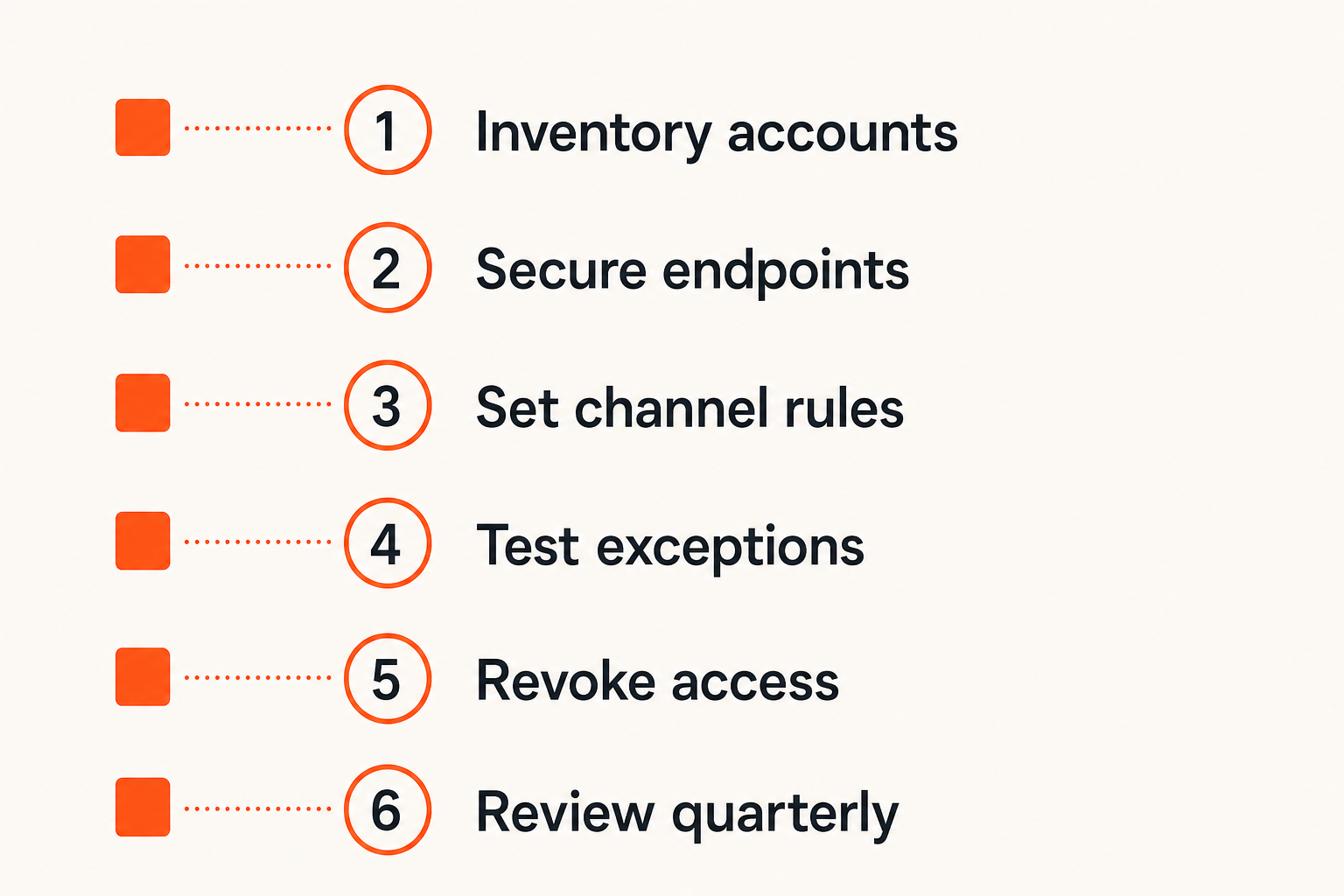
Week one inventory the current workflow
List every messaging account, linked device, browser session, integration, file repository, and backup used for client work. Record which clients use each system and whether old projects still have active access.
Then sample three recent projects. Trace one sensitive message, one file, one approval, and one credential from receipt to project close. The exercise usually reveals more copies and ambiguous ownership than an app-level review.
Choose an initial baseline: one primary encrypted communication route, one file location, one credential method, and one fallback channel. Do not migrate everything before testing the model.
Weeks two and three standardize and test
During week two, secure endpoints and accounts. Update devices, strengthen authentication, remove stale sessions, disable revealing previews, and review backup behavior. Create the short client onboarding message and handling levels.
During week three, test with a low-risk project. Ask another person to simulate common exceptions:
- A new participant requests access.
- The client replaces a phone.
- A sensitive attachment is sent to the wrong thread.
- The preferred service is unavailable.
- Payment details change unexpectedly.
- The project ends earlier than planned.
A control that only works during an ideal project is not an operational control.
Week four review the evidence
Review what the test produced. Could you identify verified participants? Was the final approval easy to locate? Did credentials remain outside chat? Could you revoke file access? Did project closure remove linked sessions and temporary copies?
Track a small set of indicators rather than vanity counts:
- Number of stale accounts or sessions found
- Number of credentials discovered in chat history
- Time required to revoke project access
- Percentage of active projects with an agreed communication plan
- Number of unexplained file copies or external integrations
These are not universal benchmarks. They are local signals showing whether the architecture is becoming easier to understand and operate. Repeat the review quarterly and after any material incident.
Decide where qrypt.chat fits
Evaluate fit using operational questions
A private messaging service should be evaluated within the workflow, not in isolation. When considering qrypt.chat for freelancer-client communication, ask how it supports the project’s actual trust boundary.
Review participant verification, device behavior, message and attachment handling, account recovery, group membership, linked sessions, notification privacy, and deletion expectations. Test the service with realistic project scenarios rather than relying only on feature labels.
Also check the human side. Can a new client join without creating unsafe workarounds? Can you distinguish expected identity changes from suspicious ones? Can both parties understand what remains after a project closes?
Keep the architecture larger than the app
No messenger should become the only place where scope, approvals, deliverables, credentials, and emergency recovery live. A resilient setup keeps secure conversation connected to controlled files, explicit records, protected endpoints, and a documented fallback.
That is the central lesson of freelancing encrypted messaging: the UI is not the whole system. Trust moves through people, devices, files, integrations, and retention decisions. Encryption strengthens that system when the surrounding workflow gives it clear boundaries.
The mistake teams make is asking whether a tool is secure in the abstract. The better question is whether the complete working process limits exposure, detects identity changes, supports cleanup, and remains usable when something goes wrong.
Try qrypt.chat
Explore private communication for security-conscious freelance and remote work. Try qrypt.chat.