
A remote team adopts a secure chat product, enables the strongest-looking privacy settings, and assumes the communication problem is solved. Then a contractor leaves with an active session, a notification preview exposes a confidential message, or an integration copies plaintext into a ticketing system.
The encryption may have worked exactly as designed. The communication system still failed.
Teams think the problem is choosing SaaS encrypted messaging with the right algorithm. The real problem is designing an operating model in which identity, devices, keys, message state, integrations, recovery, and human behavior preserve the intended trust boundary. In 2026, that is an architecture and workflow decision—not a checkbox in a chat application.
This guide explains how to evaluate and implement that system without requiring every reader to become a cryptographer.
Table of contents
- SaaS encrypted messaging is an architecture
- Build the threat model before choosing software
- Understand end-to-end encryption boundaries
- Control identity access and devices
- Design the message lifecycle workflow
- Handle integrations bots and notifications safely
- Plan administration compliance and recovery
- Operate encrypted messaging as production infrastructure
- Implement and migrate without losing control
- Evaluate product fit and make the final decision
SaaS encrypted messaging is an architecture
Encryption is only one control
Encryption protects content under specific conditions. It does not decide who should be in a room, whether a device is trustworthy, how long attachments remain available, or what happens when someone loses a phone.
A useful way to think about SaaS encrypted messaging is as a chain of controls:
- Identity establishes who a participant is.
- Authorization determines where that participant belongs.
- Key management determines who can decrypt.
- Endpoint security protects decrypted content.
- Retention controls how long content remains useful—and exposed.
- Operations handle failures, departures, and incidents.
The mistake teams make is assessing these controls independently. A strong protocol paired with weak device enrollment can still permit an unauthorized endpoint to receive legitimate keys.
The service model changes the risk
SaaS removes the need to maintain messaging servers, databases, availability zones, and client distribution infrastructure. It also introduces a service provider into delivery, account management, updates, and potentially key or content handling.
That is not automatically bad. A maintained service can be safer than an abandoned self-hosted deployment. The practical question is which responsibilities remain with the provider, which remain with the customer, and which must be shared.
The team at saasrow.com regularly examines software through this operational lens: product value depends on how the service fits the workflow, not merely on the length of its feature list.
Start with communication classes
Do not force every message into one policy. Define classes such as:
| Communication class | Typical content | Membership | Suggested retention |
|---|---|---|---|
| Routine coordination | Scheduling, status | Broad team | Short to moderate |
| Sensitive operations | Credentials process, incidents | Restricted group | Short |
| Client communication | Project and account details | Named participants | Contract dependent |
| Durable records | Approvals, formal decisions | Controlled system | Move to record system |
Chat is useful for rapid coordination. It is usually a poor permanent system of record. Moving durable decisions into an appropriate repository reduces pressure to retain every conversation indefinitely.
Practical rule: Classify conversations before configuring rooms, retention, or integrations. Policy should follow the content and participants, not the name of the chat channel.
Build the threat model before choosing software
Identify what must remain private
Begin with assets rather than products. These may include customer details, security findings, internal strategy, legal discussions, employee information, authentication material, and location data.
For each asset, ask:
- Can it be discussed in messaging at all?
- Which roles need access?
- Does it need to persist after the conversation?
- Would metadata about the conversation itself be sensitive?
- Is forwarding outside the original group acceptable?
This exercise often reveals that the requirement is not simply “private chat.” It may be private incident coordination with short retention, or client messaging where identity verification matters more than anonymity.
Name the adversaries that matter
A useful threat model includes realistic actors and failure conditions:
- A network observer on hostile Wi-Fi
- A compromised or curious service operator
- An attacker who steals account credentials
- A former employee with an enrolled device
- Malware or another user on an unlocked endpoint
- A legitimate participant who screenshots or forwards content
- A subpoena, policy requirement, or administrative request
- Accidental exposure through backups and notifications
No messaging product eliminates all of these risks. End-to-end encryption can reduce provider and network visibility, but it cannot stop an authorized recipient from photographing the screen.
Separate probable risks from dramatic ones
Teams sometimes optimize for an advanced cryptographic attack while leaving shared tablets signed in or allowing unrestricted guest invitations. That reverses the likely risk order for many organizations.
Score each scenario by likelihood, impact, detectability, and available mitigation. A stolen unlocked laptop may deserve more attention than an attempt to break modern cryptography. That changes the conversation from “Is this app secure?” to “Does this system reduce our material communication risks?”
Document accepted risks too. If users may export messages for business reasons, say so and control the destination rather than pretending export cannot happen.
Understand end-to-end encryption boundaries
Transport encryption is not enough
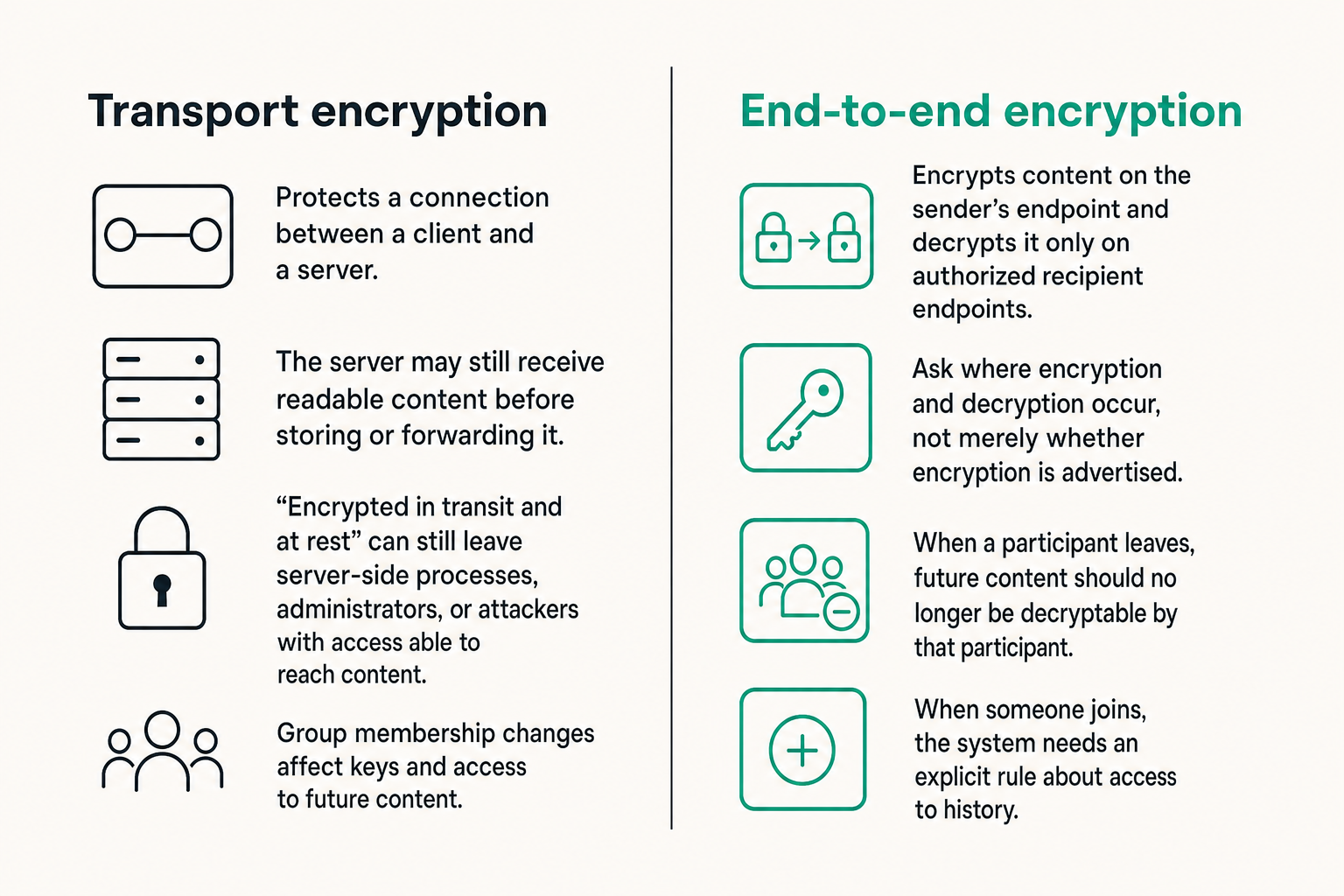
Transport encryption protects a connection between a client and a server. The server may still receive readable content before storing or forwarding it. End-to-end encryption, by contrast, is intended to encrypt content on the sender’s endpoint and decrypt it only on authorized recipient endpoints.
The distinction matters because “encrypted in transit and at rest” can still leave server-side application processes, administrators, or attackers with database and key access able to reach content. Ask where encryption and decryption occur, not merely whether encryption is advertised.
Also ask how group membership changes affect keys. When a participant leaves, future content should no longer be decryptable by that participant. When someone joins, the system needs an explicit rule about access to history.
Endpoints are part of the security boundary
Readable messages must exist somewhere for humans to use them. On endpoints, content may appear in memory, local databases, screenshots, clipboard history, accessibility tools, crash reports, or operating-system backups.
Controls that matter include:
- Local database protection
- Screen-lock requirements
- Application lock or reauthentication
- Remote device revocation
- Minimal diagnostic logging
- Safe attachment handling
- Protection against unencrypted cloud backups
What breaks in practice is the assumption that end-to-end encryption makes endpoint conditions irrelevant. It does the opposite: it moves more trust toward the endpoints.
Metadata remains operationally important
A provider may need routing information, account identifiers, device status, timestamps, message size, abuse signals, or subscription data even when message content is encrypted. Some metadata is necessary to operate a reliable multi-device service.
Evaluate what is collected, why it is needed, how long it remains, and who can access it. Avoid absolute claims such as “zero data” unless the architecture genuinely supports them.
Metadata can reveal that two people communicated during an incident, even without exposing their words. For high-risk users, that relationship may itself be sensitive. For a normal remote team, the more immediate concern may be excessive retention of IP addresses or verbose client logs.
Control identity access and devices
Tie accounts to durable identities
A messaging account should map to a person or controlled service identity. Shared accounts make attribution, revocation, and incident investigation unreliable.
For organizations, evaluate single sign-on, multifactor authentication, domain controls, guest labeling, and role-based administration. For smaller groups, verified contact methods and clear safety-number or key-verification workflows may be more practical.
Identity verification should be understandable. If a contact’s cryptographic identity changes after device replacement, users need a clear warning and an appropriate verification path—not a technical message they will reflexively dismiss.
Treat every device as a credential
A logged-in device is effectively a standing authorization to receive and decrypt messages. Inventory it accordingly.
A device enrollment workflow should answer:
- Who initiated enrollment?
- Was a trusted existing factor used to approve it?
- Are other sessions notified?
- Can the user and administrator inspect enrolled devices?
- Can one device be revoked without destroying the whole account?
- What message history, if any, reaches the new device?
Practical rule: If the team cannot quickly list and revoke devices, it does not have reliable control over encrypted messaging access.
Make offboarding an immediate workflow
Removing someone from a payroll or identity directory is not enough if their messaging session and local message history remain available. Offboarding should remove room membership, revoke sessions, rotate relevant group access, transfer ownership, and preserve only records required by policy.
Contractors and guests deserve particular attention because their end dates may not align with standard employee workflows. Assign every guest an internal owner and an expiration date.
Revocation usually protects future access. It may not erase messages already decrypted, downloaded, copied, or captured. Policies should state that limitation clearly instead of promising retroactive deletion that endpoints cannot guarantee.
Design the message lifecycle workflow
Map state from composition to deletion
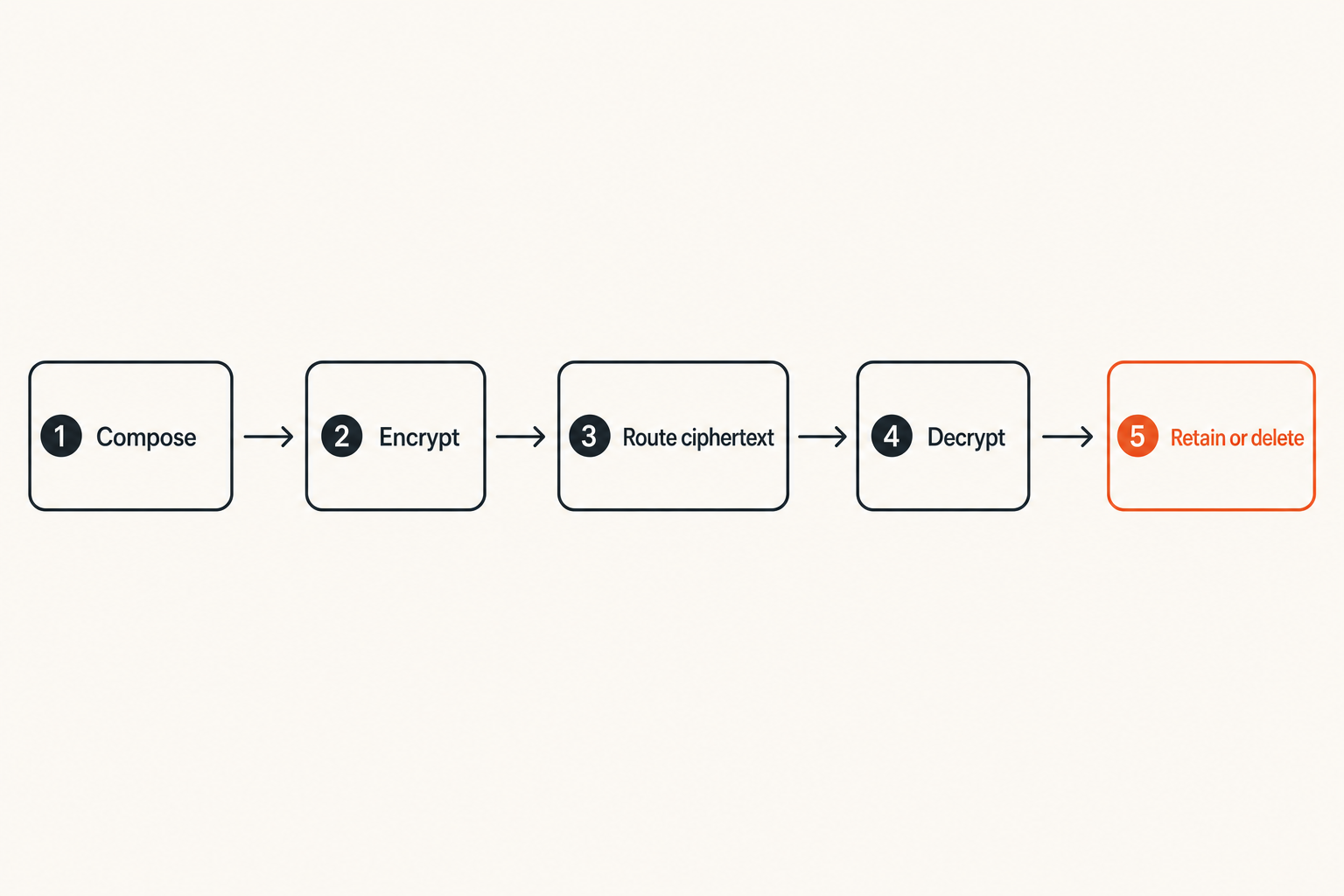
Security reviews often inspect storage while skipping the full lifecycle. Map a message through these states:
- The sender composes plaintext on an endpoint.
- The client encrypts content for authorized recipients.
- The service queues and routes ciphertext.
- Recipient devices fetch and decrypt it.
- Local clients retain, index, or cache content.
- Expiration or deletion removes available copies according to policy.
For each state, identify the responsible party and failure behavior. If a recipient is offline for three months, does queued ciphertext remain? If a device misses a deletion event, is deletion retried? If an attachment expires, do downloaded copies remain?
The lifecycle—not the send button—is the product’s real security surface.
Choose retention by conversation type
Short retention reduces the volume available after account or endpoint compromise. It can also remove useful context, complicate investigations, and conflict with recordkeeping duties.
A sensible configuration may combine:
- Ephemeral direct conversations for sensitive coordination
- Short retention in operational rooms
- Longer retention for ordinary team coordination
- Prohibition on placing formal records solely in chat
- A controlled workflow for preserving required decisions elsewhere
Avoid using disappearing messages as proof that content no longer exists. Recipients may capture it, and backups or offline devices can complicate deletion semantics.
Define delivery and retry behavior
Messaging is a distributed system. Mobile clients sleep, networks switch, devices operate offline, and duplicate requests happen. Product teams should understand delivery acknowledgments, retry limits, ordering, and attachment upload behavior.
A simplified client operation might resemble:
create local message ID
encrypt content for current recipients
submit ciphertext with message ID
if timeout: retry using the same ID
if accepted: record server acknowledgment
if membership changed: refresh keys and re-evaluate send
Stable message identifiers help prevent duplicate sends after timeouts. Clients should not silently downgrade to plaintext when encryption or key distribution fails. Failure should be visible and safe.
Handle integrations bots and notifications safely
Integrations can terminate encryption
The most common architecture mistake is adding a bot, archive connector, webhook, or AI assistant without asking where decryption occurs. An integration that receives plaintext becomes another endpoint and another trust boundary.
Compare the two models:
| Model | What works | What fails |
|---|---|---|
| Client-side integration | Content is processed on an authorized endpoint | Availability and deployment can be harder |
| Server-side plaintext integration | Central automation is simple | Provider or integration can access content |
| Ciphertext-only webhook | Event routing can remain private | Most content-based automation is impossible |
| Dedicated bot identity | Access can be scoped and audited | The bot can read every room it joins |
Grant bots explicit identities, minimal room access, narrow permissions, and revocable credentials. Never treat a bot as invisible infrastructure.
Notification previews create side channels
A perfectly encrypted message can appear in plaintext on a locked screen, smartwatch, vehicle display, shared desktop, or push notification service. Configure previews according to device risk and user context.
For sensitive deployments, notifications can indicate that a message arrived without including sender or content. Remote teams using managed laptops may permit more detail if screen locks and physical controls are strong.
Test behavior on each supported operating system. A policy written for the mobile application may not match browser notifications or wearable devices.
Search and automation require tradeoffs
Server-side search is straightforward when the server can index plaintext. With end-to-end encryption, search may need to occur locally on each device, use privacy-preserving indexes with limitations, or be unavailable across historical content.
The same tension applies to content moderation, data loss prevention, translation, summarization, and e-discovery. These features require access to content somewhere.
The mistake teams make is demanding provider-blind encryption and unrestricted server-side content processing at the same time. Make the tradeoff explicit. For highly sensitive rooms, disable content-reading automation. For lower-risk workflows, use a separately governed environment rather than weakening every conversation.
Plan administration compliance and recovery
Administrative control is not message access
An administrator may need to provision users, enforce authentication, manage subscriptions, configure retention, remove devices, and inspect service health. None of those tasks inherently requires reading message content.
Ask vendors to distinguish control-plane capabilities from content access. A well-designed administrative console can expose account state, policy compliance, device inventory, and delivery health without exposing plaintext.
Role separation is useful. Billing administrators do not need security permissions; help-desk staff may revoke a session without changing organization-wide policy; security administrators should use strong authentication and auditable actions.
Recovery changes the trust model
Account recovery is where strong designs often become vague. If the provider can restore all encrypted history after a password reset, determine what recovery secret or escrow mechanism makes that possible and who controls it.
Common approaches include:
- Recovery keys held by the user
- Approval from an existing trusted device
- Encrypted backups protected by a separate secret
- Organization-managed recovery under documented policy
- No historical recovery, with access starting fresh
There is no universally correct option. A newsroom protecting sources may prefer unrecoverable history. A business may require managed continuity. The key is to ensure recovery cannot silently bypass the stated encryption boundary.
Compliance needs explicit boundaries
Compliance is not synonymous with retaining and inspecting every message. Start with the actual obligation: access control, deletion, legal hold, record preservation, residency, auditability, or incident reporting.
Then determine whether chat should carry regulated records. It can be safer to keep sensitive coordination ephemeral while transferring required records to a purpose-built system through an approved human workflow.
Practical rule: Do not add a universal decryption or export path merely because someone says “compliance.” Map the specific requirement, responsible owner, authorized scope, and audit trail first.
Operate encrypted messaging as production infrastructure
Monitor service health without reading content
Operators still need visibility when content is opaque. Useful operational signals include authentication failures, queue age, delivery latency, client version distribution, device enrollment anomalies, key-distribution errors, attachment failures, and crash rates.
These signals should be aggregated and minimized. Diagnostic value is not a license to collect message content, contact graphs, or permanent device histories.
Establish alert ownership. A dashboard showing failed deliveries is not useful if nobody knows whether the SaaS provider, internal IT team, or security function should respond.
Prepare for incidents and degraded service
Create runbooks before the service becomes the incident-response channel. They should cover:
- Provider outage
- Suspected account takeover
- Lost or stolen device
- Compromised administrator
- Incorrect group membership
- Vulnerable client release
- Accidental disclosure through an integration
- Loss of recovery material
Maintain an independent emergency communication path. If the messaging platform is unavailable or suspected of compromise, the response team should not rely exclusively on it to coordinate.
During an incident, preserve the minimum evidence needed without broadly exporting private conversations. Device lists, timestamps, policy changes, and administrative audit events may answer the operational question without exposing unrelated content.
Measure outcomes instead of adoption
Message volume and daily active users say little about security. Better operational questions include:
- Are inactive devices being removed?
- How quickly are departing users revoked?
- Do sensitive rooms have fewer unnecessary members?
- Are clients updated within the required window?
- How often do users bypass the system through personal chat tools?
- Can the team complete a device-loss drill?
- Are required records moved to the correct repository?
Use trends rather than invented universal benchmarks. A small high-risk team and a large distributed company will have different acceptable operating ranges.
Implement and migrate without losing control
Run a scoped pilot
A pilot should test the difficult workflows, not just message sending. Include users on different operating systems, an administrator, a remote worker, a guest, and someone responsible for offboarding or compliance.
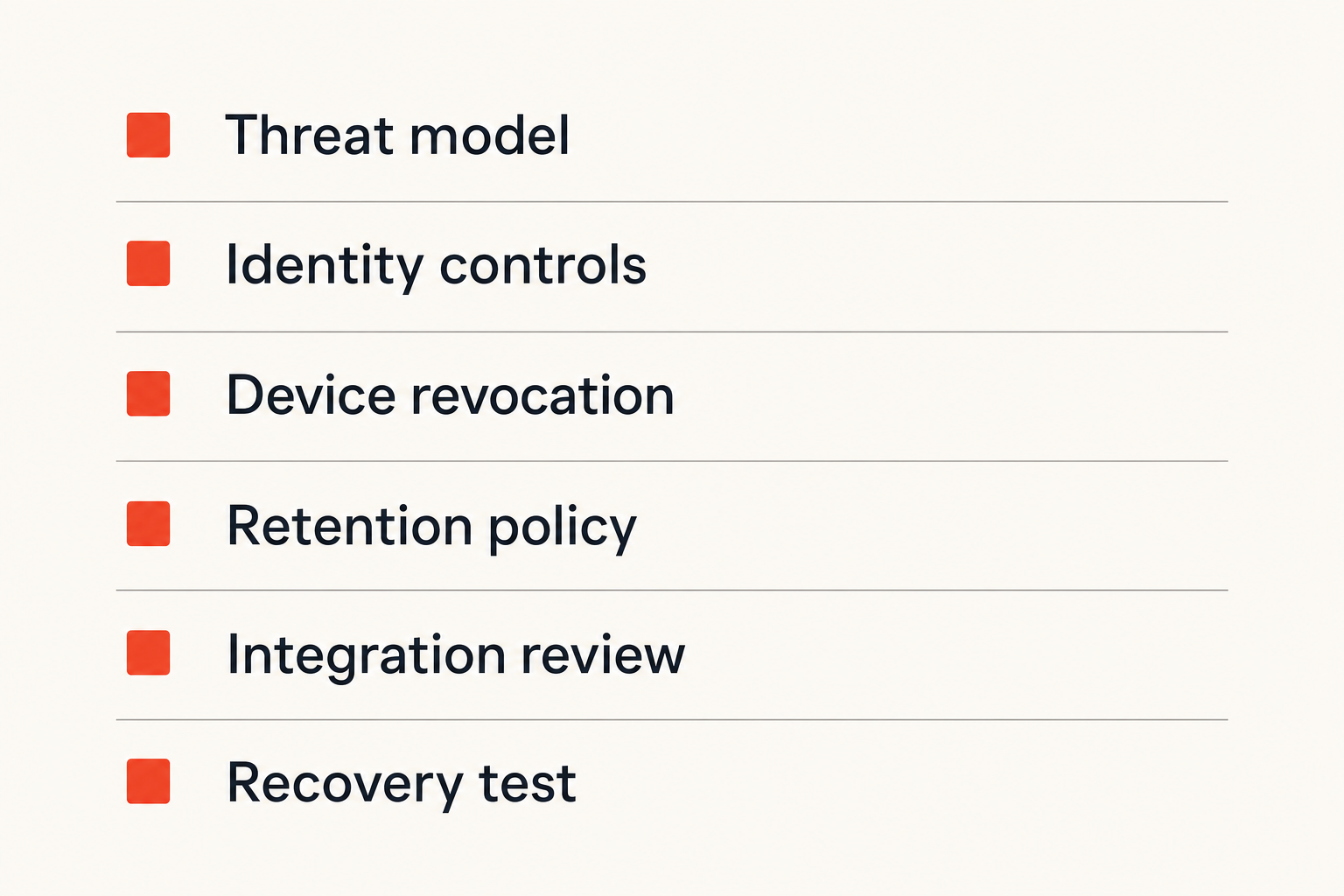
A practical implementation sequence is:
- Define communication classes and prohibited content.
- Document the threat model and trust boundaries.
- Configure identity, multifactor authentication, and administrator roles.
- Test device enrollment, verification, and revocation.
- Configure retention and attachment behavior.
- Review every integration and notification path.
- Exercise recovery, offboarding, and outage runbooks.
- Approve rollout only after owners accept residual risks.
Record unexpected behavior. Product documentation may describe intended semantics, but testing reveals how browsers, mobile operating systems, and offline clients behave in practice.
Migrate conversations deliberately
Avoid bulk-importing years of legacy chat merely because import is available. Historical content expands the impact of a future compromise and may bring old participants, attachments, and retention obligations into the new environment.
Prefer a clean cutover date. Preserve required records in their designated systems, archive legacy platforms according to policy, and start sensitive rooms with reviewed membership.
Run old and new systems in parallel only briefly. Long overlap creates ambiguity about where users should communicate and which offboarding workflow applies. Disable new activity in the legacy tool once the cutover is stable.
Train users around decisions
Feature tours do not teach secure behavior. Training should answer concrete questions:
- How do I verify a new contact or changed device?
- Which conversations require short retention?
- What should never be pasted into chat?
- How do I report an unexpected enrollment alert?
- When should a decision move into the system of record?
- What do I do after losing a device?
- May I invite a guest, bot, or integration?
Provide short, contextual guidance and repeat it during onboarding, device changes, and incidents. Users need decision rules at the moment of action, not a yearly slideshow.
Evaluate product fit and make the final decision
Use an evidence-based checklist
Marketing terminology is inconsistent, so ask questions that produce testable answers:
- Where are messages encrypted and decrypted?
- Can the provider access plaintext or recovery secrets?
- How are identity-key changes communicated?
- What happens to history on a new device?
- Can one device be remotely revoked?
- How are keys updated after membership changes?
- What metadata and diagnostics are retained?
- Can notifications hide sender and content?
- Do integrations receive plaintext?
- How do deletion and expiration behave offline?
- Which controls are available to administrators?
- What happens during provider failure or account recovery?
Request architecture explanations in plain language. If a critical boundary cannot be explained without vague assurances, treat that as an unresolved risk.
Know what good product fit looks like
The best product is not necessarily the one with the most controls. It is the one whose trust model matches the team’s risk, whose workflows users can follow, and whose operational behavior administrators can validate.
For privacy-conscious individuals, good fit may mean minimal account data, understandable verification, private defaults, and safe multi-device use. For remote teams, it may also require controlled membership, rapid revocation, clear guest handling, and dependable cross-platform delivery.
qrypt.chat fits the conversation when the objective is straightforward private communication rather than bolting encryption onto a broad collaboration suite. Evaluate it using the same architecture questions: participants, devices, lifecycle, metadata, recovery, and operational ownership. That keeps the decision useful rather than promotional.
SaaS encrypted messaging works when privacy survives ordinary events: adding a laptop, losing a phone, inviting a contractor, handling an outage, or removing a teammate. Choose the system by testing those events—not by trusting a lock icon.
Try qryptchat
Use qrypt.chat for private, encrypted conversations with a workflow built around secure communication. Try qrypt.chat.