
Secure messaging apps are easy to install and surprisingly easy to deploy badly.
A team moves sensitive conversation out of email, chooses an encrypted chat tool, and assumes the risk has dropped. Then screenshots go into cloud notes. Recovery keys sit in personal inboxes. Contractors keep access after offboarding. People verify no keys because the user experience makes it optional. The message content may be encrypted, but the workflow is still leaking.
Teams think the problem is choosing the most private app. The real problem is designing a communication system that survives real users, multiple devices, lost phones, legal retention requirements, and incident response.
That changes the conversation. Secure messaging apps are not just consumer privacy tools. In 2026, they are part of operational architecture for privacy-conscious users, security teams, founders, journalists, remote teams, and anyone who needs private communication to stay private after deployment.
Table of contents
- Why secure messaging apps are an operating decision
- How to define your threat model before choosing secure messaging apps
- The secure messaging app comparison that actually matters
- Metadata is where many private chats still leak
- Device security decides whether encryption holds
- Rollout workflow for secure messaging apps
- What breaks when secure messaging apps are implemented badly
- What works in production
- Where qrypt.chat fits
- Closing checklist for choosing secure messaging apps
Why secure messaging apps are an operating decision
The download is not the deployment
Most teams evaluate secure messaging apps the same way they evaluate personal software: install it, send a message, check whether it says end-to-end encrypted, and move on. That is not a deployment. That is a test message.
A real deployment answers harder questions. Who is allowed in which conversations? What happens when someone loses a phone? Are messages retained, deleted, exported, or backed up? Can an admin read anything? Can a provider recover anything? What happens when a group member leaves the company, project, or relationship?
The mistake teams make is treating secure chat as a feature instead of a system boundary. Once sensitive conversation moves into an app, that app becomes part of the security perimeter. It carries business context, relationship maps, incident details, credentials, strategy, legal conversations, and sometimes personal safety information.
Practical rule: If a messaging app carries sensitive decisions, treat it like infrastructure, not a casual communication preference.
Privacy depends on the workflow
End-to-end encryption protects message content in transit and usually at rest on provider infrastructure. It does not automatically protect unlocked devices, screenshots, copy-paste behavior, notification previews, cloud backups, unmanaged desktops, compromised endpoints, or people forwarding messages into less secure systems.
That does not make encryption meaningless. It means encryption is one control in a broader workflow. A useful way to think about it is: the app protects the message channel, but your operating model protects the conversation.
For individuals, that operating model may be simple: use a secure app, turn off cloud backups, verify important contacts, and keep device locks strong. For a remote team, it becomes more formal: onboarding, offboarding, group naming, retention rules, device requirements, escalation paths, and audit expectations.
The 2026 pressure is metadata and devices
The practical pressure has shifted. Many serious secure messaging apps now offer strong content encryption. The harder questions are metadata, device exposure, identity trust, and long-term cryptographic resilience.
Metadata means who talks to whom, when, how often, from which devices, and in which groups. Device exposure means the message is private until the endpoint is compromised, unlocked, backed up insecurely, or handed to someone else. Identity trust means you know the person behind the key is still the person you intend to reach.
Related reading from our network: teams designing private media workflows face similar architecture tradeoffs around storage, access, and operational habits, even though the application domain is different.
How to define your threat model before choosing secure messaging apps
Start with what you are protecting
Before comparing secure messaging apps, write down what the conversation must protect. Not in abstract terms like privacy or security. Use concrete categories.
Examples:
- Personal conversations that should not be harvested for advertising.
- Business negotiations that should not leak before announcement.
- Security incident response details that should not be exposed to an attacker.
- Legal, medical, financial, or source-protection conversations.
- Remote team coordination across countries, devices, and networks.
Each category creates different requirements. A family group needs usability and low friction. A security team handling a live breach needs identity verification, device discipline, short retention, and reliable escalation. A founder group discussing acquisition terms needs confidentiality, offboarding discipline, and controls against accidental forwarding.
Separate ordinary privacy from targeted risk
Not every user faces the same adversary. Many people mainly want protection from casual data collection, platform profiling, unsafe public Wi-Fi, and accidental disclosure. Others face targeted phishing, device compromise, coercion, insider risk, legal pressure, or sophisticated surveillance.
The practical question is not whether an app is secure in a generic sense. The practical question is whether the app and workflow match the risk.
| Risk profile | Main concern | Messaging priority | Workflow priority |
|---|---|---|---|
| Everyday privacy | Data collection and casual exposure | End-to-end encryption, minimal data use | Disable previews and backups |
| Remote team | Sensitive work discussions | Group controls and reliable identity | Onboarding and offboarding |
| Security operations | Incident details and attacker awareness | Verified contacts, rapid escalation | Short retention and device hygiene |
| High-risk user | Targeted compromise or surveillance | Strong cryptography and metadata reduction | Compartmentalization and strict devices |
No table can decide for you, but it forces a better discussion. The app choice should follow the risk model, not the other way around.
Decide what failure looks like
Good threat modeling includes failure states. What breaks in practice is not always the cryptography. It is the recovery path, the exception process, or the human workaround.
Ask:
- If a phone is stolen, what conversations are exposed?
- If an employee leaves, which groups must be reviewed?
- If a key changes, who verifies it and how?
- If a user cannot access the app, where do they go for support?
- If messages must be preserved for a legal reason, who decides and where does preservation happen?
Practical rule: Choose secure messaging apps based on the failures you can tolerate, not the features you like on a comparison page.
The secure messaging app comparison that actually matters
Compare architecture before features
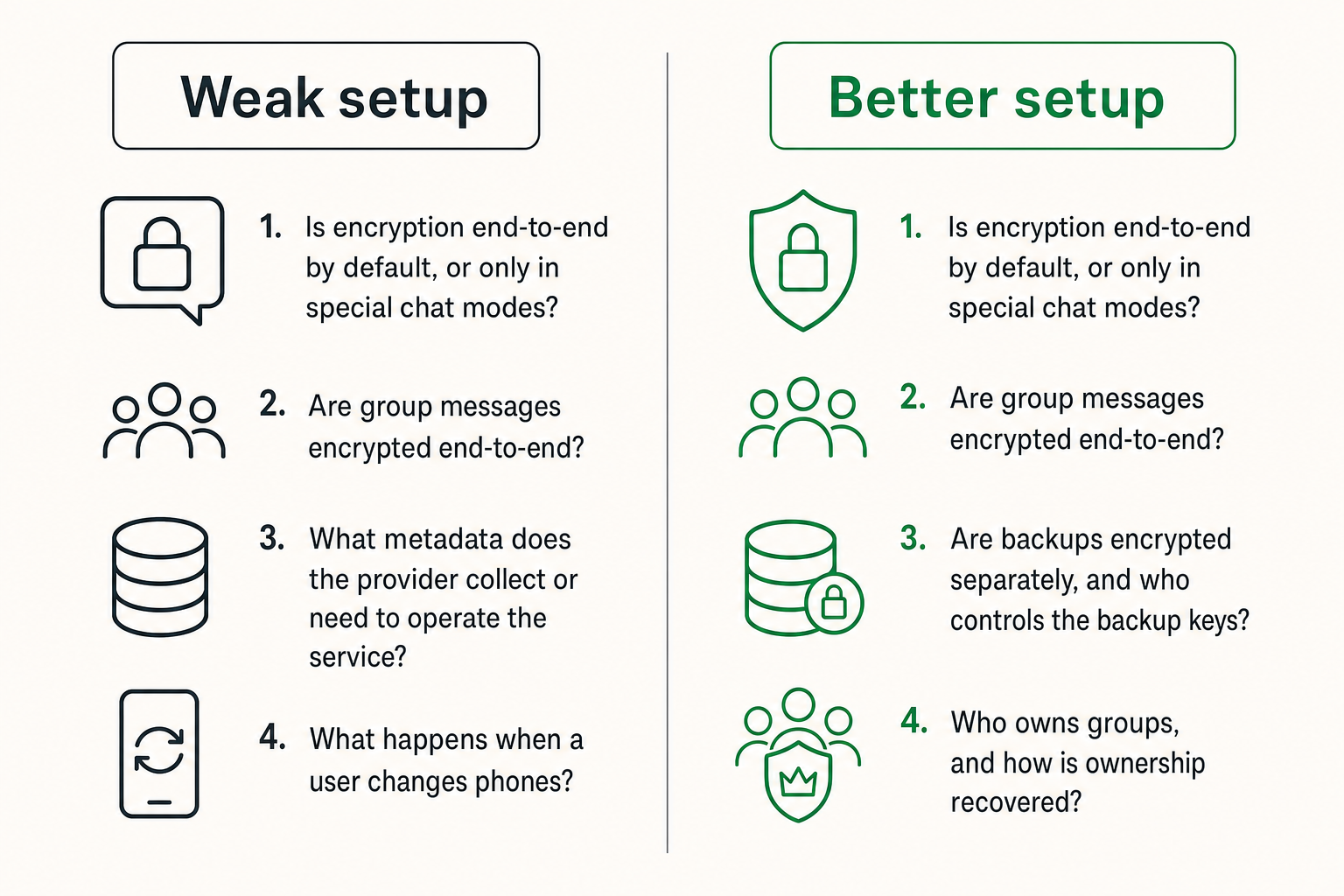
Feature lists are useful only after you understand the architecture. Voice calls, stickers, desktop clients, channels, bots, search, and file sharing all matter to adoption. But the first comparison should be about trust boundaries.
Look at these questions before UI polish:
- Is encryption end-to-end by default, or only in special chat modes?
- Are group messages encrypted end-to-end?
- What metadata does the provider collect or need to operate the service?
- How are keys generated, stored, rotated, and verified?
- Can the provider reset accounts or add devices in a way that changes trust?
- Are backups encrypted separately, and who controls the backup keys?
- Does the desktop app weaken the security model?
- What happens when a user changes phones?
A secure messaging app with fewer features may be safer for a sensitive workflow than a feature-rich collaboration platform with unclear encryption boundaries. That changes the conversation from which app is nicest to which app has the right failure behavior.
Do not confuse encryption with security
Encryption is necessary, but it is not the entire security model. A product can advertise encrypted messaging while still exposing metadata, allowing risky backups, syncing to weak endpoints, or creating admin flows that users do not understand.
The comparison that actually matters is operational:
| Evaluation area | Weak implementation | Better implementation |
|---|---|---|
| Encryption mode | Optional private chats | End-to-end encryption by default |
| Identity | Phone number only, no verification habit | Key or safety-number verification for important contacts |
| Devices | Unlimited unmanaged device linking | Clear device list and removal workflow |
| Backups | Cloud backup enabled without user understanding | Backup controls with clear key ownership |
| Groups | Large informal groups that never expire | Purpose-specific groups with owners |
| Retention | Everything kept forever | Retention matched to risk and need |
Related reading from our network: crypto checkout teams face the same separation between interface and real system state; in messaging, the chat UI is not the whole security system.
Metadata is where many private chats still leak
Content privacy is only one layer
End-to-end encryption protects message contents from the service provider and network observers in many designs. Metadata can still reveal sensitive context. If two executives message intensely before a public announcement, the content may be encrypted while the timing and relationship pattern remain revealing.
Metadata can include:
- Account identifiers.
- Contact discovery data.
- IP addresses or connection times.
- Group membership.
- Message timestamps and delivery events.
- Device types and linked clients.
- Push notification routing details.
Different secure messaging apps handle metadata differently. Some minimize it aggressively. Others retain more because they support discovery, sync, abuse prevention, analytics, or multi-device convenience. The tradeoff is not always obvious from the home page.
Group behavior creates patterns
Groups are where metadata becomes operationally interesting. A one-to-one chat reveals a relationship. A group reveals a structure.
A product launch group, legal strategy group, incident response group, or source-protection group can disclose more than the messages themselves. Membership, naming, activity spikes, and churn create signals. Even if outsiders cannot read the messages, a compromised device screenshot of the group list may be enough to reveal sensitive work.
What works is boring but effective: keep groups small, name them carefully, remove people quickly, and avoid mixing risk levels. Do not put every sensitive topic into one permanent leadership chat. Do not let project groups become archives for years of unrelated decisions.
Notifications can betray context
Notifications are an underrated leak. Lock-screen previews, wearable devices, desktop banners, and operating system notification logs can expose sender names, message fragments, group names, and urgency.
For private communication, notification settings are part of the security model. A secure app cannot fully protect a message if the operating system displays the sensitive part on a locked screen in a meeting room.
Practical rule: If a message would be harmful on a lock screen, configure notifications as if the lock screen is public.
For teams, make notification guidance explicit. For high-risk channels, disable previews. For incident rooms, avoid descriptive group names that reveal the event. For personal privacy, remember that smartwatches and shared tablets are often weaker than phones.
Device security decides whether encryption holds
The endpoint is usually the soft target
Attackers often do not need to break encryption. They can target the phone, laptop, browser session, cloud account, or person. That is why secure messaging apps must be evaluated together with endpoint hygiene.
Minimum device controls for sensitive messaging:
- Strong screen lock and short auto-lock.
- Current operating system and app updates.
- No rooted or jailbroken devices for sensitive accounts.
- Disk encryption enabled where applicable.
- Device inventory for team use.
- Ability to revoke lost or retired devices.
- Separate work and personal contexts when risk justifies it.
For security professionals, this is obvious. For normal users, it is where private communication often fails. The app is strong, but the phone is shared with a child, backed up to a weak cloud account, synced to an old tablet, or left unlocked on a desk.
Backups are a second message system
Backups are not an administrative detail. They are a second copy of the communication system. If backups are not protected with the same seriousness as messages, the encryption story weakens.
The key questions:
- Are message backups enabled by default?
- Are backups end-to-end encrypted?
- Who controls the backup key?
- Can the platform provider access backup content?
- Can account recovery expose old messages?
- Are file attachments backed up differently than text?
Some users should disable backups entirely for sensitive conversations. Others need encrypted recovery because losing message history would break business continuity. Neither choice is universally correct. The mistake teams make is not deciding. They accept defaults and discover the real backup model after a lost phone.
Key verification needs a human workflow
Most people do not verify keys. They intend to, then they do not. The app may provide safety numbers, QR codes, or security code changes, but the human process is missing.
For ordinary chats, verification can be reserved for important contacts. For sensitive operations, make it part of onboarding. For high-risk users, verification should happen through a separate trusted channel, preferably in person or through a known voice/video channel, depending on risk.
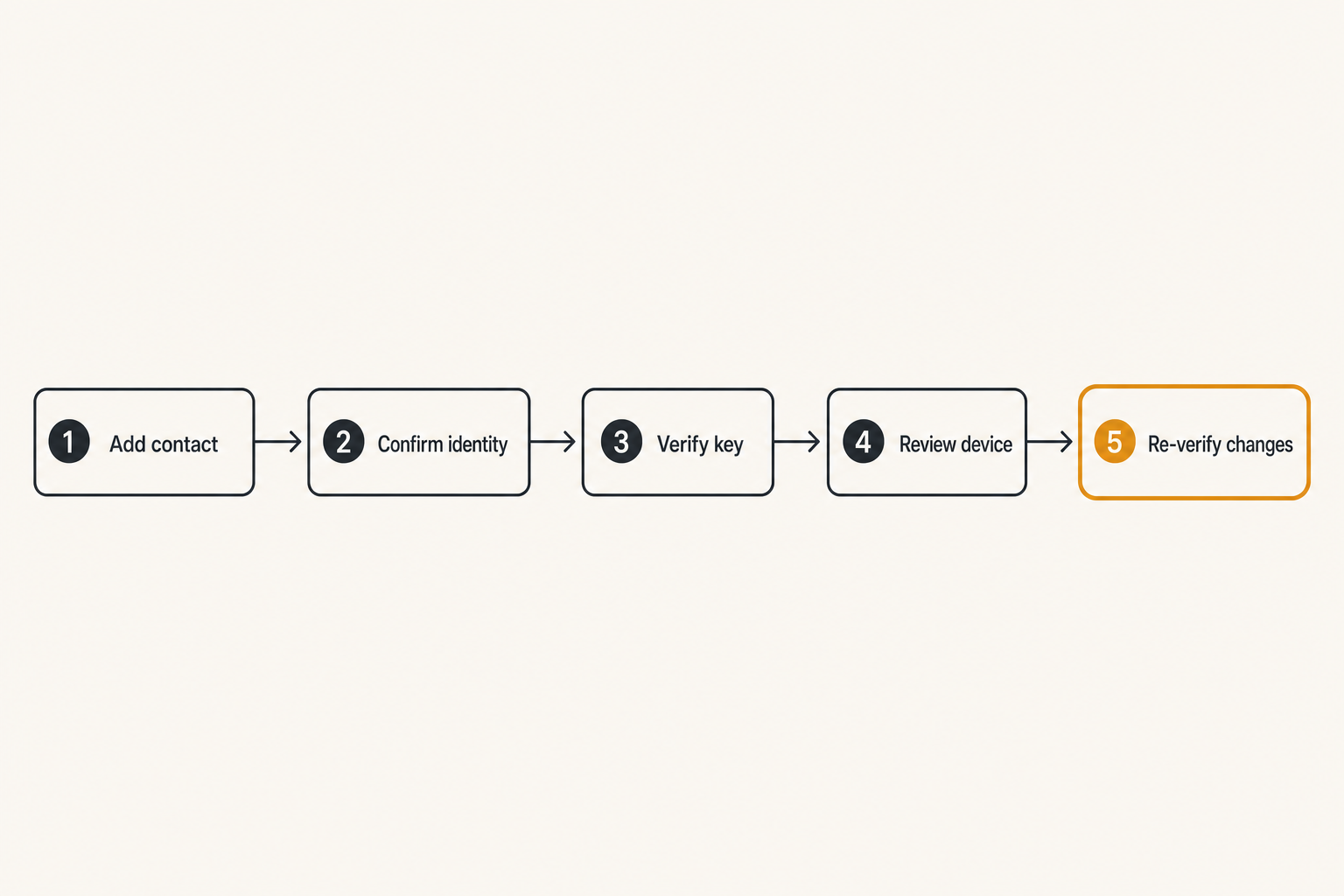
A lightweight verification workflow looks like this:
- Add the contact or group member.
- Confirm identity through a separate channel.
- Verify the safety code or key fingerprint.
- Record that verification happened if the team requires it.
- Re-verify after unexplained key changes.
Related reading from our network: crawl-path architecture in search systems has an adjacent lesson: paths and signals matter more than a single object, and secure messaging has the same workflow dependency.
Rollout workflow for secure messaging apps
A practical implementation sequence
A secure messaging rollout should be treated like a small infrastructure project. It does not need six months of governance. It does need ownership and sequencing.
Use this sequence:
- Define the risk model. Decide what conversations belong in the secure app and what does not.
- Select the app. Compare encryption defaults, metadata practices, device model, backups, group controls, and usability.
- Write the usage policy. Keep it short and concrete.
- Configure devices. Set notification, backup, update, and screen-lock expectations.
- Onboard users. Add contacts, verify important identities, and explain group rules.
- Migrate conversations. Move sensitive workflows intentionally instead of duplicating them everywhere.
- Remove old channels. Close or freeze insecure groups when possible.
- Test failure paths. Lost device, offboarding, key change, legal hold, and urgent escalation.
- Review periodically. Validate groups, devices, retention, and user habits.
This is not heavy bureaucracy. It is basic operational hygiene. The point is to prevent the tool from becoming another unmanaged side channel.
Policy should be short enough to follow
Long security policies do not help if nobody reads them. A secure messaging policy should fit on one page for most teams.
Example:
secure_messaging_policy:
  approved_use:
    - sensitive team coordination
    - incident response
    - private external conversations
  prohibited_use:
    - password sharing
    - permanent credential storage
    - exporting chats to unmanaged tools
  device_rules:
    screen_lock: required
    os_updates: required
    notification_previews: disabled_for_sensitive_groups
    unmanaged_desktop_clients: not_allowed
  group_rules:
    owner_required: true
    review_interval: quarterly
    offboarding_review: required
  verification:
    required_for:
      - executives
      - incident responders
      - external high-risk contacts
The practical question is whether a new user can understand the rules in five minutes. If not, the policy will become decoration.
Migration is where habits break
The hardest part is not installing the app. It is moving the actual workflow.
People keep using email because clients are there. They keep using SMS because external contacts respond faster. They keep using workplace chat because files and search are convenient. They keep using personal apps because old groups already exist.
To migrate successfully, make the secure path easier for sensitive work. Create the right groups. Pin the escalation channel. Give examples of what belongs there. Remove duplicate channels where possible. If the old workflow remains active, users will split conversations, and context will leak across systems.
If you want a broader security posture reference while designing the rollout, qrypt.chat keeps a concise overview of its approach on the security page.
What breaks when secure messaging apps are implemented badly
Shadow channels come back
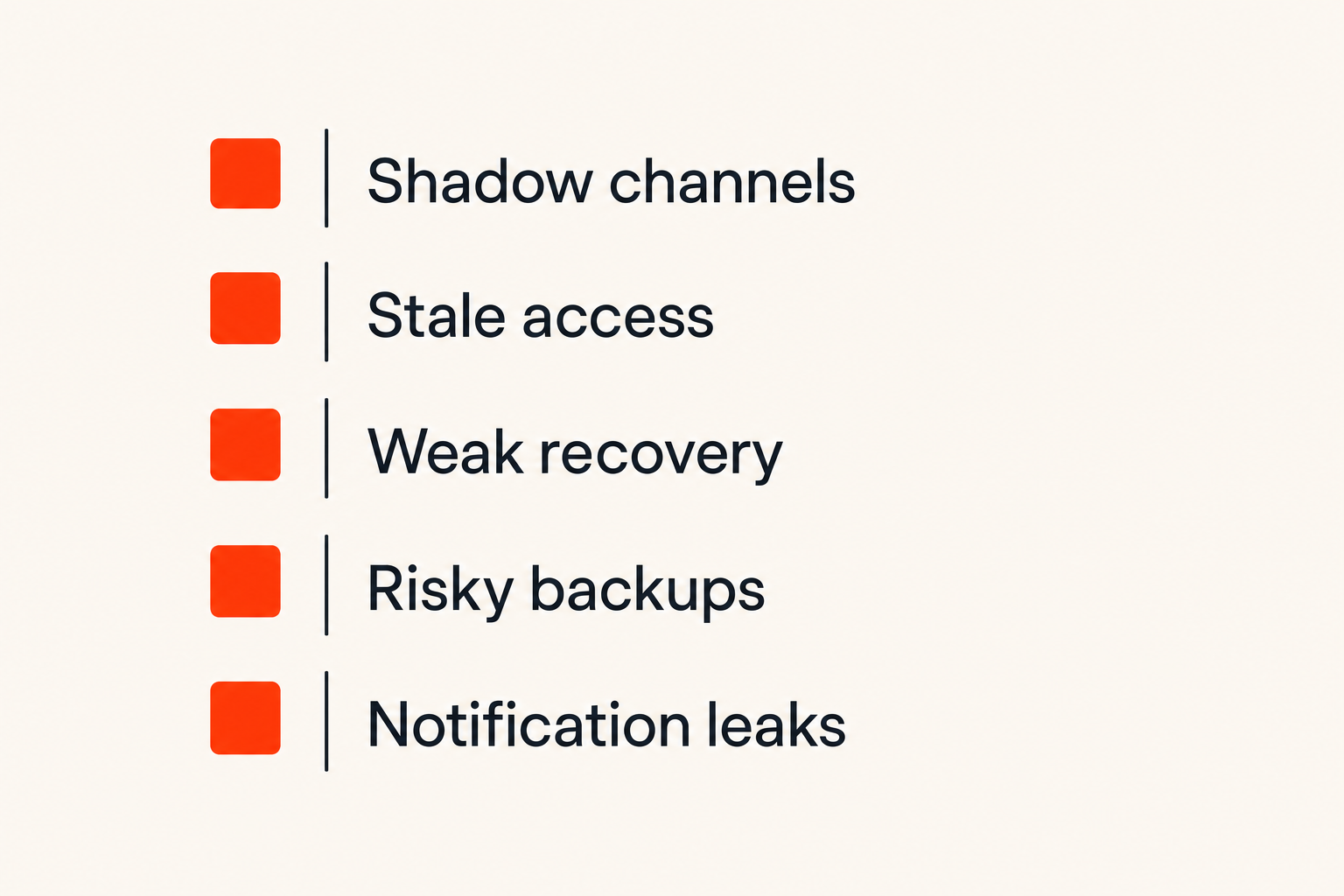
When a secure messaging app is too hard to use, people route around it. That is the first failure mode.
They send a quick SMS. They paste details into a shared document. They take screenshots and upload them to a project tool. They forward a sensitive message into an email thread because someone is not in the group. The secure app still exists, but the workflow has split.
What fails is pretending users will tolerate friction without a reason. What works is matching the tool to the job and removing unnecessary friction. If a team needs secure external coordination, make external contact onboarding clear. If desktop use is allowed, explain the device requirements. If it is not allowed, explain why.
Access control gets informal
Messaging groups often outlive their purpose. Contractors remain in project groups. Former employees stay in old chats on personal devices. External advisors get added to leadership channels for one urgent decision and never removed.
This is not a cryptography failure. It is ownership failure.
Every sensitive group needs an owner. The owner does not need to be a security engineer. They need to know why the group exists, who belongs in it, and when it should be reviewed. For remote teams, group review should be tied to offboarding and project closure.
Support and recovery become security risks
Recovery flows are where security promises get tested. A user loses a device. An executive changes phones before travel. A contractor cannot access a group. Someone sees a key-change warning and ignores it because a meeting starts in two minutes.
If the support path is informal, people will invent shortcuts. They may approve a new device without verification, re-add someone to a sensitive group based on a rushed message, or restore from an insecure backup.
Good recovery is documented before the emergency. It says who can approve account recovery, how identity is verified, what happens to old devices, and when group members should be warned.
For users who want to understand how privacy commitments are framed at the service level, the qrypt.chat privacy page is the right place to inspect those boundaries.
What works in production
Default private, explicit exceptions
What works in production is not asking people to make a perfect privacy decision every time they send a message. Defaults matter.
Use secure messaging as the default for sensitive work. Make exceptions explicit. If a conversation moves to email for legal archiving, say so. If a customer requires a different channel, document the reason. If a file must be stored in a project system, do not pretend the chat app still controls it.
Default private does not mean everything belongs in the app. Passwords should go into password managers. Long-term documents should go into controlled storage. Tickets should go into ticketing systems. Secure messaging is for conversation, coordination, and time-sensitive private exchange.
Small groups and named owners
Small groups create less exposure and clearer accountability. Large groups become broadcast channels, archives, and social spaces. That is fine for low-risk community chat. It is bad for sensitive operations.
A useful group structure:
- One group per sensitive purpose.
- Clear owner for each group.
- Minimal membership.
- Review date or closure condition.
- No permanent dumping-ground group for all confidential topics.
This structure also helps users understand what belongs where. A group named Incident Response - July 2026 has a different expectation than Leadership Chat. The first can be closed, exported under policy if required, and reviewed. The second tends to become a permanent risk sink.
Periodic validation beats trust theater
Security teams sometimes perform trust theater: long policies, dramatic warnings, and no validation. Better to run small checks.
Quarterly or semiannual validation can include:
- Review sensitive groups and remove stale members.
- Confirm device lists for high-risk users.
- Check notification preview settings.
- Test lost-device recovery.
- Reconfirm backup expectations.
- Verify keys for critical contacts after device changes.
Practical rule: A secure messaging program is healthy when recovery, offboarding, and verification are boring and repeatable.
Where qrypt.chat fits
Private communication as an architecture problem
qrypt.chat is built for people who care about private communication, secure messaging, and practical digital security. That matters because the market is noisy. Many products talk about privacy. Fewer force the right architectural questions: encryption boundaries, identity, metadata, device trust, and long-term resilience.
The useful product question is not whether one app can magically eliminate all risk. It cannot. The useful question is whether the app fits a disciplined private communication workflow.
If your conversations include sensitive personal, professional, or security context, you need a messaging layer that treats privacy as a design constraint rather than a sticker on the landing page. That is the space qrypt.chat is designed for.
Post-quantum thinking without product theater
Post-quantum cryptography can attract hype, but the underlying concern is practical: encrypted data captured today may be valuable later. Teams with long-lived confidentiality requirements should at least understand how their messaging choices handle cryptographic change over time.
That does not mean every user needs to become a cryptographer. It means users should prefer systems that take cryptographic agility seriously and explain their security posture clearly. qrypt.chat describes its direction around quantum-resistant encrypted messaging on the about page, which is useful context for buyers and technically curious users.
The mistake teams make is treating future cryptographic risk as either science fiction or a silver bullet. It is neither. It is one more architecture question alongside endpoints, metadata, backups, and human workflow.
A fit for users who operate carefully
qrypt.chat is a better fit when users are willing to operate carefully: verify important contacts, think about devices, control backups, and separate sensitive conversations from noisy channels.
No secure messaging app can save a workflow that exports every sensitive message into screenshots and unmanaged drives. But a well-designed app can reduce exposure, make safer defaults easier, and support a cleaner communication boundary.
That is the practical product fit: not magic privacy, but a better foundation for private communication when the users also respect the workflow.
Closing checklist for choosing secure messaging apps
Questions to answer before rollout
Before you standardize on secure messaging apps, answer these questions in plain language:
- What conversations must move into the secure app?
- What conversations should not happen in chat at all?
- Who owns each sensitive group?
- What devices are allowed?
- Are notification previews acceptable?
- Are backups enabled, encrypted, and understood?
- How are important contacts verified?
- What happens when someone loses a device?
- What happens when someone leaves the team?
- How often are groups and devices reviewed?
- What metadata risk are you willing to accept for usability?
If the answers are unclear, pause before rollout. The app choice may still matter, but the workflow will decide the outcome.
The final decision rule
Secure messaging apps should reduce exposure without creating a fragile process that users abandon. The best choice is the one that fits your threat model, supports your real devices, minimizes unnecessary data, handles recovery cleanly, and gives people a workflow they can follow under pressure.
Teams think the problem is picking the most secure app. The real problem is building a private communication system that keeps working after onboarding, travel, device changes, emergencies, and offboarding.
That is the standard to use in 2026. Secure messaging apps are not just where messages are sent. They are where trust, identity, metadata, devices, retention, and human behavior meet.
Try qrypt.chat
qrypt.chat is for people who care about private communication, secure messaging, and practical digital security. Try qrypt.chat.