Secure messaging apps are easy to install and surprisingly easy to operate badly.
A team moves client discussions into an encrypted chat app. A journalist verifies a source on one device but continues replying from another. A remote company mandates disappearing messages, then discovers everyone is forwarding screenshots into email because search is easier there.
Teams think the problem is choosing the app with the strongest encryption badge. The real problem is building a communication workflow where identity, devices, metadata, retention, and recovery all match the risk.
That changes the conversation. Secure messaging apps are not just consumer privacy tools. In 2026, they are part of operational security, remote work, incident response, executive communications, and personal digital hygiene. The practical question is not which app looks safest on a feature grid. The practical question is whether your use of the app survives contact with real people, real phones, real mistakes, and real pressure.
Table of contents
- Why secure messaging apps are a workflow decision in 2026
- Secure messaging apps comparison: what actually matters
- Threat models: decide what you are protecting against
- Metadata, identity, and contact discovery
- Devices, keys, and account recovery
- Remote team rollout: policy beats enthusiasm
- Message lifecycle: retention, deletion, and evidence
- Integrations, automation, and secure workflows
- Failure modes when secure messaging apps are implemented badly
- How to evaluate and validate a secure messaging app
- Where qrypt.chat fits
- Closing: choose secure messaging apps like infrastructure
Why secure messaging apps are a workflow decision in 2026
Threat model before tool preference
Most bad secure messaging decisions start with a product preference instead of a threat model. Someone likes one app. Someone else likes another. A third person says end-to-end encryption is enough. Then the team argues over features while avoiding the harder question: who are we trying to keep out, and what exactly are we trying to protect?
A useful way to think about it is in layers:
- Content privacy: can the service provider read message bodies?
- Metadata exposure: who can see who talked to whom, when, from where, and how often?
- Device compromise: what happens if a phone, laptop, browser profile, or backup account is taken over?
- Identity assurance: how do users know they are talking to the right person?
- Operational fit: will people actually use the tool correctly under deadline pressure?
If the answer is personal privacy from casual snooping, your requirements look one way. If the answer is executive communications during a breach, they look different. If the answer is source protection, dissident organizing, legal strategy, or healthcare coordination, they change again.
Practical rule: choose secure messaging apps against a named threat model, not against a generic privacy vibe.
Encryption is necessary, not sufficient
End-to-end encryption matters. Without it, the provider can often access message content, either directly or through server-side processing. But encryption is only one control in a larger system.
What breaks in practice is everything around the cryptography. People lose phones. They sync chats into cloud backups. They paste sensitive details into notification previews. They invite the wrong account into a group. They skip safety number checks because everyone is in a hurry. They keep old contractors in channels because no one owns offboarding.
So yes, cryptography is the foundation. But foundations do not make a building safe by themselves. You still need doors, access rules, maintenance, logs where appropriate, and a plan for what happens when someone leaves.
For teams that want a broader privacy baseline, vendor security posture matters too. Reviewing a provider's security model, key handling, and published controls is more useful than reading a feature list in isolation; qrypt.chat maintains a dedicated security overview for that reason at QryptChat security.
Consumer privacy and team operations diverge
A private chat between two friends optimizes for simplicity. A team workflow optimizes for consistency, role changes, device turnover, compliance obligations, and recoverability.
Those goals can collide. A solo user may want no administrative control at all. A company may need enforceable offboarding. A journalist may avoid account recovery mechanisms because recovery can become an attack path. A distributed engineering team may need secure incident channels that work when normal systems are degraded.
The mistake teams make is assuming that a secure consumer habit automatically becomes a secure organizational workflow. It does not. The moment more than a few people are involved, ownership and policy matter as much as app selection.
Secure messaging apps comparison: what actually matters
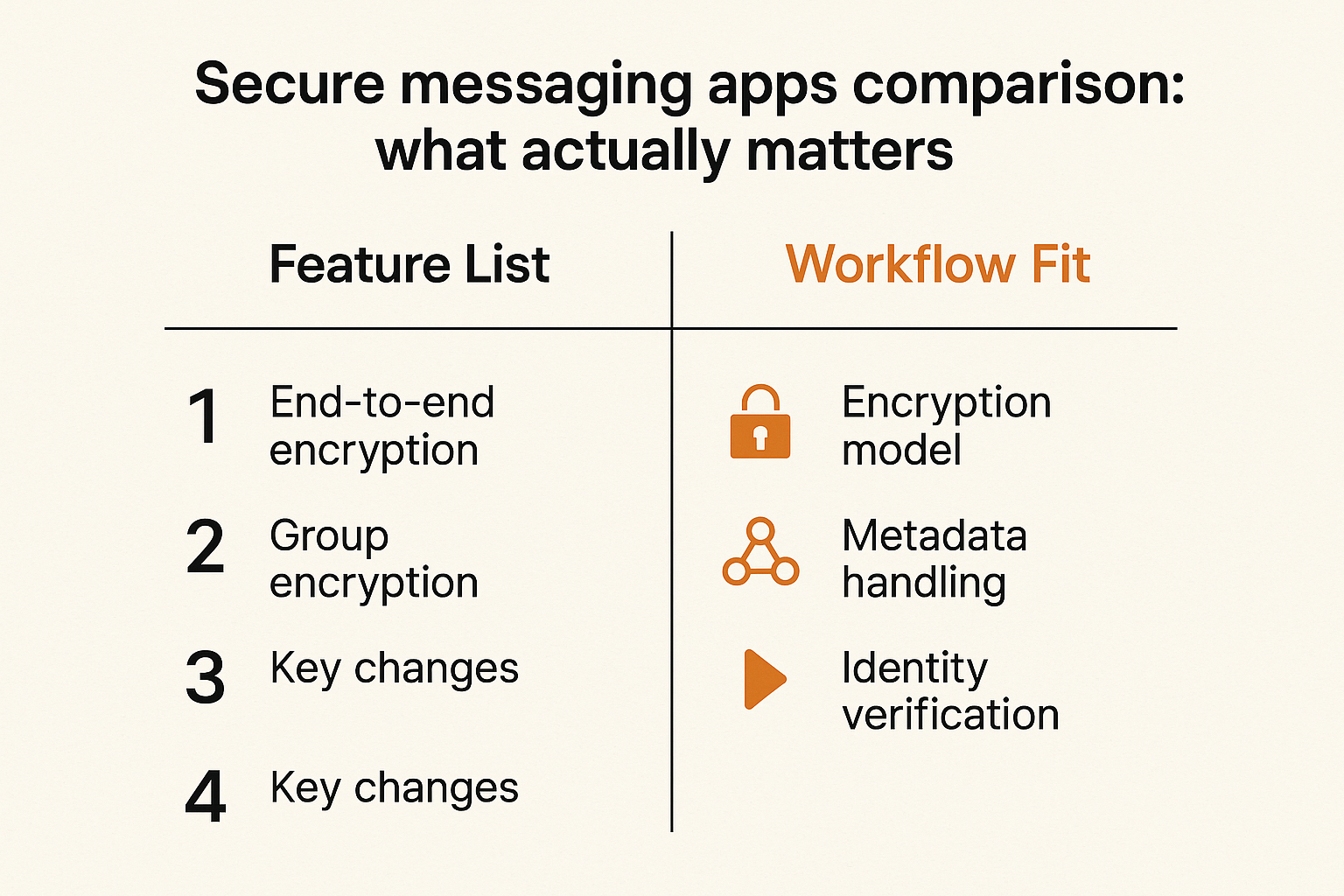
Comparison table for practical selection
A feature checklist is useful only if it maps to operational decisions. The table below is a better starting point than asking which app is best in the abstract.
| Decision area | What to check | Why it matters | Common failure |
|---|---|---|---|
| Encryption model | End-to-end encryption by default, group encryption behavior, key changes | Protects message content from provider access | Private one-to-one chats, weaker group or backup behavior |
| Metadata handling | Account identifiers, contact discovery, IP exposure, server logs | Communication patterns can be sensitive even when content is encrypted | Teams protect content but leak the social graph |
| Identity verification | Safety numbers, key fingerprints, device approval, out-of-band checks | Prevents impersonation and man-in-the-middle risk | Users accept new keys without verification |
| Device model | Linked devices, session visibility, remote unlink, mobile and desktop behavior | Most compromise happens at endpoints | Old laptops stay connected for months |
| Backup and recovery | Encrypted backups, recovery keys, cloud sync behavior | Backups can undo end-to-end encryption | Chats are safe in app, exposed in cloud backup |
| Admin and policy | Group ownership, invite control, offboarding, retention settings | Teams need repeatable controls | No one knows who owns sensitive rooms |
| Usability | Search, notifications, file sharing, onboarding friction | Users route around tools that slow them down | Sensitive data moves back to email or Slack |
The table does not tell you which app to pick. It tells you what conversation to have. That changes the conversation from brand loyalty to architecture.
What works
What works is boring and repeatable:
- A short threat model written before rollout.
- A list of allowed use cases and prohibited use cases.
- Device and backup rules that normal users can follow.
- A verification process for high-risk contacts.
- Group ownership and offboarding responsibility.
- Periodic review of linked devices and sensitive rooms.
For individual users, the same idea applies at smaller scale. Decide which conversations need high privacy. Decide which contacts require identity verification. Decide what devices are allowed to receive messages. Decide what should never be stored in chat at all.
What fails
What fails is treating secure messaging apps as magic containers for sensitive information.
A secure app does not make an insecure phone safe. It does not make a screenshot disappear. It does not stop someone from copying a password into a note-taking app. It does not fix weak account recovery. It does not turn a chaotic team into a disciplined team.
Related reading from our network: teams implementing collaboration systems face the same architecture-first problem in project management, where the workflow has to come before the board; see Asana Project Management Software in 2026 for an adjacent operator view.
Threat models: decide what you are protecting against
Casual exposure and device loss
For many users, the realistic threat is not a nation-state. It is a lost phone, a nosy coworker, a shared tablet, a compromised email account, or a cloud backup that contains more than expected.
In that model, secure messaging apps should reduce routine exposure:
- Lock the app with biometrics or a passcode.
- Disable sensitive notification previews.
- Avoid unencrypted cloud backups.
- Remove old linked devices.
- Use disappearing messages where long-term history creates risk.
This is not glamorous security. It is the layer that prevents most everyday privacy failures.
Provider access and metadata
End-to-end encryption reduces provider access to content. It does not necessarily eliminate provider visibility into metadata. Depending on the architecture, a provider may still see account identifiers, IP addresses, device registration, contact discovery events, group membership changes, and message timing.
Metadata can be harmless in one context and dangerous in another. A remote product team may not care if the provider knows employees communicate frequently. A lawyer, activist, investigator, or executive team may care a lot.
The practical question is whether metadata exposure is within your risk tolerance. If not, you need to look at account identifiers, contact discovery, sealed sender-like approaches, network privacy, and whether users should pair the messaging app with additional network protections.
Future decryption risk
Some conversations lose sensitivity quickly. Others remain sensitive for years. Legal strategy, health information, source identities, credentials, merger discussions, and political organizing can remain damaging long after the message is sent.
That is why current-year secure messaging architecture increasingly includes forward secrecy, post-compromise recovery, and interest in post-quantum cryptography. The concern is not only whether messages are safe today. It is whether captured encrypted traffic could become readable later if cryptographic assumptions change or keys are exposed.
Be careful with hype here. Post-quantum positioning does not remove the need for endpoint security, identity verification, or good retention rules. But for long-lived secrets, future decryption risk is a legitimate design input, not a marketing footnote.
Metadata, identity, and contact discovery
The content may be private while the graph leaks
A message can be encrypted and still reveal a lot. Who you contacted, when you contacted them, how often you communicate, and whether you suddenly joined a new group can all create a useful map.
For individuals, this may expose personal relationships, medical concerns, employment plans, or political activity. For teams, it can reveal client names, incident response activity, executive negotiations, or partner relationships.
The mistake teams make is equating private content with private communication. In high-risk settings, the communication graph is often the sensitive asset.
Practical rule: if the relationship is sensitive, treat metadata as part of the message.
Identity verification has to survive real life
Most users do not verify keys. They should, but they usually do not. They are busy, the interface is unfamiliar, and the risk feels abstract until something goes wrong.
That means identity verification needs a practical trigger model. Do not ask users to verify everything. Ask them to verify when risk justifies the friction:
- First contact with a high-risk person.
- New device added to an important account.
- Safety number or key change.
- Group creation for sensitive work.
- Executive, legal, financial, or incident response communications.
Verification should happen out of band when possible: voice call, in-person scan, known secondary channel, or pre-established verification phrase. The point is to make impersonation harder without asking users to become cryptographers.
Directory convenience creates exposure
Contact discovery is convenient. It can also leak address books or allow unwanted correlation. Apps handle this differently, but the tradeoff is consistent: easier discovery often means more metadata surface.
For a low-risk family group, phone-number discovery may be acceptable. For sensitive sources or compartmented teams, it may not be. Consider whether users can register without exposing a primary phone number, whether contact discovery can be disabled, and whether team directories should be managed separately.
If privacy policy language matters to your decision, read it like an operator, not like a checkbox. Look for what data is collected, why it is collected, how long it is retained, and what is shared. The qrypt.chat approach is documented in its privacy information, which is the kind of page teams should review before standardizing on any secure chat provider.
Devices, keys, and account recovery
Multi-device is an architecture choice
Multi-device support is one of the most important usability features in secure messaging apps. It is also one of the most important security decisions.
A single-device model is simpler and often safer, but less convenient. Multi-device access supports real work across phones and laptops, but expands the endpoint attack surface. Browser sessions, desktop clients, old tablets, and unmanaged personal laptops become part of your security boundary.
For teams, require regular linked-device review. For individuals, check the device list whenever you replace a phone, repair a laptop, or suspect account access. A forgotten linked desktop can become a quiet long-term exposure.
Backups are usually where privacy breaks
Backups are the classic privacy trap. People choose secure messaging apps for end-to-end encryption, then restore conversations through a cloud account protected by a weak password and SMS recovery.
The backup question should be explicit:
- Are message backups enabled by default?
- Are backups end-to-end encrypted separately?
- Who controls the backup key?
- Can the provider restore message content?
- Are media files included?
- Do deleted messages remain in backups?
If users cannot answer those questions, assume backup behavior needs training or restriction.
Recovery must be explicit
Account recovery is always a tradeoff. Strong recovery helps users regain access. Weak recovery gives attackers a path around encryption.
For personal use, decide whether convenience or resistance to account takeover matters more. For teams, define recovery ownership. Does IT help? Does the provider help? Is recovery intentionally impossible without a user-controlled key? What happens when an executive loses a phone during travel?
There is no universal answer. There should be a documented answer.
Remote team rollout: policy beats enthusiasm
Define channels by sensitivity
Remote teams often introduce secure messaging apps in response to a scare: a breach, a client demand, a board concern, or a sensitive project. The rollout starts with urgency and ends with confusion.
Do not start by creating rooms. Start by defining sensitivity levels.
Example:
- Public or low sensitivity: general coordination, no confidential data.
- Internal sensitive: roadmap, hiring, internal operations.
- Restricted: legal, finance, security incidents, executive discussions.
- Highly restricted: credentials, source protection, regulated data, breach response.
Then decide which levels belong in the secure messaging app, which belong elsewhere, and which should not be in chat at all.
Separate personal, client, and operational chat
Mixing personal, client, and operational communication creates cleanup problems. A consultant uses one app for family, client work, and internal company decisions. Later, the company wants to offboard the consultant, preserve some records, delete others, and prove access was removed. Good luck.
For teams, compartmentalization is not paranoia. It is maintenance.
Use separate groups for separate purposes. Avoid long-running mega-chats. Keep client channels distinct from internal channels. Do not let incident response rooms become permanent social rooms after the incident ends.
Related reading from our network: home media and privacy workflows have similar boundary problems between devices, networks, and automation; Plug Tech in 2026 is a useful adjacent example of why architecture beats gadget selection.
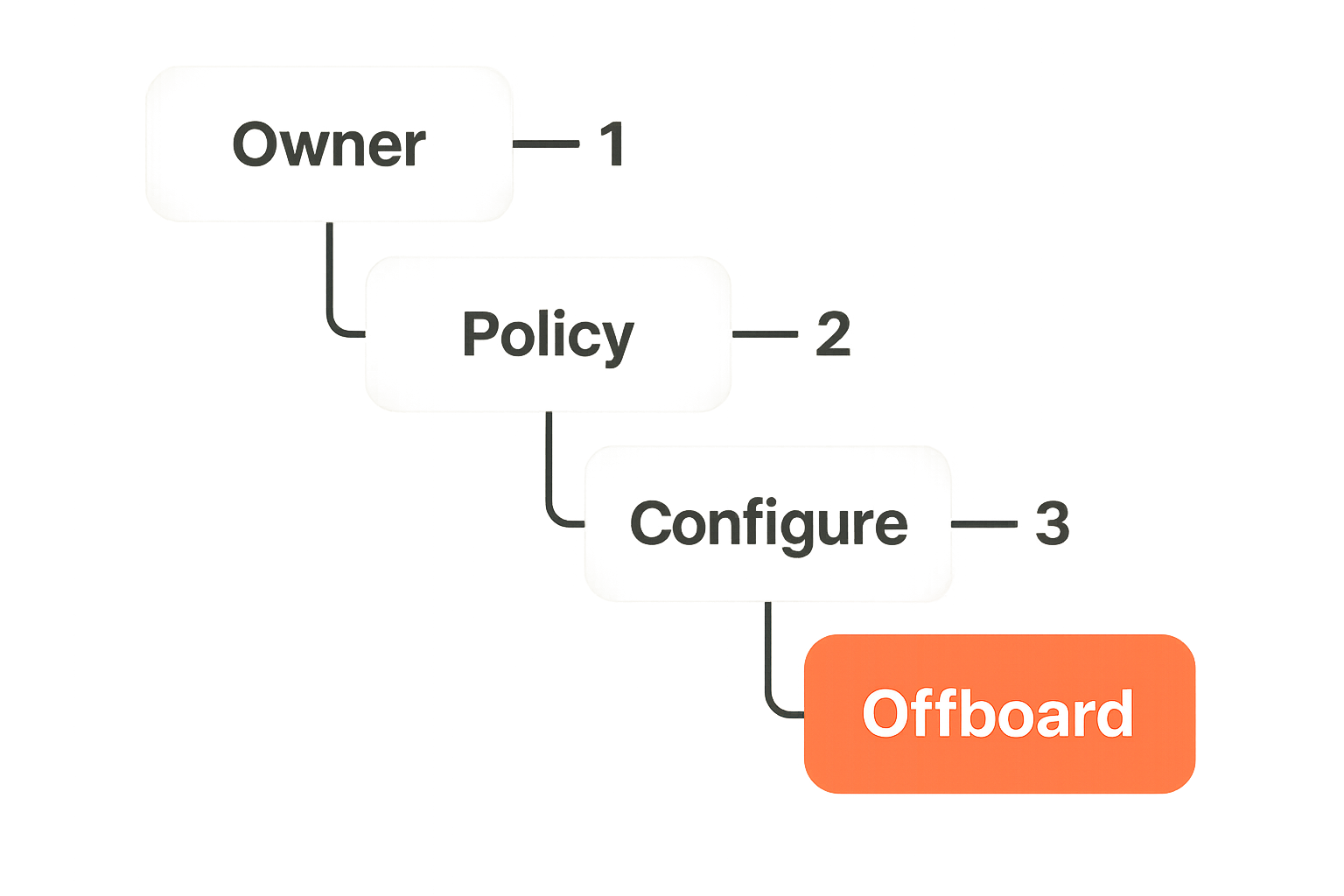
Onboarding and offboarding sequence
A secure messaging rollout needs a boring sequence. Boring is good.
- Assign an owner for the secure messaging environment.
- Define approved use cases and prohibited data types.
- Configure groups, invite permissions, disappearing message defaults, and device rules.
- Onboard users with a short guide covering verification, backups, notifications, and reporting.
- Require identity verification for restricted channels.
- Review linked devices after onboarding.
- Offboard users by removing group access, verifying device unlinking where possible, and rotating any shared secrets that were exposed in chat.
Practical rule: if you cannot offboard a user cleanly, you have not finished onboarding them securely.
Message lifecycle: retention, deletion, and evidence
Disappearing messages are not records management
Disappearing messages are useful. They reduce long-term exposure and limit casual history mining. But they are not a records management program.
A disappearing message can be photographed, copied, forwarded, exported, or captured in a notification. It may remain in backups depending on timing and configuration. It may also conflict with legal or regulatory duties if used in the wrong context.
Use disappearing messages to reduce accumulation, not to pretend records never existed.
Legal holds and regulated work
Some teams are required to preserve certain communications. Others are required to avoid storing certain data in the first place. Those are different obligations.
Before standardizing on secure messaging apps for business communication, decide what categories of work are allowed:
- Legal strategy.
- HR investigations.
- Security incidents.
- Healthcare or financial data.
- Customer support.
- Board communications.
- Source or witness communications.
If a category has retention obligations, involve counsel or compliance early. Secure deletion and compliance preservation can pull in opposite directions.
Screenshots and exports are the ugly edge
Users control their endpoints. That means screenshots, screen recordings, copy-paste, and external cameras are always part of the risk model.
Some apps can discourage or detect certain capture behavior. None can make endpoint trust irrelevant. If a participant is malicious or compromised, message content can escape.
The practical response is not fatalism. It is classification. Do not put material in chat if the damage from participant capture is unacceptable. Use secure messaging for coordination and necessary communication, but avoid treating it as a vault for the most sensitive secrets.
Integrations, automation, and secure workflows
Bots can break the trust boundary
Teams love bots because bots reduce manual work. They also expand the trust boundary.
A bot that posts alerts into an encrypted room may need access to incident data. A bridge that connects secure chat to a ticketing system may copy sensitive content into a less secure database. A transcription tool may send audio to a third-party processor. An AI assistant may create logs outside the encrypted conversation.
The mistake teams make is approving the secure messaging app and forgetting to assess everything connected to it.
For each integration, ask:
- What data does it read?
- What data does it write?
- Where is data stored after processing?
- Who operates the integration?
- Can the integration be removed quickly?
- Does it weaken the confidentiality model users expect?
Notifications leak more than teams expect
Notifications are metadata with previews. They show names, topics, snippets, and urgency. On locked screens, shared conference room displays, smart watches, car dashboards, and desktop popups, notifications become accidental broadcasts.
For high-risk conversations, disable previews. For team rollouts, document notification settings. For executives, legal teams, and incident responders, assume notifications are visible to people nearby unless configured otherwise.
This is a small control with an outsized privacy benefit.
Adjacent workflow tools still matter
Secure messaging apps are not project management tools, ticketing systems, document repositories, password managers, or legal archives. When teams force one app to do every job, security usually gets worse.
Use chat for time-sensitive communication. Use password managers for secrets. Use document systems for controlled files. Use ticketing systems for durable work tracking. Use legal systems for matters that need preservation.
Related reading from our network: checkout workflows have a similar lesson about not confusing the visible interface with the underlying process; Walgreens Coupon Code Workflow is a consumer example, but the operator pattern is the same.
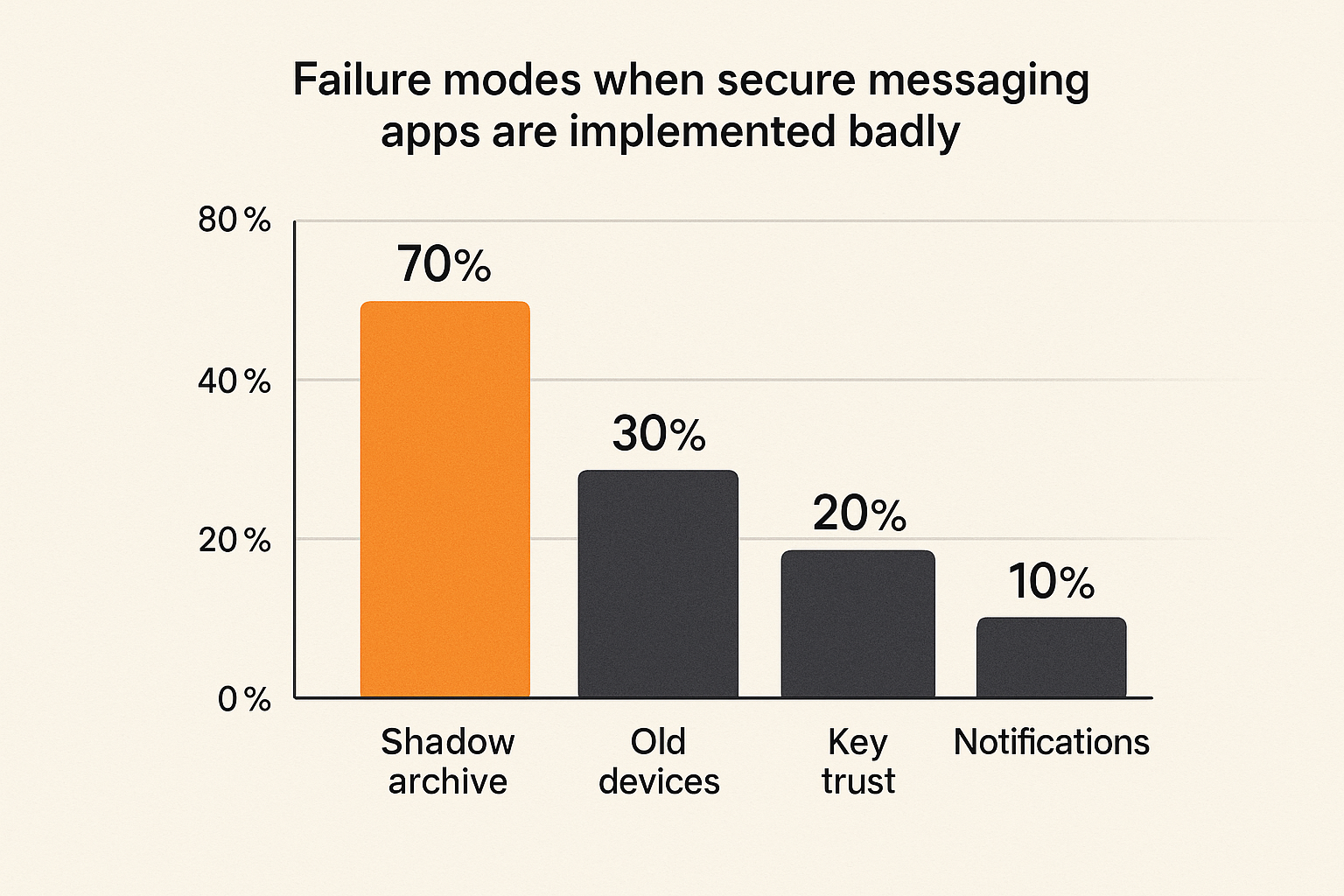
Failure modes when secure messaging apps are implemented badly
The shadow archive problem
The shadow archive is what happens when users trust the secure app for conversation but rely on another system for memory.
Examples:
- Someone forwards chat decisions to email so they can search later.
- A manager copies sensitive messages into a project board.
- A support lead exports chat history to a spreadsheet.
- An engineer pastes incident details into an AI tool for summarization.
The organization thinks sensitive communication is protected. In reality, the sensitive record has moved into systems with different access controls, retention rules, and vendor exposure.
The fix is to define where decisions live. If chat is only for discussion, document final decisions in the right system with the right classification. If chat itself is the record, then retention and access controls must match that role.
The unmanaged device problem
Unmanaged devices are where clean policies go to die.
A contractor joins from a personal laptop. A founder links a desktop client on a home machine. An employee keeps an old phone signed in. A browser session remains active after a device is sold or repaired.
In secure messaging, the endpoint is often the weakest part of the system. A strong encryption protocol does not help if the device is unlocked, infected, shared, or abandoned.
For teams, decide whether personal devices are allowed in restricted chats. If they are, set minimum expectations: device lock, current OS, no shared accounts, app lock, encrypted storage, and prompt reporting for loss or compromise.
The trust-on-first-use trap
Many encrypted messaging systems make first contact easy and warn users later when keys change. This can be acceptable for casual use. It is weaker for high-risk communication.
The trap is assuming that because a chat is encrypted, the identity is verified. Encryption protects a channel. Verification tells you who is at the other end.
For sensitive contacts, do not rely only on first contact. Verify identity out of band. Re-verify when keys change. Be especially cautious after device loss, account recovery, travel, arrests, layoffs, or suspected compromise.
Practical rule: encryption without identity verification protects a conversation with someone; it may not prove that someone is the person you intended.
How to evaluate and validate a secure messaging app
A practical evaluation sequence
You do not need a six-month committee to evaluate secure messaging apps, but you do need a sequence that forces the right questions.
- Write the threat model in one page.
- List the conversations that will move into the app.
- List the conversations that must not move into the app.
- Review encryption, metadata, identity, device, backup, and recovery behavior.
- Test onboarding with a small group of real users.
- Simulate device loss and offboarding.
- Test key change warnings and identity verification.
- Review notification leakage on mobile, desktop, and wearable devices.
- Decide retention defaults by channel type.
- Document the operating rules in plain language.
This sequence exposes friction before the rollout becomes political. It also makes tradeoffs visible. If users hate the workflow, they will route around it. Better to discover that in a pilot than during an incident.
Security questions to ask vendors
Ask vendors questions that map to real failure modes:
- Is end-to-end encryption enabled by default for one-to-one and group chats?
- What metadata is visible to the provider?
- How does contact discovery work?
- What happens when a user adds a new device?
- Are backups encrypted, and who controls the keys?
- Can the provider recover message content?
- How are key changes surfaced to users?
- What administrative controls exist for groups and offboarding?
- What data remains after account deletion?
- How are security issues disclosed and handled?
For broader context and continuing practical guidance, the QryptChat team publishes privacy and encrypted messaging material on the QryptChat blog, but the same principle applies anywhere: prefer operational clarity over vague security claims.
Pilot metrics that matter
Do not measure only adoption. A tool can have high adoption and poor security behavior.
Track practical signals:
- Percentage of users who completed identity verification for restricted contacts.
- Number of unmanaged or stale linked devices found during review.
- Number of sensitive messages forwarded into email or other systems.
- User confusion around backups and recovery.
- Offboarding time for a test user.
- Incidents involving notification leakage or wrong-recipient messages.
These are not vanity metrics. They tell you whether the secure messaging workflow is actually working.
Where qrypt.chat fits
Product fit for privacy-conscious communication
qrypt.chat is built for people who care about private communication, secure messaging, and practical digital security. That means the fit is architectural, not cosmetic.
If you are evaluating encrypted chat in 2026, look for a provider whose product direction matches the problems in this guide: confidentiality, modern cryptography, practical identity expectations, and a clear stance on privacy. qrypt.chat positions itself around end-to-end encrypted messaging and post-quantum cryptography, which is relevant for users who care about long-lived confidentiality as well as current privacy.
That does not remove your responsibility to manage devices, backups, verification, and retention. No provider can do that entire job for you. But product design can either support disciplined behavior or make it harder.
When qrypt.chat is a good fit
qrypt.chat is worth considering when your communication requirements include:
- Private one-to-one conversations.
- Sensitive group messaging.
- Users who care about secure messaging beyond basic convenience.
- Long-lived confidentiality concerns.
- A desire to reduce exposure from conventional chat tools.
- Teams or individuals willing to treat messaging as an operational workflow.
It is especially relevant for privacy-conscious users, security professionals, remote teams, and encrypted chat users who want a tool aligned with practical digital security rather than generic social messaging.
When to use additional controls
Even with a strong secure messaging app, some situations require additional controls:
- Device management for company-owned hardware.
- Password managers for secrets instead of pasting credentials into chat.
- Legal archiving tools where preservation is required.
- Network privacy tools where IP exposure matters.
- Separate identity verification procedures for high-risk contacts.
- Incident response playbooks for breach communications.
A secure messaging app is a critical component. It is not the whole security program.
Closing: choose secure messaging apps like infrastructure
The final operating checklist
The best secure messaging apps are not the ones with the loudest claims. They are the ones that fit your threat model, reduce real exposure, and can be operated consistently by the people who depend on them.
Before you standardize, check the basics:
- Have you written the threat model?
- Do you know what metadata still exists?
- Are users verifying identities when it matters?
- Are devices and backups controlled?
- Are notifications configured for privacy?
- Are group owners responsible for access?
- Is offboarding tested?
- Are retention rules explicit?
- Are integrations reviewed?
- Do users know what not to put in chat?
The mistake teams make is expecting secure messaging apps to compensate for unclear ownership. They will not. But if you treat encrypted messaging as infrastructure, with rules, workflows, and validation, it becomes a strong privacy layer instead of another disconnected tool.
Secure messaging apps matter in 2026 because communication is where sensitive work happens. Choose them like the workflow matters, because it does.
Try qrypt.chat
qrypt.chat is for people who care about private communication, secure messaging, and practical digital security. Try qrypt.chat