Secure messaging apps are easy to install and hard to operate well.
A user picks an encrypted chat app, moves a sensitive conversation there, and assumes the risk went down. A team creates a private channel for incident response, legal review, or customer escalations, and assumes the channel is now safe. Then screenshots leak, old devices stay logged in, recovery flows weaken the account, or sensitive context gets copied into email because the workflow was never designed.
Teams think the problem is finding the most secure messaging app. The real problem is building a communication system that preserves privacy when people are busy, remote, interrupted, and working across devices.
That changes the conversation. The practical question is not only which app has end-to-end encryption. It is who can join, what data remains outside the encrypted payload, how identity is verified, what happens when someone loses a phone, how long messages live, and whether the team can still coordinate under pressure without bypassing the tool.
Table of contents
- Secure messaging apps are an operating model
- Start with the threat model
- Evaluate secure messaging apps by architecture
- Identity and device trust decide what encryption protects
- Build a secure messaging workflow
- What breaks when secure messaging apps are deployed badly
- Retention recovery and legal boundaries
- Secure messaging apps for remote teams
- What to validate before rollout
- Where qrypt.chat fits
- Closing rules for secure messaging apps
Secure messaging apps are an operating model
Encryption is only one control
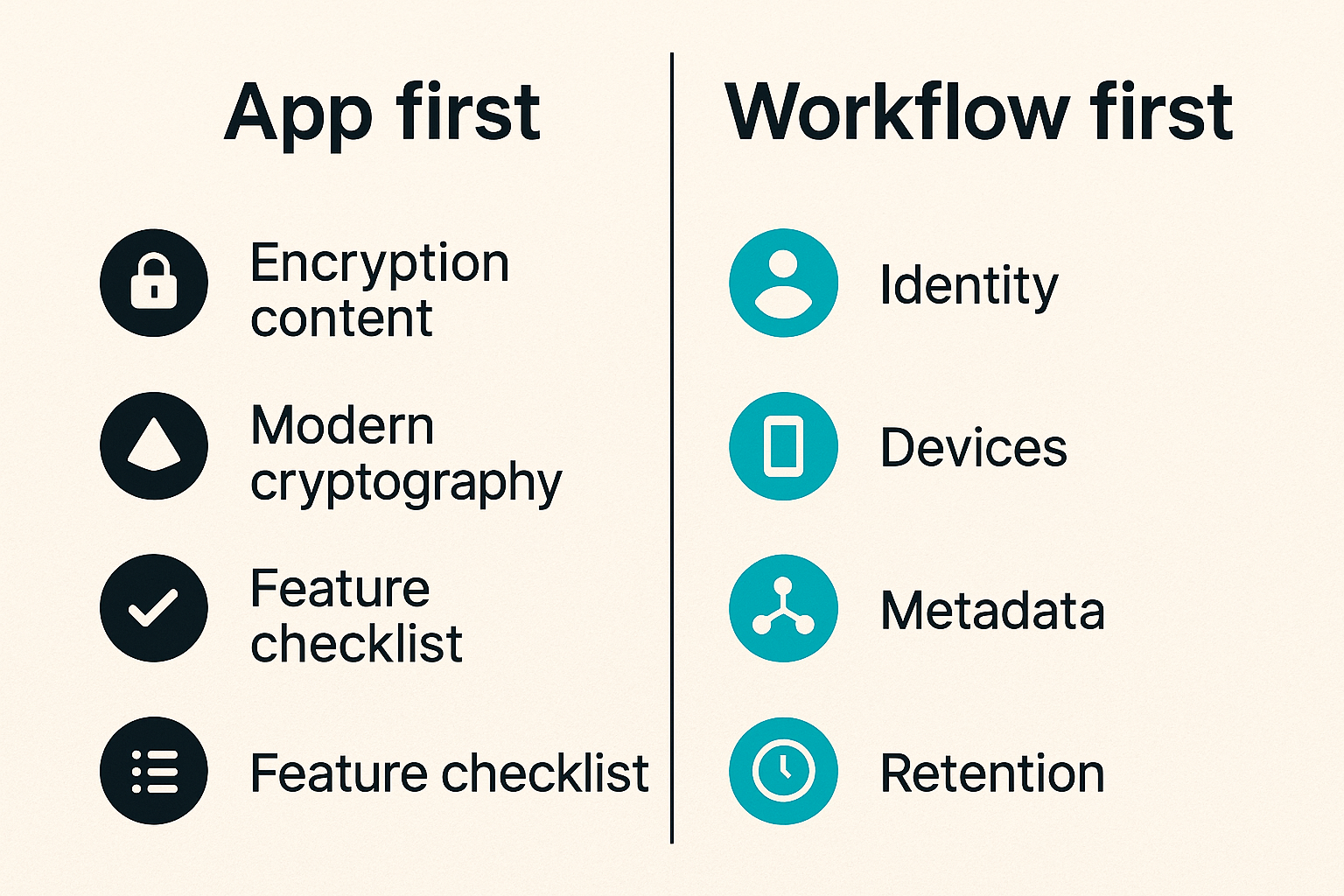
The mistake teams make is treating secure messaging apps as a feature checklist. End-to-end encryption matters. Modern cryptography matters. But the encrypted message is only one part of the system.
A useful way to think about it is this: the message content may be protected in transit and at rest, but the communication workflow still creates risk around identity, endpoints, notifications, backups, link previews, copied text, attachments, admin access, and user behavior.
If a sensitive conversation starts in an encrypted chat and ends in a shared screenshot posted to a ticket, the privacy boundary moved. If a compromised laptop remains enrolled, the cryptography did not fail. Device trust failed. If a user cannot verify who they are talking to, strong encryption may protect a conversation with the wrong participant.
Practical rule: Do not evaluate secure messaging apps as isolated apps. Evaluate the full path of a sensitive conversation from invite to deletion.
This is why security professionals care about architecture, not just branding. A secure messenger should reduce unnecessary exposure, but it cannot fix unclear ownership or reckless handling of sensitive context.
The app has to match the workflow
A journalist protecting sources, a family avoiding data harvesting, a startup coordinating a security incident, and a remote legal team negotiating a deal do not have the same workflow.
They may all need encrypted messaging. They do not all need the same defaults.
| Decision area | Personal privacy use case | Team security use case |
|---|---|---|
| Identity | Known contacts and manual verification | Managed onboarding and role changes |
| Retention | Short-lived conversations | Policy-driven retention by channel |
| Devices | Few personal devices | Multiple endpoints with offboarding |
| Admin model | Minimal administration | Clear ownership and audit expectations |
| Failure response | User-driven recovery | Incident and access response process |
That table is not theoretical. In production, this is where tools either help or get routed around. If the secure channel is harder than the unsafe channel, people will eventually use the unsafe channel.
Related reading from our network: teams thinking about media devices and privacy face a similar architecture problem in plug tech for cord cutters, where the device is only one part of the system.
Start with the threat model
Personal privacy is not the same as team security
Secure messaging apps get discussed as if privacy is one universal requirement. It is not.
A privacy-conscious user may care about reducing tracking, avoiding cloud message scans, limiting exposure to telecom metadata, and keeping intimate conversations away from data brokers. A security team may care about incident containment, executive impersonation, insider risk, regulated information, and secure coordination during an outage.
Those are adjacent, but not identical.
For a personal user, the decision may be: Can I trust this app more than SMS, email, or a default social platform DM? For a team, the decision becomes: Can we operate this as a controlled communication layer without creating a parallel shadow system?
The practical question is what failure you are trying to prevent:
- A service provider reading message content
- A stolen phone exposing old conversations
- A cloud backup restoring messages to an attacker
- A malicious participant exporting content
- A remote employee keeping access after departure
- A fake identity entering a sensitive group
- Metadata revealing who talks to whom and when
Each one leads to different controls.
Map adversaries to real actions
Threat modeling does not need to become an academic exercise. It should produce operational decisions.
If your risk is casual snooping, default end-to-end encryption and device lock hygiene may be enough. If your risk is targeted compromise, you need stronger identity verification, device review, notification discipline, and a plan for compromised accounts. If your risk is legal discovery or regulated retention, disappearing messages alone may create more confusion than protection.
A simple mapping works:
- List the sensitive conversations you want to protect.
- Identify who should never see them.
- Identify how exposure would actually happen.
- Pick controls that interrupt those paths.
- Re-test the workflow after real use.
Practical rule: If a control does not interrupt a real exposure path, it is probably theater.
This is where secure messaging becomes a business decision. You are not buying secrecy in the abstract. You are reducing specific communication risks without breaking the work.
Evaluate secure messaging apps by architecture
End-to-end encryption and key handling
End-to-end encryption means message content is encrypted so that only the intended endpoints should be able to read it. In a good design, the service operator cannot casually inspect the message body.
But the phrase does not answer every question. You still need to understand how keys are generated, stored, rotated, backed up, and replaced when devices change. Multi-device messaging is especially important because every additional endpoint expands the place where plaintext can appear.
Questions worth asking:
- Are keys generated on user devices?
- What happens when a user adds a new device?
- Are participants warned about key changes?
- Can users verify contacts out of band?
- Does account recovery restore message history?
- Are backups encrypted separately, and by whom?
If a tool claims strong encryption but hides every key event from users, it may be convenient but harder to trust. If it exposes every cryptographic detail in a way normal users ignore, it may be secure on paper and weak in practice.
For a deeper walkthrough of how encrypted chat becomes a full operating workflow, see our prior guide to end-to-end encrypted messaging apps.
Metadata and server trust
Message content is not the only sensitive data. Metadata can include sender, recipient, timestamps, group membership, device identifiers, IP information, contact discovery data, push notification routing, attachment sizes, and account creation signals.
Some metadata is difficult to eliminate because messages need to be routed. The question is whether the app minimizes it, protects it, separates it, or keeps it longer than necessary.
What breaks in practice is assuming encrypted content means invisible communication. It usually does not. An observer may not know what was said, but they may infer that a legal team, executive, and incident lead started messaging at 2 a.m. during an outage.
That may matter.
A privacy review should include the service privacy posture, not just the cryptographic claim. When a tool explains what it collects and why, its privacy policy becomes part of the technical evaluation, not legal wallpaper.
Identity and device trust decide what encryption protects
Verification must be usable
Encryption protects communication between endpoints. Identity tells you whether those endpoints belong to the right people.
This is the part many secure messaging apps make awkward. They may provide safety numbers, QR verification, key fingerprints, or device change alerts. Those controls are useful only if people understand when to use them.
A good workflow defines verification moments:
- Before discussing legal, financial, or security-sensitive topics
- When adding someone to a private group
- After a device change alert
- During incident response or executive communication
- When a contact appears to send an unusual request
Verification should be boring, repeatable, and brief. If it requires a ten-minute lecture every time, users will skip it.
Practical rule: Identity verification should happen at moments of elevated risk, not as vague optional hygiene.
For high-risk teams, verification can be paired with out-of-band checks. A phone call, video confirmation, or previously agreed phrase may be enough to prevent a convincing impersonation from entering the wrong channel.
Device lifecycle is the hidden risk
Most messaging failures are endpoint failures. Lost phone. Old tablet. Unmanaged laptop. Employee departure. Shared family device. Browser session forgotten on a hotel workstation.
The secure app can only protect what the device environment allows.
Teams need a device lifecycle policy that answers:
- Which devices are allowed for sensitive channels?
- Who approves new device enrollment?
- What happens when a device is lost?
- How quickly can access be revoked?
- Are notifications allowed on lock screens?
- Are desktop clients permitted on unmanaged machines?
A simple policy can be enough:
secure_messaging_policy:
  sensitive_channels:
    require_screen_lock: true
    allow_unmanaged_desktop: false
    require_contact_verification: true
    lockscreen_previews: disabled
    lost_device_response: revoke_within_1_hour
    offboarding: remove_from_groups_before_account_deactivation
The exact settings vary by organization. The point is to make them explicit before something goes wrong.
Build a secure messaging workflow
Define channels by risk and purpose
Secure messaging apps become messy when every conversation goes into one giant private group. That feels simple until nobody knows what belongs there.
Define channels by risk and purpose. For example:
- Personal private chats for one-to-one sensitive communication
- Team operations channels for routine internal coordination
- Incident channels for active security or availability events
- Executive channels for high-impact decisions
- Legal or finance channels for restricted topics
Each channel should have a clear owner. The owner is responsible for membership, purpose, retention expectations, and cleanup.
A useful naming pattern is boring and explicit:
incident-active-sev1legal-contract-reviewexec-urgent-verificationsecurity-disclosures
Names do not need to reveal secrets. They do need to prevent accidental misuse.
Create escalation paths before incidents
When a real incident starts, people fall back to habit. If the secure workflow is not already known, the team will use email, SMS, consumer DMs, or whatever channel gets attention fastest.
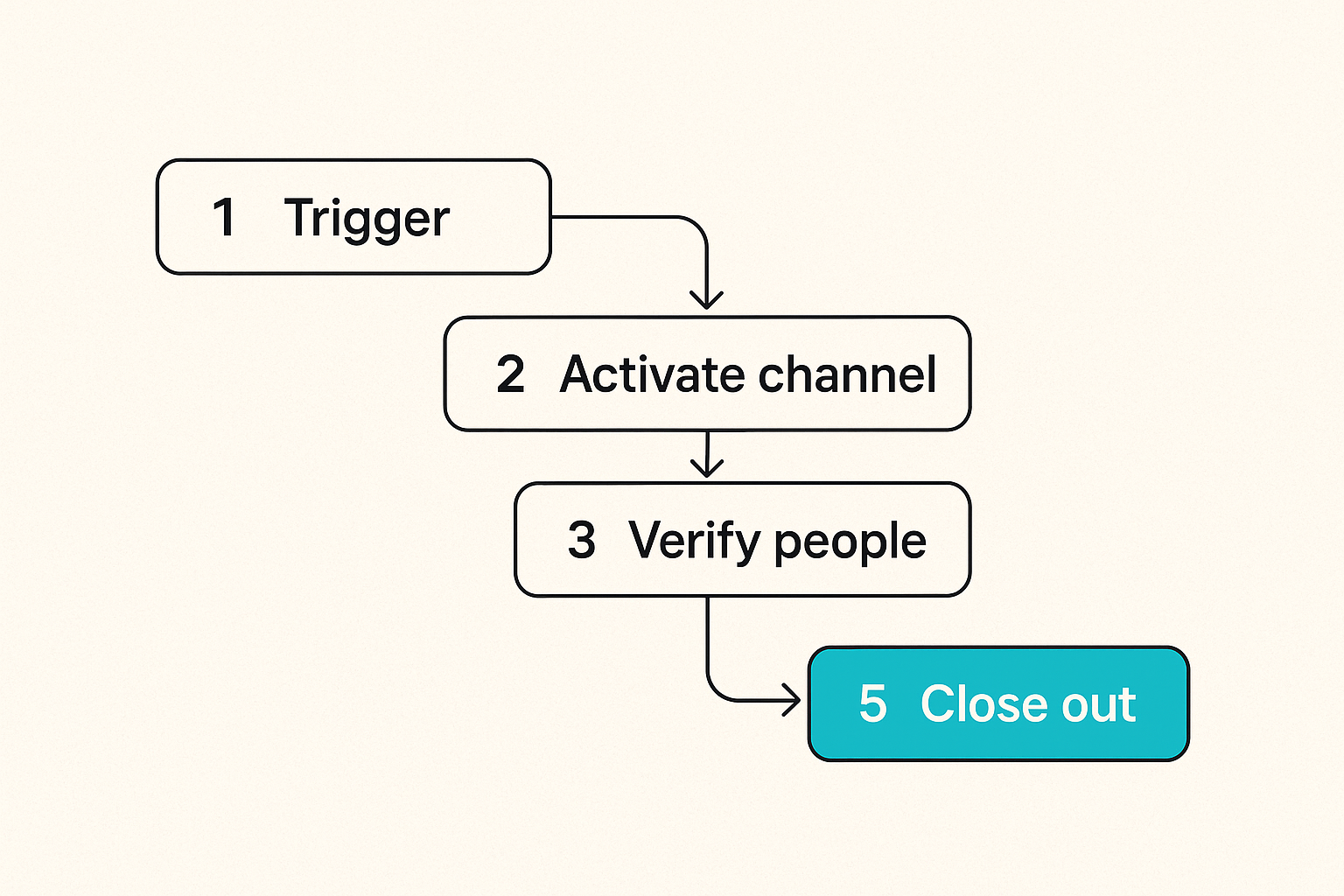
Build the escalation path in advance:
- Identify the trigger that requires secure messaging.
- Open or activate the correct channel.
- Verify participants before sensitive details are shared.
- Pin the incident owner and decision log rules.
- Move artifacts to approved systems after the event.
- Close the channel or change retention when the event ends.
This is not bureaucracy. It is how you avoid scattered evidence, accidental disclosure, and missing context.
Related reading from our network: remote teams often struggle with permissions, handoff, and control in non-security contexts too, which is why the Vizio remote control workflow analogy is useful when designing collaborative access patterns.
What breaks when secure messaging apps are deployed badly
People bypass tools that slow them down
What breaks in practice is not always cryptography. It is friction.
If users cannot find contacts, cannot recover from normal device changes, cannot search when appropriate, or cannot share files safely, they will create a workaround. Workarounds usually have worse privacy properties than the original tool.
Common bypasses include:
- Copying sensitive text into email for convenience
- Sending screenshots through less secure apps
- Reusing personal accounts for business conversations
- Adding external participants without verification
- Keeping old groups alive because cleanup is unclear
- Using cloud notes or docs as unofficial message archives
The mistake teams make is blaming users for bypassing a workflow that was never designed around their actual constraints.
A secure messaging rollout should include a support path. Users need to know where to ask: Can I add this contractor? Can I use desktop? What do I do if I lost my phone? Should this topic go in the incident channel or the legal channel?
Screenshots and exports defeat private channels
No secure messaging app can fully prevent a participant from photographing a screen, copying text, or summarizing the conversation somewhere else. Some apps can discourage or limit exports. They cannot remove the basic trust issue: authorized participants can leak.
That does not make secure messaging useless. It means you need to separate confidentiality from participant trust.
What works:
- Limit group size for sensitive topics
- Use need-to-know membership
- Set expectations about screenshots and forwarding
- Keep decision records in approved systems
- Avoid sharing secrets that should be in a vault
What fails:
- Treating disappearing messages as leak prevention
- Adding large groups for convenience
- Sharing passwords or tokens in chat
- Assuming no audit trail means no risk
- Ignoring insider or compromised-user scenarios
For communities and local groups, the same trust-routing issue shows up outside security tooling. Related reading from our network: Mighty Networks alternatives for local communities looks at coordination, trust, and follow-up as an operating problem.
Retention recovery and legal boundaries
Disappearing messages are not governance
Disappearing messages are useful. They reduce old sensitive content sitting on devices. They can lower casual exposure if a phone is lost later. They can keep routine private chats from becoming permanent archives.
But they are not a complete governance model.
A business may need some records retained for legal, compliance, customer support, or incident review. A user may need proof of harassment, fraud, consent, or a transaction. A security team may need a decision timeline after a breach. If everything disappears automatically without a clear rule, the organization can lose important context.
The practical question is what should live in the chat and what should move to a system of record.
For example:
| Information type | Good place for chat | Better system of record |
|---|---|---|
| Quick coordination | Yes | Not usually needed |
| Passwords and secrets | No | Password manager or vault |
| Incident decisions | Temporary discussion | Incident management system |
| Legal approvals | Limited coordination | Contract or legal system |
| Customer data | Minimize | CRM or support platform |
Practical rule: Use secure chat for coordination. Use purpose-built systems for durable records and secrets.
Recovery can become the weakest control
Account recovery is where many secure systems become less secure. Users forget passwords, lose phones, change numbers, and replace laptops. The product has to help them recover, but every recovery path is also an attacker path.
Questions to ask before rollout:
- Can support reset access to message history?
- Does recovery require a second factor?
- Are recovery codes available?
- Can an attacker with a SIM swap take over the account?
- Are old sessions invalidated after recovery?
- Are contacts notified when identity keys change?
Personal users should store recovery codes safely and avoid depending only on phone numbers where possible. Teams should document recovery procedures and make sure help desk staff cannot accidentally become a bypass around encryption.
If recovery is too strict, users lose access and blame the tool. If recovery is too loose, attackers use it. The right answer depends on the threat model, but pretending recovery is separate from security is a mistake.
Secure messaging apps for remote teams
Remote work increases coordination pressure
Remote teams use chat as the default office. That makes secure messaging apps more important and more dangerous.
In an office, some sensitive context moves through rooms, whiteboards, and quick verbal checks. In a remote organization, the same context gets typed, forwarded, searched, synced, and notified across devices. The attack surface becomes the communication layer.
Remote teams should decide which conversations require secure messaging instead of general collaboration tools:
- Security incidents
- Employee relations issues
- Legal negotiations
- Executive approvals
- Mergers, acquisitions, and financing
- Vulnerability reports
- Customer data escalations
The goal is not to move all work into the most restrictive channel. That usually fails. The goal is to route sensitive work to a channel designed for it.
For teams comparing secure messaging options, review the vendor security model, encryption claims, infrastructure assumptions, and operational controls. A public security overview is a useful starting point for that review.
Permissions need ownership
Every sensitive group needs an owner. Without ownership, groups sprawl.
Ownership includes:
- Approving new participants
- Removing people when roles change
- Reviewing group membership on a schedule
- Setting channel purpose and retention expectations
- Deciding when a temporary group should close
- Handling lost-device or compromised-account events
This matters because remote teams change quickly. Contractors join. Employees move teams. Advisors get pulled into a thread. External counsel needs access for one week. If nobody owns membership, the encrypted room slowly becomes crowded and stale.
A practical cadence:
- Review critical group membership monthly.
- Review incident groups immediately after closure.
- Remove temporary participants by default.
- Require explicit renewal for long-running sensitive groups.
- Document ownership in the group description or team policy.
That is not glamorous security work. It is the work that keeps private channels private.
What to validate before rollout
Run a practical security checklist
Before choosing or standardizing on secure messaging apps, run a checklist that maps to real use.
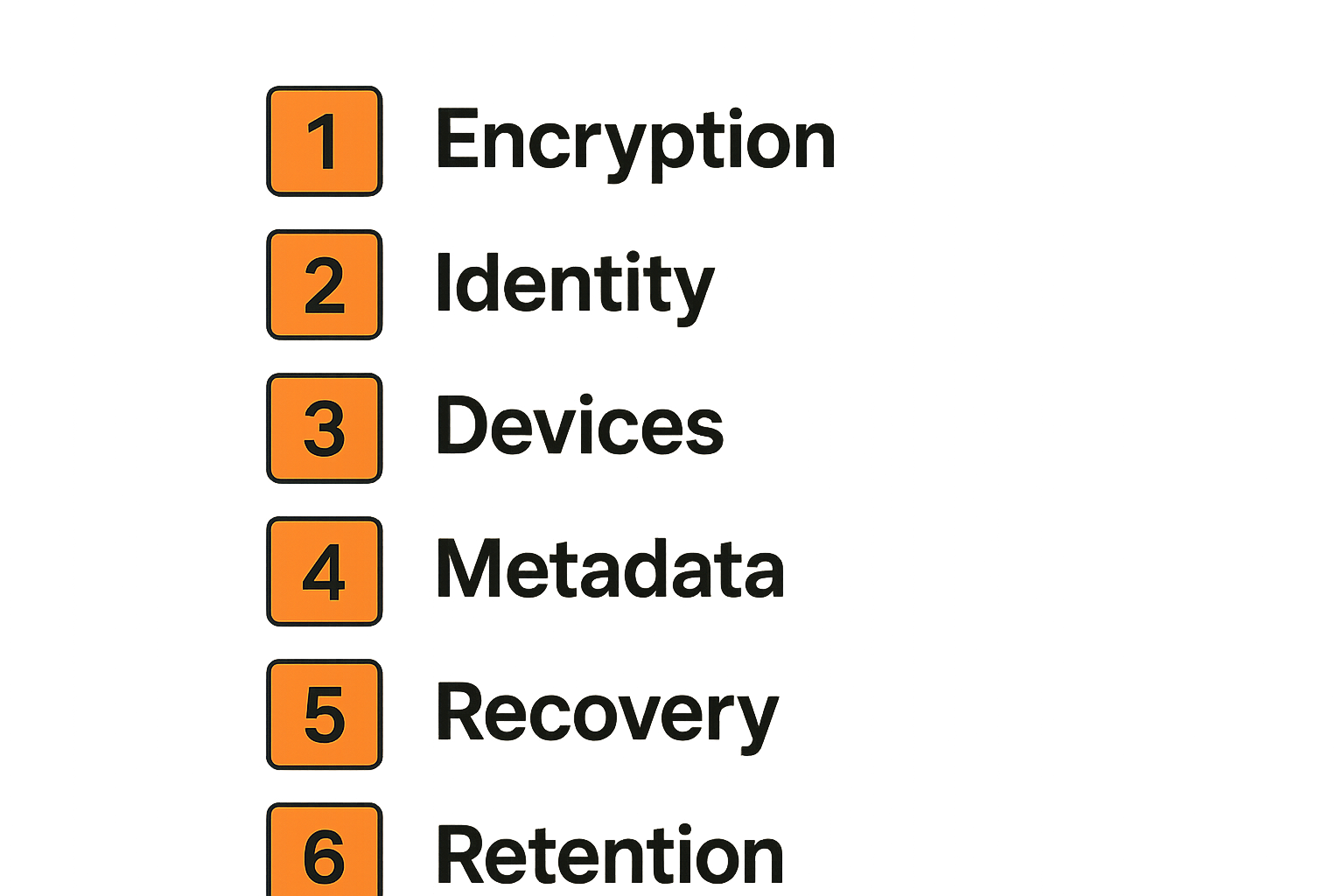
Minimum validation areas:
- Encryption model: Is message content end-to-end encrypted for the conversation types you will use?
- Identity: Can users verify contacts and detect key changes?
- Devices: Can you review, add, and remove devices safely?
- Metadata: What does the service collect, store, and expose?
- Recovery: What happens after phone loss, password loss, or account takeover?
- Retention: Can message lifetime match your policy?
- Notifications: Can sensitive previews be disabled?
- Attachments: Are files protected consistently with messages?
- Administration: Who can create, join, remove, or manage groups?
- Support: Can users get help without weakening security?
This should be tested with real users, not just security staff. Security staff will tolerate friction that normal users route around.
Test failure cases not happy paths
Happy-path demos are cheap. Failure testing is where you learn whether the workflow holds.
Test these scenarios:
- A user loses a phone during an active incident.
- A contractor needs temporary access to one group.
- A participant changes devices and triggers a key warning.
- An executive receives an unusual payment request.
- A team member leaves the company suddenly.
- A sensitive attachment is sent to the wrong group.
- A user tries to restore messages from backup.
- A participant takes a screenshot and posts it elsewhere.
For each scenario, ask three questions: Who owns the response? What does the app enforce? What must the team do manually?
This is where secure messaging apps become operationally real. The product can enforce some controls, warn on others, and leave some to policy. You need to know which is which before relying on it.
Where qrypt.chat fits
Private communication should be designed for real users
qrypt.chat is built for people who care about private communication, secure messaging, and practical digital security. That means the product conversation starts from a simple assumption: users need strong privacy controls, but they also need a workflow they can actually use.
For some teams, the priority is end-to-end encrypted communication that is easier to standardize than ad hoc personal apps. For others, it is a cleaner way to separate sensitive conversations from noisy collaboration tools. For privacy-conscious users, it may be about reducing unnecessary exposure while still communicating normally.
The architecture matters. Post-quantum and quantum-resistant approaches are increasingly part of the secure messaging discussion, especially for users worried about long-lived confidentiality. But the operator view is still grounded: cryptography helps when the identity, device, retention, and recovery workflow is also handled well.
If you want the product-level overview, the qrypt.chat about page explains the focus on quantum-resistant encrypted messaging without requiring every reader to be a cryptographer.
Use the tool as part of a broader security practice
Secure messaging should not be the only control in your security program. It should connect to the rest of how you work.
For a team, that may mean pairing qrypt.chat with device management, password managers, incident response procedures, and clear data handling rules. For an individual, it may mean using strong device locks, safer backups, contact verification, and more careful sharing habits.
The product fit is strongest when you know what conversations deserve a protected channel and what should stay elsewhere. Not every message needs maximum ceremony. The sensitive ones need a path that people remember under pressure.
A lightweight rollout plan looks like this:
- Pick two or three sensitive workflows first.
- Define who owns each private channel.
- Set device and notification expectations.
- Teach verification with one practical example.
- Run a lost-device drill.
- Review what users bypassed and fix the friction.
That approach beats a big announcement with no operating model.
Closing rules for secure messaging apps
Choose based on operating risk
Secure messaging apps are not interchangeable privacy stickers. They are communication systems with cryptographic, human, and operational boundaries.
Choose based on the risks you actually face. If you are a personal user, focus on reducing tracking, protecting message content, managing device access, and avoiding unsafe backups. If you are a team, focus on identity, membership, retention, offboarding, support, and incident use.
The practical question is not which app sounds the most secure. It is which app supports the way sensitive communication really moves through your life or organization.
Keep validating the workflow
Your communication risk changes. People join. Devices change. Threats shift. Teams become remote, then hybrid, then distributed across vendors and customers. A secure messaging workflow that worked last year can become stale this year.
Review the basics regularly: who is in sensitive groups, which devices are active, how recovery works, whether users understand verification, and where sensitive records belong. The strongest secure messaging apps still need disciplined operation.
That is the sober answer for 2026. Pick strong tools, but do not outsource the workflow. Secure messaging apps work best when privacy, identity, devices, and human behavior are designed together.
Try qrypt.chat
qrypt.chat is for people who care about private communication, secure messaging, and practical digital security. Try qrypt.chat.