Most people choose secure messaging apps the same way they choose a notes app: install three options, compare the interface, ask which one feels faster, then hope the lock icon means the hard problems are solved.
That works until a phone is lost, a contractor leaves, a legal request arrives, a screenshot leaks, or a team starts forwarding sensitive decisions back into email because the secure channel is inconvenient.
Teams think the problem is picking the most encrypted app. The real problem is building a communication workflow where identity, devices, metadata, retention, access, and response are handled deliberately.
That changes the conversation. Secure messaging apps are not only consumer privacy tools. In 2026, they are part of the operating layer for remote teams, journalists, founders, security teams, lawyers, activists, and anyone who treats private communication as infrastructure rather than a feature.
Table of contents
- What teams get wrong about secure messaging apps
- Threat models decide what secure messaging apps can actually protect
- The architecture of private messaging
- Identity and devices are the real control plane
- Retention, backups, and screenshots break clean encryption stories
- Roll out secure messaging apps as an operating workflow
- Compare secure messaging apps by operational fit
- What breaks when implementation is careless
- Measure secure messaging apps by outcomes, not feature lists
- Where qrypt.chat fits in the secure messaging stack
- Closing checklist for secure messaging apps in 2026
What teams get wrong about secure messaging apps
Security is not a badge on the app store
The mistake teams make is treating secure messaging apps as interchangeable containers for encrypted text. One app has end-to-end encryption, another has disappearing messages, another has a clean desktop client, and the buying conversation becomes a feature checklist.
That is too shallow. A privacy-conscious user may need protection from casual account compromise. A remote executive team may need protection from leaked strategy discussions. A newsroom may need source protection. A security team may need a resilient channel during incident response when corporate email or chat cannot be trusted.
Those are different jobs. They require different defaults, different identity practices, and different tolerance for convenience.
A useful way to think about it is this: the app is only one layer. The real system includes who is allowed in the conversation, how they prove identity, what happens when a device changes, how long messages exist, whether backups preserve secrets, and how people behave under pressure.
Practical rule: Do not evaluate secure messaging apps only by cryptographic claims. Evaluate the whole communication path from invitation to deletion.
The workflow matters more than the logo
In production, private communication fails at the edges. A team may pick a strong encrypted chat app, then paste sensitive exports into a shared document. A founder may move board updates to a secure channel, then forward screenshots to an investor over email. A support team may use encrypted messaging with customers, then copy the thread into a ticketing system with broad access.
The practical question is not which app has the best slogan. It is which workflow keeps sensitive communication in a controlled path without making people invent side channels.
For remote teams, this matters because work is already fragmented across laptops, phones, home networks, contractors, and SaaS tools. For security professionals, it matters because incident response communications may happen during credential compromise, endpoint investigation, or legal review. For privacy-conscious individuals, it matters because personal safety often depends on habits, not only algorithms.
Related reading from our network: teams choosing tools in a different category face the same workflow-first buying problem in this practical budgeting software guide, where approvals and ownership matter more than the spreadsheet replacement itself.
Threat models decide what secure messaging apps can actually protect
Start with who you are protecting against
A threat model is not an academic exercise. It is the difference between useful security and security theater.
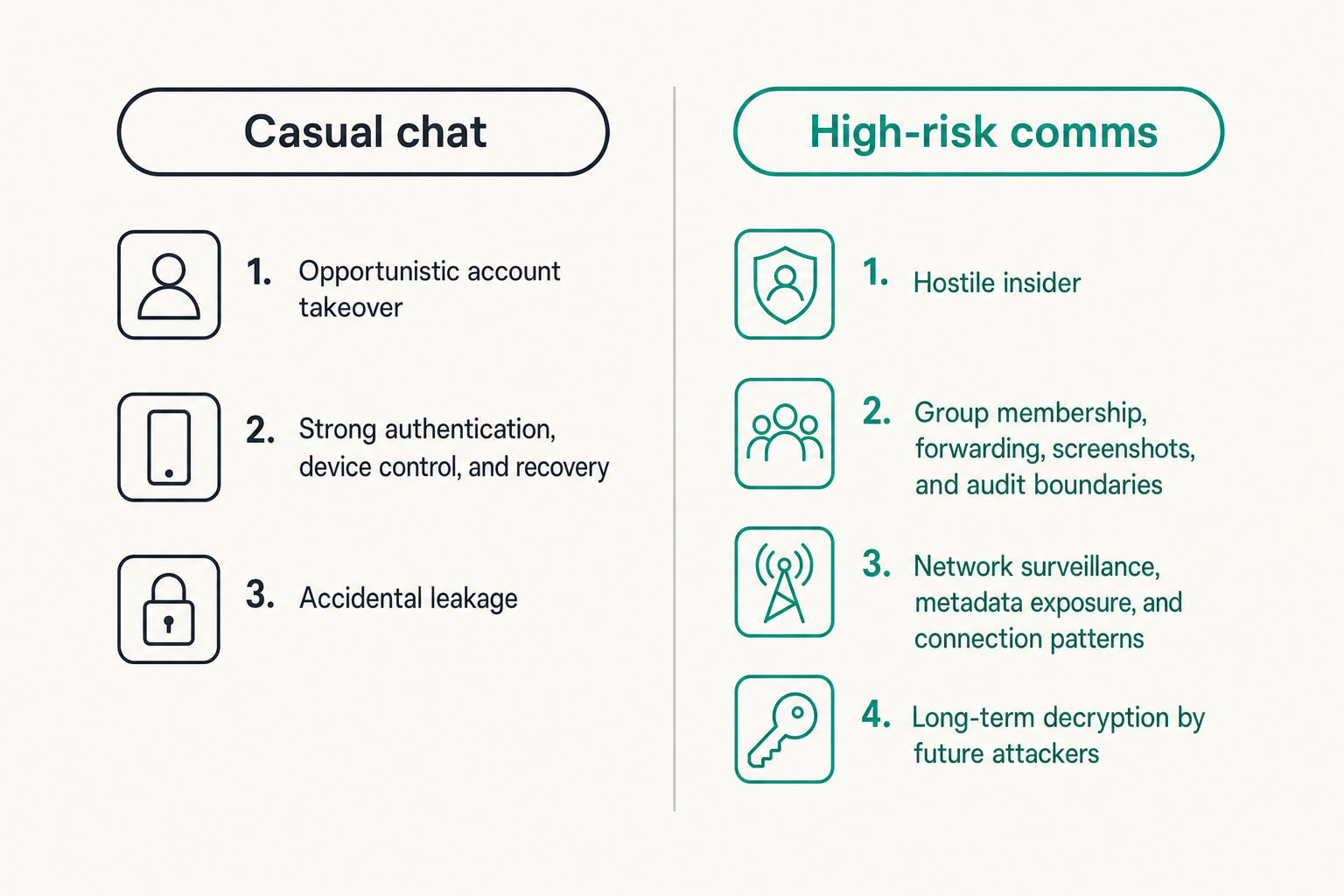
If your main risk is opportunistic account takeover, you care about strong authentication, device control, and recovery. If your risk is a hostile insider, you care about group membership, forwarding, screenshots, and audit boundaries. If your risk is network surveillance, you care about transport security, metadata exposure, and connection patterns. If your risk is long-term decryption by future attackers, you care about cryptographic durability and post-quantum assumptions.
The mistake teams make is asking whether an app is secure in the abstract. Secure against whom? For how long? Under what failure mode? On whose device?
A small founder team may accept phone-number identity because everyone knows each other and the highest risk is accidental leakage. A legal or security team may need stricter identity verification because impersonation inside a sensitive thread is a real operational risk. A journalist communicating with sources may need to minimize metadata as much as message content.
Practical rule: If you cannot name the adversary, you cannot choose the right secure messaging workflow.
Separate message content from communication context
End-to-end encryption protects message content from being readable by intermediaries when implemented correctly. But communication context can still reveal a lot.
Who talked to whom? When? How often? From what device class? From which network region? Did a conversation spike right before a product launch, legal filing, security incident, or political event?
This is metadata. It is not always protected the same way as message content. Many users say they want private chat, but what they really need is reduced exposure of both content and context.
What breaks in practice is that teams assume encrypted content means private communication. It may not. If the service, device, notification system, backup provider, or recipient behavior exposes enough context, an adversary may not need the text.
This does not mean every team needs extreme anonymity. It means teams should be honest. If the concern is casual snooping, strong encrypted messaging may be enough. If the concern is targeted surveillance or sensitive source protection, metadata handling becomes a first-class requirement.
The architecture of private messaging
End-to-end encryption is the baseline
Secure messaging apps should use end-to-end encryption for private conversations. That means messages are encrypted on the sender device and decrypted on the recipient device, not exposed in readable form to the service operator along the way.
But baseline does not mean complete. A good architecture also needs authenticated key exchange, forward secrecy, protection against replay or downgrade behavior, and safe handling of group membership changes. Group messaging is especially hard because the system must update keys when participants join, leave, change devices, or lose access.
For non-experts, the practical interpretation is simple: do not treat encryption as a single switch. Ask how keys are created, where they live, when they rotate, how new devices are trusted, and what happens when something changes.
If a vendor cannot explain this clearly, that is a signal. It does not mean the implementation is bad, but it does mean your team may not be able to operate it safely.
The qrypt.chat security model is a useful place to understand how a secure messaging provider explains its cryptographic and operational assumptions without forcing every reader to become a cryptographer.
Metadata is where many designs leak
Metadata is stubborn because messaging systems need routing information. A server usually needs to know where to deliver a message. Push notification systems may know an app received something. Devices may store previews. Logs may capture timestamps. Support workflows may expose account identifiers.
The goal is not to pretend metadata disappears. The goal is to minimize it, protect it, shorten its useful life, and avoid collecting what the product does not need.
A practical metadata review should ask:
- What identifiers are required to create an account?
- What conversation metadata is visible to the provider?
- What logs are retained, and for how long?
- Are push notifications content-free?
- Can contact discovery be done without uploading a full address book in readable form?
- What metadata remains after account deletion?
Related reading from our network: storage-heavy media workflows face adjacent questions about privacy, indexing, and operational traces in this home media architecture guide, even though the use case is very different.
Practical rule: Treat metadata as operational data with privacy consequences, not harmless exhaust.
Identity and devices are the real control plane
Device enrollment needs ceremony
Most secure messaging failures are not caused by someone breaking modern encryption directly. They are caused by someone getting access to an account, device, recovery path, or group they should not control.
Device enrollment is the point where the system decides whether a new endpoint should receive secrets. That decision deserves friction. Not pointless friction, but meaningful verification.
For individuals, that may mean checking safety numbers, confirming identity through a second channel, and removing old devices. For teams, it may mean requiring admin approval before a new device joins a workspace, documenting who owns the device, and having an offboarding checklist.
The mistake teams make is optimizing enrollment for speed and treating device changes as harmless. In secure communication, a new device is not just a convenience. It is a new place where decrypted content may exist.
Key changes need user-visible trust decisions
Key changes happen for normal reasons: a user buys a new phone, reinstalls the app, clears local storage, or resets an account. They also happen for dangerous reasons: account takeover, device compromise, or attempted impersonation.
A secure messaging app should make meaningful key changes visible enough that users can respond. The design challenge is avoiding alert fatigue. If every minor event screams for attention, people ignore the warnings. If important changes are hidden, attackers get room to operate.
For teams, key-change handling should be part of policy. For example:
- Sensitive groups pause discussion after an unexpected key change.
- The participant verifies identity through an approved second path.
- The group resumes only after the change is understood.
- If verification fails, the participant is removed and the incident is reviewed.
This is not paranoia. It is normal access control applied to encrypted messaging.
Retention, backups, and screenshots break clean encryption stories
Disappearing messages are a policy, not magic
Disappearing messages are useful, but they are often misunderstood. They reduce long-term exposure on devices and in chat history. They do not prevent someone from taking a screenshot, photographing a screen, copying text before expiration, or storing content in another system.
The practical question is whether disappearing messages match the risk. For casual privacy, short retention can reduce accidental discovery. For regulated teams, deletion may conflict with recordkeeping obligations. For incident response, short-lived messages may protect sensitive details but also remove context needed for after-action review.
A useful retention policy defines message lifespan by channel type:
- Ephemeral coordination: minutes to hours.
- Sensitive planning: days.
- Operational decisions: retained elsewhere in an approved system, not only chat.
- Legal or compliance matters: handled according to counsel and policy.
The mistake teams make is using disappearing messages as a universal answer. They are a control, not a substitute for judgment.
Backups often become the weakest system
Many encrypted messaging conversations are secure in transit and weak in backup. If message history is copied into device backups, cloud backups, desktop exports, screenshots, mobile notification logs, or ticketing tools, your protection boundary moved.
Ask where plaintext exists. On which devices? In which backups? Under which account credentials? Can administrators access it? Can cloud providers access it? Can a family-shared device account expose it? Can mobile device management software capture it?
For organizations, this should be written down. Not every team needs a complex data map, but every team using secure messaging for sensitive work should know where messages can persist outside the app.
For individuals, the simplest hardening move is often to review cloud backup settings, lock-screen previews, desktop sync, and old device access. These are boring controls. They are also where real leaks happen.
Roll out secure messaging apps as an operating workflow
Define channels before inviting people
Rolling out secure messaging apps without channel design creates confusion. People need to know what belongs in the secure app and what does not.
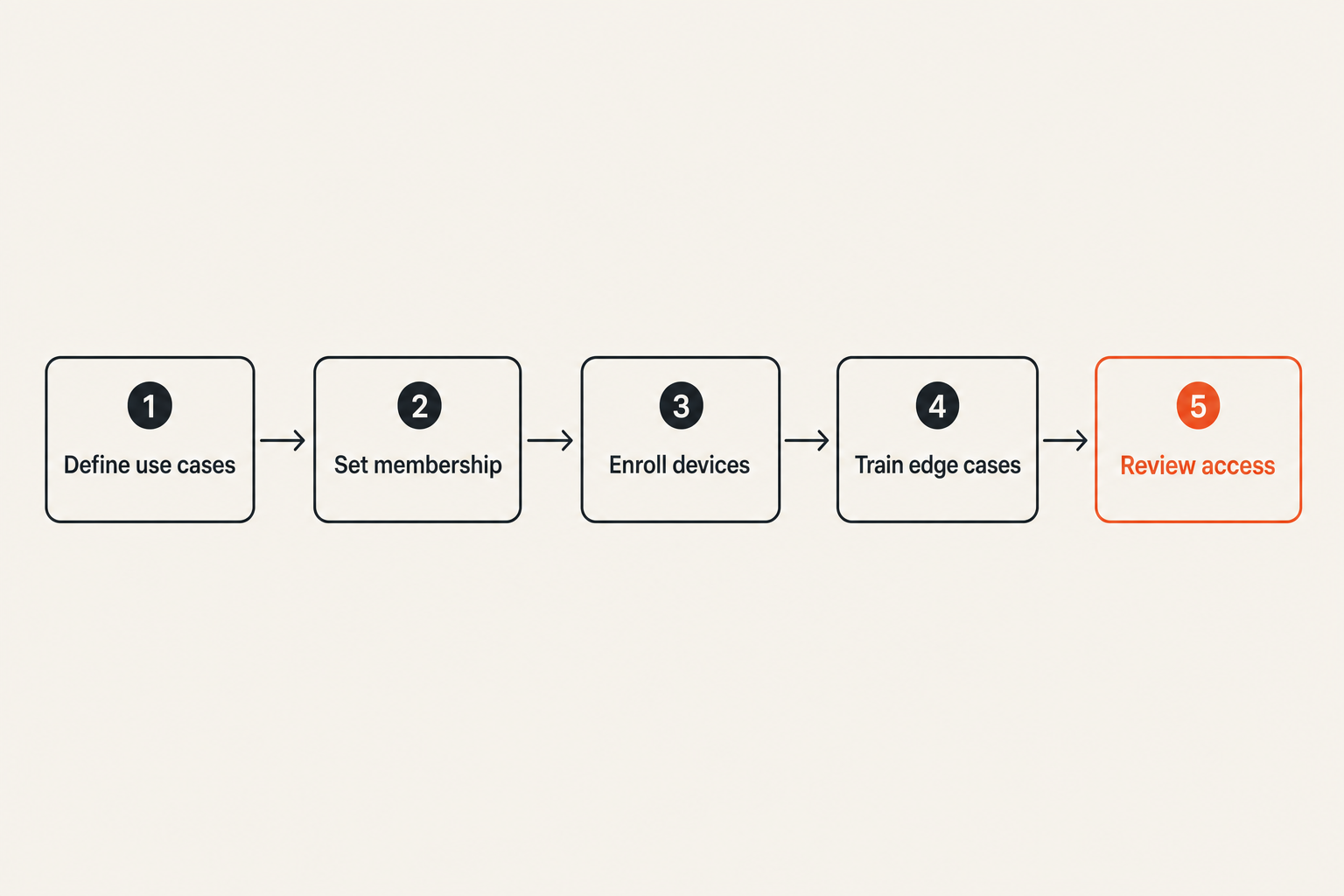
A basic rollout plan should define:
- Use cases: executive decisions, incident response, source communication, customer privacy, personal safety, or project coordination.
- Participant rules: who can create groups, invite members, approve new devices, and remove users.
- Retention defaults: how long messages live by channel type.
- Escalation paths: what to do after device loss, suspected compromise, or accidental disclosure.
- Offboarding: how to remove people, rotate groups, and verify old devices no longer receive messages.
- Exceptions: when communication must move to legal, ticketing, compliance, or archival systems.
This is where many rollouts fail. The app is deployed, but the rules are not. Then every group invents its own behavior.
Related reading from our network: launch teams hit a similar operational problem when checkout, delivery, and support are treated as separate pieces; this digital product launch workflow is a useful adjacent example of why the visible interface is never the whole system.
Train for edge cases, not only normal chat
Training should not be a tour of buttons. People can learn buttons by using the app. Training should cover the failure modes.
Run through realistic scenarios:
- A team member loses a phone during travel.
- A key-change warning appears in a sensitive group.
- A contractor leaves with access to old chats.
- A user accidentally posts a secret in the wrong group.
- An executive receives a message from a lookalike account.
- The normal company chat is unavailable during a security incident.
A good rollout gives people short scripts. Who do they tell? What do they stop doing? Which group is trusted? How is identity reverified?
Practical rule: Train users on what to do when trust changes, not only how to send a message.
Compare secure messaging apps by operational fit
A practical comparison model
Feature grids are useful only if they connect to decisions. Use a comparison model that maps product traits to operational risks.
| Evaluation area | Weak approach | Better approach | Why it matters |
|---|---|---|---|
| Encryption | Vendor says messages are encrypted | Clear end-to-end encryption model and key handling | Prevents vague security claims from driving selection |
| Identity | Account equals phone or email only | Identity verification and visible trust changes | Reduces impersonation and silent device risk |
| Metadata | Not discussed | Collection, logs, notification behavior, and retention explained | Context can expose sensitive relationships |
| Devices | Unlimited convenience | Device review, removal, and compromise process | Devices are where plaintext usually exists |
| Retention | Same setting everywhere | Channel-specific retention defaults | Different conversations need different lifespans |
| Admin model | Everyone can invite anyone | Ownership and approval paths are defined | Prevents group sprawl and unauthorized access |
| Recovery | Easy reset with weak proof | Recovery balanced against takeover risk | Recovery is often an attack path |
| Usability | Secure but avoided | Secure enough and actually used | Unused security does not protect communication |
The best secure messaging app for a particular team is the one whose defaults line up with the team’s risk and behavior. If a tool is technically strong but too painful for daily use, people will route around it. If a tool is pleasant but vague about trust and retention, it may not be appropriate for sensitive work.
What works and what fails
What works:
- A small number of approved secure channels.
- Clear rules for who can invite participants.
- Device verification for sensitive conversations.
- Short retention for high-risk coordination.
- A documented response path for lost devices and suspected compromise.
- Periodic review of groups, devices, and inactive users.
What fails:
- Everyone choosing their own encrypted chat app.
- Sensitive work split across secure chat, email, documents, and screenshots.
- No owner for group membership.
- Blind trust in disappearing messages.
- Ignoring desktop clients and backups.
- Treating key-change warnings as noise.
The practical question is not whether a tool has every privacy feature. It is whether your users can follow the workflow when tired, rushed, traveling, or under pressure.
What breaks when implementation is careless
People route around friction
Security that blocks work without explaining why creates shadow workflows. People will move urgent conversations to SMS, email, consumer chat, personal notes, or screenshots if the approved secure messaging app gets in the way.
This is not a user education problem only. It is an architecture problem. If the system requires too many steps for low-risk communication, people abandon it. If it has too little ceremony for high-risk communication, it fails silently.
Segment your channels. Not every message needs the same controls. A team can have a low-friction encrypted channel for routine coordination and a stricter channel for sensitive approvals, incident response, legal discussions, or source protection.
That changes the conversation from secure versus convenient to appropriate friction for the risk.
Security teams lose visibility into risk
Private messaging creates a tension for security teams. The goal is to protect content from unnecessary access, including unnecessary internal access. But the organization still needs to manage risk: account compromise, offboarding, device loss, abusive behavior, or accidental disclosure.
The answer is not to demand plaintext visibility. That defeats the point. The answer is to define operational signals that do not expose message content unnecessarily.
Useful signals may include device enrollment events, group membership changes, failed authentication attempts, abnormal recovery activity, and administrative actions. For personal use, the equivalent is simpler: know which devices are linked, which accounts can recover access, and which conversations deserve extra verification.
A privacy-respecting system should minimize content exposure while still giving users and administrators enough context to manage trust.
Measure secure messaging apps by outcomes, not feature lists
Metrics that actually help
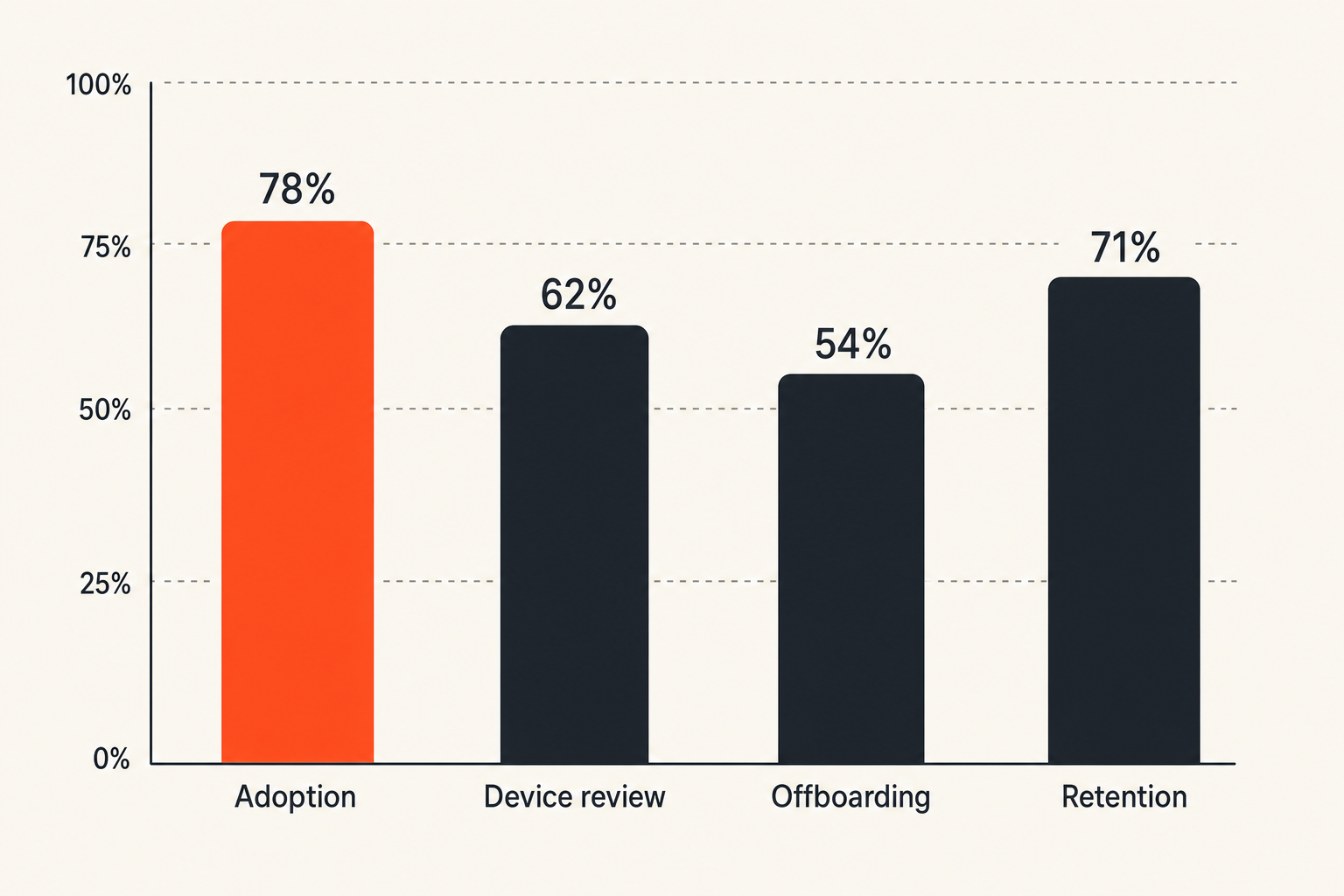
You do not need fake precision to measure whether secure messaging apps are working. You need a small set of indicators tied to behavior.
For teams, useful measures include:
- Adoption by approved use case, not total messages.
- Number of sensitive groups with named owners.
- Time to remove access after offboarding.
- Number of unreviewed devices per user.
- Frequency of key-change verification in sensitive groups.
- Incidents where sensitive communication moved to unapproved channels.
- Retention settings aligned to channel purpose.
For individuals, the same idea becomes a personal checklist:
- Do I know which devices can read my messages?
- Are lock-screen previews disabled for sensitive chats?
- Are cloud backups aligned with my privacy needs?
- Do I verify contacts before sharing sensitive information?
- Do I separate routine chat from high-risk communication?
The mistake teams make is measuring deployment instead of protection. Installed does not mean adopted. Adopted does not mean used correctly. Used correctly once does not mean the workflow survives turnover or stress.
Review cadence keeps the system honest
Secure communication is not a one-time setup. People change phones. Contractors join and leave. Threats change. Products change. Defaults change. Legal requirements change. A review cadence catches drift.
A lightweight quarterly review can cover:
- Active groups and owners.
- Members who no longer need access.
- Devices that should be removed.
- Retention settings that no longer match the work.
- Any incidents or near misses.
- Training gaps discovered during real use.
For higher-risk teams, reviews may be monthly or tied to projects. For individuals, a simple reminder to review devices and backups is better than pretending the first setup remains perfect forever.
The qrypt.chat privacy posture is relevant here because privacy is not only a promise at signup; it depends on what data is collected, how it is handled, and what assumptions users can reasonably make over time.
Where qrypt.chat fits in the secure messaging stack
Private communication needs durable cryptographic assumptions
The product-fit question should be architectural: where do you need private communication with stronger assumptions than ordinary chat?
qrypt.chat is built for people who care about private communication, secure messaging, and practical digital security. That matters most in workflows where the cost of exposure is high: sensitive team coordination, confidential planning, security discussions, source communication, and personal conversations that should not become durable data exhaust.
Post-quantum cryptography is part of that conversation because not all communication has the same shelf life. Some messages lose value quickly. Others may remain sensitive for years. If your concern includes long-term confidentiality, the cryptographic roadmap matters.
That does not mean every user should panic about quantum timelines. It means teams should avoid pretending today’s convenience choices have no long-term consequences. The qrypt.chat post-quantum messaging approach is designed for readers who want stronger privacy assumptions without needing to parse every primitive from first principles.
Use the product where the workflow demands privacy
qrypt.chat should not be treated as a decorative secure channel next to a dozen uncontrolled channels. Use it where the workflow benefits from a deliberate privacy boundary.
Good fits include:
- Private one-to-one conversations where trust matters.
- Small group coordination with sensitive context.
- Remote teams that need a cleaner secure channel than general workplace chat.
- Security professionals who need private coordination outside noisy collaboration tools.
- Privacy-conscious users who want encrypted chat aligned with practical security habits.
Bad fits are mostly workflow problems: using secure messaging while copying everything into email, inviting unmanaged participants into sensitive groups, ignoring device changes, or treating encryption as permission to share more than necessary.
The goal is not to make every conversation dramatic. The goal is to give sensitive conversations a place where the architecture matches the risk.
Closing checklist for secure messaging apps in 2026
Questions to answer before standardizing
Before you standardize on secure messaging apps for yourself or your team, answer these questions plainly:
- What are we protecting: content, metadata, identity, timing, relationships, or all of the above?
- Who are we protecting against: opportunistic attackers, insiders, compromised accounts, service providers, targeted surveillance, or future decryption?
- Which conversations belong in the secure app?
- Who can invite people and approve devices?
- What happens when a phone is lost or a key changes?
- How long should messages live?
- Where else can plaintext appear through backups, screenshots, notifications, exports, or integrations?
- How will we review access over time?
- What is the fallback channel during an incident?
- What behavior would cause us to change the workflow?
If these questions feel operational rather than cryptographic, that is the point. Secure messaging apps fail less often because users cannot define encryption and more often because nobody owns the workflow around trust.
The practical next step
Pick one sensitive communication path and map it end to end. Do not start with the entire organization. Start with one real use case: executive planning, incident response, source communication, customer privacy, or personal high-risk chat.
Write down who participates, how identity is verified, which devices are allowed, how long messages live, where backups exist, and what happens when something goes wrong. Then choose the secure messaging app that supports that workflow instead of forcing your workflow to match a generic feature list.
Secure messaging apps in 2026 are not just about private chat. They are about making private communication operationally reliable when devices, people, and risks keep changing.
Try qrypt.chat
qrypt.chat is for people who care about private communication, secure messaging, and practical digital security. Try qrypt.chat.