
A security service sounds like something you buy, enable, and forget. That is the first operational problem.
In encrypted messaging, the failure usually does not start with cryptography. It starts when a sensitive conversation happens in the wrong channel, an employee exports a thread to an unmanaged device, a vendor asks for credentials over chat, or nobody knows who owns the response when a private communication workflow breaks.
Teams think the problem is choosing the most secure app. The real problem is designing a security service around communication: identity, access, device trust, message handling, retention, escalation, and recovery.
That changes the conversation. In 2026, a security service for private communication is not a feature checklist. It is an architecture decision and an operating workflow. The practical question is not, does this tool encrypt messages? The practical question is, can your team use it under pressure without leaking context, losing evidence, or creating a second shadow system?
Table of contents
- Security service architecture starts with threat ownership
- What a security service must protect in encrypted messaging
- The service model: people, process, and technical controls
- Build the encrypted messaging security workflow
- What works in practice
- What fails when teams implement it badly
- Incident response for private communication
- How to evaluate a security service in 2026
- Implementation sequence for remote teams
- Where qrypt.chat fits as a private communication security service
- Choosing a security service without buying theater
Security service architecture starts with threat ownership
The service is the workflow, not the logo
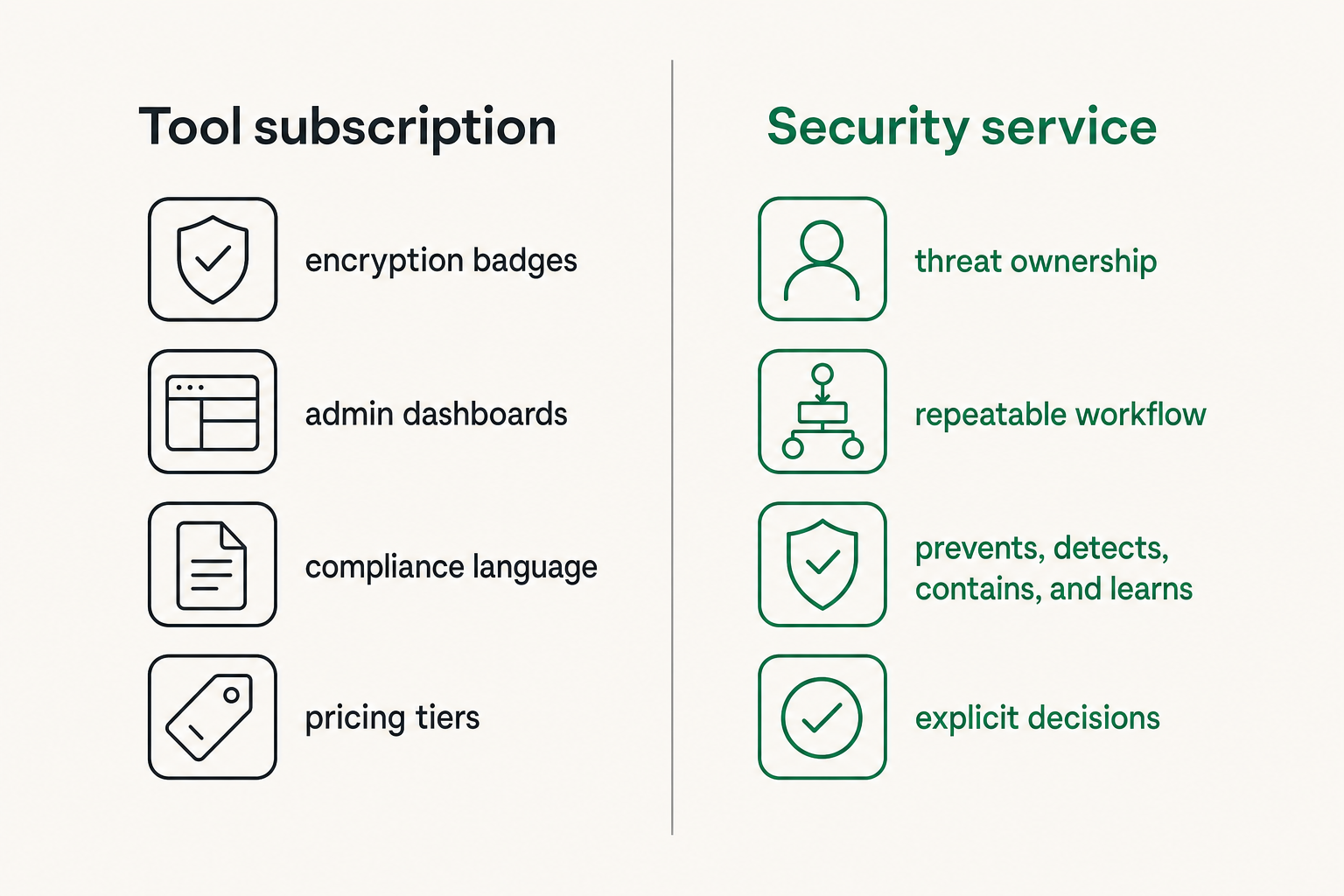
The mistake teams make is treating a security service as a subscription category. They compare encryption badges, admin dashboards, compliance language, and pricing tiers. Some of that matters. None of it is enough.
A useful way to think about it is this: the service is the repeatable way your organization prevents, detects, contains, and learns from communication risk. The tool is only one component.
For encrypted messaging, that service includes:
- who can create sensitive rooms or groups;
- how members are verified;
- what happens when a device is lost;
- how external parties are invited;
- which conversations must never leave the secure channel;
- who investigates suspicious contact attempts;
- how offboarding removes access without breaking legitimate records.
If those decisions are not explicit, users will improvise. In private communication, improvisation usually means screenshots, forwarded messages, duplicated threads, personal accounts, and silent policy exceptions.
Practical rule: If users need to invent the secure workflow during a stressful moment, you do not have a security service. You have a tool with hope attached.
Assign ownership before buying tools
Security service ownership is not always obvious. IT may own devices. Security may own risk. Legal may own retention. Operations may own vendor coordination. HR may own employee investigations. Executives may own the highest-risk conversations.
If nobody owns the full communication lifecycle, the system breaks between departments. A lost phone becomes an IT ticket, but nobody checks whether sensitive rooms were exposed. A phishing message gets reported to security, but nobody tells the team to pause the vendor payment thread. Legal asks for a record, but users already deleted local exports without guidance.
Assign a simple ownership model:
| Area | Owner | Decision they control |
|---|---|---|
| Identity verification | Security or IT | Who is a real participant |
| Device access | IT | Which devices may read messages |
| Sensitive workflows | Business owner | Which conversations require secure channels |
| Incident response | Security lead | Who coordinates containment |
| Retention and deletion | Legal or compliance | What must be kept or removed |
| User training | Operations | How people actually follow the workflow |
That table is not bureaucracy. It is how you prevent a private messaging system from turning into another unmanaged collaboration tool.
Map communication risk by business process
Do not start with every possible threat. Start with the business processes where a message can create damage.
Examples:
- executive decision-making;
- customer support involving identity documents;
- legal or tax communication;
- incident response coordination;
- vendor payments and bank changes;
- engineering secrets and access credentials;
- HR investigations and employee health information.
Each process has different failure modes. A vendor payment thread needs impersonation resistance and approval separation. An HR investigation needs strict membership and careful retention. Incident response needs speed, reliable identity, and evidence preservation. The same encrypted chat feature can support all three, but the security service around it must differ.
Related reading from our network: teams building response workflows face similar ownership problems in incident command structure for SOC teams, where unclear decision rights slow containment.
What a security service must protect in encrypted messaging
Messages are only one part of the exposure
Encrypted messaging protects content in transit and, depending on design, at rest. That is necessary. It is not the whole system.
What breaks in practice is everything around the message:
- account recovery flows;
- push notification previews;
- device backups;
- contact discovery;
- file downloads;
- screenshots;
- copied text;
- invited guests;
- browser sessions;
- user confusion about which channel is approved.
A security service has to reduce these surrounding exposures. Otherwise, the team will say it uses encrypted messaging while sensitive content still leaks through previews, exports, or parallel conversations.
This is why product claims should be read operationally. End-to-end encryption is a security property. A secure communication service is the set of controls and behaviors that make the property useful in production.
Metadata can become the real leak
Even when content is protected, metadata can reveal patterns. Who talked to whom, when they talked, which files were exchanged, and how often a room became active can be sensitive.
For some teams, metadata is low risk. For others, it is central. Journalists, legal teams, security researchers, executives, activists, and incident responders may care not only about the message body, but also about association and timing.
A practical security service should ask:
- Are contact lists exposed or discoverable?
- Are room names sensitive?
- Are notifications revealing message context?
- Are logs minimized and access-controlled?
- Can administrators see more than they need?
- Are analytics aligned with privacy promises?
The answer does not need to be extreme in every environment. It needs to be honest. If the service collects operational metadata, define who can access it and why.
Devices decide whether encryption holds
Most communication failures happen on endpoints. A message can be strongly encrypted and still visible on a compromised laptop, a shared family tablet, a stolen phone, or a browser profile synced to a personal account.
Device posture is therefore part of the security service. At minimum, private teams should define:
- device lock requirements;
- operating system update expectations;
- screen lock timeout;
- lost device reporting;
- local notification settings;
- whether unmanaged personal devices are allowed;
- whether secure rooms require stronger device rules.
Practical rule: Encrypted messaging does not compensate for unmanaged endpoints. Treat every device that can decrypt messages as part of the security boundary.
The service model: people, process, and technical controls
People: who is allowed to know what
Security services fail when membership becomes casual. Someone adds a contractor to a room for one task. The contractor stays for six months. A former employee remains in a side channel. A vendor contact changes roles, but nobody updates the group. The original security decision quietly expires.
People controls should be simple and visible:
- name the room owner;
- require owner approval for new members;
- review membership on a schedule for sensitive rooms;
- remove guests automatically after a project ends where possible;
- keep executive, legal, HR, and incident rooms tightly scoped.
The goal is not to make communication painful. The goal is to avoid pretending that a private room remains private after membership becomes stale.
Process: how sensitive work moves
A secure process tells users where work should happen. It also tells them what not to do.
For example:
- Payment instruction changes must be confirmed in a secure room and never approved from email alone.
- Incident response coordination happens in a designated encrypted channel, not in scattered direct messages.
- Identity documents may be uploaded only where retention and access are controlled.
- Legal strategy conversations cannot be copied into general project chat.
These rules are useful because they match real work. Generic policies like use secure communication for sensitive data often fail because users have to interpret sensitivity every time.
Controls: what the system enforces
Policies work better when the system carries part of the load. Good controls reduce the number of decisions users must make correctly.
Useful controls include:
- strong account authentication;
- verified contacts or trusted identity flows;
- encrypted message transport and storage design;
- room-level access control;
- limited notification previews;
- device session visibility;
- revocation for lost devices;
- clear deletion and retention behavior;
- export restrictions where appropriate;
- auditability for administrative actions without exposing message content unnecessarily.
A security service should not rely on heroic user behavior. It should make the safe path the obvious path.
Related reading from our network: trust workflows show up outside messaging too; the same production discipline appears in Apple Developer Program distribution and signing workflows, where identity, entitlements, and release control matter as much as code.
Build the encrypted messaging security workflow
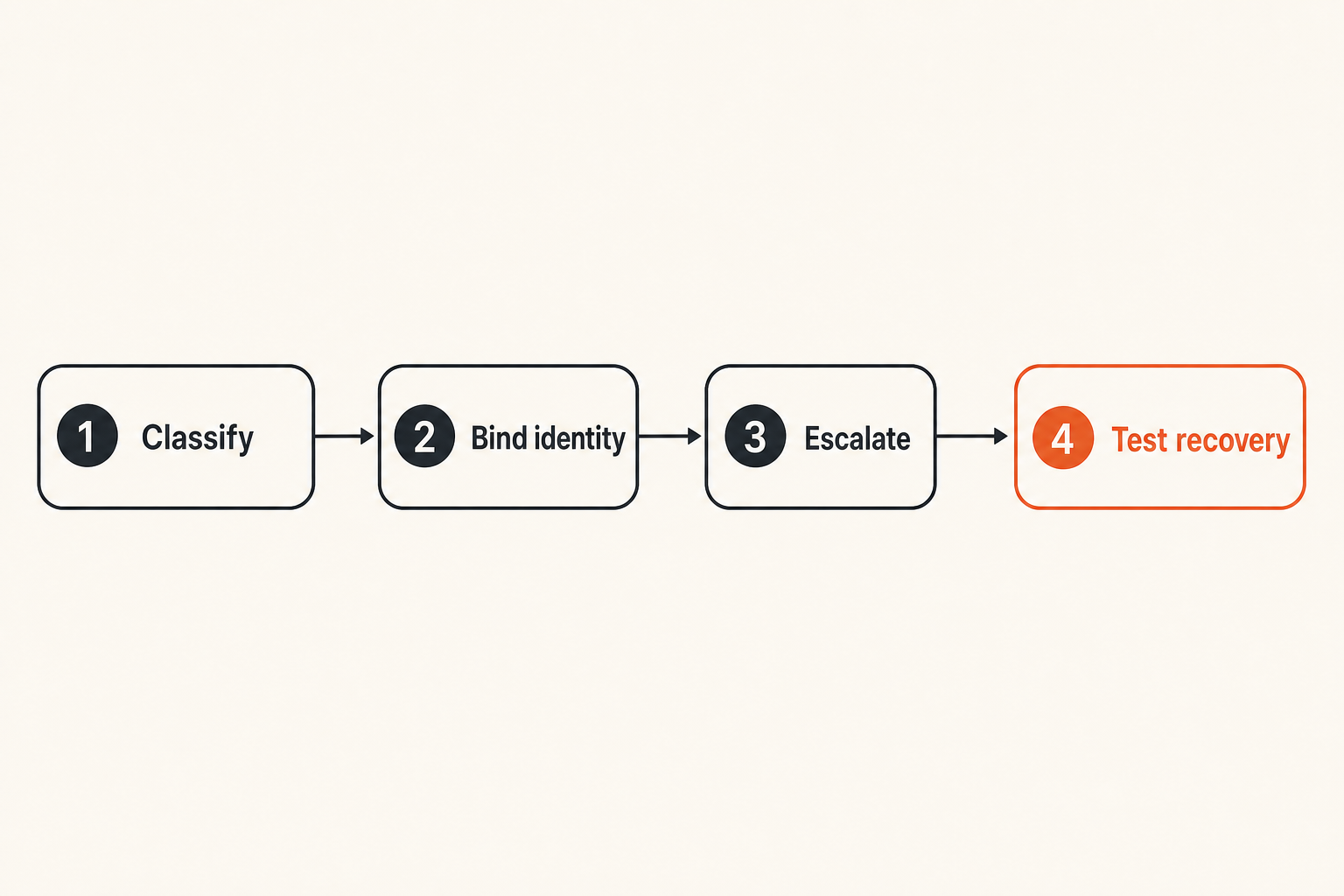
Step 1: classify conversations
Start with conversation classes, not tool settings. Most teams need only a small model:
- Public or low-risk coordination.
- Internal operational communication.
- Confidential business communication.
- Restricted communication for legal, security, HR, finance, or executive work.
- Emergency incident communication.
Each class gets different membership, device, retention, and escalation rules. This avoids arguing over every message. Users learn which room type fits the work.
A small policy example:
conversation_classes:
  confidential:
    allowed_channels: encrypted_team_room
    external_guests: owner_approved
    notification_preview: disabled
    review_membership_days: 30
  restricted:
    allowed_channels: encrypted_restricted_room
    external_guests: security_and_legal_approved
    unmanaged_devices: not_allowed
    review_membership_days: 14
This does not need to be complex. It needs to be clear enough that a new employee can follow it.
Step 2: bind identity and devices
Identity is the center of private communication. If you cannot trust who is in the room, message encryption becomes less meaningful.
Practical identity controls include:
- require strong authentication for accounts;
- verify new members through a second channel for high-risk rooms;
- show device sessions to users;
- remove old sessions during offboarding;
- avoid shared accounts;
- document how external participants prove identity.
For sensitive teams, device binding matters. If a user signs in from a new device, the service should make that visible. For restricted workflows, require review before the device can access critical rooms.
Step 3: define escalation paths
Every private communication workflow needs an escalation path. Users need to know what to do when something feels wrong.
Examples:
- A vendor asks to change payment details.
- A participant receives a suspicious login prompt.
- A room member posts credentials by mistake.
- A device with active sessions is lost.
- An external guest requests access to old files.
- Someone notices a user account behaving strangely.
The escalation path should answer three questions:
- Who do I notify?
- What should I stop doing immediately?
- Where do we coordinate the response?
Practical rule: The first secure action should be obvious. If reporting a suspicious message requires searching a wiki, users will either ignore it or spread it to the wrong channel.
Step 4: test recovery and offboarding
Recovery is where many security services reveal their real design. Can users recover access without giving attackers an easy path? Can an organization remove access without destroying legitimate continuity? Can a lost device be handled quickly?
Test these scenarios before you need them:
- user loses phone during travel;
- employee leaves with access to restricted rooms;
- executive gets a new device;
- contractor project ends;
- account recovery request arrives from an unusual location;
- admin account is suspected compromised.
If the answer is unclear, fix the workflow. Do not wait for the incident.
What works in practice
Separate social chat from operational chat
People need casual communication. That does not mean casual communication should carry sensitive decisions. Teams get into trouble when every conversation, joke, approval, credential hint, and executive discussion happens in one large channel.
Separate channels by purpose:
- general team chat for low-risk coordination;
- project rooms for delivery work;
- restricted rooms for sensitive topics;
- incident rooms for active response;
- external rooms for vendor or partner coordination.
This separation gives users a mental model. It also helps security teams investigate without crawling through unrelated conversations.
Use default-private rooms for sensitive work
For sensitive workflows, private should be the default. The user should not need to remember to switch modes, disable previews, or invite the right smaller group every time.
Good defaults include:
- no broad discovery for restricted rooms;
- limited membership;
- clear room purpose in the description;
- disabled message previews;
- explicit owner;
- periodic access review;
- no automatic guest persistence beyond the project.
This is not about paranoia. It is about reducing repeat decisions. Teams leak data when privacy depends on perfect memory.
Document the exception path
Exceptions are inevitable. A customer cannot access the secure channel. A regulator requires a different portal. A vendor has an emergency. A field employee has limited connectivity. Pretending exceptions will not happen creates shadow process.
Write the exception path:
- who can approve it;
- what minimum information may be shared;
- how the conversation is brought back into the secure workflow;
- what record is kept;
- when the exception expires.
Related reading from our network: operational exceptions are not unique to security; teams choosing field service management software workflows face similar rollout risk when mobile users, dispatch, support, and back-office processes do not line up.
What fails when teams implement it badly
Encryption without identity discipline
The most common failure is encrypted confusion. The team deploys a secure messenger, but nobody verifies participants. Room membership grows. Personal devices remain active. External guests linger. Users assume the lock icon means every workflow is safe.
Encryption protects against important network and provider threats. It does not prove that every person in the room belongs there.
A bad implementation looks like this:
| Weak pattern | Why it breaks | Better pattern |
|---|---|---|
| Anyone can create sensitive rooms | No ownership or review | Room owner required |
| Guests remain indefinitely | Access outlives business need | Expiring guest access |
| Personal devices unrestricted | Endpoint exposure expands | Device rules by room class |
| No member verification | Impersonation risk remains | Verified identity for restricted rooms |
| No offboarding checklist | Former users retain access | Access removal tied to HR and IT |
Policy without user ergonomics
Another failure mode is secure on paper, impossible in daily work. If users need ten steps to share a sensitive file, they will use email. If mobile access is too painful, field users will send screenshots. If approval workflows stall urgent decisions, executives will route around them.
Security service design needs enough friction to reduce risk and enough usability to survive production. That balance is not found in a policy document. It is found by watching real workflows.
Ask users:
- Where do you currently send sensitive information?
- Which step feels slow or unclear?
- What do you do when the approved tool is unavailable?
- Which external parties create exceptions?
- What would you do during an urgent incident?
The answers will tell you where the secure workflow will break.
Retention confusion
Retention is uncomfortable because privacy and accountability can pull in different directions. Some conversations should disappear quickly. Some must be retained for legal, security, or business reasons. Many teams do not decide until after a dispute or incident.
Define retention by conversation class. Do not leave it to individual preference.
Examples:
- Low-risk coordination may have short retention.
- Legal matters may require preservation.
- Security incidents may require evidence handling.
- HR investigations may need strict access and defined retention.
- Executive strategy may need limited membership and careful deletion rules.
If your service cannot express these differences, compensate with process. If your process cannot compensate, the tool is not a good fit for the workflow.
Incident response for private communication
Define the first 30 minutes
When a messaging incident happens, speed matters. The first 30 minutes should not be spent deciding who is in charge.
Define a short response plan:
- Confirm the report and open a secure incident room.
- Identify affected accounts, devices, rooms, and external participants.
- Freeze risky activity, such as payment approvals or credential sharing.
- Revoke suspicious sessions or remove exposed devices.
- Preserve necessary evidence with minimal access expansion.
- Communicate next steps to affected users.
The plan should fit on one page. It should name roles, not just teams.
Preserve evidence without expanding exposure
Evidence handling is tricky in private communication. Screenshots, exports, and forwarded messages can spread sensitive content beyond the original boundary. But deleting everything can destroy the ability to investigate.
Use a controlled evidence process:
- capture only what is needed;
- store evidence in a restricted location;
- record who accessed it;
- avoid forwarding sensitive threads into broad channels;
- separate investigation notes from raw message content;
- involve legal or compliance when required.
The goal is to understand what happened without turning the investigation into a second leak.
Use tabletop exercises for messaging failures
A tabletop exercise does not need to be dramatic. Pick a realistic scenario and walk through it.
Scenarios worth testing:
- A finance manager receives a secure message from a lookalike vendor contact.
- A laptop with active restricted-room access is stolen.
- A contractor downloads sensitive files before offboarding.
- An incident response room accidentally includes the wrong external participant.
- A user posts an API key in a project room.
During the exercise, look for hesitation. Hesitation shows where ownership, tooling, or policy is unclear.
Practical rule: If the team cannot explain the response in plain language, the security service is too fragile for real incidents.
How to evaluate a security service in 2026
Ask architecture questions, not just feature questions
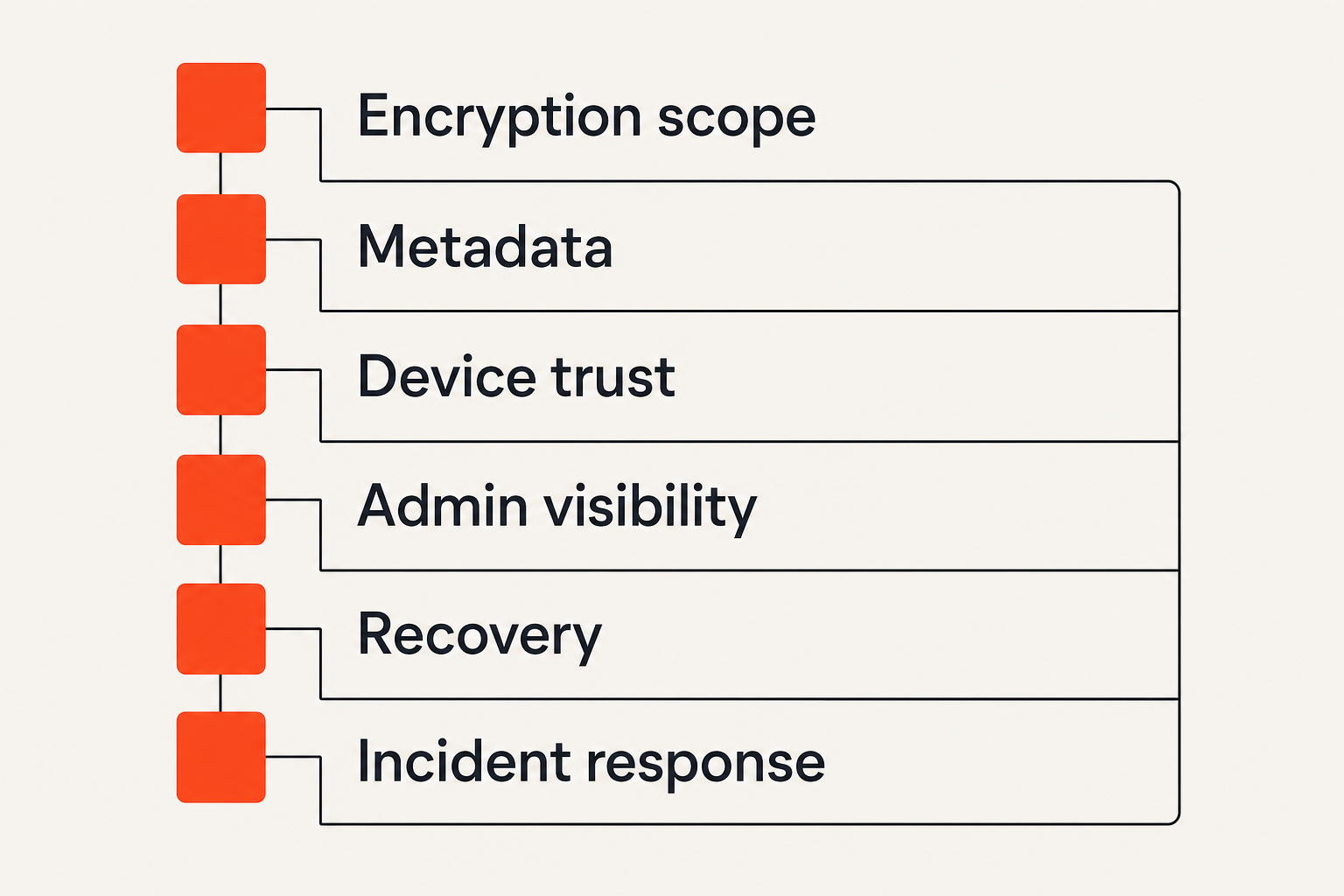
Feature checklists hide operational gaps. Ask vendors and internal teams architecture questions:
- What data is encrypted, where, and under whose keys?
- What metadata is collected and retained?
- How are users and devices verified?
- What can administrators see or change?
- How does account recovery work?
- How are lost devices revoked?
- What happens when an external guest leaves a project?
- Can room policy differ by sensitivity?
- How are exports, screenshots, and file downloads handled?
- How does the service support incident response?
You are not looking for magical answers. You are looking for clear tradeoffs. Every security service has boundaries. The risk is not having boundaries; the risk is hiding them.
Check privacy claims against operations
Privacy claims should map to operational behavior. If a service says it minimizes data, ask what logs exist. If it says administrators cannot read messages, ask what they can see. If it says messages are private, ask how notifications, backups, and file previews work.
For qrypt.chat readers, the privacy model matters as much as the feature surface. The qrypt.chat privacy page is the right place to review how the service describes data handling expectations before you map it into a team workflow.
The mistake teams make is accepting privacy language without testing the workflow. Privacy is not only a promise. It is the result of design choices, defaults, user behavior, and operational discipline.
Test the unhappy paths
Demos usually show the happy path: send a message, create a room, invite a user, share a file. Real security service evaluation starts after that.
Test these unhappy paths:
- user forgets password;
- user loses device;
- admin makes a membership mistake;
- guest access must be revoked quickly;
- sensitive message is sent to the wrong room;
- legal requests a record;
- employee leaves suddenly;
- mobile user has poor connectivity;
- suspicious login appears during an active incident.
The service that handles these cases cleanly is usually more valuable than the one with the flashiest interface.
Implementation sequence for remote teams
Start with one high-risk workflow
Do not roll out a security service by declaring that all communication is now secure. That creates confusion and resistance. Start with one workflow where the risk is obvious.
Good candidates:
- finance approvals;
- security incident response;
- executive coordination;
- customer identity document handling;
- HR investigations;
- legal matter communication;
- vendor onboarding.
Pick the workflow, map the participants, define the room class, set device expectations, document escalation, and run a short pilot. Learn from the pilot before expanding.
Write the smallest useful policy
Long policies are rarely read during real work. A useful policy should answer immediate questions:
- Which conversations must use the secure service?
- Who owns each sensitive room?
- Who can invite external participants?
- What should users do if something looks suspicious?
- What happens when a device is lost?
- What content may not be copied out?
- How does offboarding work?
Keep the policy short enough that managers can explain it. Then back it with training and defaults.
A minimal rollout sequence:
- Select one sensitive workflow.
- Name the business owner and security owner.
- Create the approved secure rooms.
- Verify participants and devices.
- Disable risky notification previews where needed.
- Publish a one-page usage rule.
- Run one realistic incident scenario.
- Review membership and exceptions after 30 days.
- Expand to the next workflow only after the first one works.
Measure adoption by risk reduction
Do not measure success by message volume alone. High usage can still mean poor security if users create uncontrolled rooms or share the wrong content.
Better measures include:
- percentage of high-risk workflows moved out of email or consumer chat;
- number of sensitive rooms with named owners;
- time to revoke a lost device;
- time to remove a departed user;
- number of unresolved guest accounts;
- number of reported suspicious messages;
- incident exercise completion;
- reduction in sensitive screenshots or exports.
These are not vanity metrics. They tell you whether the security service is reducing real exposure.
Where qrypt.chat fits as a private communication security service
Private communication as infrastructure
qrypt.chat is relevant when private communication is not a side preference but an infrastructure requirement. If your team handles sensitive conversations, client details, investigations, security coordination, or executive decisions, the messaging layer becomes part of your security architecture.
The qrypt.chat approach is built around encrypted messaging for people who care about privacy and practical digital security. For readers evaluating the technical posture, the qrypt.chat security page is the natural place to review how the service presents its secure messaging model.
That does not remove the need for workflow design. It gives you a stronger foundation for the workflow.
When qrypt.chat is a good fit
qrypt.chat is a good fit when teams want secure messaging to support real operational habits:
- private team discussions;
- sensitive one-to-one communication;
- remote coordination;
- security-aware user behavior;
- reduced dependence on ad hoc consumer chat;
- clearer separation between ordinary collaboration and confidential work.
It is especially relevant for privacy-conscious users, security professionals, and distributed teams that want private communication without turning every conversation into a compliance project.
If you are comparing the service at a higher level, the qrypt.chat overview explains the positioning around quantum-resistant encrypted messaging and private communication.
When you still need adjacent controls
No messaging product eliminates the need for adjacent security controls. You still need device management where appropriate, user training, phishing defense, identity governance, retention decisions, and incident response ownership.
The practical way to position qrypt.chat is as the private communication layer in a broader security service. It should reduce exposure in conversations, not pretend to own every security outcome by itself.
That honesty matters. Security tools become dangerous when buyers treat them as substitutes for process.
Choosing a security service without buying theater
The closing test
A security service should make private communication easier to do correctly and harder to do accidentally wrong. That is the test.
Before choosing or expanding a service, ask:
- Can users explain which conversations belong there?
- Can room owners manage membership without guesswork?
- Can the team revoke access quickly?
- Can incidents be coordinated without leaking more data?
- Can privacy claims survive operational review?
- Can remote users follow the process under pressure?
- Can leadership see risk reduction without reading every message?
Teams think the problem is finding the perfect secure messenger. The real problem is building a communication workflow where security properties, user behavior, and business ownership reinforce each other.
A good security service does not create theater. It gives people a reliable way to communicate privately, respond quickly, and keep sensitive work out of channels that were never designed to protect it. In 2026, that is the practical standard for any security service built around encrypted messaging.
Try qrypt.chat
qrypt.chat is for people who care about private communication, secure messaging, and practical digital security. Try qrypt.chat.