VA secure messaging sounds like a simple feature until a real team has to operate it. A patient sends a sensitive note. A clinician replies from a managed workstation. A remote coordinator gets a notification. Someone attaches a screenshot. Suddenly the issue is not whether messages can be sent. The issue is whether the system protects content, context, identity, routing, retention, and support workflows without slowing everyone down.
Teams think the problem is secure chat. The real problem is controlled communication across people, devices, policies, and records.
That changes the conversation. VA secure messaging is not just a patient portal button or a compliance checkbox. It is an architecture decision: where messages live, who can read them, how they are routed, how long they are retained, what metadata is exposed, and how users recover when something goes wrong.
The practical question is not whether secure messaging is useful. It is whether your workflow keeps private communication private after the message leaves the composer box.
Table of contents
- What VA secure messaging is really solving
- Architecture decisions behind VA secure messaging
- Privacy model for VA secure messaging
- Workflow design for patients, clinicians, and remote teams
- Implementation sequence for secure messaging
- Failure modes that break secure messaging
- Comparing VA-style secure messaging with consumer encrypted chat
- Security controls that matter in 2026
- Metrics and governance for private communication
- Where qrypt.chat fits in the secure messaging stack
What VA secure messaging is really solving
VA secure messaging is usually discussed as a way for veterans and care teams to exchange messages without using ordinary email. That description is true, but incomplete. The harder problem is operational: the message has to arrive with the right context, reach the right owner, avoid unnecessary exposure, and remain auditable enough for the organization to manage risk.
A useful way to think about it is communication with a record attached. Unlike casual chat, secure messaging in a healthcare or public-sector environment must support continuity, accountability, and privacy at the same time.
Portal messaging is not the same as private messaging
A portal can make communication more secure than email because the sensitive content stays behind authentication instead of traveling through inboxes. But a portal is not automatically private in the deeper sense.
Private communication requires several things to be true:
- The sender and recipient identities are strongly verified.
- Message content is encrypted in transit and at rest.
- Administrative access is limited and logged.
- Notifications do not reveal sensitive content.
- Attachments inherit the same controls as text.
- Retention is intentional, not accidental.
- Support staff cannot browse content simply because it is convenient.
The mistake teams make is assuming that authenticated access solves the whole problem. It does not. Authentication answers who can log in. It does not answer what they can see, how messages are routed, or whether metadata can be used to infer sensitive facts.
The trust boundary starts before the message
The trust boundary begins when a user chooses a device, opens a session, receives a notification, or delegates access. If a patient reads a message on a shared tablet, if a clinician copies text into an unmanaged app, or if a coordinator forwards a summary through email, the secure messaging system did not fail cryptographically. The workflow failed operationally.
Practical rule: Treat secure messaging as a workflow boundary, not just a transport boundary.
That rule matters for VA secure messaging, healthcare portals, and any private communication system used by distributed teams. The secure part is not only the message channel. It is the chain of decisions around the channel.
Architecture decisions behind VA secure messaging
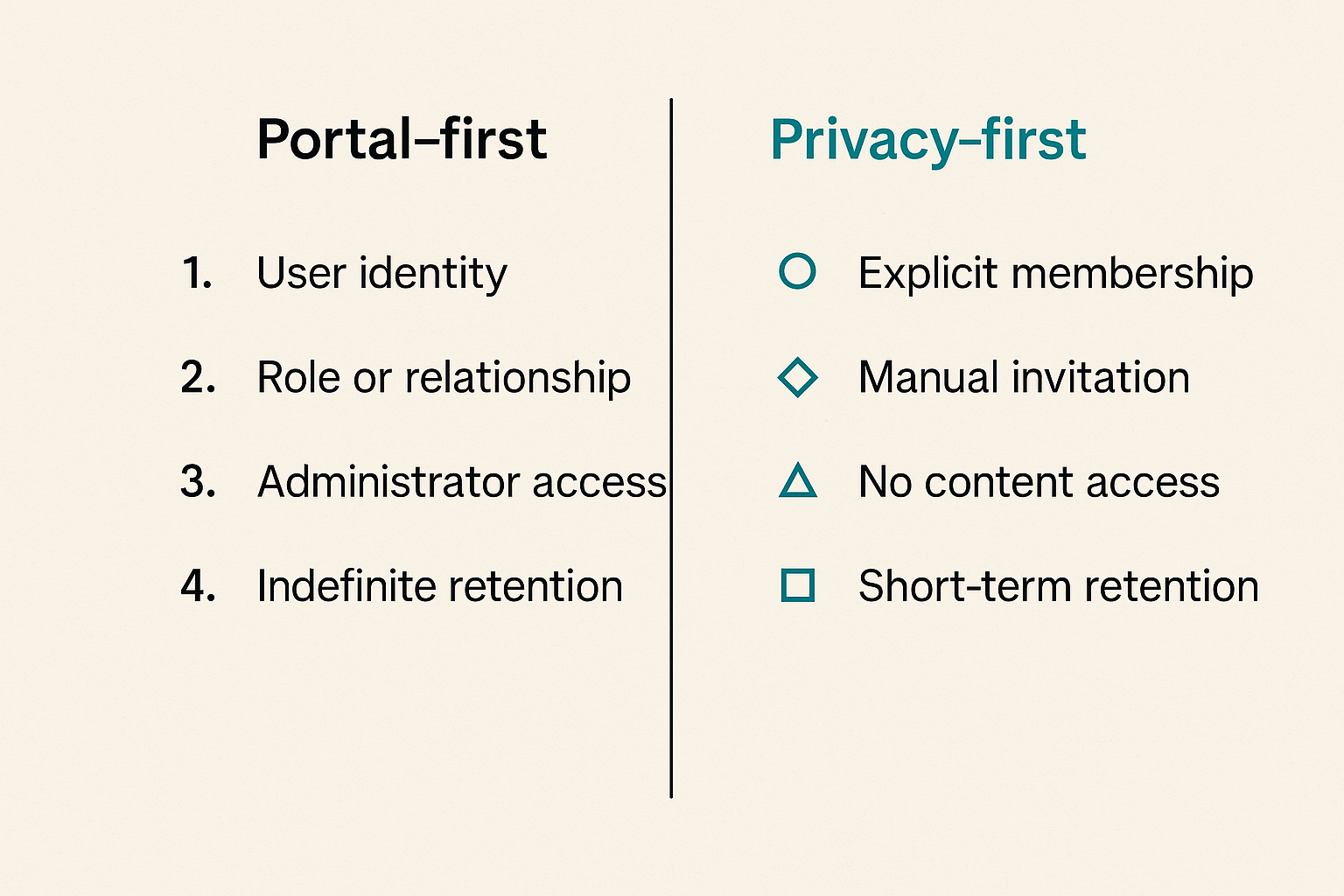
Good secure messaging architecture is mostly about removing ambiguous access. If a system cannot clearly answer who can send, who can read, who can route, who can audit, and who can delete, it will become fragile under real usage.
Identity and access control
Identity is the foundation. In a VA secure messaging context, identity is not just a username. It includes the user’s role, relationship to a care team, session state, device risk, and authorization to access a particular conversation.
For privacy-conscious teams outside healthcare, the same pattern applies. A remote engineering team, legal team, security team, or executive group should not rely only on shared channels and informal trust. You need explicit membership, least privilege, and rapid removal when someone leaves a role.
Access control should answer these questions:
- Is the person allowed to participate in this conversation?
- Is access based on role, relationship, or manual invitation?
- Can administrators read message content, or only manage accounts?
- Can support staff impersonate users?
- Are access changes reflected immediately across devices?
- Are privileged actions logged in a way that can be reviewed?
If the answer is unclear, the system will drift toward convenience. Convenience usually means broader access than intended.
Message state, retention, and audit trails
Secure messaging is stateful. A message can be drafted, sent, delivered, read, routed, escalated, archived, exported, or deleted. Each state has privacy implications.
Retention is especially sensitive. Keeping messages forever creates risk. Deleting them too aggressively can break continuity, compliance, or dispute resolution. The right answer depends on the environment, but the decision should be deliberate.
A practical state model might track:
- Created by sender.
- Accepted by secure messaging service.
- Delivered to authorized mailbox or channel.
- Read by recipient or team queue.
- Assigned to owner.
- Resolved, escalated, or archived.
- Retained or deleted according to policy.
Audit trails should prove that controls worked without turning into content surveillance. Log the event, actor, role, timestamp, device class, and administrative action. Avoid logging full message bodies unless there is a specific legal or operational requirement.
Notifications without leaking content
Notifications are where many systems quietly leak. A locked phone preview, desktop banner, email digest, or SMS alert can expose names, subjects, appointment details, or enough context to create harm.
For VA secure messaging and adjacent secure communication tools, notification design should be conservative by default:
- Say that a secure message is available.
- Avoid sensitive subject lines.
- Do not include message body previews.
- Let users disable previews on shared devices.
- Use generic sender labels when necessary.
- Require reauthentication before showing content.
This feels small until a sensitive notification appears on a conference room screen or family-shared device. What breaks in practice is rarely the encryption layer. It is the edge where secure systems talk to insecure attention channels.
Privacy model for VA secure messaging
VA secure messaging needs a privacy model that goes beyond the slogan encrypted messages. Encryption matters, but privacy also depends on metadata, administrative process, retention, and user behavior.
What should be encrypted
At minimum, message content should be encrypted in transit and at rest. Attachments should receive the same treatment. Session tokens, backup artifacts, logs, and exports also need protection because they often contain fragments of sensitive context.
End-to-end encryption raises the bar because service operators cannot read message content under normal conditions. But end-to-end encryption can complicate search, recovery, delegation, compliance review, and multi-party workflows. That does not make it bad. It means the product has to be honest about the tradeoff.
For readers evaluating encrypted messaging tools, qrypt.chat publishes its security positioning around end-to-end encrypted and quantum-resistant messaging on the QryptChat security page. The useful question is not whether a tool uses strong words. It is whether its security model matches the workflow you are actually running.
What metadata still reveals
Metadata is the part teams underestimate. Even when message content is protected, metadata can reveal relationships, urgency, timing, frequency, location patterns, and organizational structure.
Examples:
- A user repeatedly messages a specialty clinic.
- A team member receives late-night secure messages from executives.
- A patient gets notification bursts after a diagnostic appointment.
- A contractor suddenly loses access to sensitive channels.
- A support queue shows which accounts have high-risk cases.
None of those require reading message content. The pattern is enough.
Related reading from our network: teams building privacy-sensitive media and storage systems face similar architecture tradeoffs around local data, metadata, and reliability in computer systems technology for streaming, torrents, IPTV, and home media.
Practical rule: If metadata can harm a user, treat it as sensitive data even when message bodies are encrypted.
Policy must match technical controls
Privacy policies often describe intentions. Systems enforce reality. If the policy says private messages are protected but administrators can browse them without friction, the control model is weak. If the product says content is encrypted but support exports include readable message bodies, the privacy model is incomplete.
The policy, product, and workflow should align on:
- What data is collected.
- Who can access it.
- When content may be disclosed.
- How long records are retained.
- What happens when a user deletes an account.
- How legal requests, abuse reports, and security incidents are handled.
For a user-facing privacy baseline, qrypt.chat describes its handling of personal data and service operation in its privacy policy. Teams should read policies as operating documents, not marketing pages.
Workflow design for patients, clinicians, and remote teams
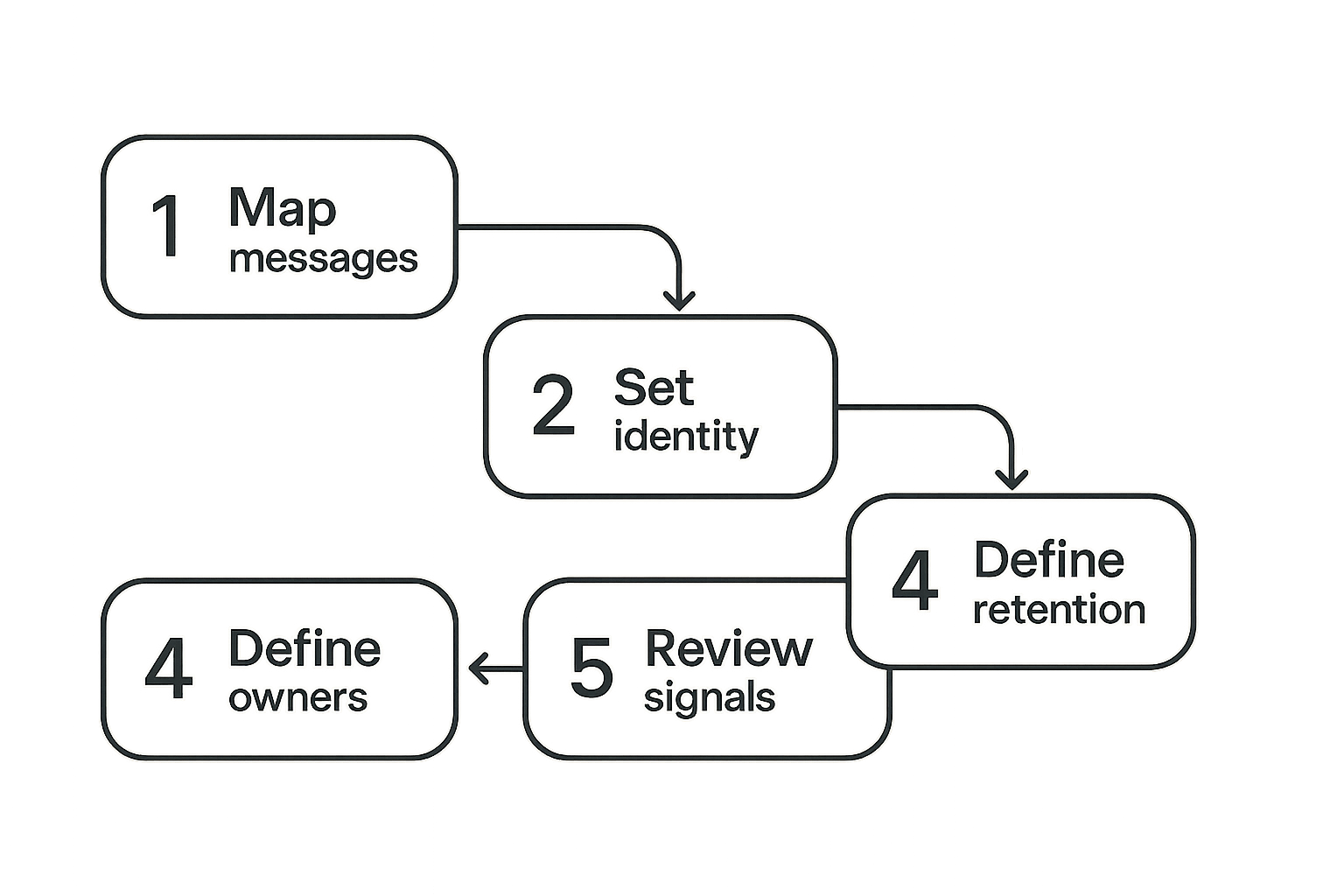
The best secure messaging system still fails if nobody owns the next step. In production, messaging is not just communication. It is intake, triage, assignment, response, and closure.
Intake routing and ownership
A secure message should not land in a vague shared inbox where everyone assumes someone else will answer. Routing should reflect the work.
Common routing patterns include:
- Direct user-to-user messaging.
- Team queues with assigned owners.
- Topic-based routing by department or specialty.
- Escalation paths for urgent or sensitive cases.
- Read-only observers for continuity.
- Delegated access for assistants or coordinators.
The practical question is who owns the message after it arrives. If ownership is ambiguous, users will work around the system. They will send follow-up emails, paste content into other tools, or call someone to ask whether the message was seen.
Response windows and escalation
Secure messaging should define expectations. If a channel is not for emergencies, say so clearly. If a team promises a response within a business window, the system should support monitoring without exposing content unnecessarily.
Useful workflow signals include:
- New message count by queue.
- Age of oldest unassigned message.
- Time to first response.
- Messages reopened after closure.
- Escalations by type.
- Failed delivery or login problems.
These signals help operators manage service quality without reading private content. That is the point: governance should measure workflow health, not turn managers into message auditors.
Attachments, screenshots, and clinical context
Attachments are where secure messaging systems inherit messy reality. A screenshot may include unrelated private information. A PDF may include metadata. A photo may include location data. A pasted transcript may contain names of people who are not part of the conversation.
Teams should make attachment behavior explicit:
- Strip unnecessary metadata where possible.
- Warn users before uploading sensitive files.
- Limit file types based on risk.
- Scan for malware without exposing content broadly.
- Apply retention rules to attachments and previews.
- Prevent automatic downloads to unmanaged devices.
Remote teams face a related problem with screen sharing and collaboration. Related reading from our network: screen sharing security operations looks at policies, SOC signals, and response playbooks for reducing blind spots in remote collaboration.
Implementation sequence for secure messaging
A secure messaging rollout should be staged. Many teams buy a tool, enable accounts, and then discover that the hard decisions were never made. The better approach is to define the operating model before broad adoption.
Step-by-step rollout
Use this sequence whether you are evaluating VA secure messaging, designing a patient communication workflow, or deploying encrypted chat for a private team:
- Map communication types. Separate routine updates, sensitive discussions, urgent issues, administrative requests, and support cases.
- Define user groups. Identify patients, clinicians, operators, administrators, external partners, and auditors.
- Set trust boundaries. Decide which conversations require portal messaging, which require end-to-end encrypted chat, and which should not happen over messaging at all.
- Choose identity controls. Require strong authentication, role-based access, and fast offboarding.
- Configure notification defaults. Disable content previews unless there is a clear reason to allow them.
- Build routing rules. Assign queues, owners, escalation paths, and response windows.
- Decide retention. Align message retention with operational, legal, and privacy requirements.
- Test failure cases. Simulate lost devices, mistaken recipients, account takeover, staff turnover, and support requests.
- Train users on boundaries. Explain what the channel is for, what it is not for, and how to escalate.
- Review metrics monthly. Measure workflow health without casually inspecting content.
Practical rule: Roll out secure messaging as an operating system for communication, not as another inbox.
Configuration checklist
Before you trust a secure messaging workflow, confirm the basics:
- Strong authentication is required for sensitive access.
- Session timeout is appropriate for shared and mobile devices.
- Message previews are disabled by default.
- Attachments are encrypted, scanned, and governed.
- Administrative access is separated from content access.
- Audit logs are available and protected from tampering.
- Users can report suspicious messages or mistaken delivery.
- Offboarding removes access across active sessions.
- Exports are controlled, logged, and justified.
- Recovery flows do not bypass the security model.
Related reading from our network: support teams in payment environments face parallel trust and escalation problems when debugging sensitive transactions, as discussed in screen sharing peptide for crypto payment support workflows.
Failure modes that break secure messaging
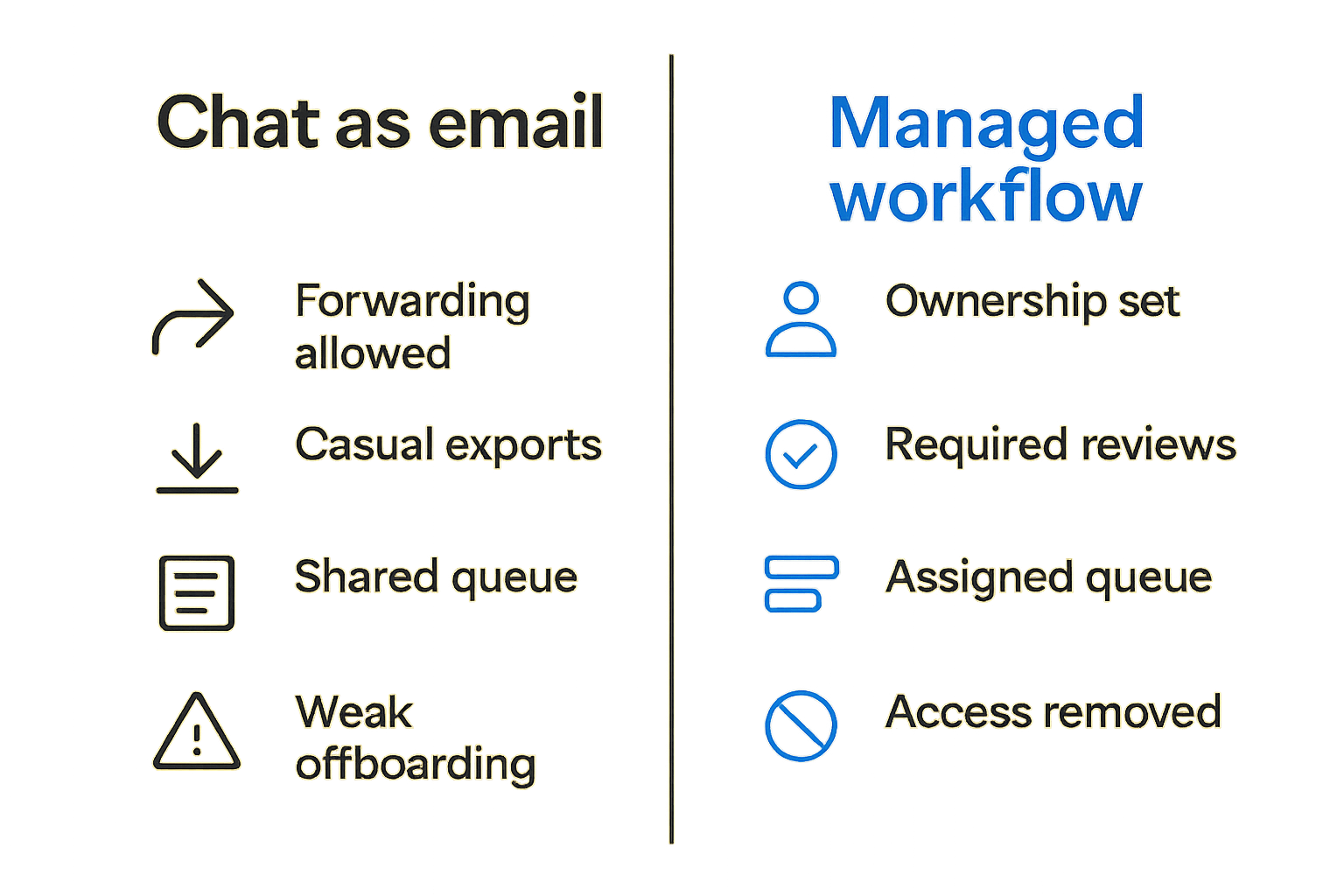
Secure messaging systems rarely fail in one dramatic moment. They degrade through small exceptions. A temporary export becomes normal. A support override becomes routine. A shared queue becomes everyone’s responsibility and nobody’s responsibility.
The mistake teams make is treating chat like email
Email trained organizations to accept weak boundaries: forwarding, copying, archiving, searching, delegating, and exporting by default. Secure messaging should not inherit those defaults without scrutiny.
If a secure message can be forwarded to an ordinary inbox, copied into an unmanaged document, or downloaded to a personal device, the privacy promise becomes narrower than users expect. Sometimes exports are necessary. But necessary is not the same as casual.
The mistake teams make is adding a secure front door while leaving side doors open.
What breaks in practice
Common failure modes include:
- Overbroad admin roles. Too many people can access too much.
- Weak notification hygiene. Sensitive details appear outside the secure environment.
- Unclear queue ownership. Messages age without response.
- Poor offboarding. Former staff retain access on old devices.
- Attachment leakage. Downloads and previews escape governance.
- Shadow workflows. Users paste messages into email, tickets, or consumer chat.
- Unreviewed integrations. APIs and bots get more access than users understand.
- Bad recovery flows. Account recovery becomes the easiest attack path.
What breaks in practice is the gap between declared privacy and daily operations. Users notice that gap. Attackers notice it faster.
What works instead
What works is boring and specific:
- Use least privilege roles.
- Separate service administration from content visibility.
- Default to generic notifications.
- Treat attachments as first-class sensitive data.
- Make message ownership visible.
- Use escalation paths instead of forwarding chains.
- Review privileged actions.
- Test lost-device and mistaken-recipient scenarios.
This is not glamorous architecture, but it is the architecture that keeps secure messaging from becoming a prettier version of email.
Comparing VA-style secure messaging with consumer encrypted chat
VA-style secure messaging and consumer encrypted chat solve overlapping but different problems. Comparing them honestly helps teams choose the right tool for the right communication path.
When portal-based messaging makes sense
Portal-based secure messaging is usually the right fit when the conversation belongs to an institutional record, needs routing to a formal team, or must align with operational governance. This is why healthcare and public-sector environments often use portals: they integrate identity, records, workflows, and policy.
Portal messaging works well for:
- Patient-to-care-team communication.
- Account-specific support requests.
- Messages requiring structured retention.
- Team queues with defined response windows.
- Workflows where identity must map to an official record.
The tradeoff is that portals can feel heavier than chat. Users may need to log in, navigate, and wait for asynchronous response. That friction can be acceptable when the risk and record requirements justify it.
When end-to-end encrypted chat makes sense
End-to-end encrypted chat makes sense when participants need fast private communication and do not want the service operator to have routine access to content. It is especially useful for security teams, remote teams, executives, journalists, advisors, and privacy-conscious users who need confidential conversations without building a full institutional portal.
| Decision area | VA-style secure portal messaging | End-to-end encrypted chat |
|---|---|---|
| Primary job | Record-linked communication | Private conversation |
| Identity model | Institutional identity and role | Participant identity and keys |
| Routing | Team queues and formal workflows | Direct groups and channels |
| Content access | Often governed by organization policy | Ideally limited to endpoints |
| Retention | Policy-driven record retention | Product and user controlled |
| Best fit | Healthcare, public services, account support | Private teams, sensitive collaboration |
| Main risk | Workflow sprawl and admin overreach | Device compromise and recovery tradeoffs |
Neither model is universally better. The practical question is which trust boundary you need. If the conversation must become part of an official service workflow, a portal may be correct. If the conversation needs strong confidentiality between participants, encrypted chat may be the better tool.
Security controls that matter in 2026
Secure messaging in 2026 has to assume hostile networks, compromised devices, phishing, account takeover, insider risk, and future cryptographic pressure. That does not mean every team needs exotic controls. It means basic controls need to be implemented cleanly.
Device posture and session management
The endpoint is where messages become readable. If the device is compromised, encryption in transit will not save the conversation after decryption.
Practical controls include:
- Reauthentication for sensitive actions.
- Shorter sessions on shared devices.
- Device removal from account settings.
- Alerts for new device sign-ins.
- Protection against notification previews.
- Local storage encryption.
- Remote session revocation.
- Clear handling for lost or stolen devices.
For remote teams, session management is often more important than another policy document. If a user cannot easily see and revoke active sessions, the system is asking them to trust invisible state.
Key management and post-quantum planning
Key management determines who can read what. In end-to-end encrypted systems, keys should be generated and protected in a way that limits server-side exposure. Recovery should be designed carefully because recovery mechanisms can become backdoors if they are too convenient.
Post-quantum planning is becoming part of the security conversation because attackers may store encrypted traffic today and attempt to decrypt it later if cryptographic assumptions weaken. Not every conversation has long-term sensitivity, but some do: medical history, legal strategy, source communications, executive planning, and security incident response.
qrypt.chat describes its focus on quantum-resistant encrypted messaging on the about page, which is relevant for teams that care about confidentiality beyond the current news cycle.
Incident response and recovery
Secure messaging needs an incident response plan before something goes wrong. That plan should cover:
- Account takeover.
- Lost or stolen devices.
- Mistaken recipient events.
- Malicious insider access.
- Compromised administrator account.
- Suspicious exports or API activity.
- Legal or emergency disclosure requests.
Response should be fast without being reckless. For example, revoking sessions is usually safe. Deleting records may not be. Notifying affected users may be necessary, but the notification itself should avoid exposing more sensitive information.
Metrics and governance for private communication
You cannot govern secure messaging by reading everyone’s messages. That defeats the point. You govern it by measuring system behavior, access behavior, and workflow outcomes.
Useful signals without content surveillance
Good metrics include:
- Number of active users.
- Message volume by queue or channel.
- Time to first response.
- Unassigned message age.
- Failed login attempts.
- New device enrollment.
- Privileged admin actions.
- Export events.
- Reported suspicious messages.
- Attachment upload volume by type.
Avoid metrics that require routine content inspection unless there is a specific, documented need. If managers need to inspect content to understand whether the workflow works, the workflow probably lacks better state signals.
A useful way to think about it is operational observability without conversational surveillance.
Ownership and review cadence
Secure messaging needs an owner. Not just an IT owner, and not just a compliance owner. It needs someone accountable for the communication workflow.
A practical review cadence:
- Weekly queue review for response delays and routing problems.
- Monthly access review for privileged roles and departed users.
- Quarterly policy review for retention, exports, and integrations.
- Semiannual incident simulation for account takeover and lost devices.
- Annual architecture review for encryption, key management, and vendor risk.
This cadence is not heavy if the system is designed well. It becomes heavy only when access, routing, and retention were never made explicit.
Where qrypt.chat fits in the secure messaging stack
VA secure messaging is a good reference point because it forces the right questions: identity, privacy, records, workflow, and trust. But not every private conversation belongs inside a portal. Many teams need secure messaging for sensitive collaboration that is faster, smaller, and more private than an institutional inbox.
Product fit without pretending one app solves everything
qrypt.chat is best understood as part of a private communication stack, not a replacement for every portal, ticketing system, or record platform. If you need formal patient-record messaging, use the governed system designed for that record. If you need confidential team communication, incident coordination, executive discussion, or privacy-conscious encrypted chat, a dedicated secure messaging tool may fit better.
The architectural split is simple:
- Use record-linked portals when the message must attach to an official workflow.
- Use encrypted chat when the priority is confidential participant-to-participant communication.
- Use ticketing systems for operational tracking, but avoid pasting sensitive message content unnecessarily.
- Use email only when the content and metadata exposure are acceptable.
That changes the conversation from which app is best to which trust boundary is correct.
VA secure messaging teaches the larger lesson: private communication is a system. The UI matters, but state, identity, metadata, device control, recovery, retention, and governance matter more. If those pieces are not designed, the secure message is only secure for part of its journey.
Try qrypt.chat
qrypt.chat is for people who care about private communication, secure messaging, and practical digital security. If your team needs encrypted chat with a serious privacy posture, Try qrypt.chat.