End to end encryption messaging sounds simple until a real team has to use it every day. The demo is easy: two people send messages, the server cannot read them, everyone feels safer. Then someone loses a phone, an executive adds a new laptop, a contractor leaves, push notifications leak context, and legal asks what can be retained.
Teams think the problem is choosing an app with strong encryption. The real problem is building a communication workflow where encryption, identity, devices, metadata, recovery, and human behavior all line up.
That changes the conversation. You are not buying a lock. You are deciding how private communication should work across people, devices, groups, files, policies, and exceptions in 2026.
The practical question is not whether end to end encryption messaging is good. It is whether your architecture still protects people when the workflow gets messy.
Table of contents
- Why end to end encryption messaging is an operating model
- What end to end encryption messaging protects and what it does not
- The architecture that makes private messaging work
- Device trust is where end to end encryption messaging usually breaks
- Metadata, notifications, and presence are the hidden leaks
- A practical rollout workflow for private teams
- What works and what fails in real deployments
- Compliance, retention, and legal discovery without pretending
- Comparing secure messaging options in 2026
- Where qrypt.chat fits in an encrypted messaging stack
- Closing checklist for end to end encryption messaging
Why end to end encryption messaging is an operating model
The problem is not just encryption
The mistake teams make is treating encryption as a checkbox in a procurement spreadsheet. They ask whether messages are encrypted. That is a start, but it is not enough.
A useful way to think about it is this: encryption protects content only when the surrounding system preserves the assumptions encryption depends on. If identity is weak, an attacker can impersonate a user. If device enrollment is loose, a compromised endpoint can join conversations. If backups are readable, private messages escape the secure channel. If notifications reveal message previews, the encryption layer did its job while the product leaked the conversation anyway.
End to end encryption messaging means the communicating endpoints hold the keys needed to read messages. The service provider should not be able to decrypt message content in normal operation. But real privacy depends on what happens before and after the message is sent.
Practical rule: Do not evaluate encrypted messaging by the send button. Evaluate the whole lifecycle: identity, devices, groups, files, notifications, backups, and recovery.
Why this changed in 2026
Private communication now spans personal phones, work laptops, contractors, international teams, AI-assisted workflows, and cloud identity systems. A simple two-device model is not how people work anymore.
Security professionals are also dealing with different risks. Phishing is more targeted. Device compromise is more realistic. Sensitive operational decisions often happen in chat before they become tickets, documents, or formal approvals. Many teams now treat messaging as the fastest path to production decisions.
That makes secure messaging infrastructure part of operational security, not just personal privacy. The chat layer carries incident response, customer escalations, financial approvals, legal coordination, and internal strategy. If that layer leaks, the business leaks.
For adjacent reading, teams handling payment workflows face similar boundary problems around chat, settlement, and customer data; Related reading from our network: encrypted messaging crypto payment architecture.
What end to end encryption messaging protects and what it does not
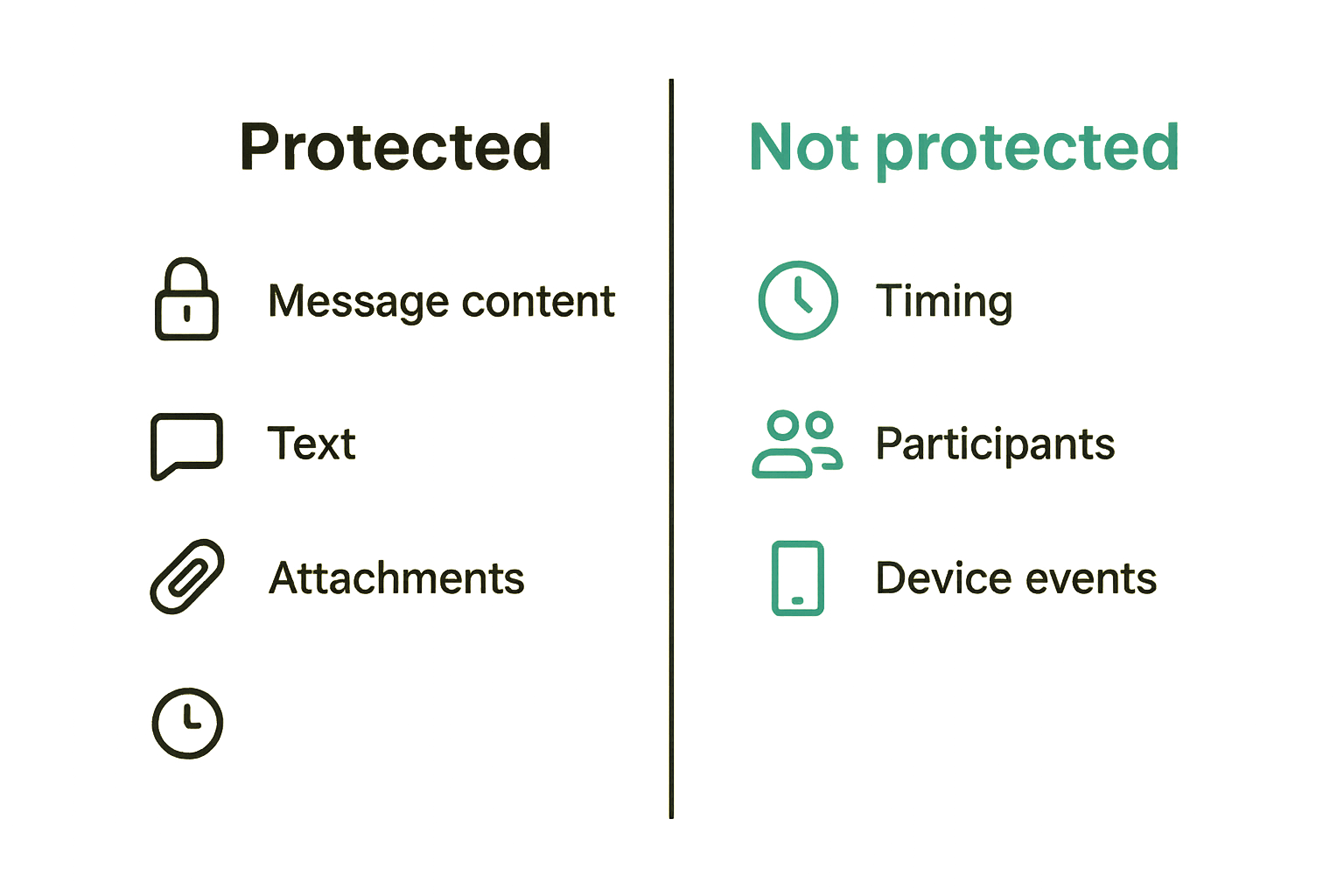
Message content versus operational metadata
End to end encryption messaging is strongest at protecting message content: text, attachments, voice notes, and other payloads when implemented correctly. It is weaker, by itself, at hiding metadata.
Metadata can include who talked to whom, when they talked, device identifiers, IP-derived location, group membership, message size, notification timing, and contact discovery patterns. Some systems reduce this exposure. Few eliminate it completely.
The practical question is what your adversary can learn without reading the message body. For some users, content confidentiality is the primary goal. For others, the fact that two parties communicated is sensitive.
Example: a journalist and a source may care about the message text, but the existence and timing of contact can also be dangerous. A remote company negotiating an acquisition may not want message content exposed, but group names, participants, and bursty weekend traffic can still reveal activity.
Server trust boundaries
In a properly designed encrypted messaging system, the server routes encrypted data but does not hold the keys needed to read message content. That reduces the blast radius of server compromise and limits what the provider can disclose.
But the server often still manages accounts, message delivery queues, group state, abuse controls, rate limits, and push notification integration. Those layers matter.
A secure architecture should make clear distinctions:
- What the server can see by design.
- What the server cannot decrypt.
- What metadata is minimized.
- What logs are retained.
- What administrators can access.
- What happens under abuse, spam, or account recovery conditions.
If a vendor cannot explain these boundaries clearly, assume the product is not designed for high-trust use.
The privacy threat model
Threat modeling sounds formal, but the practical version is simple. Ask what you are trying to prevent.
Are you protecting against network observers? Cloud provider access? A malicious insider at the messaging provider? A stolen phone? A subpoena? A compromised endpoint? A careless user forwarding screenshots?
Each threat changes the design. End to end encryption helps with provider-side content access. It does not stop someone from photographing a screen, exporting data from a compromised device, or adding the wrong person to a group.
Practical rule: If your threat model includes compromised endpoints, encryption in transit and at rest will not save you. Device trust becomes the control plane.
The architecture that makes private messaging work
Identity keys, session keys, and device keys
Most users do not need to become cryptographers. Operators do need to understand the moving parts.
A typical secure messaging architecture separates long-term identity from short-lived message encryption. Identity keys help establish who a user or device is. Session keys protect current conversations. Device keys let multiple endpoints participate without sharing one fragile secret across every phone and laptop.
This separation matters because different events require different responses. A user changing phones should not mean every past message becomes exposed. A compromised session should not necessarily compromise future sessions. A removed device should stop receiving future messages.
The mistake teams make is assuming one account equals one identity. In practice, identity is a relationship between a person, their devices, and the cryptographic keys that prove continuity.
Forward secrecy and post-compromise recovery
Forward secrecy limits damage if a key is later exposed. Old messages should not automatically become readable because one current key leaks. Post-compromise recovery focuses on restoring secure communication after a device or session may have been compromised.
These properties are not decorative. They are the difference between a single incident and a historical breach.
What breaks in practice is not usually the math. It is implementation around edge cases: offline devices, multi-device sync, group membership changes, attachment re-downloads, and backup restoration. If old keys are reused too broadly, the privacy model degrades.
Attachments, backups, and search
Text messages are only part of the system. Files are often the sensitive payload: contracts, images, credentials, recordings, screenshots, logs, and exports.
Attachments should be encrypted as payloads, not treated as generic cloud files with a private chat link pasted on top. Backups should not quietly bypass end to end encryption by storing plaintext message history in a cloud account. Search should be designed carefully, because server-side search over plaintext content conflicts with end to end privacy.
Local encrypted search can work. Client-side indexing can work. Short retention windows can reduce risk. What fails is pretending that every convenience feature is free.
Device trust is where end to end encryption messaging usually breaks
New devices are identity events
Adding a new device is not a small UI action. It is a security event.
If an attacker can add a device to an account, encryption will faithfully deliver future messages to the attacker. The system may still be end to end encrypted, but the wrong endpoint is now one of the ends.
That changes the conversation. Device enrollment should involve clear user visibility, strong authentication, and preferably out-of-band verification for sensitive groups. Existing participants should be notified when a new device joins a private conversation. Quiet device enrollment is convenient for attackers.
For readers who want a deeper adjacent architecture view, we previously covered the same key and device issues in end to end encryption messaging as practical architecture.
Lost phones, shared laptops, and unmanaged endpoints
The clean architecture diagram assumes every endpoint is controlled, updated, locked, and used by one person. Real life does not.
People lose phones. Contractors use personal laptops. Executives disable screen locks because they are inconvenient. Families share tablets. Remote workers travel across borders. Old devices sit in drawers with valid sessions.
A practical secure messaging deployment needs endpoint rules:
- Require device lock and operating system updates.
- Make active sessions visible to users.
- Allow fast device revocation.
- Expire stale devices.
- Notify users and admins about risky device changes.
- Separate personal and organizational accounts when possible.
The goal is not perfect control. The goal is to avoid silent trust expansion.
Verification that humans can actually use
Cryptographic verification often fails because it is designed for people who already understand cryptographic verification. Fingerprints, safety numbers, QR codes, and verification phrases can work, but only if the workflow fits real behavior.
For a small executive group, manual verification may be reasonable. For a 300-person remote company, you need a scalable process tied to onboarding, offboarding, and role changes.
Practical rule: Verification that nobody performs is not a security control. Design verification around moments when users already expect friction, such as onboarding a device or joining a sensitive group.
Metadata, notifications, and presence are the hidden leaks
Push notifications and previews
Push notifications are a common leak path. A message can be encrypted in the app while the notification preview exposes content on a lock screen, operating system notification center, wearable device, or third-party push service.
Many users enable previews because they are convenient. Many teams never define a policy. That is how confidential conversations leak in airports, shared offices, livestreams, screenshots, and screen shares.
A sane default is to hide message content in notifications. Show that a message arrived, not what it says. For highly sensitive groups, consider disabling previews completely.
Group membership and contact discovery
Group metadata is operationally sensitive. A group called Acquisition Steering Committee with three executives and outside counsel tells a story even if every message is encrypted.
Contact discovery is another problem. Some products upload address books or derive social graphs to make onboarding easier. That may be acceptable for casual use. It may be unacceptable for users who want strong privacy.
The practical question is what the service learns while helping users find each other. Privacy-preserving discovery is possible, but teams should not assume it exists without asking.
For a looser consumer example of private sharing tradeoffs, Related reading from our network: encrypted messaging coupon codes and private deal sharing.
Admin analytics versus privacy
Organizations like dashboards. They want adoption metrics, active users, message volume, retention reports, export controls, and risk indicators. Some of those are reasonable. Some undermine the privacy model.
You can measure whether accounts exist, devices are active, groups are configured, and policies are applied without reading message content. You can also go too far and rebuild a behavioral map that reveals sensitive internal operations.
The mistake teams make is asking for workplace surveillance features inside a privacy product. Decide what administrative visibility is necessary and what would create new risk.
A practical rollout workflow for private teams
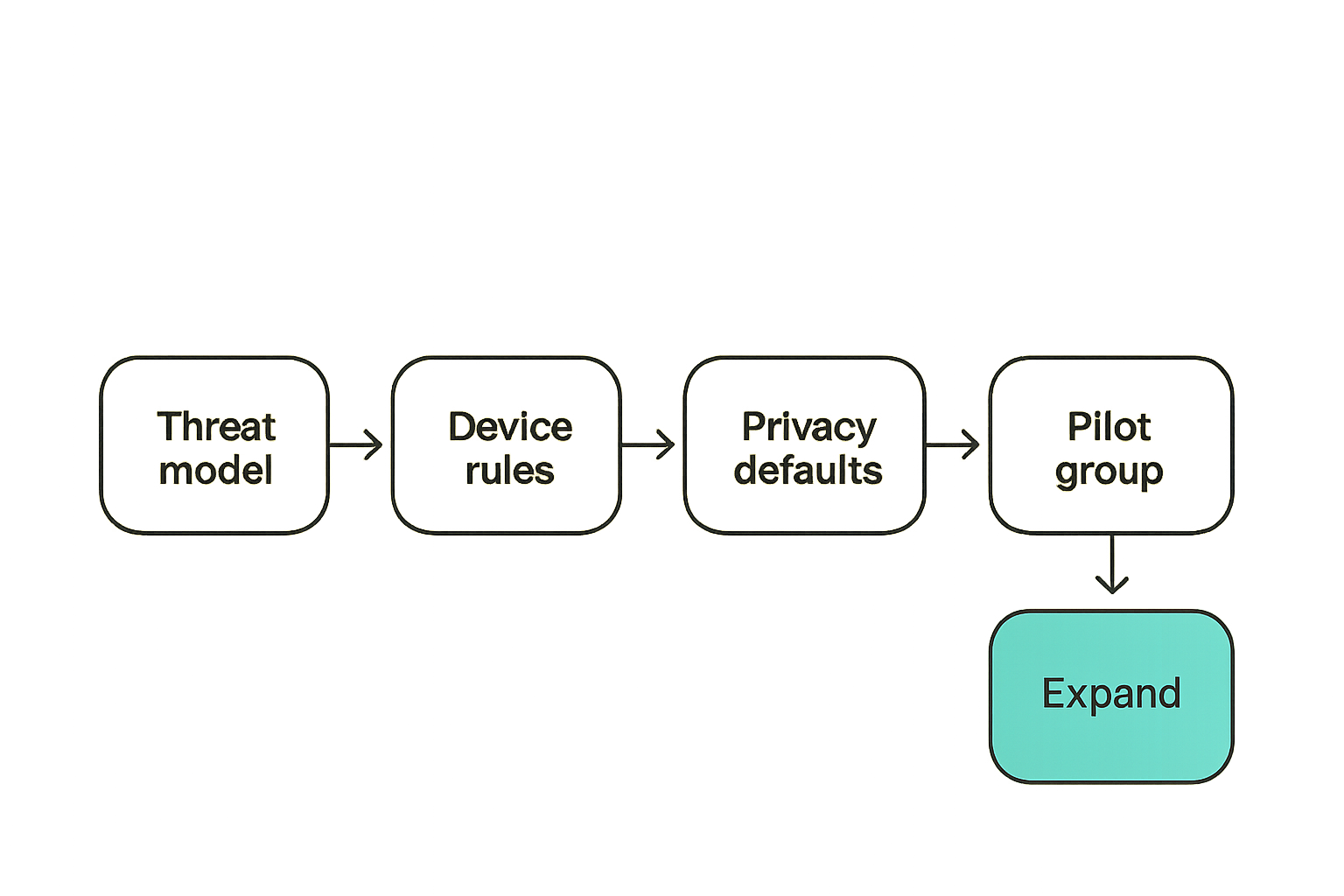
Step by step implementation sequence
Secure messaging rollout should look more like infrastructure deployment than app adoption. Here is a practical sequence.
- Define the threat model. Decide whether you care most about provider access, network observers, device loss, insider risk, metadata exposure, or all of the above.
- Classify conversation types. Separate casual coordination, sensitive operations, executive decisions, legal matters, incident response, and external communications.
- Choose account and device rules. Define who can create accounts, how devices are added, when sessions expire, and how lost devices are revoked.
- Configure privacy defaults. Disable message previews, limit profile exposure, set sensible retention, and review contact discovery behavior.
- Pilot with a high-signal group. Use security, leadership, or incident response teams first because they will find edge cases quickly.
- Document user workflows. Cover verification, group creation, file sharing, device replacement, offboarding, and reporting suspicious activity.
- Review failure events. Simulate lost phone, wrong group member, departing employee, and compromised laptop scenarios before broad rollout.
- Expand gradually. Add teams in waves and track support issues, not just adoption.
The output should be a working communication pattern, not a slide that says encrypted chat approved.
Ownership, policy, and support
Someone has to own the workflow. In smaller teams, that may be the founder or security lead. In larger organizations, it may be shared across security, IT, legal, and operations.
Define ownership for:
- Account provisioning.
- Device enrollment and revocation.
- Group naming and membership.
- Retention settings.
- External guest access.
- Incident response usage.
- User support.
Without ownership, secure messaging becomes a shadow system. People will still use it, but exceptions will accumulate until nobody knows what is safe.
What to pilot before you mandate it
Pilots should test friction, not just features. Ask users to replace a real workflow for two weeks. Have them add a device, lose a simulated device, verify a colleague, send files, create a sensitive group, and remove someone from access.
Track where they get confused. That confusion is where future privacy incidents will happen.
A good pilot answers these questions:
- Can users tell who they are talking to?
- Can they understand device warnings?
- Can admins revoke access quickly?
- Are notifications safe by default?
- Do file workflows stay encrypted?
- Does retention match policy?
- Can support help without reading messages?
What works and what fails in real deployments
What works
What works is boring and operational.
Strong defaults work. Clear device visibility works. Simple verification flows work. Explicit group ownership works. Short retention for high-risk chats works. User education tied to real tasks works. Fast offboarding works.
The best encrypted messaging deployments do not rely on every user making perfect choices. They make the safest path the default path.
Practical rule: If privacy depends on users changing five settings after install, your rollout is already fragile.
What fails
What fails is usually predictable.
A team mandates secure chat but leaves sensitive work in email, SMS, and consumer apps. Users copy messages into ticket systems with weaker access controls. Screenshots become the unofficial export format. Former employees remain in groups. Device warnings are ignored because nobody explained them. Backups restore old message history onto uncontrolled devices.
Another common failure is overcentralization. An organization wants end to end encryption but also wants administrators to recover every message, inspect every file, and search every conversation. That is not a small feature request. It changes the trust model.
Failure modes to test
Before trusting any private messaging workflow, test the ugly cases.
| Failure mode | What breaks | Practical control |
|---|---|---|
| Lost phone | Future messages may remain accessible | Fast session revocation and device visibility |
| New device added silently | Attacker becomes a valid endpoint | User alerts and verification prompts |
| Cloud backup stores plaintext | Encrypted chat leaks through backup | Encrypted backups or disabled message backup |
| Wrong group member | Sensitive content sent to valid but unintended recipient | Group ownership and join notifications |
| Push preview enabled | Content leaks outside the app | Hidden previews by default |
| Departing contractor | Access remains after work ends | Offboarding checklist and group review |
| Server logs too much metadata | Conversation patterns become exposed | Log minimization and retention limits |
Do not wait for an incident to learn these behaviors. Run tabletop exercises. Make someone prove the workflow works under stress.
Compliance, retention, and legal discovery without pretending
Retention is a business decision
Retention is not a cryptography setting. It is a business decision with security, legal, and operational consequences.
Some teams need short-lived conversations because the risk of stored sensitive data is greater than the benefit of history. Others need formal records for regulated decisions. Both positions can be valid. The problem is mixing them without saying so.
End to end encryption messaging can support retention policies, but the policy has to be honest about what is retained, where it is retained, who can access it, and whether message content remains private from the provider.
Auditing without reading messages
Auditing does not have to mean message inspection. In many cases, teams need evidence that controls were applied, not access to content.
Useful audit events can include account creation, device enrollment, device removal, group membership changes, policy changes, failed login attempts, and retention configuration. These events support governance without turning private chat into readable corporate surveillance.
The privacy line should be explicit. Audit the control plane. Avoid reading the conversation unless the use case truly requires a different product category.
For public details about how qrypt.chat thinks about user data and privacy boundaries, review the qrypt.chat privacy information before adopting any sensitive workflow.
When regulated teams need separate channels
Some regulated teams need archival, supervision, e-discovery, or formal retention. If those requirements are absolute, do not pretend a private messenger alone solves them.
The better architecture is channel separation. Use end to end encryption messaging for sensitive coordination where privacy is required. Use approved record systems for decisions that must be formally retained. Do not blur the two and then blame users for confusion.
This is an operational design problem. Decide which conversations belong where, then train people accordingly.
Comparing secure messaging options in 2026
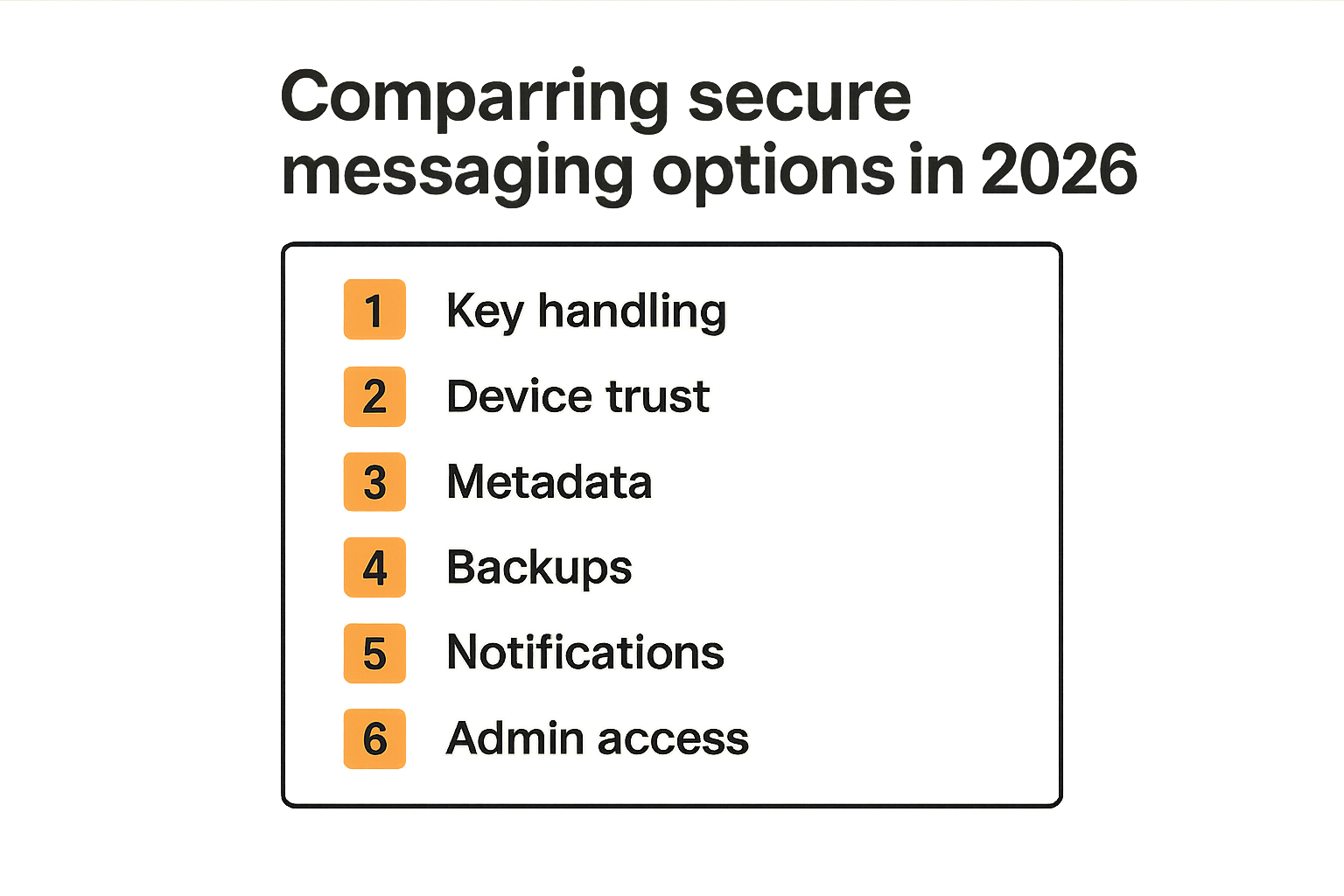
Evaluation table for buyers
The market is noisy. Some products are private messengers. Some are enterprise collaboration suites with encryption features. Some are consumer apps with strong cryptography but weak administrative fit. Some are legacy tools with marketing language around security.
Use a comparison table that focuses on architecture, not slogans.
| Evaluation area | Strong signal | Weak signal |
|---|---|---|
| Encryption model | Clear end to end design and documented key handling | Vague claims about military grade encryption |
| Device management | Visible sessions, revocation, new-device alerts | Silent device sync with little user visibility |
| Metadata handling | Minimization, limited logs, clear disclosures | Broad analytics without privacy boundaries |
| Group security | Membership alerts and owner controls | Groups treated like casual channels |
| Backups | Encrypted or user-controlled backup model | Plaintext cloud backup by default |
| Notifications | Hidden previews by default | Full message previews on lock screens |
| Admin controls | Control-plane audit without content access | Admins can read everything while claiming E2EE |
| Usability | Verification fits real workflows | Security prompts users do not understand |
| Vendor posture | Clear security documentation | Marketing pages with no operational detail |
Questions to ask vendors
Ask direct questions. A serious vendor should answer without hiding behind broad language.
- Who can decrypt message content?
- What metadata do your servers store?
- How are new devices added?
- Are users alerted when device keys change?
- How are group membership changes handled?
- Are attachments encrypted end to end?
- How do backups work?
- Can admins read messages?
- What logs are retained, and for how long?
- What happens when a user loses a device?
- How does the product handle account recovery?
- Is there public security documentation?
If the answers are unclear, slow down. Private communication systems require trust, but trust should be earned through architecture, not adjectives.
For a tangential comparison in another consumer technology space, privacy-minded households also deal with device sprawl, account sharing, and workflow tradeoffs; Related reading from our network: fubo streaming cord cutter architecture.
Cost of switching
Switching messaging tools has hidden cost. People have habits. Groups have history. External contacts may already be on another platform. Support teams will need answers. Security teams will need policy. Leaders will need to model behavior.
Do not underestimate migration. Start with the workflows where privacy risk is highest and coordination value is clear. Incident response, executive communications, legal coordination, founder conversations, security operations, and sensitive partner discussions are common starting points.
The practical goal is not to move every message on day one. It is to stop the most sensitive messages from traveling through channels you already know are wrong.
Where qrypt.chat fits in an encrypted messaging stack
Product fit for privacy-conscious users
qrypt.chat is for people who care about private communication, secure messaging, and practical digital security. That means the product fit is strongest where users want conversations to remain between intended participants, not exposed through provider-side content access or careless defaults.
This is not about hype. It is about reducing unnecessary trust in the communication provider and making private messaging usable enough that people actually use it.
If you are evaluating whether the platform matches your expectations, start with the public qrypt.chat security overview and compare it against your own threat model.
Product fit for remote teams
Remote teams have a specific problem: decisions happen across time zones, devices, and contexts. The same person may move from phone to laptop to tablet in a day. Sensitive messages may appear during travel, on public Wi-Fi, or during screen sharing.
For these teams, the secure messaging layer has to be practical. It should support fast coordination without training everyone to think like a cryptographer. It should make risky events visible. It should reduce the number of places sensitive conversations can leak.
The right fit is not every possible enterprise feature. It is the set of controls that preserves private communication while keeping the workflow usable.
How to evaluate us technically
Evaluate qrypt.chat the same way you would evaluate any secure messaging tool.
Look at content encryption, device behavior, privacy posture, notification defaults, account recovery, group workflows, and operational transparency. Ask what the provider can access. Ask what happens when a device is lost. Ask what metadata remains. Ask how users verify identity and device changes.
The broader qrypt.chat position is explained on the qrypt.chat about page, but the best evaluation is still practical: run a pilot with real workflows, real devices, and real failure scenarios.
Closing checklist for end to end encryption messaging
The short version
End to end encryption messaging is a strong privacy foundation, but it is not magic. It protects message content when the keys, endpoints, and workflows are designed correctly. It does not automatically solve metadata, device compromise, screenshots, retention, backups, or poor group hygiene.
Use this checklist before adopting or expanding a secure messenger:
- Define the threat model.
- Confirm who can decrypt content.
- Review metadata exposure.
- Treat device enrollment as a security event.
- Hide notification previews by default.
- Encrypt attachments and backups appropriately.
- Make group membership visible.
- Decide retention intentionally.
- Audit control-plane events, not private content.
- Test lost device, new device, offboarding, and wrong-recipient scenarios.
- Pilot with real sensitive workflows before broad rollout.
The mistake teams make is asking for a private chat app and stopping there. The better move is to design a private communication workflow. That is how end to end encryption messaging becomes operational security instead of a marketing claim.
Try qrypt.chat
qrypt.chat is for people who care about private communication, secure messaging, and practical digital security. If end to end encryption messaging is becoming part of your personal or team workflow, Try qrypt.chat.