End to end encryption messaging sounds simple until a real team depends on it. Someone shares a sensitive file in the wrong group. A contractor keeps access after offboarding. A lost phone still has cached messages. A manager assumes “encrypted” means the provider, the admin, the attacker, and the endpoint all see nothing.
Teams think the problem is choosing a secure messaging app. The real problem is designing a communication workflow where keys, devices, metadata, recovery, group membership, and human behavior do not quietly undo the encryption.
That changes the conversation. The practical question is not “does this app use encryption?” It is “what has to be true for our private conversations to stay private in production?” In 2026, that question matters for remote teams, security professionals, journalists, founders, healthcare-adjacent operators, crypto payment teams, and anyone whose chat history has become an operational system of record.
A useful way to think about end to end encryption messaging is as an architecture decision, not a feature checkbox. The UI is the least interesting part. The hard parts are identity, trust, device lifecycle, metadata exposure, support workflows, and what happens when something goes wrong.
Table of contents
- End to end encryption messaging is an architecture choice
- Threat model before tool selection
- The key management model decides your real security
- Metadata is the privacy layer teams forget
- Device trust is where end to end encryption messaging usually breaks
- Group messaging changes the risk profile
- Implementation workflow for teams
- What works and what fails
- Operational controls for secure messaging
- Where qrypt.chat fits in the architecture
End to end encryption messaging is an architecture choice
End to end encryption messaging means messages are encrypted on the sender’s device and decrypted on the recipient’s device. In a well-designed system, the service provider should not be able to read message contents while they are in transit or stored on its servers.
That definition is useful, but incomplete. It describes the cryptographic boundary. It does not describe the operating boundary.
What breaks in practice is usually not the math. It is the workflow around the math.
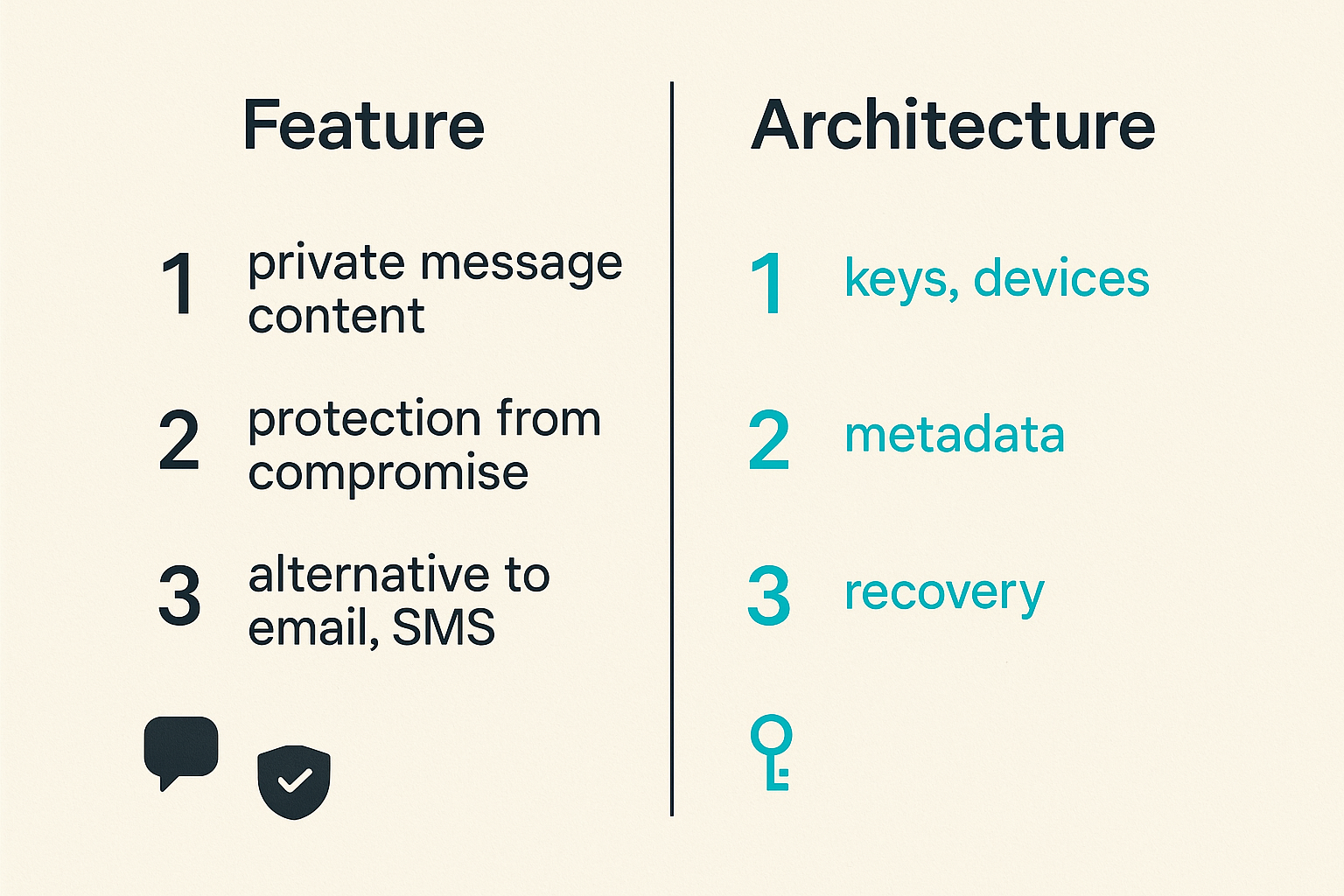
What teams think they are buying
Many teams believe they are buying three things:
- private message content;
- protection from provider-side compromise;
- a cleaner alternative to email, SMS, or standard workplace chat.
Those are valid goals. But they are not enough. A secure channel can still leak context through notifications, filenames, group titles, screenshots, exports, unmanaged devices, support processes, or a well-meaning admin who adds the wrong user to a room.
The mistake teams make is treating encrypted messaging as a replacement app. In reality, it becomes part of identity management, endpoint security, incident response, and records handling.
Practical rule: if a messaging system carries operational decisions, credentials, customer context, or legal-sensitive conversations, treat it as infrastructure, not a convenience app.
What they are really operating
A private messaging environment has several moving parts:
- user identity and account provisioning;
- device enrollment and removal;
- key generation, rotation, storage, and recovery;
- group membership and guest access;
- message retention and deletion behavior;
- file handling and previews;
- notifications across lock screens and desktops;
- incident response when an account or device is suspected compromised.
You do not need every user to understand elliptic curves, ratchets, or post-quantum schemes. You do need the organization to understand where trust sits.
If trust sits only in the app logo, the deployment is weak. If trust is distributed across verified identities, controlled devices, explicit group membership, and clear recovery rules, the deployment is much stronger.
Why this matters in 2026
The communication surface has changed. Teams coordinate across personal phones, contractor laptops, shared workspaces, AI note tools, notification bridges, browser sessions, and customer support channels. A message rarely stays a message. It becomes a screenshot, a task, a file, a calendar invite, a forwarded decision, or an audit concern.
End to end encryption messaging remains one of the best tools for protecting content from unnecessary exposure. But in 2026, a private chat system has to assume messy endpoints, mixed teams, and attackers who target users rather than cryptographic primitives.
For readers who want a broader privacy workflow view, we previously covered adjacent rollout considerations in End to End Encryption Messaging in 2026, including keys, metadata, device trust, and team adoption decisions.
Threat model before tool selection
Before choosing a secure messaging platform, decide what you are defending against. This step sounds obvious. It is often skipped because product comparison feels more tangible than threat modeling.
The practical question is: who should not be able to read, infer, retain, or misuse your communications?
Who can read content
At minimum, end to end encryption messaging should protect message content from:
- network observers;
- compromised transit infrastructure;
- cloud storage operators;
- the messaging provider’s routine server-side access;
- attackers who obtain server-side message databases without endpoint keys.
That is the content layer. It matters. Without it, every other privacy claim gets weaker.
But content protection does not automatically protect against a compromised recipient, malware on an endpoint, a user copying text elsewhere, or a device backup that stores decrypted material. Those are different problems. A mature deployment names them instead of pretending the encryption layer solves all of them.
Who can see metadata
Metadata includes who communicated, when, how often, from which device, in which group, and sometimes with what file size or message pattern. Depending on the system, it may also include profile data, contact discovery events, IP-derived information, push notification routing, and administrative logs.
For many ordinary conversations, metadata exposure may be acceptable. For legal, security, activist, executive, healthcare, crypto, or incident response conversations, metadata can be highly sensitive.
Related reading from our network: payment teams face a similar boundary problem when chat starts carrying transaction context, which is why encrypted messaging crypto workflows need to separate payment state, keys, and customer support context.
What endpoints can still leak
Endpoint leakage is the uncomfortable part because it is where policy meets reality. Common leaks include:
- unlocked phones on shared desks;
- desktop notifications visible during screen share;
- screenshots saved to cloud photo libraries;
- copied text pasted into unencrypted tools;
- browser sessions left open;
- mobile backups that preserve local data;
- malware, stalkerware, or remote management abuse.
Practical rule: end to end encryption protects the path between endpoints. It does not make an untrusted endpoint trustworthy.
If your threat model includes hostile insiders, device seizure, advanced malware, or coercion, your controls need to go beyond messaging. That may include hardened devices, minimal retention, strict room membership, disappearing messages where appropriate, and separate channels for high-risk conversations.
The key management model decides your real security
The encryption model is only as useful as the key-management model around it. If keys are generated well but recovered carelessly, the system is weak. If identity keys change silently, users cannot trust conversations. If backups reintroduce provider access, the privacy story changes.
Identity keys and device trust
A secure messaging system usually needs some concept of long-term identity keys and per-device keys. The user’s identity is not just a username or phone number. It is a cryptographic identity that other participants can verify.
In practical terms, teams should ask:
- How are new devices added?
- Do other participants see when a device changes?
- Can users verify safety numbers, fingerprints, or equivalent identity proofs?
- Can admins add devices to user accounts?
- What happens when a user loses access to all trusted devices?
The answer determines whether the system resists impersonation or merely encrypts messages to whoever controls the account at that moment.
Session keys and forward secrecy
Modern secure messaging often uses short-lived session keys and ratcheting protocols so that compromise of one key does not expose the entire history. This is commonly discussed as forward secrecy and post-compromise security.
The operator-level question is not “does the protocol sound impressive?” The question is what happens after compromise:
- Are old messages protected if a current key leaks?
- Can future sessions heal after a device is restored to a safe state?
- Are attachments encrypted with separate keys?
- Are keys stored in hardware-backed keystores when available?
Strong cryptography should reduce blast radius. Weak implementation turns one device compromise into a long-term archive compromise.
Recovery without creating a backdoor
Recovery is where many private systems become less private. Users forget passwords. Phones break. Executives demand urgent access. Support teams get pressured to “just restore the chat history.”
If the provider can restore all message history without user-held secrets, then someone other than the endpoint may have access to decryption material. That may be acceptable for some enterprise collaboration tools. It is not the same as strict end to end encryption messaging.
A better recovery model is explicit about tradeoffs:
- account recovery restores identity only, not old message content;
- encrypted backups require a user-held recovery phrase or key;
- device transfer requires an already trusted device;
- administrative recovery is limited, logged, and cannot silently decrypt past content.
Practical rule: any recovery process that can silently restore private message history can also become a decryption path. Design recovery as a security boundary, not a support shortcut.
For platform-level details and trust posture, teams should review the provider’s public security material, including pages such as qrypt.chat security, before rolling out private communication to sensitive groups.
Metadata is the privacy layer teams forget
Metadata is rarely the headline feature. It is also rarely harmless. In many environments, the existence, timing, and participants of a conversation are sensitive even when content is encrypted.
Content secrecy is not traffic secrecy
If an observer cannot read the message but can see that the incident response lead, outside counsel, and the CFO started a high-volume group at 11:47 p.m., they may still learn something valuable.
Messaging systems vary in how much metadata they collect or expose. Some metadata is operationally necessary. Servers need enough information to route messages. Abuse prevention, rate limiting, spam controls, and account recovery may require limited logs. The privacy question is whether collection is minimized, bounded, and clearly explained.
A useful way to think about it is this: content encryption answers “what was said?” Metadata discipline answers “what can be inferred?”
Group names files and notifications
Teams often leak sensitive context through surfaces adjacent to the encrypted payload:
- group names like “Acquisition Legal Review”;
- attachment filenames like “layoff-plan-final.pdf”;
- push notifications that reveal sender and preview text;
- desktop banners during calls;
- email notification fallbacks;
- calendar integrations that mirror chat context.
End to end encryption messaging should be paired with naming conventions, notification defaults, and attachment rules. It is not glamorous, but it prevents avoidable leaks.
For a consumer-adjacent example of the same pattern, related reading from our network: private deal-sharing communities also need to avoid oversharing identity and purchase context when using encrypted messaging coupon codes.
Retention logs and admin visibility
Retention is a business decision with security consequences. Keeping everything makes discovery, breach impact, and insider misuse worse. Deleting everything too aggressively may break accountability, continuity, or regulatory obligations.
The right answer depends on the room type:
- ephemeral coordination may need short retention;
- customer support may need structured records outside chat;
- executive strategy may need limited access and deliberate deletion;
- incident response may need a post-incident evidence package, not permanent raw chat history.
The mistake teams make is applying one retention setting everywhere. Sensitive rooms should have their own retention, membership, export, and notification policy.
Device trust is where end to end encryption messaging usually breaks
The strongest message protocol in the world still terminates on a device. If that device is unmanaged, shared, infected, or abandoned, the privacy model degrades quickly.
Device trust is not about being paranoid. It is about knowing which endpoints are allowed to hold decrypted material.
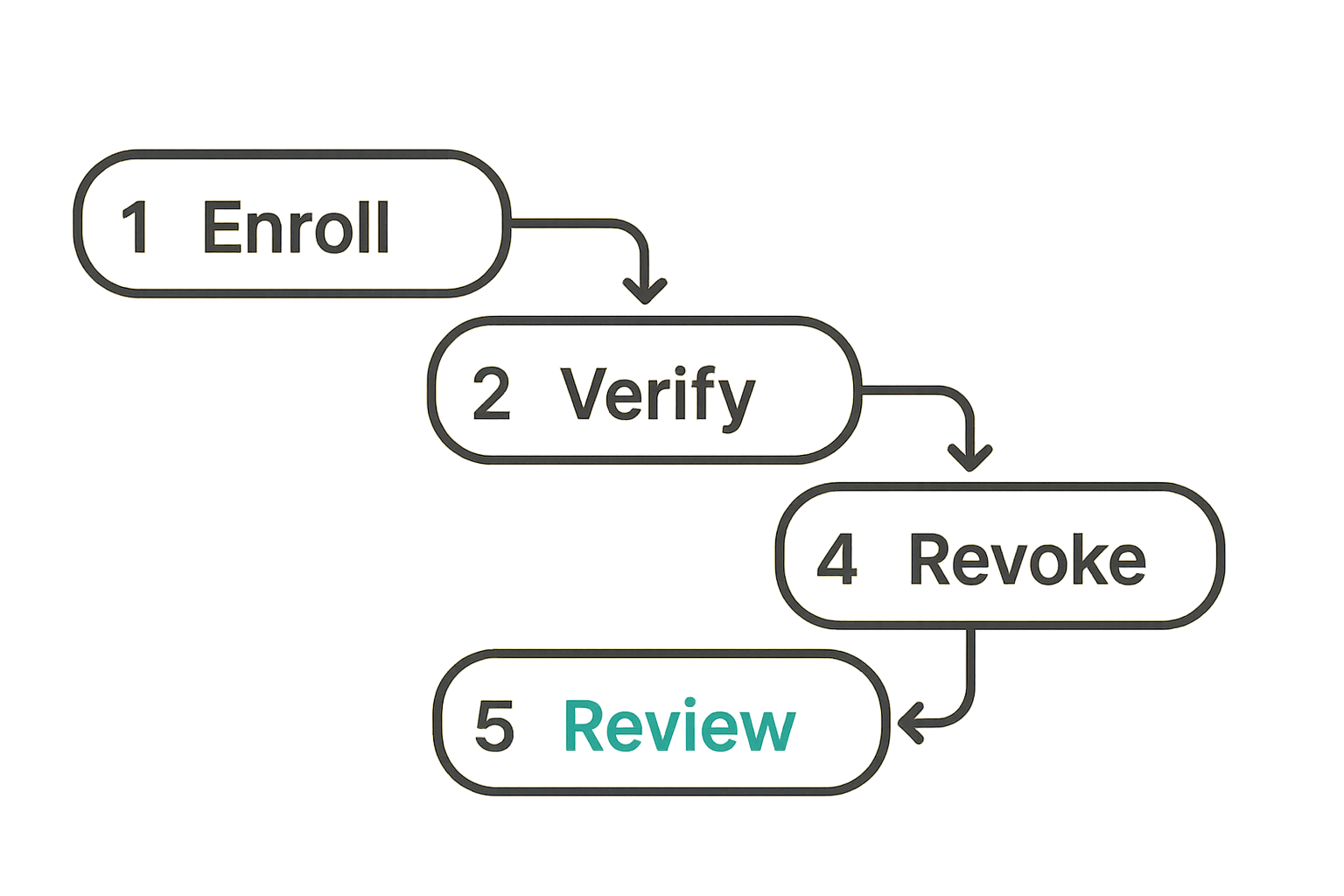
Enrollment and verification
Device enrollment should be visible and intentional. When a user adds a new phone, tablet, or desktop client, other participants should have a way to detect that change. High-risk groups may need manual verification before continuing sensitive discussion.
For teams, a reasonable enrollment workflow includes:
- The user signs in on the new device.
- The system requires approval from an existing trusted device or a strong recovery method.
- Existing contacts or group members receive a device-change notice.
- Sensitive rooms pause or warn until the new device is trusted.
- Admins can remove devices but cannot silently add decryption capability.
This is where usability matters. If verification is painful, users skip it. If verification is invisible, attackers exploit it. The best workflow is clear enough for normal people and strict enough for sensitive rooms.
Lost stolen and shared devices
Lost-device handling should be planned before the first incident. The response should not depend on a panicked user guessing what to do.
A practical lost-device procedure:
- User reports the lost device through a known channel.
- Admin or user revokes the device from the account.
- High-sensitivity groups rotate membership state or create a replacement room if needed.
- Participants assume cached local messages may be exposed if the device was unlocked or weakly protected.
- The team documents whether any follow-up notification, credential rotation, or customer impact review is required.
Shared devices are even worse. A family tablet, front-desk machine, or shared contractor laptop should not hold private team messages. If shared-device use is unavoidable, keep it out of high-trust rooms.
Remote work and BYOD boundaries
Remote teams often adopt encrypted messaging because work happens everywhere. That also means messages land on personal phones, home computers, and networks the organization does not control.
The practical boundary is not “no BYOD ever.” Many teams cannot operate that way. The boundary is classifying which conversations can happen on which devices.
For example:
- general team coordination may allow personal devices;
- security incidents may require managed devices;
- legal or executive rooms may require strict device verification;
- customer secrets may require separate systems of record rather than chat history.
This is an architecture decision. If the same chat account handles casual coordination and crown-jewel secrets on the same unmanaged device, the team has chosen convenience over segmentation.
Group messaging changes the risk profile
One-to-one encrypted messaging is simpler. Group messaging introduces membership churn, permission drift, social pressure, guest access, and context collapse.
What breaks in practice is not usually the first group creation. It is month six, when half the members have changed roles and nobody remembers why three external accounts still have access.
Membership changes are security events
Every group membership change changes the trust boundary. Adding a member means future messages may be decrypted by another endpoint. Removing a member does not necessarily erase what they already received or cached.
Teams should treat membership changes in sensitive rooms as security events:
- announce additions;
- confirm removals;
- review member lists periodically;
- create new rooms when the topic or audience materially changes;
- avoid using old rooms for new sensitive projects.
Practical rule: if the audience changes, assume the room’s security context changed. Do not keep using a stale group because the thread history is convenient.
Role based rooms beat one giant chat
A single “leadership” or “security” chat becomes a dumping ground. It accumulates unrelated context, stale members, and mixed sensitivity. Role-based or purpose-based rooms are safer.
Examples:
security-alerts-triagefor immediate operational alerts;incident-2026-06-provider-outagefor a specific incident;exec-legal-sensitivefor narrow leadership/legal discussions;customer-escalation-redactedfor support coordination without unnecessary customer data.
The room name should be useful without revealing too much. The membership should match the purpose. The retention should match the risk.
External guests need explicit handling
External guests are common: lawyers, auditors, contractors, vendors, advisors, researchers, family members, or customer representatives. They are also a common source of drift.
A good guest model answers:
- Who approved the guest?
- What room are they allowed into?
- When does access expire?
- Can they download files?
- Are they on a verified device?
- What happens when the engagement ends?
If your answer is “we trust them,” that may be fine socially. It is not an access-control model.
Implementation workflow for teams
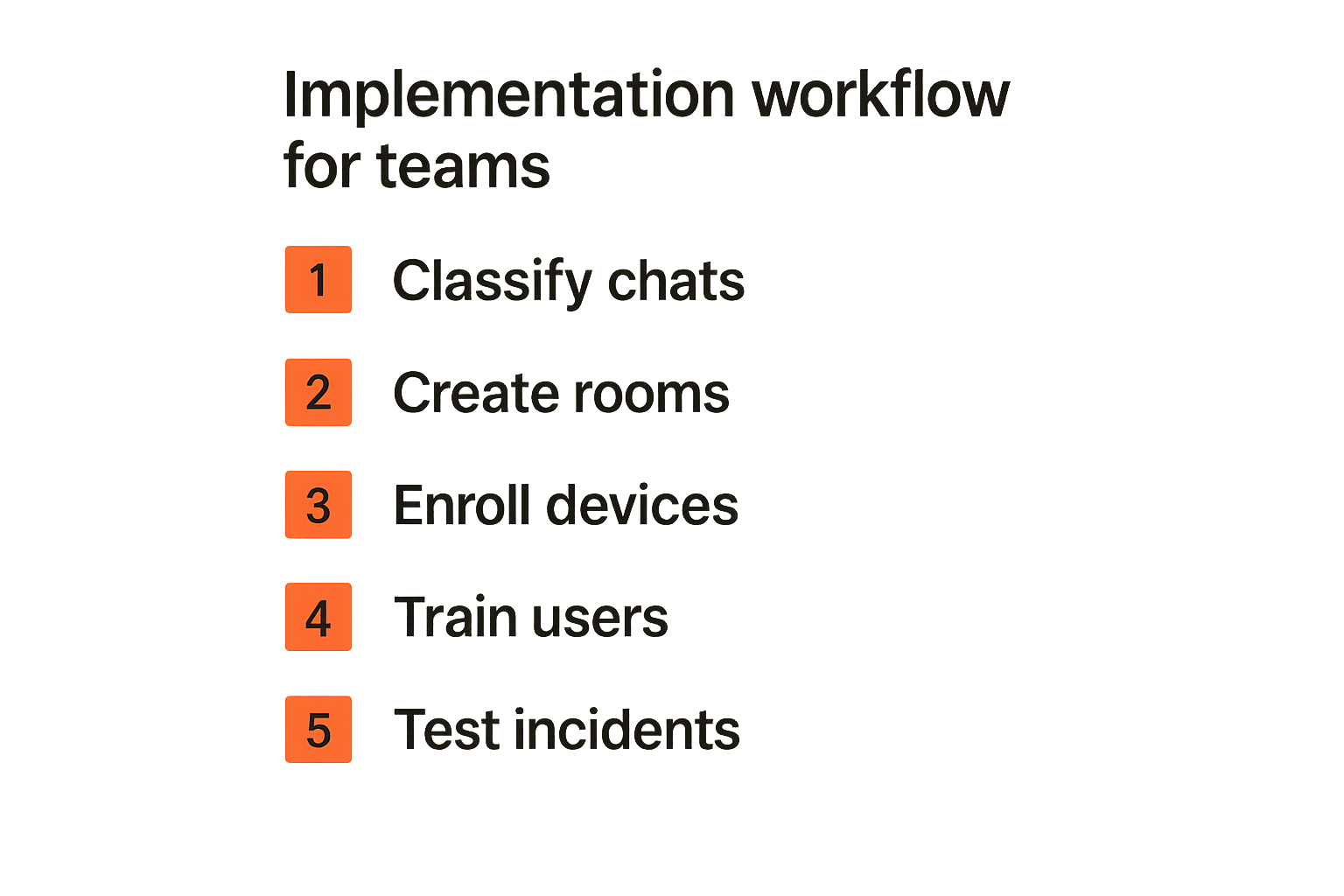
Rolling out secure messaging is not just telling everyone to install an app. The rollout should map communication types to security requirements, then phase adoption without breaking normal work.
Start with communication classes
Begin by classifying conversations. Keep the list short enough to use.
A practical starting model:
- Public or low sensitivity: announcements, logistics, non-sensitive coordination.
- Internal sensitive: strategy, internal operations, personnel context, non-public plans.
- High sensitivity: legal, incident response, security findings, executive decisions, customer secrets.
- External sensitive: vendor, advisor, client, contractor, or partner discussions.
Each class should have rules for device trust, retention, external sharing, file handling, and screenshots. The point is not bureaucracy. The point is making the secure path obvious.
Roll out in rings
Do not migrate every conversation at once. Start with the people who feel the pain and can give useful feedback.
A numbered rollout sequence works well:
- Pilot a narrow use case. Pick one sensitive workflow, such as security incident coordination or executive travel planning.
- Define room templates. Decide default settings for membership, retention, notifications, and file sharing.
- Enroll trusted devices. Verify identity and device-change behavior before sensitive content moves.
- Train on three behaviors. Verify important contacts, avoid sensitive notification previews, and report lost devices fast.
- Migrate high-risk conversations. Move only the workflows that benefit from privacy and can follow the rules.
- Review after 30 days. Look for friction, bypasses, stale rooms, and unclear ownership.
That changes the conversation from “everyone use this app” to “this is how we protect specific communication paths.”
Validate with real incidents
Tabletop exercises reveal whether the workflow works. You do not need a dramatic simulation. Use ordinary scenarios:
- a user loses a phone after a conference;
- a contractor leaves but remains in three groups;
- a screenshot of a sensitive chat appears in another tool;
- an executive adds a personal tablet;
- a support discussion includes unnecessary customer information.
Ask what the team would do in the first 15 minutes. If nobody knows who owns device revocation, room cleanup, or user notification, the deployment is incomplete.
Related reading from our network: media and home infrastructure communities face a lighter version of the same coordination problem when designing private alerts and groups for encrypted messaging streaming privacy.
What works and what fails
End to end encryption messaging succeeds when the secure workflow is easier than the insecure workaround. It fails when the official policy ignores how people actually communicate.
What works in production
What works:
- clear rules for which conversations belong in encrypted chat;
- visible device changes;
- simple identity verification for high-risk contacts;
- room templates for sensitive workflows;
- short retention where business requirements allow it;
- explicit guest expiration;
- separate systems of record for structured customer, legal, or financial data;
- training focused on specific user actions, not cryptography lectures.
The best deployments are boring. Users know where to talk, what not to paste, how to verify a new device, and what to do when something feels wrong.
What fails quietly
What fails:
- assuming encryption eliminates endpoint risk;
- allowing unlimited unmanaged devices in sensitive rooms;
- using one giant group for every topic;
- ignoring metadata and notification previews;
- relying on screenshots for recordkeeping;
- using chat as a password vault;
- keeping former employees or contractors in rooms;
- enabling recovery flows that contradict the privacy promise.
The dangerous failures are quiet because the app still appears to work. Messages send. Locks appear. Users feel safe. Meanwhile, the real risk has moved to devices, groups, and operational sprawl.
A comparison table for selection
Use product comparisons carefully. Feature lists are useful, but architecture matters more than marketing language.
| Area | Weak implementation | Stronger implementation | What to ask |
|---|---|---|---|
| Content encryption | Encryption in transit only or server-accessible message history | Message encrypted on sender device and decrypted on recipient device | Can the provider read stored messages? |
| Device changes | Silent new-device access | Visible alerts and verification options | Who is notified when a device is added? |
| Recovery | Support can restore full history | Recovery requires user-held secret or trusted device | Can recovery decrypt old messages? |
| Metadata | Broad logging without clear limits | Minimized, documented operational metadata | What is collected and for how long? |
| Groups | Stale membership and unclear guests | Membership reviews, guest expiration, room purpose | Who owns each sensitive room? |
| Retention | One setting for everything | Retention by room type and risk | What should disappear, and when? |
| Files | Attachments treated like normal chat text | Encrypted attachments with clear download behavior | Where do files live after download? |
| Admin controls | Admin convenience overrides privacy | Admin can manage access without silent decryption | What can admins actually see? |
If a vendor cannot answer these questions clearly, that is a signal. It does not always mean the product is bad. It means you do not yet understand the trust model.
Operational controls for secure messaging
Security controls that users cannot follow will be bypassed. The goal is not to create a perfect policy. The goal is to create a small set of controls that reduce real risk without pushing people back to SMS, email, or random consumer apps.
Policy that users can actually follow
A workable secure messaging policy should fit on one page. It should say:
- which conversations must use encrypted messaging;
- which conversations must not happen in chat at all;
- when to verify a contact or device;
- how to name sensitive rooms;
- what files can be shared;
- what to do if a device is lost;
- how guests are approved and removed;
- who owns room cleanup.
Avoid vague phrases like “use good judgment” as the main control. Good judgment helps, but people under time pressure need concrete defaults.
A better rule is: “Legal, security incident, executive, and customer-secret discussions must use approved encrypted rooms with verified members and no lock-screen previews.” That is specific enough to execute.
Incident response for chat
Secure messaging needs an incident path. Without one, users improvise.
Minimum incident playbooks:
- Lost device: revoke, assess cached data, rotate related credentials if needed.
- Wrong recipient: stop the thread, assess sensitivity, move to a clean room, document exposure.
- Compromised account: remove sessions, verify devices, notify affected rooms, rebuild trust.
- Stale guest: remove, review files and decisions shared, decide whether a new room is needed.
- Screenshot leak: identify source, reduce distribution, review policy and device controls.
These incidents are not theoretical. They are normal operations. A private messaging system should make the response faster, not more confusing.
Metrics without surveillance
Teams need to know whether the rollout works, but measurement can undermine privacy if done badly. Avoid turning secure messaging into employee surveillance.
Useful operational metrics are aggregate and workflow-focused:
- number of sensitive rooms with assigned owners;
- percentage of high-risk users with verified devices;
- number of stale guests removed during review;
- time to revoke a lost device;
- number of incidents caused by wrong-room or wrong-recipient errors;
- training completion for specific safety behaviors.
Avoid reading message content to measure adoption. Avoid broad exports unless legally required and consistent with the privacy model. If the analytics layer becomes more invasive than the messaging layer is private, the architecture is working against itself.
For external transparency, review how a provider describes data handling and user rights. The qrypt.chat privacy page is the right kind of place to check when your rollout depends on minimizing unnecessary exposure.
Where qrypt.chat fits in the architecture
qrypt.chat is for people who care about private communication, secure messaging, and practical digital security. That means the product conversation should start with architecture: who needs private rooms, which devices are trusted, what metadata matters, and how users recover access without weakening the promise.
Product fit for privacy conscious teams
qrypt.chat is a fit when your team wants encrypted communication treated as a core workflow rather than a novelty feature. That includes:
- remote teams coordinating sensitive work;
- privacy-conscious users who want a clearer trust boundary;
- security professionals separating incident discussion from ordinary workplace chat;
- small organizations that need private communication without pretending every user is a cryptographer;
- groups evaluating post-quantum and future-resistant secure messaging approaches.
No messaging product removes the need for endpoint discipline. The value is in giving teams a stronger private channel and a cleaner structure for secure conversations.
If you are evaluating the broader project posture, the qrypt.chat about page provides useful context on its focus around quantum-resistant encrypted messaging.
How to evaluate it
Use the same questions you would use for any serious end to end encryption messaging rollout:
- Can the provider read message content?
- What happens when a device is added?
- How are identities verified?
- What metadata is collected?
- How does recovery work?
- What are the defaults for notifications and files?
- Can teams segment sensitive conversations into purpose-built rooms?
- What happens during offboarding or lost-device response?
The answer does not need to be magical. It needs to be explicit. Secure messaging is not a vibe. It is a set of trust boundaries users can understand and operators can defend.
End to end encryption messaging works best when the workflow is designed before the crisis. Pick the sensitive conversations. Define the device rules. Decide how groups are owned. Make recovery honest. Keep metadata in the conversation. Then choose the tool that supports that operating model.
Try qrypt.chat
qrypt.chat is for people who care about private communication, secure messaging, and practical digital security. Try qrypt.chat.