End to end encryption messaging looks simple until you have to rely on it.
A remote team moves sensitive decisions into chat. A family shares private documents. A security team coordinates during an incident. Everyone assumes the encryption label means the conversation is handled. Then someone adds an unmanaged device, forwards a screenshot, loses an account, exposes message previews, or stores a backup in the wrong place.
Teams think the problem is choosing an encrypted app. The real problem is building a communication workflow where the server is not trusted with message content, devices are treated as security boundaries, and people know what the tool does not protect.
That changes the conversation. End to end encryption messaging is not a badge on a product page. It is an architecture decision, an operational habit, and a risk model for private communication in 2026.
Table of contents
- Why end to end encryption messaging is an operating model
- Threat model first, then app choice
- The encryption workflow that has to work every day
- Key management is where secure messaging succeeds or fails
- Metadata is the practical privacy leak
- Team workflows need rules, not just encrypted chats
- What breaks when end to end encryption messaging is implemented badly
- A practical implementation sequence for users and teams
- What works, what fails, and how to choose
- How qrypt.chat fits into a private communication architecture
Why end to end encryption messaging is an operating model
The UI is the smallest part
The mistake teams make is treating secure messaging like a design problem. They compare bubbles, reactions, file upload size, and whether the app feels familiar. Those things matter for adoption, but they are not the core system.
The core system is the path a message takes from one human to another without turning the service provider, cloud storage layer, notification provider, or administrator into a content reader.
A useful way to think about it is simple: the chat UI is the terminal. The security model is the product.
If the workflow encourages people to copy sensitive content into email, export chat logs to unmanaged folders, or recover accounts through weak channels, the encryption layer is only solving part of the problem.
The trust boundary moved to endpoints
In end to end encryption messaging, the server should route encrypted payloads, manage delivery, and coordinate state without seeing plaintext message content. That sounds clean. In practice, it moves trust to phones, laptops, browsers, operating systems, backups, and user behavior.
That is not a weakness of E2EE. It is the point. But it means endpoint hygiene becomes part of private communication.
If a laptop is compromised, the attacker does not need to break cryptography. If a phone displays sensitive content on the lock screen, message encryption did not stop shoulder surfing. If a user adds a new device without verifying identity, the cryptographic trust chain gets weaker.
Practical rule: Do not ask whether a messaging app is encrypted. Ask where plaintext exists, who can access it, and what happens when a device changes.
Privacy goals before feature lists
Before comparing encrypted chat apps, write down what privacy means in your context.
For some users, the goal is preventing the provider from reading messages. For others, it is reducing metadata exposure. For a company, it may be keeping internal decisions out of SaaS admin consoles and email archives. For security professionals, it may be coordinating sensitive response work without leaking incident details.
This is why a prior architecture pass matters. We covered the broader design pattern in End to End Encryption Messaging in 2026: A Practical Architecture Guide, but the operational layer is where most failures show up.
The practical question is not which product claims the strongest privacy. It is which workflow survives daily use.
Threat model first, then app choice

Who are you trying to protect against
Threat modeling does not have to be academic. You are deciding which parties should not be able to read, infer, retain, or misuse your communications.
Common threat categories include:
- Service providers that should not see message content
- Cloud vendors and infrastructure operators
- Account administrators inside an organization
- Network observers on public or hostile networks
- Compromised devices
- Abusive insiders or ex-members of a group
- Legal, regulatory, or discovery scenarios where retention matters
The answer changes the design. If your primary concern is provider access, content encryption is central. If your concern is group membership leakage, metadata minimization matters more. If your concern is employee offboarding, device and session revocation must be crisp.
Related reading from our network: teams handling payment operations face a similar separation problem between sensitive state and chat context in encrypted messaging crypto workflows.
What metadata still exists
End to end encryption messaging protects message content when implemented correctly. It does not automatically eliminate metadata.
Metadata can include who talked to whom, when, from which device, how often, in which group, and with what approximate message size. Some systems reduce this. Some expose more than users expect. Some protect content well but still create a useful social graph.
What breaks in practice is the assumption that unreadable content equals invisible communication. It does not.
If your risk model includes association, source protection, journalism, activism, sensitive health conversations, or internal investigations, metadata belongs near the top of the evaluation list.
What the provider should not know
A mature provider should be clear about what it can and cannot access. You want specific answers, not vague promises.
Ask whether the provider can access plaintext messages, attachments, contact lists, group names, profile details, recovery secrets, or backups. Ask what logs are retained. Ask what support staff can see. Ask how abuse handling works without broad content visibility.
The qrypt.chat privacy approach is relevant here because privacy is not only a legal document. It is a set of product and infrastructure boundaries that determine what the service is technically positioned to know.
Practical rule: If a provider cannot explain what data it does not have, assume the operational boundary is weaker than the marketing page suggests.
The encryption workflow that has to work every day
Message creation and key agreement
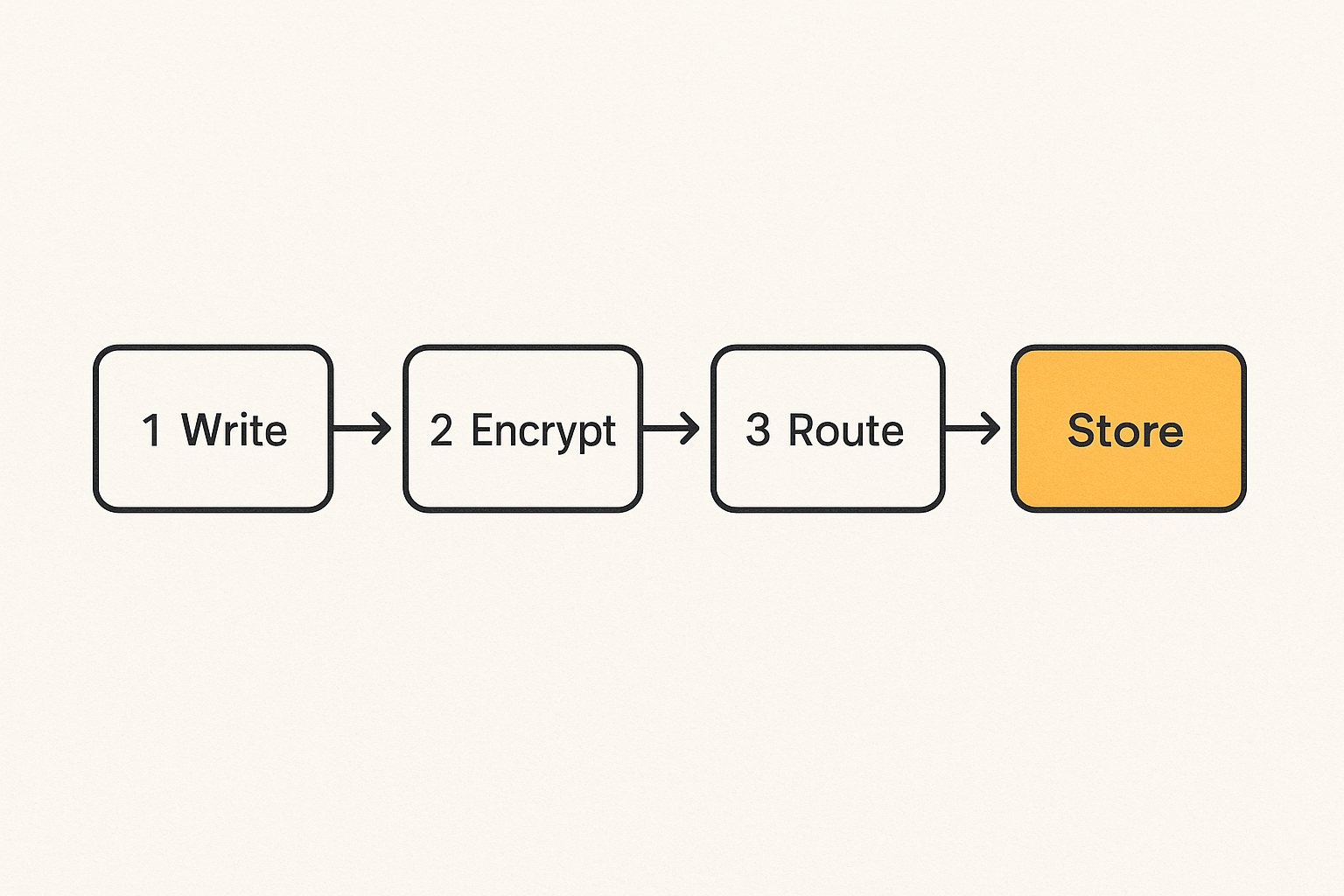
At the workflow level, a secure message moves through a small set of critical steps:
- The sender writes plaintext on a trusted endpoint.
- The app encrypts the message using keys associated with the intended recipient or group.
- The server receives encrypted content and routes it.
- The recipient device decrypts locally.
- Local storage, notifications, backups, and display rules determine what happens next.
Most users focus on step three because that is where the provider sits. Operators should focus on all five.
If encryption happens after upload, the model is weak. If decrypted messages are indexed by another app, the model leaks. If group keys are mishandled during membership changes, the model becomes hard to reason about.
Device additions, removals, and recovery
Device lifecycle is one of the least glamorous parts of encrypted messaging, and one of the most important.
Users replace phones. Employees leave. Contractors rotate off projects. People lose laptops. A secure messaging workflow needs a clear answer for each event.
Good systems make device additions visible. They warn participants when identity material changes. They support removal of stale sessions. They provide recovery without silently handing plaintext to the provider.
The mistake teams make is optimizing onboarding while ignoring offboarding. Adding a device is a convenience feature. Removing trust is a security feature.
Attachments, previews, and search
Attachments often carry more sensitive information than the messages around them. PDFs, screenshots, audio files, exported logs, and images may contain names, credentials, location data, or regulated information.
The same applies to link previews. A preview may require fetching a URL, exposing IP information, or revealing that a user viewed a private link. Search can also create local indexes that outlive the message.
For adjacent reading, media-heavy communities face similar workflow issues around private alerts and notifications. Related reading from our network: encrypted messaging streaming privacy architecture.
Practical rule: Treat attachments, previews, and local search as separate data systems. Encryption of the chat body does not automatically secure everything attached to it.
Key management is where secure messaging succeeds or fails
Identity keys and verification
Cryptography works only if users are communicating with the keys they think they are using. That is why identity verification matters.
In a casual one-to-one conversation, verification may be a quick check. In a sensitive team environment, it should be part of onboarding. The goal is to reduce the risk of impersonation, silent device insertion, or mistaken trust.
Useful verification patterns include out-of-band checks, safety number comparison, device change alerts, and visible identity state. The important part is not ritual. It is making trust changes observable.
A private messaging system should also publish enough security detail for serious users to evaluate assumptions. The qrypt.chat security information is where those implementation boundaries belong, because users should not have to reverse-engineer the trust model from slogans.
Backups without silent exposure
Backups are where many encrypted systems get awkward. Users want recovery. Security teams want continuity. Privacy requires that recovery does not become a hidden plaintext escrow.
There are several patterns, each with tradeoffs:
- No cloud backup: strong privacy, painful recovery
- User-controlled encrypted backup: balanced, but requires careful key handling
- Provider-managed recovery: convenient, but may weaken the trust boundary
- Enterprise archive integration: operationally useful, but often conflicts with E2EE goals
The practical question is whether backup keys are controlled by the user, the provider, the organization, or some combination. If the provider can restore your message history without a secret it does not know, you should understand what that implies.
Post-quantum planning in 2026
Post-quantum cryptography is no longer a distant research topic for teams making long-term privacy decisions. The immediate question is not whether every chat needs exotic algorithms tomorrow. The practical question is what happens to messages that are captured now and attacked later.
This is especially relevant for sensitive business, legal, personal, journalistic, or security communications with a long confidentiality shelf life.
A sensible 2026 posture is skeptical but prepared: prefer systems that can evolve cryptographic primitives, explain their key agreement choices, and avoid brittle designs that cannot migrate. Hype is not helpful. Upgrade paths are.
Metadata is the practical privacy leak
Contact discovery and social graphs
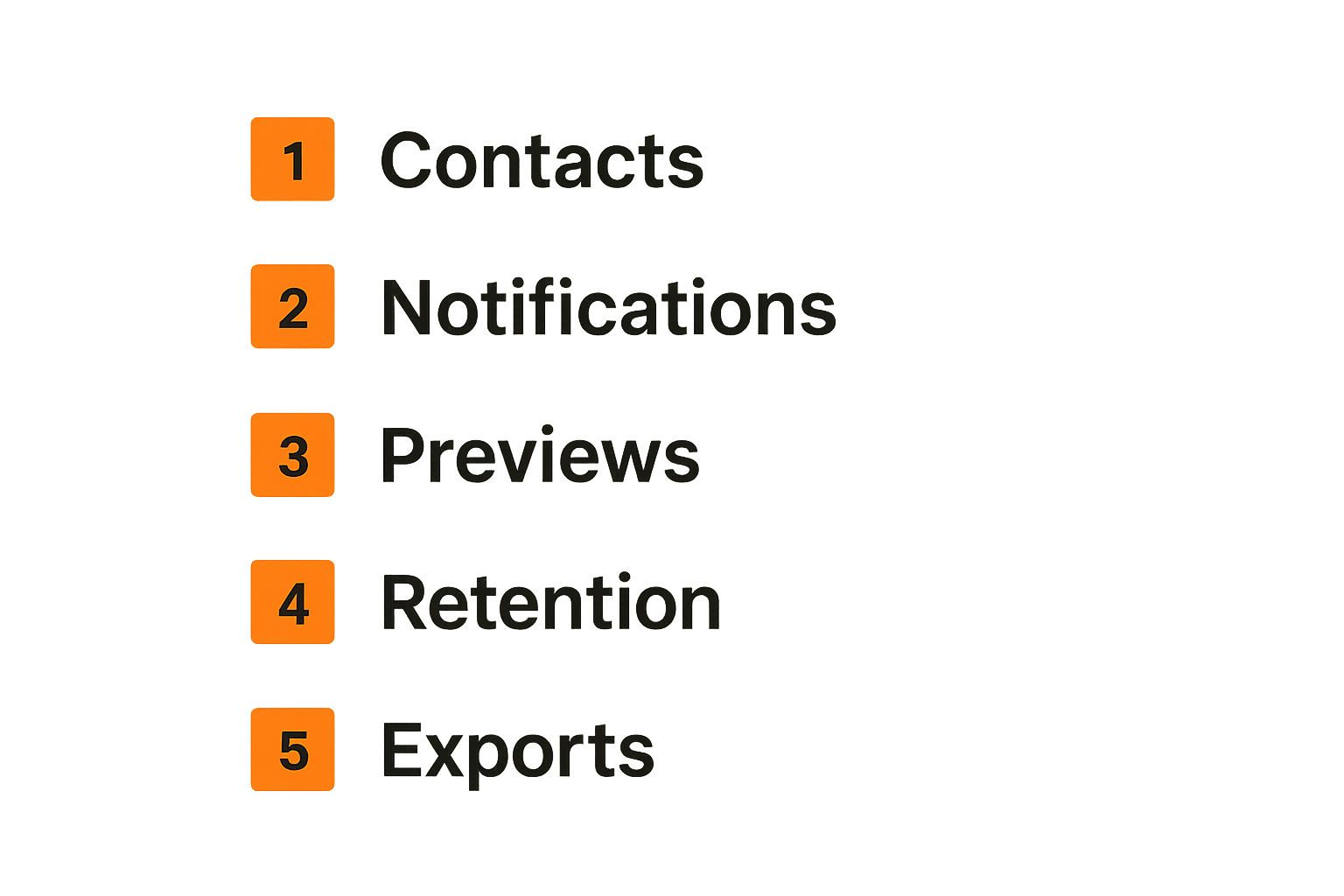
Contact discovery is convenient. It is also dangerous if implemented carelessly.
Many messaging apps help users find contacts by uploading address books or matching identifiers. If this process is not privacy-preserving, the service can learn social relationships even when it cannot read messages.
For privacy-conscious users, this matters. Your contact graph may reveal more than a message body: political groups, health providers, legal support, sources, customers, partners, or internal reporting lines.
A better design minimizes raw contact exposure, limits retention, and makes discovery optional or constrained. A worse design treats address book upload as harmless because message bodies are encrypted.
Notifications and link previews
Notifications are a common leak because they move message snippets into operating system services, lock screens, wearables, car displays, and notification histories.
Disable previews for high-risk conversations. Consider whether sender names should appear. Be careful with shared devices and work profiles. Do not assume the messaging app controls every display surface after a notification leaves it.
Link previews have a similar issue. If the client or server fetches a URL to generate a preview, that action may reveal interest in the link. In sensitive workflows, previews should be disabled or generated in a way that does not leak unnecessary context.
Retention, screenshots, and exports
End to end encryption does not stop a participant from saving, copying, photographing, or exporting content. This is not a cryptographic failure. It is a human and endpoint reality.
Retention settings still matter. Disappearing messages can reduce data accumulation, but they are not magic deletion. Screenshots may still happen. Logs may exist on compromised devices. Legal obligations may require preservation in some environments.
What works is clear policy: which chats are ephemeral, which are durable, which topics do not belong in chat, and when users must move to a more controlled workflow.
Related reading from our network: even deal-sharing communities run into oversharing and verification problems, which is why private distribution patterns matter in encrypted messaging coupon code workflows.
Team workflows need rules, not just encrypted chats
Channels, roles, and least privilege
Teams often recreate the same mistake they made in email: everyone is in every room because it feels easier.
Encrypted group chat does not remove the need for least privilege. Sensitive channels should have clear ownership, membership review, and scope. Private executive discussions, security incidents, customer escalations, legal matters, and personal data should not live in broad channels.
A useful channel model defines:
- Who owns the room
- Who can add members
- What information belongs there
- Whether messages expire
- What happens when someone leaves
- Whether attachments are allowed
Incident response over private chat
Security teams need fast communication during incidents, but incident chat has special risks. It can contain vulnerability details, indicators, customer impact, attacker behavior, credentials by mistake, legal opinions, and executive decisions.
Do not improvise this during an active incident. Pre-create secure rooms. Pre-verify key people. Define what belongs in the chat versus the incident management system. Decide how evidence is handled.
The practical question is how to shorten coordination time without scattering sensitive state across unmanaged chat history.
Remote teams and device hygiene
Remote work makes encrypted messaging more important and more fragile. Users switch networks, devices, locations, and time zones. Personal and work devices blur. Notifications appear in public places.
Minimum rules help:
- Require device lock and disk encryption
- Remove inactive devices and users quickly
- Disable message previews for sensitive rooms
- Use separate work profiles where possible
- Review group membership on a schedule
- Train users to verify identity changes
Practical rule: Secure messaging policy should be short enough to follow during a bad day. If users need a manual to make the safe choice, the workflow will fail.
What breaks when end to end encryption messaging is implemented badly
Security theater
Security theater happens when teams adopt an encrypted app but keep the old leakage paths.
They paste secrets into chat. They export transcripts to shared drives. They allow unmanaged devices. They leave former contractors in groups. They use screenshots as a workflow. They discuss sensitive issues in broad rooms because creating the right room takes too long.
The encryption may be real, but the operating model is not.
A strong secure messaging rollout removes obvious bypasses. If users constantly work around the tool, the tool is not deployed correctly.
Lost accounts and unrecoverable data
There is a real tradeoff between privacy and recovery. Pretending otherwise creates support pain.
If recovery is too easy, it may weaken encryption. If recovery is too strict, users lose data and create unsafe side channels to compensate. Teams need to decide what matters more for each conversation type.
For example, an ephemeral incident coordination room may not need long-term recovery. A legal collaboration room may require a controlled retention process outside normal chat. A personal private conversation may prioritize provider ignorance over convenience.
The mistake teams make is applying one recovery model to every conversation.
Compliance confusion and shadow archives
Compliance teams often ask whether encrypted messaging can be archived. Security teams ask whether it should be. Those are different questions.
Some regulated workflows require retention. Some privacy-sensitive workflows require minimization. Some environments need both, separated by topic and role.
What breaks in practice is shadow archiving: users manually export conversations because the official process is unclear. That creates uncontrolled copies, weak access control, and discovery risk.
If you need retention, design it intentionally. If you need privacy, do not pretend exported chat logs are harmless.
A practical implementation sequence for users and teams
Step by step rollout
A clean rollout is better than a dramatic migration. Start with the conversations where privacy matters most and where behavior can realistically change.
- Define the top three communication risks.
- List which conversations need end to end encryption messaging.
- Choose a primary app and prohibit sensitive fallback channels.
- Verify identities for the first group of users.
- Configure notifications, device rules, and backups.
- Create rooms by sensitivity, not by org chart alone.
- Move one workflow at a time.
- Review device lists and room membership after two weeks.
- Document what should never be posted in chat.
- Revisit retention and recovery after real use.
This sequence is intentionally boring. Boring is good. Most private communication failures are not cinematic attacks. They are configuration drift, unclear ownership, and habits inherited from email.
Baseline configuration
For privacy-conscious individuals, the baseline is straightforward:
- Use strong device authentication
- Keep the operating system updated
- Disable sensitive notification previews
- Verify important contacts
- Understand backup settings
- Use disappearing messages when appropriate
- Avoid sending credentials or recovery codes
For teams, add administrative controls:
- Written room ownership
- Membership review cadence
- Device offboarding process
- Incident communication plan
- Data retention decision by channel type
- Training for identity change warnings
Validation questions
Before relying on an encrypted messaging workflow, ask these questions:
- Can the provider read message content?
- Can administrators read message content?
- What metadata is retained?
- What happens when a new device joins?
- What happens when a user leaves?
- Are backups encrypted with user-controlled secrets?
- Are attachments handled consistently?
- Can users export data, and where does it go?
- What support visibility exists?
- How are abuse reports handled?
The answers do not need to be perfect for every use case. They need to be explicit.
What works, what fails, and how to choose
Comparison table
| Decision area | What works | What fails |
|---|---|---|
| App selection | Choose based on threat model, key handling, metadata posture, and usability | Choose only by popularity or a vague encryption claim |
| Device trust | Treat each device as a security boundary | Assume encryption protects compromised endpoints |
| Backups | Use clear, user-controlled recovery assumptions | Enable cloud recovery without understanding access |
| Groups | Review membership and device changes | Let old members and stale devices persist |
| Notifications | Limit previews for sensitive conversations | Leak content to lock screens and wearables |
| Attachments | Apply separate rules for files and previews | Treat files as automatically safe because chat is encrypted |
| Retention | Decide by workflow and risk | Export logs manually when people panic |
| Training | Teach a few repeatable rules | Publish a long policy nobody uses |
This table is not a procurement checklist by itself. It is a way to keep the conversation grounded.
Buyer evaluation checklist
When evaluating end to end encryption messaging, look for direct answers to operational questions:
- Is encryption end-to-end by default?
- Are group membership changes visible?
- Are identity key changes surfaced to users?
- Can the provider decrypt backups?
- Is contact discovery privacy-preserving?
- Can message previews be controlled?
- Are attachments encrypted and stored consistently?
- Is there a migration path for future cryptography?
- Does the vendor explain limitations plainly?
A vendor that admits tradeoffs is usually more useful than one that claims privacy without boundaries.
Red flags to walk away from
Walk away, or at least slow down, when you see these patterns:
- Encryption is optional and easy to disable accidentally
- The provider can reset access and restore message history without user-held secrets
- Device changes are invisible
- Metadata retention is vague
- Backups are described only as convenient
- Admin visibility is unclear
- The product depends on users ignoring warnings
- The roadmap talks about privacy but not key management
The point is not paranoia. The point is operational clarity.
How qrypt.chat fits into a private communication architecture
Product fit, not magic
qrypt.chat is built for people who care about private communication, secure messaging, and practical digital security. That does not mean any product can remove every risk. It means the product should fit into a workflow where message content, device trust, and privacy boundaries are treated seriously.
The right fit is users and teams that do not want secure messaging to be a decorative feature. They want encrypted communication to be part of how they handle sensitive conversations, remote coordination, and long-term privacy decisions.
This is especially relevant in 2026, as more teams realize that ordinary chat tools became operational memory for everything: strategy, credentials by mistake, customer issues, legal context, security incidents, and personal data.
Where to start
Start with one high-value workflow. Do not migrate every conversation on day one.
Good first candidates include:
- Founder or executive coordination
- Security incident communication
- Private client discussions
- Sensitive remote team operations
- Personal conversations with long confidentiality needs
- Small groups where device verification is realistic
Then define three rules: who belongs, what belongs, and how long it should remain accessible. That is enough to make the first rollout real.
End to end encryption messaging is strongest when the product and the habit reinforce each other. The app reduces provider access. The workflow reduces human leakage. The team treats devices, metadata, and recovery as part of the system.
Try qrypt.chat
qrypt.chat is for people who care about private communication, secure messaging, and practical digital security. If you are building a more private communication workflow, Try qrypt.chat and evaluate end to end encryption messaging as an operating model, not just an app feature.