End to end encryption messaging usually gets evaluated the wrong way. Teams compare screenshots, reactions, file sharing, and whether the vendor says messages are encrypted. Then a device is lost, a contractor leaves, a backup syncs to the wrong place, or an admin asks for an audit trail nobody designed.
Teams think the problem is choosing a secure chat app. The real problem is building a private communication workflow that keeps working when humans, devices, support requests, and incident response get messy.
That changes the conversation. The practical question is not whether encryption exists somewhere in the stack. The practical question is who can read what, when keys change, what metadata remains, how devices are trusted, how recovery works, and what breaks when a team operates under pressure.
In 2026, end to end encryption messaging is an architecture decision. For individuals, it protects sensitive conversations from unnecessary exposure. For remote teams and security professionals, it becomes part of operational security: identity, access, retention, offboarding, and response all need to fit together.
Table of contents
- Why end to end encryption messaging is an architecture decision
- Start with the threat model before the feature list
- Key management is the product
- End to end encryption messaging workflow for teams
- Metadata backups and retention are where privacy leaks
- Comparing encrypted messaging approaches
- Implementation workflow for a private team rollout
- What breaks when end to end encryption messaging is implemented badly
- Verification incident response and operational evidence
- Where qrypt.chat fits in the operating model
Why end to end encryption messaging is an architecture decision

The mistake teams make is treating encrypted messaging as a binary label. Encrypted or not encrypted. Secure or not secure. Approved or not approved.
In production, the boundary is never that clean. A message may be encrypted between devices, but the group membership event may expose who joined. The content may be private, but the notification preview may leak context. A server may never see plaintext, but a poorly managed device may keep years of sensitive history.
A useful way to think about it is this: encryption protects a specific boundary. Architecture decides whether that boundary is in the right place.
Teams think privacy is a setting
A privacy setting is easy to enable and easy to misunderstand. Users assume that once a chat says end to end encrypted, every related risk has been handled. That is not how secure messaging works.
Private communication depends on several layers working together:
- Cryptographic design for message confidentiality and integrity
- Identity verification so users know who they are talking to
- Device trust so new endpoints do not silently inherit sensitive access
- Metadata discipline so the service does not collect avoidable operational signals
- Backup controls so plaintext does not reappear somewhere else
- Team workflows for onboarding, offboarding, recovery, and escalation
If any one of those layers is ignored, the user experience can still look fine while the security model quietly weakens.
Practical rule: Do not ask whether a messenger is encrypted. Ask where plaintext exists, who controls the keys, and what happens when a device changes.
The system must protect communication in motion and at rest
End to end encryption messaging is usually described as protection while messages travel across the network. That matters, but it is incomplete.
The message also exists before sending, after delivery, during indexing, inside notifications, in attachment previews, on devices, in local databases, and sometimes in backups. A good system reduces the number of places plaintext can appear and makes the remaining places explicit.
For individuals, that means fewer accidental leaks. For remote teams, it means communication security can be operated instead of merely trusted. The system has to support real work: replacing phones, adding contractors, revoking access, handling legal or compliance requests, and responding to suspected compromise.
Related reading from our network: teams evaluating workflow tools face a similar gap between demo screens and operational controls in this invoicing software workflow guide. The domain is different, but the lesson is the same: the UI is not the system.
Start with the threat model before the feature list
A feature list tells you what the product can do. A threat model tells you what it must resist. If you skip the threat model, every product looks acceptable until something breaks.
The practical question is not whether every user needs the same level of privacy. They do not. A journalist coordinating sources, a security team handling incident details, a family sharing personal documents, and a startup discussing customer data have different exposure profiles. But all of them benefit from knowing what the messaging system is designed to protect.
Who can see message content
Start by mapping who can access plaintext content under normal and abnormal conditions.
Ask these questions:
- Can the service provider read messages on its servers
- Can cloud backup providers read message history
- Can workspace admins export plaintext conversations
- Can new devices access old messages automatically
- Can push notification providers see message previews
- Can attachments be scanned, indexed, or cached outside the encrypted channel
A strong end to end encryption model should make server-side plaintext access structurally unavailable, not just contractually discouraged. Policy is useful, but architecture is harder to bypass.
If a vendor says it does not read messages, that is a business promise. If the vendor does not hold the keys required to decrypt messages, that is an architectural constraint. Those are not the same thing.
What metadata still exists
Encryption protects content. It does not automatically erase metadata.
Metadata can include sender, recipient, group membership, timestamps, device identifiers, IP information, message size, attachment size, login events, and contact discovery signals. Some metadata is operationally necessary. The problem is collecting more than needed, retaining it longer than needed, or exposing it to people who do not need it.
What breaks in practice is that teams over-focus on message content and under-specify metadata handling. For many real investigations, metadata is enough to reconstruct sensitive patterns: who talked to whom, during which incident, from which location, and how often.
For adjacent reading, the same metadata versus experience tradeoff appears in consumer streaming and home media workflows; Related reading from our network: this fubo streaming workflow article is not about encrypted chat, but it is a useful reminder that convenience systems generate operational traces.
Key management is the product
If end to end encryption messaging has a hard center, it is key management. Everything else is support structure.
Keys decide who can decrypt messages. Identity decides whether the key belongs to the person you think it belongs to. Device management decides whether new endpoints should participate. Recovery decides what happens when people lose access. Rotation decides what happens after compromise or membership changes.
A messenger can have a polished interface and still fail the key management test.
Identity keys create long term trust
Most secure messaging systems use some form of long-term identity key and session keys. The details vary, but the operational idea is simple: users need a stable cryptographic identity, and sessions need fresh keys for ongoing conversations.
Long-term identity is what allows verification. If Alice verifies Bob today, Alice needs a way to know whether Bob tomorrow is still Bob or a new device, reset account, or attacker-controlled endpoint.
This is where user experience matters. If identity warnings are too noisy, users ignore them. If identity changes are hidden, users cannot make trust decisions. The right pattern is clear but not theatrical: tell the user when trust has changed, explain why it matters, and make verification practical.
For teams, identity verification should not depend on heroic behavior. Build a routine:
- Verify high-risk contacts during onboarding
- Re-verify after device replacement
- Treat unexpected identity changes as review events
- Keep sensitive incident rooms restricted until membership is confirmed
Practical rule: A key change is not a UI annoyance. It is a trust event that needs context and a decision.
Device changes are security events
People replace phones. Laptops get stolen. Contractors use personal devices. Employees leave. Operating systems restore app data from backups. These are normal events, not edge cases.
That means device lifecycle must be part of the encrypted messaging architecture.
A useful device policy answers:
- How does a new device join an account
- Can a new device decrypt old messages
- Do existing participants get notified
- Can a lost device be removed quickly
- Does removal revoke future access only, or affect stored history
- Are local messages protected by device encryption and app lock controls
There is no universal answer for every team. Some teams prioritize seamless multi-device history. Others prefer stricter forward secrecy and limited history transfer. The point is to choose deliberately.
For readers who want the broader architectural version of this discussion, the QryptChat team has also written about end to end encryption messaging architecture for private communication, including keys, devices, metadata, and rollout decisions.
End to end encryption messaging workflow for teams
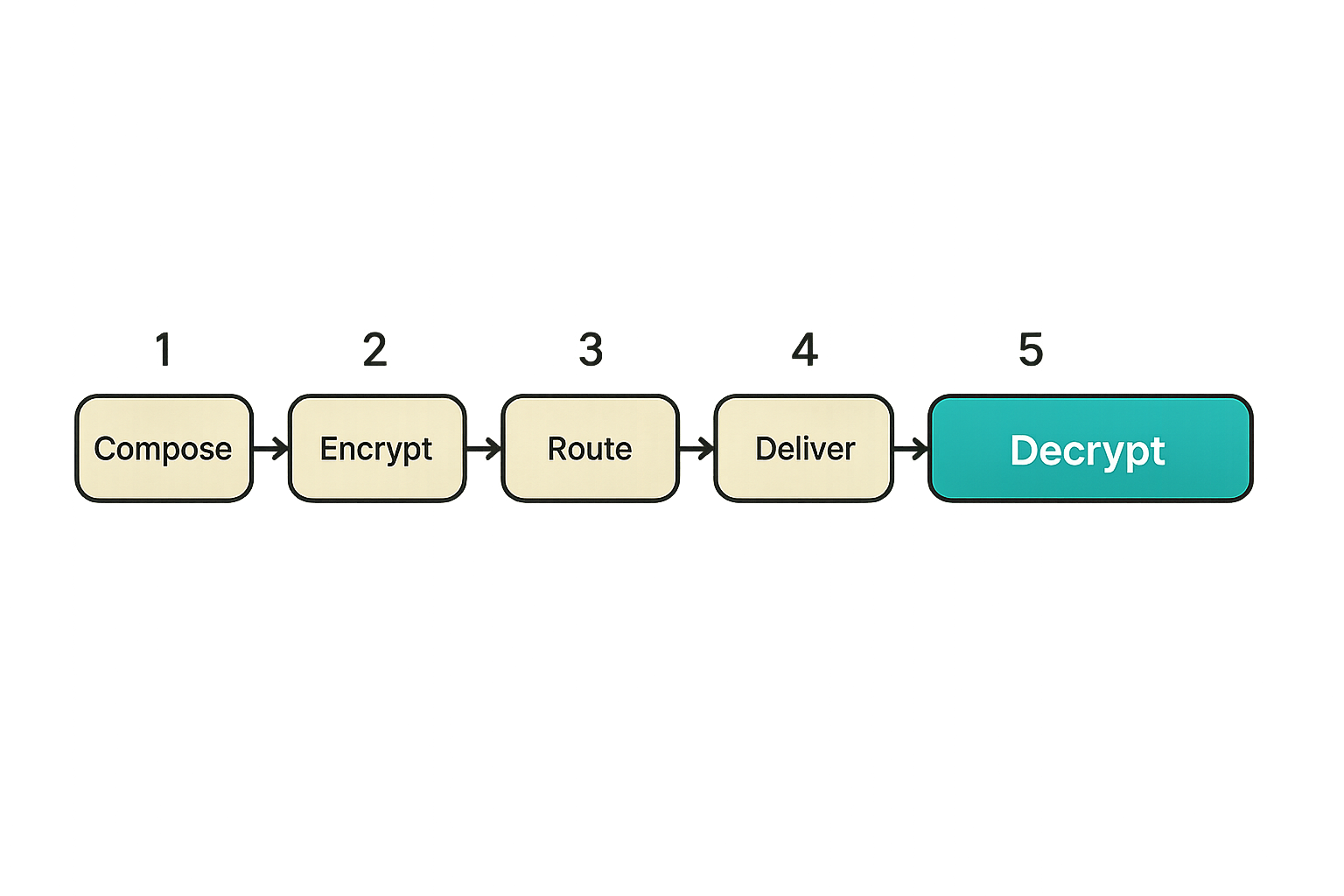
A secure messenger is not only a cryptographic channel. It is a workflow. Messages are created, encrypted, routed, delivered, decrypted, stored, searched, forwarded, deleted, exported, and sometimes used as evidence in an incident review.
Teams think the problem is getting everyone into the same private chat. The real problem is keeping sensitive conversations inside the right trust boundary as work changes.
The normal message path
A simplified end to end encrypted message path looks like this:
- The sender writes a message on a trusted device.
- The app encrypts the message locally using keys associated with the intended recipient or group.
- The server routes ciphertext and delivery metadata.
- The recipient device receives ciphertext.
- The recipient device decrypts locally.
- The app stores message data according to local and account settings.
That flow is easy to draw. The edge cases are harder.
What if the recipient has three devices? What if one device is offline for two months? What if a group has 40 members and one person leaves? What if a user restores from backup? What if legal asks for data the provider cannot decrypt? What if a user reports harassment but the platform cannot inspect message content?
Those are not arguments against encryption. They are reasons to design the operating workflow honestly.
The workflow users actually follow
Users do not experience cryptography. They experience friction, warnings, missing history, notification behavior, search, file previews, and support responses.
A practical secure messaging workflow needs to support:
- Fast conversation creation without accidental public channels
- Clear group membership visibility
- Device review before sensitive discussions
- Sensible defaults for disappearing or retained messages
- Attachment handling that does not leak through previews or downloads
- User education at the moment of risk, not in a forgotten policy document
The mistake teams make is assuming users will compensate for weak architecture with careful behavior. They usually will not. Good systems make the safe path the easy path and reserve warnings for events that actually matter.
Related reading from our network: AI agent builders face a similar problem with local credentials and tool boundaries; this Mac tools architecture guide is a useful adjacent read on why endpoint context matters.
Metadata backups and retention are where privacy leaks
End to end encryption messaging protects content from the service layer, but privacy often fails around the content. Metadata, backups, exports, analytics, screenshots, notification previews, and endpoint compromise all sit outside the narrow message-encryption story.
That changes the conversation from encryption alone to data minimization.
Messages are not the only sensitive data
Consider a small incident response team. The content of a chat may be encrypted, but the following facts can still be sensitive:
- A breach-response room was created at 2:13 a.m.
- The legal lead, infrastructure lead, and CEO joined within five minutes
- A contractor was removed from the room before a disclosure discussion
- A large file was shared shortly after customer support joined
- Several users logged in from unfamiliar networks
None of that requires reading message content. In some cases, metadata is the signal.
A privacy-conscious service should minimize collection, restrict internal access, and make retention understandable. It should also distinguish between metadata required to operate the service and metadata collected because it might be useful later.
Practical rule: If metadata is not needed for delivery, safety, abuse handling, billing, or account security, challenge why it is being collected.
Backups exports and screenshots change the risk
Backups are where many encrypted workflows quietly lose their privacy properties. If encrypted chat history is backed up in plaintext to a cloud account, the practical protection may shift from messenger cryptography to cloud account security.
Exports have a similar problem. A team may forbid server-side access to plaintext but allow users to export sensitive threads into local files, shared drives, ticketing systems, or email attachments. Screenshots are even harder because they move content outside the messaging system entirely.
This does not mean backups, exports, and screenshots can never exist. It means they need clear boundaries:
- Decide whether message history should be restorable on new devices
- Make backup encryption explicit
- Warn users before exporting sensitive rooms
- Disable previews where notification exposure is unacceptable
- Treat screenshots as an endpoint and policy problem, not a cryptography problem
A useful privacy policy should explain what data is collected, retained, and shared without hiding behind vague language. For qrypt.chat readers, the service-level data posture is described in the QryptChat privacy information, which is the right kind of document to review before trusting any private communication tool.
Comparing encrypted messaging approaches
Not every encrypted messenger is built for the same job. Some are optimized for personal conversations. Some are optimized for workplace administration. Some prioritize anonymity. Some prioritize compliance. Some prioritize usability across many devices.
The practical question is fit. A tool can be secure for one operating model and wrong for another.
Consumer chat versus managed private chat
Consumer secure messaging is often excellent for personal privacy: simple onboarding, strong defaults, minimal admin surface, and low operational overhead. But teams may need device review, organization-level onboarding, room governance, and clearer support paths.
Managed workplace chat often has stronger administration, but that can conflict with end to end encryption if admins can export or inspect plaintext by design. Sometimes that tradeoff is intentional. Sometimes it is hidden under enterprise language.
The point is not that one category is always better. The point is to understand the trust model before putting sensitive work into it.
What to compare before you migrate
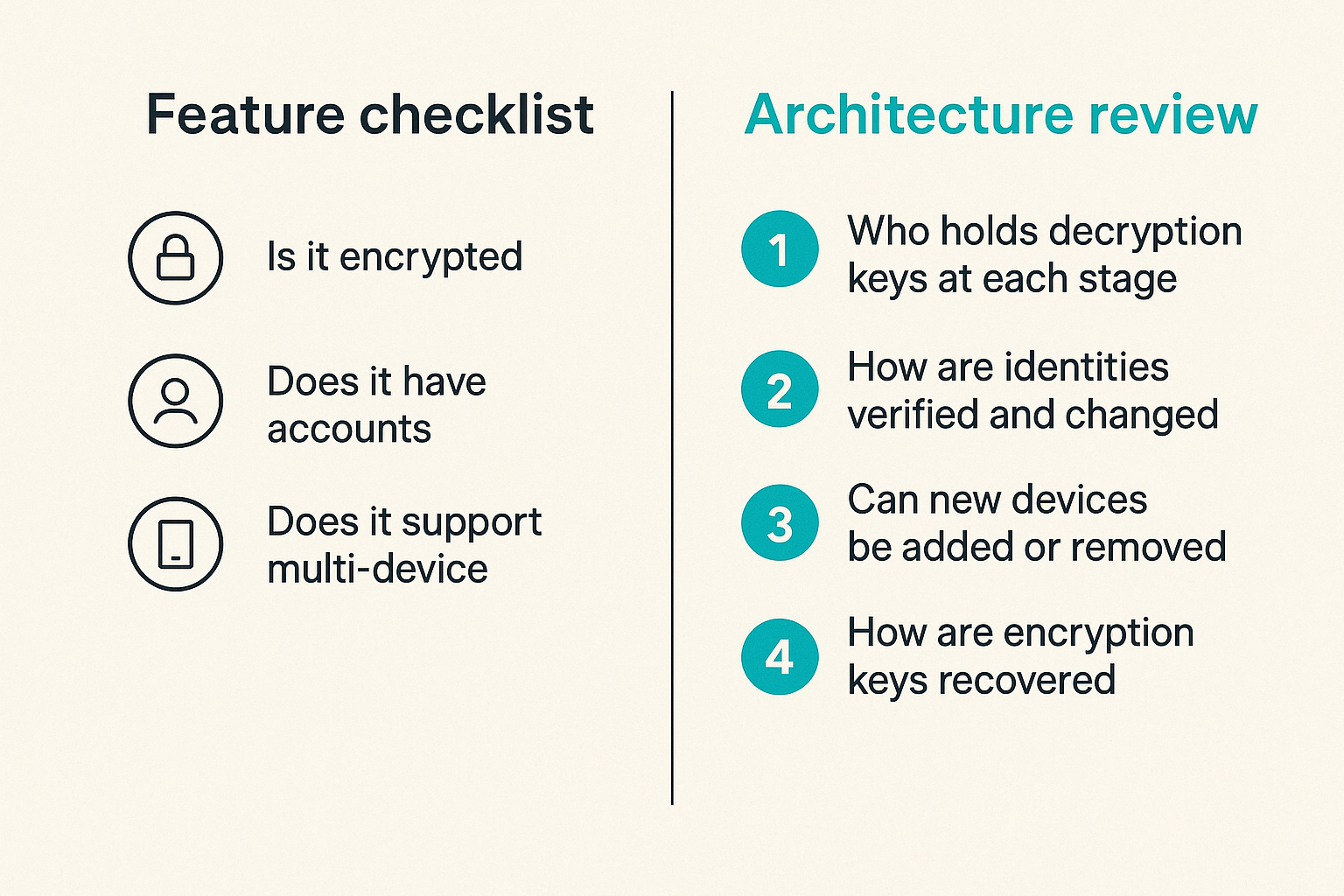
| Decision area | Weak evaluation question | Better architecture question |
|---|---|---|
| Encryption | Is it encrypted | Who holds decryption keys at each stage |
| Identity | Does it have accounts | How are identities verified and changed |
| Devices | Does it support multi-device | Can new devices decrypt old history and who is notified |
| Metadata | Does it protect privacy | What metadata is collected and retained |
| Backups | Can users restore history | Where does plaintext or decryptable history exist |
| Admin controls | Can admins manage users | Can admins access content or only manage membership |
| Incident response | Is support available | What evidence exists without breaking privacy |
| Offboarding | Can users be removed | What happens to local history and future access |
This table is where many buying processes become more honest. It turns security claims into implementation questions.
Practical rule: Compare encrypted messengers by failure behavior, not by happy-path features.
Implementation workflow for a private team rollout
Rolling out end to end encryption messaging should look less like installing an app and more like changing a security-sensitive workflow. The rollout does not need to be bureaucratic. It does need ownership.
The practical question is who decides which conversations belong in the encrypted system, who handles exceptions, and how users know what to do when trust changes.
A practical rollout sequence
Use a short implementation path that forces the important decisions early:
- Define protected conversation types. Examples include executive discussions, incident response, customer-sensitive threads, source conversations, legal coordination, and private team channels.
- Map participants and devices. Identify who needs access, which devices they use, and which devices should not be allowed.
- Choose retention behavior. Decide whether rooms should retain history, expire messages, or limit attachment availability.
- Set verification expectations. Require identity verification for high-risk contacts and sensitive rooms.
- Configure notification and preview defaults. Reduce accidental exposure on lock screens and shared workspaces.
- Create onboarding steps. Make secure messaging part of day-one access, not an optional afterthought.
- Create offboarding steps. Remove users from groups, review devices, and document what local data may remain.
- Test recovery. Simulate a lost phone, replaced laptop, account reset, and urgent room creation.
- Document escalation. Decide what users do when they see a key change, unknown device, suspicious message, or compromised account.
- Review after real use. Adjust defaults based on friction, support requests, and incidents.
This sequence is intentionally operational. It is not a cryptography checklist. It is a way to make sure the encryption model survives normal business events.
Ownership matters more than policy text
A policy that nobody owns becomes shelfware. For a private messaging rollout, assign clear owners:
- Security owner for threat model and verification expectations
- Operations owner for onboarding and offboarding
- IT owner for device posture and recovery
- Team leads for room membership and usage norms
- Legal or compliance owner for retention and export requirements
Small teams can combine these roles. The point is not headcount. The point is decision clarity.
If nobody owns device removal, lost phones stay trusted. If nobody owns room membership, old contractors remain in sensitive threads. If nobody owns retention, users invent their own export habits. What breaks in practice is usually not cryptography. It is ownership.
What breaks when end to end encryption messaging is implemented badly
Bad encrypted messaging rollouts have a familiar shape. The tool is announced, users join, sensitive conversations move over, and then exceptions accumulate. Someone cannot restore history. Someone ignores a key warning. Someone adds a personal device. Someone exports a thread to email because a manager asked for context.
None of these events are surprising. They are predictable failure modes.
Common failure modes
The most common problems are operational:
- Silent device trust. New devices join without enough visibility, creating uncertainty about who can read future messages.
- Confusing key warnings. Users see alerts but do not understand whether they should stop, verify, or ignore.
- Backup mismatch. Chat content is encrypted in transit but recoverable through a less protected backup path.
- Overbroad groups. Sensitive conversations happen in rooms with stale membership.
- Unclear offboarding. Former employees lose account access but retain local message history on unmanaged devices.
- Shadow exports. Users copy content into email, documents, tickets, or screenshots to work around search or retention gaps.
- Support dead ends. Users report suspicious behavior, but support cannot inspect content and has no alternative evidence workflow.
- Admin misunderstanding. Leaders assume admins can recover or audit content, then discover the encryption model prevents it.
That last point matters. End to end encryption is supposed to limit provider and admin access to plaintext. If leadership expects full content recovery, the organization has not aligned on the operating model.
What works and what fails
| Scenario | What fails | What works |
|---|---|---|
| Lost phone | Waiting for the user to self-report someday | Fast device removal and clear re-verification |
| New laptop | Silent history access | Visible device enrollment and scoped history behavior |
| Sensitive group | Adding everyone for convenience | Smaller rooms with named owners |
| Key warning | Generic alert fatigue | Contextual warning with verification steps |
| Compliance request | Assuming plaintext export exists | Knowing what evidence is available before the request |
| User training | One-time security memo | In-product guidance at risky moments |
| Contractor exit | Removing only the main account | Reviewing rooms, devices, and retained local data |
A good rollout accepts that encrypted messaging creates tradeoffs. You gain content confidentiality against the service layer. You may lose some centralized inspection and recovery patterns. That is not a bug. It is the model. The question is whether the team has designed around it.
Verification incident response and operational evidence
Security teams often ask a fair question: if the provider cannot read content, how do we investigate abuse, compromise, or policy violations?
The answer is not to weaken encryption by default. The answer is to separate content privacy from operational evidence and user-controlled reporting.
How to prove the system is behaving
You can validate an encrypted messaging system without reading user messages. Look for evidence around the edges:
- Device enrollment logs
- Account login and session events
- Group membership changes
- Key change notifications
- Delivery and failure events where appropriate
- User reports with consented message excerpts or attachments
- Client version and update status
- Recovery and reset events
This kind of evidence does not replace content inspection, and it should still be minimized. But it gives operators enough context to respond to many incidents without turning the service into a surveillance tool.
Teams should also test assumptions. Can admins read content? Can support decrypt attachments? Can a restored device access old history? Can a removed user receive future group messages? Can a push notification expose sensitive text? These tests are simple, but many teams never run them.
For more on the security posture behind the product rather than the marketing layer, the QryptChat security overview is the right place to review how secure messaging claims are framed and maintained.
Incident playbooks for private messaging
Private messaging still needs incident response. The playbooks just look different.
Create playbooks for at least these situations:
- Lost or stolen device
- Unexpected identity or key change
- Suspicious login or account takeover concern
- Sensitive message sent to the wrong room
- Former member discovered in a private group
- User reports harassment or malicious content
- Device malware suspected on an endpoint
- Legal or compliance request for conversation records
Each playbook should define the user action, owner action, evidence available, and privacy boundary. For example, a suspicious key change playbook may instruct the user to pause sensitive conversation, verify the contact through another channel, review device changes, and notify the room owner.
The mistake teams make is writing incident response around tools that can see everything. With end to end encryption messaging, response has to respect the fact that plaintext is intentionally not available to the service provider.
Where qrypt.chat fits in the operating model
qrypt.chat is for people who care about private communication, secure messaging, and practical digital security. That matters because the right encrypted messenger is not just a feature bundle. It is a trust boundary users can understand and operate.
This is especially relevant for privacy-conscious users, security professionals, remote teams, and encrypted chat users who want strong confidentiality without pretending that cryptography solves every workflow problem.
A product fit for private communication
A useful product in this category should help users answer concrete questions:
- Who can read this conversation
- Which devices are trusted
- What happens if a device changes
- What data does the service collect
- What can support help with without breaking privacy
- How should teams handle onboarding and offboarding
qrypt.chat is positioned around private communication and secure messaging rather than broad collaboration sprawl. If your team is trying to reduce exposure in sensitive conversations, that focus matters. Fewer unrelated features can mean fewer places where private data leaks into side channels.
The fit is strongest when you treat the tool as part of an operating model: choose the conversations that belong there, align users on verification and devices, review privacy posture, and avoid using encrypted chat as a dumping ground for every business record.
For background on the project and its focus on quantum-resistant encrypted messaging, you can review the QryptChat about page before deciding where it fits in your communication stack.
The closing operating model
End to end encryption messaging is not magic, and that is the point. Magic cannot be operated. Architecture can.
The practical model is straightforward:
- Keep plaintext on user-controlled endpoints
- Make key and device changes visible
- Minimize metadata collection and retention
- Treat backups and exports as separate risk surfaces
- Design onboarding, offboarding, and recovery before rollout
- Build incident response around privacy-preserving evidence
- Teach users what to do at the moment trust changes
If you are an individual, this helps you choose tools more intelligently. If you run a remote team, it gives you a rollout plan. If you are a security professional, it gives you a way to evaluate claims without getting trapped in vendor language.
The closing point is simple: end to end encryption messaging works best when it is treated as a workflow for private communication, not a badge on a chat app.
Try qrypt.chat
qrypt.chat is for people who care about private communication, secure messaging, and practical digital security. Try qrypt.chat and build your end to end encryption messaging workflow around privacy you can actually operate.