
A client sends production credentials through an old direct message. A contractor forwards a confidential brief to a personal account. Six months later, nobody remembers which device still contains the project history.
This is the operational reality behind freelancing encrypted messaging. Choosing an encrypted chat app matters, but the app cannot decide who should access a conversation, how identity is verified, where files are stored, or when project data should be deleted.
Teams think the problem is finding a more private messenger. The real problem is building a communication workflow that remains secure from client intake through offboarding.
That changes the conversation. Instead of asking whether an app uses encryption, freelancers and clients need to ask what is protected, which risks remain, and how the workflow behaves when a device is lost, an account is compromised, or a dispute appears months later.
Table of contents
- Freelancing encrypted messaging is a system, not an app
- Map the communication risk before choosing tools
- Define trust and identity at client intake
- Separate chat, files, secrets, and approvals
- Build the freelancing encrypted messaging workflow
- Control devices, notifications, and local data
- Preserve useful records without keeping everything
- Handle groups, subcontractors, and changing access
- Avoid common encrypted messaging failure modes
- Evaluate encrypted messaging for freelance work
Freelancing encrypted messaging is a system, not an app
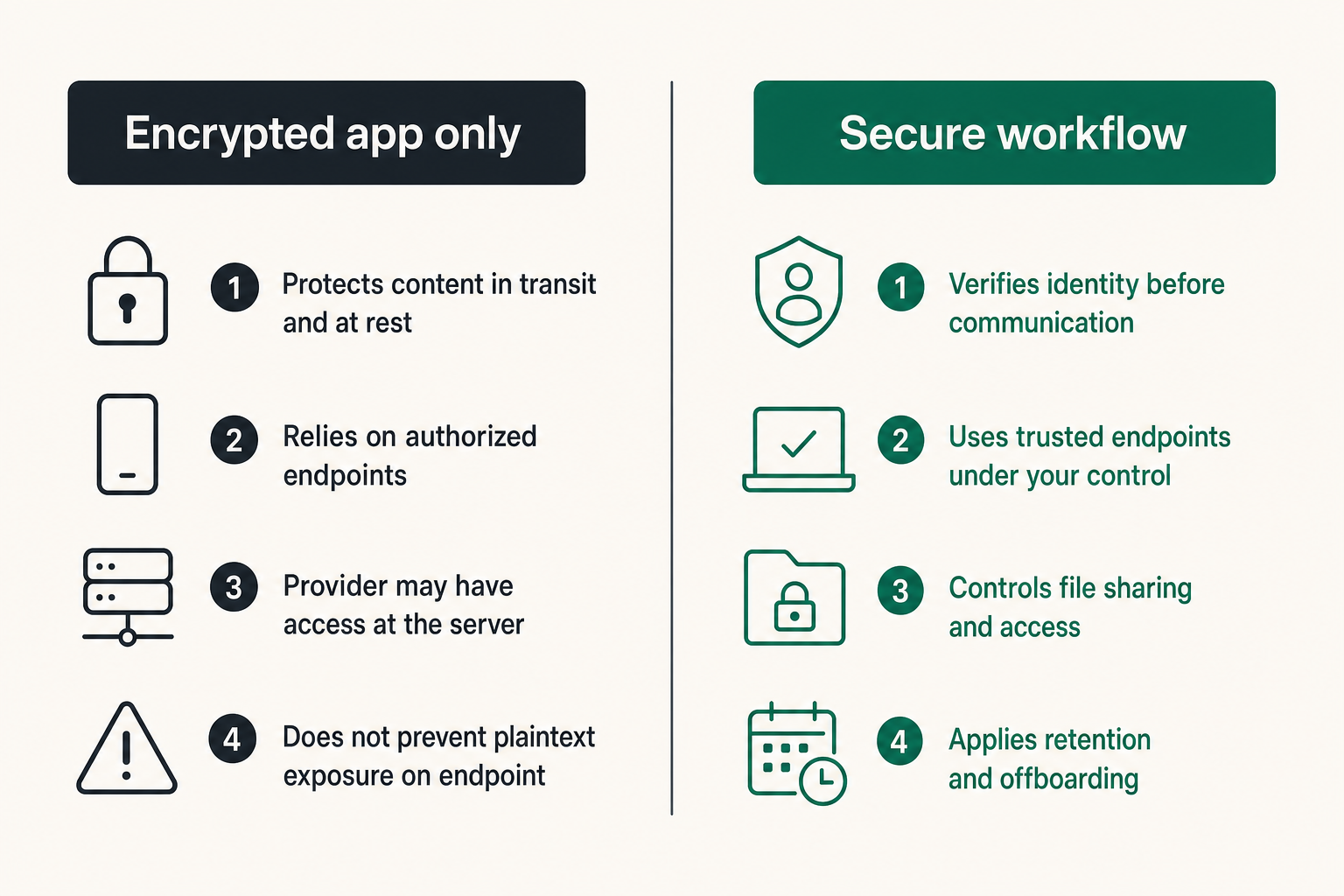
What end-to-end encryption actually protects
End-to-end encryption, or E2EE, is designed so that message content can be read only on participating endpoints. Properly implemented, it prevents an intermediary carrying or storing the messages from reading their plaintext content.
That is a meaningful property for freelance work. Conversations may contain unreleased product details, legal drafts, customer information, security findings, interview notes, financial documents, or internal strategy. Transport encryption alone protects data while it moves between a device and a server, but the service may still have access at the server. E2EE narrows that trust boundary.
It also reduces risk on hostile or poorly controlled networks. A freelancer can work from a hotel, coworking space, airport, or temporary location without relying on the local network to preserve message confidentiality.
However, encryption is not a magic shield around the project. It protects content under specific conditions. If an authorized endpoint displays plaintext to the wrong person, the cryptography has done its job even though the workflow has failed.
Practical rule: Treat end-to-end encryption as a protected transport and conversation layer, not as a substitute for identity, endpoint, and access controls.
What remains outside the encrypted channel
Depending on the service design, encryption may not conceal every form of metadata. The system may still process information such as account identifiers, connection times, message timing, group membership, device details, or IP-derived data. Freelancers should inspect a provider's architecture and privacy documentation rather than assuming that “encrypted” means “anonymous.”
Content can also escape at the endpoints through:
- Lock-screen notification previews
- Screenshots or copied text
- Unencrypted device backups
- Malware or malicious browser extensions
- Shared operating-system accounts
- Exported transcripts and downloaded files
- A compromised client or freelancer account
The mistake teams make is evaluating only the cryptographic claim. The practical question is whether the complete workflow keeps sensitive information away from unintended people while preserving enough usability to get work done.
Map the communication risk before choosing tools
Classify the information you exchange
Not every message needs the same handling. A scheduling note and a production signing key do not create comparable consequences. Before configuring tools, list the information exchanged during a typical engagement and assign simple handling levels.
| Information class | Examples | Recommended handling |
|---|---|---|
| Routine | Meeting times, public links, general status | Approved messaging channel |
| Internal | Drafts, estimates, project discussions | Encrypted channel with controlled membership |
| Confidential | Customer records, private research, contract details | E2EE plus restricted file storage and retention |
| Secret | Passwords, recovery codes, private keys | Dedicated secret-sharing mechanism, never normal chat |
The labels do not need to become a compliance bureaucracy. Their purpose is to stop users from putting every type of data into the most convenient box.
A useful way to think about it is that classification selects a route. Routine coordination can stay in chat. A large confidential file belongs in controlled storage. A password belongs in a credential manager or time-limited secret exchange. A formal acceptance belongs in the project's system of record.
Model realistic threats
A threat model should reflect the actual engagement. A journalist protecting sources, a designer handling an unreleased campaign, and a developer accessing production infrastructure have different priorities.
Ask five direct questions:
- Who would benefit from obtaining the information?
- Which devices and accounts can currently access it?
- What would happen if a message reached the wrong client or contractor?
- How long will the information remain sensitive?
- Which records must be retained for contractual, tax, or legal reasons?
For many freelancers, the likely failures are mundane: phishing, account takeover, lost devices, accidental forwarding, reused passwords, overbroad group membership, or forgotten project folders. High-risk users may also need to account for targeted surveillance, coercion, device seizure, and traffic analysis.
The team at ugig.net approaches freelance systems from the operator's side: security controls have to fit proposals, delivery, client communication, and the realities of independent work. A theoretically perfect process that clients bypass on day two is not a useful process.
Define trust and identity at client intake
Verify the person before trusting the channel
An encrypted conversation can be private and still involve an impostor. If a freelancer accepts a new account based only on a familiar display name, encryption protects the attacker's conversation too.
Identity verification should use information outside the channel being verified. For an existing client, confirm the new account during a known video call or through a previously established contact method. For a new client, compare contract details, business domains, billing information, and the people named in the engagement.
Some encrypted systems expose safety numbers, fingerprints, or verification codes. Where available, compare them through a second channel, especially before sharing high-impact information. Recheck identity when the application reports a key or device change. A legitimate device replacement can trigger the warning, but the warning should not be ignored automatically.
Practical rule: Verify identity before sending sensitive content, and verify again when the trusted device or encryption identity changes unexpectedly.
Create a communication agreement
Security expectations should be established during onboarding, not improvised after a confidential file has already been sent. A short communication agreement can specify:
- The approved messaging service and account identifiers
- Who may join the project conversation
- Where files and final deliverables will be stored
- How credentials will be exchanged
- Which channel is valid for approvals and scope changes
- Expected response windows and an emergency contact route
- Retention and deletion expectations after completion
- The process for reporting a lost device or suspected account compromise
This agreement does not need to be a separate legal document. It can be a clearly labeled section in the statement of work or onboarding checklist. The value comes from making the routing decisions explicit.
Without it, clients tend to scatter decisions across email, consumer chat, project tools, and voice calls. The freelancer then has to reconstruct which message was authoritative when billing, scope, or delivery is disputed.
Separate chat, files, secrets, and approvals
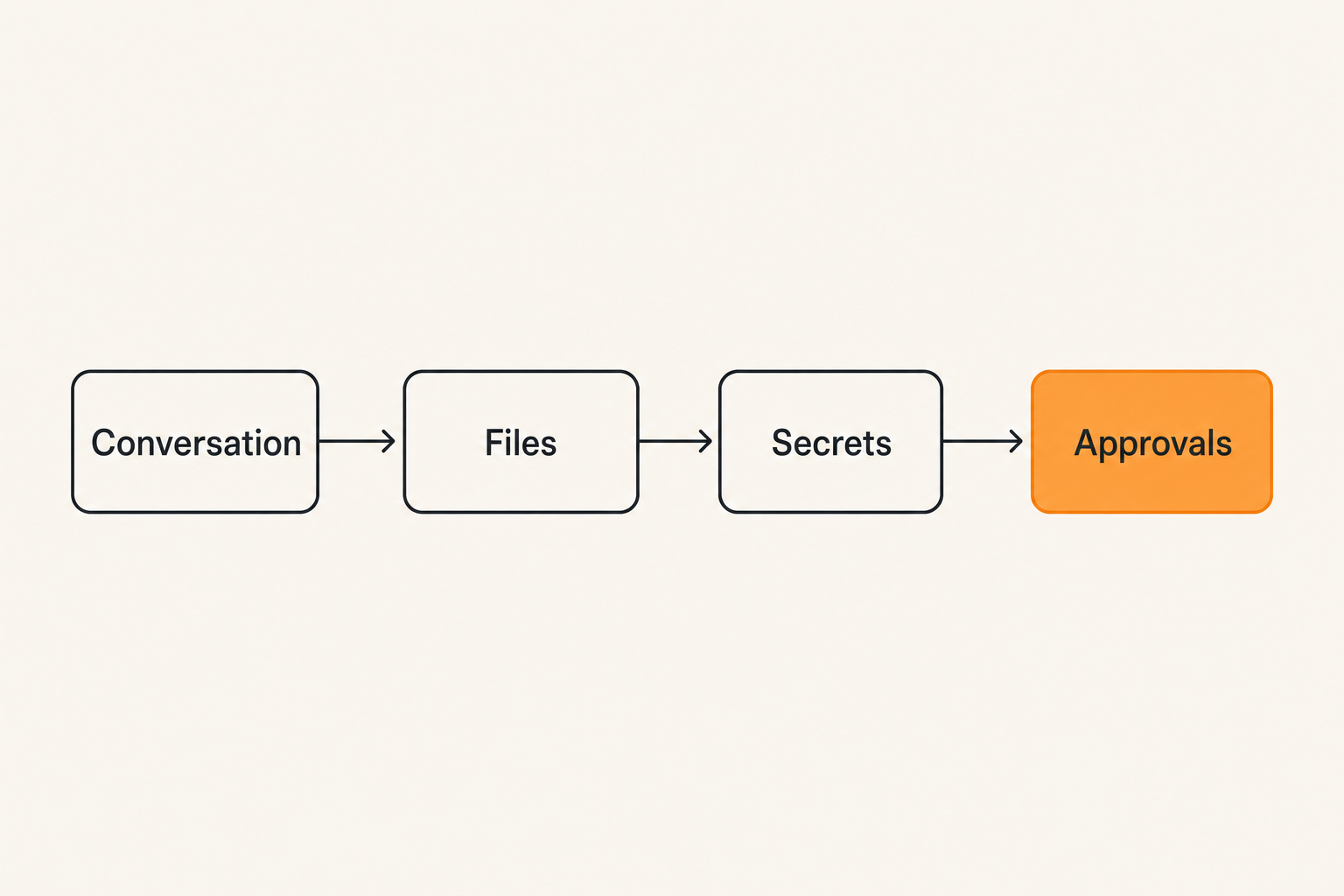
Give each system one clear job
What breaks in practice is the attempt to make chat serve as the entire project environment. Messaging is excellent for quick coordination, questions, and contextual discussion. It is usually a poor long-term database, credential vault, version-control system, or contract archive.
A cleaner architecture separates four functions:
| Function | System responsibility | Typical control |
|---|---|---|
| Conversation | Questions, updates, coordination | E2EE and verified participants |
| File storage | Working assets and deliverables | Permissions, versioning, expiration |
| Secrets | Passwords, tokens, recovery material | Vaulting, auditability, rotation |
| Record of authority | Scope, acceptance, payment decisions | Durable project or contract record |
The message can point to an object without containing the object. For example, “Version 3 is ready for review” can link the client to a controlled file location. “Access has been granted” can refer to an account created with the minimum necessary permissions rather than embedding a reusable password.
This separation limits damage. If a transcript is exposed, it does not automatically reveal every credential and source file. It also makes deletion more reliable because information is not duplicated across dozens of message threads.
Keep credentials out of conversation history
Chat is tempting for credentials because it is immediate. It is also easy to search, sync, copy, quote, screenshot, and forget. Deleting one message may not remove notifications, exports, local caches, or copies already viewed by another participant.
Use unique user accounts where possible. If a shared secret cannot be avoided, deliver it through a purpose-built mechanism with expiration or one-time access. Send the username and secret through separate paths when that meaningfully reduces risk. Rotate the credential after a contractor leaves or after the temporary access period ends.
Never ask clients to paste private keys, seed phrases, primary recovery codes, or master passwords into chat. If a client sends one anyway, assume it may persist: move the workflow to a safer method, revoke or rotate the exposed secret, and document completion without repeating the value.
Practical rule: A secret placed in chat should be treated as exposed to every current participant, every authorized endpoint, and every retained copy of that conversation.
Build the freelancing encrypted messaging workflow
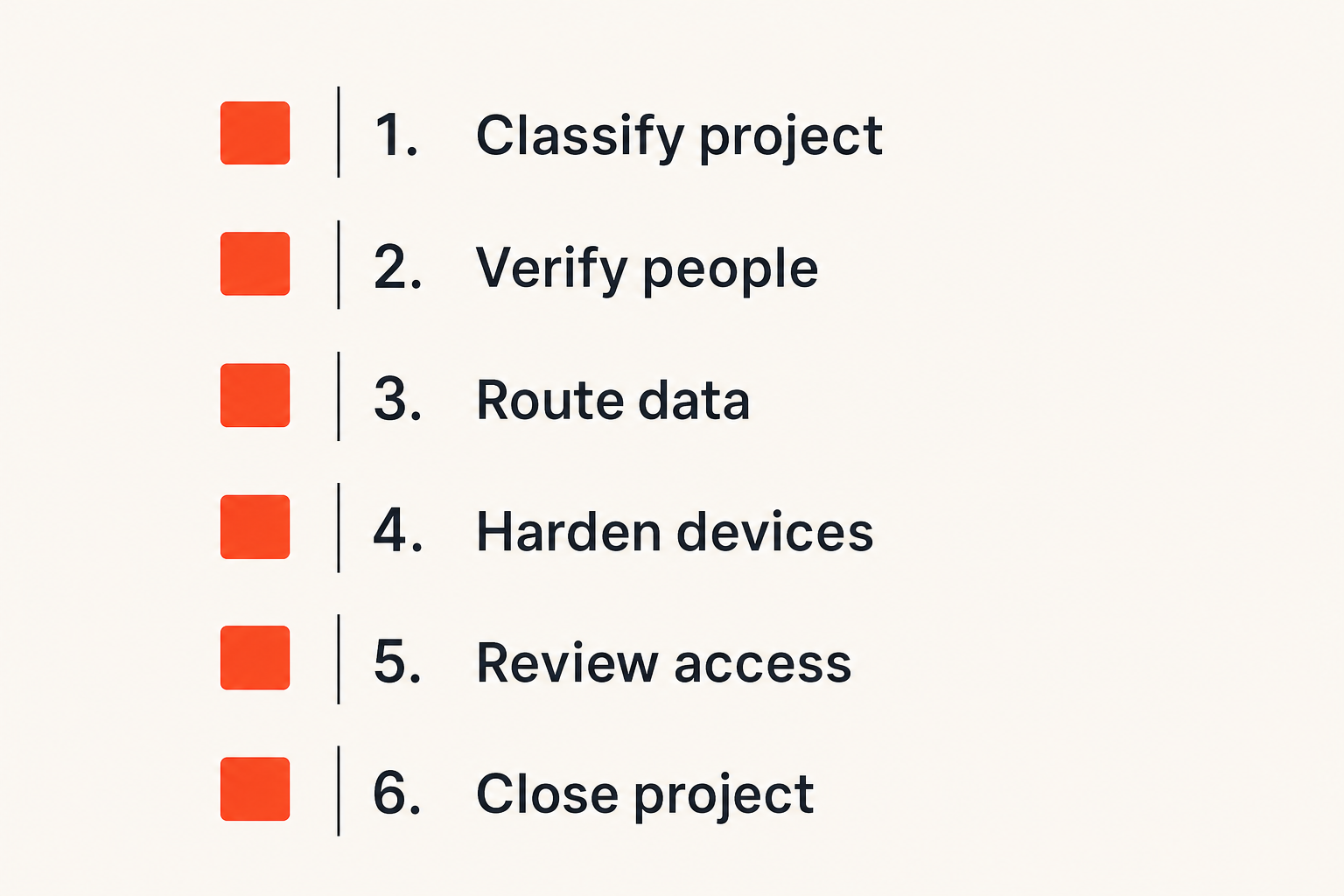
Use a repeatable implementation sequence
A secure workflow should be simple enough to repeat for every engagement. The following sequence covers the main decisions without requiring the client to become a cryptographer.
- Classify the project. Identify likely data types, contractual constraints, and consequences of disclosure.
- Choose the approved channel. Select an encrypted messaging service appropriate to the participants, devices, and risk level.
- Verify participants. Confirm account identifiers and, for sensitive work, compare available verification codes through another channel.
- Define data routes. Decide where conversations, files, secrets, approvals, and invoices belong.
- Harden endpoints. Enable device encryption, strong authentication, updates, short screen locks, and controlled notifications.
- Test recovery and escalation. Confirm how users regain access and how they report a lost device without weakening normal security.
- Review access during the project. Remove obsolete devices and participants instead of waiting until the end.
- Close deliberately. Export only required records, revoke access, rotate credentials, and delete data according to the agreed policy.
Document this as a reusable checklist. Freelancers should not rebuild the security architecture from memory each time a new client appears.
Design for routine exceptions
Real projects do not remain inside a neat diagram. A client may be unable to install the preferred app. A subcontractor may join for three days. A phone may break during a deadline. An auditor may require a durable approval record.
Plan acceptable exceptions in advance. For example:
- If the primary channel is unavailable, use a named fallback rather than whichever app is convenient.
- If a new participant joins, announce the addition and restate what historical material they can access.
- If a device is lost, revoke its session before continuing sensitive discussion.
- If an approval must be retained, record the final decision in the agreed system of record.
- If a client cannot use the strongest workflow, reduce the information shared through that route.
Fallbacks should preserve the intent of the control. Sending confidential content through ordinary SMS because an encrypted service is briefly unavailable defeats the design. Delaying the sensitive exchange or moving to a verified call may be safer.
Control devices, notifications, and local data
Treat endpoints as part of the security boundary
Messages must become readable somewhere. That makes the freelancer's laptop, phone, browser session, and operating-system account part of the protection model.
At minimum, work devices should use full-device encryption, supported software, prompt security updates, automatic screen locking, and strong account authentication. Biometric unlock can improve daily usability, but users should understand the legal and physical risks relevant to their location. A strong passcode remains important.
Separate operating-system profiles or dedicated work devices can reduce accidental exposure when projects are particularly sensitive. At a minimum, avoid shared family accounts, untrusted browser extensions, unofficial messaging clients, and rooted or jailbroken devices for confidential work.
Account recovery deserves equal attention. A recovery process based on a compromised email inbox can undermine an otherwise strong messenger. Protect recovery email, store recovery codes offline or in an appropriate vault, and remove old phone numbers or devices from account settings.
Reduce exposure from convenience features
Convenience settings often disclose more than expected. Notification previews can display a client's name and message on a locked screen. Automatic media downloads can copy confidential files into a photo library, cloud backup, or shared folder. Clipboard history can retain copied secrets.
Review these settings on every endpoint:
- Hide sensitive notification content on locked screens.
- Disable automatic media saving where confidential files are exchanged.
- Restrict cloud backups or confirm that backup protection fits the threat model.
- Review linked desktop and browser sessions regularly.
- Avoid leaving web sessions open on shared machines.
- Disable message previews in operating-system search where possible.
- Confirm that deleted downloads do not remain in trash or synchronized folders.
The right configuration depends on the work. A freelance illustrator may need media downloads for efficiency, while a security consultant handling vulnerability evidence may prohibit them. The point is to make the choice deliberately.
Preserve useful records without keeping everything
Separate evidence from conversation
Some freelancers enable disappearing messages and assume the records problem is solved. Disappearing messages can reduce casual accumulation, but they do not guarantee deletion from screenshots, exports, notifications, backups, or another participant's camera. They also create problems when a key approval disappears before an invoice dispute.
Instead, distinguish temporary conversation from durable evidence. Most exploratory discussion does not need permanent retention. Final scope changes, acceptance decisions, payment terms, and required compliance records may need to be preserved elsewhere.
A lightweight decision record can capture:
Decision: Approve revised homepage scope
Project: Client redesign
Approved by: Named client contact
Date: 2026-09-30
Effect: Add two templates; extend delivery by five days
Source: Verified project conversation
This preserves the business fact without keeping every surrounding message indefinitely. Do not copy sensitive content into the record unless it is necessary.
Set a retention and deletion policy
Retention should answer three questions: what is kept, for how long, and who deletes it. “We delete things eventually” is not a policy.
A small freelance practice might retain contracts, invoices, final approvals, and required accounting records according to applicable obligations while deleting routine chat and redundant drafts after a shorter period. Projects involving regulated or contractually restricted data may require a different schedule.
Do not promise deletion that the architecture cannot deliver. If multiple participants can export or screenshot content, explain the limit. If a service retains encrypted data for synchronization, understand when the ciphertext and account metadata are removed. If legal preservation is required, pause normal deletion for the relevant material.
Practical rule: Retain decisions and obligations intentionally; do not retain entire conversations merely because deletion requires effort.
Handle groups, subcontractors, and changing access
Make membership changes visible
Freelancers often move from a one-to-one client conversation to a group containing employees, specialists, and subcontractors. Every additional participant adds endpoints, recovery paths, and opportunities for accidental disclosure.
Before adding someone, identify their role and minimum required access. A copy editor may need one document and a narrow conversation, not the client's full project history. Create a separate room or thread when segmentation is available and useful.
Membership changes should be obvious to the group. Participants need to know when a new person can read current or historical content, when someone replaces a device, and when an external contractor leaves. Silent access changes erode trust even if no information is misused.
For highly sensitive engagements, periodically re-verify participants and review linked devices. This is particularly important after organizational changes, travel, lost hardware, or suspicious login activity.
Offboard people and projects deliberately
Offboarding is where many freelance security processes stop. The final invoice is paid, everyone moves on, and access remains active for years.
A project closure checklist should include:
- Confirm delivery and identify records that must be retained.
- Remove subcontractors and temporary client participants.
- Revoke shared links, sessions, API tokens, and temporary accounts.
- Rotate any credential that was shared or broadly accessible.
- Transfer ownership of client-controlled files and systems.
- Delete local working copies according to the agreement.
- Archive or close the conversation if the service supports it.
- Record that offboarding was completed without recording secret values.
Access should also be reviewed when a contributor leaves mid-project. Waiting for formal completion can leave a former contractor inside active conversations and storage locations.
Avoid common encrypted messaging failure modes
What fails in practice
The most common failures are not exotic attacks on cryptographic algorithms. They are mismatches between the tool and the surrounding workflow.
Choosing by brand recognition alone. A familiar app may be acceptable, but familiarity does not answer questions about metadata, recovery, device linking, group history, backups, or deletion.
Trusting display names. Attackers can copy names and profile images. Sensitive exchanges require a stronger identity check.
Using one group for every project function. This exposes history to people who need only a narrow slice of the engagement.
Sending secrets because the chat is encrypted. Encryption does not provide rotation, least privilege, controlled reveal, or reliable secret deletion.
Assuming disappearing messages eliminate evidence. Recipients can preserve content, while the freelancer may lose records needed for legitimate business disputes.
Ignoring endpoint compromise. An unlocked laptop or compromised account reads the same plaintext as the authorized user.
Creating a policy clients cannot follow. A complicated workflow drives people toward side channels and undocumented exceptions.
What works instead
Effective systems use a small number of understandable rules:
- One approved conversation channel with a documented fallback
- Verification before high-impact exchanges
- Separate routes for files, secrets, and durable approvals
- Restricted groups based on current project roles
- Hardened devices and protected account recovery
- Explicit retention and offboarding steps
- A clear response procedure for lost devices and suspicious changes
The security process should appear in onboarding templates, project checklists, and subcontractor agreements. Automation can help with reminders and access reviews, but it should not make silent trust decisions. A tool can report a new device; a person still needs to determine whether that device is legitimate.
Evaluate encrypted messaging for freelance work
Use operational criteria, not feature counts
Feature lists tend to flatten meaningful architectural differences. Evaluate a service against the way work actually moves.
Start with content protection: is end-to-end encryption used for the relevant conversation types, and how are keys or trusted devices handled? Then examine identity verification, account recovery, device management, group membership, message history, attachments, deletion behavior, and available privacy documentation.
Also test ordinary operations:
- Can a nontechnical client join without weakening account security?
- Is a changed identity or new device clearly signaled?
- Can users inspect and revoke linked sessions?
- What happens to history when someone joins a group?
- How are attachments stored and removed?
- Can the freelancer separate clients cleanly?
- Does the recovery model introduce a weaker path into the account?
- Can users understand what disappearing messages do and do not guarantee?
Run a small test engagement before relying on any platform for critical work. Add and remove a participant, link a second device, recover an account, send a file, change retention settings, and inspect what remains on each endpoint.
Where qrypt.chat fits
qrypt.chat is relevant when freelancers and remote teams want private communication to be a deliberate part of their operating model rather than an afterthought. The product decision still needs to sit inside the broader architecture described here: verified people, appropriate devices, separate secret handling, controlled records, and deliberate offboarding.
No messenger can prevent an authorized recipient from copying a message or secure a device already controlled by an attacker. A well-chosen encrypted channel can, however, reduce unnecessary exposure and provide a clearer boundary for project communication.
For freelancing encrypted messaging, that boundary is valuable because independent workers regularly cross organizations, devices, and networks. The goal is not to claim that one application solves trust. The goal is to choose a private channel and then operate it with rules that survive normal client work.
Try qrypt.chat
Private encrypted messaging for people and teams that want communication security without turning every conversation into a security project. Try qrypt.chat.