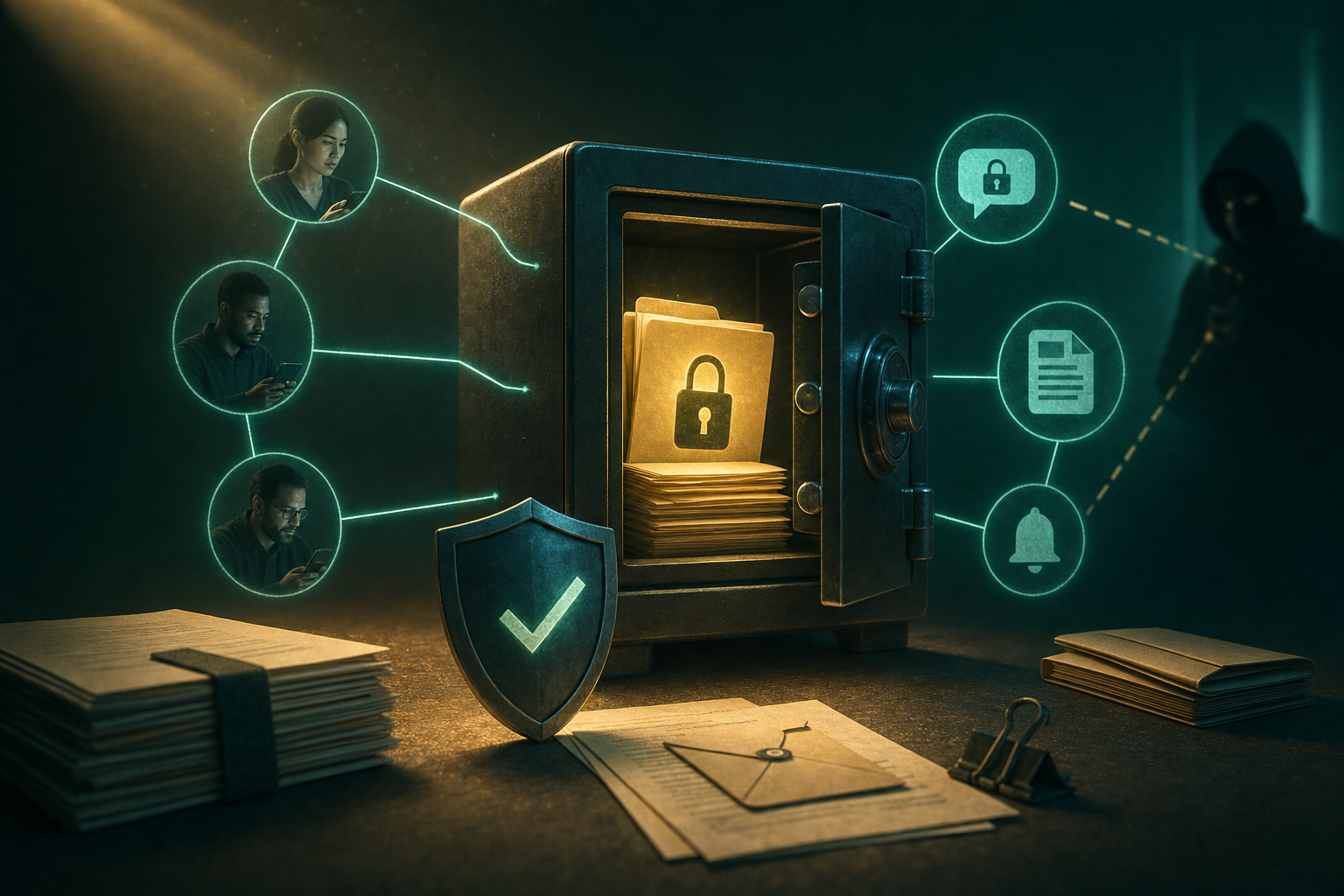
IRS secure messaging sounds simple until a real tax issue lands in a remote team, family office, small business, or advisory practice. Someone gets a notice. Someone else has the records. A third person drafts the response. Then screenshots, PDFs, email forwards, and chat messages start spreading across systems that were never designed to hold tax identity data.
Teams think the problem is accessing IRS secure messaging. The real problem is controlling the private workflow around it.
That changes the conversation. The practical question is not whether an IRS portal message is more secure than ordinary email. It usually is. The practical question is whether your surrounding process protects identity, limits exposure, preserves evidence, and gives the right people enough context without copying sensitive records everywhere.
In 2026, that matters because tax communication is no longer a single-person desktop task. Remote work, delegated bookkeeping, outside advisors, shared family finances, and mobile-first behavior all create more handoffs. IRS secure messaging can reduce risk, but only if you treat it as one controlled channel inside a larger secure communication architecture.
Table of contents
- Why IRS secure messaging is a workflow problem
- Build the IRS secure messaging trust boundary
- Map the end-to-end tax communication workflow
- What works for privacy-conscious users
- What fails when teams implement IRS secure messaging badly
- Security controls for IRS secure messaging in 2026
- Handling attachments without creating data sprawl
- IRS secure messaging for remote teams and advisors
- Implementation sequence you can actually run
- Where qrypt.chat fits in the private tax communication stack
Why IRS secure messaging is a workflow problem
The message is only one state
A tax message moves through states. It is received, interpreted, assigned, discussed, drafted, approved, submitted, confirmed, stored, and eventually deleted or archived. IRS secure messaging may handle the official exchange, but it does not automatically control the rest of those states.
The mistake teams make is treating the portal as the entire security model. They log in carefully, then copy the same content into email, unmanaged chat, cloud folders, ticket comments, and personal downloads. The most sensitive data may not be lost inside the IRS channel. It may leak from the support conversation around the IRS channel.
A useful way to think about it is this: the IRS portal is the front door for official communication. Your private workflow is the hallway, filing cabinet, meeting room, and disposal bin. If those are messy, the front door does not save you.
The portal is not your internal system
IRS secure messaging is built for communication with the IRS, not for your internal operating process. It may not express your approval chain, your naming rules, your retention policy, or your separation between tax preparer, founder, controller, spouse, assistant, and counsel.
That is normal. Government portals should not become your internal collaboration layer. But if you do not define the collaboration layer yourself, people will improvise. In production, improvisation usually means email attachments, screenshots, and vague chat messages like please look at this IRS thing.
Practical rule: Use IRS secure messaging for the official exchange. Use a separate encrypted coordination channel for internal discussion, ownership, and decisions.
The privacy boundary starts before login
Privacy does not begin when the message is sent. It begins when someone first sees the notice, identifies the taxpayer, decides who needs to know, and chooses where to discuss it. A clean IRS secure messaging workflow starts before anyone opens the portal.
For privacy-conscious users, this is the point that matters. You can have strong encryption in the official channel and still create unnecessary exposure through calendar invites, SMS alerts, copied files, or a browser session left open on a shared machine.
Build the IRS secure messaging trust boundary
Separate IRS identity from team identity
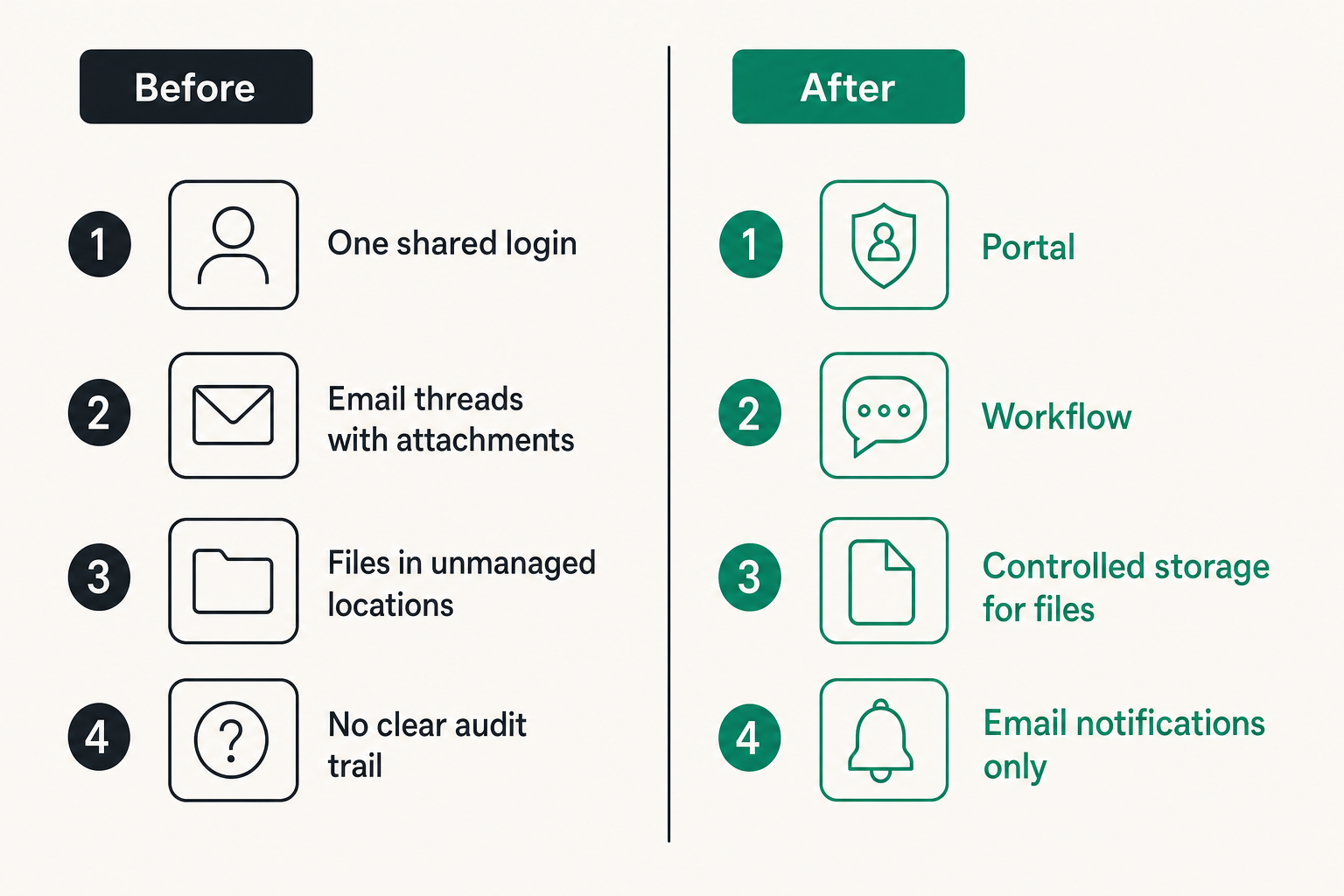
IRS account identity and team identity are different things. The person authenticated to the IRS may be the taxpayer, an authorized representative, or someone using a specific business account. The people discussing the issue internally may include bookkeepers, founders, advisors, legal counsel, or family members.
Do not blur those identities. A shared login may feel efficient, but it destroys accountability. If everyone uses the same credentials, you cannot reliably answer who read the message, who downloaded the attachment, or who submitted the response.
A better model is role separation:
| Role | What they do | What they should not do |
|---|---|---|
| IRS account owner | Authenticates and submits official messages | Share credentials casually |
| Workflow owner | Tracks status, deadlines, and decisions | Pretend to be the account owner |
| Reviewer | Reviews draft responses and supporting files | Download every record by default |
| Advisor | Gives tax or legal guidance | Move records into unmanaged tools |
That comparison matters because identity is not only a login issue. It is an evidence issue.
Treat attachments as evidence
Attachments are often the real risk. A message may contain a short question, but the supporting files can include notices, transcripts, wage forms, bank details, EINs, SSNs, addresses, and signatures. Once those files leave the portal, your system becomes responsible for protecting them.
Treat every attachment as evidence until proven otherwise. Track source, version, purpose, submitter, and storage location. Do not rename files randomly. Do not edit originals. Do not keep multiple unmanaged copies because someone wanted a convenient desktop folder.
A simple evidence record can be enough:
case_id: 2026-tax-irs-004
source: IRS secure messaging download
file: notice-cp2000-2026-08-12-original.pdf
owner: finance-lead
purpose: response drafting
storage: encrypted case folder
retention: delete working copy after confirmation
Decide what never leaves encrypted channels
Some information should never move through email or ordinary team chat. That includes full taxpayer identifiers, authentication recovery details, portal screenshots with visible identity data, and unredacted documents that are not needed by the recipient.
This is where tool choice matters. If your internal discussion includes sensitive tax identity data, the coordination layer should support strong privacy assumptions, not just convenience. QryptChat publishes more about its approach to encrypted messaging and practical security on its security page, which is the right kind of documentation to review before putting sensitive workflows into any communication tool.
Practical rule: If a message would create harm if forwarded to the wrong person, it does not belong in ordinary email.
Map the end-to-end tax communication workflow
Intake and assignment
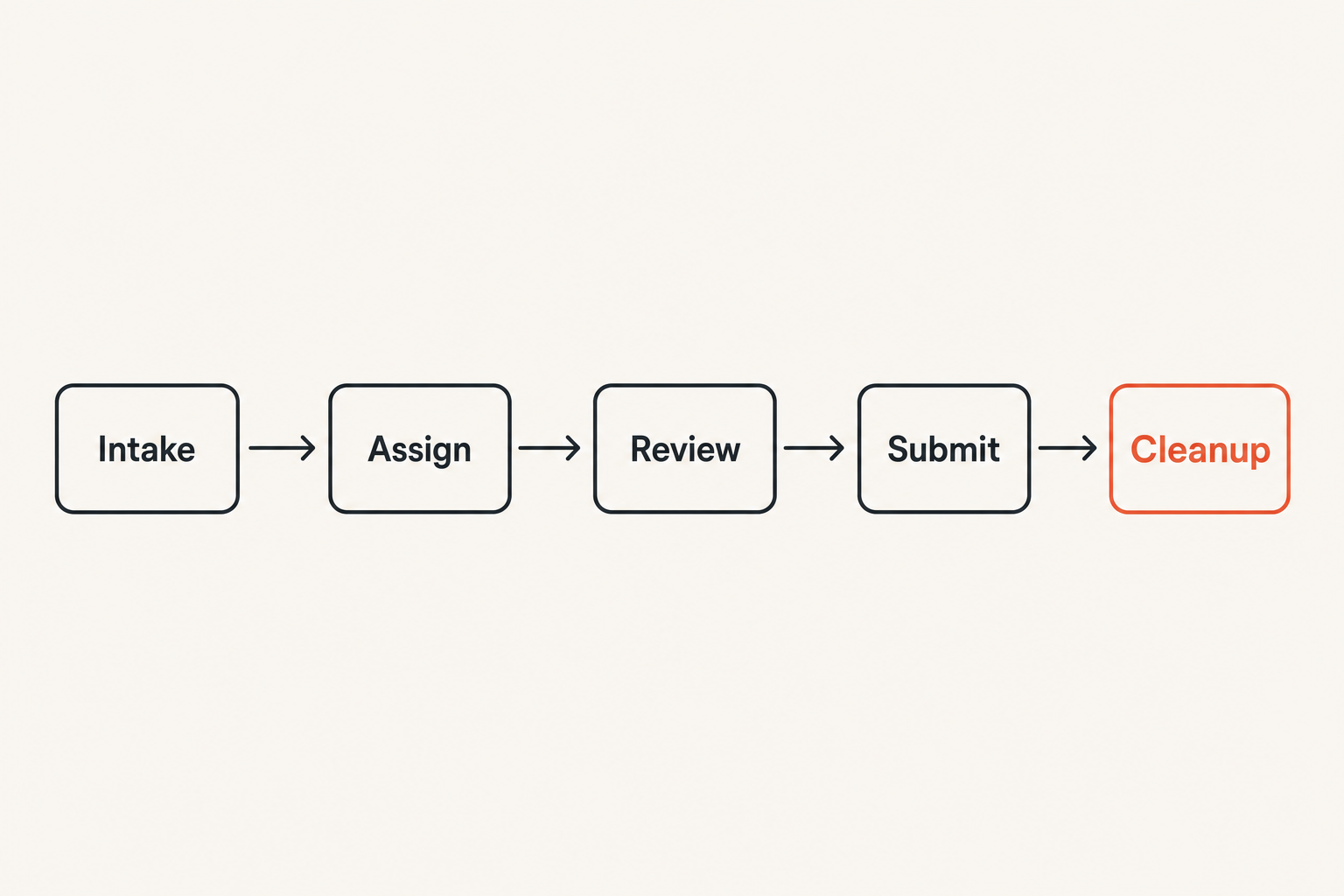
The intake step decides whether the rest of the workflow stays clean. When an IRS notice or portal message appears, do not immediately forward it. First, classify it.
Ask four questions:
- Is this a real IRS communication or a possible phishing attempt?
- Who is the official account owner or authorized representative?
- What deadline or response window applies?
- What records are required to understand the issue?
Then assign one workflow owner. This person does not need to be the final decision maker. Their job is to prevent sprawl. They track the case, control where discussion happens, and keep the response from splitting into parallel threads.
Drafting and review
Drafting is where sensitive content tends to spread. One person pulls the notice. Another drafts language. A third asks for more context. Then someone pastes an unredacted paragraph into a broad team channel.
A safer drafting model uses controlled summaries. The workflow owner creates a short issue brief in the encrypted coordination channel. Only the people who need the full document receive access to the full document. Everyone else gets the minimum context required for a decision.
Example brief:
Case: 2026-tax-irs-004
Issue: Income mismatch notice for 2024 filing
Deadline: 2026-09-03
Needed: Confirm corrected brokerage statement
Sensitive files: Stored in encrypted case folder
Decision needed: Approve response language by Friday
No full SSN. No unnecessary attachment. No screenshot pasted into a general channel.
Submission and confirmation
Submission should be boring. The owner logs in from a trusted device, verifies the IRS portal context, uploads the approved file, sends the message, and captures confirmation using the least sensitive method available.
If a confirmation number is available, record that. If only a screenshot is possible, crop or redact unnecessary identity fields before sharing internally. What breaks in practice is the after-action moment. People complete the upload, then scatter confirmation details across tools because they are relieved the task is done.
Related reading from our network: teams working on cloud-hosted visibility face a similar ownership problem around access, logging, and crawler behavior in Google Compute Engine and AEO. Different domain, same lesson: the platform is only part of the workflow.
Retention and deletion
Retention is not hoarding. Keeping every working copy forever increases breach impact and makes later discovery painful. Deleting everything immediately creates audit risk. You need a simple rule tied to the case lifecycle.
For many teams, the workable pattern is:
- Preserve originals in a controlled encrypted location.
- Keep working drafts only while the response is active.
- Record submission metadata and final files.
- Delete temporary screenshots, exports, and local copies after confirmation.
- Review the case at a defined interval.
Practical rule: Retain evidence intentionally. Delete convenience copies aggressively.
What works for privacy-conscious users
Use one owner per thread
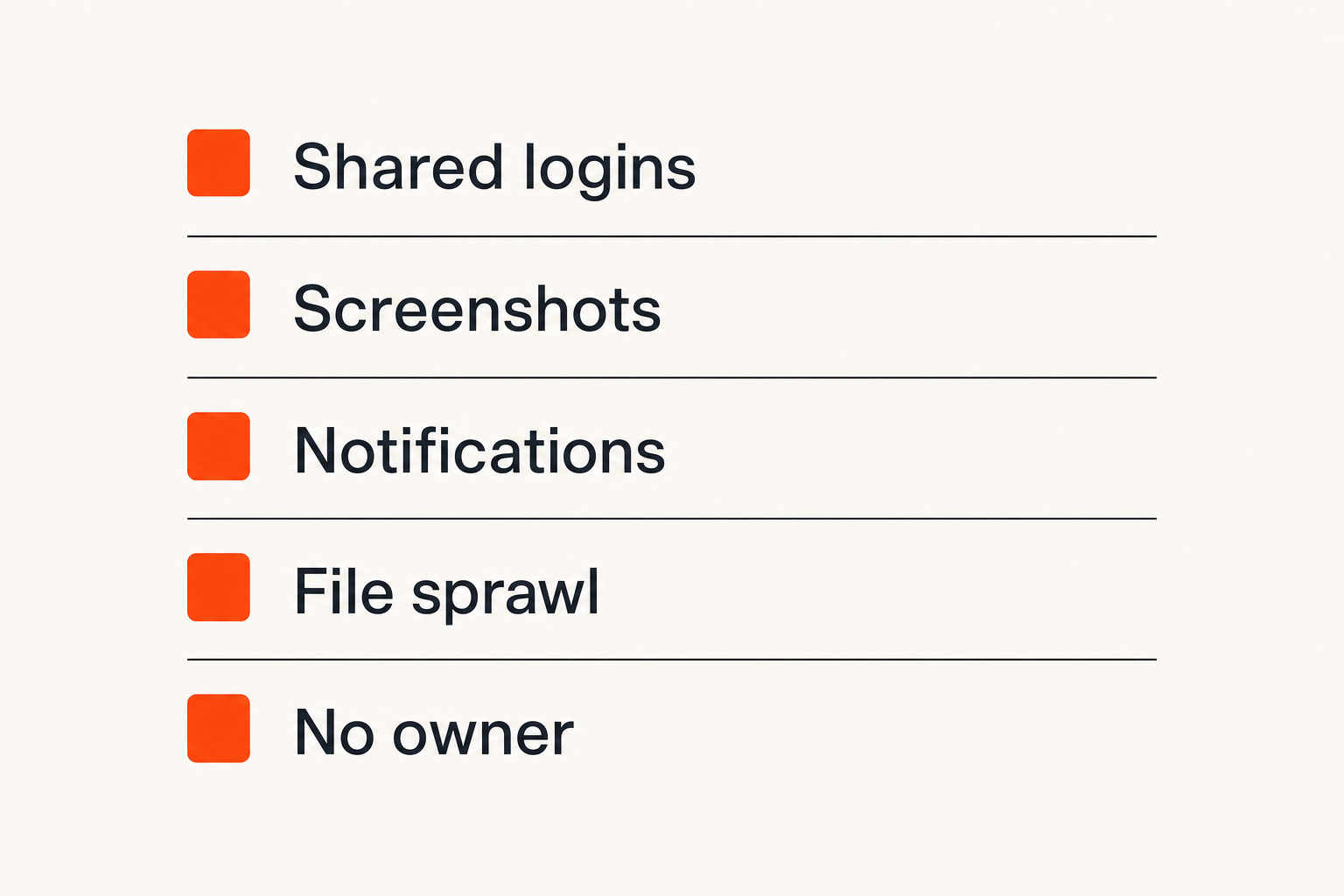
One owner prevents drift. The owner does not need to answer every tax question, but they should control status, naming, deadlines, and where the official record lives. Without an owner, IRS secure messaging becomes one more tab everyone assumes someone else is handling.
The owner should maintain a case note with five fields: current status, next action, responsible person, deadline, and storage location. That is enough structure for most private users and small teams.
Keep sensitive context out of email
Email is usually where tax privacy goes to die. It is searchable forever, copied freely, synced across devices, and frequently integrated into third-party systems. Even when email transport encryption exists, the operational control is weak.
Use email only for low-sensitivity notifications such as please check the secure channel. Do not include taxpayer identifiers, document previews, portal screenshots, or detailed tax narratives. If the email would be useful to an attacker, it is too detailed.
For readers who want a broader privacy baseline, qrypt.chat maintains a plain-language privacy page that is worth reading when you evaluate any secure messaging vendor, not only for tax workflows.
Use minimum necessary sharing
Minimum necessary sharing is not bureaucracy. It is how you keep a small tax issue from becoming a broad privacy exposure. A reviewer may need the response text but not the full document set. A founder may need the deadline and financial impact but not every identity field. A spouse may need the status but not the advisor's full note history.
The practical question is always: what is the smallest amount of information this person needs to perform their role?
What fails when teams implement IRS secure messaging badly
Shared logins create audit gaps
Shared logins are the classic shortcut. They reduce friction today and create uncertainty tomorrow. If a message is sent incorrectly, a file is downloaded, or a response deadline is missed, the team cannot reconstruct responsibility.
They also create recovery risk. If a shared credential is stored in a password manager entry used by too many people, copied into chat, or known by a former contractor, the IRS account becomes difficult to trust. Even if nothing bad happens, you lose confidence in the chain of custody.
What works is delegated access where available, documented authority, and clear separation between the person who authenticates and the people who advise.
Screenshots become uncontrolled records
Screenshots feel harmless because they are quick. In tax workflows, they often become uncontrolled records. A screenshot may include name, address, account status, notice details, browser tabs, timestamps, bookmarks, or other visible context.
What fails is using screenshots as the default collaboration method. They get pasted into chats, downloaded to phones, backed up to consumer cloud accounts, and forgotten.
If a screenshot is unavoidable, apply three rules:
- Capture only the needed area.
- Redact identity fields before sharing.
- Store it with the case, not in a personal camera roll.
Notifications leak more than teams expect
Portal notifications, email previews, mobile lock screens, and calendar reminders can expose more than people realize. A subject line, sender, or snippet may be enough to reveal that a person or business is dealing with a tax matter.
This is not paranoia. It is operational reality. Remote teams work in airports, coworking spaces, family homes, and client offices. Notifications are part of the attack surface.
A better notification policy is simple: use generic prompts that tell people where to look, not what the sensitive issue is.
| Notification style | Example | Risk |
|---|---|---|
| Bad | IRS wage mismatch notice for Jane needs response | Exposes identity and issue |
| Better | Secure tax case requires review today | Limits sensitive detail |
| Best | Check encrypted case channel before 3 PM | Keeps context inside protected channel |
Related reading from our network: media and document streaming teams deal with similar cache, metadata, and privacy tradeoffs in Doc Streaming in 2026. The domain is different, but the metadata problem is familiar.
Security controls for IRS secure messaging in 2026
Device hygiene before portal access
A secure portal session on a compromised device is not secure. Before accessing IRS secure messaging, use a device that is patched, protected, and not shared casually. Avoid public computers. Avoid browser profiles full of extensions you do not trust. Avoid accessing tax portals over hostile networks unless you have a hardened setup.
Device hygiene is not glamorous, but it prevents the most ordinary failures. Keep the operating system updated. Use a reputable password manager. Lock the screen. Do not let the browser save sensitive downloads into random folders.
MFA and recovery planning
Multi-factor authentication is necessary, but recovery planning is where teams often get sloppy. If the only recovery method belongs to one person and that person is unavailable, the workflow stalls. If recovery details are shared too broadly, the account becomes exposed.
Document who owns recovery, where backup codes are stored, and what happens when a phone is lost. Store recovery material in a controlled vault, not in a chat message. Review access when employees, contractors, advisors, or family office staff change roles.
Practical rule: MFA is not complete until recovery is controlled, documented, and tested.
Phishing checks and domain discipline
IRS-themed phishing works because urgency overrides process. A message says action required, a link appears, and someone wants the issue gone. The fix is domain discipline.
Do not use links from unexpected messages to reach tax portals. Navigate from a trusted bookmark or typed address. Verify the domain. Treat attachments in unsolicited messages as hostile until confirmed. If a team member reports a suspicious message, discuss it in the encrypted coordination channel without forwarding the dangerous content broadly.
Related reading from our network: decentralized compute operators face the same pattern of ownership, retries, validation, and trust boundaries when choosing an Akash Network alternative. The useful parallel is that reliable workflows depend on verification, not hope.
Handling attachments without creating data sprawl
Name files for humans and audits
File names should make later review possible without exposing too much. Random names like scan-final-v2.pdf are useless. Overly detailed names with full SSNs are dangerous.
Use a predictable pattern:
caseid-documenttype-year-version-sensitivity.pdf
2026-irs-004-notice-2024-original-restricted.pdf
2026-irs-004-response-2026-v3-internal.pdf
2026-irs-004-confirmation-2026-final-restricted.pdf
This gives humans enough context and avoids putting high-risk identifiers in file names. It also helps when you need to delete temporary drafts after the case closes.
Redact before internal discussion
Redaction is not only for external publication. It is useful inside teams. If someone only needs to confirm a dollar amount, remove unrelated identity fields. If someone only needs to review wording, provide the text without the full notice.
Do not rely on fake redaction. Drawing a black box over text in a screenshot or document may not remove the underlying data. Use tools that actually remove content, then verify by copying text, inspecting the file, or exporting a flattened version when appropriate.
Verify uploads and downloads
When uploading to IRS secure messaging, verify the correct file, correct version, and correct recipient context before sending. Most bad submissions are not caused by cryptographic failure. They are caused by human workflow errors.
Use a two-person review for high-impact matters. One person prepares the final file. Another confirms the case ID, file name, version, and message text. This is lightweight, but it catches the mistakes that portals cannot catch for you.
IRS secure messaging for remote teams and advisors
Split external submission from internal coordination
Remote teams need a clean split. The IRS secure messaging portal handles external submission. The encrypted team channel handles internal coordination. The document repository holds controlled records. Those should not collapse into one messy tool.
This split reduces confusion. If someone asks where the official message lives, the answer is the IRS portal. If someone asks where the decision history lives, the answer is the encrypted case channel. If someone asks where final records live, the answer is the controlled case folder.
A previous qrypt.chat article goes deeper on the same operating model for tax teams in IRS Secure Messaging in 2026: A Private Workflow for Teams That Cannot Afford Tax Communication Sprawl, especially around identity, phishing defense, and records.
Use encrypted chat for decision history
Decision history is different from document storage. You need to know who approved a response, why a position was taken, and what deadline drove the action. That context belongs in a private channel with limited membership, not in a scattered email chain.
A good encrypted chat workflow uses concise status updates:
- Received notice and verified portal source.
- Assigned finance lead as owner.
- Advisor requested corrected statement.
- Draft response approved by taxpayer.
- Submitted via IRS secure messaging.
- Confirmation recorded in case folder.
This creates a usable timeline without copying every sensitive document into the chat.
Escalate exceptions without broadening access
Sometimes a matter becomes legal, urgent, or financially material. The failure mode is adding everyone to the channel just in case. That broadens exposure and makes later cleanup harder.
Instead, create an exception path. Add only the required reviewer. Summarize the issue. Share full documents only when needed. Remove temporary access when the exception is resolved.
Implementation sequence you can actually run
Day zero checklist
Before the next IRS message arrives, set the defaults. Waiting until a deadline is active guarantees shortcuts.
Use this checklist:
- Identify who may access IRS secure messaging.
- Define the encrypted internal channel for tax coordination.
- Choose the controlled storage location for final records.
- Create a case naming convention.
- Document MFA and recovery ownership.
- Decide what cannot be sent by email.
This is not a large governance project. It is basic operational hygiene.
Seven-step operating procedure
Here is a practical sequence for small businesses, remote teams, advisors, and privacy-conscious households:
- Verify the source before clicking or downloading anything.
- Create a case ID and assign one workflow owner.
- Move internal discussion into the encrypted case channel.
- Store originals in the controlled case folder.
- Draft the response with minimum necessary sharing.
- Submit through IRS secure messaging from a trusted device.
- Record confirmation, close temporary access, and delete working copies.
The sequence is intentionally boring. Boring workflows are easier to follow under pressure.
Metrics that show the workflow is working
You do not need enterprise dashboards to know whether the process works. Track a few simple signals:
| Signal | Good sign | Warning sign |
|---|---|---|
| Case ownership | Every case has one owner | Multiple people assume someone else owns it |
| Sensitive email | Email contains only generic prompts | Tax details appear in inboxes |
| Attachment control | Originals stored once | Files appear in many personal folders |
| Response time | Deadlines visible early | Urgent reminders appear late |
| Cleanup | Working copies removed | Screenshots remain everywhere |
What breaks in practice is not usually one dramatic event. It is a slow accumulation of unmanaged copies and unclear responsibility.
Where qrypt.chat fits in the private tax communication stack
What qrypt.chat should not replace
qrypt.chat should not replace IRS secure messaging. It should not be used to impersonate a tax portal, submit official IRS messages, or bypass required authorization. The official channel stays official.
That distinction is important. Secure messaging products are most useful when they respect system boundaries. The IRS portal is for communication with the IRS. Your encrypted internal channel is for private coordination around the work.
Good product fit
qrypt.chat fits when the sensitive part of the workflow is the human discussion: who needs to review the notice, what context can be shared, which draft is approved, and when the case can be closed. For remote teams and privacy-conscious users, that coordination often carries more risk than the final portal submission.
The product fit is architectural, not magical. Use qrypt.chat to keep tax-related discussion out of ordinary email and consumer chat. Keep official records in controlled storage. Keep portal activity inside IRS secure messaging. Connect the three with a simple case ID and a disciplined owner.
That changes the conversation. Instead of asking whether one app can solve tax privacy, you build a workflow where each system has a job and sensitive communication has a protected path.
IRS secure messaging is useful in 2026, but it is only safe when the surrounding workflow is private, intentional, and boring enough to follow.
Try qrypt.chat
qrypt.chat is for people who care about private communication, secure messaging, and practical digital security. If your IRS secure messaging workflow needs a safer internal coordination layer, Try qrypt.chat.