
IRS secure messaging sounds like a solved problem until a real tax issue hits a remote team.
A notice arrives. Someone logs in. Someone else needs context. A PDF gets downloaded, renamed badly, dropped into a shared folder, forwarded to an accountant, discussed in chat, and half the audit trail now lives outside the official portal.
Teams think the problem is access to IRS secure messaging. The real problem is building a private, verifiable workflow around it.
That changes the conversation. The portal matters, but the portal is not your whole communication system. The practical question is how you manage identity, attachments, internal discussion, approvals, phishing defense, and long-term records without turning sensitive tax communication into a scattered pile of screenshots and forwarded emails.
This guide is written for privacy-conscious users, security professionals, remote teams, and encrypted chat users who want the workflow to hold up in production, not just look clean in a policy document.
Table of contents
- IRS secure messaging is not your whole tax communication system
- Start with identity and access before content
- Build a private workflow around every IRS message
- Attachments records and evidence need their own controls
- Phishing and impersonation are workflow failures
- Secure messaging privacy depends on metadata too
- What breaks when teams implement IRS secure messaging badly
- Security professionals should treat tax messaging like a regulated workflow
- Tooling choices for encrypted coordination
- Where qrypt.chat fits in the workflow
- Closing checklist for IRS secure messaging in 2026
IRS secure messaging is not your whole tax communication system
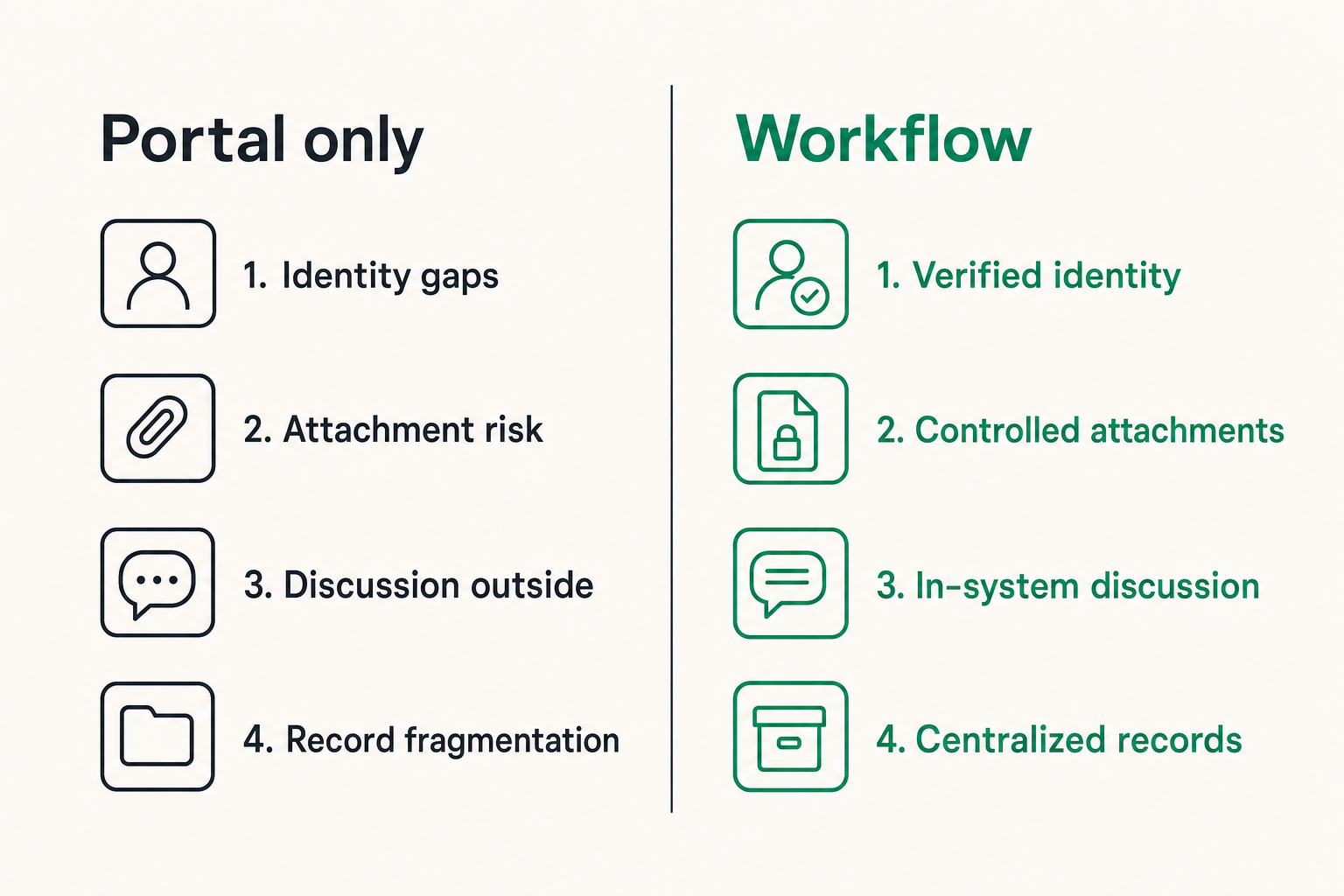
The portal is a boundary not a collaboration layer
IRS secure messaging should be treated as an official boundary: a place where certain communications may be sent, received, and reviewed. It is not the place where your whole team should debate strategy, annotate documents, track responsibilities, or manage every support question.
The mistake teams make is assuming that because a portal is official, everything around the portal is automatically secure. In practice, the sensitive work often happens after the official message is read. Someone has to interpret the request, locate records, ask a preparer a question, and decide what to submit.
If that work happens in ordinary email or unmanaged chat, the privacy benefit shrinks quickly. For a deeper adjacent workflow view, we previously covered IRS secure messaging as private tax workflow, but the key point is simple: the system includes every place the message travels.
What the portal can and cannot protect
A secure portal can reduce some obvious risks. It can avoid plain email delivery of sensitive messages. It can require authentication. It can provide a single official place to retrieve certain communications.
But it cannot protect a PDF once you download it. It cannot stop an employee from pasting sensitive details into a general company channel. It cannot decide whether your accountant should see a full transcript or only a specific attachment. It cannot prove that your internal decision process was appropriate unless you design for that.
Practical rule: Treat IRS secure messaging as the official exchange point, not the private workspace for everything around the exchange.
The operational gap around the message
The operational gap is where privacy usually leaks. It includes screenshots, browser downloads, copied text, forwarded notices, calendar reminders, and informal side conversations.
A useful way to think about it is this: every official message creates at least four internal events. Intake, analysis, response, and retention. Each event has different people, different systems, and different risk.
That means the workflow needs clear routing. Who is allowed to open the message? Who summarizes it? Where are attachments stored? Who approves a response? How do you preserve enough evidence without creating unnecessary duplicates?
Start with identity and access before content
Separate IRS identity from team identity
The person who can access IRS secure messaging may not be the same person who needs to analyze the issue. That is normal. What breaks in practice is when teams compensate by sharing credentials, forwarding raw files, or letting one person become the informal tax mailbox.
Do not merge external identity with internal responsibility. The IRS-facing account should be managed according to official access rules. The internal team identity model should separately define who can see the message, who can comment on it, who can approve action, and who can archive it.
This sounds bureaucratic until someone leaves the company, changes roles, or becomes unavailable during a deadline. Then access design becomes business continuity.
Use least privilege for tax conversations
Least privilege is not only about system permissions. It is also about conversation scope. A payroll question does not require the whole finance team to see owner tax IDs. A notice about a single entity does not require every contractor to receive the full context.
Use smaller rooms, threads, or cases. Invite people because they have a role, not because they might be useful later. If a person only needs a decision summary, give them the summary instead of the source document.
Practical rule: If someone does not need the original IRS message to perform their task, do not give them the original message.
Treat account recovery as a security event
Account recovery is often where secure messaging programs quietly weaken. A phone changes. A user loses access. A backup email is outdated. The team rushes to restore access and skips validation.
Treat recovery as a security event. Confirm the requester through a known channel. Log who approved the recovery. Review recent account activity after access is restored. Rotate any internal shared references that may have been exposed during the incident.
The practical question is not whether recovery will happen. It will. The question is whether recovery is controlled or improvised under deadline pressure.
Build a private workflow around every IRS message
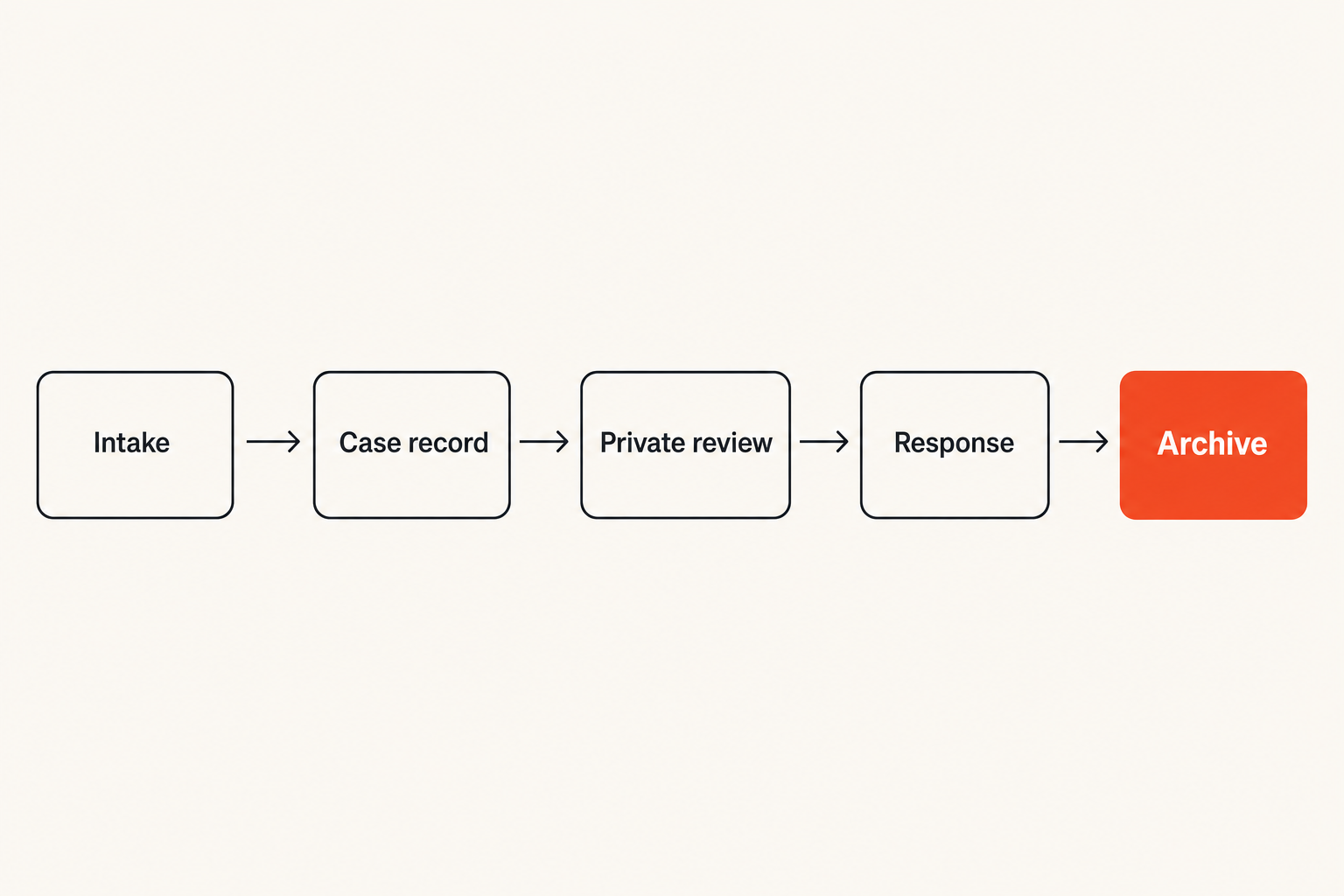
A practical intake to archive sequence
The workflow should be boring enough to repeat. Boring is good. Boring survives turnover, tax season, vacations, and incident response.
A workable sequence looks like this:
- Receive or check the official message through the approved IRS access path.
- Record a minimal internal case entry with date, topic, owner, and deadline.
- Store required attachments in the approved encrypted location.
- Summarize the request without copying unnecessary sensitive fields.
- Assign review to the right internal or external expert.
- Approve the response through a defined owner.
- Submit through the official channel when required.
- Archive the final message, response, evidence, and decision summary.
This is not about making tax communication slow. It is about removing ambiguity.
What to keep outside the portal
Keep internal deliberation outside the IRS portal unless the message is meant for the agency. Your team may need to debate interpretation, risk, missing documents, or legal advice. That does not belong in an official external exchange by default.
But outside does not mean casual. Use a private coordination channel with controlled access and retention. Keep notes factual. Avoid speculation that does not help the decision. Separate privileged or legal discussions where appropriate.
For teams that care about digital privacy beyond tax workflows, the broader qrypt.chat privacy approach is relevant because private communication is not just message encryption. It is also data minimization, retention discipline, and clear boundaries.
How remote teams should coordinate
Remote teams need explicit handoffs. In an office, people often rely on informal context. In distributed work, informal context becomes hidden context.
Use a short case header at the top of the internal thread:
- IRS message date
- taxpayer or entity involved
- response deadline
- internal owner
- external preparer or counsel if applicable
- current status
- next action
That header prevents the same sensitive document from being reopened repeatedly by people who are only trying to understand status. It also reduces deadline risk because the next action is visible.
Attachments records and evidence need their own controls
Name files for future humans
Bad filenames create real security problems. A folder full of download.pdf, notice-final.pdf, and screenshot-2.png forces people to open files just to identify them. Every unnecessary open is another exposure.
Use a naming convention that supports search without exposing too much in the name. For example:
2026-02-14_entityA_irs-notice_ref-1234_received.pdf
That is better than including full taxpayer identifiers in the filename. The goal is to make records findable while keeping sensitive values inside controlled documents, not sprayed across sync clients, previews, and logs.
Verify before you upload
Before sending anything through IRS secure messaging or another official channel, verify three things: recipient context, document accuracy, and redaction scope.
Recipient context means you are responding to the right matter. Document accuracy means the file is final, complete, and not a working draft. Redaction scope means the attachment contains what is needed and not extra data from another taxpayer, employee, customer, or entity.
The mistake teams make is reviewing the tax answer but not the file artifact. Metadata, hidden sheets, comments, and combined PDFs can leak more than the visible page.
Keep an audit trail without oversharing
You need an audit trail. You do not need unlimited duplication. Keep the official message, submitted response, attachments, approval record, and concise decision summary. Avoid keeping every intermediate screenshot and chat excerpt unless there is a legal or operational reason.
A clean audit trail answers these questions:
- What was received?
- Who reviewed it?
- What was decided?
- What was sent?
- When was it sent?
- Where is the final record?
Practical rule: Preserve decisions and final evidence. Do not preserve accidental sprawl just because storage is cheap.
Phishing and impersonation are workflow failures
Do not click your way into tax communication
Phishing succeeds when people treat links as instructions. A message says there is a tax issue, includes a link, and creates urgency. Someone clicks before thinking because the workflow never told them what to do instead.
Your rule should be simple: navigate to official services through known bookmarks or typed addresses, not through unexpected messages. If a notification arrives, treat it as a prompt to check the official source, not as the source itself.
This matters for IRS secure messaging because the official nature of tax communication makes it attractive to attackers. Fear and deadlines compress judgment.
Create an out-of-band verification path
Out-of-band verification means you confirm through a channel independent from the suspicious prompt. If an email, text, or chat message claims a tax action is required, verify through the official portal or a known contact path.
For teams, this should be written down. Who checks the official account? Who contacts the preparer? Who escalates to legal? Who can tell the rest of the team to pause?
Do not make every employee solve every suspicious message from scratch. Centralize the decision path, not the sensitive data.
Train people on decisions not slogans
Security slogans are cheap. Do not click suspicious links. Check the sender. Be careful. These are not useless, but they are incomplete.
Train the actual decision tree:
- If a tax message arrives by email, do not click the link.
- Open the known official access path.
- Check whether a corresponding message exists.
- If it does not, report the message internally.
- If it does, start the intake workflow.
That changes the conversation from awareness to execution. People do better when the next step is obvious.
Secure messaging privacy depends on metadata too
Message content is only one exposure
Encryption protects message content in transit and at rest depending on the system design, but content is not the only privacy issue. Metadata can expose who is involved, when a tax issue occurred, which entity it relates to, and how quickly the team responded.
In internal tools, metadata often appears in notifications, search indexes, mobile previews, audit logs, and integrations. A private attachment stored securely can still be undermined by a chat notification that says too much.
For secure messaging privacy, review notification text, channel names, file names, and integration logs. The sensitive data may not be where you expect it.
Retention can be useful and risky
Retention is not automatically good or bad. Tax records often need to be kept. But keeping every draft, duplicate, and casual comment forever increases exposure and review burden.
Define retention by record type. Official notices and final responses may have one retention rule. Internal coordination notes may have another. Temporary working files should expire. Access should be reviewed after the matter closes.
This is where privacy and operations need to cooperate. If retention is too short, you lose evidence. If retention is too broad, you create a shadow archive of sensitive history.
Use private coordination channels intentionally
Private coordination channels are useful when they reduce email forwarding, centralize context, and limit access. They are harmful when every sensitive matter becomes a permanent group discussion.
Use dedicated spaces for specific tax matters. Keep membership small. Summarize decisions. Close or archive the space when the work is complete. Review whether attachments should remain in chat or move to a record system.
Privacy is not achieved by moving the same behavior into a different app. It is achieved by changing the behavior.
What breaks when teams implement IRS secure messaging badly
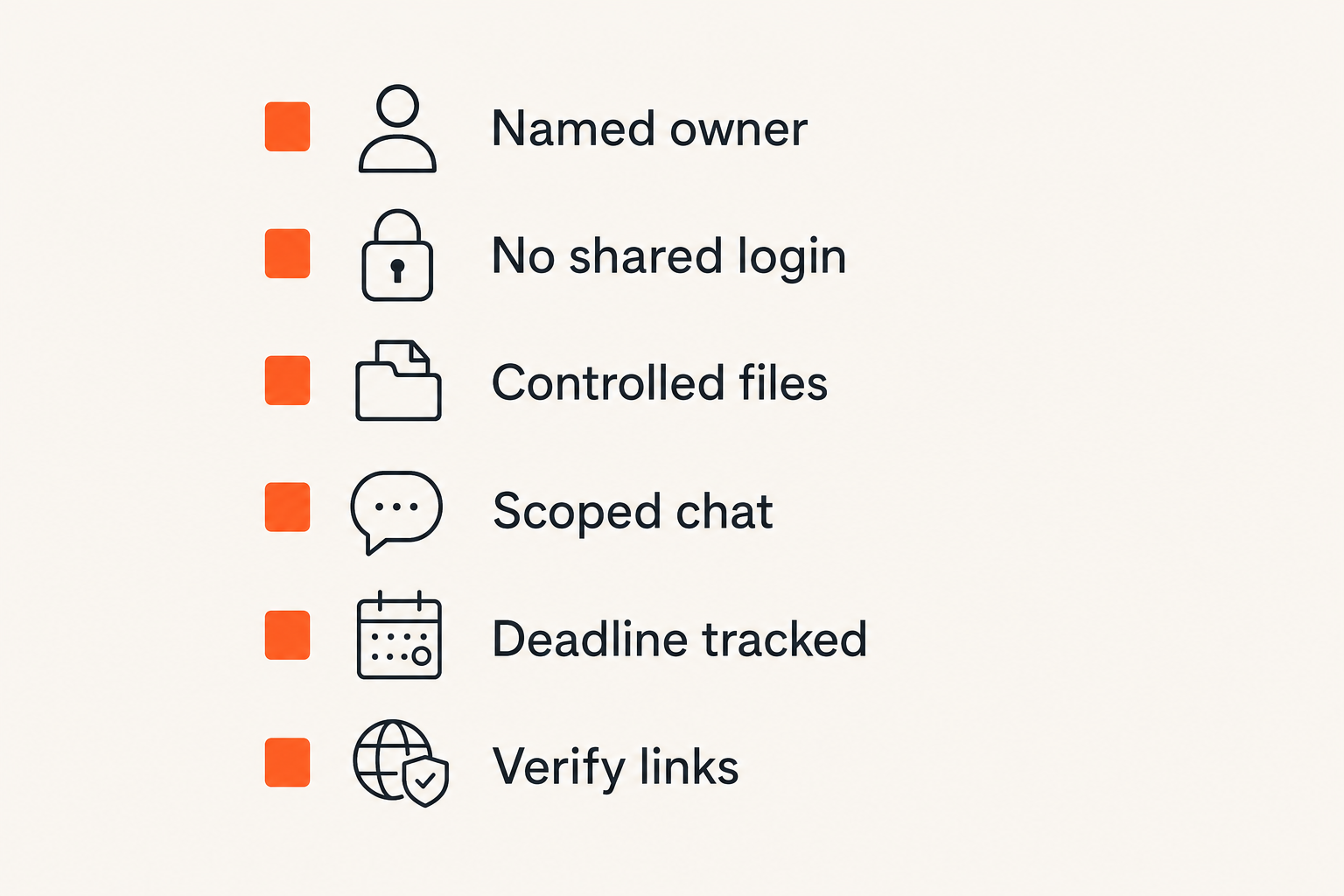
The common failure modes
What breaks in practice is rarely dramatic at first. It is small workflow debt.
Common failure modes include:
- one person becomes the only portal operator
- credentials or device access are shared informally
- notices are downloaded to unmanaged laptops
- screenshots replace official records
- accountants receive full threads instead of scoped documents
- internal chat becomes the real archive
- deadlines live in personal calendars
- phishing reports go to nobody in particular
None of these require malicious behavior. They happen because teams are moving quickly and the system is underdesigned.
What works
What works is boring control design. A named owner. A known access path. A standard case header. Encrypted coordination. Minimal sharing. Clear approval. Final archive.
Use this lightweight control map:
| Control area | Practical implementation | Why it matters |
|---|---|---|
| Identity | Named IRS account owner and backup | Avoids credential sharing |
| Intake | Case entry with deadline and owner | Prevents lost notices |
| Coordination | Private encrypted thread per matter | Reduces email sprawl |
| Attachments | Controlled storage and naming rules | Limits accidental exposure |
| Approval | Documented response owner | Prevents unauthorized submissions |
| Retention | Final records plus scoped notes | Keeps evidence without clutter |
This is enough for many teams to move from improvised to reliable.
What fails
What fails is tool-driven security without ownership. Buying a secure app does not decide who can upload a document. A portal does not decide who can interpret a notice. A shared drive does not decide whether a draft spreadsheet should be deleted.
The mistake teams make is confusing protected storage with protected workflow. Storage is one component. Workflow is the chain of custody for information and decisions.
If nobody owns the chain, the chain breaks at the busiest moment.
Security professionals should treat tax messaging like a regulated workflow
Map owners systems and approvals
Security professionals should map the workflow the same way they would map a sensitive customer-data process. Identify systems, owners, data types, approvals, and handoffs.
A basic map should include:
- IRS access point
- identity provider or authentication method
- endpoint used to download documents
- internal encrypted communication channel
- document repository
- tax preparer or legal counsel handoff
- approval authority
- archive location
This map does not need to be beautiful. It needs to be accurate enough that someone can review risk and fix gaps.
Validate controls with realistic scenarios
Do not validate with a checklist alone. Walk through scenarios.
Scenario one: a message arrives two days before a deadline and the primary owner is offline. Can the backup access the official source without credential sharing?
Scenario two: an employee receives a convincing tax phishing email. Do they know where to report it and what not to click?
Scenario three: an accountant requests all prior correspondence. Can the team provide only the relevant records?
These exercises expose workflow gaps quickly because they force the team to move information, not just describe policy.
Connect proactive and reactive work
Proactive work is designing the workflow. Reactive work is handling a real notice, suspected phishing attempt, or access issue. Mature teams connect the two.
After each real matter, run a short review:
- Did the intake work?
- Were permissions correct?
- Did anyone need data they should not have needed?
- Were records easy to find?
- Did notifications expose sensitive details?
- What should change before the next message?
This is the same practical security loop used in incident response: prepare, detect, respond, learn. Tax communication deserves that discipline because the data is sensitive and deadlines are real.
Tooling choices for encrypted coordination
Compare chat email shared drives and portals
No single tool handles everything well. The right architecture uses each tool for the job it is good at.
| Tool | Good for | Weakness | Use with IRS secure messaging |
|---|---|---|---|
| IRS portal | Official exchange | Limited internal workflow | Send and receive official messages |
| External coordination | Forwarding and phishing risk | Use sparingly with scoped content | |
| Shared drive | Document storage | Permission drift | Store final records with controls |
| Encrypted chat | Private discussion | Can become messy archive | Coordinate decisions and handoffs |
| Case tracker | Status and ownership | May expose metadata | Track deadlines and owners |
A useful way to think about it is separation of duties. Official exchange, private discussion, document retention, and status tracking are different jobs.
Integration matters more than feature count
Feature lists are seductive. In real workflows, integration and boundaries matter more. Can your private chat point to a document without copying it? Can your case tracker show status without exposing taxpayer details? Can your storage system restrict access after a matter closes?
Security architecture is often about reducing unnecessary movement. The fewer times a notice is copied, previewed, forwarded, and re-uploaded, the smaller the exposure surface.
For readers evaluating secure messaging tools more broadly, the qrypt.chat security overview explains the product direction around encrypted communication and post-quantum security without assuming every user wants to become a cryptographer.
Do not centralize more data than needed
Centralization can help governance, but it can also create a larger target. Do not dump every IRS message, tax file, chat transcript, and support note into one giant workspace just because it is convenient.
Use references where possible. Store final documents in the record system. Discuss decisions in the private channel. Track status in the case system. Keep sensitive values out of titles and notifications.
The goal is not maximum consolidation. The goal is controlled movement with clear ownership.
Where qrypt.chat fits in the workflow
Product fit for private tax coordination
qrypt.chat fits the part of the workflow where people need to coordinate privately about sensitive information. That includes internal review, preparer questions, approval discussion, and incident handling when a suspicious message appears.
It should not replace IRS secure messaging. It should not become your tax record system by accident. It should be used as a private communication layer around the official portal and the controlled archive.
That is the architectural point: use the official channel for official exchange, use encrypted coordination for private team work, and use governed storage for records.
Boundaries we would not blur
We would not blur these boundaries:
- official agency communication versus internal discussion
- final tax records versus working notes
- account access versus team collaboration
- encrypted messages versus long-term evidence storage
- privacy controls versus legal retention obligations
Teams get into trouble when one system becomes everything. The portal becomes the archive. Chat becomes the source of truth. Email becomes the approval trail. A private workflow keeps each responsibility explicit.
Related lessons from adjacent workflows
Adjacent domains face similar tradeoffs. Related reading from our network: time tracking software workflow decisions shows how approvals, privacy, and reporting matter more than the timer UI.
Related reading from our network: machine learning engineer jobs and AEO architecture is a different niche, but the workflow lesson is similar: structure and retrieval determine whether a system can be trusted later.
Related reading from our network: SNY streaming workflow reliability is about media access, yet it reinforces the same operator principle: the visible interface is not the whole system. Identity, devices, rights, and support paths matter.
Closing checklist for IRS secure messaging in 2026
The short implementation sequence
If you are starting from a messy process, do not try to redesign everything at once. Start with the highest-risk gaps.
- Identify the official IRS secure messaging access owner and backup.
- Create a standard intake record with owner, deadline, and status.
- Define where downloaded notices and attachments may be stored.
- Move internal discussion into a controlled private channel.
- Stop forwarding full notices unless the recipient truly needs them.
- Write a phishing verification path that does not depend on clicking links.
- Define approval authority before any response is submitted.
- Archive final records and delete unnecessary working copies.
- Review the workflow after the next real message.
This is enough to reduce confusion, limit exposure, and make the next tax communication easier to handle.
Final practical rule
Practical rule: IRS secure messaging is safest when the team can prove who accessed the message, who reviewed it, what was sent, and where the final record lives.
The practical question is not whether the portal is secure in isolation. The practical question is whether your whole communication path is private, verifiable, and operationally sane.
If your team treats IRS secure messaging as one component in a larger secure workflow, the privacy model becomes much stronger. If you treat it as the entire system, the weak points move into chat, email, downloads, and human improvisation.
Try qrypt.chat
qrypt.chat is for people who care about private communication, secure messaging, and practical digital security. Use it as the encrypted coordination layer around sensitive workflows like IRS secure messaging. Try qrypt.chat