
IRS secure messaging sounds like a simple portal problem. Log in, read the message, upload the file, move on.
That is not how it works in production. The risky part is usually everything around the portal: who told the user to log in, which device they used, how the attachment was prepared, who reviewed the response, where the record was stored, and whether the team discussed sensitive tax details in an unprotected side channel.
Teams think the problem is access to IRS secure messaging. The real problem is building a private, verifiable communication workflow around a government channel that you do not fully control.
That changes the conversation. The practical question is not whether IRS secure messaging is good or bad. The practical question is how privacy-conscious users, security teams, remote finance teams, and tax professionals should handle tax communication without leaking data through email, screenshots, chat apps, unmanaged downloads, or rushed approvals.
Table of contents
- IRS secure messaging is not your whole tax communication system
- Build the IRS secure messaging workflow around identity records and response
- Verification comes before conversation
- Attachments are where tax privacy usually breaks
- IRS secure messaging versus ordinary email and team chat
- A practical implementation sequence for remote teams
- Common failure modes in IRS secure messaging workflows
- Metrics and audit signals worth tracking
- How qrypt.chat fits an IRS secure messaging workflow
- Closing checklist for safer IRS secure messaging
IRS secure messaging is not your whole tax communication system
IRS secure messaging can be useful when it is available for a specific tax interaction, notice, online account workflow, or practitioner process. It gives you a more controlled path than normal email for certain exchanges with the IRS.
But it is still only one part of the system. The portal does not automatically secure the rest of your day. It does not stop a colleague from pasting a tax ID into a casual chat. It does not prevent someone from downloading a transcript to an unmanaged laptop. It does not solve internal approval, evidence handling, or retention.
A useful way to think about it is this: IRS secure messaging is the official transaction lane. Your private workflow is the road network feeding into it.
What the IRS channel is good at
The IRS-controlled channel is usually best for official message exchange, document submission where supported, and reducing reliance on ordinary email. It can help establish a clearer boundary between a government interaction and random inbound messages pretending to be government interaction.
That matters because tax communication has high-value data: Social Security numbers, employer IDs, addresses, income details, business records, bank references, transcripts, and identity verification material.
Practical rule: Use the IRS channel for the official exchange, but do not treat the existence of a portal as proof that the surrounding workflow is secure.
What it is not designed to do
The IRS channel is not your team room, your case management system, your document governance program, or your internal secure messenger. It also may not be available for every issue, every taxpayer, or every stage of a tax process.
What breaks in practice is the gap between official communication and internal coordination. A remote controller asks a founder for documents over SMS. A tax preparer shares a screenshot over email. A security lead reviews a notice in a general-purpose chat channel. None of that is fixed by the portal.
If you want a deeper tactical checklist for portal use, identity checks, attachments, and records, our earlier guide on IRS secure messaging workflows covers the operational basics. This article goes one level deeper into architecture and ownership.
Build the IRS secure messaging workflow around identity records and response
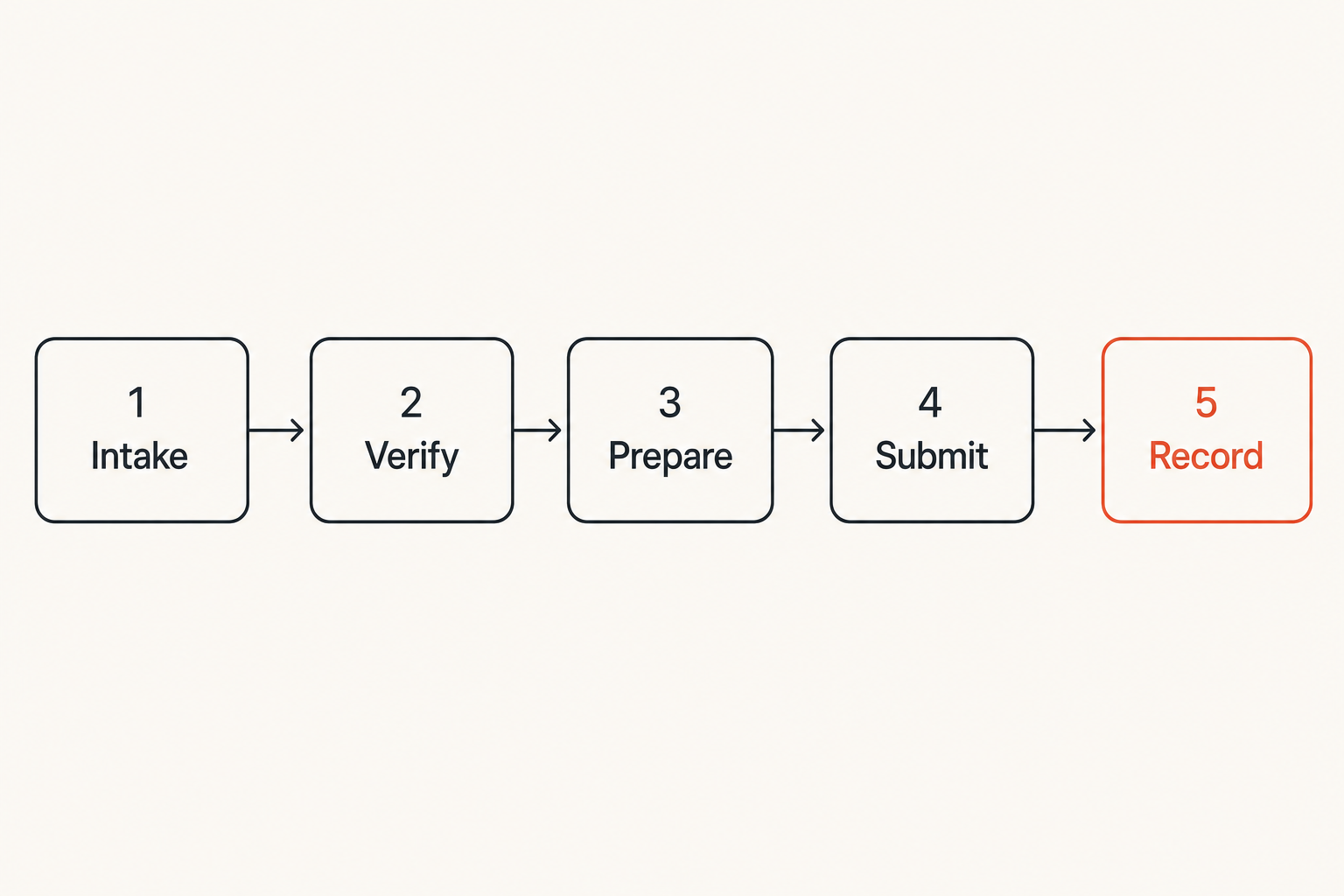
The first design decision is not which button to click. It is which states a tax communication must pass through before anyone sends or uploads anything.
Many privacy incidents are not advanced attacks. They are messy handoffs. Someone receives a notice, forwards it to the wrong account, asks for help in an insecure channel, renames files inconsistently, and loses track of the final submission.
The five-state workflow
A simple workflow for IRS secure messaging should have five states:
- Intake: A notice, prompt, or task is received and logged without oversharing sensitive content.
- Verification: The team confirms the request through a trusted path and avoids links from suspicious messages.
- Preparation: Documents are collected, minimized, reviewed, and named consistently.
- Submission: The authorized person uses the official IRS channel where appropriate.
- Record: The final message, receipt, timestamp, and decision trail are stored according to policy.
This sounds basic. It is not. It is the difference between a controlled tax workflow and a private-data scavenger hunt.
Where encrypted chat fits
Encrypted chat is not a replacement for IRS secure messaging. It is the coordination layer around it.
Use encrypted messaging to discuss who owns the task, whether a file is ready, which device should be used, whether counsel or a preparer has approved the response, and when the record has been archived. Do not use it to impersonate official IRS communication or to bypass the official channel when the official channel is required.
The point is separation of duties. The IRS channel carries official tax communication. The private channel carries internal coordination. Records live in an approved repository. Each layer has a job.
Related reading from our network: teams dealing with endpoint-scale action face a similar ownership problem in fleet response architecture for SOC workflows, where the hard part is not the button press but the trigger, owner, evidence, and follow-up.
Verification comes before conversation
A good IRS secure messaging workflow starts before anyone logs in. The most dangerous moment is often the prompt: an email, text, phone call, forwarded notice, or internal message saying something needs attention.
Attackers do not need to defeat the portal if they can route a user to a fake login page or convince a finance employee to send documents through the wrong channel.
Treat every prompt as untrusted until proven otherwise
Do not click links from unsolicited messages and assume they are legitimate. Navigate through known official paths, saved bookmarks, or verified account access procedures. If a message claims urgent IRS action is required, slow down. Urgency is a control surface attackers exploit.
A practical verification pattern is:
- Confirm the source of the request.
- Use a known IRS access path rather than a link in the message.
- Check whether the requested action appears inside the authenticated account or official correspondence.
- Escalate anomalies before collecting documents.
- Record the verification decision.
Practical rule: The more urgent the tax message feels, the more disciplined the verification path should be.
Use a separate trusted path for coordination
Remote teams need a trusted internal path to coordinate without leaking tax data into personal email or consumer messaging apps. That path should be known before the incident arrives.
This is where many teams get sloppy. They define security for the portal, but not for the internal conversation. The tax manager uses email, the founder uses SMS, the accountant uses a shared drive comment, and the security person asks for context in a general chat.
A secure internal channel should support end-to-end encryption, device awareness, clear participant identity, and a privacy posture that matches the sensitivity of the tax data being discussed. If you evaluate tools, read the vendor security model, not just the homepage. The qrypt.chat security overview is an example of the kind of page users should expect from a secure messaging provider.
Attachments are where tax privacy usually breaks
Tax messages are sensitive, but attachments are often worse. A single PDF can contain identifiers, payroll data, bank details, signatures, addresses, dependent information, and historical business context.
The mistake teams make is treating file upload as an administrative step. It is a data handling event.
Classify the file before you upload it
Before a file goes into IRS secure messaging, classify it. At minimum, decide whether it contains identity data, financial data, third-party data, employee data, legal advice, or privileged context. Then ask whether every page is necessary.
File minimization is not just a privacy slogan. It reduces blast radius if the wrong version is shared internally, stored in the wrong folder, or attached to the wrong message.
Use a naming pattern that supports review without exposing too much in the filename. For example:
- case-date-documenttype-version
- taxpayer-initials-not-full-id
- reviewed or final only after approval
Avoid filenames that include full Social Security numbers, full bank account numbers, or unnecessary personal details.
Control screenshots scans and exports
Screenshots are the quiet failure mode. Someone captures a portal page, drags it into a chat, and now sensitive information exists outside the official system with unclear retention.
Scans create similar problems. A multifunction printer may store images. A phone scanning app may sync documents to a personal cloud. A PDF editor may leave metadata in the file.
Practical rule: If a screenshot or scan contains tax data, treat it like the tax record itself, not like a temporary convenience file.
Good attachment hygiene includes local device checks, metadata review where appropriate, encrypted storage for working files, limited access, and deletion of unnecessary drafts. None of this needs to be theatrical. It needs to be repeatable.
Related reading from our network: adjacent privacy tradeoffs show up in home media and network design too; legal IPTV, torrent, and home media workflows are a reminder that convenience paths often become data exposure paths when users skip architecture.
IRS secure messaging versus ordinary email and team chat
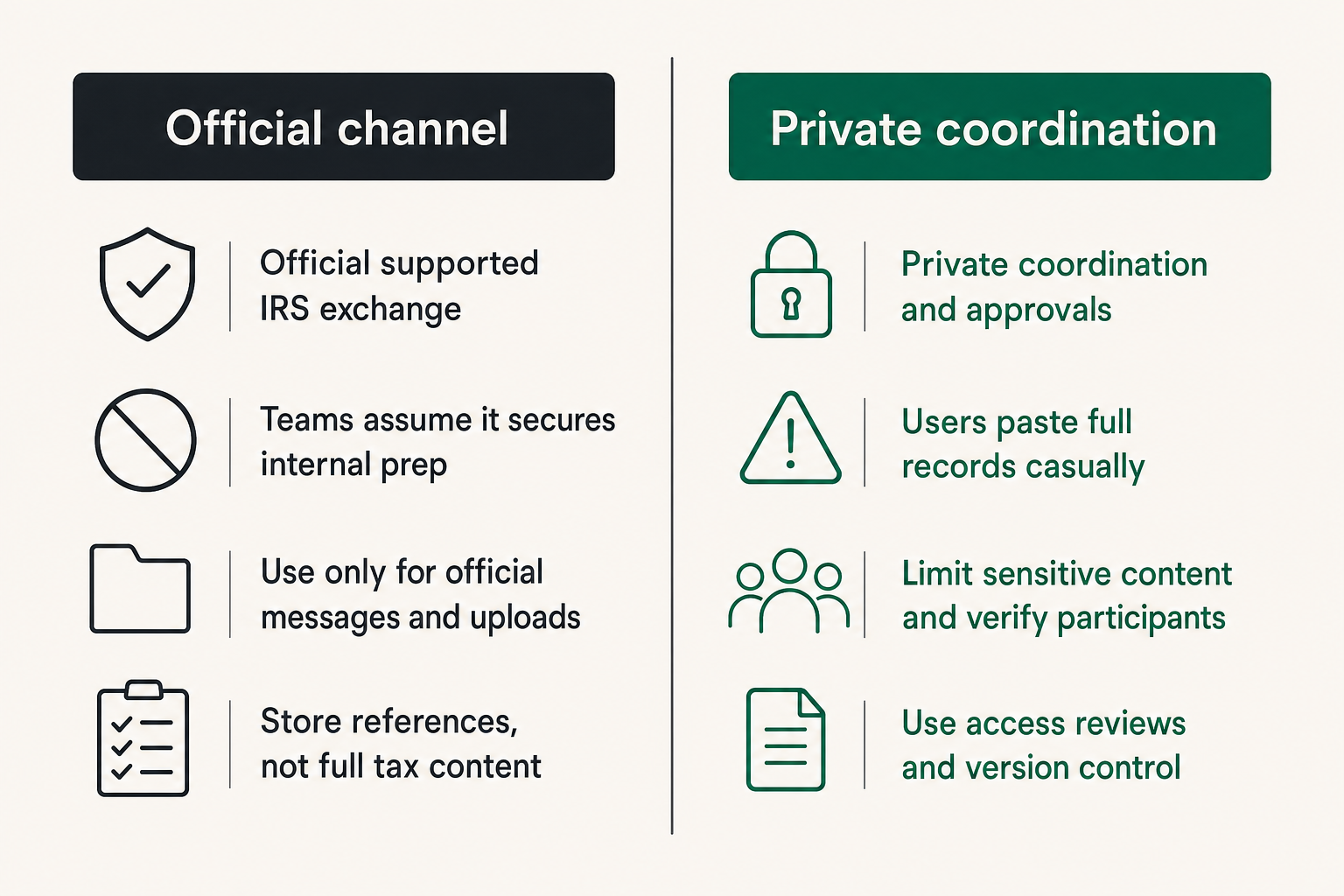
The useful comparison is not whether one channel feels easier. The useful comparison is what each channel is allowed to carry.
IRS secure messaging, encrypted internal chat, ordinary email, and ticketing systems can all exist in the same workflow. The failure is using them interchangeably.
Comparison that matters in practice
| Channel | Best use | What fails | Practical control |
|---|---|---|---|
| IRS secure messaging | Official supported IRS exchange | Teams assume it secures internal prep | Use only for official messages and uploads |
| Encrypted team chat | Private coordination and approvals | Users paste full records casually | Limit sensitive content and verify participants |
| Ordinary email | Low-sensitivity scheduling or notifications | Forwarding, phishing, retention sprawl | Avoid tax data and links to login pages |
| Shared drive | Controlled document storage | Overbroad permissions and stale drafts | Use access reviews and version control |
| Ticketing system | Task ownership and audit trail | Sensitive data in comments | Store references, not full tax content |
The architecture should make the safe path easier than the unsafe path. If users have to improvise every time, they will choose speed.
The mistake teams make with convenience tools
Convenience tools become dangerous when nobody defines their boundary. Team chat is fast, so someone pastes a notice. Email is familiar, so someone forwards a PDF. Shared drives are easy, so drafts accumulate forever.
This is not a people problem first. It is a workflow design problem. If the approved path is slow, unclear, or only known to one person, users will route around it.
A better rule is to define allowed content by channel. For example, encrypted chat may allow task status, initials, high-level context, and approval decisions, while full tax documents stay in controlled storage and official submissions happen only through the IRS channel.
A practical implementation sequence for remote teams
Remote teams need more than advice. They need a sequence that works when the founder is traveling, the controller is part-time, the accountant is external, and the notice deadline is real.
Do not wait until a tax message arrives to design the process.
Step by step operating procedure
Use this as a baseline and adapt it to your risk level:
- Define the owner for IRS account access and secure messaging tasks.
- Create a trusted internal coordination channel for tax communication.
- Document the verification path for IRS-related prompts.
- Establish approved devices and browsers for official access.
- Define file naming, minimization, and review rules.
- Require a second-person review for sensitive uploads or responses.
- Store final records in an approved repository.
- Log the submission date, channel, owner, and follow-up requirement.
- Review exceptions after the case closes.
That sequence is intentionally boring. Boring is good here. Tax privacy fails when the process depends on memory.
Minimum roles and ownership
At small companies, one person may hold multiple roles. Still, define the roles:
- Request owner: accountable for the tax matter.
- Verifier: confirms the prompt or notice through trusted paths.
- Document preparer: collects and minimizes attachments.
- Reviewer: checks accuracy and sensitivity before submission.
- Submitter: uses the official IRS channel where appropriate.
- Records owner: archives the final trail.
The same person can be preparer and submitter in a low-risk scenario. But for high-sensitivity records, separation helps. It reduces mistakes and gives the team a clean audit trail.
Related reading from our network: workflow tools in other domains face the same approval and reporting trap; this guide to time tracking software workflow fit is a useful adjacent example of why approvals, integrations, and reporting matter more than the visible timer.
Common failure modes in IRS secure messaging workflows
Bad workflows do not usually fail loudly at first. They accumulate risk quietly. Then a deadline is missed, an attachment is wrong, a fake prompt is trusted, or nobody can prove what was submitted.
What breaks when the workflow is informal
Common failure modes include:
- Link-driven login: a user clicks from an email instead of using a trusted path.
- Wrong-channel coordination: sensitive details move through SMS or personal email.
- Attachment sprawl: drafts and screenshots remain on unmanaged devices.
- Unclear authority: multiple people think someone else submitted the response.
- No record trail: the team cannot reconstruct what happened later.
- Over-sharing: more pages or identifiers are sent than the request requires.
- Participant drift: external preparers, assistants, or contractors enter the conversation without review.
The practical impact is not only privacy exposure. It is operational drag. Every unclear handoff creates investigation time.
What works better
What works is explicit routing:
- Official IRS communication stays in the official channel where supported.
- Internal discussion stays in an encrypted, known participant channel.
- Documents stay in controlled storage.
- Tasks and deadlines are tracked without dumping sensitive content into comments.
- Final records are archived with minimal but sufficient context.
This gives users a map. It also gives security professionals something to validate. You can ask whether the path was followed instead of debating individual judgment after the fact.
Practical rule: If your process cannot explain where a tax record is allowed to live, it is not a process yet.
Metrics and audit signals worth tracking
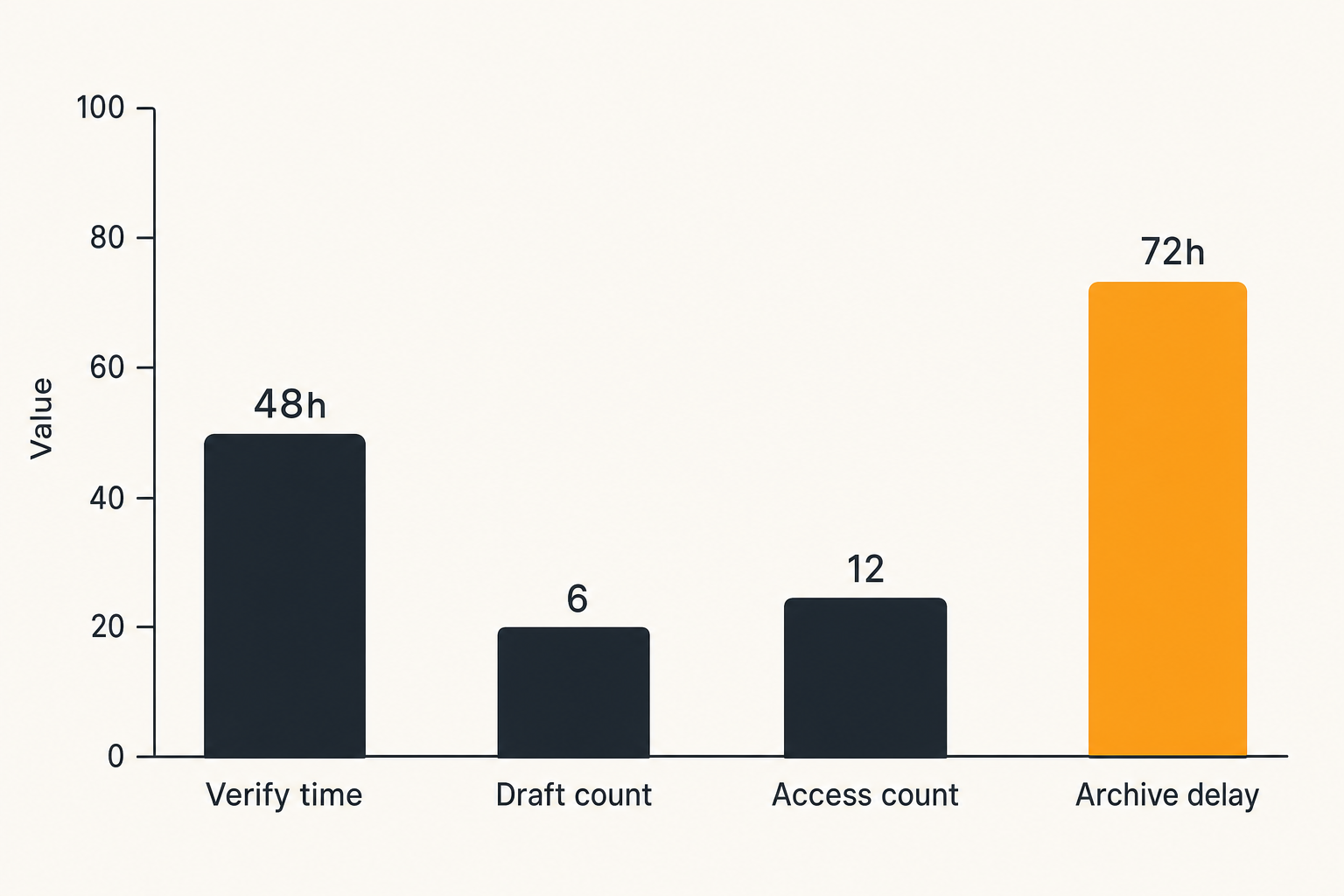
You do not need a heavy governance program to improve IRS secure messaging hygiene. You need a few signals that show whether the workflow is healthy.
The goal is not surveillance. The goal is reducing ambiguity around sensitive communication.
Measure handoffs not just messages
Useful metrics include:
- Time from prompt received to verification completed.
- Time from verification to document readiness.
- Number of people with access to working files.
- Number of draft versions created.
- Number of exceptions to approved channels.
- Number of responses requiring second review.
- Time from submission to final archive.
These are workflow metrics, not vanity metrics. They show where risk and delay enter the system.
For example, if verification is consistently slow, users may start clicking links to save time. If document review creates too many versions, attachment sprawl increases. If archiving is delayed, the final evidence trail becomes weaker.
Signals that deserve review
Some events should trigger review even if no incident has occurred:
- A user receives an IRS-related message through an unexpected channel.
- A login prompt appears after clicking an inbound link.
- A tax document is shared outside the approved path.
- A new participant is added to a sensitive tax discussion.
- A file contains more personal data than the request appears to require.
- A submission deadline changes without a recorded owner.
This is where security teams can help without becoming a blocker. Define the signals, define the escalation path, and make it easy to ask for help.
How qrypt.chat fits an IRS secure messaging workflow
qrypt.chat is not the IRS. It should not be positioned as a substitute for IRS secure messaging or any official government communication channel.
Its fit is the private coordination layer around sensitive communication. For privacy-conscious users, security professionals, encrypted chat users, and remote teams, that layer matters because the side conversation often carries enough context to create real exposure.
Use secure messaging for coordination not impersonation
Use qrypt.chat to coordinate internal tax workflows: confirm ownership, ask whether a document is ready, request review, discuss high-level context, and track whether a response has been submitted. Keep official submissions in the proper official channel.
The boundary is important. A secure messenger should reduce leakage, not create a shadow government inbox. Do not forward official IRS messages into a chat room unless your retention and privacy rules allow it. In many cases, it is safer to reference the case, task, or document location without pasting the full content.
Match the tool to the threat model
For some users, the concern is phishing. For others, it is insider access, device compromise, data retention, cloud sync, or long-term confidentiality. Your messaging tool should match the threat model.
That means looking at encryption, identity, device handling, data minimization, and the provider privacy posture. For readers who want to understand how qrypt.chat approaches user data, the privacy information is the right place to start.
The bigger point is architectural: official portals, secure messengers, storage systems, and task tools each need boundaries. When those boundaries are clear, users make fewer dangerous improvisations.
Closing checklist for safer IRS secure messaging
IRS secure messaging is useful, but it is not a complete privacy program. Treat it as one controlled channel inside a larger workflow.
The practical question for 2026 is whether your team can receive a tax prompt, verify it, coordinate privately, prepare the right attachment, submit through the right path, and preserve the record without leaking sensitive data along the way.
Before you log in
Ask:
- Did this prompt arrive through a trusted path?
- Am I using a known official access route rather than an inbound link?
- Is the device appropriate for tax records?
- Do I know who owns the response?
- Is internal coordination happening in an approved secure channel?
Before you send
Ask:
- Is this the minimum necessary document set?
- Has the file been reviewed for sensitive excess data?
- Are drafts and screenshots controlled?
- Has the response been approved by the right person?
- Will the final record be archived with owner, date, and follow-up?
If you can answer those questions consistently, IRS secure messaging becomes part of a defensible private communication workflow instead of a fragile portal habit.
Try qrypt.chat
qrypt.chat is for people who care about private communication, secure messaging, and practical digital security. Use it as the encrypted coordination layer around sensitive workflows like IRS secure messaging. Try qrypt.chat