
IRS secure messaging sounds simple until a real tax issue lands in the inbox.
A notice arrives. A preparer asks for documents. A remote finance lead wants to know who has answered the examiner. Someone forwards a screenshot over email because it is faster. Now the team has three channels, four copies of the same document, and no clean record of what was actually sent.
Teams think the problem is finding a secure way to message the IRS. The real problem is building a workflow where identity, evidence, deadlines, attachments, and private coordination stay under control.
That changes the conversation. IRS secure messaging is not a generic encrypted chat app. It is an official channel for specific tax interactions, and it should be treated like a controlled case system. The practical question is not only, can I send this securely? It is, who can access it, what record will exist later, how do we verify the channel, and what private side conversations should happen somewhere else?
Table of contents
- IRS secure messaging is not just a safer inbox
- The IRS secure messaging workflow is identity, evidence, and response
- Threat model for IRS secure messaging in 2026
- When to use IRS secure messaging and when not to
- Prepare before you send anything
- Message structure, attachments, and auditability
- Remote teams and tax professionals need access rules
- Common failure modes that break IRS secure messaging
- A practical operating model for IRS secure messaging
- Where qrypt.chat fits around IRS secure messaging
- Final rules for safer IRS secure messaging
IRS secure messaging is not just a safer inbox
It is a case channel, not private chat
The mistake teams make is treating IRS secure messaging like a normal messaging app with a government logo. That is the wrong mental model.
Secure messaging with the IRS is usually tied to a specific tax matter, account, representative relationship, notice, examination, or document request. It is not a place for brainstorming, internal debate, casual status updates, or broad collaboration. It is part of the administrative record around a tax issue.
A useful way to think about it is this: the IRS message thread is the external case file. Your team chat is the internal workbench. Mixing the two creates avoidable risk.
If you send half-formed explanations, unnecessary personal details, or internal assumptions through the official channel, you may create confusion or a record you did not intend to create. If you keep relevant evidence outside the official channel when the IRS requested it there, you may miss a deadline or lose traceability.
The trust boundary is the IRS portal
The secure part of IRS secure messaging depends on staying inside the official workflow. Notifications may arrive by email, but the message itself should be accessed through an authenticated IRS entry point, not through a random link in an email or text.
That distinction matters because attackers do not need to break IRS infrastructure to cause damage. They can imitate urgency, copy a logo, spoof a sender, and push a taxpayer or employee into a fake portal. In production, many account takeovers start with a believable notification and an impatient click.
Practical rule: Treat email or text alerts as prompts to manually navigate to the official IRS account or known portal, not as trusted transport for tax content.
The business risk is workflow drift
Workflow drift is what happens when a clean process becomes a pile of exceptions. The owner is out. Someone downloads a PDF to a personal laptop. A CPA sends a draft reply over email. A founder pastes an SSN into a general chat because the deadline is tomorrow.
None of those decisions feel reckless in the moment. They feel practical. But together they create a system where sensitive tax data moves through untracked channels.
This is why IRS secure messaging is an architecture problem. The portal is one component. The operating model around it decides whether the system is actually private, defensible, and usable.
The IRS secure messaging workflow is identity, evidence, and response
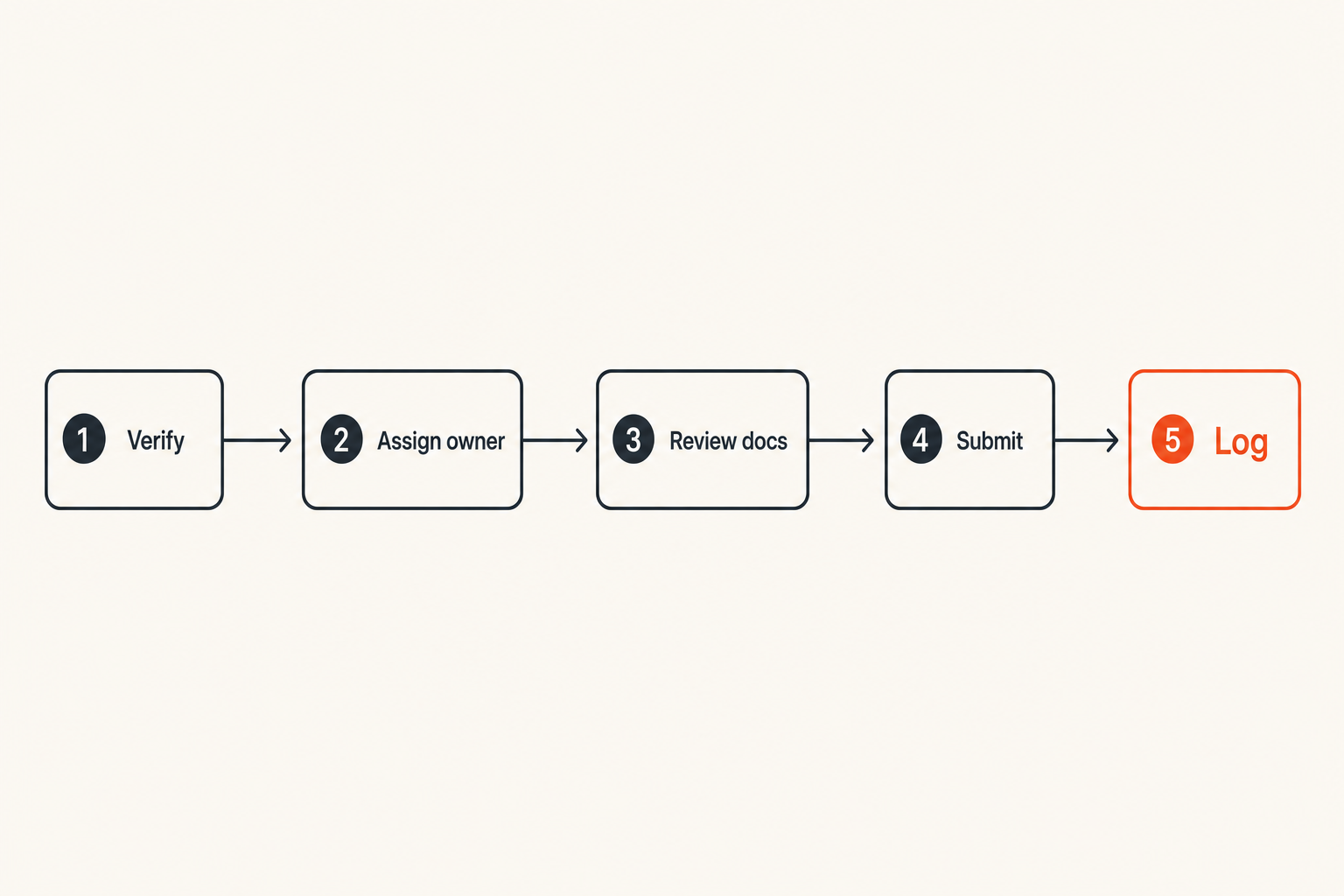
Who can read and send
Before anyone opens a tax message, decide who is allowed to access the case. For an individual taxpayer, that may be simple. For a business, remote team, or tax professional, it is usually not.
You need to know:
- Who owns the tax issue internally
- Who is authorized to communicate with the IRS
- Who can prepare supporting materials
- Who can approve final wording
- Who can access identity documents, returns, payroll records, bank records, or notices
The portal account is not a substitute for internal authorization. If a junior employee can access a shared inbox, cloud drive, or password vault, they may effectively have access to tax data even if they never log into the IRS portal.
What belongs in the thread
The IRS thread should contain what the IRS needs to evaluate the specific matter. That usually means direct answers, requested documents, clarifying explanations, and status responses.
It should not contain every internal conversation that led to the answer. You do not need to expose internal debate, unrelated financial details, employee commentary, or private operational context unless it is specifically relevant.
A good IRS message is concise, complete, and attached to the request. It answers the question without creating five new ones.
What needs a parallel private channel
Most teams still need a parallel private channel. A founder may need to ask the finance lead where a document came from. A preparer may need to request missing schedules. A remote employee may need to confirm whether a payroll record contains corrected data.
That internal coordination should happen in a secure messaging environment designed for private communication. If your team is evaluating that broader stack, our guide to secure messaging apps architecture covers threat models, metadata, retention, and rollout decisions in more depth.
The key is separation. Use IRS secure messaging for the official exchange. Use a private internal channel for preparation, review, and coordination.
Threat model for IRS secure messaging in 2026
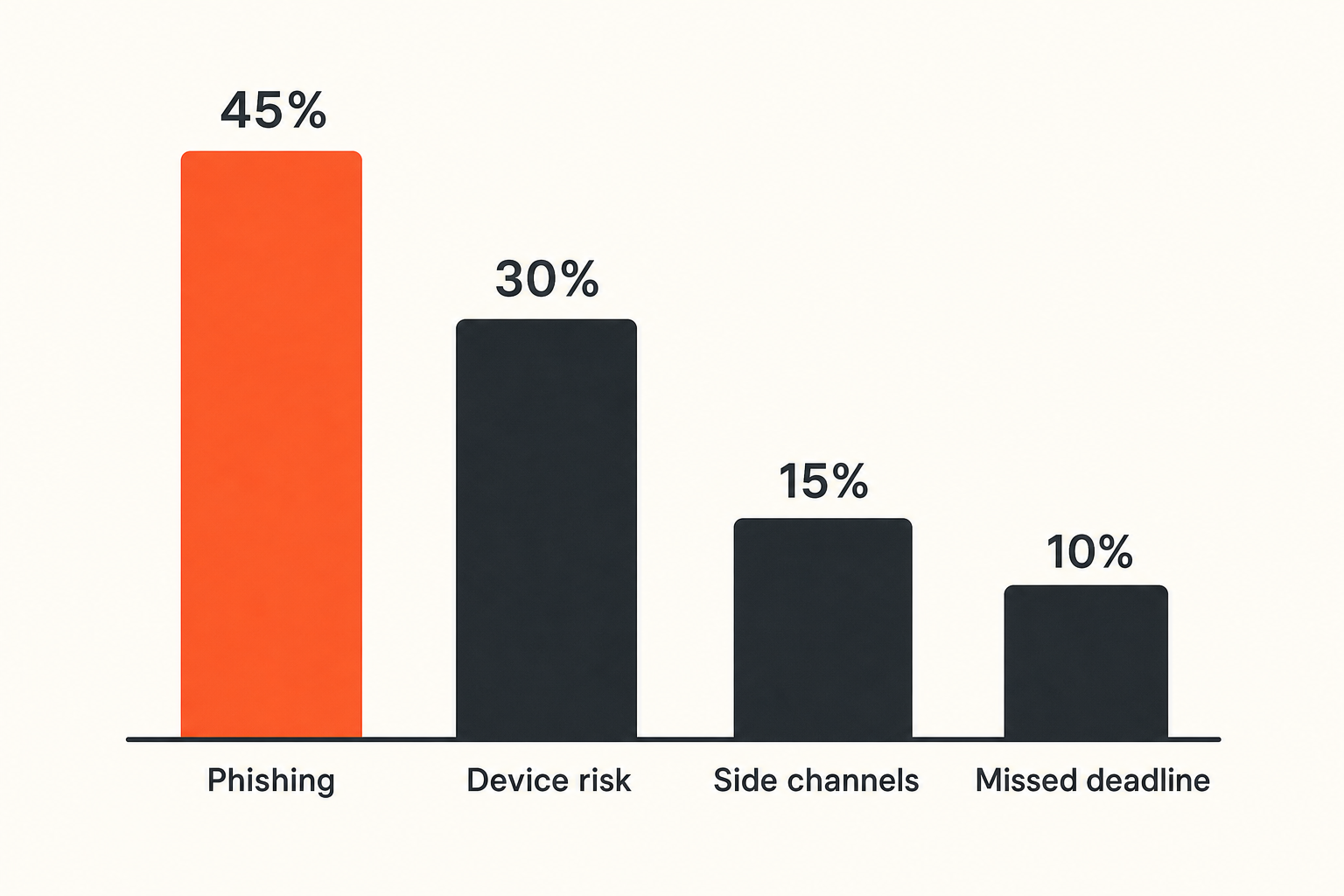
Phishing and fake notice pressure
Tax communication is attractive to attackers because it carries urgency and fear. The IRS brand gets attention. A deadline gets clicks. A refund, penalty, audit, lien, or identity verification request can push people into fast decisions.
The attacker does not need a perfect scam. They need one person to trust one link, upload one document, or reveal one credential.
What breaks in practice is not cryptography. It is verification discipline. People see a tax deadline and stop following their normal security process.
Related reading from our network: teams managing large media or automation workflows face similar trust-boundary problems when they separate safe automation from risky shortcuts, as discussed in Applied Industrial Technologies for Safer Torrent, IPTV, and Home Media Workflows in 2026.
Device compromise beats portal security
A secure portal cannot protect data once the endpoint is compromised. If a laptop has malware, a browser extension captures sessions, or a shared device keeps downloaded documents in local storage, the risk has already moved outside the IRS system.
This is the uncomfortable part of secure messaging: the channel may be encrypted, authenticated, and well-controlled, while the user environment is messy.
For tax workflows, baseline device hygiene matters:
- Updated operating systems and browsers
- Screen lock and disk encryption
- No shared browser profiles for tax work
- No unknown extensions in the browser used for IRS access
- No saving tax PDFs to unmanaged downloads folders
- Password manager use instead of reused passwords
- Multi-factor authentication where available
Metadata still matters
Even when message content is protected, metadata can reveal operational details. Who accessed the system, when they responded, what device they used, and how quickly the team moved can all matter in a security review.
For ordinary taxpayers, this may be low concern. For executives, public figures, high-risk professions, security teams, or businesses handling sensitive employee records, metadata discipline is part of the privacy model.
Do not overstate the issue. The IRS must have enough information to run the tax process. But do not create extra metadata through unnecessary forwarding, screenshots, exports, or side-channel copies.
Practical rule: The fewer places a tax document travels, the easier it is to secure, explain, delete, and recover later.
When to use IRS secure messaging and when not to
Good fits
IRS secure messaging is a good fit when the IRS has made the channel available for a specific matter and you need to exchange case-related information. It can reduce mailing delays, improve traceability, and keep the exchange closer to the official record.
Use it for:
- Responding to eligible IRS requests
- Uploading requested documents
- Clarifying a specific notice or case question
- Confirming receipt or status when the workflow allows it
- Keeping taxpayer-to-IRS communication inside an authenticated environment
This does not mean every tax issue supports secure messaging. Availability depends on the IRS program, account type, representative access, and the specific case.
Bad fits
Do not use IRS secure messaging as a general storage system, team chat, password exchange, or legal strategy workspace.
Bad fits include:
- Internal debate about what position to take
- Sending credentials or shared secrets
- Uploading unrelated financial records just in case
- Asking broad tax planning questions outside the scope of the case
- Replacing professional advice with portal messages
- Sending documents before confirming that the request is legitimate
The mistake teams make is assuming a secure channel makes any content appropriate. It does not. Secure transport does not fix poor information governance.
Ambiguous cases
Some cases are not obvious. A request may mention a document category broadly. A tax professional may ask you to collect materials before deciding what is responsive. A business record may contain both relevant and unrelated personal information.
When in doubt, slow down. Confirm the scope of the request. Ask your qualified tax professional how much context is required. Keep internal review separate from the final IRS response.
A comparison helps:
| Decision area | What works | What fails |
|---|---|---|
| Channel choice | Use official IRS messaging for eligible case communication | Reply through email links without verification |
| Internal review | Discuss drafts in a private team channel | Debate strategy inside the IRS thread |
| Attachments | Upload only responsive, prepared records | Dump folders of unrelated files |
| Ownership | Assign one response owner | Let multiple people answer independently |
| Recordkeeping | Keep a local evidence log | Rely on memory and screenshots |
Prepare before you send anything
Verify the official entry point
Start by verifying how you are supposed to access the message. Do not rely on a search ad, a shortened link, or a forwarded email. Navigate through a known IRS route, your authenticated account, or a professional workflow you have already validated.
For organizations, write this down. A runbook should say exactly how employees reach the portal, what domains are acceptable, what alerts look like, and who to contact if something seems wrong.
If you are documenting privacy obligations for your own users or clients, align the same discipline with your broader privacy commitments. For example, a team that publishes a clear privacy policy should also operate tax communications in a way that minimizes unnecessary collection and sharing.
Normalize documents before upload
Document preparation is where many secure workflows get sloppy. People upload photos, scans with bad names, multi-purpose PDFs, or exports containing hidden data.
Before uploading, standardize the file:
- Convert images to readable PDFs when appropriate
- Remove unrelated pages
- Confirm the document is legible
- Use a consistent naming convention
- Check whether metadata should be removed
- Verify that the file matches the request
- Keep the original in a controlled location if needed
Be careful with redaction. Redact only when appropriate and when it does not make the response incomplete. If the IRS requested a full record, excessive redaction can create delay or suspicion. If a document contains unrelated sensitive data, ask your tax professional how to handle it.
Assign a single response owner
Every IRS secure messaging workflow needs one accountable owner. Not five helpers. One owner.
That owner does not need to do all the work. They coordinate collection, review, approval, upload, and logging. They also prevent duplicate or contradictory responses.
A simple ownership model looks like this:
case_owner: finance_lead
preparer: external_cpa
approver: company_officer
portal_sender: authorized_representative
document_source: payroll_admin
backup_owner: controller
The point is not the format. The point is removing ambiguity before a deadline creates pressure.
Message structure, attachments, and auditability
Write for the examiner and future you
A good message is boring. It identifies the request, answers it, references attachments, and avoids unnecessary commentary.
Use a structure like:
- Identify the notice, tax period, or case reference.
- State the purpose of the response.
- List the attached documents.
- Explain any missing or partial items.
- Ask for confirmation or next steps if appropriate.
Do not write like you are texting a coworker. Do not bury the answer in a long narrative. Do not speculate.
Practical rule: If the message would be confusing to someone reading it six months later, rewrite it before sending.
Name attachments like records, not screenshots
Attachment names are small things that create large downstream value. A file named IMG_3827.pdf tells nobody anything. A file named 2024-payroll-tax-deposit-confirmation-q2.pdf is easier to review, log, and defend.
Use a naming convention that includes:
- Tax year or period
- Entity or taxpayer reference when safe
- Document type
- Version or date
- Optional sequence number for multi-part responses
Avoid putting full SSNs, full account numbers, or excessive personal identifiers in filenames. The filename itself can leak context when copied, downloaded, or shared.
Keep a local evidence log
The IRS system may preserve messages, but you should maintain your own controlled log of what happened. This is not about duplicating sensitive data everywhere. It is about keeping a minimal audit trail.
Log:
- Date and time of portal access
- Person who accessed the portal
- Request or notice reference
- Files uploaded
- Message summary
- Confirmation or receipt details
- Follow-up deadline
Store the log in a secure location with restricted access. Do not turn it into a dumping ground for every document. The log should help you reconstruct the timeline without multiplying sensitive files.
Related reading from our network: architecture-heavy systems often fail at the handoff layer rather than the user interface, a pattern also visible in Streaming SaaS: The Architecture Behind Delivering Video, Audio, and Live Content at Scale.
Remote teams and tax professionals need access rules
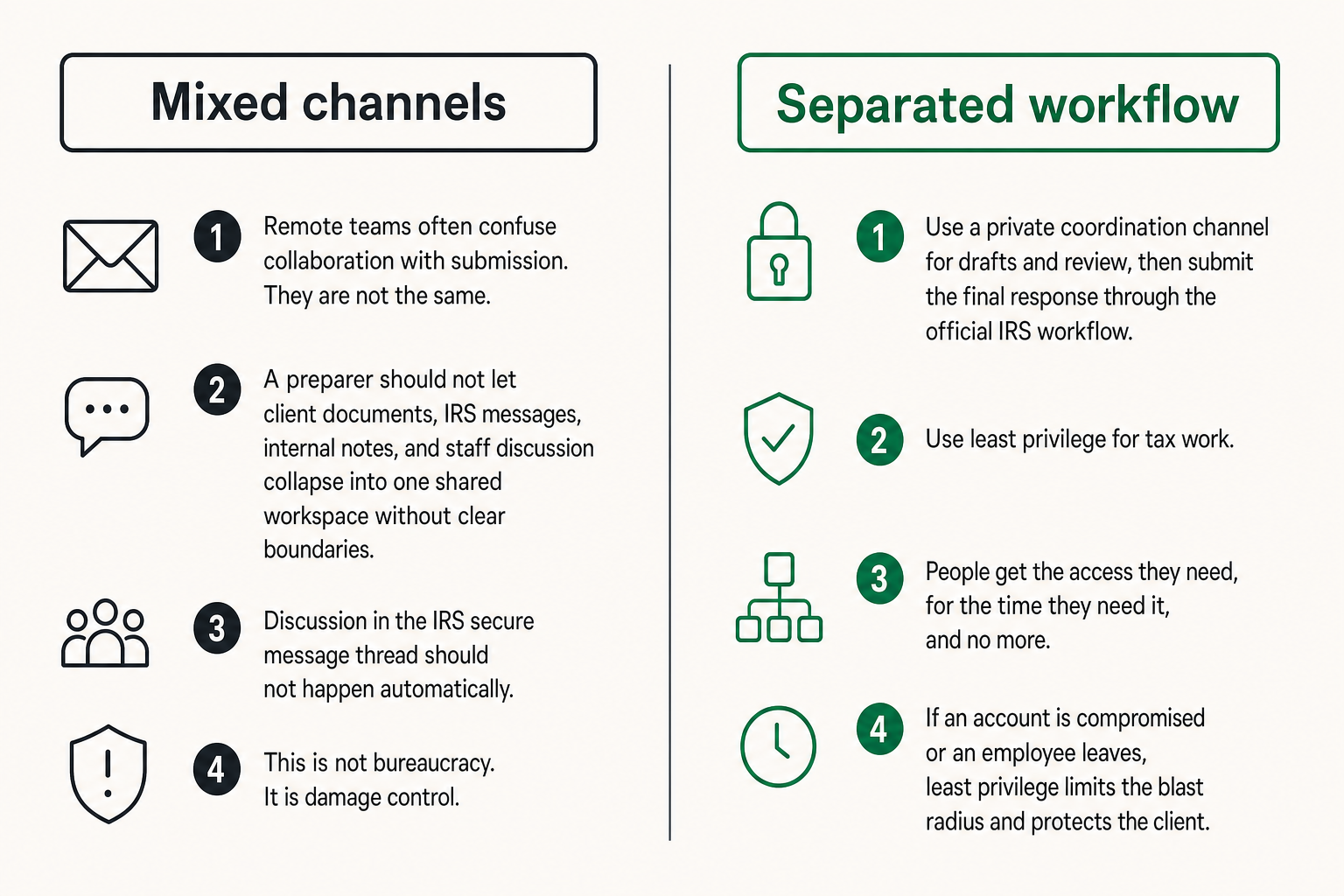
Separate client chat from the IRS portal
Remote teams often confuse collaboration with submission. They are not the same.
Your CPA, bookkeeper, legal advisor, finance lead, and founder may need to discuss a tax issue. That discussion should not automatically happen in the IRS secure message thread. Use a private coordination channel for drafts and review, then submit the final response through the official IRS workflow.
This separation is especially important for firms serving multiple clients. A preparer should not let client documents, IRS messages, internal notes, and staff discussion collapse into one shared workspace without clear boundaries.
Use least privilege for tax work
Least privilege means people get the access they need, for the time they need it, and no more.
For IRS secure messaging around a business matter, that may mean:
- The payroll admin can provide payroll records but cannot send the IRS response
- The CPA can draft and review but uses authorized representative access only where properly established
- The founder approves the response but does not collect every raw document
- The finance lead owns the timeline and evidence log
- IT supports device security but does not read tax content unless necessary
This is not bureaucracy. It is damage control. If an account is compromised or an employee leaves, least privilege limits the blast radius.
For teams evaluating messaging platforms around these workflows, the security model should be visible and testable. QryptChat describes its approach to quantum-resistant encrypted messaging for readers who want to understand how secure communication design maps to practical privacy needs.
Offboarding is part of tax security
Tax issues can outlast employment, vendor contracts, and client relationships. If someone helped with a response in March and leaves in June, their access should not persist because nobody remembered to remove it.
Offboarding should include:
- Removing portal access where applicable
- Rotating shared credentials if any were used, though shared credentials should be avoided
- Removing access to tax folders
- Revoking access to private team channels
- Collecting or deleting local copies from managed devices
- Updating the case owner and backup owner
What breaks in practice is continuity. A team keeps access open because it is convenient, then later cannot explain who had visibility into sensitive records.
Common failure modes that break IRS secure messaging
Treating email alerts as trusted messages
Email alerts are useful. They are not proof. A legitimate-looking alert can still be a phish, a forwarded notification, or a stale message.
Train users to treat alerts as signals, not channels. The response should be to open the official route independently, authenticate, and inspect the case there.
This habit feels slower the first week. After that, it becomes normal. More importantly, it removes the attacker's favorite shortcut.
Mixing personal and business records
Small businesses often blur personal and business finances. That operational reality can create privacy problems when responding to tax requests.
If a business bank statement includes personal transfers, if a payroll file includes employee identifiers, or if a contractor record contains unrelated correspondence, prepare the document carefully before upload. The answer is not to hide responsive records. The answer is to avoid sending unrelated sensitive context accidentally.
Security professionals already understand data minimization. Tax teams need the same habit.
Losing the response timeline
IRS workflows are deadline-driven. A secure message does not help if the team misses the date, sends a partial answer, or cannot prove what happened.
Timeline failures usually come from vague ownership:
- Nobody knew who was responsible
- The CPA assumed the client uploaded the file
- The founder assumed the finance lead approved it
- The email alert went to an inactive inbox
- A portal message was read but not logged
Create one timeline. Put the next action and owner in writing. Do not let the portal be the only place where the deadline exists.
Sending secrets through side channels
The worst version of secure messaging is a secure portal surrounded by insecure shortcuts. Someone cannot access a file, so another person emails it. A password is pasted into chat. A tax ID is sent over SMS. A PDF is uploaded to an open link.
That is how the system fails.
Related reading from our network: independent professionals face a similar channel-control problem when they rely too heavily on one platform instead of designing a deliberate stack, as covered in Are Freelance Websites Worth It in 2026? Build a Channel Stack, Not a Platform Habit.
A practical operating model for IRS secure messaging
The sequence to run every time
A practical IRS secure messaging workflow does not need to be complex. It needs to be repeatable.
Run this sequence every time:
- Receive the alert or notice without clicking unverified links.
- Navigate to the official IRS access point through a known route.
- Authenticate and confirm the case, taxpayer, period, and request.
- Assign or confirm the internal case owner.
- Collect only documents needed for the request.
- Review documents for accuracy, relevance, readability, and unnecessary exposure.
- Draft the response in a private internal workspace if collaboration is needed.
- Approve the final wording and attachment set.
- Send through IRS secure messaging when eligible and appropriate.
- Log the date, sender, attachments, summary, and next deadline.
- Monitor the portal through the verified route until the matter is closed.
The practical question is not whether each step is hard. It is whether the team skips steps under pressure.
A minimum checklist
Use a short checklist rather than a long policy nobody reads:
- Verified official access route
- Confirmed taxpayer and tax period
- Confirmed authorized sender
- Confirmed response owner
- Reviewed attachment scope
- Checked filenames and readability
- Removed unnecessary local copies
- Logged submission and next deadline
This checklist should live where the work happens. If the finance team uses a ticketing system, put it in the ticket template. If a CPA firm uses a client portal, put it in the case procedure. If a small remote team uses secure chat, pin it in the tax-response channel.
Escalation rules
Define when the case moves from normal workflow to escalation.
Escalate when:
- The notice threatens enforcement action or a near-term deadline
- Identity theft is suspected
- A user clicked a suspicious tax-related link
- Documents may have been sent to the wrong recipient
- Portal access appears unauthorized
- The team disagrees on what the IRS requested
- Legal privilege or regulated data may be involved
Escalation does not always mean panic. It means the issue needs a different owner, a tax professional, legal review, incident response, or direct verification through an official channel.
Practical rule: Any workflow that handles tax identifiers should have a security escalation path before the first incident.
Where qrypt.chat fits around IRS secure messaging
Private coordination outside the official portal
qrypt.chat does not replace IRS secure messaging. It fits around it.
The IRS portal is for official communication with the IRS. A private encrypted channel is for the human coordination that happens before and after that official exchange: collecting documents, confirming facts, discussing drafts, assigning owners, and tracking next steps without scattering sensitive details across email and consumer chat apps.
This is the same architecture pattern security teams use elsewhere: keep the system of record clean, and keep operational coordination controlled.
What qrypt.chat should not replace
Do not use qrypt.chat, or any private messaging app, to impersonate an IRS channel, bypass an official request, or avoid required tax procedures. If the IRS asks for a response through a specific eligible workflow, follow that workflow.
A secure internal chat is not a filing system, tax advisor, document retention policy, or government portal. It is a private communication layer.
That boundary is important. Good security tools reduce confusion. They should not create a second unofficial tax record that conflicts with the official one.
Product fit for privacy-conscious teams
qrypt.chat is relevant when the people around a tax issue need a better private coordination layer. That includes privacy-conscious users, remote teams, security professionals, encrypted chat users, founders, finance leads, and advisors who do not want sensitive tax context spread through ordinary email threads.
If you want to understand the broader philosophy behind the product and its focus on private communication, the QryptChat about page explains the direction without requiring every reader to be a cryptography expert.
The product fit is architectural: official IRS communication stays official, while internal coordination happens in a secure messaging environment built for privacy.
Final rules for safer IRS secure messaging
What works
IRS secure messaging works when teams treat it as a controlled case channel.
What works:
- Manually verifying the official access route
- Keeping internal discussion separate from official messages
- Assigning one response owner
- Preparing documents before upload
- Limiting access by role
- Maintaining a minimal evidence log
- Watching deadlines outside the portal too
- Escalating suspicious links or account behavior quickly
The goal is not to make tax communication complicated. The goal is to make it boring, repeatable, and defensible.
What fails
What fails is the illusion that a secure portal makes the entire workflow secure.
A secure message thread does not fix a compromised laptop. It does not fix a fake login page. It does not fix uncontrolled downloads, shared credentials, vague ownership, or sensitive documents forwarded through ordinary email.
The mistake teams make is buying into the channel and ignoring the edges. The edges are where private tax data usually leaks.
Closing checklist
Before the next IRS secure messaging event, decide the basics:
- Who owns the case?
- How do we verify the portal?
- Where do we coordinate privately?
- What documents are responsive?
- Who approves the final message?
- Where do we log the submission?
- What happens if something looks suspicious?
IRS secure messaging is useful when it is part of a disciplined workflow. Use the official channel for the official exchange. Use secure private communication for the coordination around it. Keep the boundary clear.
Try qrypt.chat
You are writing for people who care about private communication, secure messaging, and practical digital security. Try qrypt.chat.