
IRS secure messaging sounds like a simple portal feature until a real tax notice lands in the middle of a busy team.
Someone gets an email. Someone else downloads a document. A manager asks for context in chat. A contractor wants a copy. The accountant replies from a different inbox. By the end of the day, the official IRS exchange is only one small part of a much larger communication trail.
Teams think the problem is getting into IRS secure messaging. The real problem is controlling everything that happens around it.
That changes the conversation. The practical question is not only whether the IRS channel is secure. It is whether your team can verify messages, coordinate privately, handle attachments, preserve records, and avoid turning email or general-purpose chat into the real system of record.
Table of contents
- Why IRS secure messaging is a workflow problem
- What IRS secure messaging should and should not contain
- Identity, access, and account ownership
- A private IRS secure messaging workflow for teams
- Secure messaging vs email vs encrypted chat
- Attachments, records, and retention
- Threat model: phishing, spoofing, and misrouting
- Implementation checklist for remote teams
- What works and what fails
- Where qrypt.chat fits
Why IRS secure messaging is a workflow problem
Portal access is only one control
A portal can protect the official exchange, but it cannot protect the spreadsheet copied into a team drive, the screenshot pasted into chat, or the forwarding chain that starts because nobody knows who owns the response.
That is the mistake teams make. They treat IRS secure messaging as a destination. In production, it behaves more like a boundary between two operating models: the official tax system on one side and your internal communication habits on the other.
If the internal side is loose, the official channel does not save you. Sensitive tax data still spreads into email, downloads folders, unmanaged mobile devices, ticket comments, and old direct messages. The portal may be secure, but your workflow is not.
The real boundary is your internal handoff
A useful way to think about it is this: IRS secure messaging handles the message exchange with the agency. Your organization handles everything before and after.
That includes:
- deciding who is authorized to view the matter;
- verifying that a notification is legitimate;
- routing the request to the right owner;
- discussing the response without leaking taxpayer data;
- storing attachments in the right place;
- documenting what was sent, when, and by whom.
Practical rule: Treat IRS secure messaging as the official channel, not the whole workflow.
The hard part is not clicking the right button. The hard part is building a repeatable private communication pattern around a high-trust government exchange.
What IRS secure messaging should and should not contain
Use the portal for official exchange
When the IRS provides a secure channel for a matter, use it for the official communication it is intended to support. That usually means reading notices, responding to requests, reviewing messages, and exchanging documents according to the instructions given for that case or service.
Do not improvise by moving official responses into normal email because it feels faster. That creates ambiguity. Was the response actually submitted? Did the correct person send it? Was the attachment complete? Can you prove what happened later?
For adjacent reading on keeping sensitive communication practices current, the QryptChat team publishes practical privacy and encrypted messaging notes on the QryptChat blog.
Do not turn email into the shadow system
Email is convenient, searchable, and dangerous. It is also where phishing lives. If your team uses email as the place where IRS messages are forwarded, attachments are collected, and response drafts are debated, then email becomes the actual tax communication system.
What breaks in practice is simple: the official record and the working record diverge. One person sees the portal message. Another sees a forwarded PDF. A third sees a partial answer in email. Nobody has the whole picture.
The better pattern is to use email only as a notification or routing trigger, not as the working space for tax content.
Treat attachments as regulated artifacts
Tax attachments are not normal files. They can contain names, addresses, Social Security numbers, employer identification numbers, income data, bank details, signatures, and correspondence history.
Treat every attachment as an artifact with a lifecycle:
- received or downloaded;
- verified;
- stored;
- discussed;
- submitted;
- retained or deleted according to policy.
Related reading from our network: teams buying workflow software face similar approval and privacy tradeoffs in this guide to time tracking software workflow design, even though the domain is different.
Identity, access, and account ownership
Map who is allowed to see what
Before you argue about tools, make the access map. Who is allowed to read IRS messages? Who can prepare a response? Who can approve submission? Who can download attachments? Who can communicate with outside counsel or a tax professional?
Small teams often skip this because everyone trusts everyone. Remote teams skip it because access feels easier than process. Security teams know where this ends: too many people with sensitive data, no owner, and no clean audit trail.
A minimal access map should include:
- taxpayer or entity involved;
- internal owner;
- backup owner;
- external advisor, if any;
- approval authority;
- storage location;
- retention rule.
Separate taxpayer identity from team identity
IRS communication often ties to a specific person, business, authorization, or representative relationship. Your team identity model is different. A finance lead may coordinate internally, but not be authorized for every external action. A founder may approve a response, but should not be the only person with portal access. An assistant may organize files, but should not see unnecessary taxpayer details.
The practical question is whether each person has the minimum context required to do their job. That is least privilege applied to tax communication.
Practical rule: Do not confuse being on the team with being authorized for the tax matter.
Review access before tax deadlines
The worst time to discover access problems is the week a response is due. Build a review point before deadlines and seasonal spikes.
Check whether:
- the right people can access the portal or the official account path;
- former employees and contractors no longer have related files;
- shared mailboxes are not holding sensitive attachments indefinitely;
- backup owners know the escalation path;
- outside advisors still have a valid engagement.
For teams with strict confidentiality requirements, it is also worth reading how the service you use approaches encryption and key handling. qrypt.chat describes its end-to-end encrypted and post-quantum security posture on its security page.
A private IRS secure messaging workflow for teams
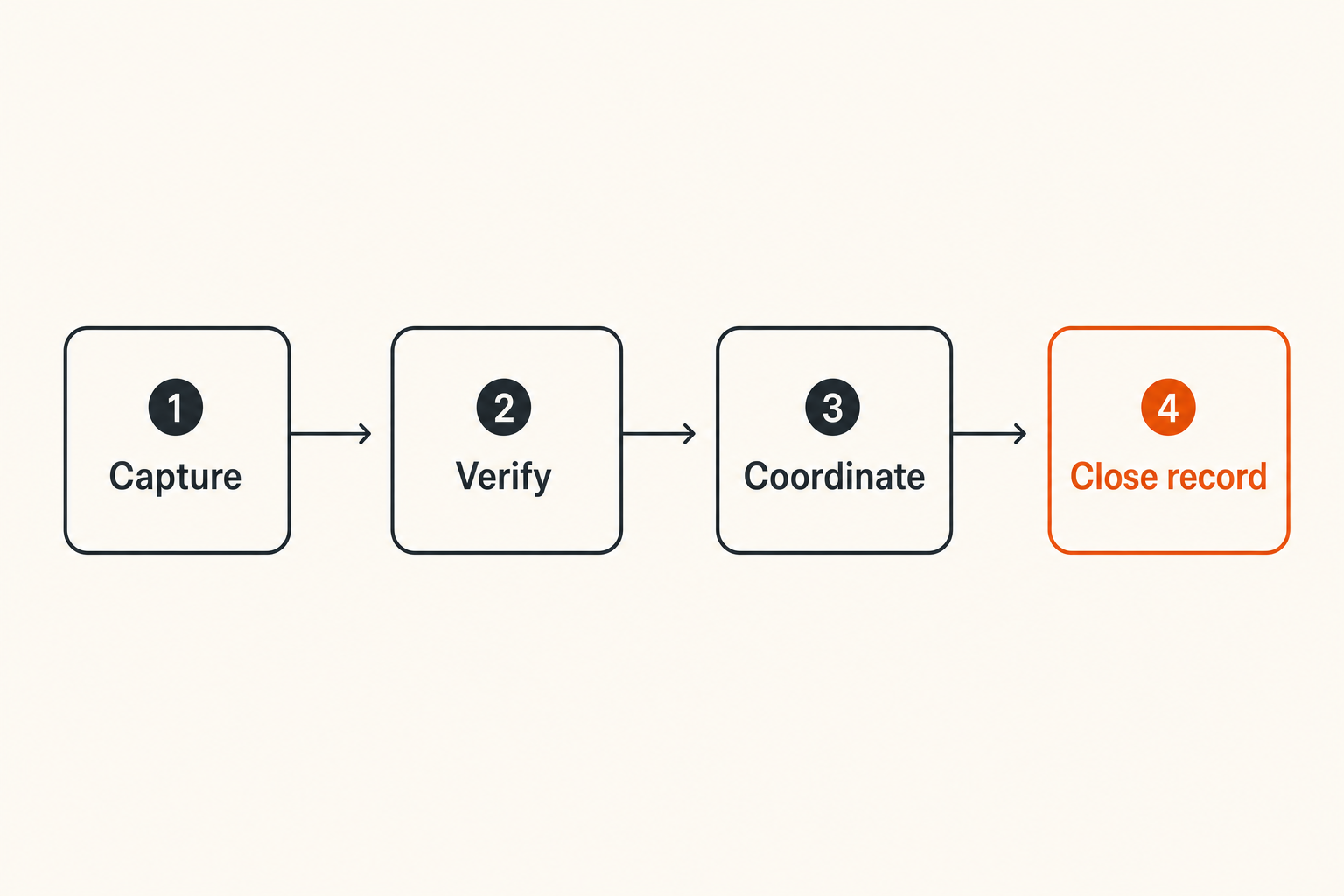
Step 1 Capture the request
Start with a single intake lane. That may be a secure internal channel, a case record, or a private thread with the authorized owner. The point is not to create bureaucracy. The point is to stop tax requests from scattering across inboxes and direct messages.
A basic intake record should capture:
- what triggered the workflow;
- who observed it;
- which taxpayer or entity it concerns;
- where the official message exists;
- the response deadline, if known;
- the owner and backup owner.
Do not paste full tax details into the intake if you do not need to. Use references and controlled storage links where possible.
Step 2 Verify the channel
Before anyone opens attachments, clicks links, or replies, verify the channel. This is where many teams get sloppy because the message looks urgent.
A simple verification sequence works better:
- Confirm the message was expected or plausible.
- Navigate to the IRS service directly instead of trusting a link in an email.
- Check that the message exists in the official account or secure portal.
- Validate the taxpayer, entity, period, and notice context.
- Record who performed the verification.
Practical rule: If the message cannot be verified through the official path, do not treat it as an IRS secure messaging item.
Step 3 Coordinate in encrypted chat
Once the official message is verified, the team still needs to coordinate. This is where encrypted chat belongs. Not as a replacement for IRS secure messaging, and not as a storage dump, but as a private workspace for decisions, clarification, and task assignment.
Use encrypted chat for:
- asking who owns the response;
- confirming whether an advisor should be involved;
- discussing non-public but necessary context;
- assigning drafting and review tasks;
- noting that a submission has been completed.
Avoid pasting full taxpayer records if a reference is enough. Avoid screenshots when a controlled document link is safer. Avoid long-running threads with mixed topics.
Step 4 Close the record
A tax communication workflow is not done when someone replies. It is done when the record is closed.
Closeout should include:
- final response sent through the official channel;
- date and time of submission;
- person who submitted;
- attachments included;
- approval evidence;
- storage location for retained records;
- next follow-up date, if needed.
This is mundane work. It is also what prevents panic three months later when someone asks what was sent.
Secure messaging vs email vs encrypted chat
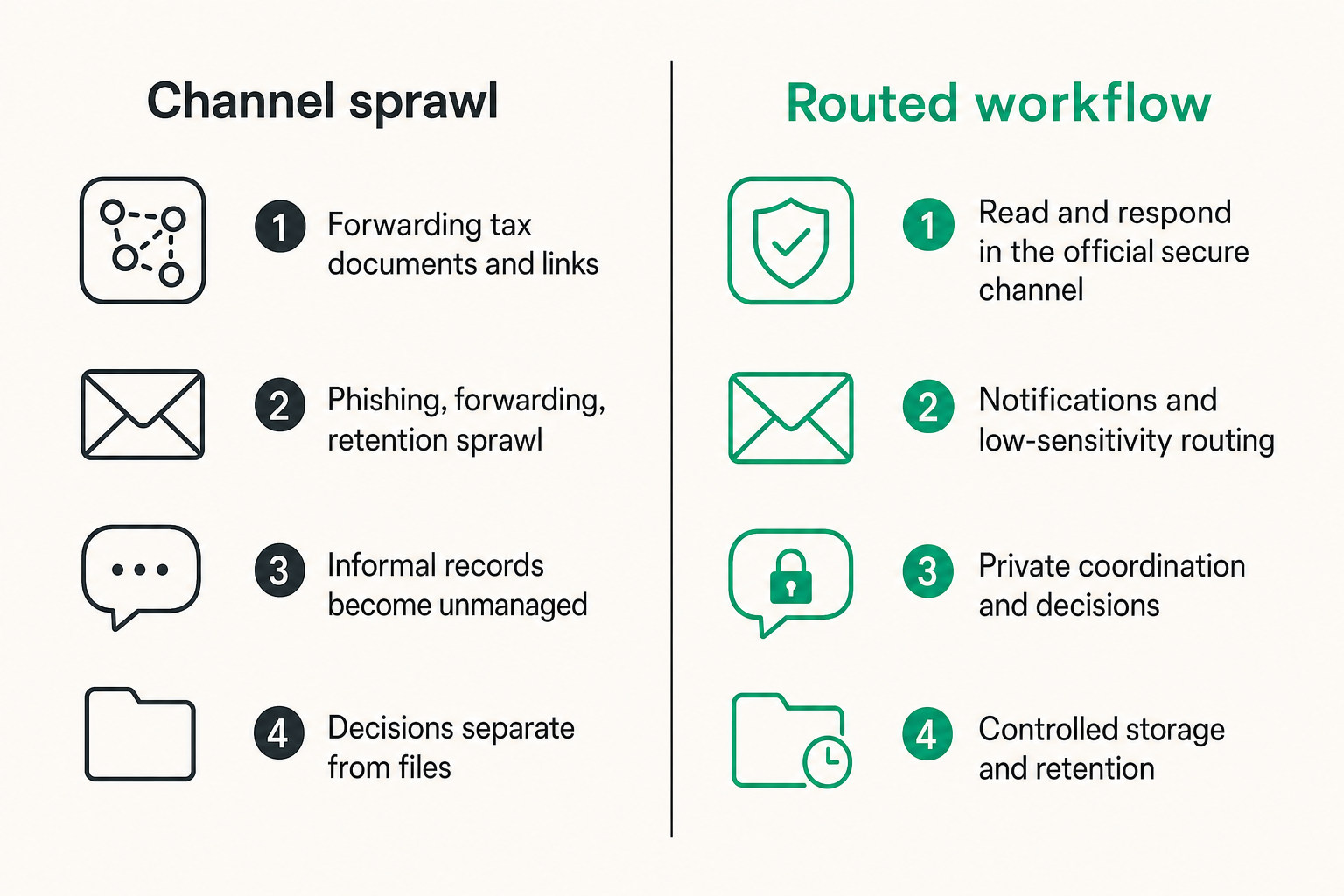
Different channels carry different risk
Teams often debate the wrong question: Is this tool secure? The better question is: What job should this channel perform?
IRS secure messaging, email, and encrypted chat are not interchangeable. They solve different parts of the workflow. If you force one channel to do every job, you either weaken security or slow the team down.
| Channel | Best use | Common misuse | Main risk |
|---|---|---|---|
| IRS secure messaging | Official agency exchange | Treating it as the only record | Internal context gets lost |
| Notifications and low-sensitivity routing | Forwarding tax documents and links | Phishing, forwarding, retention sprawl | |
| Encrypted chat | Private coordination and decisions | Dumping files without lifecycle rules | Informal records become unmanaged |
| Document vault | Controlled storage and retention | Using it as a discussion thread | Decisions separate from files |
| Ticket or case system | Ownership and status tracking | Storing excessive sensitive data | Overexposure to operators |
That changes the conversation. You do not need one perfect tool. You need clear routing.
Use a routing matrix
A routing matrix is a small policy that tells people where different content belongs. It does not have to be complex.
Example:
- Official IRS message: read and respond in the official secure channel.
- Internal task assignment: encrypted team channel.
- Draft response: controlled document workspace.
- Approval: documented in the case record or encrypted approval thread.
- Final artifact: retained in approved storage.
- Email notification: logged, then minimized.
Related reading from our network: the same architecture lesson appears in media workflows, where the user interface is not the whole system; this piece on doc streaming architecture makes the point through sources, metadata, caching, and privacy.
Where encrypted chat fits
Encrypted chat is the coordination layer. It is where humans ask questions, resolve ambiguity, and keep work moving without broadcasting sensitive details into email.
But encrypted chat should not become a black hole. If a decision matters, record the decision. If a file matters, store it properly. If an action matters, assign it clearly.
A good encrypted messaging workflow has boundaries:
- private by default;
- limited membership;
- short topic scope;
- clear owner;
- links to controlled records when needed;
- no casual forwarding to unmanaged channels.
Attachments, records, and retention
Name files for humans and audits
Bad file names create operational drag. Downloads named notice.pdf, scan-final-final.pdf, and response-new.pdf are manageable for one afternoon and painful during review.
Use names that make sense without exposing more than necessary. A practical pattern:
entity_or_initials-taxyear-notice_type-date-version.pdf
For example:
acme-2025-cp-notice-2026-08-11-v1.pdf
Keep the pattern consistent. Do not include full Social Security numbers or excessive personal data in file names. File names travel into logs, sync tools, previews, and search indexes.
Keep copies out of casual storage
What breaks in practice is copy multiplication. Someone downloads a notice. Someone uploads it to a chat. Someone else saves it locally to annotate. A fourth person sends it to an advisor by email.
Now you have four or more copies, each with different controls.
The better approach:
- store the canonical copy in approved storage;
- share references instead of raw files where possible;
- restrict downloads for viewers who do not need them;
- remove working copies after submission;
- avoid mobile downloads unless required;
- document exceptions.
If privacy is part of your operating model, your messaging provider should have a privacy posture that matches the sensitivity of your conversations. qrypt.chat explains its data handling commitments in its privacy policy.
Define retention before the first notice
Retention is not just a legal question. It is an operational one. If people do not know what to keep, they keep everything. If they do not know what to delete, they delete inconsistently.
Define retention rules for:
- official messages;
- submitted responses;
- drafts;
- internal approvals;
- attachments;
- advisor communications;
- working chat threads.
Do not rely on memory. Write the rule down where the team works.
Threat model: phishing, spoofing, and misrouting
What breaks in practice
Attackers do not need to break IRS secure messaging to exploit tax communication. They can attack the edges: email notifications, fake links, lookalike portals, urgent messages, malicious attachments, compromised advisors, or confused handoffs.
The highest-risk moments are usually ordinary:
- a busy employee clicks a link from an email;
- a contractor receives a forwarded tax document;
- a manager approves a response without seeing the source;
- a file is sent to the wrong advisor;
- a spoofed sender asks for missing information;
- someone searches old email and uses an outdated thread.
The mistake teams make is assuming government-related messages are self-authenticating. They are not. The workflow must authenticate them.
Verification beats urgency
Urgency is a signal to slow down, not speed up. A message that creates pressure should trigger verification steps.
Use a simple challenge:
- Did we navigate directly to the official service?
- Did a known authorized person verify the message?
- Does the message match a real taxpayer, entity, period, or case?
- Are we being asked to send sensitive data outside the expected channel?
- Is the deadline real or just implied by the sender?
Practical rule: Never let urgency downgrade the communication channel.
This is especially important for remote teams. People are more likely to act alone, outside the office, on mobile devices, or across time zones.
Train around real messages
Generic security training is easy to ignore. Train around the actual workflow your team uses.
Show people examples of:
- legitimate notification patterns;
- fake IRS-themed emails;
- correct portal navigation;
- approved internal routing;
- allowed and disallowed attachment handling;
- escalation paths when something feels wrong.
Keep it practical. The goal is not to turn everyone into a security analyst. The goal is to prevent predictable mistakes.
Related reading from our network: trust and follow-up problems show up outside security too, and this guide on running a local community network is a useful adjacent model for routing asks, offers, and accountability.
Implementation checklist for remote teams
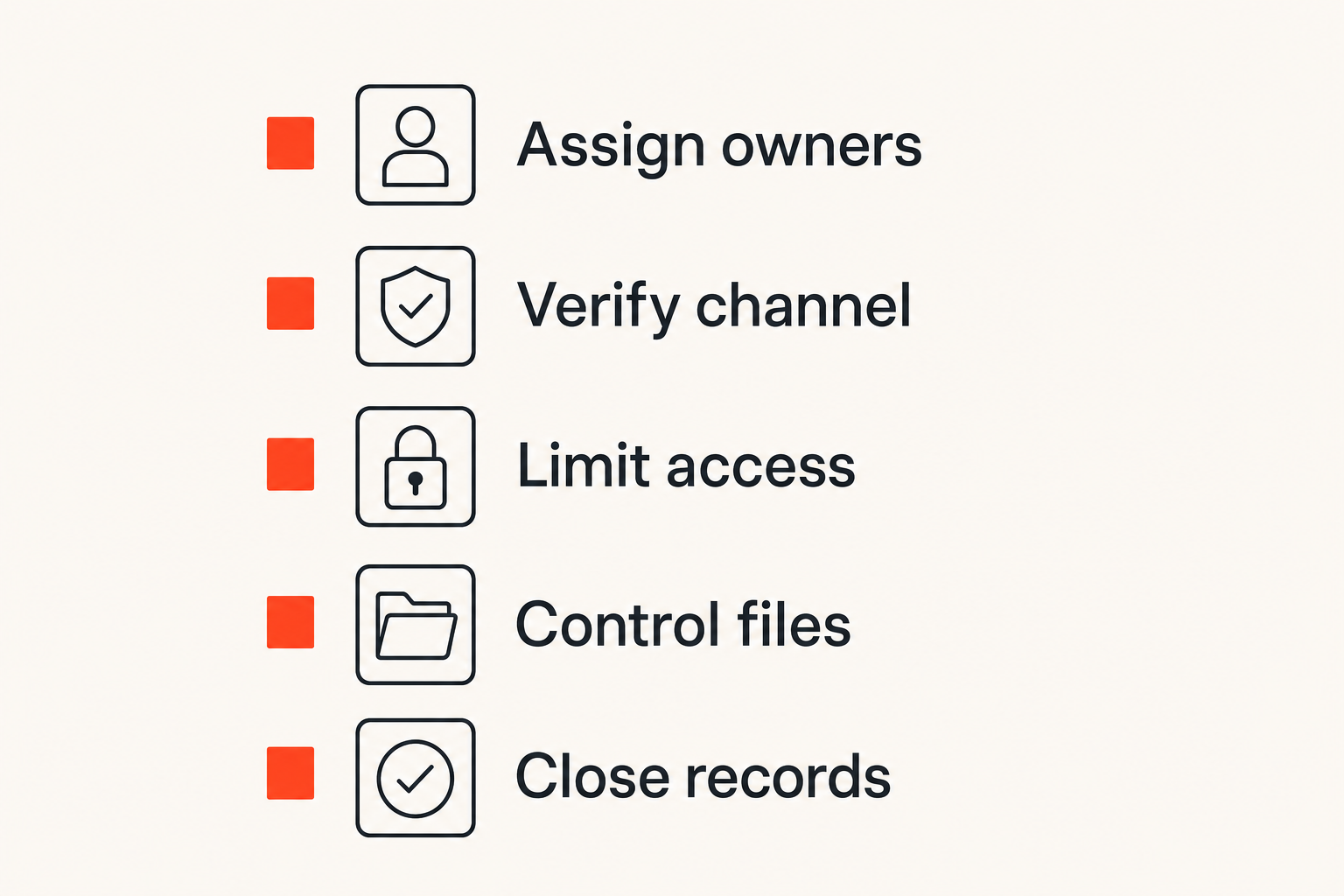
Assign owners before tools
Tools amplify ownership. They do not create it. Before buying or configuring anything, assign roles.
At minimum, define:
- IRS communication owner;
- backup owner;
- security reviewer;
- document custodian;
- business approver;
- external advisor contact.
For a solo operator, these may be the same person. For a remote team, they should be explicit. Ambiguity is the enemy.
Build a repeatable intake lane
The intake lane should be boring. That is the point.
A usable sequence:
- Notification or observation enters the intake lane.
- Owner verifies the message through the official path.
- Owner creates or updates the case record.
- Sensitive discussion moves to encrypted chat with limited membership.
- Files go into controlled storage.
- Draft and approval happen in the defined workspace.
- Final response goes through IRS secure messaging where applicable.
- Record is closed and retained according to policy.
This workflow should fit on one page. If it requires a training manual to execute, people will route around it.
Measure the right things
Do not measure security theater. Measure whether the workflow reduces risk and confusion.
Useful signals include:
- time from notification to verified owner;
- number of tax attachments sent by email;
- number of unresolved tax-related threads;
- percentage of cases with documented closeout;
- access reviews completed before deadlines;
- incidents involving wrong recipients or unverified links.
These are not vanity metrics. They tell you whether private tax communication is becoming operationally reliable.
What works and what fails
What works
What works is not complicated. It is disciplined.
- Direct navigation to official IRS services instead of trusting email links.
- Clear ownership for each tax matter.
- Encrypted team coordination with limited membership.
- Controlled storage for attachments.
- Consistent naming and retention rules.
- Documented approval and closeout.
- Periodic access review.
- Simple escalation when something looks wrong.
A useful way to think about it is to separate the official channel, the coordination channel, and the record channel. When those are distinct, people know where work belongs.
What fails
What fails is usually a familiar pattern:
- one person holds all portal knowledge;
- tax documents move through email because it is fast;
- screenshots replace controlled records;
- chat threads mix multiple taxpayers or entities;
- nobody verifies links under time pressure;
- old contractors retain access to files;
- approvals happen verbally and are never recorded;
- closeout is skipped once the response is sent.
The portal can be secure and the overall workflow can still fail. That is the uncomfortable part. It is also the part teams can fix.
For a deeper adjacent treatment of this same topic, see our prior guide to IRS secure messaging as a private tax workflow, which focuses on identity, records, phishing defense, and encrypted coordination.
Where qrypt.chat fits
Use encrypted chat for coordination not official filing
qrypt.chat is not a replacement for IRS secure messaging, and it should not be positioned that way. The IRS channel remains the official path when it is the required or appropriate system for the matter.
Where encrypted chat fits is the private coordination layer around that official exchange. Teams need a place to discuss who owns the issue, what context matters, which files are needed, whether an advisor should be involved, and when the record can be closed.
That coordination should not happen in open group chats, casual SMS threads, or long email chains if the content is sensitive.
Product fit for privacy conscious teams
qrypt.chat is a fit when your team cares about secure messaging as an operating habit, not just a feature checkbox. That includes privacy-conscious users, security professionals, remote teams, founders, and advisors who need to discuss sensitive matters without spraying context across unmanaged channels.
The architectural role is clear:
- IRS secure messaging handles official exchange;
- qrypt.chat supports encrypted internal coordination;
- controlled storage holds canonical records;
- your workflow defines ownership, verification, and retention.
No messaging app eliminates the need for policy. But the right encrypted channel makes the secure path easier than the careless one.
Final operating principle
The closing principle is simple: IRS secure messaging protects the official conversation only if the surrounding workflow does not leak, confuse, or fragment it.
Build the workflow first. Assign ownership. Verify channels. Keep attachments controlled. Use encrypted chat for private coordination. Close the record.
That is how IRS secure messaging becomes part of a durable private communication system instead of another portal people route around.
Try qrypt.chat
qrypt.chat is for people who care about private communication, secure messaging, and practical digital security.
If IRS secure messaging is part of your tax communication workflow, use encrypted coordination where the team discussion belongs. Try qrypt.chat.