Secure messaging apps usually enter a team through the wrong door. Someone asks which app has the strongest encryption, the cleanest interface, or the best reputation. A few people install it. Sensitive conversations move there. Everyone assumes the privacy problem is now handled.
Teams think the problem is choosing a secure chat app. The real problem is designing a private communication workflow that survives messy devices, group changes, backups, screenshots, metadata, and human behavior.
That changes the conversation. The practical question is not only whether messages are encrypted in transit. It is who can join a room, where keys live, what happens when a phone is lost, how long sensitive content remains searchable, and whether the organization can explain its choices under pressure.
In 2026, secure messaging apps matter because more work happens across personal devices, remote teams, contractors, international travel, and regulated conversations. The UI is not the system. The system is identity, endpoint security, retention, recovery, trust, and operational discipline.
Table of contents
- Why secure messaging apps are a workflow decision
- Start with a threat model, not an app store ranking
- Compare secure messaging apps by control points
- Metadata and identity are where privacy leaks
- Device security decides whether encryption survives
- Team workflows need ownership and retention rules
- Validation: how to test secure messaging apps before rollout
- What works vs what fails in production
- Implementation plan for privacy-conscious teams
- Where qrypt.chat fits into the secure messaging apps decision
Why secure messaging apps are a workflow decision
Encryption is necessary but not enough
End-to-end encryption is table stakes for private communication. Without it, the service provider, network operators, compromised infrastructure, or legal requests aimed at stored provider-side content can become part of the exposure path.
But encryption alone does not answer the operational questions that determine whether private messaging works in practice:
- Who is allowed to start sensitive conversations?
- How are identities verified before confidential information is shared?
- Are message previews exposed on lock screens?
- Are backups encrypted, disabled, or outside the trust boundary?
- What happens when someone leaves the team?
- Can users export, forward, screenshot, or copy sensitive content?
- How does the team handle lost devices?
The mistake teams make is treating cryptography as a substitute for policy. Cryptography narrows who can read messages. Policy and workflow determine whether the wrong conversation, wrong device, or wrong participant breaks the model.
Practical rule: Choose secure messaging apps by the controls they give you over the full conversation lifecycle, not by the strongest claim on the landing page.
The real object is the conversation lifecycle
A useful way to think about it is that every sensitive conversation has a lifecycle:
- A person decides a topic is sensitive.
- They choose a channel.
- Participants are invited or discovered.
- Identities are trusted, assumed, or verified.
- Messages, files, links, and reactions move through the channel.
- Notifications and metadata are generated.
- Devices store keys and local content.
- The conversation is searched, retained, deleted, exported, or abandoned.
- Participants change roles, lose devices, or leave.
Secure messaging apps need to support that lifecycle without forcing users into unsafe workarounds. If deleting messages is confusing, users will leave content around. If verification is painful, users will skip it. If device recovery is impossible for normal users, support teams will invent insecure processes.
Why this matters in 2026
The privacy surface has widened. Remote teams use personal phones. Contractors come and go. AI assistants, clipboard managers, keyboard extensions, cloud backups, and mobile notification systems can touch content adjacent to secure chats. Travel and border searches create device exposure. Phishing increasingly targets session state and device access rather than only passwords.
That does not mean every user needs a spy-movie setup. It means the secure messaging decision should be boring, explicit, and testable. Many teams already have too many channels: email, SMS, workplace chat, ticket systems, project tools, video chat, and personal messaging apps. Adding one more app only helps if it becomes the right place for the right class of conversation.
For readers who want adjacent context on private communication beyond this guide, the QryptChat team keeps practical security writing on the QryptChat blog, including workflow-focused guidance for evaluating secure messaging choices.
Start with a threat model, not an app store ranking
Personal privacy, team security, and regulated work
The best secure messaging app for a journalist protecting a source may not be the best fit for a small company coordinating incident response. A privacy-conscious family has a different risk model than a legal team, a health startup, or a security operations group.
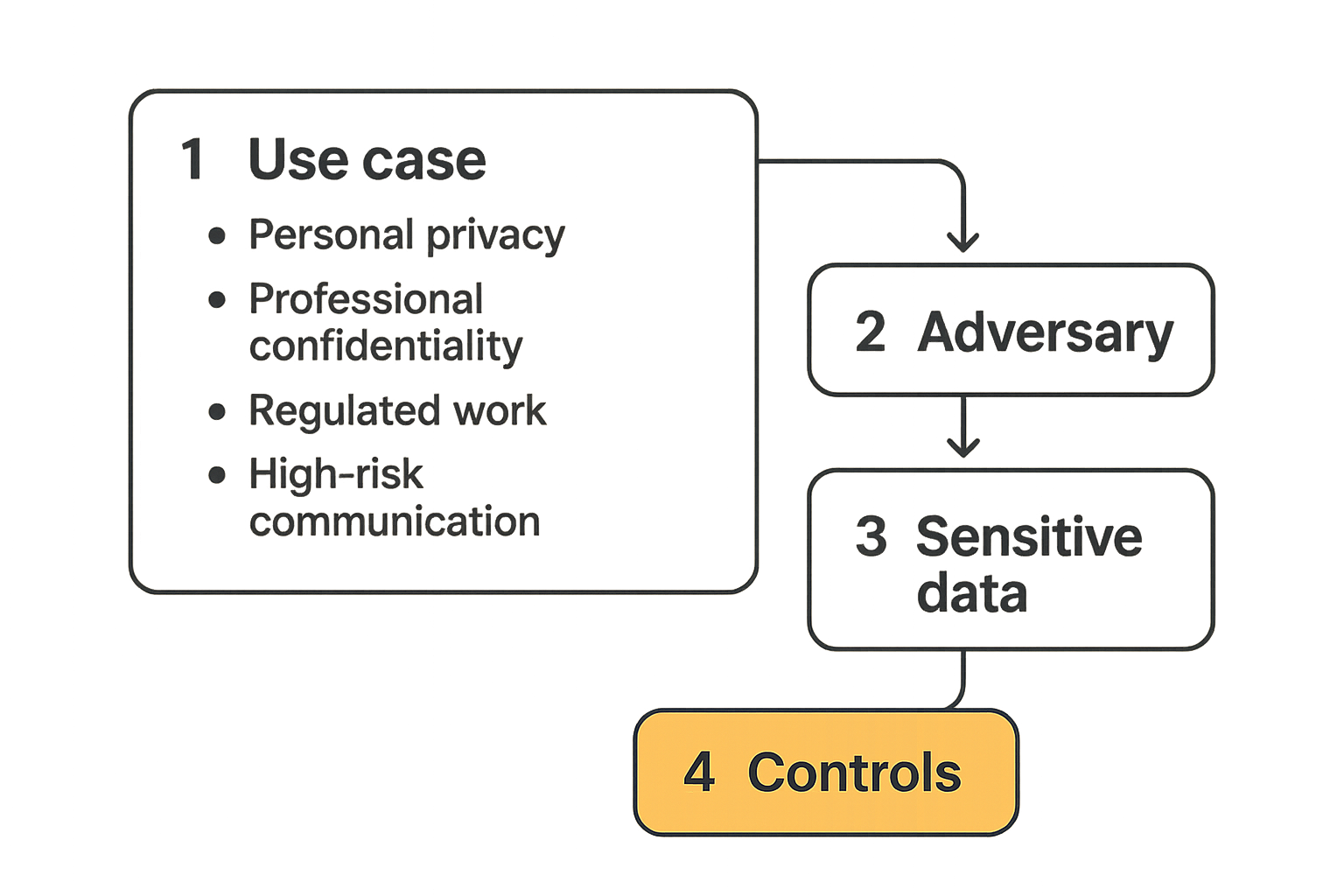
Start by naming the use case:
- Personal privacy: reduce exposure to platforms, advertisers, casual snooping, and weak defaults.
- Professional confidentiality: protect customer data, negotiations, credentials, internal decisions, and incident details.
- Regulated work: manage retention, access, audit expectations, legal holds, and documented policies.
- High-risk communication: protect vulnerable people, sources, activists, executives, or targeted employees.
These are not the same architecture. A tool that maximizes anonymity may frustrate enterprise onboarding. A tool that offers admin visibility may create a trust issue for sensitive personal communication. A tool that retains nothing may conflict with regulated recordkeeping.
Related reading from our network: teams making infrastructure choices face similar workflow-first tradeoffs in cloud computing companies architecture, where routing, validation, and operational fit matter more than a simple vendor ranking.
Adversaries, channels, and consequences
Threat modeling does not need to be academic. It needs to be specific enough to prevent bad defaults.
Ask three questions:
- Who are we trying to protect against? Casual snoops, abusive insiders, data brokers, compromised Wi-Fi, device thieves, phishing groups, cloud providers, legal discovery, or targeted surveillance?
- What communication matters? Credentials, customer records, personal safety details, financial information, product plans, legal strategy, incident response, or source identities?
- What happens if it leaks? Embarrassment, account takeover, customer harm, physical risk, regulatory exposure, business loss, or legal consequences?
The practical question is not whether a tool is absolutely secure. No production system deserves that label. The practical question is whether the tool reduces the most likely and most damaging exposure paths for your environment.
The minimum viable threat model
For most privacy-conscious users and small teams, a useful threat model fits on one page:
communication_classes:
  public: marketing, announcements, non-sensitive coordination
  internal: routine work, scheduling, low-risk files
  confidential: customer data, credentials, legal, finance, incidents
  high_risk: safety issues, source protection, targeted threats

allowed_channels:
  public: email, public chat, project tools
  internal: workplace chat
  confidential: approved secure messaging app
  high_risk: approved secure messaging app + identity verification

device_requirements:
  screen_lock: required
  os_updates: required
  cloud_backups: restricted
  notification_previews: disabled for confidential rooms
  lost_device_report_time: same day

retention:
  confidential: short default retention unless business need exists
  high_risk: shortest feasible retention
This is enough to guide app selection. If an app cannot support your channel rules, identity checks, device requirements, or retention expectations, it is probably not the right default.
Practical rule: A secure messaging rollout without a threat model becomes a popularity contest between apps. A one-page threat model turns it into an architecture decision.
Compare secure messaging apps by control points
Transport, endpoints, identity, and metadata
When comparing secure messaging apps, break the system into control points instead of feature names.
- Transport: Is content encrypted end to end? Are group messages protected? How are attachments handled?
- Endpoints: Where are keys stored? What happens on desktop clients, web sessions, and mobile devices?
- Identity: How do users know they are talking to the right person? Is verification visible and usable?
- Metadata: What does the service learn about who talks to whom, when, how often, and from where?
- Recovery: How do users regain access without creating a universal bypass?
- Administration: Can teams manage membership, policy, and offboarding without reading message content?
- Retention: Can users or admins control message lifetime in a way that matches risk?
That changes the conversation from which app is secure to which app gives us the right controls for this communication class.
The comparison table operators should use
| Evaluation area | Good sign | Warning sign | Question to ask |
|---|---|---|---|
| End-to-end encryption | Clear explanation of message, attachment, and group encryption | Vague security language without boundaries | What content can the provider technically access? |
| Identity verification | Users can verify contacts in a practical way | Trust is invisible or entirely automatic | How do users detect impersonation or key changes? |
| Metadata handling | Minimal collection, clear privacy posture | Broad logging or unclear retention | What data exists outside message content? |
| Device model | Multi-device behavior is documented | Web or desktop sessions are treated casually | Where do keys live and how are sessions revoked? |
| Backups | Encrypted or controllable backup model | Plain cloud backups undermine E2EE | Are message backups inside or outside the encryption boundary? |
| Admin controls | Membership and policy controls without content access | Admins must over-collect to manage risk | Can we govern rooms without reading messages? |
| Deletion and retention | Clear controls and user expectations | Deletion is ambiguous or inconsistent | What remains after a message or account is deleted? |
| Support path | Secure account recovery and abuse handling | Support can bypass user privacy | What can support staff access or reset? |
A comparison table like this forces tradeoffs into the open. Some consumer tools may be excellent for personal privacy but weak for team lifecycle management. Some enterprise tools may offer governance but collect metadata that high-risk users should avoid.
What the badge does not tell you
Security badges rarely explain operational boundaries. A page can say end-to-end encrypted while still leaving open questions about contact discovery, group membership, server-side metadata, device enrollment, push notifications, crash logs, and support access.
Look for technical clarity. For example, QryptChat publishes more about its security approach on the qrypt.chat security page, which is the right kind of place to examine claims about end-to-end encryption and post-quantum design before deciding whether the model fits your risk profile.
The mistake teams make is assuming a good cryptographic primitive automatically means a good secure messaging system. The primitive matters. The implementation, defaults, recovery path, and lifecycle controls matter just as much.
Metadata and identity are where privacy leaks
Contact discovery and social graphs
Message content gets most of the attention. Metadata does much of the damage.
A service may not read your messages but still learn that a lawyer contacted a client at midnight, a journalist messaged a source after a news event, an executive contacted a banker before an announcement, or an employee joined an incident response room after a breach alert.
Contact discovery is one common leak path. Apps often make onboarding easy by scanning address books or matching phone numbers. That may be acceptable for casual use. It may be unacceptable for high-risk communication where the contact graph itself is sensitive.
The practical question is whether the app can support your identity model without unnecessary exposure:
- Can users connect without uploading full address books?
- Are phone numbers required, optional, or hidden?
- Can users use handles, aliases, or organization-managed identities?
- Are group memberships visible beyond participants?
- Are key changes clearly surfaced?
Notifications, backups, and link previews
What breaks in practice is often outside the encrypted message pipeline.
Notifications can expose message text on lock screens. Cloud backups can store message history outside the app encryption model. Link previews may fetch URLs through servers or expose browsing intent. Keyboard apps, clipboard managers, screenshots, screen recording, and desktop search can create secondary copies.
None of this means users should panic. It means secure messaging apps should be configured as part of a wider device and data workflow.
Related reading from our network: home media and device ecosystems have the same hidden-surface problem, where the visible app is only one part of the privacy and support picture; see this workflow view of plug tech, streaming devices, and home media.
Practical metadata reduction
You will not eliminate metadata entirely. You can reduce unnecessary metadata and avoid creating avoidable records.
Good defaults include:
- Disable message previews for confidential conversations.
- Avoid uploading full contact books unless the risk is acceptable.
- Use disappearing messages for high-risk or low-retention conversations.
- Keep sensitive group names boring and non-revealing.
- Avoid sending sensitive links through preview-generating clients.
- Revoke old devices and sessions promptly.
- Separate public, internal, confidential, and high-risk channels.
Practical rule: If the relationship between people is sensitive, treat metadata as content. Design the channel accordingly.
Device security decides whether encryption survives
Keys live on messy endpoints
End-to-end encryption protects content between endpoints. It does not magically protect a compromised endpoint.
Phones get shared with family members. Laptops run browser extensions. Desktops stay logged in. Employees use unmanaged devices. People delay OS updates. Some users sync everything to consumer cloud services. Others take screenshots because they need to move information into a ticket, contract, or support case.
The secure messaging app can reduce risk, but the endpoint is where messages become readable. If an attacker controls the device, sees the screen, captures notifications, or steals an unlocked session, encryption has already done its job and the failure has moved elsewhere.
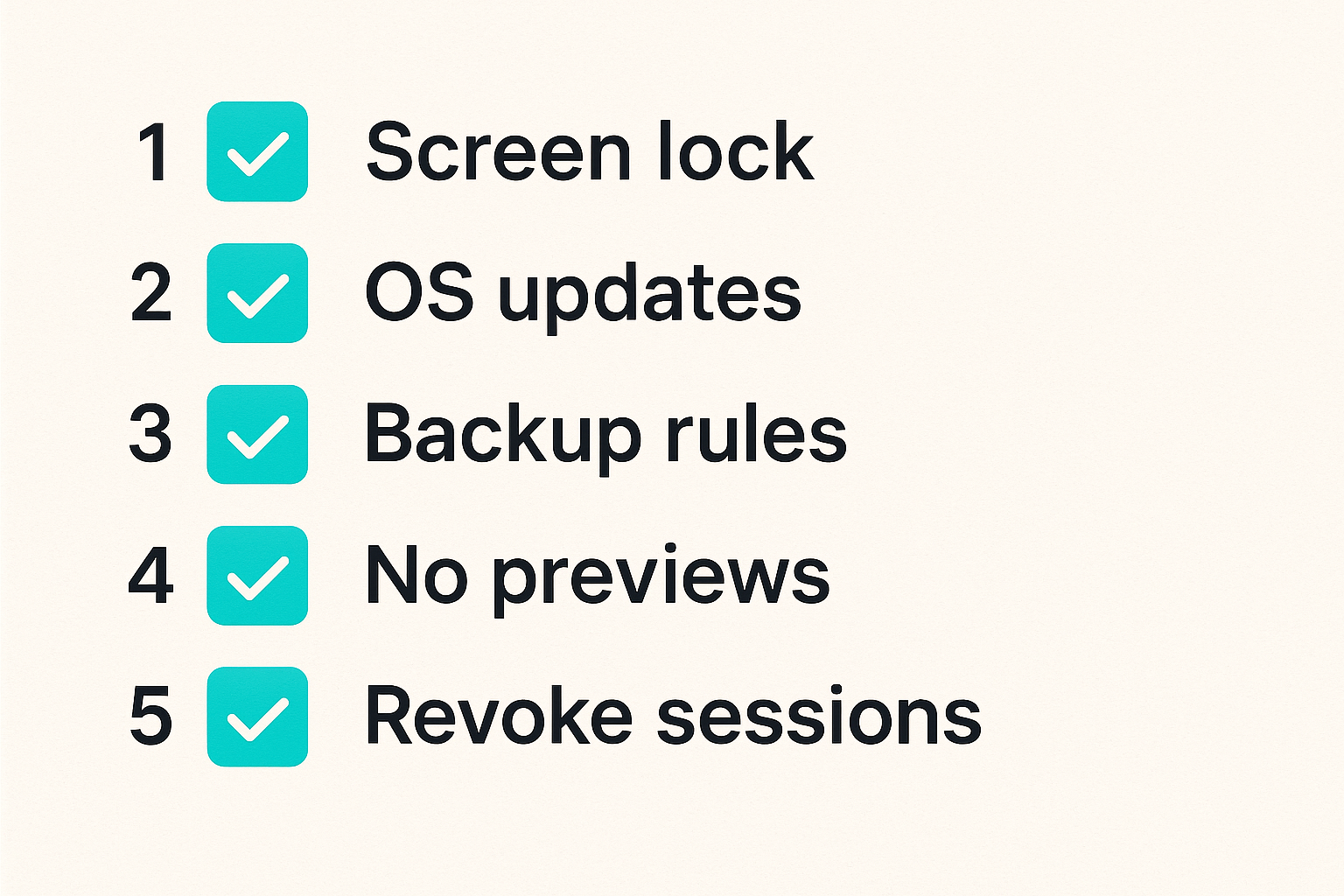
For teams, minimum endpoint rules should be explicit:
- Device passcode or biometric unlock required.
- Current operating system updates required.
- Lost device reporting required.
- Notification previews restricted.
- Old desktop and web sessions reviewed.
- Screen sharing guidance documented.
- Sensitive conversations avoided on unmanaged shared devices.
Screenshots, exports, and shared devices
Many privacy failures are user-experience failures. If people cannot extract a decision, preserve a required record, or share a safe summary, they may screenshot the entire thread. If they cannot invite the right person, they may forward content into email. If they cannot use the app on desktop, they may copy sensitive text into a less secure channel.
That is why secure messaging workflows need safe escape hatches.
Examples:
- For incident response, summarize decisions in the ticket system without copying secrets.
- For legal work, define when messages must be preserved and where official records belong.
- For customer support, move customer identifiers through approved systems rather than chat screenshots.
- For executive communication, define when high-risk topics must be handled in a verified room.
The mistake teams make is banning every unsafe action without providing a workable alternative. Users will route around impossible policies.
Recovery without creating a backdoor
Recovery is one of the hardest parts of secure messaging architecture. Users lose phones. Employees replace laptops. People forget passwords. Teams need continuity. But every recovery mechanism can become a bypass if designed poorly.
Evaluate recovery with uncomfortable questions:
- Can the provider reset access to message history?
- Can administrators add themselves to private rooms silently?
- Are recovery keys user-controlled, organization-controlled, or provider-controlled?
- Does a new device require participant visibility or verification?
- Can old devices be revoked quickly?
A privacy-preserving recovery model may be less convenient than a standard SaaS reset flow. That is not a bug. It is a tradeoff. The key is to make the tradeoff visible before rollout, not during the first lost-phone incident.
Team workflows need ownership and retention rules
Who creates rooms and approves members
For individual users, the room model is simple: talk to the people you trust. For teams, it gets messy fast.
A remote team may have rooms for engineering, leadership, finance, security incidents, vendors, contractors, and customer escalations. Without ownership, rooms become permanent semi-private archives with unclear membership and unknown sensitivity.
Assign owners to sensitive rooms. The owner does not need to read everything or police every message. Their job is to maintain the boundary:
- Why does this room exist?
- What class of information belongs here?
- Who approves new members?
- When should membership be reviewed?
- What is the retention expectation?
- Where should final records live if the room is temporary?
This is especially important for incident response. Related reading from our network: SOC teams can borrow useful triage and ownership patterns from CHP traffic incident thinking for SOC response, because the same problem appears in secure chat: fast coordination fails when ownership is ambiguous.
Retention, deletion, and legal reality
Privacy-conscious users often prefer short retention. Security professionals often agree, until the organization needs records for compliance, customer commitments, investigations, or legal holds.
The practical answer is not keep everything or delete everything. It is classify conversations.
| Conversation class | Typical retention posture | Operational note |
|---|---|---|
| Casual coordination | Short retention | Avoid turning chat into a permanent archive |
| Confidential work | Short to moderate retention | Keep official records in approved systems |
| Incident response | Short chat retention, durable incident record | Summaries belong in the case system |
| Legal or regulated matters | Policy-driven retention | Coordinate with counsel before deletion rules |
| High-risk personal safety | Shortest feasible retention | Reduce metadata and participant exposure |
Deletion also needs plain-language expectations. A deleted message may disappear from visible clients but still exist in backups, recipient devices, logs, screenshots, or exports depending on the system. Good policy does not overpromise.
A privacy policy is not a substitute for technical review, but it does describe important boundaries. Users evaluating qrypt.chat should read the qrypt.chat privacy information alongside security documentation and their own threat model.
Onboarding and offboarding sequence
A workable team rollout needs a repeatable sequence:
- Classify communication. Decide which topics must move to secure messaging and which stay elsewhere.
- Create approved rooms. Name owners, purpose, participant rules, and retention expectations.
- Verify identities. Require extra verification for high-risk rooms or external participants.
- Configure devices. Enforce screen locks, update expectations, notification settings, and backup guidance.
- Train users. Explain what belongs in the app, what does not, and how to report mistakes.
- Review membership. Check sensitive rooms on a schedule and after role changes.
- Offboard promptly. Remove departing users, revoke sessions, and confirm device access is closed.
This is not bureaucracy for its own sake. It prevents the common failure where the secure app becomes a second shadow workplace with no owner.
Validation: how to test secure messaging apps before rollout
Run realistic failure drills
Do not validate secure messaging apps only by sending a test message. Validate the cases that break systems.
Run a pilot with scenarios like:
- A user loses a phone while traveling.
- A contractor leaves a project.
- A key change appears for an executive account.
- A confidential message is sent to the wrong room.
- A user needs to preserve an official decision without exposing the full thread.
- A desktop session remains logged in after a laptop is reassigned.
- A high-risk participant needs to join without exposing their personal contact graph.
For each scenario, write down what happens, who owns the response, and whether the app supports the desired behavior.
Practical rule: If you have not tested lost devices, offboarding, key changes, and wrong-room messages, you have not tested the secure messaging workflow.
Check admin, audit, and support paths
Many teams focus on the user experience and forget the operational back office. That is where privacy tools can accidentally become unmanageable or overpowered.
Check these paths:
- Can admins remove users without accessing content?
- Can support staff reset accounts, and what does that expose?
- Are new device additions visible to users or room members?
- Can room ownership be transferred when someone leaves?
- Are abuse reports handled without broad content collection?
- Can the organization document policy without weakening end-to-end encryption?
Security professionals should be skeptical of both extremes. A tool with no administrative model may fail team operations. A tool with too much administrative power may undermine privacy. The right answer depends on the threat model.
Measure friction without weakening policy
Friction is not automatically bad. Some friction protects users. Identity verification should require attention. Adding a new device should not be invisible. Joining a sensitive room should not feel like joining a public channel.
But unnecessary friction creates workarounds. If users cannot search recent operational context, they may copy messages into notes. If external participants cannot join safely, teams may fall back to SMS. If retention is too aggressive for business workflows, people may export content elsewhere.
Measure friction during the pilot:
- How often do users leave the app for a less secure channel?
- Which policy settings generate support requests?
- Which workflows require screenshots or copying?
- Where do users misunderstand deletion or verification?
- Which teams need different defaults?
Then adjust the workflow, not just the training deck.
What works vs what fails in production
What works
What works is boring and consistent.
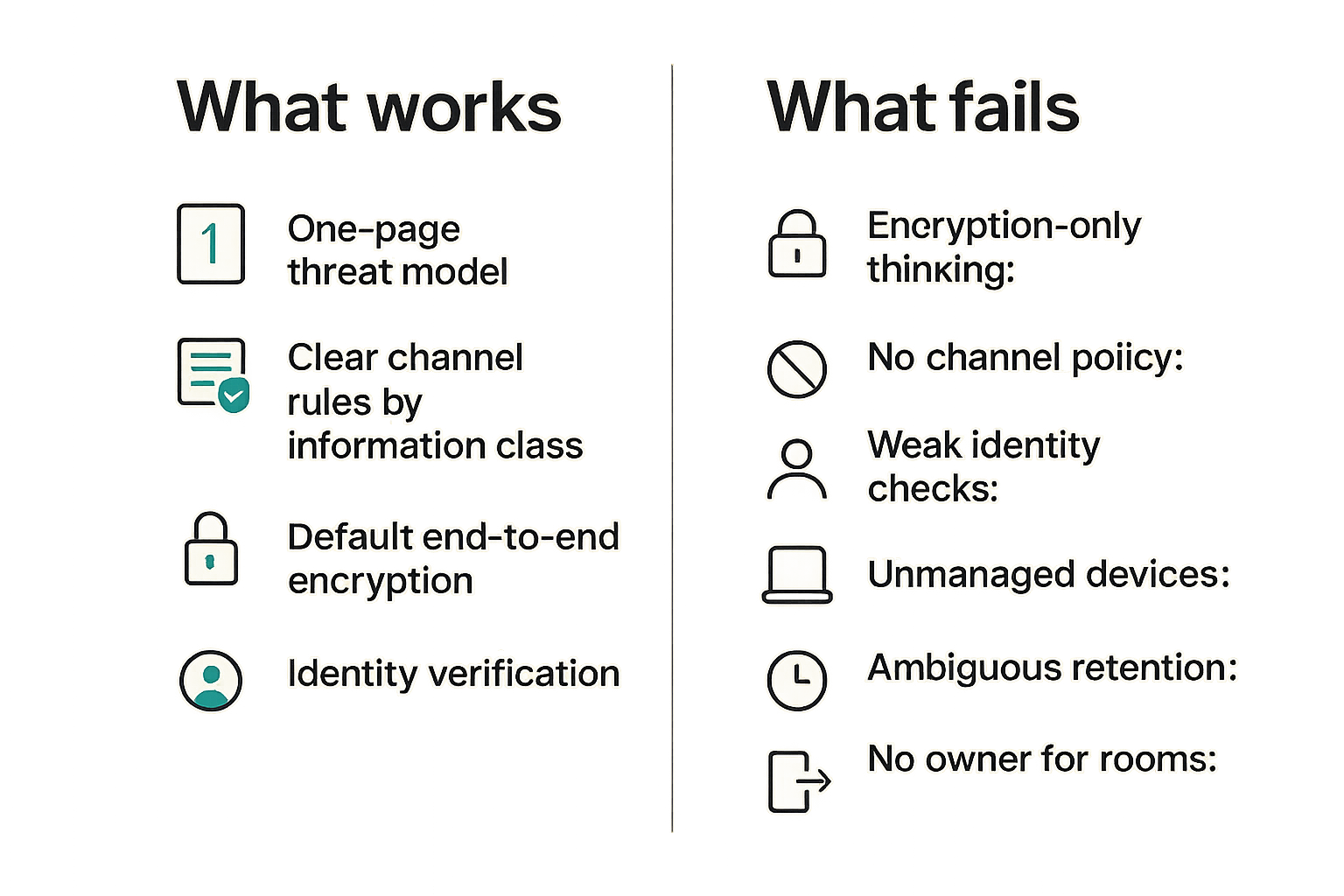
Strong secure messaging deployments usually have these traits:
- A one-page threat model.
- Clear channel rules by information class.
- Default end-to-end encryption for confidential content.
- Identity verification for high-risk conversations.
- Notification and backup guidance.
- Room owners for sensitive team spaces.
- Retention settings matched to business reality.
- Offboarding built into the employee and contractor lifecycle.
- Periodic reviews of devices and membership.
- Clear escalation paths for mistakes.
This is not about making every conversation maximally locked down. It is about making the secure path easier than the unsafe workaround for the conversations that matter.
What fails
What fails is also predictable.
- Encryption-only thinking: The team chooses an app but never changes behavior.
- No channel policy: Sensitive content still appears in SMS, email, and random workplace chat rooms.
- Weak identity checks: Users assume names and avatars are enough.
- Unmanaged devices: Old sessions, shared laptops, and exposed notifications leak content.
- Ambiguous retention: Users believe deletion means more than it technically means.
- No owner for rooms: Former contractors and stale participants remain in sensitive spaces.
- Support shortcuts: Account recovery bypasses the privacy model.
- Tool sprawl: Multiple secure apps create confusion about where sensitive work belongs.
The mistake teams make is viewing these as user discipline problems. Some are. Most are architecture problems. If the system makes the secure behavior unclear, slow, or unsupported, users will improvise.
Common breakpoints to watch
Watch the points where secure messaging touches the rest of work:
- Copying chat decisions into project management tools.
- Sending files from secure rooms into email for convenience.
- Inviting vendors or contractors to internal rooms.
- Handling customer data in screenshots.
- Moving incident response from chat into durable records.
- Switching phones or adding desktop clients.
- Traveling with unlocked or poorly configured devices.
- Using AI tools, transcription tools, or plugins near sensitive content.
A useful way to think about it is that secure messaging is the control plane for private coordination, not the storage system for every business record. If the app becomes the only place decisions live, users will fight retention. If the app is only a temporary coordination layer, deletion becomes easier to reason about.
Implementation plan for privacy-conscious teams
Phase 1: map conversations
Start with inventory, not installation.
List where sensitive communication happens today:
- Email threads.
- SMS and personal messengers.
- Workplace chat.
- Video meeting chat.
- Ticket comments.
- Project management tools.
- Shared documents.
- Customer support systems.
- Personal notes and screenshots.
Then classify the top conversation types. For each, decide whether secure messaging is the right channel, a temporary coordination layer, or not appropriate at all.
Example mapping:
| Conversation type | Current channel | Risk | Target workflow |
|---|---|---|---|
| Password sharing | Workplace chat | High | Stop; use password manager |
| Incident triage | Mixed chat and calls | High | Secure room plus incident record |
| Customer escalation | Email and support tool | Medium | Support tool for records, secure chat for coordination |
| Executive travel | SMS | High | Verified secure room, short retention |
| Routine scheduling | Any | Low | Leave outside secure channel |
This prevents the common problem where secure messaging becomes a dumping ground for everything.
Phase 2: configure policy
Turn the threat model into defaults.
A small team policy might look like this:
secure_messaging_policy:
  required_for:
    - credentials_discussion
    - security_incidents
    - legal_strategy
    - executive_travel
    - sensitive_customer_escalations

  prohibited_content:
    - raw_passwords
    - long_term_secret_storage
    - full_customer_exports

  room_controls:
    owner_required: true
    external_members_require_approval: true
    quarterly_membership_review: true

  device_controls:
    notification_previews: disabled_for_sensitive_rooms
    screen_lock: required
    unmanaged_shared_devices: prohibited_for_high_risk

  retention:
    default_confidential_room_days: 30
    high_risk_room_days: 7
    official_records_location: approved_system_of_record
Do not copy this blindly. Use it as a starting structure. The right retention period and device requirements depend on your legal, operational, and personal risk.
Phase 3: train, monitor, and revisit
Training should be practical, not theatrical. Users need to know:
- Which topics belong in secure messaging apps.
- How to verify a contact or key change.
- What deletion does and does not mean.
- How to report a wrong-room message.
- How to add a new device safely.
- What to do before travel.
- Where official records belong.
Monitoring does not mean reading message content. It means reviewing the workflow:
- Are sensitive rooms owned?
- Are stale members removed?
- Are device sessions current?
- Are users falling back to insecure channels?
- Are support requests revealing usability problems?
- Are retention settings still aligned with business needs?
Revisit the model after major changes: new jurisdictions, new contractors, new device policies, new regulatory obligations, new threat activity, or a major incident. Secure communication is not a one-time procurement decision.
Where qrypt.chat fits into the secure messaging apps decision
Product fit without pretending tools solve everything
qrypt.chat is built for people who care about private communication, secure messaging, and practical digital security. That means the product conversation should stay grounded: an encrypted app can provide strong technical foundations, but users and teams still need a threat model, device hygiene, identity discipline, and retention rules.
The fit is strongest when the buyer or user already understands that secure messaging apps are part of a privacy architecture, not a magic privacy blanket. If you are evaluating end-to-end encrypted messaging with post-quantum cryptography in mind, the qrypt.chat about page is a useful place to understand the project direction and decide what questions to ask next.
What to evaluate next
Before standardizing on any secure messaging app, including qrypt.chat, evaluate these items against your actual workflow:
- Does the app protect message content in the way your threat model requires?
- Does the identity model work for your users, contacts, and teams?
- Does device enrollment make key changes visible enough?
- Can you manage sensitive rooms without over-collecting content?
- Do retention and deletion settings match your legal and privacy expectations?
- Can normal users recover from common mistakes without support creating a bypass?
- Does the app reduce insecure workarounds rather than creating new ones?
The closing point is simple: secure messaging apps are useful when they become the trusted path for the right conversations. They fail when teams treat them as a badge and leave the surrounding workflow untouched.
Try qrypt.chat
qrypt.chat is for people who care about private communication, secure messaging, and practical digital security. If you are evaluating secure messaging apps for 2026, start with the workflow, then test the tool against it.