
Most teams do not lose privacy because they picked the wrong chat icon. They lose it because nobody owns the whole communication workflow.
A security service sounds like something you buy: endpoint monitoring, a managed SOC, a secure messaging app, a policy engine, a compliance portal. In private communication, that is too narrow. The security service is the operating layer around how sensitive messages are created, delivered, stored, searched, escalated, retained, and deleted.
Teams think the problem is finding a more secure tool. The real problem is building a communication system that still works when devices are lost, users leave, links get forwarded, regulators ask questions, or an incident starts at 2:13 a.m.
That changes the conversation. In 2026, encrypted messaging is no longer a niche requirement. Remote teams, security professionals, executives, legal operators, journalists, founders, and privacy-conscious users all need communication that is private by design and operationally usable. The practical question is not whether encryption matters. It is whether your security service can turn encryption into a reliable workflow.
Table of contents
- What a security service means for private communication
- Why security service decisions are harder in 2026
- The security service reference architecture
- What works: security controls that survive real use
- What fails: common security service anti-patterns
- Implementation workflow for remote teams
- Incident response inside a private messaging environment
- How to evaluate a security service vendor
- Product fit: where qrypt.chat belongs
What a security service means for private communication

A useful way to think about a security service is simple: it is the set of controls and workflows that protect a sensitive activity from predictable failure. For private messaging, the sensitive activity is not just sending a message. It includes user identity, device trust, key handling, group membership, access revocation, message retention, attachments, escalation, and support.
The mistake teams make is treating secure messaging as a binary. Encrypted or not encrypted. Approved or not approved. Enterprise or consumer. That framing misses the actual risk. A strong cryptographic design can still be undermined by weak onboarding, shared devices, unmanaged screenshots, unclear retention, or an admin model that gives too many people too much power.
The tool is only one layer
The chat application is visible, so it gets the attention. But the user interface is the thinnest part of the system. What breaks in practice is the state around it.
A private communication security service needs answers for:
- Who is allowed to join a sensitive conversation?
- How is a device trusted, replaced, or removed?
- What happens when an employee leaves?
- Can administrators manage access without reading messages?
- How are suspicious links, files, or identity changes handled?
- Which records are retained, and which should not exist in the first place?
- How does the team coordinate during a security incident without moving to an unsafe channel?
If those questions are answered informally, the security service is informal. That may work for a three-person team. It does not scale well.
Practical rule: Do not evaluate a security service only by its encryption claim. Evaluate the workflow around identity, devices, membership, recovery, and response.
The service boundary matters
Every security service has a boundary. Inside the boundary, you expect protection. Outside it, you need assumptions, compensating controls, or acceptance of risk.
For encrypted messaging, the boundary usually includes the messaging client, transport, cryptographic protocol, account model, device trust model, and administrative controls. It may not include endpoint malware, camera capture, human coercion, screen recording, unmanaged backups, or conversations copied into another platform.
That does not make encrypted messaging weak. It makes architecture honest.
The practical question is: where does your private communication layer stop, and what service owns the next risk? If endpoint detection owns device compromise, say that. If legal owns retention, document it. If managers own group membership, define it. Security fails when everyone assumes someone else is handling the edge case.
Why security service decisions are harder in 2026
The pressure on private communication has changed. More business decisions happen in chat. More incidents begin with messages. More sensitive files move between personal and work devices. More users expect privacy, but fewer tolerate friction.
At the same time, attackers have become practical. They do not need to break modern encryption if they can compromise an account, trick a user, abuse notification previews, capture a recovery flow, or get a screenshot forwarded into an unsafe channel.
Private messaging is now business infrastructure
Private messaging used to be treated as a side channel. In many organizations, it is now where approvals happen, security incidents are coordinated, legal questions are triaged, customer problems are escalated, and leadership decisions are made.
That makes the security service around messaging part of business continuity. If the secure channel is unavailable during an incident, people will move to whatever works. Usually that means personal SMS, consumer chat, email, or a hastily created group in a tool nobody has reviewed.
The wrong lesson is to ban alternatives with a policy nobody follows. The better lesson is to make the secure workflow usable enough that people do not need to improvise.
For teams comparing privacy posture and product assumptions, the qrypt.chat overview of quantum-resistant encrypted messaging is a useful starting point because it frames secure chat as a privacy architecture, not just a convenience feature.
Attackers target workflow gaps
In production, many privacy incidents are workflow incidents. A user joins the wrong group. A contractor keeps access too long. An executive receives a convincing impersonation message. A support screenshot leaks a private thread. A team exports messages to analyze an issue and stores the export in a shared drive.
These are not exotic failures. They are the normal cost of operating communication systems without clear ownership.
Related reading from our network: teams building software delivery pipelines face similar boundary problems in network security for CI/CD and software supply chains, where runners, registries, webhooks, and response paths matter more than one isolated control.
The security service reference architecture
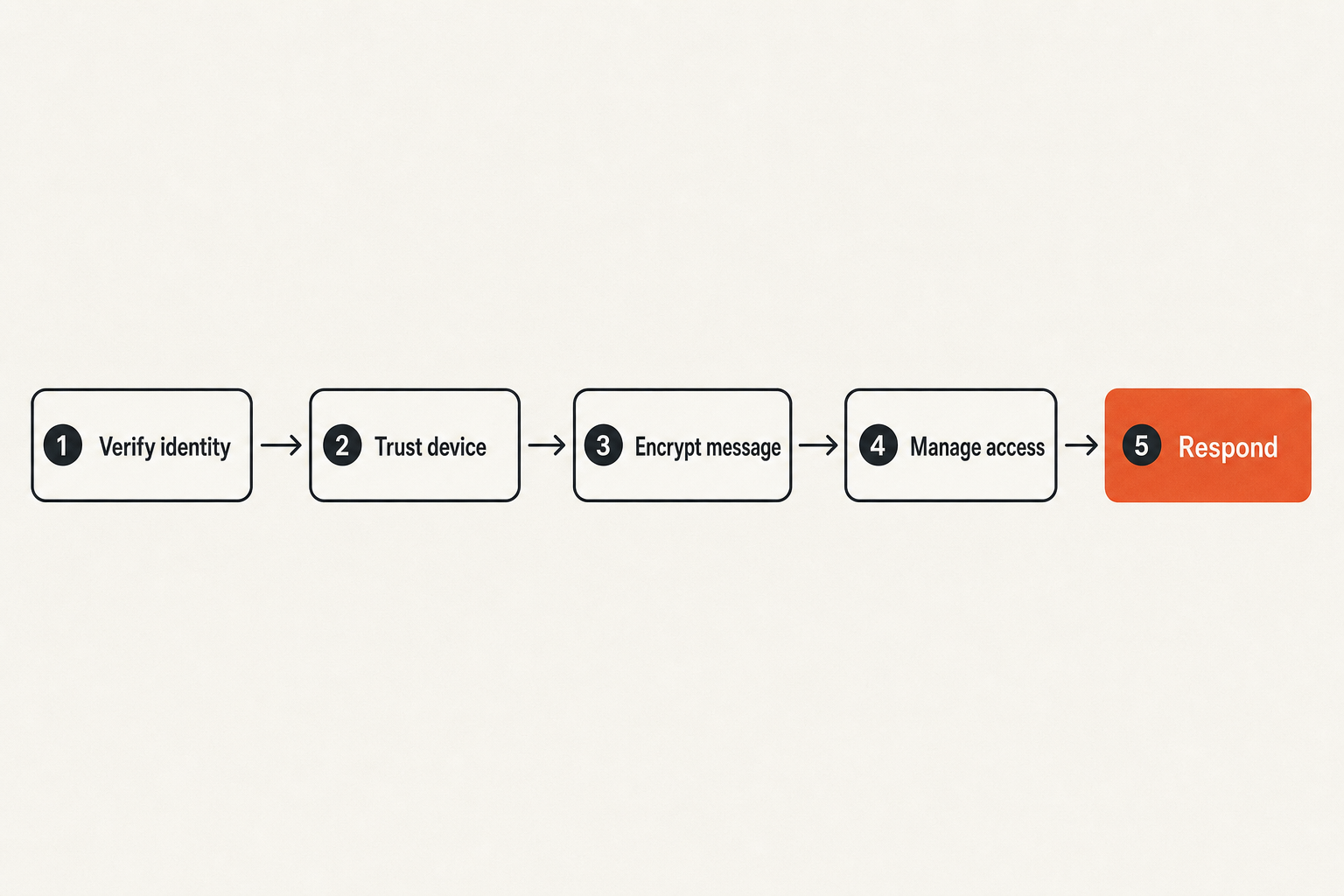
A good security service architecture for private messaging should be boring in the best way. It should define what happens before, during, and after communication. It should reduce judgment calls during stressful moments. It should preserve confidentiality while giving operators enough control to manage access and respond to incidents.
Think in layers, not features.
Identity, device, message, and response layers
A practical reference model has four layers.
- Identity layer: who the user claims to be, how they authenticate, and how the organization verifies them.
- Device layer: which devices can access messages, how device changes are approved, and how lost devices are removed.
- Message layer: how content is encrypted, delivered, stored, retained, deleted, and protected from unnecessary exposure.
- Response layer: how the team detects suspicious activity, escalates concerns, preserves evidence where appropriate, and communicates during incidents.
Each layer should have an owner. If identity is owned by IT, device trust by security, retention by legal, and group membership by business managers, write that down. If one person owns all of it in a small team, write that down too.
Practical rule: If nobody owns a layer of the messaging workflow, the control does not exist. It is just an assumption waiting to fail.
Where encrypted messaging fits
Encrypted messaging sits primarily in the message layer, but it influences every other layer. End-to-end encryption protects message content from service-side exposure. Post-quantum design choices may help address long-term confidentiality concerns where adversaries can store encrypted traffic today and attempt decryption later.
But encryption does not decide whether Bob should still be in the legal strategy group. It does not validate that a new phone belongs to Alice. It does not prevent a user from pasting secrets into an unapproved tool. That is why a security service needs both cryptographic controls and operational controls.
A useful division looks like this:
- Cryptography protects content in transit and at rest within the intended model.
- Identity controls reduce account impersonation and unauthorized enrollment.
- Device controls limit where plaintext can appear.
- Policy controls define acceptable use and escalation paths.
- Response controls keep the team from abandoning secure channels during an incident.
This is also why vendor questions should be architectural. Ask what the provider can see. Ask what admins can do. Ask what logs exist. Ask what happens when trust changes.
What works: security controls that survive real use
Security services fail when controls are technically correct but operationally unrealistic. If the process is too slow, users bypass it. If the admin model is too powerful, privacy suffers. If logs are too verbose, sensitive metadata accumulates. If logs are nonexistent, response becomes guesswork.
What works is a set of controls that minimize exposure while still supporting day-to-day operations.
Minimize metadata exposure
Message content is the obvious privacy concern, but metadata can also be sensitive. Who talked to whom, when, how often, from which device, and inside which group can reveal legal strategy, business negotiations, medical context, political activity, or personal relationships.
A mature security service asks what metadata is necessary for operation and what metadata is only convenient for analytics, monitoring, or support.
Examples of metadata minimization choices:
- Avoid storing message content on servers in readable form.
- Limit retention of delivery logs where possible.
- Separate billing or account data from conversation data.
- Reduce unnecessary user activity dashboards.
- Avoid broad search features that require server-side visibility into content.
- Design support workflows that do not ask users to paste private messages into tickets.
The qrypt.chat privacy page is relevant here because privacy posture is not only about encryption. It is also about what the service chooses not to collect, expose, or operationalize.
Separate admin power from message visibility
Administrative control is necessary. Someone must remove users, manage teams, handle lost devices, and keep the service available. But administrative control should not automatically mean content visibility.
This is one of the most important distinctions in private messaging architecture. In weak designs, admin convenience becomes surveillance. In better designs, admins can manage membership and policy without reading private conversations.
Practical rule: Admins should be able to manage access without becoming silent participants in every conversation.
For many teams, this requires a mindset shift. Security leadership may want visibility for investigations. Legal may want retention. Managers may want auditability. Privacy-conscious users may want strong confidentiality. A working security service balances these needs through clear boundaries, not vague promises.
The best answer is rarely maximum visibility. It is targeted visibility, minimum necessary metadata, defined escalation, and documented tradeoffs.
What fails: common security service anti-patterns
Most failed security service deployments look reasonable in the planning meeting. They fail later because the architecture ignored human behavior, unclear ownership, or operational pressure.
The mistake teams make is buying a control and assuming adoption equals protection. Adoption is only the start. Protection depends on whether users know what belongs in the secure channel, whether admins can maintain trust, and whether the system still works under stress.
Compliance theater without operational control
Compliance theater happens when the organization can show a policy, a vendor contract, and a training slide, but cannot operate the workflow.
Symptoms include:
- Users do not know which conversations require the secure channel.
- Contractors remain in groups after projects end.
- Incident response moves to email because the secure tool is not set up for crisis coordination.
- Sensitive screenshots are pasted into ticketing tools.
- Retention rules exist but nobody knows how they map to actual message storage.
- Device loss is handled ad hoc.
This is not a paperwork problem. It is a service design problem.
Related reading from our network: consumer media workflows face a softer version of the same issue in AP Bio streaming in 2026, where the legal and privacy-safe path depends on workflow clarity, not just finding an app that plays video.
Centralized convenience that weakens privacy
The other failure mode is centralizing everything because it makes management easier. Centralized search, centralized archives, centralized admin review, centralized exports, centralized support access. Each feature may sound useful. Together, they can collapse the privacy model.
A private messaging security service should be skeptical of convenience features that require broad access to sensitive content. The question is not whether a feature is useful. The question is what it makes visible, to whom, under what conditions, and for how long.
What fails:
- Server-side message indexing that exposes content.
- Support tooling that lets staff inspect conversations by default.
- Group exports with weak access controls.
- Notification previews that reveal sensitive content on locked screens.
- Backup flows that store plaintext outside the encrypted model.
- Recovery processes that allow account takeover with weak verification.
What works:
- Narrow administrative actions.
- Strong device re-verification.
- Clear warnings when group membership changes.
- Minimal support access to private content.
- User-visible trust changes.
- Retention choices aligned to risk and law.
Implementation workflow for remote teams
Remote teams make the security service problem sharper. People work across home networks, personal devices, temporary locations, client environments, airports, coworking spaces, and time zones. The secure messaging layer has to support real work without turning every conversation into a help desk ticket.
The practical question is: how do you roll this out without creating a policy nobody follows?
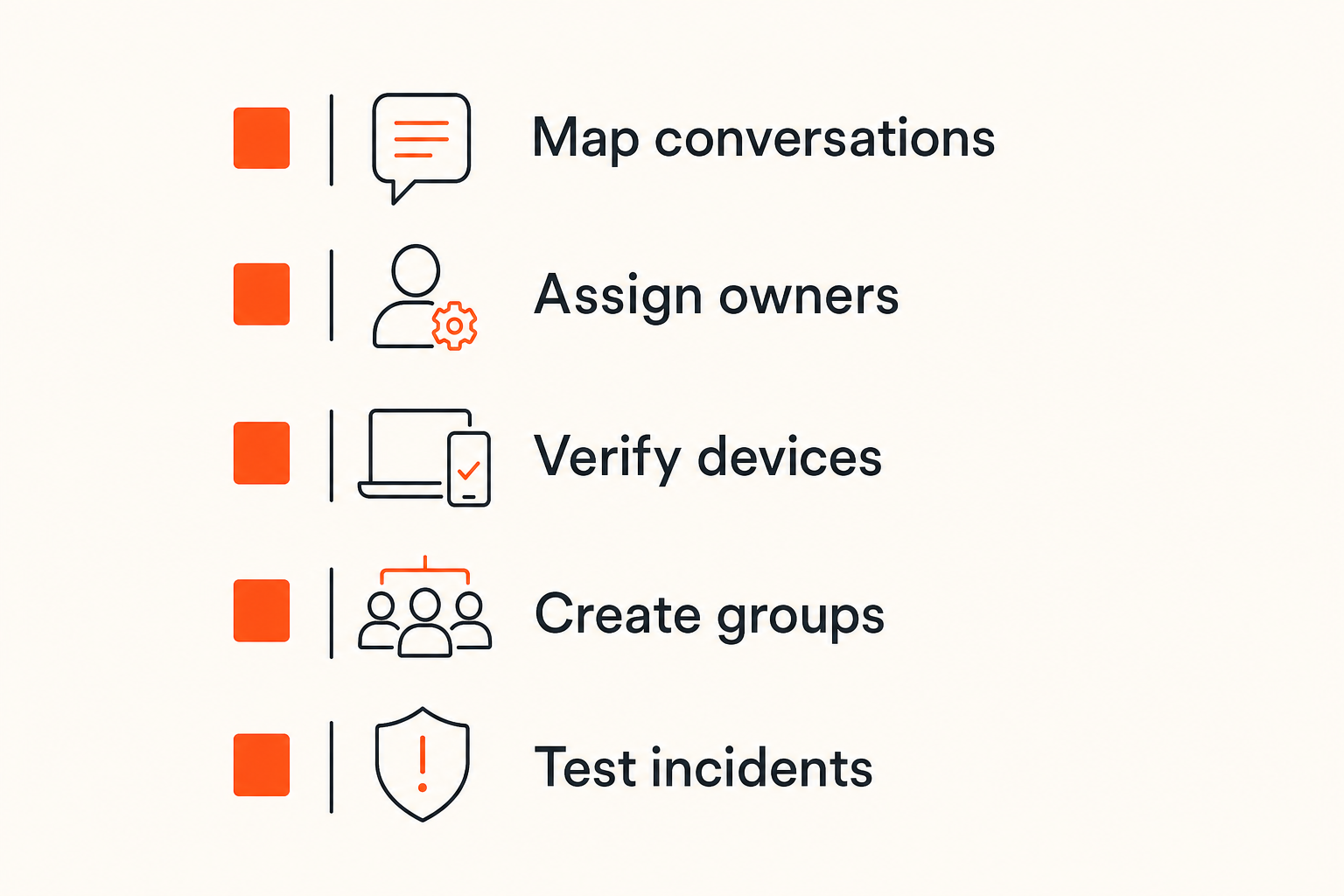
A practical rollout sequence
Use a staged implementation. Do not start with a 40-page policy. Start with the workflows that create the most exposure.
- Map sensitive conversation types. Identify legal, finance, security, executive, customer, HR, incident response, and product strategy conversations.
- Define required channels. Decide which conversation types must use encrypted messaging and which can stay elsewhere.
- Assign owners. Name who owns identity, devices, group membership, retention, and incident communication.
- Establish enrollment rules. Define how users join, how devices are approved, and how identity changes are verified.
- Create group templates. Build standard groups for incident response, leadership, legal coordination, and customer escalation.
- Write exit procedures. Remove users and devices during offboarding, role changes, contractor completion, or suspected compromise.
- Test incident communication. Run a short drill where email and normal chat are assumed compromised or unavailable.
- Review metadata and retention. Decide what is collected, why it is needed, and when it is deleted.
- Train with scenarios. Give users examples, not slogans.
This sequence turns secure messaging from an app rollout into a security service implementation.
Policy examples that reduce ambiguity
Policies should be short enough to use and specific enough to enforce. Long policy documents often fail because users cannot translate them into daily behavior.
A useful policy snippet might look like this:
secure_messaging_policy:
  required_for:
    - incident_response
    - legal_strategy
    - executive_approvals
    - customer_security_escalations
    - credential_or_secret_discussions
  prohibited_actions:
    - forwarding_sensitive_threads_to_email
    - pasting_private_messages_into_support_tickets
    - adding_unverified_external_users
    - storing_plaintext_exports_in_shared_drives
  device_rules:
    lost_device_report_time: immediate
    new_device_verification: out_of_band_required
    contractor_access_review: weekly
The point is not the YAML. The point is removing ambiguity. Users should not have to guess whether a security incident belongs in the secure channel. Managers should not have to improvise offboarding. Security should not discover during an investigation that half the evidence is scattered across personal apps.
For more detailed architectural thinking on this topic, the prior qrypt.chat guide to security service architecture for encrypted messaging goes deeper into threat ownership, team workflows, and validation.
Incident response inside a private messaging environment
Incident response creates a paradox. During an incident, teams need to communicate quickly. But the incident may involve compromised accounts, suspicious devices, phishing, insider risk, or exposed systems. Moving fast in the wrong channel can make the incident worse.
A private messaging security service should include an incident mode. Not necessarily a special button, but a defined workflow for high-risk communication.
Respond without breaking confidentiality
Incident channels should be created before the incident. Membership should be reviewed regularly. Backup contacts should be known. Device trust should be current. If you wait until the breach to decide where the breach team talks, you are already behind.
For sensitive response work, define:
- Primary secure incident group.
- Secondary secure group if identity compromise is suspected.
- Out-of-band verification method for adding members.
- Rules for sharing indicators, screenshots, logs, and customer data.
- Decision log location and retention boundary.
- Executive update format.
- Legal and communications escalation path.
The security service does not need to replace your entire incident response platform. But it should make sure the human coordination layer does not become the weakest link.
Related reading from our network: the same production-signing and credential-boundary thinking appears in Apple Developer Program architecture for open AI agent standards, where identity, events, credentials, and privacy must be designed before automation scales.
Validate controls before the incident
Many controls look fine until tested. A quarterly tabletop exercise can reveal simple failures:
- The incident group has outdated members.
- The legal contact is not enrolled.
- A new executive has not verified a device.
- Notification previews expose sensitive incident details.
- People still paste logs into email because the secure channel does not support the workflow.
- The escalation path depends on a person who is unavailable.
Do not run theatrical drills. Run operational drills. Pick one scenario and test whether communication stays private, fast, and controlled.
Practical rule: A security service is not validated by procurement. It is validated when users can complete a sensitive workflow under pressure without bypassing controls.
How to evaluate a security service vendor
Vendor evaluation should not be a feature checklist copied from the last procurement cycle. For private communication, you need to understand architecture, visibility, failure modes, and operational fit.
The practical question is not which vendor has the longest security page. It is which vendor's assumptions match your threat model.
Questions that expose architecture quality
Ask direct questions. Vague answers are useful signals.
- What message content can the provider access, if any?
- What metadata is collected, retained, and exposed to admins?
- How are keys generated, stored, rotated, and protected?
- How are new devices verified?
- What happens when a user loses a device?
- Can admins read messages, export conversations, or silently join groups?
- How are group membership changes shown to users?
- What logs exist for administrative actions?
- How does support operate without requesting private content?
- What happens if the service is unavailable during an incident?
- How does the product handle long-term confidentiality risk?
- What are the limits of the security model?
The last question matters. A trustworthy provider can explain what the service does not protect against. Overconfident claims are a risk signal.
For teams that need to inspect security posture, the qrypt.chat security page is the right place to review how the service presents its design assumptions and protection model.
Comparison table for buyers and operators
Use a table like this during evaluation. It forces the discussion away from slogans and toward operating reality.
| Evaluation area | Weak security service | Stronger security service |
|---|---|---|
| Encryption claim | Broad marketing language | Clear model, limits, and user-visible trust assumptions |
| Admin control | Admins can access too much by default | Admins manage access without routine content visibility |
| Metadata | Collected broadly for convenience | Minimized, explained, and retained only when needed |
| Device changes | Treated as normal login events | Verified, visible, and revocable |
| Incident workflow | Users improvise under pressure | Predefined secure groups and escalation rules |
| Support model | Users paste private content into tickets | Support avoids content access and uses safe diagnostics |
| Offboarding | Manual and inconsistent | Owned, repeatable, and audited |
| Retention | Undefined or excessive | Mapped to legal, privacy, and operational needs |
| User experience | Secure but unusable | Secure enough to become the default workflow |
No table will decide for you. But it makes tradeoffs visible. That changes the conversation with leadership, legal, security, and users.
Product fit: where qrypt.chat belongs
qrypt.chat belongs in the private messaging layer of a security service architecture. That is an important distinction. It is not a replacement for endpoint security, identity governance, legal policy, or incident response ownership. It is the encrypted communication layer those workflows depend on when privacy matters.
The right product fit is strongest when a team has sensitive conversations that should not be exposed to unnecessary infrastructure, administrators, support systems, or casual forwarding into weaker channels.
A private messaging layer, not a whole security department
A secure messaging product should help with confidentiality, trust, and usable private communication. It should not pretend to solve every risk around human behavior, compromised endpoints, or organizational policy.
That honesty is useful. If you are building a security service around private communication, qrypt.chat can be evaluated as the secure channel for sensitive coordination. Then you wrap it with your identity decisions, device rules, offboarding process, incident playbooks, and retention expectations.
A practical deployment might look like this:
- Use qrypt.chat for incident coordination, leadership discussion, legal-sensitive threads, and high-trust remote team communication.
- Define which teams and groups require it.
- Keep group membership small and owned.
- Verify new devices out of band for sensitive roles.
- Avoid copying private threads into email, tickets, or shared drives.
- Train users on what belongs in the secure channel and what does not.
The closing point is simple: a security service for private messaging works when encryption, ownership, workflow, and response line up. If one of those is missing, the system will still look secure in a demo and still break in practice.
Try qrypt.chat
qrypt.chat is for people who care about private communication, secure messaging, and practical digital security. If your team needs a security service layer for encrypted communication, start with the secure channel and build the workflow around it.