
A virtual assistant needs a password, a customer record, or a draft contract to complete a task. The fastest path is often a direct message. That message is then copied into email, exposed in a notification preview, retained on a personal device, or left accessible after the assistant's contract ends.
Teams think the problem is choosing a VA secure messaging app. The real problem is controlling how sensitive work moves between people, devices, conversations, and business systems.
Encryption matters, but the inbox is only one component. Identity verification, channel design, device policy, retention, escalation, and offboarding determine whether the workflow remains private in production. That changes the conversation from “Which app should we install?” to “What communication system can we operate safely?”
This guide uses “VA” primarily to mean virtual assistant. If your context is the US Department of Veterans Affairs, healthcare, or another regulated organization, use only institutionally approved systems and follow the applicable records, privacy, and authorization requirements. The architectural questions below still apply, but they do not replace formal compliance guidance.
Table of contents
- VA secure messaging is an operating model
- Design the VA secure messaging architecture
- Control identity devices and access
- Route conversations by purpose and sensitivity
- Evaluate encryption metadata and key behavior
- Set retention records and recovery rules
- Implement VA secure messaging in stages
- Avoid common secure messaging failures
- Measure whether the workflow works
- Fit qrypt.chat into the communication boundary
VA secure messaging is an operating model
Resolve the meaning of VA first
“VA secure messaging” can refer to communication with a virtual assistant, messaging associated with Veterans Affairs services, or a product using VA as an internal abbreviation. Those environments have different owners and obligations.
A founder working with a remote assistant can define a private collaboration process. A clinician, contractor, or patient interacting with Veterans Affairs cannot substitute an unapproved consumer messenger for an authorized healthcare channel. Write the use case at the top of the project brief, identify the policy owner, and record which rules govern it.
The practical question is not whether a messenger looks secure. It is whether the organization is authorized to use it for the specific people, data, and task involved.
Map the information before the app
List what the assistant actually handles during a normal week. Common categories include calendar details, customer names, invoices, internal drafts, authentication links, support screenshots, personal identifiers, and account recovery information.
Classify each category using a simple model:
- Routine: scheduling, public links, and non-sensitive coordination.
- Internal: drafts, procedures, and operational discussions.
- Restricted: credentials, identity records, financial data, private customer content, or regulated information.
- Prohibited: data the assistant or chosen channel must never receive.
This inventory exposes where stronger controls are needed. It also prevents the common policy of treating every message identically, which usually leads users to ignore the policy.
Define the trust boundary
Draw the boundary around authorized users, approved devices, messaging infrastructure, and connected services. Anything outside it—including personal email, consumer cloud backups, browser extensions, and pasted AI prompts—needs an explicit decision.
Practical rule: If the team cannot identify where a message may be stored, previewed, exported, or forwarded, it has not defined a secure messaging boundary.
Trust is not permanent. It changes when a device is replaced, a contractor adds a subcontractor, an integration receives message content, or an employee leaves. VA secure messaging therefore needs lifecycle controls, not just a secure sign-in ceremony.
Design the VA secure messaging architecture
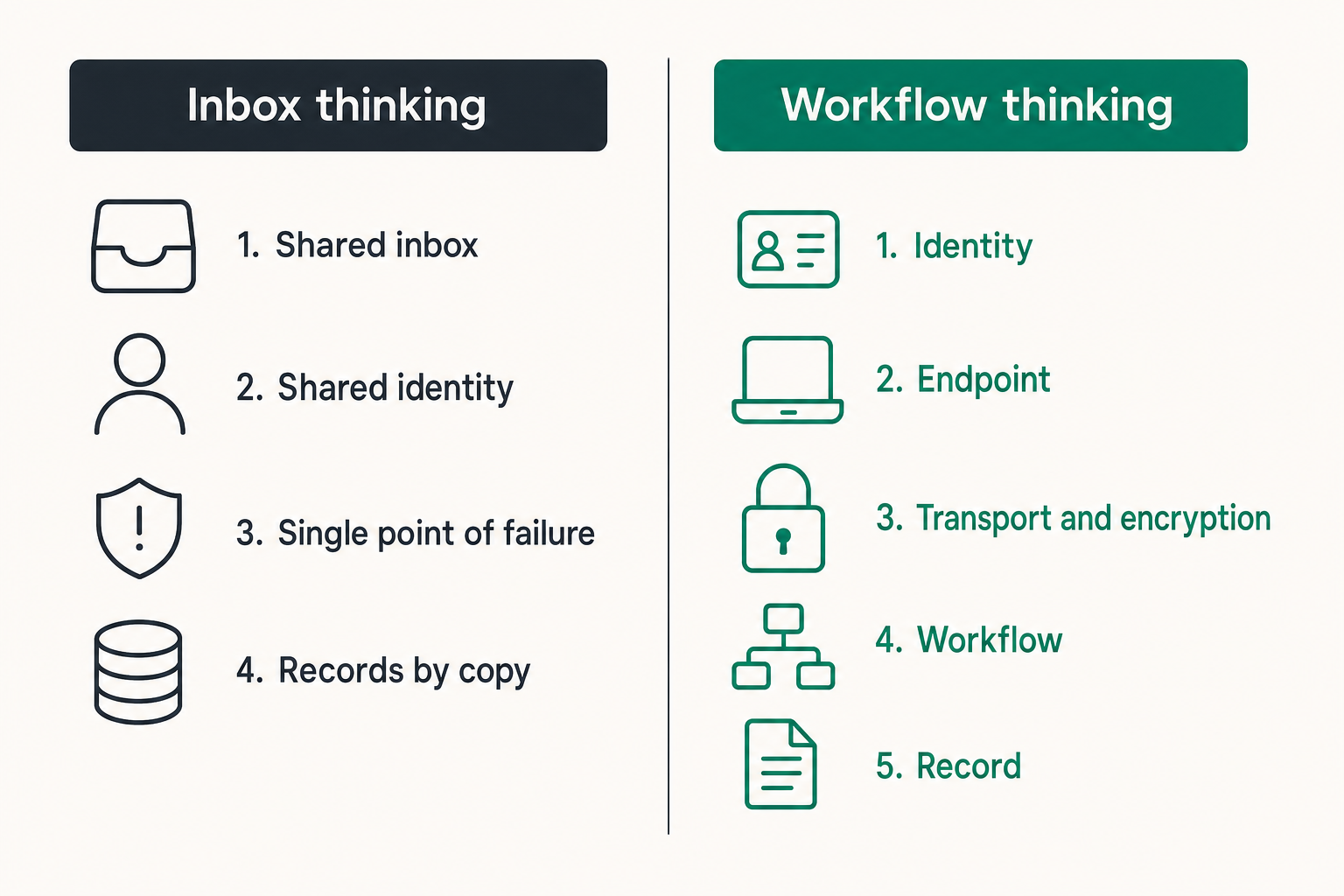
Separate the communication layers
A useful way to think about the architecture is as five connected layers:
- Identity: who the user is and how that identity is verified.
- Endpoint: which phone, laptop, browser, or desktop client can participate.
- Transport and encryption: how messages and attachments are protected in transit and from service-side access.
- Workflow: where requests are routed, approved, escalated, and completed.
- Record: which final decisions or artifacts move into the official business system.
A weakness in one layer can defeat strengths elsewhere. End-to-end encryption cannot stop an unlocked laptop from showing a message. Strong authentication cannot prevent an authorized assistant from pasting content into an unapproved tool. A retention setting cannot delete a screenshot saved to a camera roll.
Choose managed access over account sharing
The mistake teams make is giving an assistant the founder's login because it appears efficient. Shared identities destroy accountability and complicate revocation. They also expose unrelated conversations, recovery settings, and historical records.
Give every person a distinct identity. Grant access to the smallest required workspace or conversation, use delegated roles in destination systems, and remove access from a central checklist. Where a service does not support delegation, prefer a controlled handoff over permanent credential sharing.
For adjacent implementation considerations, related reading from our network covers how operators evaluate and deploy encrypted messaging SaaS without leaving governance and integration gaps.
Compare inbox thinking with workflow thinking
| Decision | Inbox thinking | Workflow thinking |
|---|---|---|
| Access | Send the account password | Create a named, scoped identity |
| Sensitive data | Put everything in chat | Minimize content and use approved handoffs |
| Channels | One conversation for all work | Separate by task and sensitivity |
| Completion | Message marked as read | Action confirmed in the system of record |
| Offboarding | Delete the contact | Revoke sessions, devices, groups, and integrations |
| Incident response | Delete suspicious messages | Preserve facts, contain access, rotate secrets, and review impact |
What works is deliberate separation. The messenger carries private coordination; a password manager carries credentials; a CRM carries customer state; a document repository carries controlled files. The UI may feel less universal, but the boundary becomes easier to reason about.
Control identity devices and access
Provision a person not a generic VA
Create an individual account tied to a verified person. Confirm identity through a second channel before exchanging restricted information. Record the engagement owner, start date, expected end date, approved groups, and recovery contact.
Authentication should resist password reuse and basic phishing. Prefer device-bound or phishing-resistant methods where supported. Recovery deserves equal attention: a secure primary login with an easily hijacked recovery email is not a secure identity.
A repeatable onboarding and offboarding pattern matters particularly for independent contractors. The freelancing encrypted messaging workflow provides an adjacent model for client intake, file sharing, device security, and access removal.
Set a minimum device baseline
A personal device does not have to be unmanageable, but the rules must be explicit. Require a supported operating system, prompt security updates, full-device encryption, automatic screen locking, and malware-resistant application practices. Disable lock-screen previews for sensitive conversations.
Decide whether local downloads are allowed. If they are, define where files may be saved and when they must be removed. Browser-only access may reduce local persistence, but it introduces session theft, extension, cache, and shared-profile risks. There is no zero-risk endpoint mode.
Practical rule: Do not send restricted content to a device you would be unable to revoke, inspect, or confidently exclude after the engagement ends.
Handle guests and subcontractors explicitly
A VA may work through an agency or delegate tasks. Never assume that a named account means only one person can view it. Contracts, onboarding questions, and technical controls should state whether subcontracting is allowed.
If another person needs access, provision them separately. Do not let the primary assistant share an account or forward message exports. Expiring guest access, narrow groups, and periodic membership reviews are more reliable than informal promises.
Route conversations by purpose and sensitivity
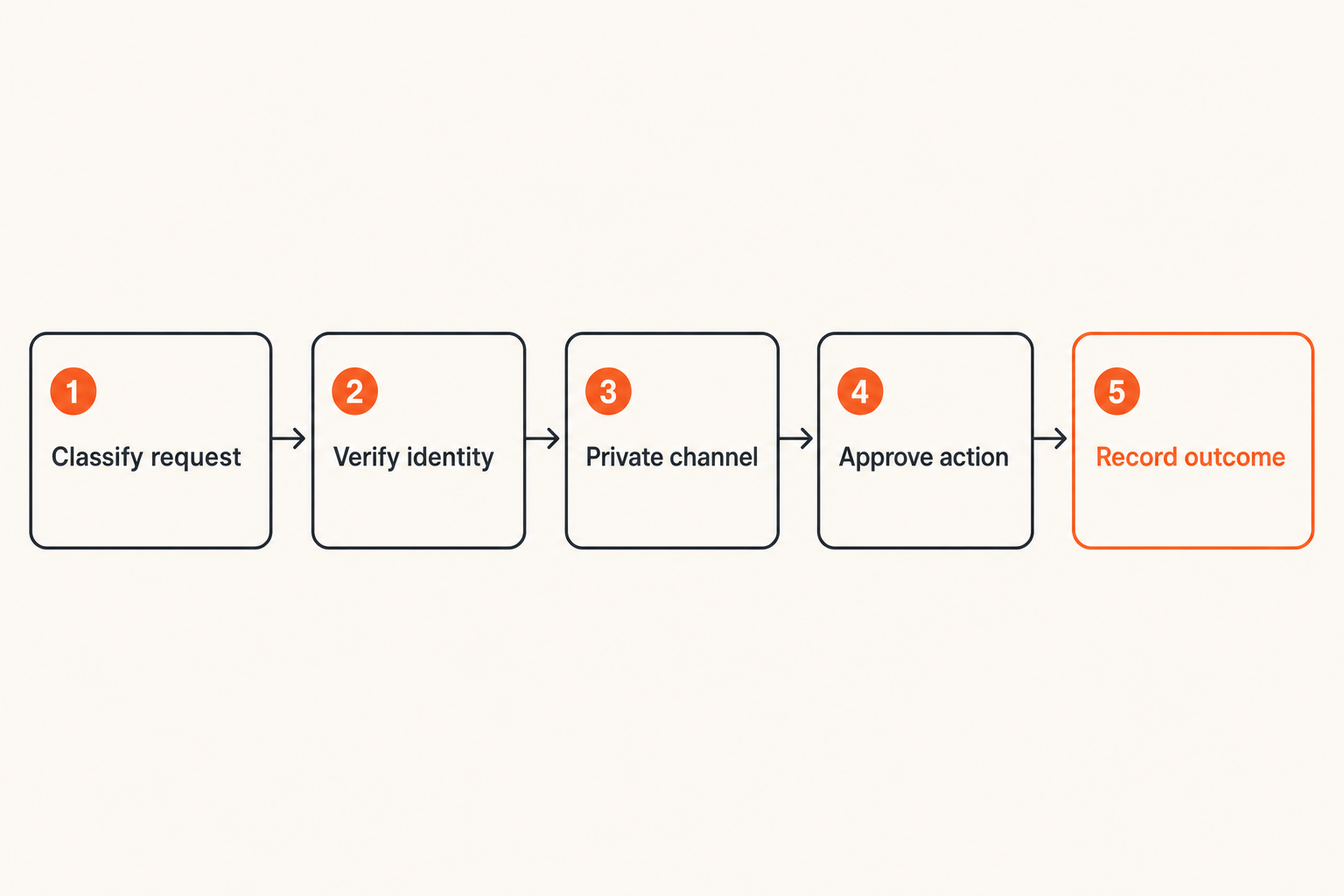
Create a small channel taxonomy
Too many rooms create confusion; one room creates uncontrolled mixing. Start with a small, memorable taxonomy:
- Requests: new tasks with an owner and expected outcome.
- Operations: normal coordination without restricted content.
- Approvals: decisions requiring an authorized person.
- Sensitive handoff: tightly scoped exchanges with limited membership.
- Incident: suspicious access, lost devices, mistaken recipients, or exposed secrets.
Name channels by function rather than individual. A function survives staff changes and makes the intended use visible. Pin a short purpose statement and prohibited-data note where users will encounter it.
Move secrets through narrow paths
Passwords, recovery codes, private keys, and full payment details should generally not live in conversation history. Use a dedicated secrets manager or delegated platform access. If a one-time secret must be communicated, constrain its lifetime and rotate it after use.
For documents, send access-controlled references instead of uncontrolled copies when possible. Set destination permissions before sharing the link, verify the recipient, and remove access when the task ends. A protected link pointing to a publicly accessible file is not meaningful protection.
Define escalation outside the chat
Messaging can fail during an account takeover, device loss, or service outage. Establish a second verified route for urgent incidents, such as a known telephone number or an approved alternate system. Do not trust a new number posted by the possibly compromised account.
A useful escalation sequence is: stop the task, verify through the alternate route, revoke affected sessions, rotate exposed credentials, preserve necessary evidence, and document the decision. This turns an alarming message into an executable response.
Evaluate encryption metadata and key behavior
Verify what end-to-end encryption covers
“Encrypted” can mean transport encryption, server-side encryption, end-to-end encryption, or an optional conversation mode. Those are not interchangeable. Determine whether message bodies, attachments, calls, group conversations, and message history receive the same protection.
Ask who holds decryption capability, how new devices obtain history, what happens when group membership changes, and whether users can verify contacts or devices. Review the provider's published threat model and limitations rather than relying on an app-store label. QryptChat provides a starting point through its description of quantum-resistant encrypted messaging.
Cryptography cannot validate the business request itself. A perfectly encrypted instruction from a compromised executive account can still authorize a damaging action. Sensitive approvals need identity verification and, for high-impact tasks, a second person or channel.
Treat metadata as operational data
End-to-end encryption may protect content while leaving some metadata available for delivery and abuse prevention. Depending on the design, this can include account identifiers, timestamps, IP-derived information, device data, contact relationships, or group membership.
Evaluate metadata according to your threat model. A routine remote team may prioritize content confidentiality and account security. A journalist, investigator, executive, or abuse survivor may care deeply about relationship and timing exposure. Marketing language rarely resolves that distinction; architecture documentation should.
Plan for key changes and future risk
Key changes occur when users reinstall applications, replace devices, recover accounts, or add endpoints. Decide how users are notified and what verification is required before sensitive communication resumes. If warnings are easy to dismiss, they become decoration.
Post-quantum protection is relevant where adversaries may collect ciphertext now and attempt decryption later. It does not remove the need for endpoint security, authenticated key exchange, safe implementation, or migration planning. Review the provider's security model and technical posture in the context of the information's required confidentiality lifetime.
Set retention records and recovery rules
Retain by business purpose
Keeping every message forever feels convenient until a compromised account exposes years of context. Deleting everything immediately can also break support, dispute handling, or regulated record duties. Set retention according to purpose and obligation.
Routine coordination may need a short lifetime. Approval evidence may belong in a durable system of record. Incident communication may require controlled preservation. Restricted data that should never have entered chat should be removed, followed by remediation of any downstream copies.
Practical rule: Keep a message only as long as its operational or legal purpose justifies the exposure it creates.
Understand exports backups and deletion
Deletion controls are frequently misunderstood. Ask whether deletion applies to one device, all participants, provider infrastructure, backups, exports, and notification caches. Also ask how offline devices behave when they reconnect.
User-managed backups can quietly weaken an otherwise strong design. Check whether backups contain plaintext or encrypted message databases, where backup keys live, and whether administrators can enforce policy. Test the actual restore path; a recovery claim is only useful if authorized users can recover and unauthorized parties cannot.
Keep systems of record separate
Chat is good for coordination but usually poor as the only repository for customer status, authorization, or task completion. Important outcomes should be written to the appropriate system: a ticket, CRM record, project tracker, financial platform, or controlled document store.
Do not copy the full conversation when a short decision record will do. Record who approved what, when, and for which object. This preserves business state without retaining unnecessary personal discussion.
Implement VA secure messaging in stages
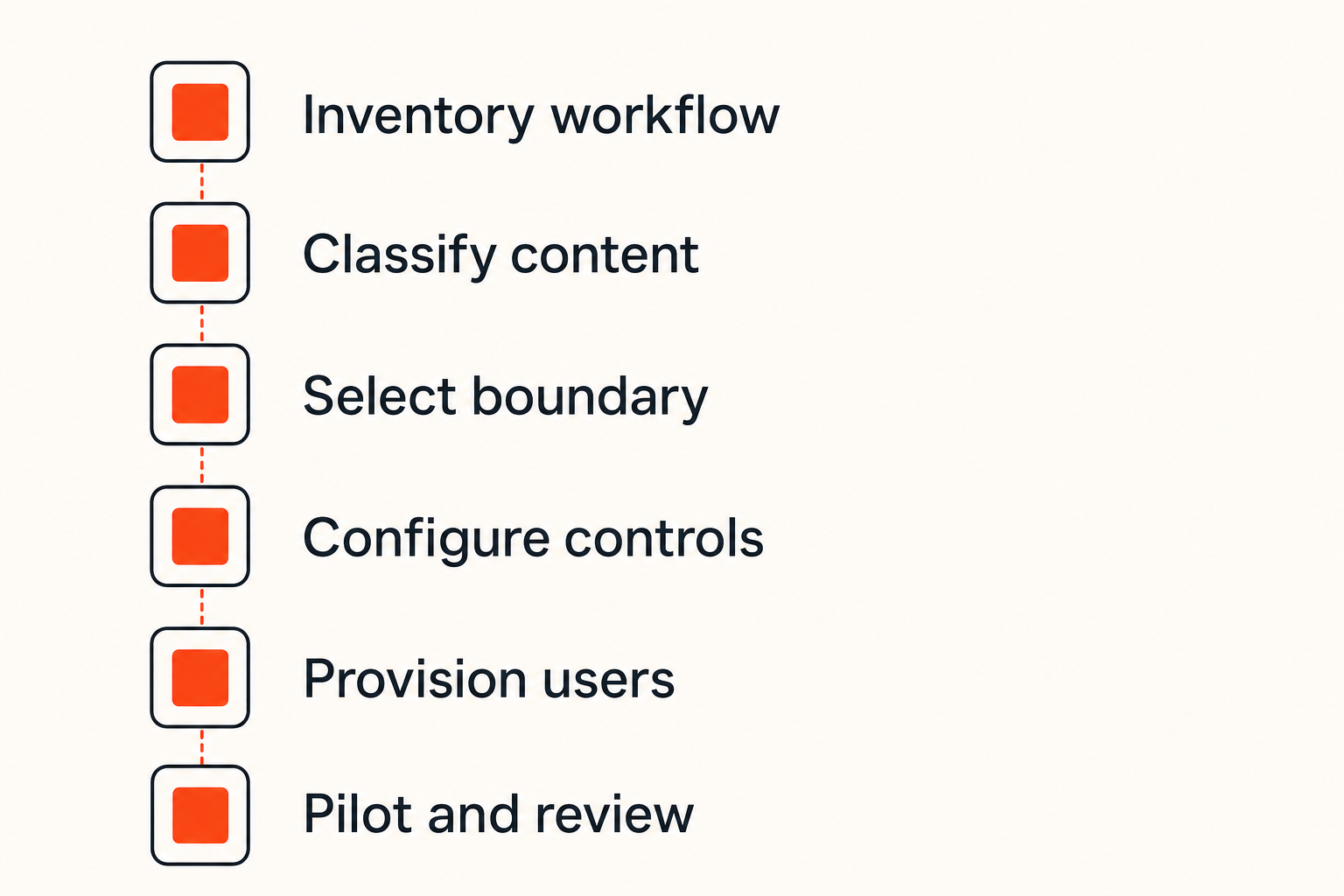
Use a seven-step deployment sequence
A controlled rollout can be lightweight without being casual:
- Inventory the workflow. Identify participants, data, current channels, destination systems, and failure consequences.
- Classify the content. Define routine, internal, restricted, and prohibited categories using concrete examples.
- Select the boundary. Choose the messaging service, approved clients, identity method, and permitted integrations.
- Configure controls. Set groups, device expectations, notification rules, retention, recovery, and administrative roles.
- Provision users. Verify each person, issue individual access, and explain the secondary incident channel.
- Pilot real tasks. Run ordinary requests, a sensitive approval, device replacement, mistaken-recipient handling, and offboarding.
- Review and expand. Fix confusing steps before adding more assistants, teams, bots, or data classes.
The mistake teams make is rolling out broadly after testing only message delivery. Delivery is the easy path. Recovery, revocation, and exceptions reveal whether the architecture works.
Pilot with a real workflow
Choose a bounded task such as calendar management or support triage. Include enough sensitivity to test the controls without starting with the organization's highest-risk process. Observe where participants copy data, switch channels, wait for approval, or misunderstand ownership.
Measure completion, not activity. A stream of quick replies can conceal missed approvals and duplicate actions. The pilot should establish whether a request enters through the right route, reaches an authorized person, receives a verifiable decision, and is recorded correctly.
Evaluation discipline transfers across industries. Related reading from our network offers a privacy and reliability evaluation checklist that illustrates why testing real operating conditions is more useful than accepting a feature list, even though the service category is different.
Document the human operating procedure
Create a one-page procedure users can follow under pressure. Include approved channels, prohibited content, how to verify a changed device, where credentials belong, how to escalate an incident, and who owns access removal.
Use examples: “Send the customer record link, not an exported database row” is more actionable than “Protect confidential information.” Put the procedure in onboarding and revisit it after incidents or material platform changes.
Avoid common secure messaging failures
What fails in practice
Common failures are architectural rather than cryptographic:
- The founder and assistant share one account.
- Sensitive and routine work coexist in a large group.
- Notification previews expose content on a locked screen.
- Files are downloaded to unmanaged personal storage.
- A bot receives every message despite needing only task IDs.
- Former contractors remain in groups or on linked devices.
- Users assume disappearing messages remove screenshots and exports.
- The team has no verified route for reporting account compromise.
What breaks in practice is the handoff between tools. A message may be secure while traveling, then become an unprotected attachment, ticket comment, clipboard entry, or browser download.
Control notification and copy leakage
Configure lock-screen previews conservatively. Keep sensitive channel names from revealing client or case information. Train users to inspect recipients before sending, especially where similarly named contacts or autofill are involved.
Clipboard managers, screen-capture tools, keyboard services, browser extensions, and accessibility utilities may observe content. A realistic policy does not claim to eliminate copying; it restricts sensitive workflows to endpoints and tools whose exposure is understood.
Be skeptical of unsafe automation
Integrations increase the number of processors, tokens, logs, and failure paths. Before connecting a bot, ask what events it receives, whether it gets message bodies, where credentials are stored, how retries work, and who can revoke it.
Prefer narrow event scopes and identifiers over full transcripts. Prevent bots from making high-impact approvals based solely on chat text. Log administrative actions without reproducing sensitive content. Automation should reduce repetitive routing, not silently widen the trust boundary.
Teams evaluating any workflow benefit from testing the final result rather than trusting the first apparent success. Related reading from our network explains this method in a different domain through a step-by-step offer validation workflow: verify constraints, test the actual outcome, and avoid assuming that a visible option will work as expected.
Measure whether the workflow works
Track operational security indicators
Avoid a vanity metric such as total encrypted messages. Useful indicators connect behavior to risk and response:
| Indicator | What it reveals | Review action |
|---|---|---|
| Active users versus roster | Orphaned or missing access | Reconcile identities |
| Unreviewed devices | Endpoint uncertainty | Verify or revoke |
| Sensitive-channel membership | Excess privilege | Remove unnecessary members |
| Time to revoke access | Offboarding readiness | Fix ownership and tooling |
| Misrouted messages | Taxonomy or training failure | Adjust channels and examples |
| Incident acknowledgment time | Escalation reliability | Retest alternate contacts |
Do not invent targets merely to create a dashboard. Establish a baseline during the pilot, identify unacceptable states, and tighten performance as the workflow stabilizes.
Test access removal and recovery
Run a quarterly or engagement-end exercise. Disable an account, remove devices, rotate relevant secrets, check shared documents, inspect group membership, and confirm that the former user cannot re-enter through recovery.
Also test legitimate recovery. Replace a device, verify identity, restore only authorized history, and confirm that key-change notifications behave as expected. Security that strands authorized users encourages insecure workarounds.
Review total operational cost
Price per user is only one input. Include onboarding time, administrative effort, support burden, integration maintenance, incident handling, migration cost, and the cost of workflow friction. A cheap messenger can be expensive if staff continually export content or bypass it.
The practical question is whether the architecture reduces uncontrolled copies and ambiguous ownership without making ordinary work impossible. Review that balance after the pilot, after significant incidents, and whenever the provider or team changes how devices, keys, backups, or integrations operate.
Fit qrypt.chat into the communication boundary
Decide where a private channel fits
A private messaging product can provide the communication layer, but it should not be asked to become the password manager, CRM, document repository, and approval database simultaneously. Define which conversations belong in it, which systems receive final records, and what content remains prohibited.
For qrypt.chat, assess participant identity, device handling, encryption design, recovery, group membership, retention behavior, and post-quantum approach against your threat model. The correct fit may be a tightly controlled channel for private coordination rather than a universal replacement for every collaboration tool.
Migrate without copying old exposure
Start with new conversations and a small group. Do not bulk-import years of history unless a documented need outweighs the expanded exposure. Recreate only necessary groups, validate every member, and move durable business decisions to their proper records.
Set an end date for the old channel. Remove linked devices and integrations, export only records that must be retained, and communicate where new requests belong. Running two indefinite “official” inboxes creates routing ambiguity and weakens incident response.
A successful VA secure messaging deployment is not the one with the most security labels. It is the one where identities are distinct, sensitive paths are narrow, devices are controlled, records land in the right systems, and access can be removed without uncertainty.
Try qrypt.chat
You are writing for people who care about private communication, secure messaging, and practical digital security. Evaluate VA secure messaging as an operated communication boundary, then Try qrypt.chat.