VA secure messaging looks simple from the outside: log in, send a message, wait for a reply. For patients, veterans, clinicians, advocates, and support teams, that simplicity is the point. But in practice, the risk does not stop at the inbox.
Teams think the problem is sending sensitive text through a secure portal. The real problem is designing a communication workflow where identity, devices, retention, notifications, escalation, and audit all behave predictably.
That changes the conversation. VA secure messaging is not only a healthcare feature. It is a useful model for anyone building or choosing private communication tools in 2026: remote teams, security professionals, encrypted chat users, and privacy-conscious people who do not want sensitive messages scattered across SMS, email, screenshots, and unmanaged devices.
The practical question is not whether a message box says secure. The practical question is whether the whole system keeps private communication private after real users touch it.
Table of contents
- VA secure messaging is a workflow, not just an inbox
- What VA secure messaging gets right
- Where VA secure messaging does not solve the whole privacy problem
- A practical architecture for private messaging workflows
- Threat model: what you are actually defending against
- Implementation workflow for remote teams and security professionals
- VA secure messaging vs general encrypted chat
- Common failure modes in secure messaging rollouts
- What works in production
- Where qrypt.chat fits in the secure messaging stack
VA secure messaging is a workflow, not just an inbox
VA secure messaging usually refers to secure messaging used in Veterans Affairs digital health workflows, commonly through patient portals and authenticated care-team communication. That context matters. Healthcare messages carry identity, medical context, scheduling implications, and records obligations.
But the lesson is broader. If a message is sensitive enough to protect, the system around the message matters as much as the encryption protecting the message body.
The inbox model hides risk
The mistake teams make is treating secure messaging like email with a better login screen. They focus on the composer, the send button, and maybe multifactor authentication. Then real usage starts.
A patient gets an email notification. A support worker copies text into another case system. A remote team member screenshots a thread. An admin exports logs during an investigation. A device stays logged in after being replaced. None of those are exotic attacks. They are normal workflow events.
What breaks in practice is the assumption that message privacy lives in one place. It does not. It lives across identity checks, session controls, device state, notification content, message routing, storage, retention, and human escalation.
Practical rule: If a user can move sensitive content into an unmanaged channel in one click, your secure messaging boundary is only advisory.
What security teams should map first
Before choosing a secure messaging product or copying the VA secure messaging model into another environment, map the workflow.
Start with five questions:
- Who is allowed to start a conversation?
- Who is allowed to receive it?
- What confirms that the recipient is the right person or team?
- Where does the message content live after delivery?
- What happens when the message is urgent, misrouted, stale, or legally relevant?
A useful way to think about it is as a state machine, not a chat box. A message is drafted, addressed, encrypted, transmitted, received, read, acted on, retained, archived, or deleted. Each state has a privacy decision.
That is why VA secure messaging is a better architecture conversation than most generic secure chat discussions. It forces you to ask who owns the workflow, not just who owns the app.
What VA secure messaging gets right
VA secure messaging is not perfect, and it is not a universal model. But it gets several structural decisions right that many private communication systems ignore.
Identity is tied to a care relationship
In ordinary chat, identity often means a phone number, email address, username, or device key. In healthcare messaging, identity has stronger workflow meaning. The sender and receiver are connected through an authorized relationship.
That changes risk. The system is not only asking whether this account exists. It is asking whether this account should be communicating with this care team in this context.
Remote teams can learn from that. A secure channel should not be a flat room where everyone with access can discuss everything. It should reflect roles, scopes, and expected communication paths.
For adjacent reading from our network: teams designing payment systems face a similar state and trust problem, where the visible checkout is only a small part of the architecture, as covered in blockchain payment gateway architecture.
Messages live inside a defined system of record
Healthcare messaging usually has a concept of record. That does not automatically mean every detail is exposed to everyone, but it does mean the organization has to decide what the message is: casual note, clinical record, administrative request, support ticket, or something else.
Many secure chat rollouts fail because they do not answer that question. Messages become both official and unofficial depending on who is asking. Legal wants retention. Security wants auditability. Users want deletion. Managers want search. Privacy teams want minimization.
You cannot satisfy those goals by pretending chat history is just chat history.
Auditability changes user behavior
Audit is not only for investigations. Audit changes how people behave because it makes the system accountable. In VA-style messaging, users expect that access and handling may be logged. That expectation can reduce casual misuse when paired with clear policy.
The key is to audit events without turning the audit layer into a second copy of the sensitive conversation. Log the minimum necessary event data: sender, recipient group, timestamp, delivery status, access event, device class, and administrative action.
Practical rule: Audit the handling of sensitive messages. Do not quietly rebuild the message database inside your logs.
Where VA secure messaging does not solve the whole privacy problem
VA secure messaging improves the communication boundary, but it does not make every downstream risk disappear. Secure portals can still leak context. Users can still expose messages on devices. Organizations can still over-retain data.
Metadata still matters
Even when content is protected, metadata can be sensitive. Who messaged whom, when, how often, and about which department can reveal personal context.
For healthcare, a message to a specific clinic can imply something. For security teams, a message to incident response can imply an active problem. For executives, a message to legal can imply risk. For remote teams, the timing and participants in a private thread can reveal strategy.
A privacy-respecting secure messaging architecture limits metadata exposure by default. It does not treat metadata as harmless simply because it is not the message body.
Devices remain the weak edge
Most privacy failures happen at the edge: unlocked phones, shared laptops, browser sessions, notification previews, cloud backups, clipboard managers, and screenshots.
VA secure messaging can enforce authentication before portal access, but it cannot fully control every endpoint behavior. The same is true for any encrypted messaging system. End-to-end encryption protects content in transit and at rest across the service boundary, but endpoints still see plaintext because users need to read messages.
That is why device hygiene remains part of messaging security:
- Require screen locks on devices used for sensitive communication.
- Avoid notification previews that include sensitive text.
- Revoke old sessions after device replacement.
- Train users not to paste sensitive content into unmanaged tools.
- Review backup behavior for message attachments and screenshots.
Forwarding breaks the boundary
The most secure portal in the world cannot protect a message once a user forwards it to ordinary email or copies it into an unmanaged document.
This is where policy and product design meet. If users constantly need to forward content to get work done, the secure system is not integrated with the workflow. Users will route around it.
The practical response is not to yell at users. It is to reduce the need for unsafe forwarding. Give them structured routing, exports with controls, role-based access, and clear escalation options.
A practical architecture for private messaging workflows
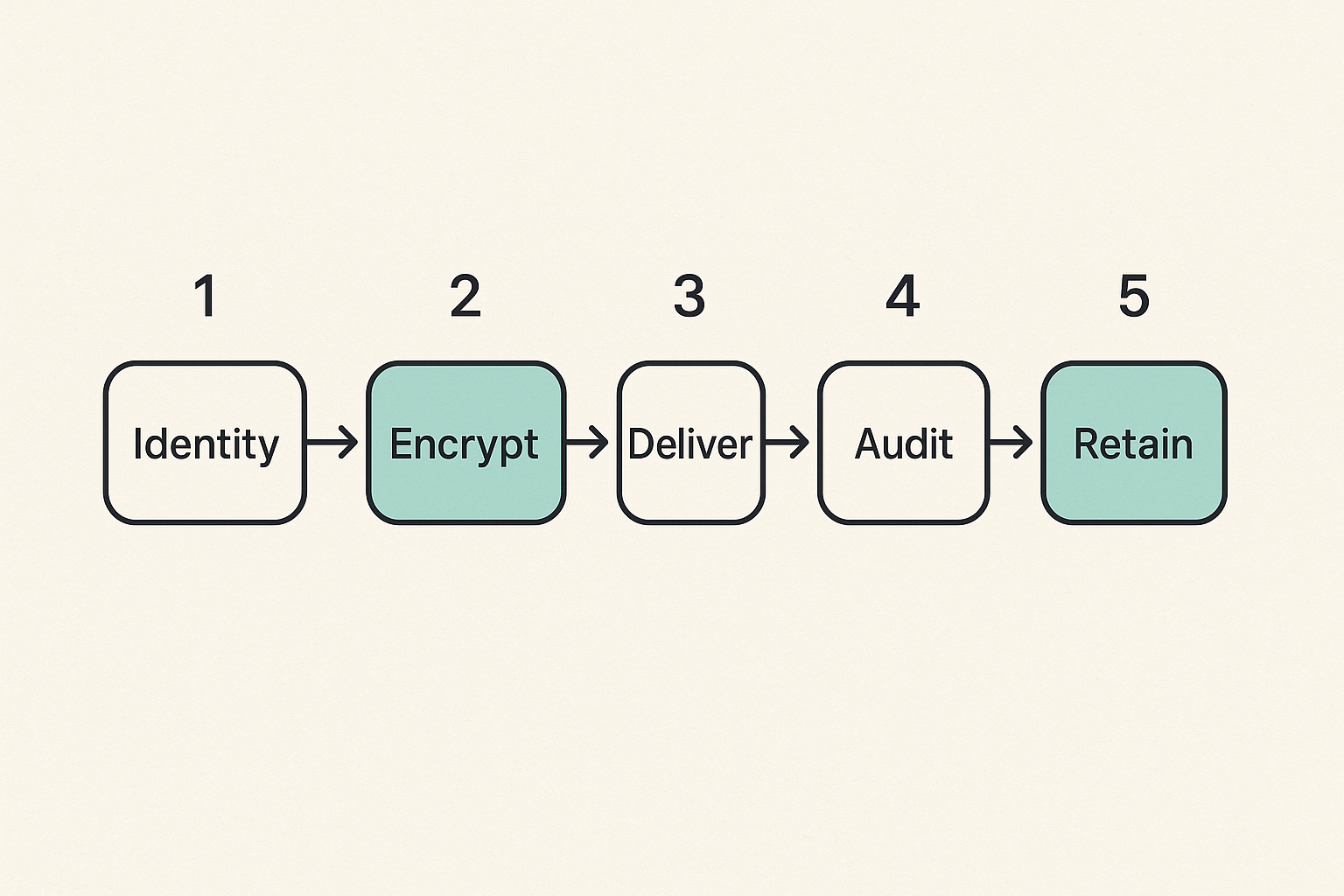
Private messaging architecture should be designed around the lifecycle of a message. The UI is the least interesting part. The hard work is state, trust, delivery, and operational control.
For a deeper baseline on private communication design, our earlier guide to end-to-end encryption messaging in 2026 walks through keys, devices, metadata, and rollout decisions in more detail.
Separate identity, message content, and delivery state
A clean architecture separates three things that often get mixed together:
| Layer | What it answers | Common mistake |
|---|---|---|
| Identity | Who is this user or device? | Treating email login as enough |
| Content | What was said or attached? | Storing plaintext where it is not needed |
| Delivery state | Was it sent, received, read, acted on? | Logging too much content in status systems |
This separation matters because each layer has different access requirements. Support may need delivery status without content. Security may need session logs without message text. Users may need content without seeing backend routing details.
When those layers are blurred, privileges expand. Admin consoles become dangerous. Logs become sensitive. Support workflows become privacy problems.
Design for offline, retries, and revocation
Real messaging systems fail in boring ways. Networks drop. Browsers crash. Phones sleep. Tokens expire. Users send to the wrong recipient. A device is lost before it syncs.
The implementation needs predictable behavior:
- Generate a message ID before send.
- Bind the message to sender identity, recipient scope, and device state.
- Encrypt content before handing it to transport where the architecture requires it.
- Store delivery state separately from message content.
- Retry delivery with idempotency so duplicate sends do not create duplicate records.
- Allow session and device revocation without corrupting the conversation history.
- Expose user-readable status without exposing internal metadata unnecessarily.
That may sound like payment or ticketing infrastructure, because it is the same class of problem: stateful, high-trust workflow. Related reading from our network: software engineer jobs in 2026 makes a similar point about designing the work before adding people or tools.
Treat notifications as sensitive
Notifications are often the privacy leak nobody owns. Teams protect the message body, then send a push notification with the sender, subject, and first sentence.
For VA secure messaging and any sensitive chat, notification design should be conservative:
- Prefer generic notifications such as new secure message available.
- Avoid message previews by default.
- Let users opt into more detail only after understanding the risk.
- Avoid sensitive department names in push text when possible.
- Treat email notification templates as part of the security boundary.
Practical rule: If the lock screen shows the secret, encryption did not fail. Product design failed.
Threat model: what you are actually defending against
A threat model does not need to be theatrical. Most organizations are not defending against movie-grade attackers every day. They are defending against account takeover, device loss, overbroad access, accidental disclosure, and long-term exposure.
Casual exposure and account takeover
Casual exposure is the most common category: someone sees a notification, opens a shared computer, reads a forwarded message, or uses a stale session. Account takeover is the next step up: phishing, credential reuse, weak recovery flows, or compromised email.
Controls that matter here:
- Multifactor authentication that users can actually use.
- Session timeouts matched to sensitivity.
- Device review and session revocation.
- Login alerts for unusual access.
- Recovery flows that do not downgrade account security.
The mistake teams make is treating MFA as the finish line. MFA helps, but if account recovery is weak or sessions live forever, attackers will use the softer path.
Provider visibility and administrative access
Secure messaging has an uncomfortable question: what can the provider see?
In some portal models, the provider must access content because the system is a record and workflow tool. In end-to-end encrypted systems, the provider should not be able to read message content. Those are different trust models.
Neither is automatically wrong. But users and organizations need to know which model they are using.
When evaluating a secure communication service, review the security model, administrative access boundaries, and encryption claims. qrypt.chat publishes security-focused information on its secure messaging approach so users can evaluate the architecture rather than rely on vague privacy language.
Long-term cryptographic risk
In 2026, serious privacy teams also need to think about long-term confidentiality. Some messages lose sensitivity quickly. Others may remain sensitive for years.
This is where post-quantum planning enters the conversation. The practical issue is not hype about quantum computers arriving tomorrow. The issue is whether data captured today could be decrypted later if cryptographic assumptions change.
A useful policy distinction:
- Short-lived operational messages may need strong modern encryption and short retention.
- Long-lived sensitive records may need stronger key lifecycle planning.
- High-risk conversations may need both encryption and minimization.
Cryptography is not a substitute for retention discipline. If you keep everything forever, you are increasing the future blast radius.
Implementation workflow for remote teams and security professionals
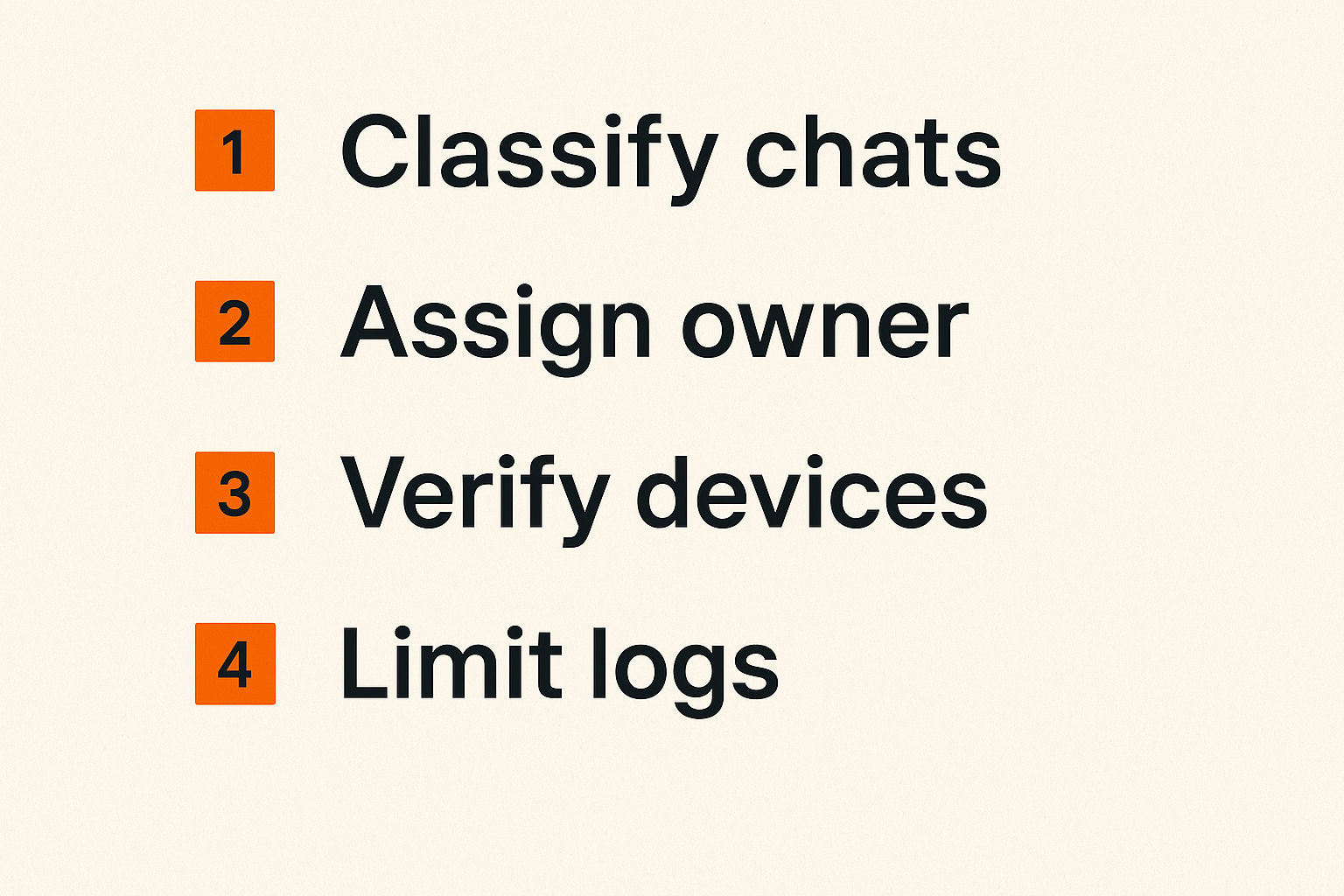
Most secure messaging failures are rollout failures. The tool may be fine. The operating model is not.
The practical question is: what do users do on Monday morning when they need to send something sensitive?
Step 1: classify conversations
Start with conversation classes, not tool names.
Example classification:
- Public or low sensitivity: normal collaboration tools are acceptable.
- Internal sensitive: use approved private team channels.
- Personal or regulated data: use secure messaging with strict access control.
- Incident or legal-sensitive: use designated encrypted channels with limited membership.
- Long-term confidential: use encrypted messaging plus retention minimization.
Do not create twenty labels. Users will ignore them. Create a small set that maps to real decisions.
Step 2: assign channel ownership
Every secure channel needs an owner. Without ownership, nobody answers basic questions:
- Who approves access?
- Who removes users?
- Who handles urgent messages?
- Who reviews stale channels?
- Who decides retention?
VA secure messaging works best when communication is tied to a care team or service. Remote teams should copy that principle. Channels should map to responsibilities, not social convenience.
Related reading from our network: even in home media and automation workflows, reliability depends on clear device state and ownership; the same operational pattern shows up in wake tech for torrent, IPTV, and home media.
Step 3: verify devices and keys
For encrypted chat users, key and device verification is where theory meets reality. If the tool supports end-to-end encryption, users still need a way to know they are talking to the right person on the right device.
Verification does not need to be constant. It needs to happen at high-risk moments:
- First sensitive conversation with a new contact.
- Device replacement.
- Account recovery.
- New member added to a private group.
- Unexpected key change.
- Incident response or legal-sensitive communication.
A good secure messaging process makes verification visible without making it impossible. If verification is too annoying, users skip it. If it is invisible, attackers get room to operate.
Step 4: review logs without reading content
Security teams need enough telemetry to investigate abuse. Privacy-conscious users need assurance that admins are not casually reading everything.
The compromise is event-level audit:
event_type: message_delivered
message_id: msg_8f31
sender_id: user_142
recipient_scope: care_team_or_group_id
device_id: dev_77
timestamp: 2026-06-12T14:03:22Z
content_logged: false
This kind of record supports investigation without storing the message body in logs. It also creates a clean separation between operational monitoring and content access.
VA secure messaging vs general encrypted chat
VA secure messaging and general encrypted chat solve overlapping but different problems. Treating them as interchangeable creates bad decisions.
Comparison table
| Dimension | VA secure messaging model | General encrypted chat model |
|---|---|---|
| Primary context | Patient or veteran to care team | Person to person or team communication |
| Identity model | Account plus institutional relationship | Account, device, key, or contact identity |
| System of record | Often yes, depending on workflow | Usually no, unless integrated |
| Provider content access | May be required by workflow | Ideally minimized or impossible in E2EE systems |
| Notification posture | Should be conservative | Varies widely by app |
| Escalation | Care or administrative routing | Team-defined or manual |
| Best fit | Structured healthcare communication | Private conversations, teams, sensitive coordination |
The point is not that one is better. The point is that they optimize for different trust boundaries.
When the healthcare model helps
The VA secure messaging model helps when communication needs structure:
- The recipient should be a role or team, not a random person.
- The message may become part of an official workflow.
- Response expectations matter.
- Auditability is required.
- Identity is tied to eligibility or a service relationship.
For organizations outside healthcare, this model is useful for HR, legal intake, customer security reports, regulated support, and internal incident escalation.
When a private chat model is cleaner
A private encrypted chat model is cleaner when the conversation is personal, fast-moving, cross-organizational, or not supposed to become an institutional record by default.
Examples:
- A remote security team coordinating during travel.
- A founder discussing a sensitive acquisition topic.
- A journalist communicating with a source.
- A privacy-conscious family discussing personal documents.
- A small team sharing credentials out-of-band during an incident, ideally with expiration and follow-up rotation.
In those cases, forcing every message through a formal portal can create more copying, more screenshots, and more side channels. The secure architecture should match the work.
Common failure modes in secure messaging rollouts
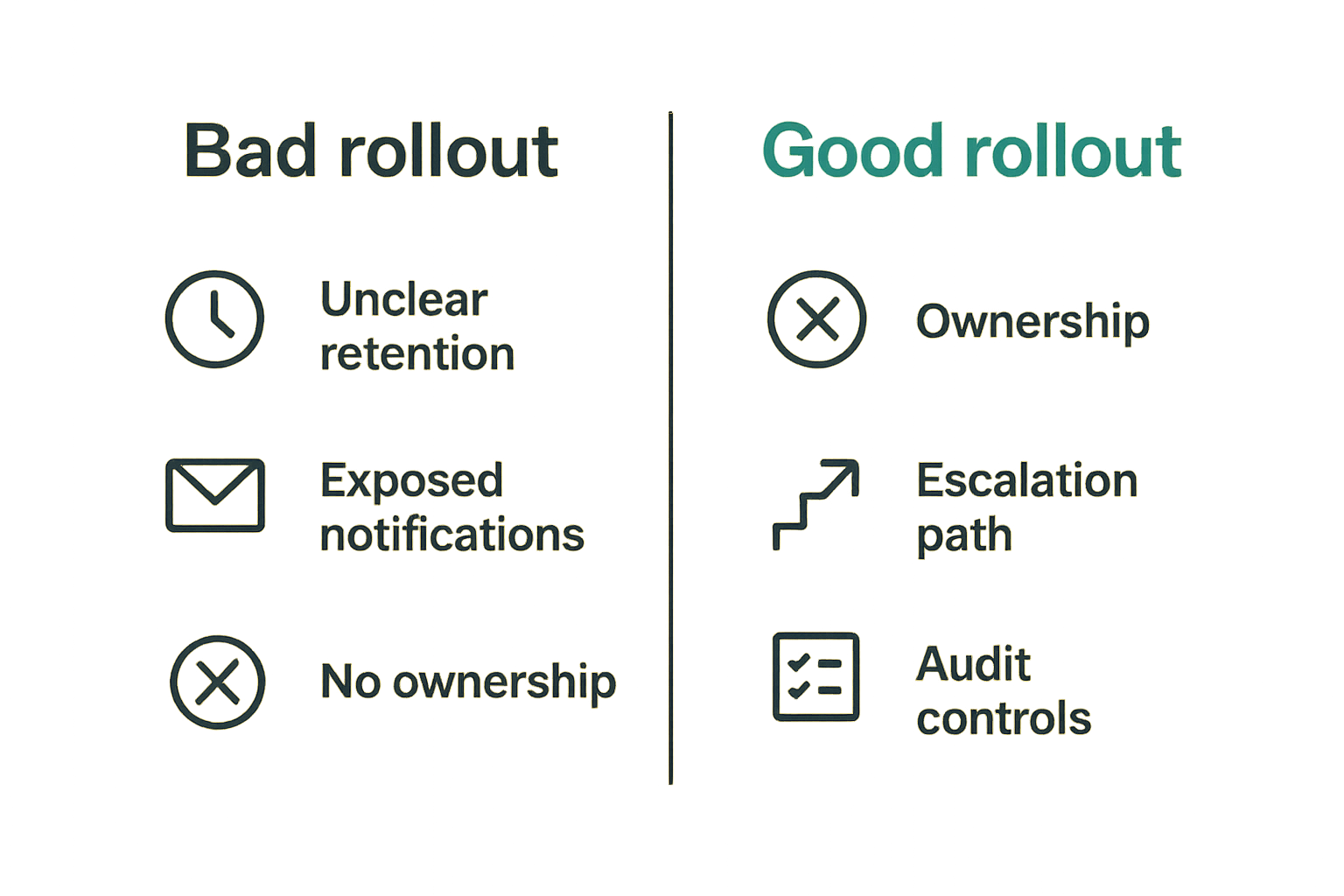
What breaks in practice is rarely the marketing claim. It is the gap between the claim and daily operations.
Security theater in the login page
A secure login page is useful. It is not the whole system.
Security theater looks like this:
- Strong login, weak session management.
- Encrypted transport, plaintext logs.
- Secure portal, detailed email previews.
- Admin access with no meaningful review.
- Delete button that hides messages from users but keeps them forever everywhere else.
The fix is to evaluate the full message lifecycle, not the front door.
No escalation path
Secure messaging is often asynchronous. That is fine until users send urgent content into a slow channel.
VA-style systems usually warn users not to use secure messaging for emergencies. Remote teams need the same clarity. If a message is urgent, where does it go? If a message is misrouted, who reassigns it? If nobody replies, when does the system alert someone?
Without escalation paths, users fall back to insecure channels because insecure channels feel faster.
Practical rule: A secure channel without an escalation path becomes an archive of delayed risk.
Retention rules nobody owns
Retention is where privacy promises become operational reality.
What fails:
- Keeping all messages forever because deletion is hard.
- Allowing users to delete records that the organization must retain.
- Retaining attachments after message deletion with no visibility.
- Backing up plaintext exports indefinitely.
- Applying the same retention rule to every conversation class.
What works is boring but effective: define retention by conversation type, document exceptions, automate deletion where appropriate, and make backups part of the policy.
Unreadable audits
Audit logs are useless if nobody can interpret them during an incident. They are dangerous if they contain too much sensitive content.
A useful audit trail answers:
- Who accessed the conversation?
- From which device or session?
- What administrative action occurred?
- Was content exported, forwarded, or downloaded?
- Were permissions changed?
It should not require three engineers and a database dump to answer those questions.
What works in production
Secure messaging that works in production is usually less dramatic than vendors imply. It is consistent. It is understandable. It fails safely.
Small policies users can follow
Long policies are where good intentions go to die. Users need short rules tied to real decisions.
Example policy:
- Use approved secure messaging for personal, medical, legal, security, and customer-sensitive details.
- Do not paste sensitive message content into unmanaged tools.
- Verify contacts or devices before high-risk conversations.
- Use the urgent path for emergencies or time-critical incidents.
- Report misdirected messages immediately.
That is enough for most users to make better decisions. The detailed control mapping can live elsewhere.
Key verification at the right moments
Key verification should not be treated as a nerd ritual. It is an identity control.
The product should make key changes understandable. The workflow should tell users when to care. A changed key for a casual channel may not need panic. A changed key before a legal-sensitive conversation should trigger verification.
This is one reason privacy-focused teams increasingly evaluate messaging tools by architecture, not screenshots. They ask how identity, keys, metadata, and retention interact. They also review privacy practices directly; for example, qrypt.chat explains its privacy posture on its privacy page rather than leaving users to infer it from product copy.
Operational drills before incidents
If secure messaging is part of incident response, test it before an incident.
A simple drill:
- Create a private incident channel.
- Add the required members.
- Verify device or key status for each member.
- Send a test message with a non-sensitive incident label.
- Confirm notification behavior.
- Remove one member and confirm access changes.
- Review audit events without reading content.
- Close the channel or apply retention policy.
This drill reveals the real problems: stale accounts, missing devices, confusing notifications, overbroad access, and unclear ownership.
Where qrypt.chat fits in the secure messaging stack
VA secure messaging is strongest inside the VA or similar institutional workflow. But many sensitive conversations happen outside those portals. Security teams, remote workers, families, advocates, founders, journalists, and privacy-conscious users still need private communication that is not ordinary SMS or email.
Private communication outside institutional portals
qrypt.chat is built for people who care about private communication, secure messaging, and practical digital security. The fit is not replacing every institutional system of record. The fit is private conversation where users need a secure messaging channel designed around confidentiality.
That matters when the communication is sensitive but does not belong in a healthcare portal, ticket queue, or corporate collaboration suite. In those cases, a dedicated encrypted chat tool can reduce the temptation to use insecure side channels.
Post-quantum thinking without operational drama
The useful version of post-quantum secure messaging is not fear-based. It is architecture-based.
The questions are straightforward:
- How is encryption handled?
- What can the service provider access?
- What metadata is minimized?
- How are devices and sessions managed?
- What happens if a device is lost?
- How does the product explain privacy tradeoffs to normal users?
VA secure messaging teaches an important lesson: secure communication is only secure when workflow, identity, and operations are designed together. General encrypted messaging adds another lesson: content confidentiality should not depend on blind trust in the server.
The closing point is simple. VA secure messaging is a strong model for structured, accountable communication, but privacy-conscious users and teams also need secure messaging for the conversations that happen outside formal portals.
Try qrypt.chat
qrypt.chat is for people who care about private communication, secure messaging, and practical digital security. Try qrypt.chat.